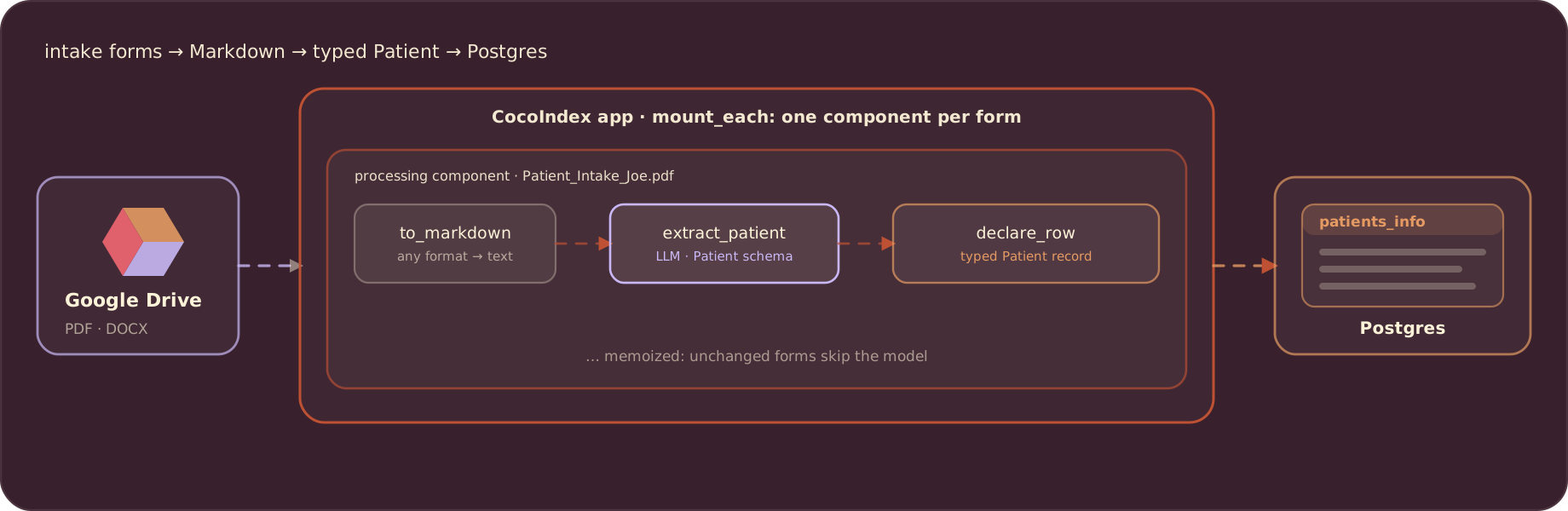
Patient intake forms arrive as PDFs and Word documents, in whatever layout each clinic uses. This post builds a CocoIndex v1 pipeline that reads those forms from Google Drive, extracts a fully typed Patient record with an LLM, and writes it to Postgres. The interesting part is that a single Python schema does all the instructing: there is no prompt template describing the fields, because the dataclass is the contract the model fills in.
This is the plain-LLM version. If you want the same extraction with a dedicated framework, see the BAML and DSPy variants. The full code is in the CocoIndex v1 repo.
The flow
Each form is its own processing component: convert the document to Markdown, extract the Patient with the LLM, and declare a row in Postgres:
The schema is the prompt
The schema follows the FHIR Patient resource, simplified to a top-level Patient plus eight nested types. It is plain Python: nested objects (address, emergency_contact, pharmacy), optional fields marked | None, and lists for repeated items (past_conditions, current_medications, allergies, surgeries).
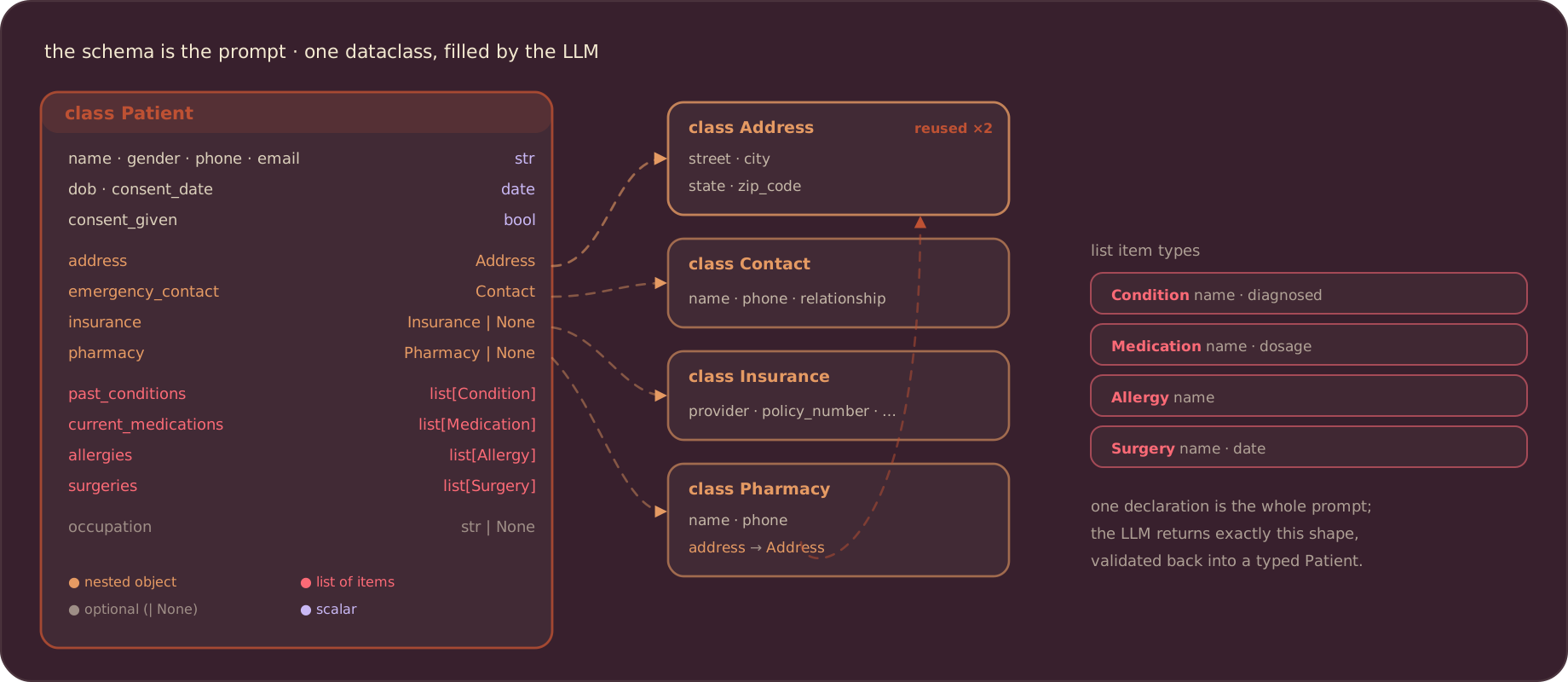
The whole schema is a set of Pydantic models. instructor uses these as the response schema, so the model returns data that matches the Python types instead of free-form text:
import datetime
from pydantic import BaseModel, Field


class Address(BaseModel):
    street: str
    city: str
    state: str
    zip_code: str


class Contact(BaseModel):
    name: str
    phone: str
    relationship: str


class Insurance(BaseModel):
    provider: str
    policy_number: str
    group_number: str | None = None
    policyholder_name: str
    relationship_to_patient: str


class Pharmacy(BaseModel):
    name: str
    phone: str
    address: Address


class Condition(BaseModel):
    name: str
    diagnosed: bool


class Medication(BaseModel):
    name: str
    dosage: str


class Allergy(BaseModel):
    name: str


class Surgery(BaseModel):
    name: str
    date: str


class Patient(BaseModel):
    name: str
    dob: datetime.date
    gender: str
    address: Address
    phone: str
    email: str
    preferred_contact_method: str
    emergency_contact: Contact
    insurance: Insurance | None = None
    reason_for_visit: str
    symptoms_duration: str
    past_conditions: list[Condition] = Field(default_factory=list)
    current_medications: list[Medication] = Field(default_factory=list)
    allergies: list[Allergy] = Field(default_factory=list)
    surgeries: list[Surgery] = Field(default_factory=list)
    occupation: str | None = None
    pharmacy: Pharmacy | None = None
    consent_given: bool
    consent_date: str | None = None
One declaration covers the whole intake form. The nested Address inside both Patient and Pharmacy is reused rather than re-described, and the | None markers tell the model which fields are allowed to be absent.
Convert any format to Markdown
An LLM cannot read a raw PDF or DOCX well, so each file is first converted to Markdown with MarkItDown, which handles PDF, Word, Excel, images, and more:
import os
import tempfile
from markitdown import MarkItDown

_md = MarkItDown()


def to_markdown(content: bytes, filename: str) -> str:
    suffix = os.path.splitext(filename)[1] or ".pdf"
    with tempfile.NamedTemporaryFile(delete=True, suffix=suffix) as tmp:
        tmp.write(content)
        tmp.flush()
        return _md.convert(tmp.name).text_content or ""
Extract the Patient
Extraction is a single CocoIndex function. It calls the model through litellm and instructor, which forces the response to match the Patient schema. memo=True caches the result, so an unchanged form is never sent to the model twice. Swapping gpt-4o for a local Ollama model or another provider is a one-line change of LLM_MODEL:
import instructor
import litellm
import cocoindex as coco

from models import Patient

LLM_MODEL = coco.ContextKey[str]("llm_model", detect_change=True)


@coco.fn(memo=True)
async def extract_patient(markdown: str) -> Patient:
    client = instructor.from_litellm(litellm.acompletion, mode=instructor.Mode.JSON)
    result = await client.chat.completions.create(
        model=coco.use_context(LLM_MODEL),
        response_model=Patient,
        messages=[
            {"role": "system", "content": "Extract patient information from the intake form."},
            {"role": "user", "content": markdown},
        ],
    )
    return Patient.model_validate(result.model_dump())
Declare a row per form
The Postgres row keeps a few flat columns for easy querying and stores the full nested record in a jsonb column (CocoIndex maps the dict to jsonb automatically). process_form reads one Drive file, converts it, extracts the patient, and declares the row:
from dataclasses import dataclass
import datetime

from cocoindex.connectors import google_drive, postgres


@dataclass
class PatientRecord:
    filename: str  # primary key
    name: str
    dob: datetime.date
    reason_for_visit: str
    patient: dict[str, object]  # the full Patient, as jsonb


@coco.fn(memo=True)
async def process_form(
    file: google_drive.DriveFile,
    table: postgres.TableTarget[PatientRecord],
) -> None:
    markdown = to_markdown(await file.read(), file.file_path.path.name)
    patient = await extract_patient(markdown)
    table.declare_row(
        row=PatientRecord(
            filename=file.file_path.path.name,
            name=patient.name,
            dob=patient.dob,
            reason_for_visit=patient.reason_for_visit,
            patient=patient.model_dump(mode="json"),
        )
    )
Wire up the app
Connections are provided once in the lifespan; this is also where CocoIndex’s local processing-state file is set. app_main mounts the Postgres table, points the Google Drive source at your folders, and fans out one process_form per file with mount_each:
import pathlib
from collections.abc import AsyncIterator

import asyncpg

DATABASE_URL = os.environ["POSTGRES_URL"]
PG_DB = coco.ContextKey[asyncpg.Pool]("patient_db")


@coco.lifespan
async def coco_lifespan(builder: coco.EnvironmentBuilder) -> AsyncIterator[None]:
    builder.settings.db_path = pathlib.Path("./cocoindex.db")
    builder.provide(LLM_MODEL, os.environ.get("LLM_MODEL", "openai/gpt-4o"))
    async with asyncpg.create_pool(DATABASE_URL) as pool:
        builder.provide(PG_DB, pool)
        yield


@coco.fn
async def app_main() -> None:
    table = await postgres.mount_table_target(
        PG_DB,
        table_name="patients_info",
        table_schema=await postgres.TableSchema.from_class(
            PatientRecord, primary_key=["filename"]
        ),
        pg_schema_name="coco_examples",
    )

    source = google_drive.GoogleDriveSource(
        service_account_credential_path=os.environ["GOOGLE_SERVICE_ACCOUNT_CREDENTIAL"],
        root_folder_ids=[
            f.strip()
            for f in os.environ["GOOGLE_DRIVE_ROOT_FOLDER_IDS"].split(",")
            if f.strip()
        ],
    )
    await coco.mount_each(process_form, source.items(), table)


app = coco.App(coco.AppConfig(name="PatientIntakeExtraction"), app_main)
To load from a local folder instead of Google Drive, swap the source for localfs.walk_dir; the rest of the flow is unchanged.
Run and query
Set the environment (a Postgres URL, an OpenAI key, and Google Drive service-account credentials; see Setup for Google Drive), then build the index:
pip install "cocoindex[postgres,google_drive]" instructor litellm markitdown asyncpg
cocoindex update main
Re-running processes only new or changed forms, since per-form extraction is memoized. Query the result in Postgres, where the flat columns and the jsonb record are both available:
SELECT filename, name, reason_for_visit,
       patient -> 'allergies' AS allergies
FROM coco_examples.patients_info;
Extraction quality
LLM extraction is not perfect, and evaluation is the real work. Structured forms with clear labels are the easy case; a scan with an unusual layout can drop a field or misread a value. When accuracy matters, keep a set of hand-checked golden records and diff each run against them, and try a different model or converter on the forms that miss. Because the schema is a single declaration, tightening a field description or swapping the model is a small change with the same typed output.
Support us
We are constantly adding examples and improving the runtime. If this was helpful, please star CocoIndex on GitHub.

About the author.

Posts from the CocoIndex team — product launches, release notes, and announcements.
Frequently asked questions.
How do I extract structured data from patient intake forms with an LLM in CocoIndex v1?
Convert each form to Markdown, then run one CocoIndex function that calls the model through litellm and instructor with a Pydantic Patient schema as the response_model, so the model returns data matching the Python types. Wrap it in @coco.fn(memo=True) so an unchanged form is never re-extracted, then declare_row the result into Postgres.
See Extract the Patient.
How do I handle PDF and DOCX forms in different formats?
Convert every document to Markdown first, so the LLM step works the same regardless of source format. This example uses MarkItDown, which handles PDF, Word, Excel, images, and more, in a small to_markdown helper that writes the bytes to a temp file and returns the text.
How do I define the schema for patient extraction, and why is it the prompt?
Define the target shape as Pydantic models: a top-level Patient plus nested types (Address, Contact, Insurance, Pharmacy) and lists (Condition, Medication, Allergy, Surgery), modeled on the FHIR Patient resource. That one declaration is the whole instruction to the model — there is no separate prompt template — and | None markers tell it which fields may be absent. Nested Address is reused by both Patient and Pharmacy.
Can I load intake forms from Google Drive, or from local files?
Both. Point google_drive.GoogleDriveSource at your service-account credentials and root folder IDs and hand source.items() to coco.mount_each, one component per form. To read local files instead, swap the source for localfs.walk_dir and the rest of the flow is unchanged.
See Wire up the app.
Where is the extracted data stored, and how do I query it?
Each form becomes one row in the Postgres patients_info table, keyed by filename. The row keeps a few flat columns (name, dob, reason for visit) for easy querying plus the full nested record in a jsonb column, which CocoIndex maps from the Python dict automatically. Query it with plain SQL, including JSON operators like patient -> 'allergies'.
See Run and query.
How do I evaluate and improve extraction quality?
LLM extraction is not perfect, so keep a set of hand-checked golden records and diff each run against them to spot missing or misread fields. On the forms that miss, try a different model or Markdown converter. Because the schema is a single declaration, tightening a field description or swapping LLM_MODEL is a small change with the same typed output.
See Extraction quality.
