
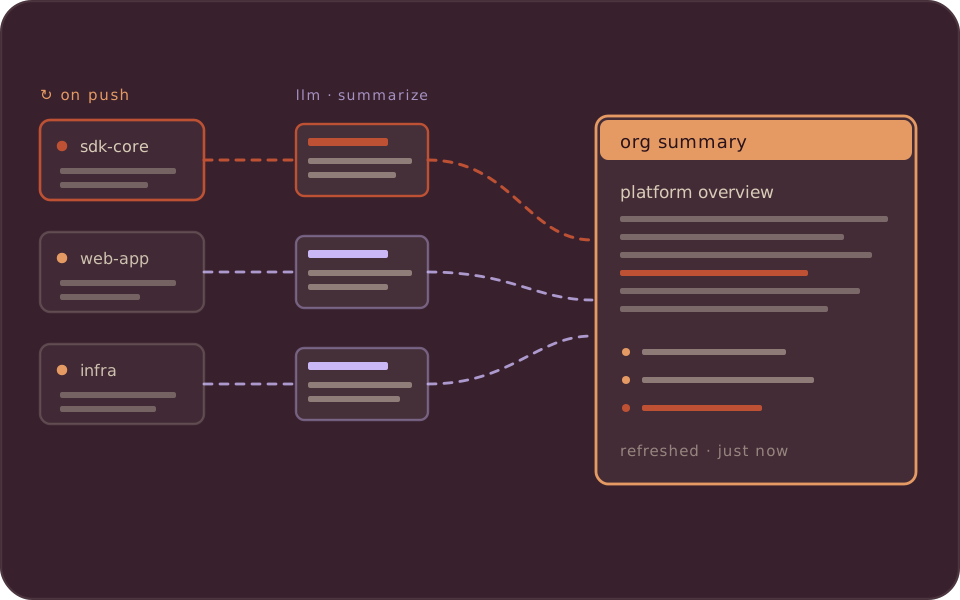
Documentation tends to drift out of sync with the code it describes. In this tutorial, we build a pipeline that generates a wiki page for each project in your codebase and keeps it current with incremental processing.
The full source code is available at CocoIndex Examples - multi_codebase_summarization.
The source is on GitHub.
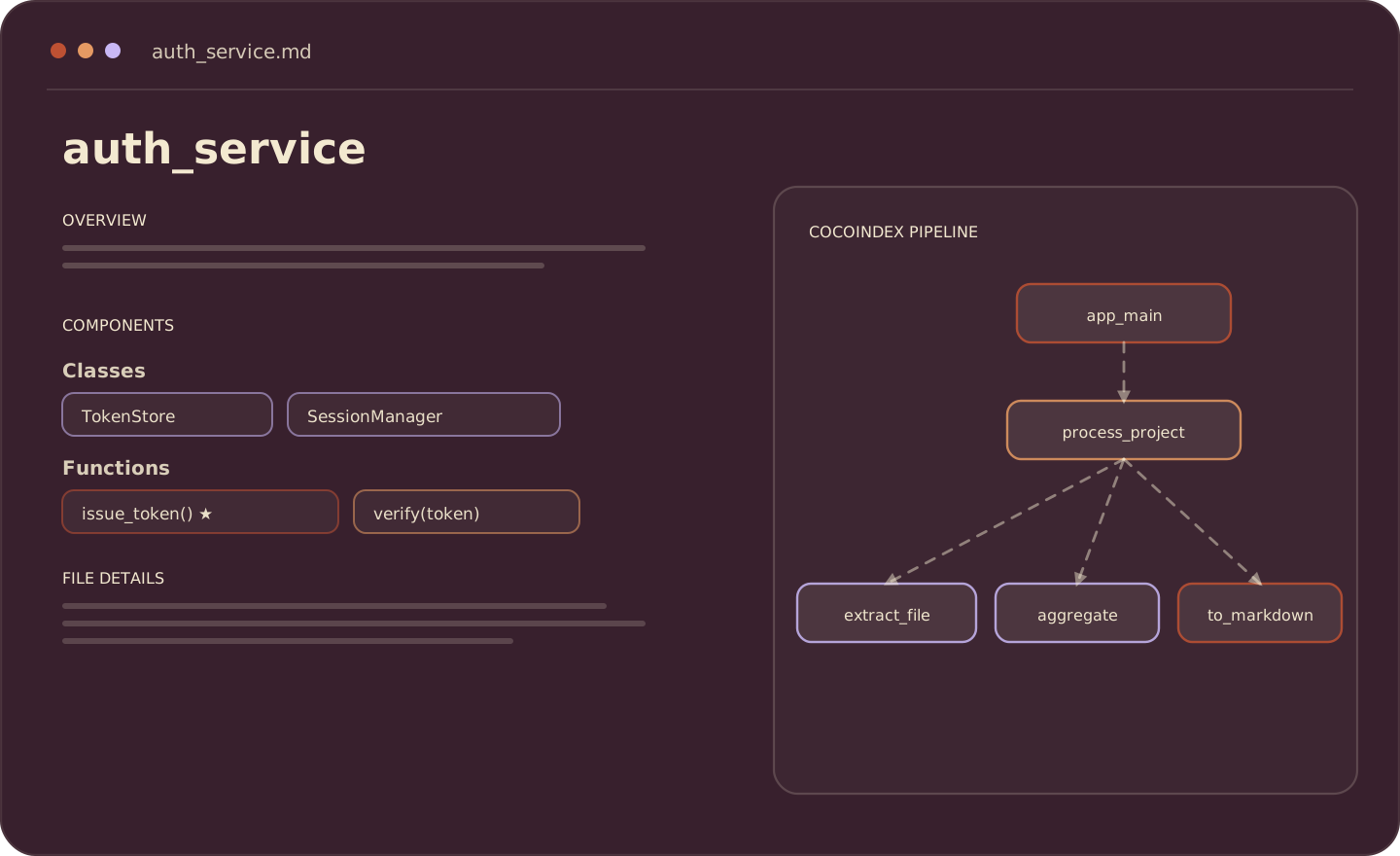
Here’s an example of the generated documentation:
The Problem
Documentation drifts. A module gets refactored, and the wiki describing it is now wrong. It usually stays wrong until someone new asks whether the docs can still be trusted.
The alternative is to derive the documentation from the code itself: a pipeline that reads your source, extracts structure from it, and produces documentation that updates when the code changes.
What We’ll Build
This project uses CocoIndex v1.
A pipeline that:
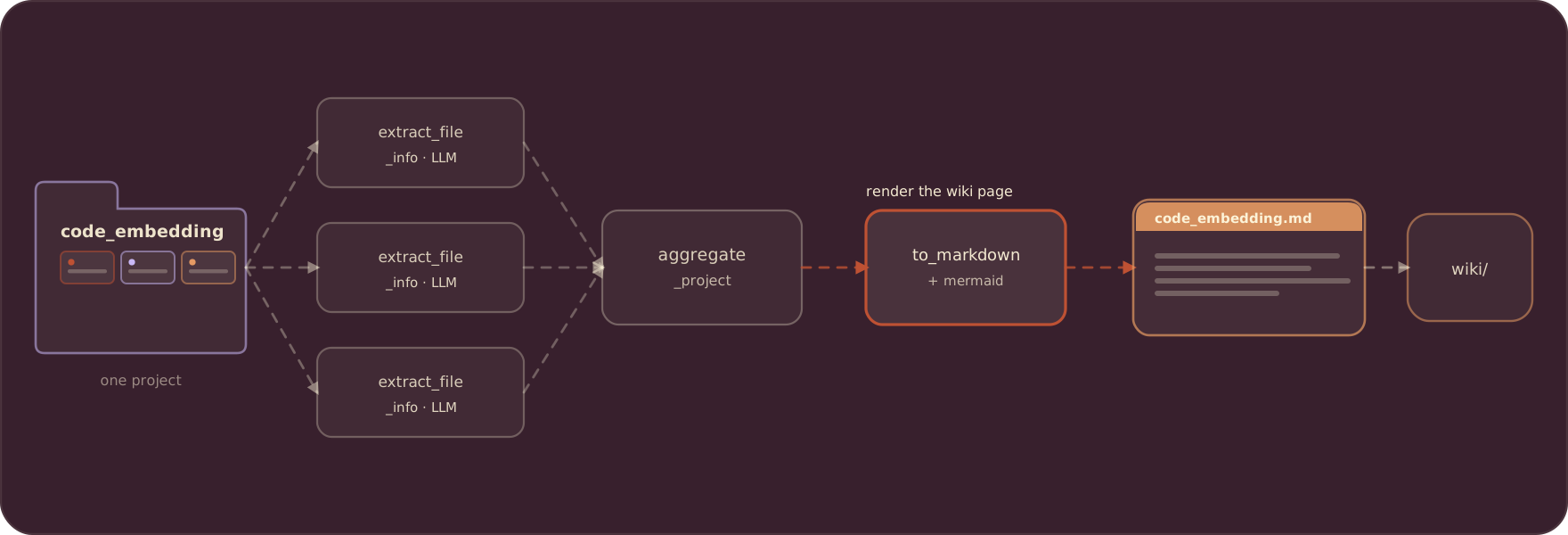
- Scans subdirectories, treating each as a separate project
- Extracts structured information from each Python file using an LLM (classes, functions, relationships)
- Aggregates file-level data into project-level summaries
- Generates Markdown documentation with Mermaid diagrams
flowchart LR
    subgraph Input
        A[projects/] --> B[project_1/]
        A --> C[project_2/]
        A --> D[project_N/]
    end

    subgraph "Process (per project)"
        B --> E["extract_file_info\n(LLM + Pydantic)"]
        E --> F["aggregate_project_info"]
        F --> G["generate_markdown"]
    end

    subgraph Output
        G --> H["project_1.md"]
    end

    classDef extract fill:#FBE7DA,stroke:#BE5133,stroke-width:1.5px,color:#7A2E1A;
    classDef aggregate fill:#FCF3D8,stroke:#8F3B24,stroke-width:1.5px,color:#5A2417;
    classDef generate fill:#DDF5DE,stroke:#16A534,stroke-width:1.5px,color:#11472A;
    class E extract;
    class F aggregate;
    class G generate;
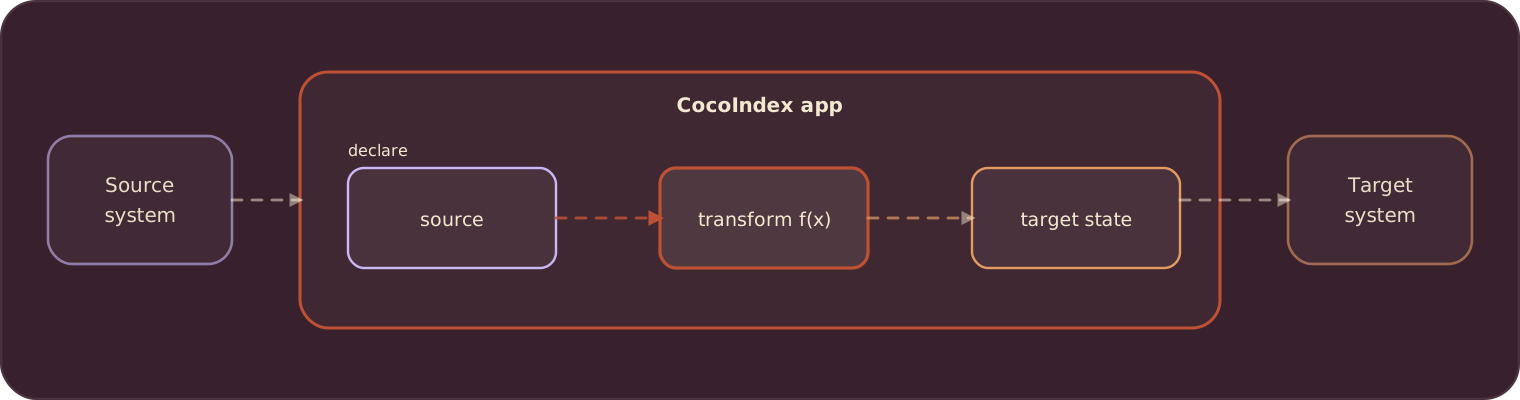
The model behind this is a single relationship:
target_state = transformation(source_state)
You declare the transformation. CocoIndex determines when to run it and which inputs need reprocessing.
The reality of modern codebases
Codebases change constantly. Teams merge many pull requests a day, and AI coding agents add and modify files continuously. A documentation pipeline has to keep up with that rate of change.
Batch regeneration handles this poorly. A nightly job is already stale by morning. An hourly job spends most of its time rebuilding files that did not change. The cost of a full rebuild scales with the size of the codebase, not with the size of the change.
Why not just write a script?
A script that loops through files, calls an LLM, and writes Markdown works for a one-time run. Keeping it correct over time raises several problems:
- File changes: after editing one file, re-running the whole pipeline is slow and expensive.
- Tracking state: to process only what changed, you have to track timestamps, checksums, or diffs yourself.
- LLM costs: re-analyzing unchanged files wastes API calls, which adds up at scale.
- Logic changes: changing the extraction prompt invalidates results for that transformation across every file.
These are caching, invalidation, and orchestration concerns, separate from the extraction logic you actually want to write.
The declarative difference
CocoIndex separates the transformation logic from the change tracking. You provide:
- Functions that extract information from a file, aggregate it, and format it.
- Dependencies between those functions, which CocoIndex records.
CocoIndex then handles incremental processing. When a source file is edited, or the processing logic changes (a different model or an updated prompt), only the affected outputs are recomputed, and the output stays consistent with the source.
Prerequisites
Install dependencies:
pip install --pre 'cocoindex>=1.0.0a6' instructor litellm pydanticSet up environment:
export GEMINI_API_KEY="your-api-key"
export LLM_MODEL="gemini/gemini-2.5-flash"
echo "COCOINDEX_DB=./cocoindex.db" > .env
Create a projects/ directory with subdirectories for each Python project:
projects/
├── my_project_1/
│   ├── main.py
│   └── utils.py
├── my_project_2/
│   └── app.py
└── ...
Define the app
Define a CocoIndex App, the top-level runnable unit in CocoIndex.
The snippets below focus on the pipeline logic; the full import list (localfs, instructor, the Pydantic models, and the rest) is in main.py.
import os
import pathlib

import cocoindex as coco

LLM_MODEL = os.environ.get("LLM_MODEL", "gemini/gemini-2.5-flash")


app = coco.App(
    "MultiCodebaseSummarization",
    app_main,
    root_dir=pathlib.Path("./projects"),
    output_dir=pathlib.Path("./output"),
)- The app scans
projects/and outputs documentation tooutput/
Define the main function
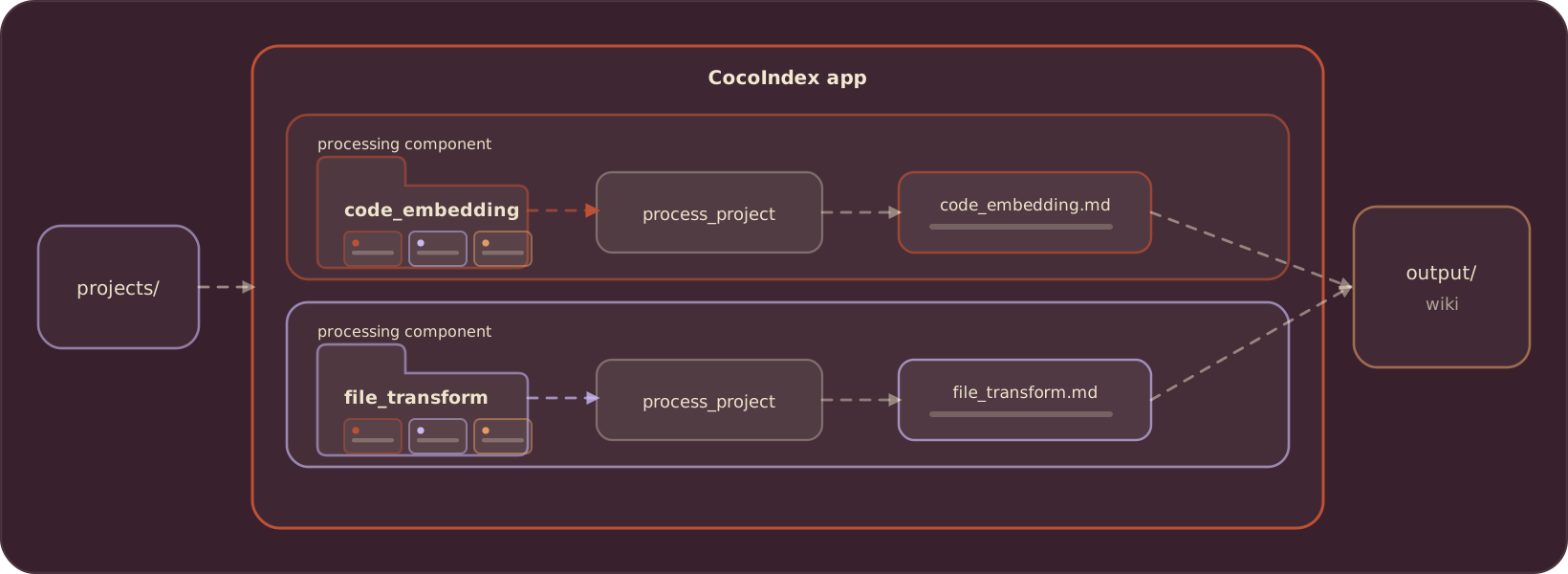
In the main function, we walk through each project in the subdirectories and process it.
It is up to you to declare the process granularity. It can be
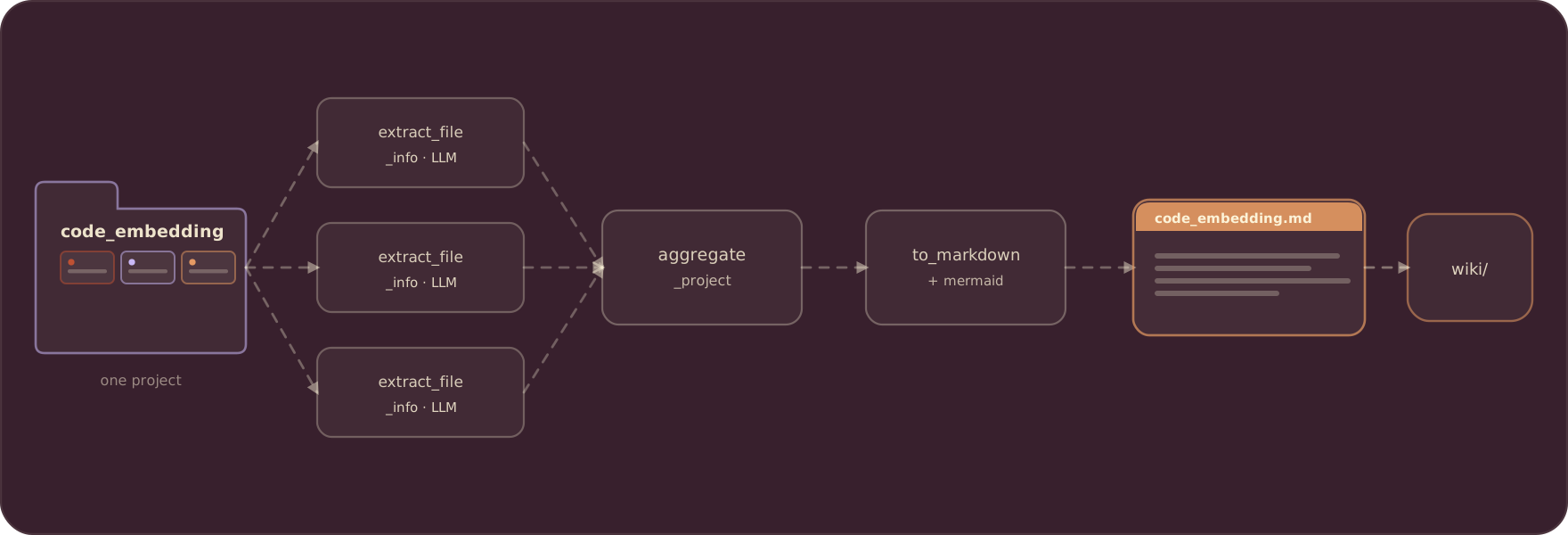
- at a directory level per project. For example, code_embedding is a project, containing multiple files,
- or at file level,
- or at even smaller units (e.g., page level, or semantic unit level).
In this example, we have a projects folder containing 20+ projects. It is natural to pick granularity at the directory level for each project, because we want to create a wiki page per project.
@coco.function
def app_main(
    root_dir: pathlib.Path,
    output_dir: pathlib.Path,
) -> None:
    """Scan subdirectories and generate documentation for each project."""
    for entry in root_dir.resolve().iterdir():
        if not entry.is_dir() or entry.name.startswith("."):
            continue
        project_name = entry.name

        files = list(
            localfs.walk_dir(
                entry,
                recursive=True,
                path_matcher=PatternFilePathMatcher(
                    included_patterns=["*.py"],
                    excluded_patterns=[".*", "__pycache__"],
                ),
            )
        )

        if files:
            coco.mount(
                coco.component_subpath("project", project_name),
                process_project,
                project_name,
                files,
                output_dir,
            )
The main function does two things:
-
Find all projects. Loop through each subdirectory in
root_dir, treating each as a separate project. -
Mount a processing component for each project. For each project with Python files,
coco.mount()sets up a processing component. CocoIndex handles execution and tracks dependencies.
A processing component groups an item’s processing together with its target states. Each component runs independently and in parallel, so when project_a finishes, its results are applied to the external system without waiting for project_b or any other project.
To learn more about processing components, you can read the documentation.
Process each project
For each project, we will
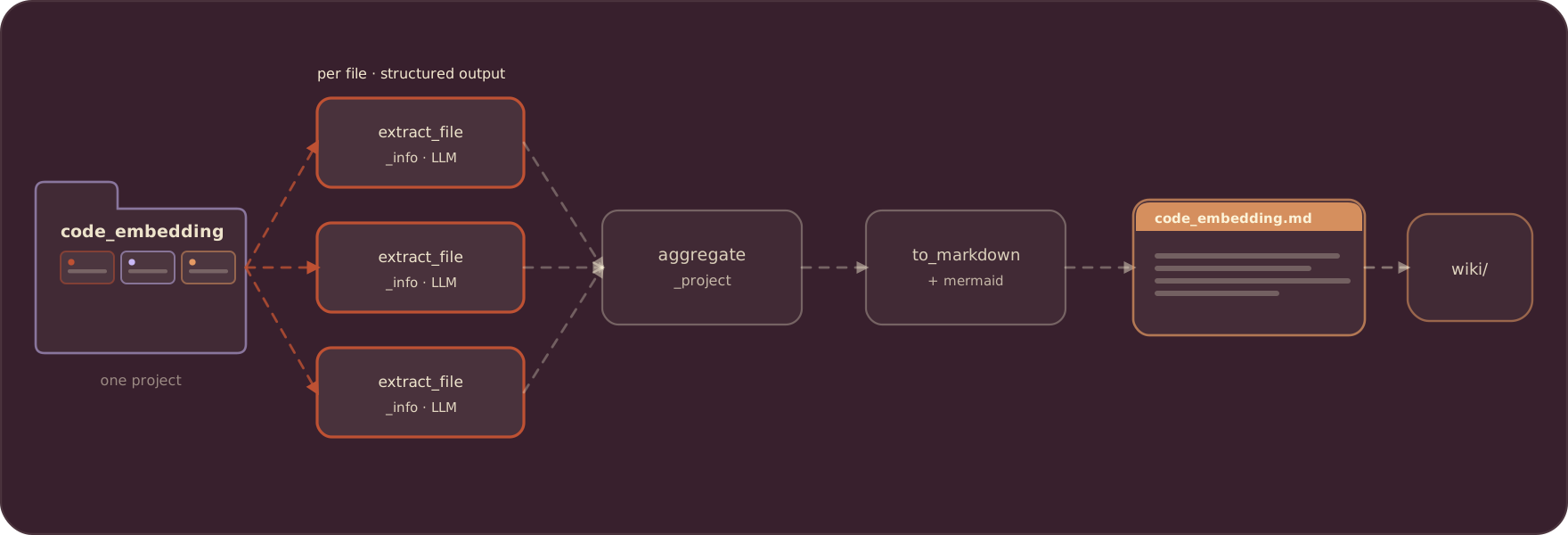
- use an LLM to extract info
- aggregate all the extraction into a project-level summary
- output the extraction to nice documentation with a Mermaid diagram.
@coco.function(memo=True)
async def process_project(
    project_name: str,
    files: Collection[localfs.File],
    output_dir: pathlib.Path,
) -> None:
    """Process a project: extract, aggregate, and output markdown."""
    # Extract info from each file concurrently using asyncio.gather
    file_infos = await asyncio.gather(*[extract_file_info(f) for f in files])

    # Aggregate into project-level summary
    project_info = await aggregate_project_info(project_name, file_infos)

    # Generate and output markdown
    markdown = generate_markdown(project_name, project_info, file_infos)
    localfs.declare_file(
        output_dir / f"{project_name}.md", markdown, create_parent_dirs=True
    )
Concurrent extraction. asyncio.gather() runs the file extractions concurrently, which is faster than sequential processing when each call waits on an LLM API response.
Extract file information with LLM
Now let’s take a look at the details for each transformation. For file extraction, we define a structure using Pydantic and use Instructor to extract with LLMs.
Define the data models
The key to structured LLM outputs is defining clear Pydantic models.
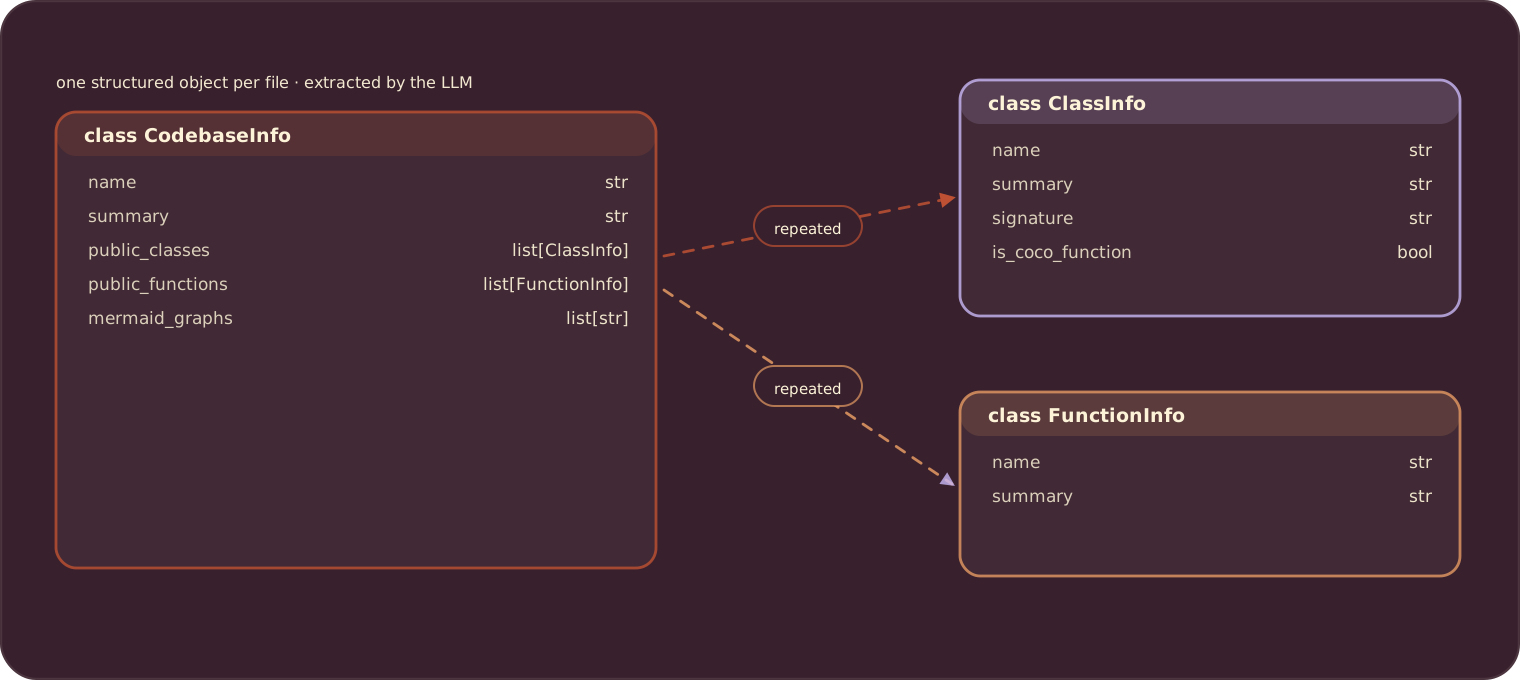
class FunctionInfo(BaseModel):
    """Information about a public function."""
    name: str = Field(description="Function name")
    signature: str = Field(
        description="Function signature, e.g. 'async def foo(x: int) -> str'"
    )
    is_coco_function: bool = Field(
        description="Whether decorated with @coco.function"
    )
    summary: str = Field(description="Brief summary of what the function does")


class ClassInfo(BaseModel):
    """Information about a public class."""
    name: str = Field(description="Class name")
    summary: str = Field(description="Brief summary of what the class represents")


class CodebaseInfo(BaseModel):
    """Extracted information from Python code."""
    name: str = Field(description="File path or project name")
    summary: str = Field(description="Brief summary of purpose and functionality")
    public_classes: list[ClassInfo] = Field(default_factory=list)
    public_functions: list[FunctionInfo] = Field(default_factory=list)
    mermaid_graphs: list[str] = Field(
        default_factory=list,
        description="Mermaid graphs showing function relationships"
    )
Extract file info
The core extraction function uses memoization to cache LLM results:
_instructor_client = instructor.from_litellm(acompletion, mode=instructor.Mode.JSON)

@coco.function(memo=True)
async def extract_file_info(file: FileLike) -> CodebaseInfo:
    """Extract structured information from a single Python file using LLM."""
    content = file.read_text()
    file_path = str(file.file_path.path)

    prompt = f"""Analyze the following Python file and extract structured information...""" # see full prompt below

    result = await _instructor_client.chat.completions.create(
        model=LLM_MODEL,
        response_model=CodebaseInfo,
        messages=[{"role": "user", "content": prompt}],
    )
return CodebaseInfo.model_validate(result.model_dump())See the full prompt in the repo.
memo=True caches the result by the function’s inputs. When the file content and the code are unchanged, CocoIndex returns the previous result instead of calling the LLM again, so unchanged files skip the remote call on later runs.
Aggregate project information
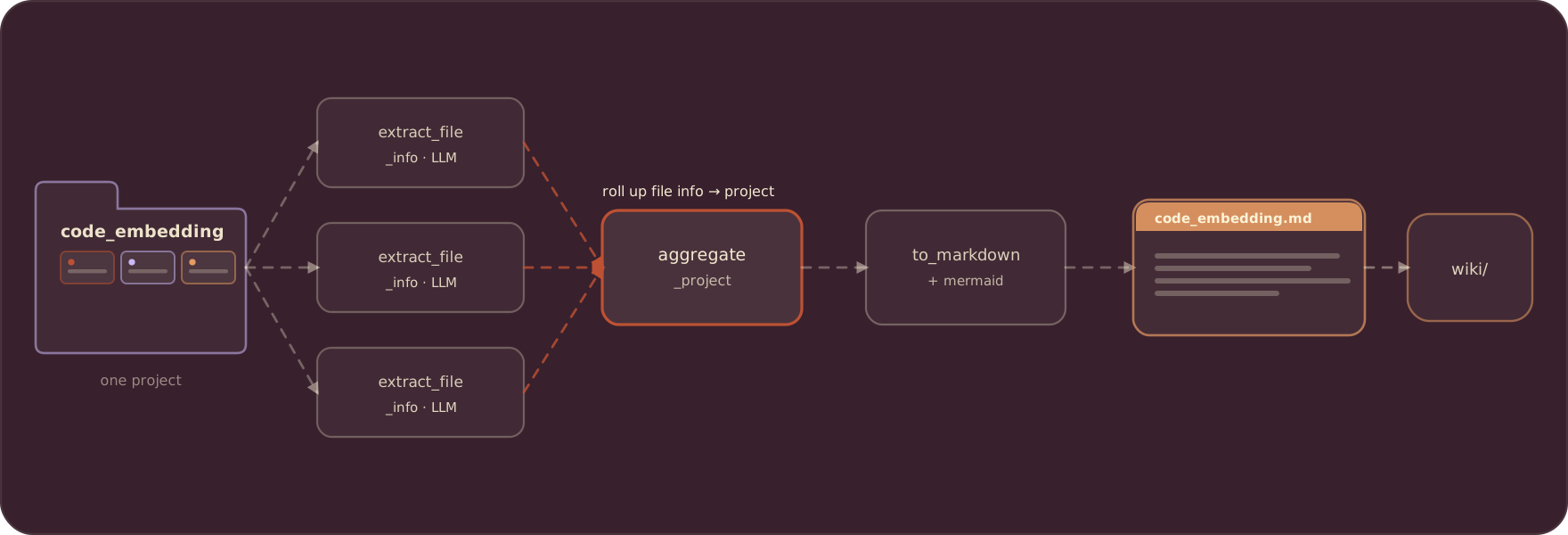
For projects with multiple files, we aggregate into a unified summary:
@coco.function
async def aggregate_project_info(
    project_name: str,
    file_infos: list[CodebaseInfo],
) -> CodebaseInfo:
    """Aggregate multiple file extractions into a project-level summary."""
    if not file_infos:
        return CodebaseInfo(
            name=project_name, summary="Empty project with no Python files."
        )

    # Single file - just update the name
    if len(file_infos) == 1:
        info = file_infos[0]
        return CodebaseInfo(
            name=project_name,
            summary=info.summary,
            public_classes=info.public_classes,
            public_functions=info.public_functions,
            mermaid_graphs=info.mermaid_graphs,
        )

    # Multiple files - use LLM to create unified summary
    files_text = "\n\n".join(
        f"### {info.name}\n"
        f"Summary: {info.summary}\n"
        f"Classes: {', '.join(c.name for c in info.public_classes) or 'None'}\n"
        f"Functions: {', '.join(f.name for f in info.public_functions) or 'None'}"
        for info in file_infos
    )

    # Collect all mermaid graphs from files
    all_graphs = [g for info in file_infos for g in info.mermaid_graphs]

    prompt = f"""Aggregate the following Python files into a project-level summary...""" # see full prompt in repo

    result = await _instructor_client.chat.completions.create(
        model=LLM_MODEL,
        response_model=CodebaseInfo,
        messages=[{"role": "user", "content": prompt}],
    )
    result = CodebaseInfo.model_validate(result.model_dump())

    # Keep original file-level graphs if LLM didn't generate a unified one
    if not result.mermaid_graphs and all_graphs:
        result.mermaid_graphs = all_graphs

return resultSee the full prompt in the repo.
This function combines file-level extractions into a single project summary:
- Single-file project: use that file’s info directly, with no extra LLM call.
- Multi-file project: ask the LLM to synthesize the file summaries into one project overview.
The result is a unified CodebaseInfo that represents the entire project rather than individual files.
Generate the Markdown documentation
Create output Markdown for each project, including a Mermaid pipeline diagram.
@coco.function
def generate_markdown(
    project_name: str, info: CodebaseInfo, file_infos: list[CodebaseInfo]
) -> str:
    """Generate markdown documentation from project info."""
    lines = [
        f"# {project_name}",
        "",
        "## Overview",
        "",
        info.summary,
        "",
    ]

    if info.public_classes or info.public_functions:
        lines.extend(["## Components", ""])

        if info.public_classes:
            lines.append("**Classes:**")
            for cls in info.public_classes:
                lines.append(f"- `{cls.name}`: {cls.summary}")
            lines.append("")

        if info.public_functions:
            lines.append("**Functions:**")
            for fn in info.public_functions:
                marker = " ★" if fn.is_coco_function else ""
                lines.append(f"- `{fn.signature}`{marker}: {fn.summary}")
            lines.append("")

    if info.mermaid_graphs:
        lines.extend(["## CocoIndex Pipeline", ""])
        for graph in info.mermaid_graphs:
            graph_content = graph.strip()
            if not graph_content.startswith("```"):
                lines.append("```mermaid")
                lines.append(graph_content)
                lines.append("```")
            else:
                lines.append(graph_content)
            lines.append("")

    if len(file_infos) > 1:
        lines.extend(["## File Details", ""])
        for fi in file_infos:
            lines.extend([f"### {fi.name}", "", fi.summary, ""])

    lines.extend(["---", "", "*★ = CocoIndex function*"])
    return "\n".join(lines)
This function converts the structured CodebaseInfo into readable documentation:
- Overview: the project summary at the top.
- Components: classes and functions with descriptions (★ marks CocoIndex functions).
- Pipeline diagram: Mermaid graphs showing how functions connect.
- File details: per-file summaries, for multi-file projects.
Run the pipeline
cocoindex update main.pyCocoIndex will:
- Scan each subdirectory in
projects/ - Extract structured information from Python files using the LLM
- Aggregate file summaries into project summaries
- Generate Markdown files in
output/
Check the output:
ls output/
# project1.md project2.md ...
Incremental Updates
The real power shows when you make changes:
Modify a file:
# Edit a Python file in one of your projects
cocoindex update main.py
# Only the modified file is re-analyzed
Add a new project:
mkdir projects/new_project
# Add .py files
cocoindex update main.py
# Only the new project is processed
Output Example
Each generated Markdown file includes:
- Overview: what the project does.
- Components: public classes and functions with descriptions.
- Pipeline diagram: a Mermaid graph showing how functions connect.
- File details: per-file summaries for multi-file projects.
graph TD
    app_main[app_main] ==> process_project[process_project]
    process_project ==> extract_file_info[extract_file_info]
    process_project ==> aggregate_project_info[aggregate_project_info]
    process_project --> generate_markdown[generate_markdown]

    classDef extract fill:#FBE7DA,stroke:#BE5133,stroke-width:1.5px,color:#7A2E1A;
    classDef aggregate fill:#FCF3D8,stroke:#8F3B24,stroke-width:1.5px,color:#5A2417;
    classDef generate fill:#DDF5DE,stroke:#16A534,stroke-width:1.5px,color:#11472A;
    class extract_file_info extract;
    class aggregate_project_info aggregate;
    class generate_markdown generate;
Key Patterns
This example combines several patterns:
- Structured LLM outputs: Pydantic models with Instructor return validated, typed data.
- Memoized LLM calls: identical inputs return a cached result, which avoids most LLM calls on incremental runs.
- Async concurrent processing:
asyncio.gather()runs file extractions in parallel. - Hierarchical aggregation: extract at the file level, then aggregate to the project level.
- Incremental processing: only changed inputs are reprocessed.
Beyond documentation: keeping derived knowledge current
The same pipeline applies wherever derived knowledge has to track a changing source, including the context that coding agents read. It is the same incremental pattern behind indexing a codebase for RAG, text embeddings, and knowledge graphs: declare the transformation once, and only changed inputs are reprocessed.
Long-horizon agents need current context
AI agents increasingly operate over long sessions, planning and acting across many steps. Their decisions depend on the state of the codebase as it is now: what changed recently, how modules interact, and the current structure of the system. Documentation that was accurate last week can lead an agent to act on assumptions that no longer hold.
Treating change as the unit of work
Processing change rather than reprocessing the whole corpus is what makes this practical:
- Efficiency: only changed inputs are processed, not the entire corpus.
- Latency: new information appears in minutes rather than after a full rebuild.
- Cost: unchanged content does not incur repeated LLM calls.
- Scalability: codebases too large to reprocess from scratch can still be kept current.
Declaring the transformation, rather than scripting the update logic by hand, is what lets the pipeline keep derived knowledge in sync with the source as the source changes.
Thanks to the community
@prrao87

Thanks @prrao87 for reviewing the example and providing detailed feedback on terminology, style, and conceptual clarity, which helped improve the developer experience.
If you have ideas, questions, or want to contribute, join us on Discord.
Next Steps
- Try the full example, or read the example walkthrough in the docs
- Join the CocoIndex Discord for questions
The source is on GitHub.

About the author.

CEO and cofounder of CocoIndex. Writes about incremental data infrastructure, agents, and the engineering decisions behind the engine.
Frequently asked questions.
How do I keep my code documentation in sync with the code without re-running the LLM on every file?
Build the docs as a CocoIndex pipeline instead of a one-shot script. CocoIndex's incremental engine fingerprints every file and every transformation, so when you re-run cocoindex update main.py after editing one file, only that file is re-analyzed and only the affected project's Markdown is regenerated, while everything else is served from cache. There is no separate "first run" vs. "update" code path; you declare the transformation once and the output stays in sync with the source. See Incremental Updates in this tutorial and the Incremental processing deep dive.
How do I only re-analyze changed files when generating docs with an LLM (skip unchanged ones)?
Decorate the per-file extraction with @coco.function(memo=True). CocoIndex fingerprints the function's inputs (the file content) and returns the cached result whenever they're unchanged, so an unchanged file never triggers an LLM call on the next run. Edit one file and only that file is re-sent to the model. See Extract file info, the Memoization keys & states docs, and the working main.py.
How do I cut LLM costs when regenerating codebase docs on every commit?
Memoize the LLM calls. Because @coco.function(memo=True) skips recomputation for unchanged inputs, regenerating docs after a commit only pays for the files that actually changed instead of re-analyzing the whole repo, typically an 80–90% reduction in LLM calls on a normal edit. See Key patterns and Extract file info; the caching mechanics are in Memoization keys & states.
How do I give my AI coding agent always-fresh, structured context about my own codebase?
Run this pipeline so each project's structured summary (classes, functions, relationships, and Mermaid diagrams) stays continuously in sync with the code, then feed those Markdown/JSON artifacts to your agent. Because updates are incremental, the agent reads knowledge that reflects the repo now, not last week, without you reprocessing the whole codebase. Run it continuously with live mode. See why current context matters and What we'll build.
How do I build a self-updating wiki for a monorepo or many repos?
Point the pipeline at a parent folder and treat each subdirectory as its own project. The main function walks root_dir, and coco.mount(coco.component_subpath("project", name), ...) creates an independent processing component per project that runs in parallel and updates on its own. Add a new repo folder and only that project is processed. See What we'll build, the full multi_codebase_summarization example, and the related code_embedding example.
How do I build my own DeepWiki-style codebase wiki I fully own (not a SaaS, code stays in my environment)?
This is an open-source, self-hosted pipeline you author and run in your own environment; your source never leaves it, and every stage (the extraction prompt, the Pydantic data model, aggregation, output format) is yours to change. Unlike a hosted wiki product, you also own the incremental engine that keeps it current and inexpensive. Start from the example on GitHub and read The declarative difference.
How do I extract structured data (classes, functions, relationships) from source code with Pydantic and an LLM?
Define Instructor-backed Pydantic models for exactly what you want (for example FunctionInfo, ClassInfo, and a top-level CodebaseInfo), then call the LLM with response_model=CodebaseInfo. You get validated, typed objects back instead of free-form text. See Define the data models and Extract file info, with full code in models.py and main.py.
How do I generate a Mermaid architecture diagram from code automatically?
Ask the LLM to emit Mermaid graphs as a field on your Pydantic model (mermaid_graphs: list[str]), then write them into the Markdown wrapped in mermaid code fences. The diagram regenerates whenever the underlying code changes, so the architecture picture does not drift from reality. See Generate markdown output and the example source.
How do I aggregate per-file LLM summaries into a single project-level summary?
Run a second LLM step that takes the list of per-file extractions and synthesizes one project summary, skipping the extra call entirely for single-file projects. CocoIndex runs the per-file extractions concurrently with asyncio.gather(), then aggregates the results. See Aggregate project information and Process each project.
How do I scan subdirectories where each folder is a separate project and process them as a pipeline?
In the main function, iterate root_dir.iterdir(), use localfs.walk_dir(...) with a PatternFilePathMatcher to collect each project's *.py files, then coco.mount() a processing component per project. CocoIndex tracks dependencies and runs each project independently and in parallel, applying each project's output as soon as it finishes. See the main.py source.
How do I keep the codebase wiki updating automatically as code changes (continuous live mode)?
Run the same pipeline under CocoIndex live mode so it watches the source and reprocesses on change instead of running once. Each project is an independent processing component, so an edit refreshes only that project's wiki page, and a new repo folder spins up its own. Trigger it from a commit hook or CI to keep the docs current on every push. See Incremental Updates.
Can I use a different LLM (OpenAI GPT, Claude, or a local model) instead of Gemini for code summarization?
Yes. The model is just the LLM_MODEL string (for example gemini/gemini-2.5-flash); extraction runs through Instructor on top of LiteLLM, so any provider LiteLLM supports works, including openai/gpt-4o, anthropic/claude-..., or a local model via ollama/.... Set the env var and the rest of the pipeline is unchanged. See Prerequisites.
