Multi-Codebase Summarization
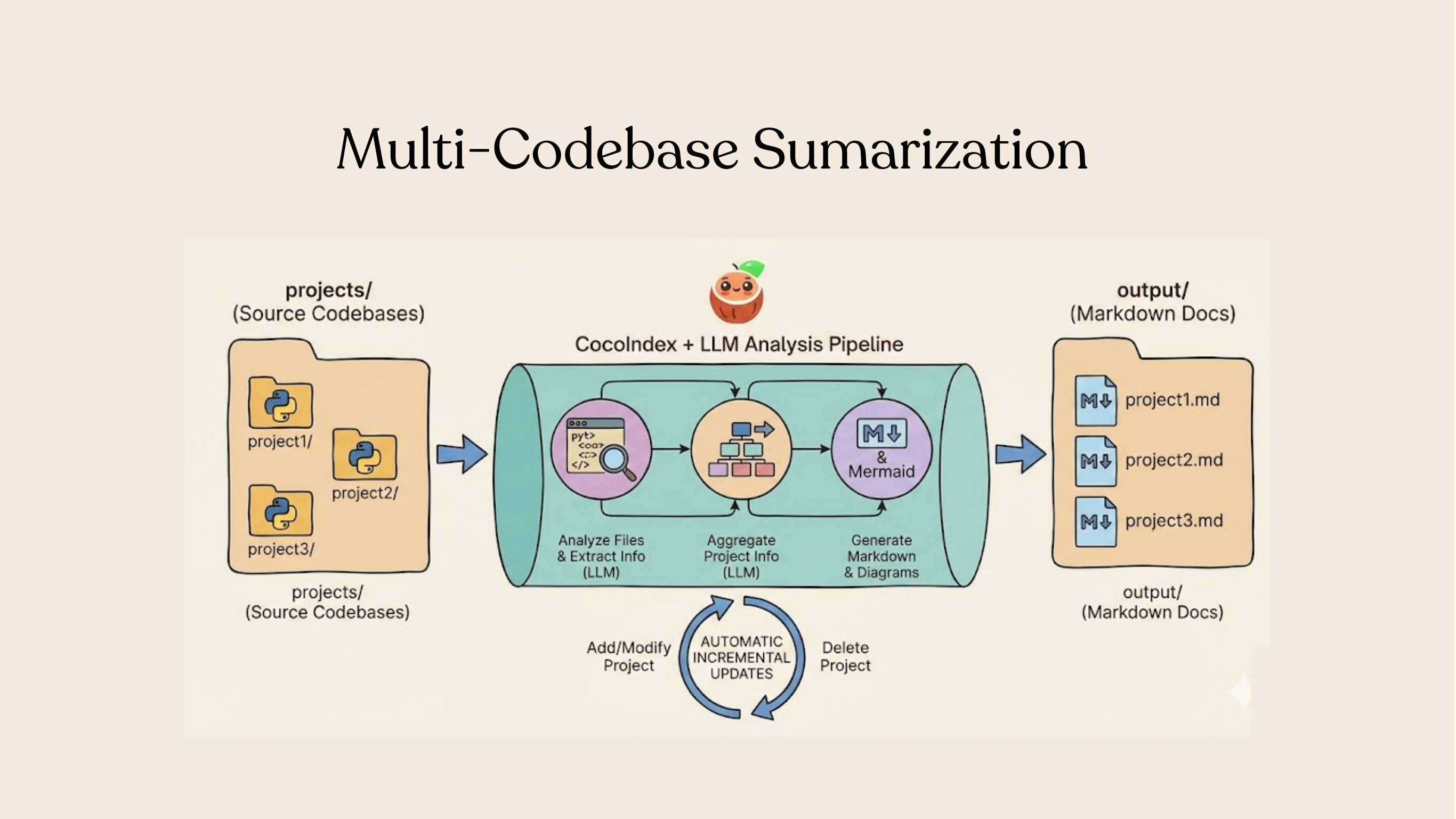
Your code is the source of truth. In this tutorial, we'll build a pipeline that automatically generates a one-pager wiki for each project in a list, that never goes out-of-date with incremental processing. Think about building your own deep wiki that is always fresh.
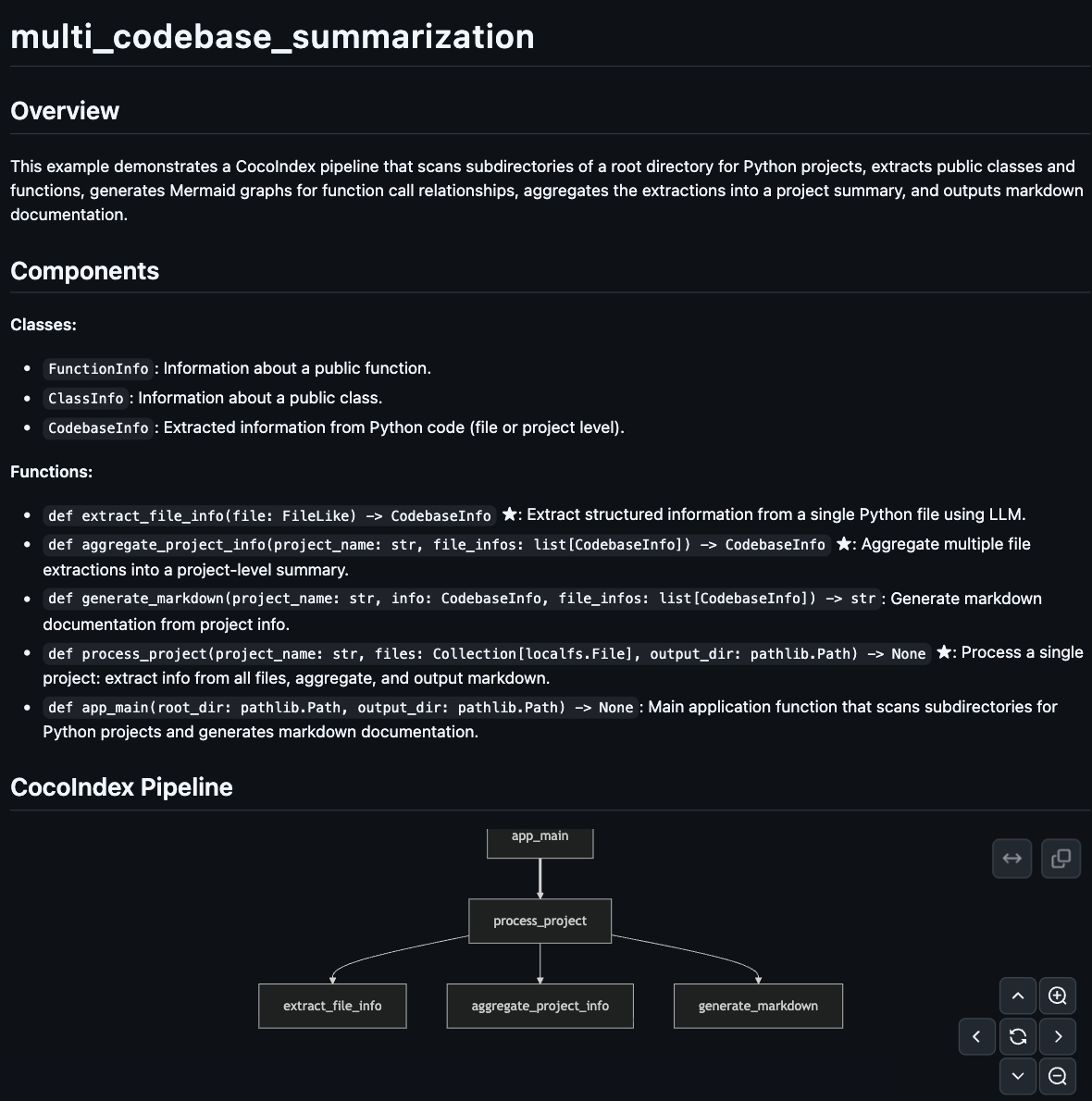
For example, for each cocoindex example project, we can have an auto-one-pager like this:
Overview
This example uses structured LLM outputs to analyze code and generate documentation at scale with LLMs.
- Scan top-level subdirectories, treating each as a separate project
- Extract structured information from each file using an LLM (classes, functions, relationships)
- Aggregate file-level data into project-level summaries
- Generate Markdown documentation with Mermaid diagrams
You declare the transformation logic with native Python without worrying about changes.
Think: target_state = transformation(source_state)
When your source data is updated, or your processing logic is changed (for example, switching to a different model, updating your LLM extraction logic), CocoIndex performs smart incremental processing that only reprocesses the minimum. And it keeps your wikis always up to date in production.
Setup
-
Install CocoIndex and dependencies:
pip install --pre 'cocoindex>=1.0.0a6' instructor litellm pydantic -
Create a new directory for your project:
mkdir multi-codebase-summarization
cd multi-codebase-summarization -
Set up your LLM environment variables:
export GEMINI_API_KEY="your-api-key"
export LLM_MODEL="gemini/gemini-2.5-flash" # Or any LiteLLM-supported model -
Create a
.envfile to configure the database path:echo "COCOINDEX_DB=./cocoindex.db" > .env -
Create a
projects/directory with subdirectories for each Python project:mkdir projectsprojects/
├── my_project_1/
│ ├── main.py
│ └── utils.py
├── my_project_2/
│ └── app.py
└── ...
Define the app
Define a CocoIndex App — the top-level runnable unit in CocoIndex.

from __future__ import annotations

import os
import asyncio
import pathlib
from typing import Collection

import instructor
from litellm import acompletion
from pydantic import BaseModel, Field

import cocoindex as coco
from cocoindex.connectors import localfs
from cocoindex.resources.file import FileLike, PatternFilePathMatcher

LLM_MODEL = os.environ.get("LLM_MODEL", "gemini/gemini-2.5-flash")


app = coco.App(
    "MultiCodebaseSummarization",
    app_main,
    root_dir=pathlib.Path("./projects"),
    output_dir=pathlib.Path("./output"),
)
- The app scans
projects/and outputs documentation tooutput/
Define the main function
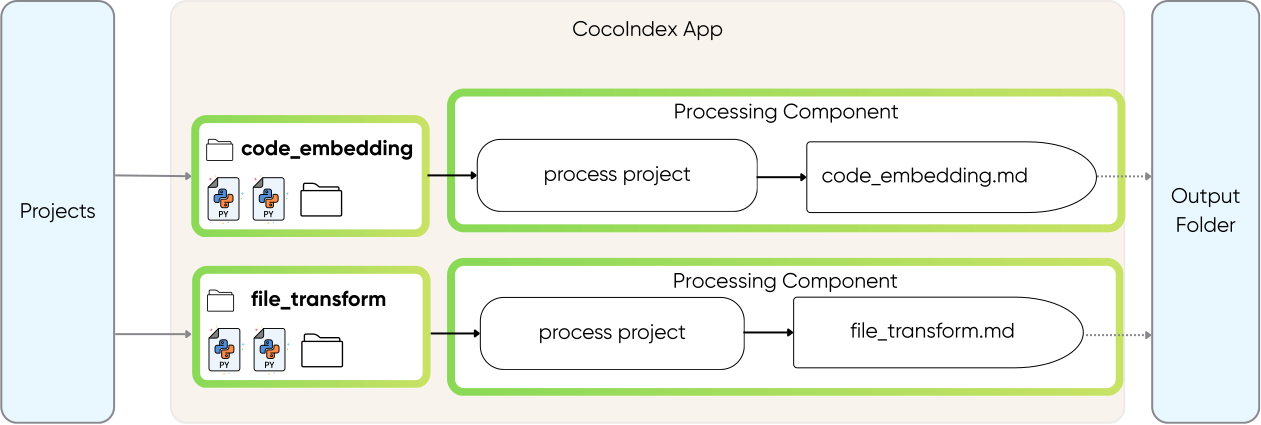
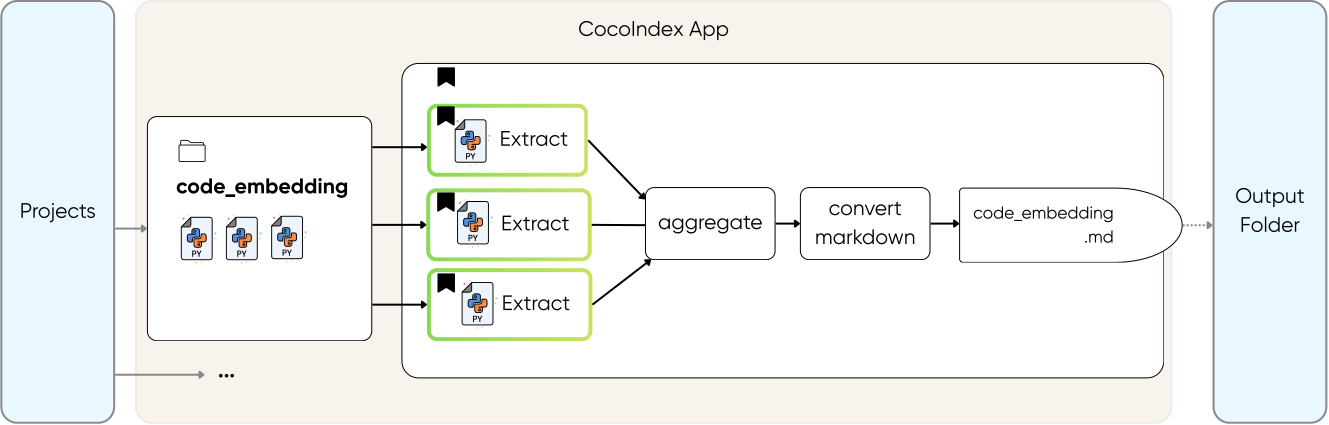
In the main function, we walk through each project in the subdirectories and process it.
It is up to you to declare the process granularity. It can be
- at a directory level per project. For example, code_embedding is a project, each containing multiple files,
- or at file level,
- or at even smaller units (e.g., page level, or semantic unit level).
In this example, we have a projects folder containing 20+ projects. It is natural to pick granularity at the directory level for each project, because we want to create a wiki page per project.
@coco.function
def app_main(
    root_dir: pathlib.Path,
    output_dir: pathlib.Path,
) -> None:
    """Scan subdirectories and generate documentation for each project."""
    for entry in root_dir.resolve().iterdir():
        if not entry.is_dir() or entry.name.startswith("."):
            continue
        project_name = entry.name

        files = list(
            localfs.walk_dir(
                entry,
                recursive=True,
                path_matcher=PatternFilePathMatcher(
                    included_patterns=["*.py"],
                    excluded_patterns=[".*", "__pycache__"],
                ),
            )
        )

        if files:
            coco.mount(
                coco.component_subpath("project", project_name),
                process_project,
                project_name,
                files,
                output_dir,
            )
The main function does two things:
-
Find all projects — Loop through each subdirectory in
root_dir, treating each as a separate project. -
Mount a processing component for each project — For each project with Python files,
coco.mount()sets up a processing component. CocoIndex handles the execution and tracks dependencies automatically.
Why processing components? A processing component groups an item's processing together with its target states. Each component runs independently and in parallel. In this case, when project_a finishes, its results are applied to the external system immediately, without waiting for project_b or any other project.
To learn more about processing components, you can read the documentation:
Processing ComponentProcess each project
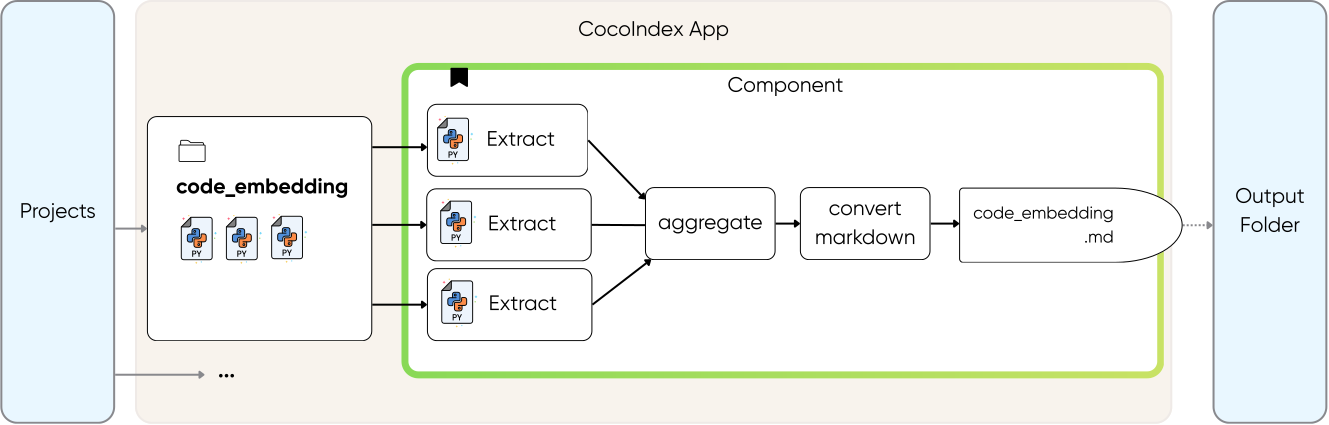
For each project, we will
- use LLM to extract info
- aggregate all the extraction into a project-level summary
- output the extraction to a nice documentation with a Mermaid diagram.
@coco.function(memo=True)
async def process_project(
    project_name: str,
    files: Collection[localfs.File],
    output_dir: pathlib.Path,
) -> None:
    """Process a project: extract, aggregate, and output markdown."""
    # Extract info from each file concurrently using asyncio.gather
    file_infos = await asyncio.gather(*[extract_file_info(f) for f in files])

    # Aggregate into project-level summary
    project_info = await aggregate_project_info(project_name, file_infos)

    # Generate and output markdown
    markdown = generate_markdown(project_name, project_info, file_infos)
    localfs.declare_file(
        output_dir / f"{project_name}.md", markdown, create_parent_dirs=True
    )
Concurrent processing with async — By using asyncio.gather(), all file extractions run concurrently. This is significantly faster than sequential processing, especially when making LLM API calls.
Extract file information with LLM
Now let's take a look at the details for each transformation. For file extraction, we define a structure using Pydantic and use Instructor to extract with LLMs.
Define the data models
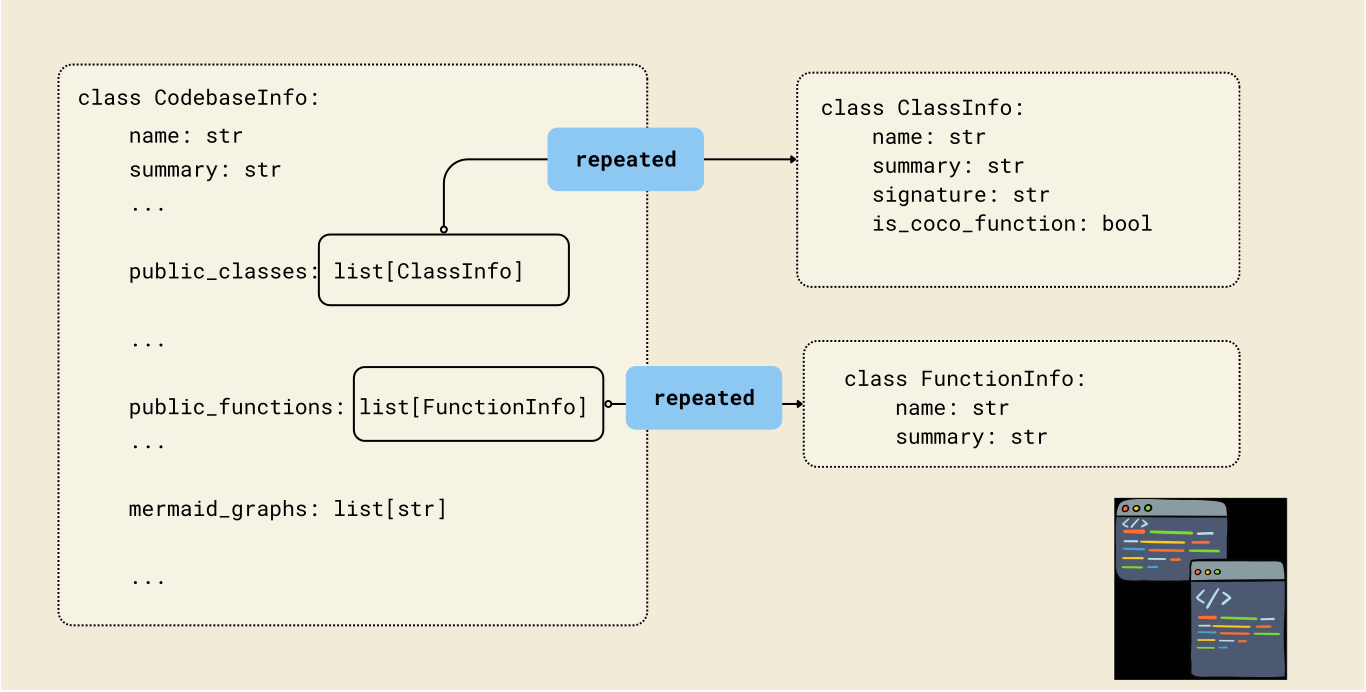
The key to structured LLM outputs is defining clear Pydantic models.
class FunctionInfo(BaseModel):
    """Information about a public function."""
    name: str = Field(description="Function name")
    signature: str = Field(
        description="Function signature, e.g. 'async def foo(x: int) -> str'"
    )
    is_coco_function: bool = Field(
        description="Whether decorated with @coco.function"
    )
    summary: str = Field(description="Brief summary of what the function does")


class ClassInfo(BaseModel):
    """Information about a public class."""
    name: str = Field(description="Class name")
    summary: str = Field(description="Brief summary of what the class represents")


class CodebaseInfo(BaseModel):
    """Extracted information from Python code."""
    name: str = Field(description="File path or project name")
    summary: str = Field(description="Brief summary of purpose and functionality")
    public_classes: list[ClassInfo] = Field(default_factory=list)
    public_functions: list[FunctionInfo] = Field(default_factory=list)
    mermaid_graphs: list[str] = Field(
        default_factory=list,
        description="Mermaid graphs showing function relationships"
    )
Extract file info
The core extraction function uses memoization to cache LLM results:
_instructor_client = instructor.from_litellm(acompletion, mode=instructor.Mode.JSON)

@coco.function(memo=True)
async def extract_file_info(file: FileLike) -> CodebaseInfo:
    """Extract structured information from a single Python file using LLM."""
    content = file.read_text()
    file_path = str(file.file_path.path)

    prompt = f"""Analyze the following Python file and extract structured information.

File path: {file_path}

```python
{content}
```

Instructions:
1. Identify all PUBLIC classes (not starting with _) and summarize their purpose
2. Identify all PUBLIC functions (not starting with _) and summarize their purpose
3. If this file contains CocoIndex apps (coco.App), create Mermaid graphs showing the
   function call relationships (see the mermaid_graphs field description for format)
4. Provide a brief summary of the file's purpose
"""

    result = await _instructor_client.chat.completions.create(
        model=LLM_MODEL,
        response_model=CodebaseInfo,
        messages=[{"role": "user", "content": prompt}],
    )
    return CodebaseInfo.model_validate(result.model_dump())
Why memo=True matters: LLM calls are expensive. With memoization, CocoIndex caches the result keyed by the file content. If you run the pipeline again without changing a file, the cached result is used—no LLM call needed.
Aggregate project information
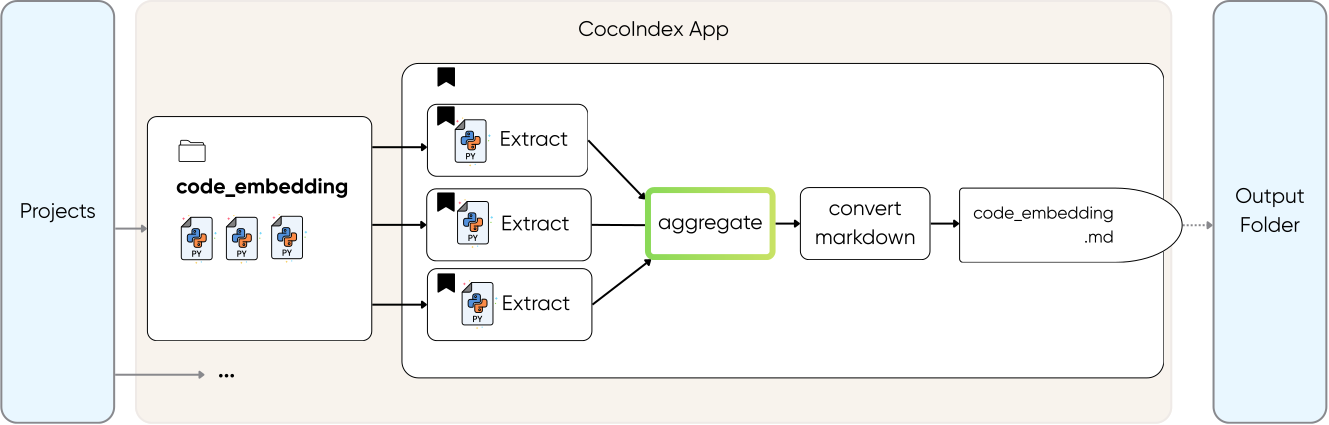
For projects with multiple files, we aggregate into a unified summary:
@coco.function
async def aggregate_project_info(
    project_name: str,
    file_infos: list[CodebaseInfo],
) -> CodebaseInfo:
    """Aggregate multiple file extractions into a project-level summary."""
    if not file_infos:
        return CodebaseInfo(
            name=project_name, summary="Empty project with no Python files."
        )

    # Single file - just update the name
    if len(file_infos) == 1:
        info = file_infos[0]
        return CodebaseInfo(
            name=project_name,
            summary=info.summary,
            public_classes=info.public_classes,
            public_functions=info.public_functions,
            mermaid_graphs=info.mermaid_graphs,
        )

    # Multiple files - use LLM to create unified summary
    files_text = "\n\n".join(
        f"### {info.name}\n"
        f"Summary: {info.summary}\n"
        f"Classes: {', '.join(c.name for c in info.public_classes) or 'None'}\n"
        f"Functions: {', '.join(f.name for f in info.public_functions) or 'None'}"
        for info in file_infos
    )

    # Collect all mermaid graphs from files
    all_graphs = [g for info in file_infos for g in info.mermaid_graphs]

    prompt = f"""Aggregate the following Python files into a project-level summary.

Project name: {project_name}

Files:
{files_text}

Create a unified CodebaseInfo that:
1. Summarizes the overall project purpose (not individual files)
2. Lists the most important public classes across all files
3. Lists the most important public functions across all files
4. For mermaid_graphs: create a single unified graph showing how the CocoIndex
   components connect across the project (if applicable)
"""

    result = await _instructor_client.chat.completions.create(
        model=LLM_MODEL,
        response_model=CodebaseInfo,
        messages=[{"role": "user", "content": prompt}],
    )
    result = CodebaseInfo.model_validate(result.model_dump())

    # Keep original file-level graphs if LLM didn't generate a unified one
    if not result.mermaid_graphs and all_graphs:
        result.mermaid_graphs = all_graphs

    return result
This function combines file-level extractions into a single project summary:
- Single file project — Just use that file's info directly (no extra LLM call needed)
- Multi-file project — Ask the LLM to synthesize all file summaries into one cohesive project overview
The result is a unified CodebaseInfo that represents the entire project, not individual files.
Generate markdown output
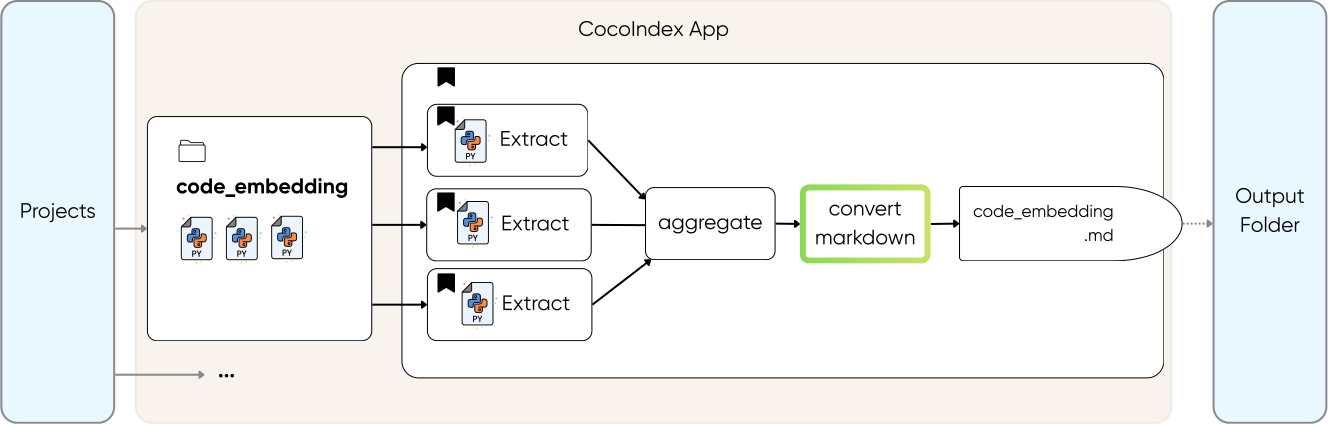
Create output markdown for each project.
@coco.function
def generate_markdown(
    project_name: str, info: CodebaseInfo, file_infos: list[CodebaseInfo]
) -> str:
    """Generate markdown documentation from project info."""
    lines = [
        f"# {project_name}",
        "",
        "## Overview",
        "",
        info.summary,
        "",
    ]

    if info.public_classes or info.public_functions:
        lines.extend(["## Components", ""])

        if info.public_classes:
            lines.append("**Classes:**")
            for cls in info.public_classes:
                lines.append(f"- `{cls.name}`: {cls.summary}")
            lines.append("")

        if info.public_functions:
            lines.append("**Functions:**")
            for fn in info.public_functions:
                marker = " ★" if fn.is_coco_function else ""
                lines.append(f"- `{fn.signature}`{marker}: {fn.summary}")
            lines.append("")

    if info.mermaid_graphs:
        lines.extend(["## CocoIndex Pipeline", ""])
        for graph in info.mermaid_graphs:
            graph_content = graph.strip()
            if not graph_content.startswith("```"):
                lines.append("```mermaid")
                lines.append(graph_content)
                lines.append("```")
            else:
                lines.append(graph_content)
            lines.append("")

    if len(file_infos) > 1:
        lines.extend(["## File Details", ""])
        for fi in file_infos:
            lines.extend([f"### {fi.name}", "", fi.summary, ""])

    lines.extend(["---", "", "*★ = CocoIndex function*"])
    return "\n".join(lines)
This function converts the structured CodebaseInfo into readable documentation:
- Overview — Project summary at the top
- Components — Lists classes and functions with descriptions (★ marks CocoIndex functions)
- Pipeline diagram — Mermaid graphs showing how functions connect
- File details — For multi-file projects, includes per-file summaries
Run the pipeline
cocoindex update main.py
CocoIndex will:
- Scan each subdirectory in
projects/ - Extract structured information from Python files using the LLM
- Aggregate file summaries into project summaries
- Generate Markdown files in
output/
Check the output:
ls output/
# project1.md project2.md ...
Incremental updates
The real power shows when you make changes:
Modify a file:
Edit a Python file in one of your projects, then run:
cocoindex update main.py
Only the modified file is re-analyzed by the LLM. Unchanged files use cached results.
Add a new project:
Add a new subdirectory with Python files:
mkdir projects/new_project
# add .py files
cocoindex update main.py
Only the new project is processed.
Key patterns demonstrated
This example showcases several powerful patterns:
- Structured LLM outputs with Instructor + Pydantic models
- Memoized LLM calls to avoid redundant API costs
- Async concurrent processing with
asyncio.gather() - Hierarchical aggregation (file → project)
- Incremental processing for efficient updates