Manuals, datasheets, and reference docs are full of structure: titles, classes, functions, parameters, defaults. It’s all laid out for humans, not machines. This post builds a CocoIndex pipeline that pulls that structure back out into typed rows, and does it entirely on your own hardware. Each PDF is converted to Markdown with docling, a local Ollama model extracts a nested schema, and the result lands in Postgres. The documents never leave your machine.
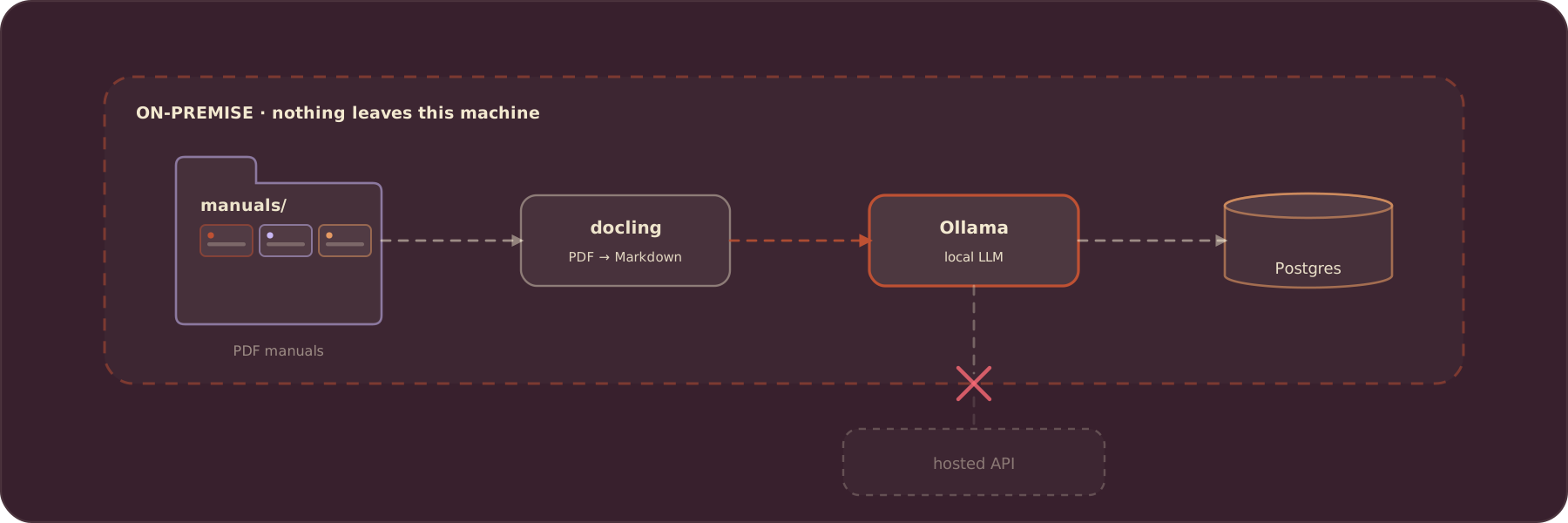
On-premise matters when the documents are sensitive: internal manuals, contracts, medical or financial filings. Running the LLM locally with Ollama means the data stays inside your network, and you can still deploy the same pipeline to your own cloud or server later without changing a line.
The full example is in the CocoIndex repo under examples/manuals_llm_extraction, and there’s a step-by-step docs walkthrough too.
Introducing CocoIndex
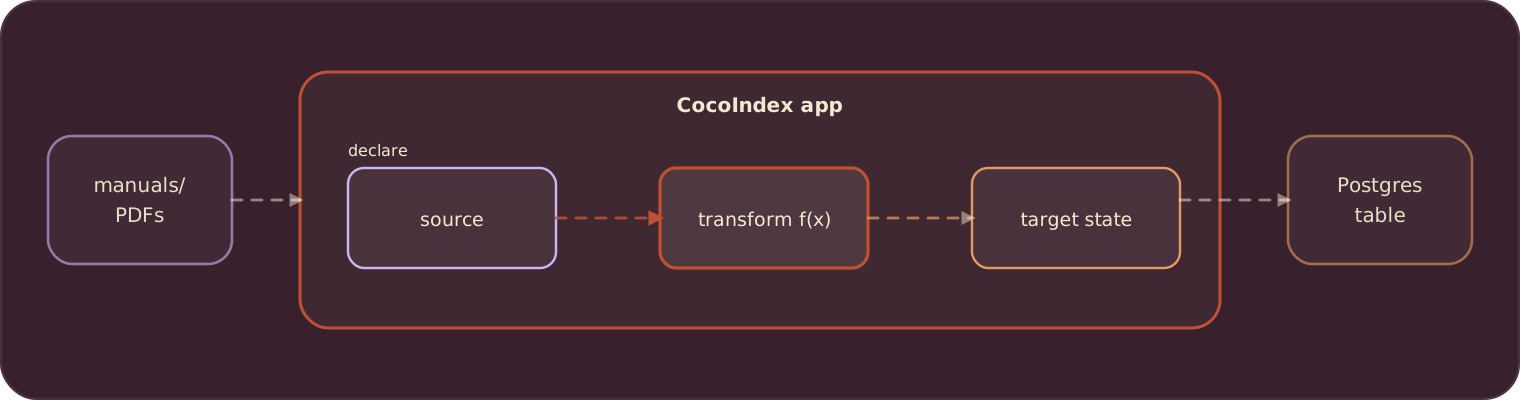
CocoIndex is an incremental data transformation framework. You declare target_state = transformation(source_state) in plain async Python and your own types, and a Rust engine underneath handles change tracking, incremental processing, and managed targets. Edit one manual and CocoIndex re-parses and re-extracts only that one, updating its row in place. The whole example is about 100 lines.
Introducing Ollama
Ollama runs open LLMs on your local machine with a single command. Download and install it, then pull a model:
ollama pull llama3.2CocoIndex talks to Ollama through LiteLLM, so the model is just a string: ollama/llama3.2. Swap that string for ollama/mistral, ollama/qwen2.5, or a hosted provider like openai/gpt-4o, and nothing else in the pipeline changes. For a fully on-premise setup, keep it pointed at Ollama.
Overview of the pipeline
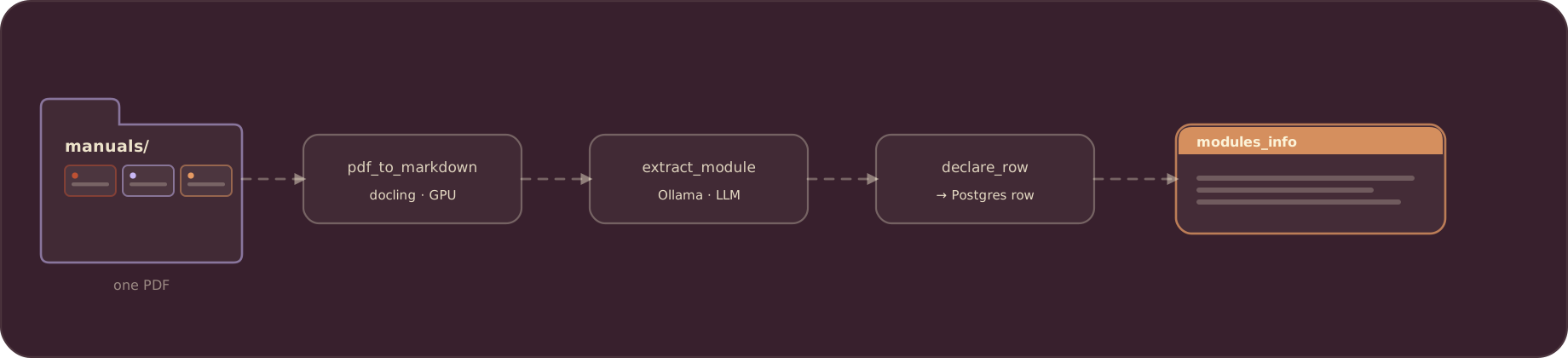
At a high level, the flow watches a manuals/ folder and turns each PDF into one typed Postgres row:
- Ingest PDFs from a local folder. CocoIndex watches
manuals/and reads new or updated PDF files as they appear. - Convert each PDF to Markdown. docling parses the document into clean Markdown, run on a
coco.GPUrunner so the heavy work stays off the event loop. - Extract a nested schema with the local LLM. The Markdown goes to Ollama through instructor, which constrains the output to a typed
ModuleInfo(title, description, classes, methods, arguments). - Declare one Postgres row per manual. Summary counts plus the full structure as JSON.
- Stay incremental. Both the parse and the extraction are cached by content, so re-running only touches what changed.
The output is a Postgres table that mirrors each document’s real shape, kept in sync with the folder as manuals come and go.
Define the pipeline
CocoIndex v1 is declarative and Python-native. The entry point is an app_main function wrapped in a coco.App: it mounts one Postgres table target, walks the manuals/ folder for PDFs in live mode, and runs one processor per file. The whole example lives in one main.py.
import cocoindex as coco
from cocoindex.connectors import localfs, postgres
from cocoindex.resources.file import FileLike, PatternFilePathMatcher

@coco.fn
async def app_main(sourcedir: pathlib.Path) -> None:
    table = await postgres.mount_table_target(
        PG_DB,
        table_name=TABLE_NAME,
        table_schema=await postgres.TableSchema.from_class(
            ModuleRecord, primary_key=["filename"]
        ),
        pg_schema_name=PG_SCHEMA_NAME,
    )

    files = localfs.walk_dir(
        sourcedir,
        recursive=True,
        path_matcher=PatternFilePathMatcher(included_patterns=["**/*.pdf"]),
        live=True,
    )
    await coco.mount_each(process_file, files.items(), table)

app = coco.App(
    coco.AppConfig(name="ManualsLlmExtraction"),
    app_main,
    sourcedir=pathlib.Path("./manuals"),
)
The live=True source keeps watching the folder, so a manual dropped in later is picked up without a restart. coco.mount_each runs process_file once per matched PDF.
The extraction schema
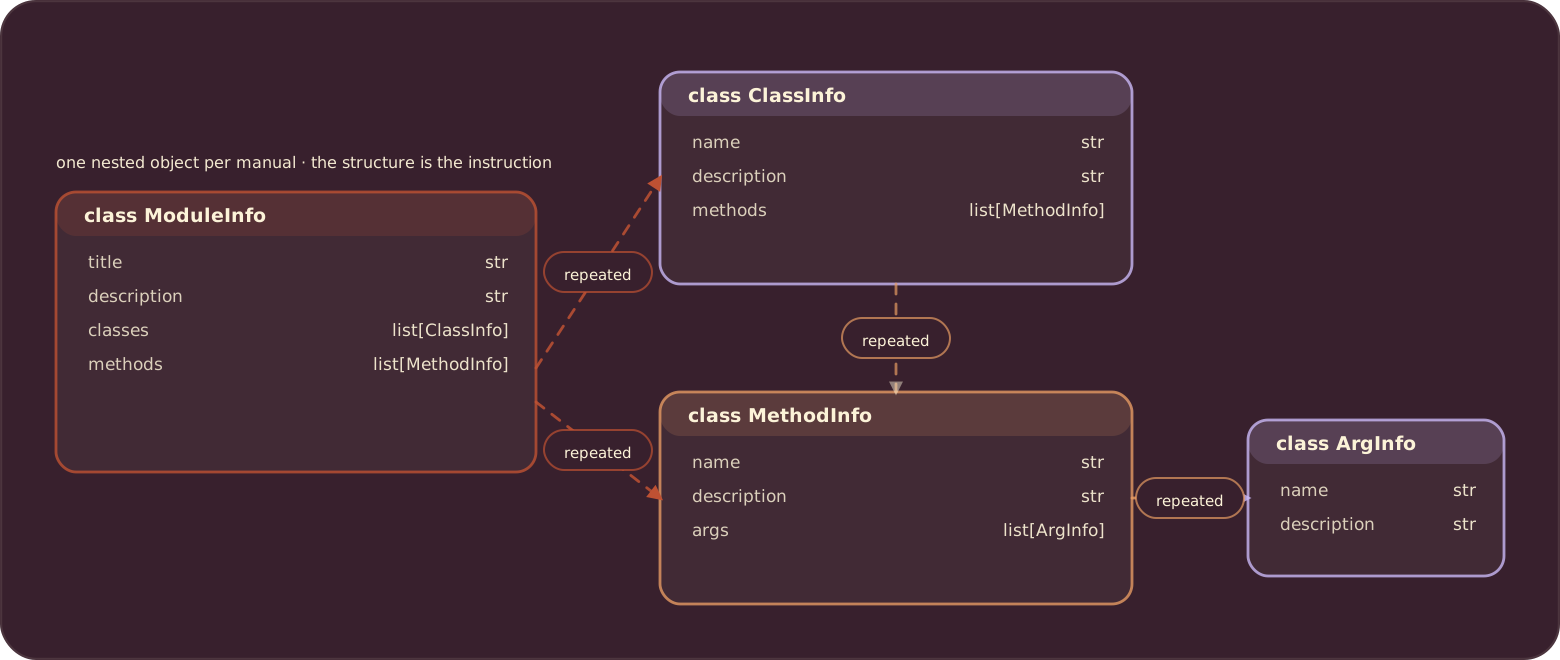
The output type is nested Pydantic, and the structure itself is the instruction to the model. A ModuleInfo has classes (each with methods) and module-level methods (each with args), so the model knows exactly what to pull out at every level, no per-level prompt tuning.
class ArgInfo(pydantic.BaseModel):
    name: str
    description: str = ""

class MethodInfo(pydantic.BaseModel):
    name: str
    args: list[ArgInfo] = pydantic.Field(default_factory=list)
    description: str = ""

class ClassInfo(pydantic.BaseModel):
    name: str
    description: str = ""
    methods: list[MethodInfo] = pydantic.Field(default_factory=list)

class ModuleInfo(pydantic.BaseModel):
    title: str
    description: str
    classes: list[ClassInfo] = pydantic.Field(default_factory=list)
    methods: list[MethodInfo] = pydantic.Field(default_factory=list)
Convert PDF to Markdown
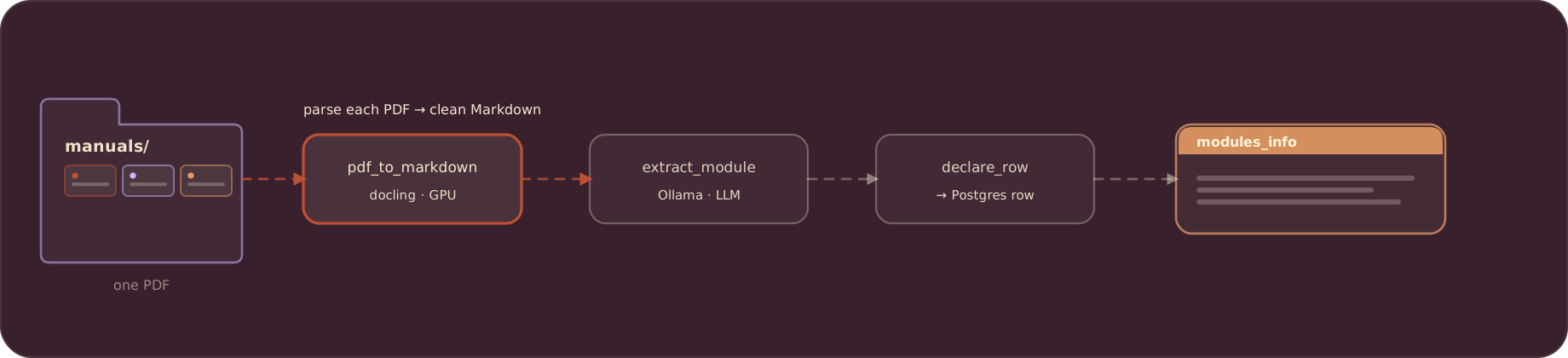
Ollama does not take PDFs directly, so each document is converted to Markdown first. docling handles the parse; the function is decorated @coco.fn.as_async(runner=coco.GPU) so the heavy work runs on the GPU runner instead of blocking the event loop.
@functools.cache
def pdf_converter() -> DocumentConverter:
    options = PdfPipelineOptions(
        accelerator_options=AcceleratorOptions(device=AcceleratorDevice.CPU)
    )
    return DocumentConverter(
        format_options={InputFormat.PDF: PdfFormatOption(pipeline_options=options)}
    )

@coco.fn.as_async(runner=coco.GPU)
def pdf_to_markdown(content: bytes) -> str:
    source = DocumentStream(name="manual.pdf", stream=io.BytesIO(content))
    return pdf_converter().convert(source).document.export_to_markdown()
Extract structured data with Ollama
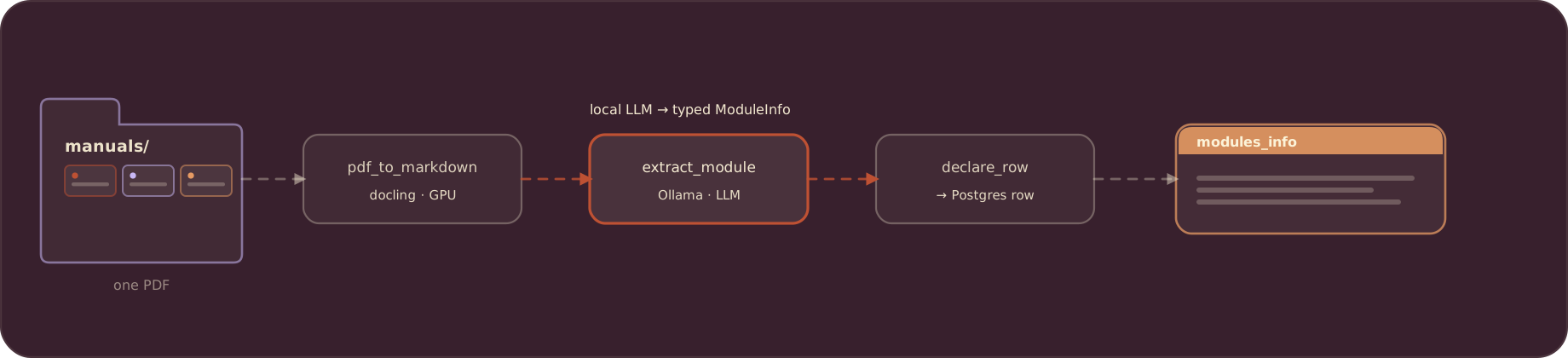
The Markdown goes to the local model. instructor wraps LiteLLM and forces the response to validate against ModuleInfo, so you get a typed object back rather than free text to parse. The model comes from context (LLM_MODEL), which is ollama/llama3.2 for an on-premise run.
@coco.fn(memo=True)
async def extract_module(markdown: str) -> ModuleInfo:
    client = instructor.from_litellm(litellm.acompletion, mode=instructor.Mode.JSON)
    result = await client.chat.completions.create(
        model=coco.use_context(LLM_MODEL),
        response_model=ModuleInfo,
        messages=[
            {"role": "system", "content": EXTRACT_PROMPT},
            {"role": "user", "content": markdown},
        ],
    )
    return ModuleInfo.model_validate(result.model_dump())
@coco.fn(memo=True) caches the extraction by its input, so an unchanged manual is never re-sent to the model on later runs.
Declare the Postgres row
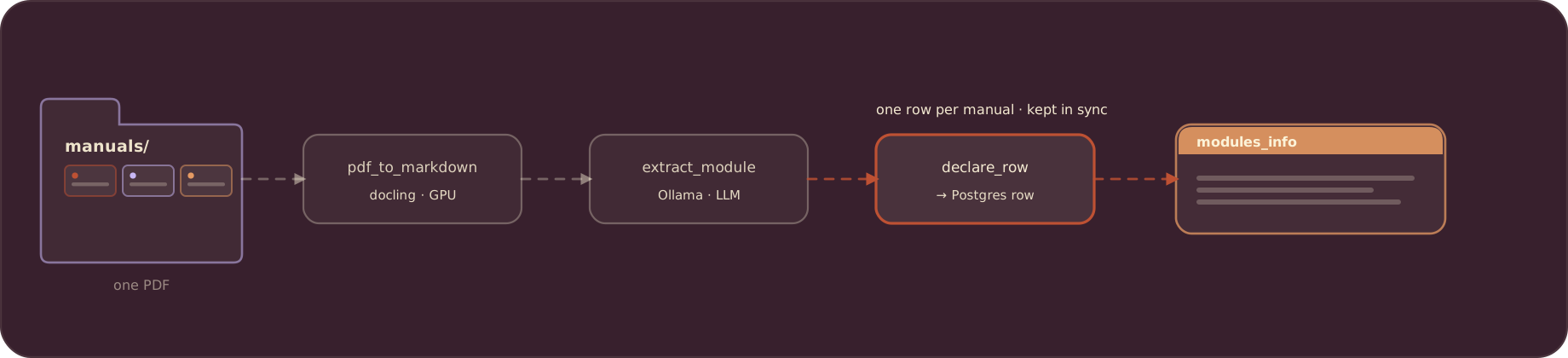
process_file ties it together: read the file, convert, extract, then declare one row. You describe the row you want; CocoIndex inserts, updates, or deletes it to match. The row carries the summary counts and the full ModuleInfo as JSON.
@dataclass
class ModuleRecord:
    filename: str  # primary key
    title: str
    description: str
    num_classes: int
    num_methods: int
    module_info: str  # the full ModuleInfo as JSON

@coco.fn(memo=True)
async def process_file(
    file: FileLike,
    table: postgres.TableTarget[ModuleRecord],
) -> None:
    markdown = await pdf_to_markdown(await file.read())
    info = await extract_module(markdown)
    table.declare_row(
        row=ModuleRecord(
            filename=file.file_path.path.name,
            title=info.title,
            description=info.description,
            num_classes=len(info.classes),
            num_methods=len(info.methods),
            module_info=json.dumps(info.model_dump()),
        )
    )
Providing shared resources
The Postgres pool and the model name are provided once at startup with @coco.lifespan and read back inside the functions with coco.use_context. LLM_MODEL is declared with detect_change=True, so if you swap models later, CocoIndex re-extracts everything against the new one with no cache to clear by hand.
PG_DB = coco.ContextKey[asyncpg.Pool]("manuals_db")
LLM_MODEL = coco.ContextKey[str]("llm_model", detect_change=True)

@coco.lifespan
async def coco_lifespan(builder: coco.EnvironmentBuilder) -> AsyncIterator[None]:
    async with asyncpg.create_pool(os.environ["POSTGRES_URL"]) as pool:
        builder.provide(PG_DB, pool)
        builder.provide(LLM_MODEL, os.environ.get("LLM_MODEL", "ollama/llama3.2"))
        yield
Running the example
Prerequisites
- Python 3.11+
- Ollama installed, with a model pulled:
ollama pull llama3.2 - Postgres (the pipeline stores the index there)
Everything runs locally. With Ollama serving the model and Postgres on your own machine, no document content leaves the box.
Quick start
The example ships a manuals/ folder of Python module reference PDFs (array, base64, copy).
cd examples/manuals_llm_extraction

# Start Postgres
docker compose -f ../../dev/postgres.yaml up -d

# Configure and install
cp .env.example .env      # set POSTGRES_URL and LLM_MODEL=ollama/llama3.2
pip install -e .

# Build the index
cocoindex update main     # catch-up run
cocoindex update -L main  # or: live run, keep watching the manuals/ folder
The extraction is faithful to each module’s shape: base64 comes out function-based (many module-level functions, no classes), while array is a single class.
Query the results
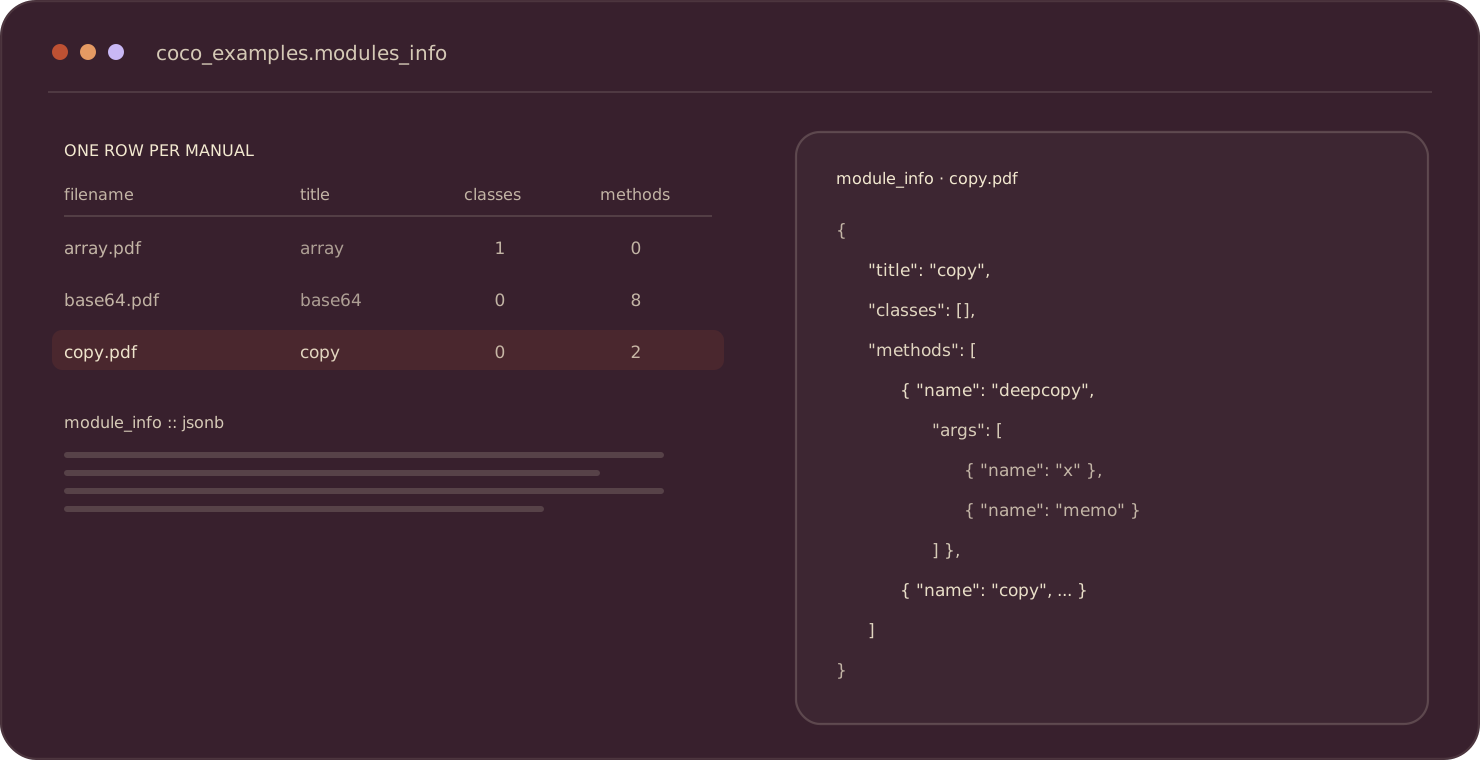
Each manual becomes one row in coco_examples.modules_info:
SELECT filename, title, num_classes, num_methods FROM coco_examples.modules_info;

-- pull the full nested structure for one module
SELECT module_info::jsonb -> 'classes' -> 0 -> 'methods'
FROM coco_examples.modules_info WHERE filename = 'copy.pdf';
Incremental updates in action
The payoff shows up after the first build. Edit a manual, drop in a new one, or delete one, and CocoIndex reconciles the table:
- A changed PDF is re-parsed and re-extracted, and its row is updated in place.
- A new PDF gets its own row.
- A removed PDF’s row is dropped.
Because both the docling parse and the LLM extraction are memoized by content, nothing else in the folder is touched. Re-run cocoindex update main anytime, or leave -L running and let it watch.
Swap the model, keep the pipeline
Because the model is a single context value, going from local to hosted (or between local models) is one env var:
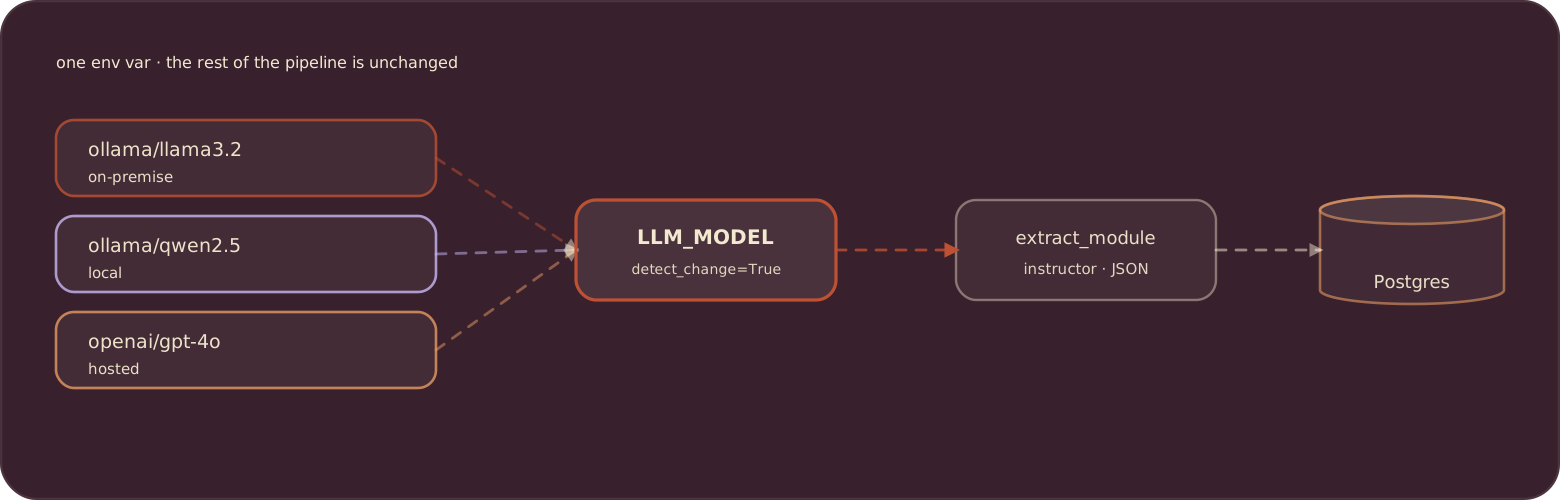
LLM_MODEL=ollama/llama3.2          # fully on-premise
LLM_MODEL=ollama/qwen2.5           # a different local model
LLM_MODEL=openai/gpt-4o            # hosted, when privacy isn't a constraint
Since LLM_MODEL is declared with detect_change=True, switching re-extracts everything against the new model automatically.
Community
We would love to hear from you. Find us on GitHub and Discord.
If this turned your manuals into structured rows, please star CocoIndex on GitHub to support us.


About the author.

Posts from the CocoIndex team — product launches, release notes, and announcements.
Frequently asked questions.
How do I extract structured data from PDFs using a local LLM?
Run an LLM locally with Ollama and use CocoIndex's ExtractByLlm function to populate a typed output class. Because Ollama does not accept PDFs directly, you first convert each PDF to markdown with a custom PdfToMarkdown function, then run the extraction on the markdown. Everything runs on your own machine or server, so no data is sent to external APIs.
How do I run structured extraction with Ollama instead of OpenAI?
Point the LlmSpec at Ollama by setting api_type=cocoindex.LlmApiType.OLLAMA and a model you have pulled (for example llama3.2), then pass your output dataclass as output_type. CocoIndex provides built-in support for Ollama, and OpenAI is also supported through the same interface.
How do I define the output schema for LLM extraction in CocoIndex?
Define the shape you want as plain Python @dataclasses.dataclass classes — the example uses nested ArgInfo, MethodInfo, ClassInfo, and a top-level ModuleInfo — and hand the class to ExtractByLlm as output_type. The LLM extracts and populates that structure for you.
How do I convert a PDF to markdown before LLM extraction?
Plug in a custom function. Define a PdfToMarkdown function spec and an executor class decorated with @cocoindex.op.executor_class(gpu=True, cache=True, behavior_version=1). The executor writes the PDF bytes to a temporary file and uses PdfConverter to extract text. A spec-plus-executor is used (rather than a standalone function) because the parser needs heavy one-time preparation before processing data.
How do I query the structured data CocoIndex extracted?
Run cocoindex update -L main to build the index, which writes to a Postgres table (named modules_info in the example). Then open a Postgres shell with psql and query it with SQL, for example selecting module_info->'title' from modules_info.
How do I add a computed summary to extracted data in CocoIndex?
Write a custom function decorated with @cocoindex.op.function() that takes the extracted object and returns a new dataclass — the example's summarize_module returns a ModuleSummary with num_classes and num_methods. Plug it into the flow with doc["module_summary"] = doc["module_info"].transform(summarize_module) and collect it as part of the index.
What do I need installed to run on-premise extraction with CocoIndex and Ollama?
You need Postgres (CocoIndex stores the index there) and Ollama with at least one model pulled via ollama pull (for example ollama pull llama3.2). The full example is about 100 lines of Python.
See Prerequisites.
