Manuals, datasheets, and reference docs are full of structure — classes, functions, parameters, defaults — laid out for humans, not machines. In this tutorial we’ll build a CocoIndex pipeline that pulls that structure out: convert each PDF manual to Markdown with docling, LLM-extract a typed summary of the module it documents, and store the result in Postgres. The sample manuals are the reference docs for a few Python standard-library modules.
The whole pipeline is ordinary async Python and your own types. The heavy PDF parse runs on a GPU runner, and the Rust engine handles incremental processing — edit one manual and only that one is re-parsed and re-extracted.
Flow overview
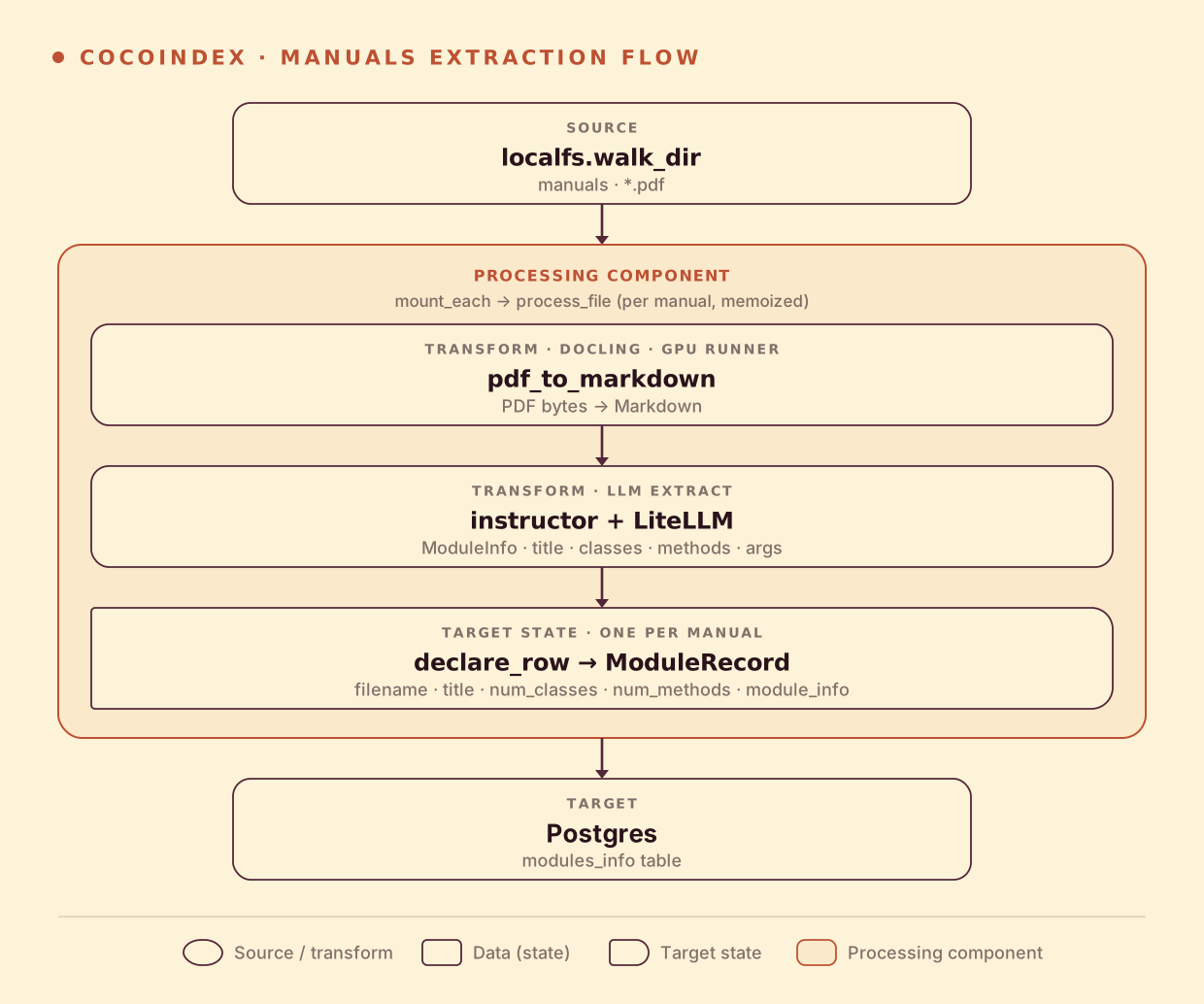
Per manual, two transforms and a row:
- Convert the PDF to Markdown with docling.
- LLM-extract a
ModuleInfo— title, description, classes (with their methods), and module-level functions (with their arguments). - Store a row in Postgres with the summary counts and the full structured info as JSON.
The extraction schema is the prompt
The output type is nested Pydantic, and the structure itself tells the model what to pull out — a module has classes, a class has methods, a method has arguments:
class MethodInfo(pydantic.BaseModel):
    name: str
    args: list[ArgInfo] = pydantic.Field(default_factory=list)
    description: str = ""


class ClassInfo(pydantic.BaseModel):
    name: str
    description: str = ""
    methods: list[MethodInfo] = pydantic.Field(default_factory=list)


class ModuleInfo(pydantic.BaseModel):
    title: str
    description: str
    classes: list[ClassInfo] = pydantic.Field(default_factory=list)
    methods: list[MethodInfo] = pydantic.Field(default_factory=list)
Extraction is instructor over LiteLLM, so LLM_MODEL swaps any provider (OpenAI, Gemini, a local Ollama model). @coco.fn(memo=True) caches both the PDF parse and the extraction by content.
Convert, extract, and store
process_file runs once per manual — docling to Markdown, LLM to ModuleInfo, then declare one Postgres row with the summary counts plus the full structure as JSON:
@coco.fn(memo=True)
async def process_file(file: FileLike, table: postgres.TableTarget[ModuleRecord]) -> None:
    markdown = await pdf_to_markdown(await file.read())
    info = await extract_module(markdown)
    table.declare_row(
        row=ModuleRecord(
            filename=file.file_path.path.name,
            title=info.title,
            description=info.description,
            num_classes=len(info.classes),
            num_methods=len(info.methods),
            module_info=json.dumps(info.model_dump()),
        )
    )
docling vs. marker. The original v0 example used
marker-pdffor the PDF→Markdown step; this v1 port uses docling — the parser the other CocoIndex PDF examples use — but the shape is identical: bytes in, Markdown out, on a GPU runner.
Run the pipeline
docker compose -f dev/postgres.yaml up -d
export POSTGRES_URL="postgres://cocoindex:cocoindex@localhost/cocoindex"
cp .env.example .env   # set OPENAI_API_KEY (or LLM_MODEL=gemini/gemini-2.0-flash, ollama/llama3.2, …)
pip install -e .
cocoindex update main
The example ships a manuals/ folder of Python module reference PDFs. Running it produces one row per manual — and the extraction is faithful to each module’s shape:
| manual | title | classes | functions |
|---|---|---|---|
array.pdf | array — efficient arrays of numeric values | 1 (array) | 0 |
base64.pdf | base64 — Base16/32/64/85 data encodings | 0 | 22 |
copy.pdf | copy — shallow and deep copy operations | 1 | 3 |
base64 is correctly recognized as function-based (22 module functions, no classes), while array is a single class — exactly the distinction you’d want from the structured output.
Explore the results
SELECT filename, title, num_classes, num_methods FROM coco_examples.modules_info;

-- pull the full nested structure for one module
SELECT module_info::jsonb -> 'classes' -> 0 -> 'methods'
FROM coco_examples.modules_info WHERE filename = 'copy.pdf';
Incremental updates
- Add a manual — only it is parsed and extracted; one new row.
- Edit a manual — re-parsed and re-extracted; the row is updated in place.
- Delete a manual — its row is removed.
- Swap the LLM —
LLM_MODELhasdetect_change=True, so everything re-extracts against the new model with no cache to clear.
Run it
The full, runnable example is in the CocoIndex repo: examples/manuals_llm_extraction. For extracting metadata from research papers instead, see Index Academic Papers; for extraction into typed JSON files, see the patient-intake examples.
Got a pile of manuals or datasheets to structure? Come tell us on Discord — and if this was useful, star CocoIndex on GitHub.