This is the Semantic Search 101 example with one thing swapped: instead of Postgres + pgvector, the vectors land in a Qdrant collection. Everything else — walk Markdown, chunk, embed locally with all-MiniLM-L6-v2 — is identical, so this post stays short and spends its words on the connector, the collection setup, and how to run it.
If you want the full chunk-and-embed walkthrough, read the base example first; the only difference here is the target.
Flow overview
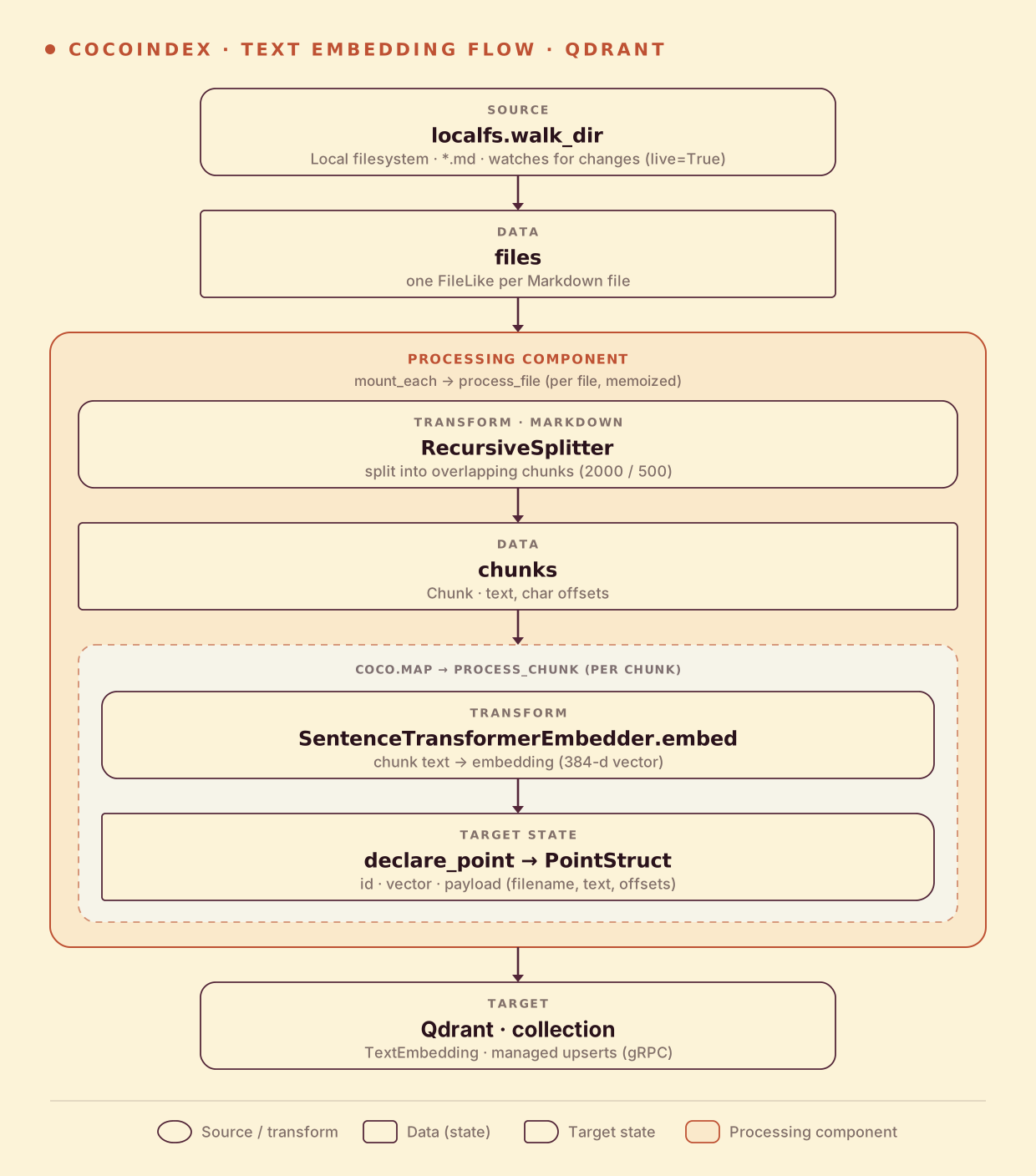
From a high level, these are the steps:
- Read Markdown files from a local directory.
- Split each file into overlapping chunks, then embed every chunk.
- Upsert each chunk’s embedding (with its text and metadata) as a point in a Qdrant collection (as target states).
You declare the transformation logic with native Python, without worrying about how updates propagate. Think: target_state = transformation(source_state).
Setup
-
A running Qdrant. The local container exposes HTTP on
6333and gRPC on6334:docker run -d -p 6333:6333 -p 6334:6334 qdrant/qdrant -
Install CocoIndex and the dependencies this example uses:
pip install -U "cocoindex[qdrant,sentence_transformers]" qdrant-client numpy python-dotenv -
A few
.mdfiles to index. Grab the sample file from the repo, or drop your own notes into amarkdown_files/directory.
Connect to Qdrant
The Qdrant client is a shared resource: provide it once in the lifespan and every step reuses it. We connect over gRPC (prefer_grpc=True) for fast point upserts, and provide the same embedder the base example uses.
QDRANT_URL = "http://localhost:6334"
QDRANT_COLLECTION = "TextEmbedding"
EMBED_MODEL = "sentence-transformers/all-MiniLM-L6-v2"

QDRANT_DB = coco.ContextKey[QdrantClient]("text_embedding_qdrant")
EMBEDDER = coco.ContextKey[SentenceTransformerEmbedder]("embedder", detect_change=True)


@coco.lifespan
async def coco_lifespan(builder: coco.EnvironmentBuilder) -> AsyncIterator[None]:
    client = qdrant.create_client(QDRANT_URL, prefer_grpc=True)
    builder.provide(QDRANT_DB, client)
    builder.provide(EMBEDDER, SentenceTransformerEmbedder(EMBED_MODEL))
    yield
Mount the collection
app_main wires the source to the target. The one Qdrant-specific call is mount_collection_target: it creates and manages the collection, deriving the vector dimensions straight from the embedder via QdrantVectorDef(schema=EMBEDDER) — no hardcoded 384. The rest is the same walk_dir → mount_each shape as the base example.
@coco.fn
async def app_main(sourcedir: pathlib.Path) -> None:
    target_collection = await qdrant.mount_collection_target(
        QDRANT_DB,
        collection_name=QDRANT_COLLECTION,
        schema=await qdrant.CollectionSchema.create(
            vectors=qdrant.QdrantVectorDef(schema=EMBEDDER)
        ),
    )
    files = localfs.walk_dir(
        sourcedir,
        recursive=True,
        path_matcher=PatternFilePathMatcher(included_patterns=["**/*.md"]),
        live=True,  # watch for changes; pass -L to `cocoindex update` to run live
    )
    await coco.mount_each(process_file, files.items(), target_collection)
mount_collection_target handles collection creation, idempotent point upserts, and orphan cleanup when a file disappears — the same managed-target guarantees pgvector gets in the base example.
Declare a point
process_file chunks the text and maps each chunk to process_chunk (identical to the base walkthrough). The only difference is the target state: instead of a typed table row, each chunk becomes a Qdrant PointStruct. The chunk text and offsets go in the payload, the embedding is the vector, and id_gen derives a stable point id from the chunk text so re-runs upsert in place.
@coco.fn
async def process_chunk(
    chunk: Chunk,
    filename: pathlib.PurePath,
    id_gen: IdGenerator,
    target: qdrant.CollectionTarget,
) -> None:
    embedding_vec = await coco.use_context(EMBEDDER).embed(chunk.text)

    point = qdrant.PointStruct(
        id=await id_gen.next_id(chunk.text),
        vector=embedding_vec.tolist(),
        payload={
            "filename": str(filename),
            "chunk_start": chunk.start.char_offset,
            "chunk_end": chunk.end.char_offset,
            "text": chunk.text,
        },
    )
    target.declare_point(point)
target.declare_point declares the point as a target state; CocoIndex inserts, updates, or deletes it to match — you never write upsert calls yourself.
Run the pipeline
Run the cocoindex CLI to build and update the index. Choose catch-up (scan, sync, exit) or live (catch up, then keep watching):
# Catch-up run
cocoindex update main

# Live run: keep watching for file changes
cocoindex update -L main
Then run a search from the command line — it embeds your query with the same model and asks Qdrant for the nearest points:
python main.py "what is self-attention?"You can also browse the collection in the Qdrant dashboard at http://localhost:6333/dashboard.
Incremental updates
CocoIndex keeps the Qdrant collection in sync and does the minimum work to get there — exactly as in the base example, just against Qdrant. @coco.fn(memo=True) on process_file decides what to recompute (a file is skipped when its content and code are unchanged), and each point’s id is derived from its chunk’s text, so mount_collection_target upserts only the points that changed and deletes points whose source is gone. Add a file and only it is embedded; edit one and unchanged chunks keep their id while new chunks are upserted and vanished chunks deleted; delete a file and its points are removed automatically. Swap the embedding model and detect_change=True re-embeds everything. A catch-up run applies the difference once and exits; live mode keeps watching.
Run it
The full, runnable example is in the CocoIndex repo: examples/text_embedding_qdrant. It’s the Semantic Search 101 flow with Qdrant as the store — start there if you want the chunk-and-embed details, and see the Postgres version to compare targets.
Already running Qdrant and want your docs searchable by meaning? Come tell us on Discord — and if this was useful, star CocoIndex on GitHub.