We’ll take a live Kafka topic of JSON messages and fan them into LanceDB tables — each message parsed, inspected, and routed to the table that matches its shape. A message with a sku field becomes a row in products; one with an emp_id field becomes a row in employees. This is the consumer side of csv-to-kafka: the same declarative flow that produced the topic now consumes it.
The whole pipeline is ordinary async Python. Kafka is just a source you treat as a keyed map, and each LanceDB table is a target you declare rows on. CocoIndex’s Rust engine does the incremental processing underneath: it consumes one message per processing component, writes the row, and only then commits the Kafka offset — so a crash mid-flight replays from the last durably-written message, with no consumer loop and no offset bookkeeping in your code.
Flow overview
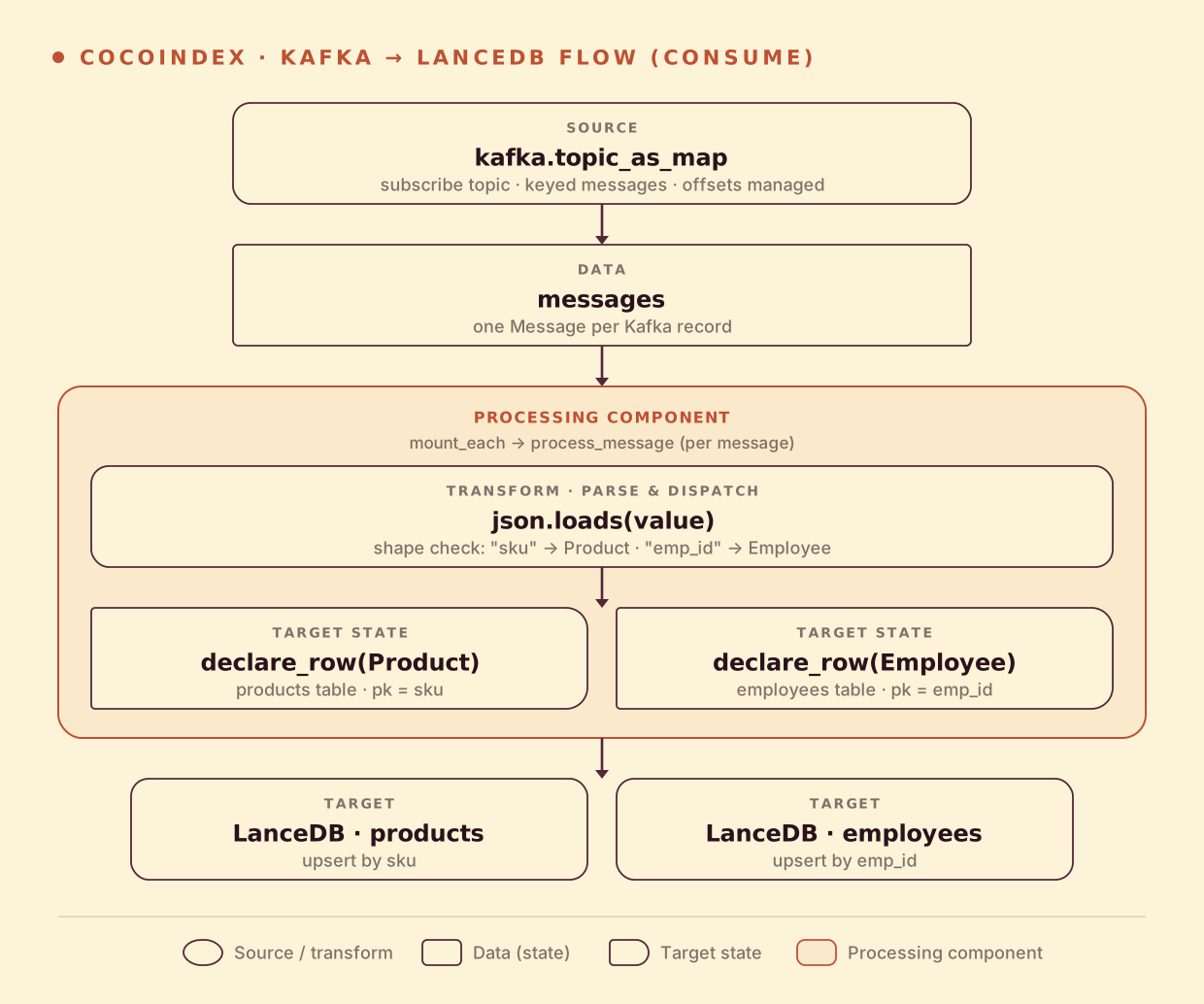
From a high level, these are the steps:
- Subscribe to a Kafka topic as a live keyed map — each message is an item keyed by its Kafka message key.
- For each message, decode the value and
json.loadsit into a row dict. - Dispatch by shape: a
skufield declares aProductrow on theproductstable; anemp_idfield declares anEmployeerow on theemployeestable.
You declare the transformation logic with native Python, without worrying about how updates propagate. Think: target_state = transformation(source_state).
Why two tables from one topic? A topic is often a firehose of heterogeneous events — orders, users, inventory, whatever a service emits — sharing a transport but not a schema. The consumer’s job is to sort the mail: read each envelope, decide what it is, and put it where it belongs. Branching on a discriminator field (
skuvsemp_idhere, but just as easily anevent_typeor a JSON Schema$id) and declaring a typed row is the same pattern whether the destination is LanceDB, Postgres, or a vector index.
Setup
-
A running Kafka broker with a topic to consume. Any broker the
confluent_kafkaclient can reach works — a locallocalhost:9092, or a managed one like StreamNative with SASL. The easy way to populate it: run csv-to-kafka first. -
Install CocoIndex with the Kafka and LanceDB extras:
pip install -U "cocoindex[kafka,lancedb]" -
A local directory for LanceDB (
./lancedb_databy default). LanceDB is embedded — there’s no server to run; the tables are just files on disk.
Shared resources: the LanceDB connection
The LanceDB connection is opened once at app startup in a lifespan hook and stashed in a ContextKey, so the rest of the pipeline can grab it without threading it through every call:
import cocoindex as coco
from cocoindex.connectors import kafka, lancedb

LANCE_DB = coco.ContextKey[lancedb.LanceAsyncConnection]("kafka_to_lancedb_db")


@coco.lifespan
async def coco_lifespan(builder: coco.EnvironmentBuilder) -> AsyncIterator[None]:
    conn = await lancedb.connect_async(LANCEDB_URI)
    builder.provide(LANCE_DB, conn)
    yield
The ContextKey does double duty later: CocoIndex’s state store identifies each table by which key the connection was anchored to plus the table name — so pointing LANCEDB_URI at a new path is what gives you a fresh database, and reusing the same path reconnects to the existing tables without re-ingesting anything.
Define the row schemas
Each table has a typed row. These are plain dataclasses — CocoIndex maps them to the LanceDB/PyArrow column types for you:
@dataclass
class Product:
    sku: str
    name: str
    category: str
    price: float


@dataclass
class Employee:
    emp_id: str
    first_name: str
    last_name: str
    department: str
    email: str
The dataclass is the schema. When we mount the table below, TableSchema.from_class reads these fields and their types to build the table, with the primary key you nominate. A Product is keyed by sku, an Employee by emp_id — the same primary keys that keyed the Kafka messages on the way in.
Process a message
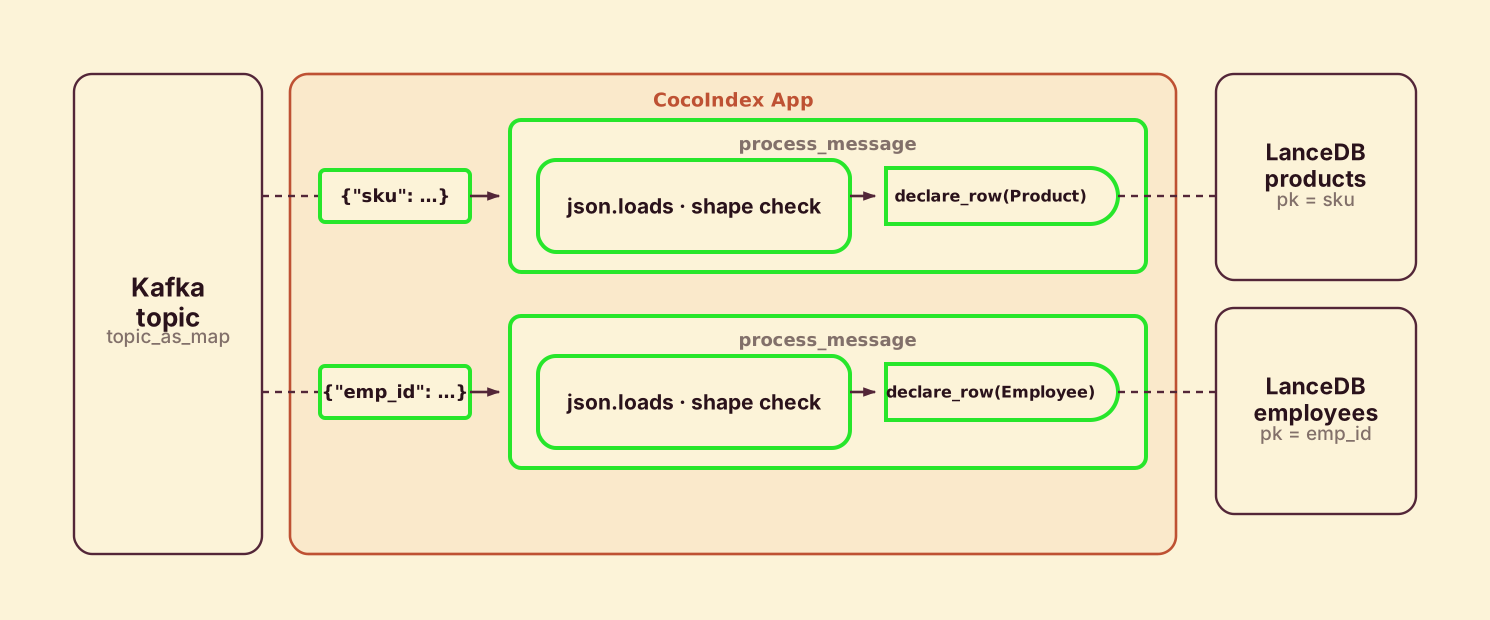
process_message runs once per message. It decodes the value, parses the JSON, and dispatches on shape — declaring a typed row on whichever table matches:
@coco.fn
async def process_message(
    msg: Message,
    products_table: lancedb.TableTarget[Product],
    employees_table: lancedb.TableTarget[Employee],
) -> None:
    value = msg.value()
    if value is None:
        return
    text = value.decode() if isinstance(value, bytes) else value
    row = json.loads(text)

    if "sku" in row:
        products_table.declare_row(
            row=Product(**{**row, "price": float(row["price"])}),
        )
    elif "emp_id" in row:
        employees_table.declare_row(row=Employee(**row))
Each message runs as its own processing component (mounted below), so the engine tracks each one independently. The component owns whichever row it declares; when its offset is committed, that row is durably in LanceDB. The value() may be bytes or str depending on the broker, so we normalize before json.loads. A message that matches neither shape declares nothing — it’s quietly skipped, no row, no error.
Declare rows, not writes
The line worth pausing on is declare_row — deliberately not insert() or upsert().
products_table.declare_row(row=Product(...))CocoIndex is state-driven: like a spreadsheet cell or a SQL materialized view, you describe what the row should be as a function of the source, and the engine figures out the transition. You don’t write separate insert / update / delete code paths. When you call declare_row(row=r):
- the primary key is new, or the row changed → it’s upserted into the table.
- the primary key was declared before but isn’t this time → that row is removed.
- the same row is declared with the same values → nothing is written. No round-trip, no rewrite.
It’s the same declare_* shape as the Postgres target and the Kafka target on the producer side — the storage differs, the API doesn’t, because the semantics are the same. The payoff: process_message is correct on the first message, every subsequent message, and after a crash-restart — there’s no separate “initial load” versus “incremental update” path.
Define the main function
app_main wires the source to the targets. It mounts both LanceDB tables, subscribes the Kafka consumer, and mounts one component per message:
@coco.fn
async def app_main() -> None:
    products_table = await lancedb.mount_table_target(
        LANCE_DB,
        table_name="products",
        table_schema=await lancedb.TableSchema.from_class(Product, primary_key=["sku"]),
    )

    employees_table = await lancedb.mount_table_target(
        LANCE_DB,
        table_name="employees",
        table_schema=await lancedb.TableSchema.from_class(
            Employee, primary_key=["emp_id"]
        ),
    )

    config: dict[str, str] = {
        "bootstrap.servers": KAFKA_BOOTSTRAP_SERVERS,
        "group.id": KAFKA_GROUP_ID,
        "enable.auto.commit": "false",
        "auto.offset.reset": "earliest",
    }

    consumer = AIOConsumer(config)
    items = kafka.topic_as_map(consumer, [KAFKA_TOPIC])
    await coco.mount_each(process_message, items, products_table, employees_table)


app = coco.App(coco.AppConfig(name="KafkaToLanceDB"), app_main)
Three things to notice:
mount_table_target(...)resolves the connection from the context key and creates the table from the dataclass schema —productskeyed bysku,employeeskeyed byemp_id. The handle it returns is what you calldeclare_rowon.enable.auto.commitis off on purpose. CocoIndex commits each offset after the row is durably written, so the consumer group always resumes from the last message it actually persisted — at-least-once delivery without__consumer_offsetsdrifting ahead of your data.auto.offset.reset="earliest"means a fresh group reads the topic from the start.topic_as_maptreats the topic as a live keyed map: each message becomes an item keyed by its Kafka key, and a tombstone (null value) deletes that key’s row.mount_eachruns oneprocess_messagecomponent per message.
That’s the whole pipeline — one file.
Run the pipeline
Copy .env.example to .env, point KAFKA_TOPIC at the topic csv-to-kafka produced (and fill in SASL creds if your broker needs them), then run the cocoindex CLI. Choose catch-up (drain what’s there, then exit) or live (catch up, then keep consuming):
# Catch-up run: consume everything up to now, write the rows, then exit
cocoindex update main.py

# Live run: catch up, then keep consuming new messages as they arrive
cocoindex update -L main.py
Live mode is one flag different from catch-up — -L on the CLI. process_message and the LanceDB tables don’t change: the same reconciliation logic runs either way, the flag only controls whether the app drains the current backlog and exits or keeps consuming. There’s no separate “streaming” code path to maintain.
Looking at the tables
After a run, the tables are just files under ./lancedb_data. Open them with the LanceDB client to confirm the dispatch landed:
import lancedb

db = lancedb.connect("./lancedb_data")

print("=== Products ===")
for row in db.open_table("products").to_arrow().to_pylist():
    print(row)

print("\n=== Employees ===")
for row in db.open_table("employees").to_arrow().to_pylist():
    print(row)
Every sku message is a row in products, every emp_id message a row in employees — keyed exactly as it was on the topic, so re-consuming the same key updates the row in place rather than duplicating it.
Incremental updates
This is where the declarative model pays for itself. You never write upsert logic or track which messages you’ve already handled — CocoIndex consumes each message, writes the row, and commits the offset, in that order. It keeps an internal state store plus the committed Kafka offsets, and both survive restarts, so stopping and restarting resumes cleanly from the last durably-written row.
- A new message — one upsert into the matching table.
- A re-keyed message (same key, changed value) — the existing row is updated in place.
- A tombstone (null value) for a key — that key’s row is removed.
- A message matching neither shape — skipped; no row, no error.
- Crash mid-flight — replays from the last committed offset; rows already written aren’t re-applied wastefully.
A catch-up run (cocoindex update main.py) drains the backlog once and exits; live mode (cocoindex update -L main.py) keeps consuming and applies each new message with sub-second latency.
Run it
The full, runnable example is in the CocoIndex repo: examples/kafka_to_lancedb. It pairs with the producer side — csv-to-kafka turns a folder of CSV files into the very topic this example consumes, so you can run both and watch a row edited on disk land in the right LanceDB table.
Got a topic full of mixed events you want sorted into typed tables? Come tell us on Discord — and if this was useful, star CocoIndex on GitHub.