We’ll take a folder of images and make it searchable in plain English — type “long neck” and get the giraffe back, with no tags, no captions, no manual labeling. The trick is CLIP: it embeds images and text into the same vector space, so a text query and a matching picture land near each other. We store the image vectors in Qdrant and serve search through a small FastAPI + React app.
The whole pipeline is ordinary async Python and your own types. The heavy lifting — incremental processing, change tracking, the managed Qdrant collection — runs in a Rust engine underneath, and the flow runs in live mode inside the API server, so dropping a new photo into the folder updates the index within a second.
Flow overview
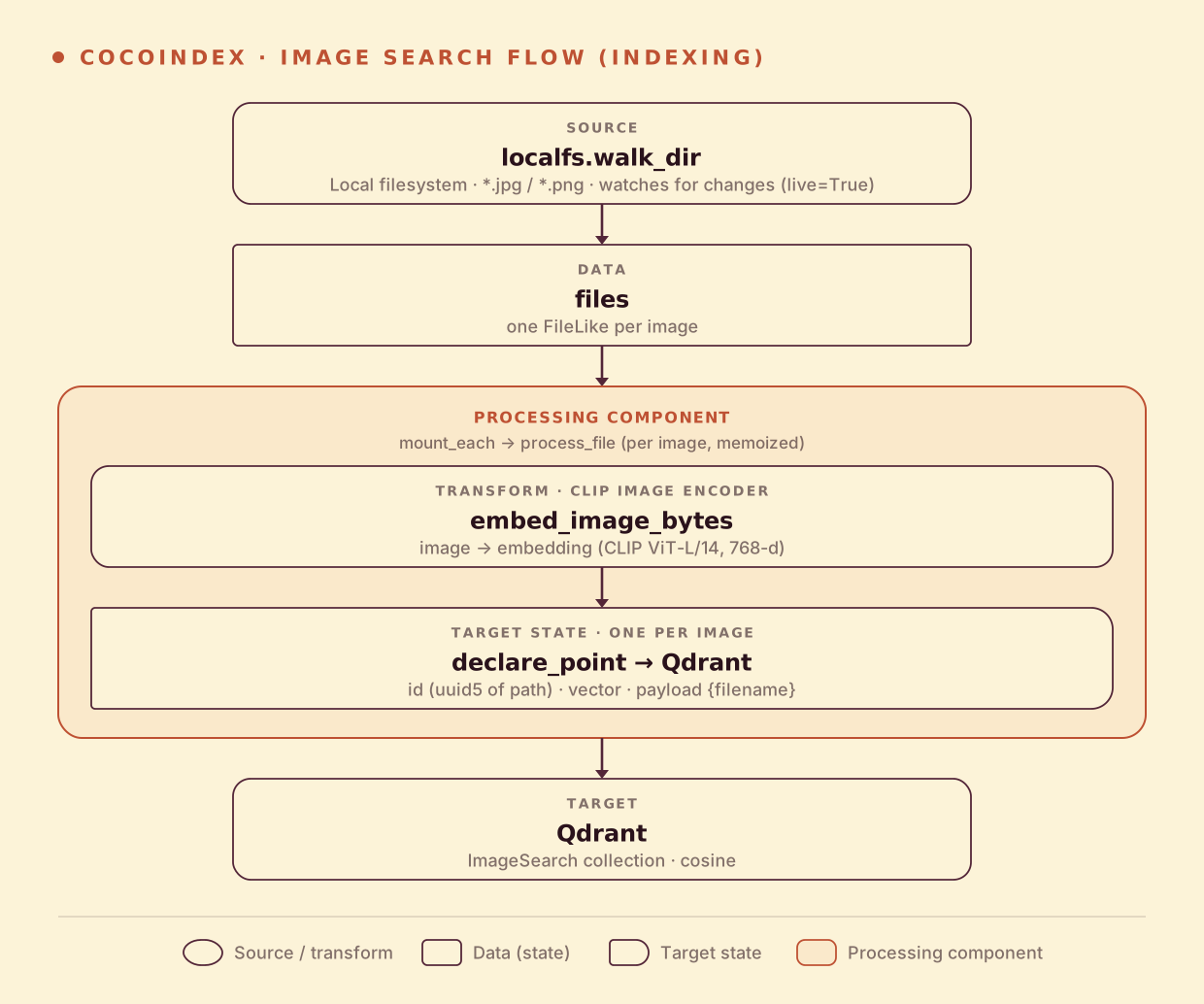
The indexing path is short — there’s no text to chunk, just one embedding per image:
- Read image files from a local directory (live).
- Embed each image with the CLIP image encoder.
- Store the vector in Qdrant (as a point, keyed by a stable id, with the filename in the payload).
You declare the transformation logic with native Python, without worrying about how updates propagate. Think: target_state = transformation(source_state).
One embedding space for images and text
This is the idea the whole example rests on. CLIP was trained to pull an image and its caption together in vector space, so the image of a giraffe and the words “long neck” end up close — even though one is pixels and the other is text. That means indexing and querying use the same model, two different encoders:
@functools.cache
def get_clip_model() -> tuple[CLIPModel, CLIPProcessor]:
    model = CLIPModel.from_pretrained(CLIP_MODEL_NAME)       # openai/clip-vit-large-patch14
    processor = CLIPProcessor.from_pretrained(CLIP_MODEL_NAME)
    return model, processor


def embed_image_bytes(img_bytes: bytes) -> list[float]:     # indexing side
    model, processor = get_clip_model()
    image = Image.open(io.BytesIO(img_bytes)).convert("RGB")
    inputs = processor(images=image, return_tensors="pt")
    with torch.no_grad():
        out = model.get_image_features(**inputs)
    return _projected_features(out)[0].tolist()


def embed_query(text: str) -> list[float]:                  # query side
    model, processor = get_clip_model()
    inputs = processor(text=[text], return_tensors="pt", padding=True)
    with torch.no_grad():
        out = model.get_text_features(**inputs)
    return _projected_features(out)[0].tolist()
Both produce a 768-d vector in the same space, so a cosine search with a text vector finds the nearest image vectors. @functools.cache loads the (large) CLIP model once and reuses it for every image and every query.
Setup
-
A running Qdrant:
docker run -d -p 6333:6333 -p 6334:6334 qdrant/qdrant export QDRANT_URL="http://localhost:6334/" -
Install CocoIndex and the dependencies this example uses:
pip install -U "cocoindex[qdrant]" torch transformers pillow fastapi "uvicorn[standard]" python-dotenv -
A few images. The example ships an
img/folder (a cat, a dog, an elephant, a giraffe) — or drop your own.jpg/.pngfiles in.
Shared resources: the Qdrant client
The lifespan provides the Qdrant client once at startup, via a context key:
QDRANT_DB = coco.ContextKey[QdrantClient]("image_search_qdrant")


@coco.lifespan
async def coco_lifespan(builder: coco.EnvironmentBuilder) -> AsyncIterator[None]:
    client = qdrant.create_client(qdrant_url(), prefer_grpc=True)
    builder.provide(QDRANT_DB, client)
    yield
Process an image
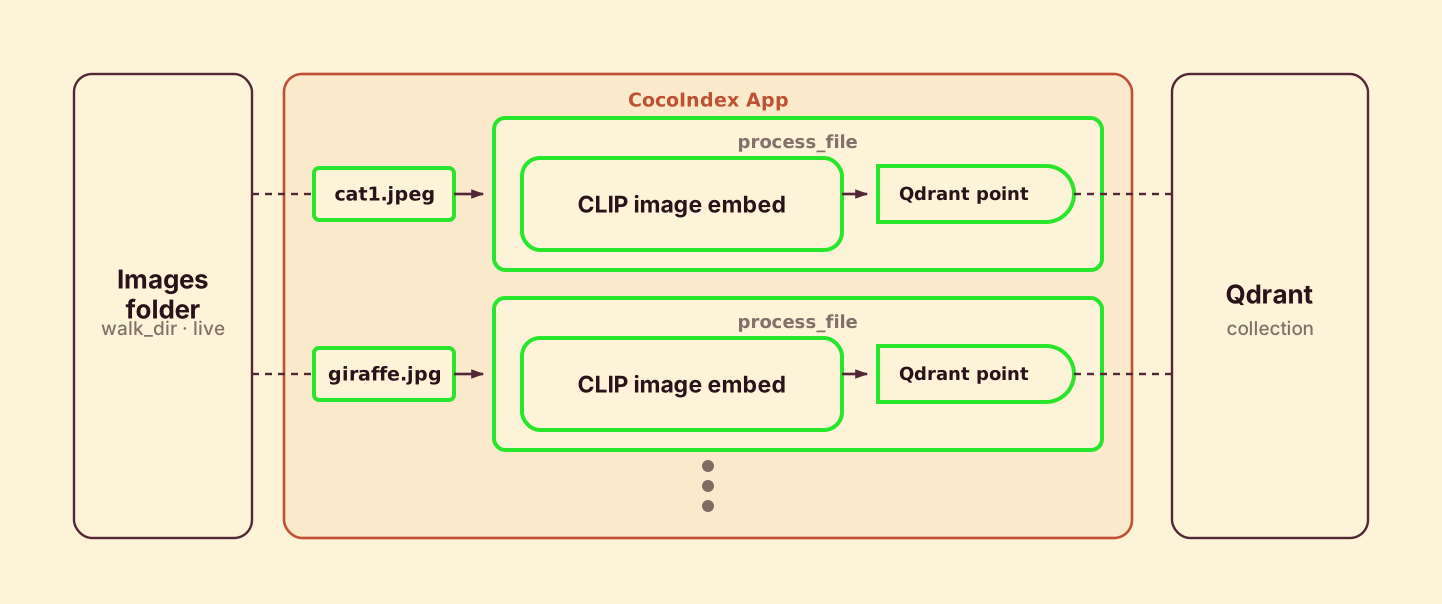
process_file runs once per image: read the bytes, embed with CLIP, and declare a Qdrant point keyed by a stable id derived from the path, with the filename in the payload.
@coco.fn(memo=True)
async def process_file(file: FileLike, target: qdrant.CollectionTarget) -> None:
    content = await file.read()
    embedding = embed_image_bytes(content)
    point = qdrant.PointStruct(
        id=_image_id(file.file_path.path),                  # uuid5 of the path — stable
        vector=embedding,
        payload={"filename": str(file.file_path.path)},
    )
    target.declare_point(point)
@coco.fn(memo=True) makes it incremental: an unchanged image is never re-embedded. Each image runs as its own processing component, so the engine tracks them independently — delete an image and its point is removed from Qdrant automatically. declare_point declares the point as a target state; CocoIndex upserts or deletes to match.
Define the main function
app_main mounts the Qdrant collection — sizing the vector to CLIP’s projection dimension and using cosine distance — then walks the image folder and mounts one component per file:
@coco.fn
async def app_main(sourcedir: pathlib.Path) -> None:
    model, _ = get_clip_model()
    dim = model.config.projection_dim   # 768 for ViT-L/14

    target_collection = await qdrant.mount_collection_target(
        QDRANT_DB,
        collection_name=QDRANT_COLLECTION,   # "ImageSearch"
        schema=await qdrant.CollectionSchema.create(
            vectors=qdrant.QdrantVectorDef(
                schema=VectorSchema(dtype=np.dtype(np.float32), size=dim),
                distance="cosine",
            )
        ),
    )

    files = localfs.walk_dir(
        sourcedir,
        recursive=True,
        path_matcher=PatternFilePathMatcher(
            included_patterns=["**/*.jpg", "**/*.jpeg", "**/*.png"]
        ),
        live=True,   # api.py runs the app with live=True
    )
    await coco.mount_each(process_file, files.items(), target_collection)


app = coco.App(
    coco.AppConfig(name="ImageSearchQdrantV1"),
    app_main,
    sourcedir=pathlib.Path("./img"),
)
mount_collection_target creates and manages the Qdrant collection for you — schema, idempotent upserts, and cleanup when an image disappears. The vector size comes straight from the model, so swapping CLIP variants just works.
Run it as a service
Unlike the batch examples, image search runs as a server. api.py is a FastAPI app whose lifespan starts the CocoIndex flow in live mode in the background — it blocks startup until the initial sweep finishes (so the collection is queryable), then keeps watching img/ while it serves requests. There’s no separate “build the index” step.
@asynccontextmanager
async def lifespan(app: FastAPI) -> AsyncIterator[None]:
    async with coco.runtime():
        _client = qdrant.create_client(pipeline.qdrant_url(), prefer_grpc=True)

        # Start a live update; block until the initial sweep is READY, then run on.
        update_handle = pipeline.app.update(live=True)
        async for snap in update_handle.watch():
            if snap.status is coco.UpdateStatus.READY:
                break
        update_task = asyncio.create_task(update_handle.result())
        try:
            yield
        finally:
            update_task.cancel()


@app.get("/search")
async def search(q: str, limit: int = 5) -> dict:
    query_embedding = pipeline.embed_query(q)               # text → CLIP vector
    results = pipeline._qdrant_search(_client, pipeline.QDRANT_COLLECTION, query_embedding, limit)
    return {"results": [{"filename": (r.payload or {}).get("filename"), "score": r.score} for r in results]}
Start the server, then the frontend:
python -m uvicorn api:app --reload --host 0.0.0.0 --port 8000

cd frontend && npm install && npm run dev   # http://localhost:5173
Search it
The React app posts your query to /search, which embeds the text with CLIP and runs a cosine search in Qdrant. Here it is answering “long neck” — the giraffe ranks first, then the other animals by visual similarity, none of which was ever tagged with a word:
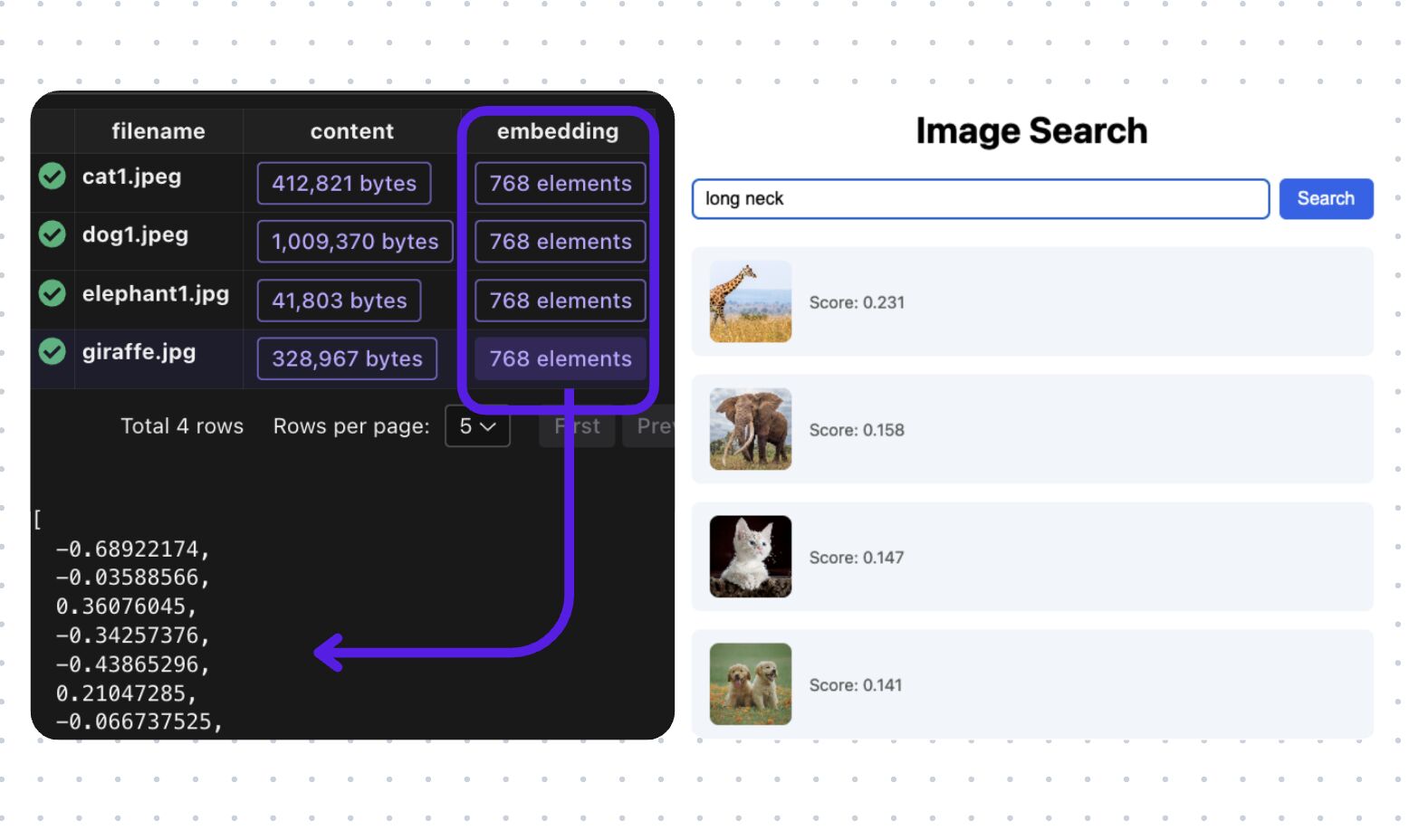
That’s the whole point of a shared image-text space: the match is by meaning, not metadata.
Incremental updates
Because the flow runs live inside the server, the index tracks the folder with no extra work from you:
- Add an image —
process_fileruns once for it, embeds it, and upserts one Qdrant point. It’s searchable within a second. - Replace an image — same id (derived from the path), new vector; the point is updated in place.
- Delete an image — its component disappears and the point is removed from Qdrant.
- Restart the server — the initial sweep reconciles against what’s already in Qdrant and re-embeds nothing that’s unchanged.
Swap the CLIP model and CocoIndex re-embeds everything against the new space; leave it alone and a restart is nearly free.
Run it
The full, runnable example is in the CocoIndex repo: examples/image_search. For higher-fidelity retrieval, image_search_colpali swaps CLIP for the multi-vector ColPali model with Qdrant MaxSim; for the text equivalent, see Semantic Search 101.
Got a photo library, a product catalog, or a screenshot pile you want to search by meaning? Come tell us on Discord — and if this was useful, star CocoIndex on GitHub.