
This is the Semantic Search 101 example with exactly one thing swapped: instead of reading Markdown off your local disk, it reads documents straight from a Google Drive folder. Everything downstream — chunking, embedding, and storing the vectors in Postgres with pgvector — is identical, so this post spends its prose on the one piece that differs: the Drive connector.
The chunk-and-embed half is explained in full in the base walkthrough; read that first if you want the line-by-line tour. Here we focus on wiring Google Drive as the source.
Flow overview
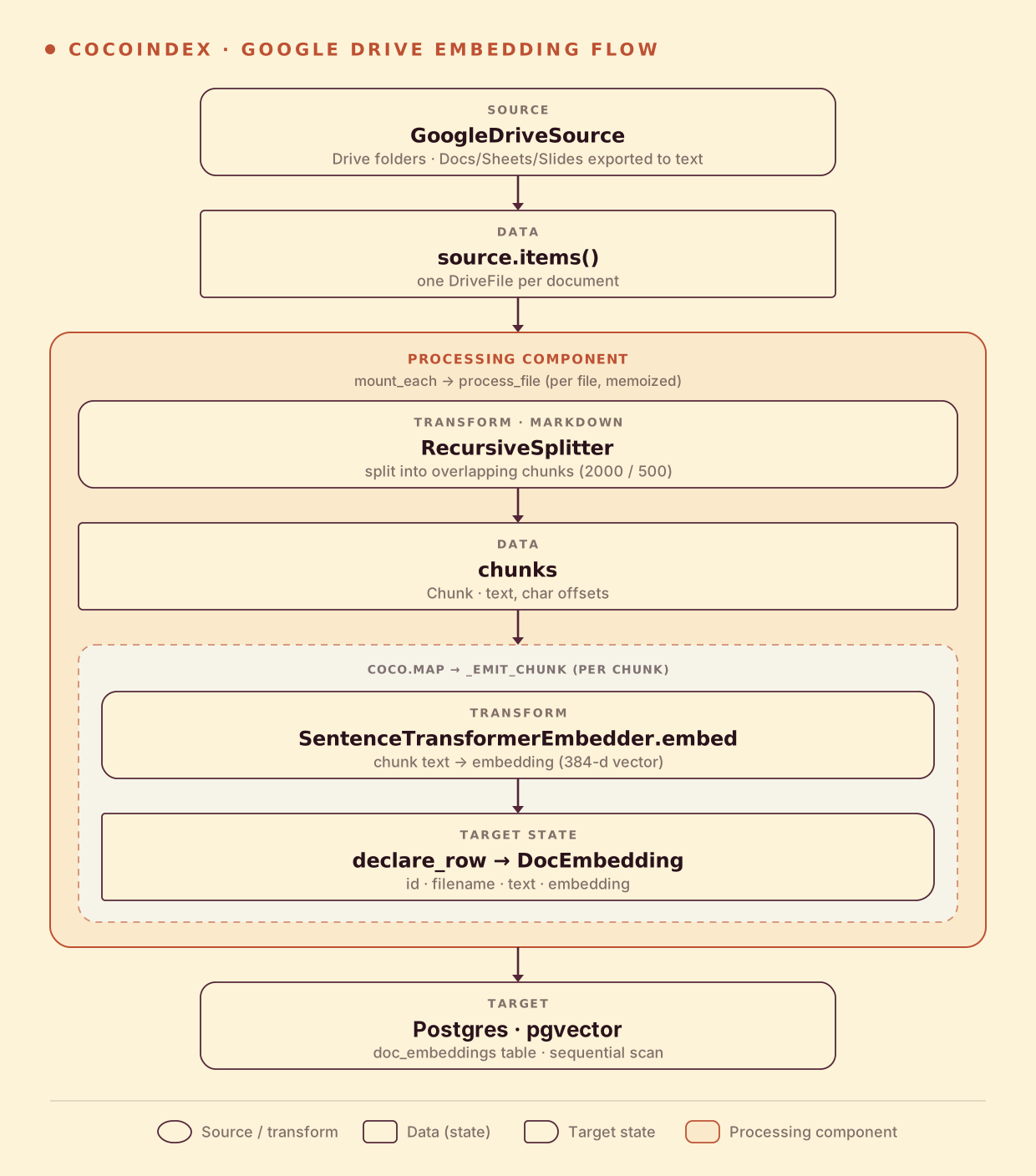
From a high level, these are the steps:
- List documents under one or more Google Drive folders (recursively), exporting Docs/Sheets/Slides to text.
- Split each file into overlapping chunks, then embed every chunk.
- Store the chunks and their embeddings in Postgres (as target states).
You declare the transformation logic with native Python, without worrying about how updates propagate. Think: target_state = transformation(source_state).
Connect to Google Drive
The Drive source needs two things: a Google Cloud service-account JSON key with Drive access, and the folder id(s) to index. CocoIndex reads both from environment variables, so nothing is hardcoded.
from cocoindex.connectors import google_drive, postgres

credential_path = os.environ["GOOGLE_SERVICE_ACCOUNT_CREDENTIAL"]
root_folder_ids = [
    folder.strip()
    for folder in os.environ["GOOGLE_DRIVE_ROOT_FOLDER_IDS"].split(",")
    if folder.strip()
]

source = google_drive.GoogleDriveSource(
    service_account_credential_path=credential_path,
    root_folder_ids=root_folder_ids,
)
GoogleDriveSource walks each root folder recursively and yields one DriveFile per document. Native Google Docs, Sheets, and Slides are exported to text (Markdown, CSV, and plain text respectively); any other file is downloaded as-is. That’s the whole connector — from here on, a DriveFile behaves like any other FileLike, so await file.read_text() works just as it does for a local file.
Define the main function
app_main mounts the Postgres table, then fans out one processing component per Drive file with mount_each. The processing component is the same process_file from the base example — read the file, chunk it, embed each chunk, and declare_row a DocEmbedding per chunk.
@coco.fn
async def app_main() -> None:
    table = await postgres.mount_table_target(
        PG_DB,
        table_name=TABLE_NAME,
        table_schema=await postgres.TableSchema.from_class(
            DocEmbedding,
            primary_key=["id"],
        ),
        pg_schema_name=PG_SCHEMA_NAME,
    )

    source = google_drive.GoogleDriveSource(
        service_account_credential_path=credential_path,
        root_folder_ids=root_folder_ids,
    )

    await coco.mount_each(process_file, source.items(), table)
source.items() yields (key, file) pairs keyed by the file’s name path, which is exactly the shape mount_each expects — so the engine tracks each Drive file as its own component and updates them independently. mount_table_target creates and manages the Postgres table: schema, idempotent upserts, and orphan cleanup when a file disappears from the folder.
Setup
-
A running Postgres with the pgvector extension:
export POSTGRES_URL="postgres://cocoindex:cocoindex@localhost/cocoindex" -
A Google Cloud service account with Drive access, and the folder id(s) you want to index. Share the folders with the service account’s email, then:
export GOOGLE_SERVICE_ACCOUNT_CREDENTIAL="/path/to/service-account.json" export GOOGLE_DRIVE_ROOT_FOLDER_IDS="folder_id_1,folder_id_2" -
Install CocoIndex with the Google Drive extra and the dependencies this example uses:
pip install -U "cocoindex[postgres,sentence_transformers,google_drive]" asyncpg pgvector numpy python-dotenv
Run the pipeline
The Google Drive source does a one-shot catch-up (live mode isn’t supported), so build the index with a single cocoindex update:
cocoindex update mainThen search straight from the command line, reusing the same embedder from the indexing flow so indexing and querying stay consistent:
python main.py "what is self-attention?"The most semantically similar chunks come back ranked — even when they share none of the words in your query.
Incremental updates
Just like the base example, CocoIndex does the minimum work to keep the index in sync. @coco.fn(memo=True) on process_file skips any Drive file whose content and the function’s code are both unchanged, and mount_table_target derives each row’s id from its chunk text, so only the rows that actually changed are upserted and rows whose source is gone are deleted.
- A document is added to the folder — only that file is chunked and embedded, and its rows are inserted.
- A document is edited — it is re-chunked; unchanged chunks keep their
idand embedding, genuinely new chunks are embedded and inserted, and chunks that no longer exist are deleted. - A document is removed from the folder — its rows are removed from the target automatically.
Because the Drive source is catch-up only, each cocoindex update main rescans the folders and applies exactly the difference.
Run it
The full, runnable example is in the CocoIndex repo: examples/gdrive_text_embedding. If you haven’t yet, read Semantic Search 101 for the line-by-line tour of chunking and embedding.
Found this useful? Star CocoIndex on GitHub and come say hi in our Discord.