Real document sets are a mix — scanned reports, slide exports, screenshots, and PDFs all jumbled together. Parsing each format into clean text is brittle and loses the layout (tables, charts, figures) that often is the answer. In this tutorial we’ll build a CocoIndex pipeline that sidesteps parsing entirely: render every PDF page to an image, embed pages and standalone images alike with the multi-vector ColPali model, and store them in one Qdrant collection. A text query then retrieves the most relevant page, no matter what format it started as.
The whole pipeline is ordinary async Python. The slow per-page model inference runs on a GPU runner, and the Rust engine handles incremental processing — add a document and only its pages get embedded.
Why ColPali (and multi-vector search)
A normal embedding squashes a whole page into one vector — fine for a paragraph, lossy for a dense report page with tables and figures. ColPali instead emits a bag of vectors (one per image patch) and matches a query token-against-patch with MaxSim. The cost is more vectors per page; the payoff is retrieval that holds up on visually dense, text-heavy pages — exactly the documents that defeat plain OCR-and-embed.
Flow overview
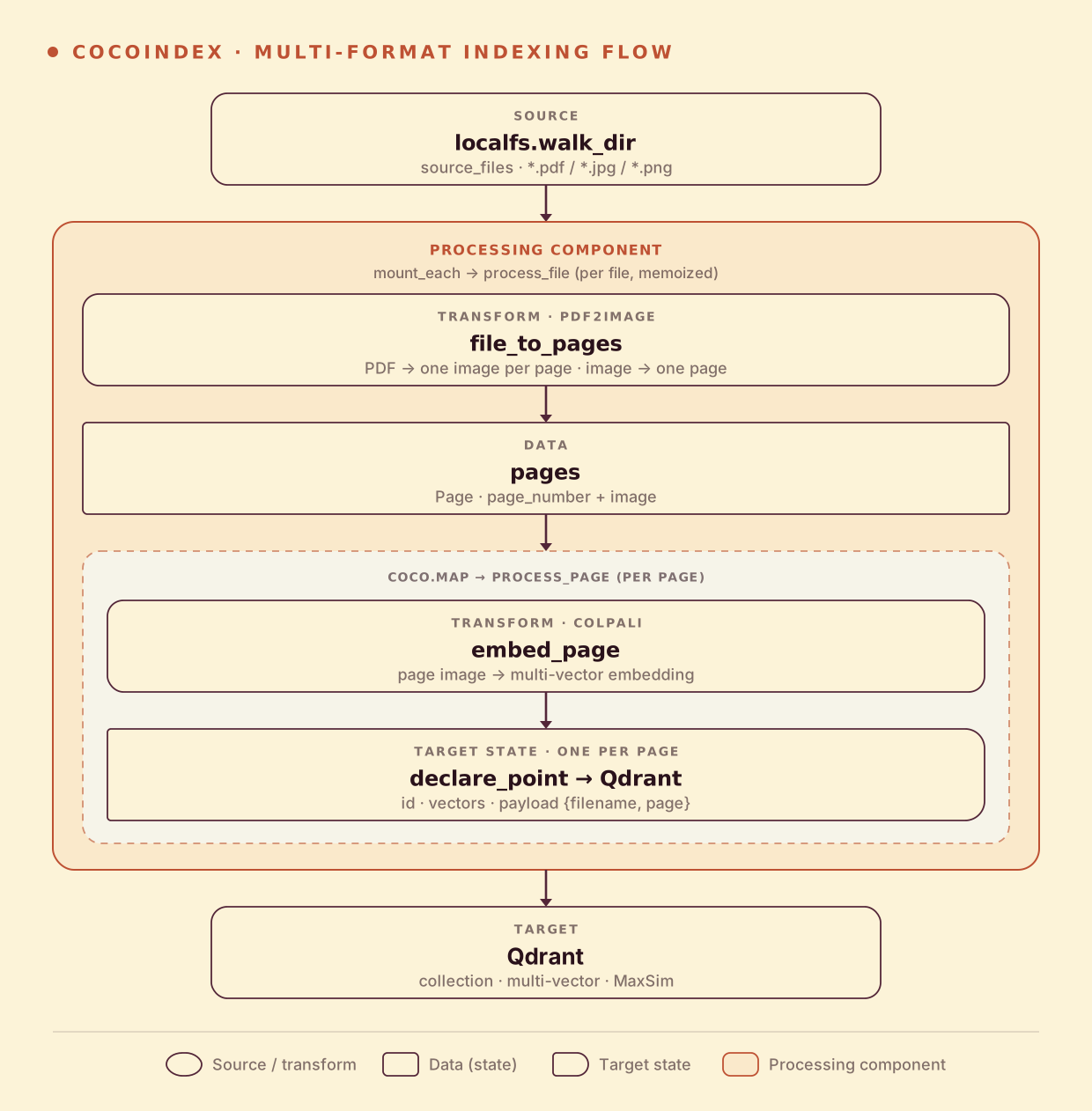
A file fans out to pages, so the shape is file → N pages → N points:
- Walk a folder of PDFs and images (live).
- Render each PDF to one image per page; an image is a single page.
- Embed every page with ColPali and store one multi-vector Qdrant point per page, tagged with filename and page number.
Split any file into pages
One function handles every format: PDFs go through pdf2image, images pass through as a single page, anything else is skipped.
@coco.fn.as_async(runner=coco.GPU)
def file_to_pages(filename: str, content: bytes) -> list[Page]:
    mime_type, _ = mimetypes.guess_type(filename)
    if mime_type == "application/pdf":
        return [
            Page(page_number=i + 1, image=_to_png(image))
            for i, image in enumerate(convert_from_bytes(content, dpi=PDF_RENDER_DPI))
        ]
    if mime_type and mime_type.startswith("image/"):
        return [Page(page_number=None, image=content)]
    return []
Embed pages and fan out
process_file splits a file into pages, then maps each page through process_file’s helper, which embeds it with ColPali and declares one multi-vector Qdrant point:
@coco.fn
async def process_page(page: Page, filename: str, target: qdrant.CollectionTarget) -> None:
    embedding = await embed_page(page.image)          # list[list[float]] — multi-vector
    target.declare_point(
        qdrant.PointStruct(
            id=_page_id(filename, page.page_number),
            vector=embedding,
            payload={"filename": filename, "page": page.page_number},
        )
    )


@coco.fn(memo=True)
async def process_file(file: FileLike, target: qdrant.CollectionTarget) -> None:
    pages = await file_to_pages(str(file.file_path.path), await file.read())
    await coco.map(process_page, pages, str(file.file_path.path), target)
embed_page runs the ColPali model (loaded once via @functools.cache) and returns a list of vectors — the multi-vector representation. coco.map fans out one process_page per page, and @coco.fn(memo=True) skips files that haven’t changed.
The multi-vector Qdrant collection
The collection is declared with a MultiVectorSchema and a MaxSim comparator — that’s what makes Qdrant score a query against the best-matching patch of each page:
target_collection = await qdrant.mount_collection_target(
    QDRANT_DB,
    collection_name=QDRANT_COLLECTION,
    schema=await qdrant.CollectionSchema.create(
        vectors=qdrant.QdrantVectorDef(
            schema=MultiVectorSchema(
                vector_schema=VectorSchema(dtype=np.dtype(np.float32), size=dim)
            ),
            distance="cosine",
            multivector_comparator="max_sim",
        )
    ),
)
Run the pipeline
docker run -d -p 6333:6333 -p 6334:6334 qdrant/qdrant
export QDRANT_URL="http://localhost:6334/"
pip install -e .          # cocoindex[colpali,qdrant], pdf2image, torch, … (needs poppler for PDFs)
cocoindex update main
The example ships a source_files/ folder mixing PDFs (papers) and images (financial report pages). A PDF expands to one point per page — the sample BERT paper alone is 16 pages.
Search across formats
Embed a text query with ColPali and search Qdrant; the same query reaches pages from PDFs and standalone images alike:
python main.py "revenue growth"On the sample set, “revenue growth” ranks the two financial-report images at the top (Sweetgreen, then Restaurant Brands), above an unrelated healthcare page — MaxSim matching the query against the most relevant patches of each page, with zero text extraction.
Incremental updates
- Add a file — only its pages are rendered and embedded; existing points are untouched.
- Edit a file — pages reconcile against what’s in Qdrant; unchanged pages keep their points.
- Delete a file — every page from it is removed.
Run it
The full, runnable example is in the CocoIndex repo: examples/multi_format_indexing. For the image-only version with a web UI, see Search Images by Text · ColPali; for a text-extraction pipeline over PDFs instead, see Semantic Search over PDFs.
Got a pile of mixed-format documents to make searchable? Come tell us on Discord — and if this was useful, star CocoIndex on GitHub.