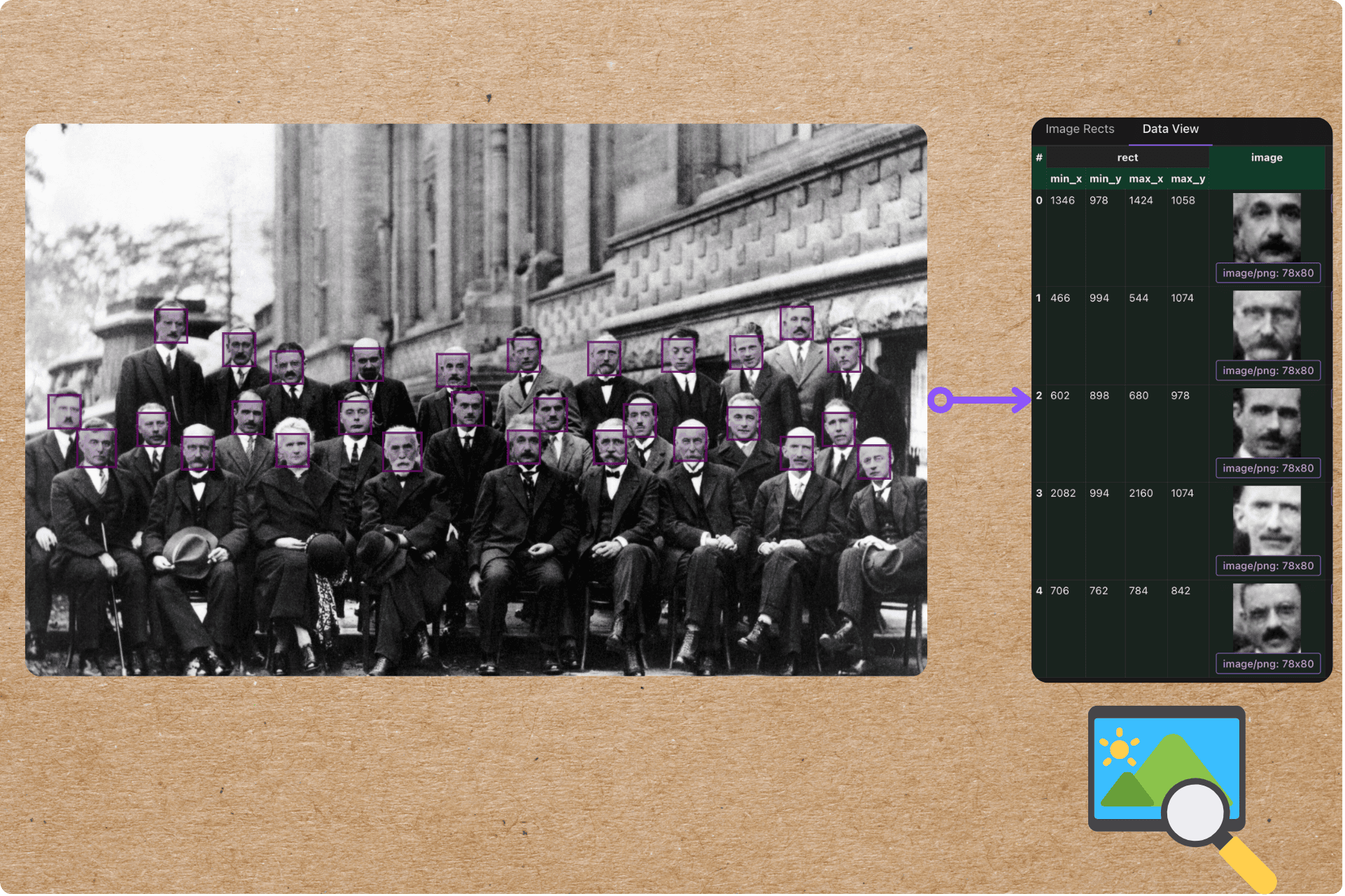
We’ll take a folder of photos and make them searchable by face — the core of “find every photo of this person.” For each image we detect every face, crop it, embed it into a 128-d vector with face_recognition (dlib), and index the faces in Qdrant. Then a query face finds the nearest indexed faces — the same person across different photos lands close together.
The whole pipeline is ordinary async Python and your own types. The heavy lifting — incremental processing, change tracking, the managed Qdrant collection — runs in a Rust engine underneath, so adding a photo only re-detects that photo, and the slow detection/embedding steps run on a GPU runner instead of blocking the event loop.
Flow overview
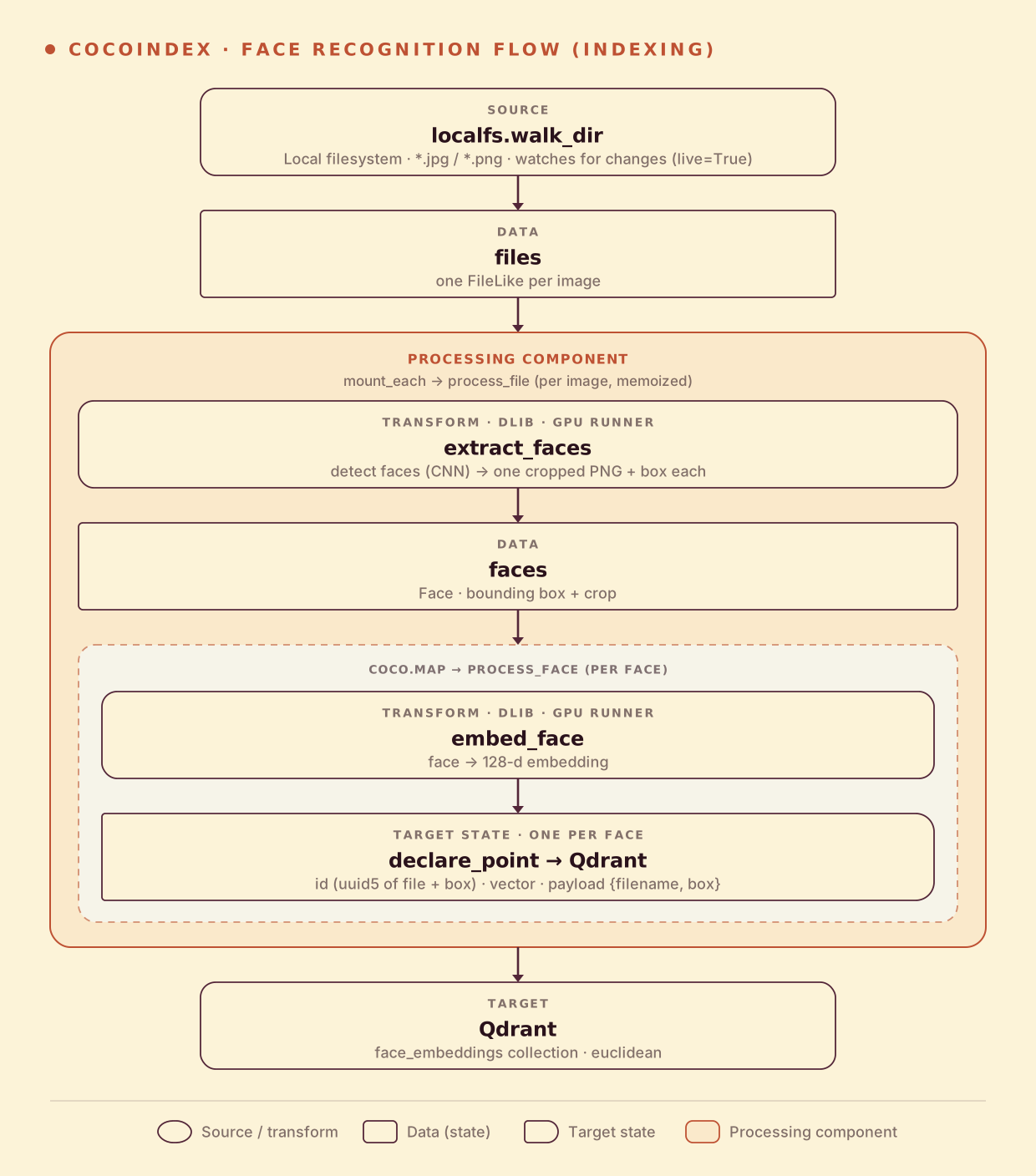
Unlike a one-embedding-per-image index, an image here fans out to many faces — so the shape is image → N faces → N points:
- Read image files from a local directory (live).
- Detect every face in each image and crop it.
- Embed each face into a 128-d vector and store one Qdrant point per face, with the source filename and bounding box.
You declare the transformation logic with native Python; CocoIndex works out what to insert, update, and delete. Think: target_state = transformation(source_state).
Detect and embed faces
Face detection and embedding are synchronous, CPU/GPU-heavy dlib calls, so each is wrapped with @coco.fn.as_async(runner=coco.GPU) to run on a dedicated GPU runner without blocking the async loop. extract_faces returns one Face (bounding box + cropped PNG) per detected face:
@dataclass
class Face:
    rect: ImageRect       # bounding box in the original image
    image: bytes          # the cropped face, as PNG


@coco.fn.as_async(runner=coco.GPU)
def extract_faces(content: bytes) -> list[Face]:
    orig = Image.open(io.BytesIO(content)).convert("RGB")
    # The CNN detector is slow on large images, so downscale, then map boxes back.
    img, ratio = _downscale(orig, MAX_IMAGE_WIDTH)
    faces = []
    for top, right, bottom, left in face_recognition.face_locations(np.array(img), model="cnn"):
        rect = ImageRect(int(left*ratio), int(top*ratio), int(right*ratio), int(bottom*ratio))
        buf = io.BytesIO()
        orig.crop((rect.min_x, rect.min_y, rect.max_x, rect.max_y)).save(buf, format="PNG")
        faces.append(Face(rect=rect, image=buf.getvalue()))
    return faces


@coco.fn.as_async(runner=coco.GPU)
def embed_face(face_png: bytes) -> list[float]:
    img = Image.open(io.BytesIO(face_png)).convert("RGB")
    return face_recognition.face_encodings(
        np.array(img), known_face_locations=[(0, img.width - 1, img.height - 1, 0)]
    )[0].tolist()
face_recognition.face_encodings returns a 128-d vector. Faces of the same person sit close in this space — dlib’s own rule of thumb is that a Euclidean distance under ~0.6 means “same person,” which is why we index with Euclidean distance below.
Process an image → fan out to faces
process_file runs once per image: detect its faces, then map each face through process_face, which embeds it and declares one Qdrant point. The point id is a stable hash of the file path plus the bounding box, so re-running never duplicates and an edited photo reconciles cleanly:
@coco.fn
async def process_face(face: Face, filename: str, target: qdrant.CollectionTarget) -> None:
    embedding = await embed_face(face.image)
    target.declare_point(
        qdrant.PointStruct(
            id=_face_id(filename, face.rect),     # uuid5 of (filename, box) — stable
            vector=embedding,
            payload={"filename": filename, "min_x": face.rect.min_x, "min_y": face.rect.min_y,
                     "max_x": face.rect.max_x, "max_y": face.rect.max_y},
        )
    )


@coco.fn(memo=True)
async def process_file(file: FileLike, target: qdrant.CollectionTarget) -> None:
    faces = await extract_faces(await file.read())
    await coco.map(process_face, faces, str(file.file_path.path), target)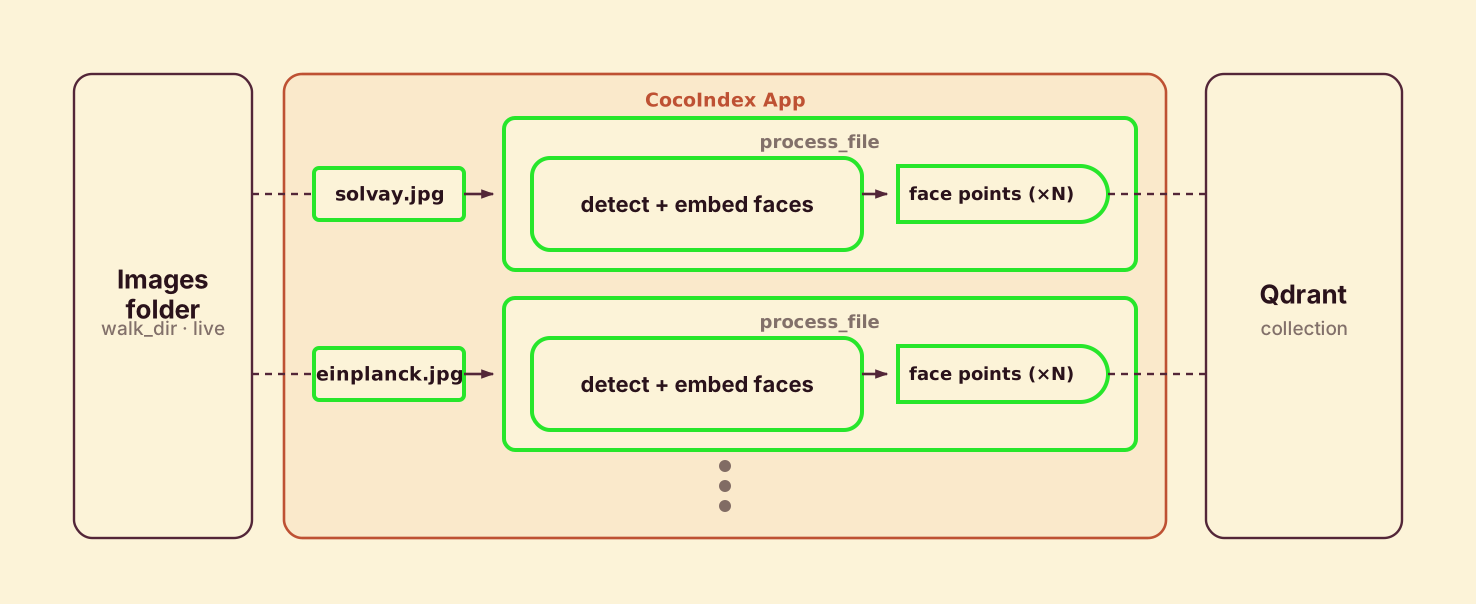
@coco.fn(memo=True) makes it incremental: an unchanged photo is never re-detected. Each image is its own processing component, so deleting a photo removes all its faces from Qdrant automatically. coco.map fans out one process_face per detected face — the multi-face equivalent of chunking a document.
Define the main function
app_main mounts the Qdrant collection sized to the 128-d face vector with Euclidean distance, then walks the image folder and mounts one component per file:
@coco.fn
async def app_main(sourcedir: pathlib.Path) -> None:
    target_collection = await qdrant.mount_collection_target(
        QDRANT_DB,
        collection_name=QDRANT_COLLECTION,   # "face_embeddings"
        schema=await qdrant.CollectionSchema.create(
            vectors=qdrant.QdrantVectorDef(
                schema=VectorSchema(dtype=np.dtype(np.float32), size=128),
                distance="euclid",            # dlib encodings compare by L2 distance
            )
        ),
    )
    files = localfs.walk_dir(
        sourcedir, recursive=True,
        path_matcher=PatternFilePathMatcher(included_patterns=["**/*.jpg", "**/*.jpeg", "**/*.png"]),
        live=True,
    )
    await coco.mount_each(process_file, files.items(), target_collection)


app = coco.App(coco.AppConfig(name="FaceRecognitionV1"), app_main, sourcedir=pathlib.Path("./images"))
Run the pipeline
You’ll need Qdrant and the face_recognition library (it depends on dlib).
docker run -d -p 6333:6333 -p 6334:6334 qdrant/qdrant
export QDRANT_URL="http://localhost:6334/"
pip install -e .   # cocoindex[qdrant], face-recognition, numpy, pillow
The example ships a handful of famous group photos in images/ (the 1927 Solvay physics conference, Steve Jobs & Bill Gates, …). Build the index:
cocoindex update main # or: cocoindex update -L main (keep watching the folder)On the sample set this indexes 36 faces — 29 from the Solvay conference alone — each as a Qdrant point keyed by (filename, bounding box).
Search by face
Embed a query face the same way and search Qdrant for the nearest indexed faces:
def query(image_path: str, *, top_k: int = 5) -> None:
    arr = np.array(Image.open(image_path).convert("RGB"))
    locs = face_recognition.face_locations(arr, model="cnn")
    query_vec = face_recognition.face_encodings(arr, known_face_locations=locs[:1])[0].tolist()
    client = qdrant.create_client(qdrant_url(), prefer_grpc=True)
    for r in _qdrant_search(client, query_vec, top_k):
print(f"[{r.score:.3f}] {(r.payload or {}).get('filename')}")python main.py query images/einplanck3.jpgBecause Einstein appears in both the Einstein–Planck photo and the Solvay conference, the query pulls his Solvay face back as a close match — a Euclidean distance around 0.46, comfortably under dlib’s ~0.6 same-person threshold. That’s face recognition across photos, with no labels or tags: the bounding box in the payload even tells you where in the source image the match is.
Incremental updates
- Add a photo — only that image is detected and embedded; its faces are upserted.
- Replace a photo — faces whose box is unchanged keep their point; new faces are added, vanished faces are deleted.
- Delete a photo — every face from it is removed from Qdrant.
- Re-run with nothing changed — zero detection, zero embedding.
The expensive part (CNN detection + embedding) is fully memoized, so iterating on the downstream schema or query never re-runs the models on unchanged photos.
Run it
The full, runnable example is in the CocoIndex repo: examples/face_recognition. For text-driven image search instead of face matching, see Search Images by Text (CLIP) — same Qdrant target, a different encoder.
Got a photo library you want to make searchable by face? Come tell us on Discord — and if this was useful, star CocoIndex on GitHub.