Use an Amazon S3 bucket as the source for Semantic Search 101. The chunking, embedding, Postgres/pgvector target, and query are the same as in the local-directory example. Configure the S3 connector and environment variables, then run catch-up to process the bucket.
Start with Semantic Search 101 for the chunk-and-embed implementation.
Flow overview
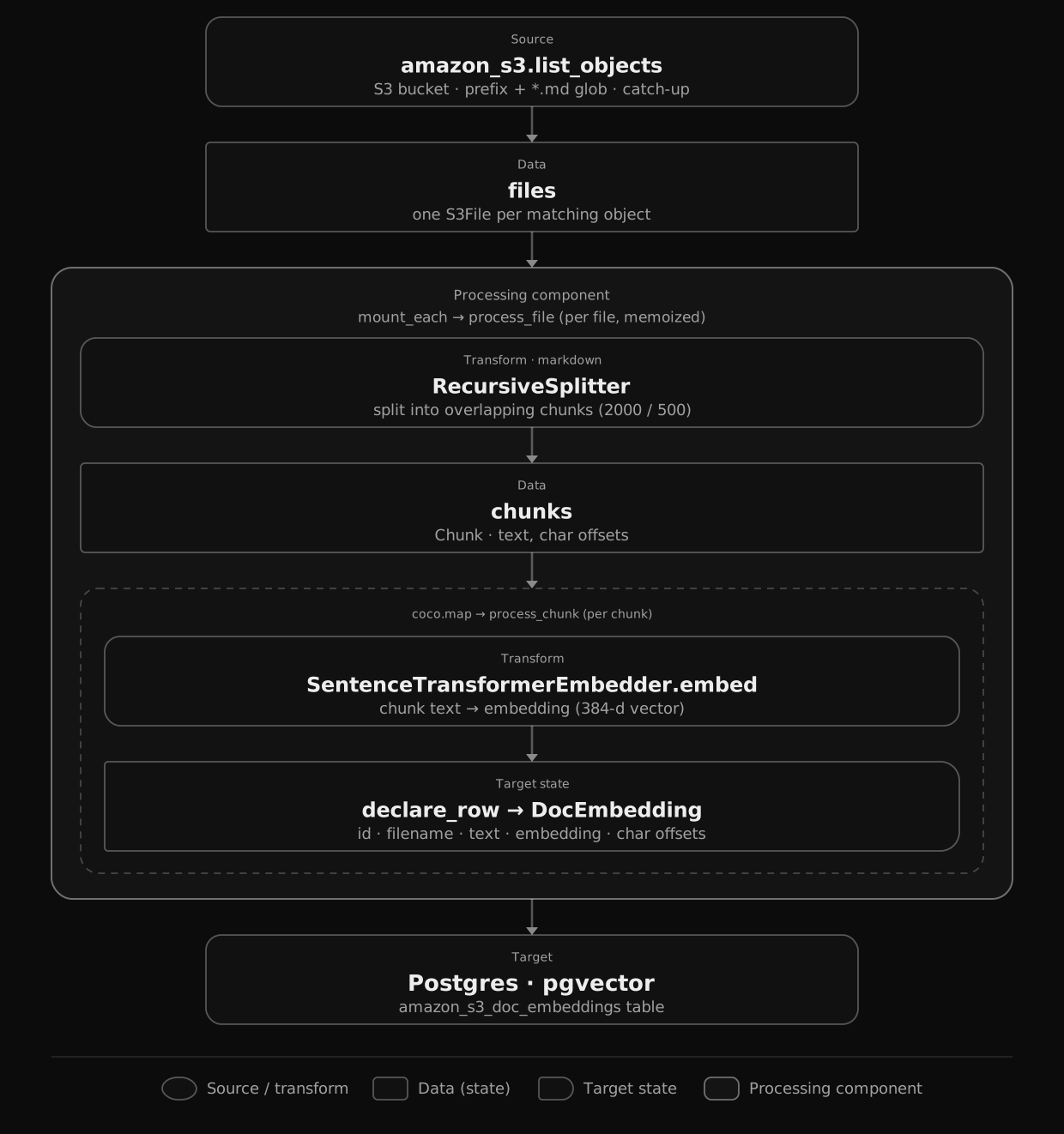 Open diagram at full size
From a high level, these are the steps:
- List Markdown objects from an Amazon S3 bucket (filtered by prefix and glob).
- Split each file into overlapping chunks, then embed every chunk.
- Store the chunks and their embeddings in Postgres (as target states).
You declare the transformation logic with native Python, without worrying about how updates propagate. Think: target_state = transformation(source_state).
The chunk-and-embed half of this pipeline is unchanged from Semantic Search 101 — same RecursiveSplitter, same SentenceTransformerEmbedder with all-MiniLM-L6-v2, same DocEmbedding row written to pgvector. The only new piece is the connector.
Provide an S3 client
The S3 connector needs an aiobotocore client. We open it once in the lifespan alongside the Postgres pool and embedder, and share it through a ContextKey.
DATABASE_URL = os.getenv("POSTGRES_URL", "postgres://cocoindex:cocoindex@localhost/cocoindex")
TABLE_NAME = "amazon_s3_doc_embeddings"
S3_BUCKET = os.environ["S3_BUCKET"]
S3_PREFIX = os.getenv("S3_PREFIX", "")

PG_DB = coco.ContextKey[asyncpg.Pool]("s3_embedding_db")
S3_CLIENT = coco.ContextKey[AioBaseClient]("s3_client")
EMBEDDER = coco.ContextKey[SentenceTransformerEmbedder]("embedder", detect_change=True)


@coco.lifespan
async def coco_lifespan(builder: coco.EnvironmentBuilder) -> AsyncIterator[None]:
    async with asyncpg.create_pool(DATABASE_URL) as pool:
        builder.provide(PG_DB, pool)
        builder.provide(EMBEDDER, SentenceTransformerEmbedder(EMBED_MODEL))

        session = aiobotocore.session.get_session()
        async with session.create_client("s3") as s3_client:
            builder.provide(S3_CLIENT, s3_client)
            yield
create_client("s3") picks up standard AWS credentials — env vars, ~/.aws/credentials, or an IAM role. Set AWS_ENDPOINT_URL to point at an S3-compatible service like MinIO.
List objects from the bucket
app_main mounts the Postgres table exactly as in the base example, then swaps localfs.walk_dir for amazon_s3.list_objects — same path_matcher glob, same mount_each fan-out.
@coco.fn
async def app_main() -> None:
    target_table = await postgres.mount_table_target(
        PG_DB,
        table_name=TABLE_NAME,
        table_schema=await postgres.TableSchema.from_class(
            DocEmbedding, primary_key=["id"],
        ),
        pg_schema_name=PG_SCHEMA_NAME,
    )

    client = coco.use_context(S3_CLIENT)
    files = amazon_s3.list_objects(
        client,
        S3_BUCKET,
        prefix=S3_PREFIX,
        path_matcher=PatternFilePathMatcher(included_patterns=["**/*.md"]),
    )
    await coco.mount_each(process_file, files.items(), target_table)
list_objects yields one S3File per matching object; prefix scopes the listing server-side, and the glob filters the rest. process_file then reads, chunks, and embeds each one — that code is identical to the base example, so see it there.
Setup
-
A running Postgres with the pgvector extension.
export POSTGRES_URL="postgres://cocoindex:cocoindex@localhost/cocoindex" -
An S3 bucket with some
.mdfiles, plus AWS credentials and the bucket name:export S3_BUCKET="my-bucket" export S3_PREFIX="markdown_files/" # optional: scope the listing -
Install CocoIndex with the
amazon_s3extra and the example’s dependencies:pip install -U "cocoindex[amazon_s3,postgres,sentence_transformers]" asyncpg pgvector numpy python-dotenv
Run the pipeline
The amazon_s3 source does not support live mode, so this is a one-shot catch-up run — scan the bucket, sync, exit:
cocoindex update mainThen search straight from the command line, reusing the same embedder so indexing and querying stay consistent:
python main.py "what is self-attention?"The most semantically similar chunks come back ranked — even when they share none of the words in your query.
Incremental updates
CocoIndex keeps the index in sync with the bucket and does the minimum work to get there. @coco.fn(memo=True) decides what to recompute (a file is skipped when its content and the function’s code are both unchanged) and mount_table_target decides what to write, deriving each row’s id from its chunk text so it upserts only the rows that actually changed and deletes rows whose source object is gone.
- An object is added — only that file is chunked and embedded; the rest is untouched.
- An object is edited — it is re-chunked; unchanged chunks keep their
idand embedding, new chunks are embedded and inserted, and stale ones are deleted. - An object is deleted — its rows are removed from the target automatically.
Because S3 is catch-up only, you re-run cocoindex update main to pick up bucket changes; the engine still applies just the difference.
Run it
The full, runnable example is in the CocoIndex repo: examples/amazon_s3_embedding.