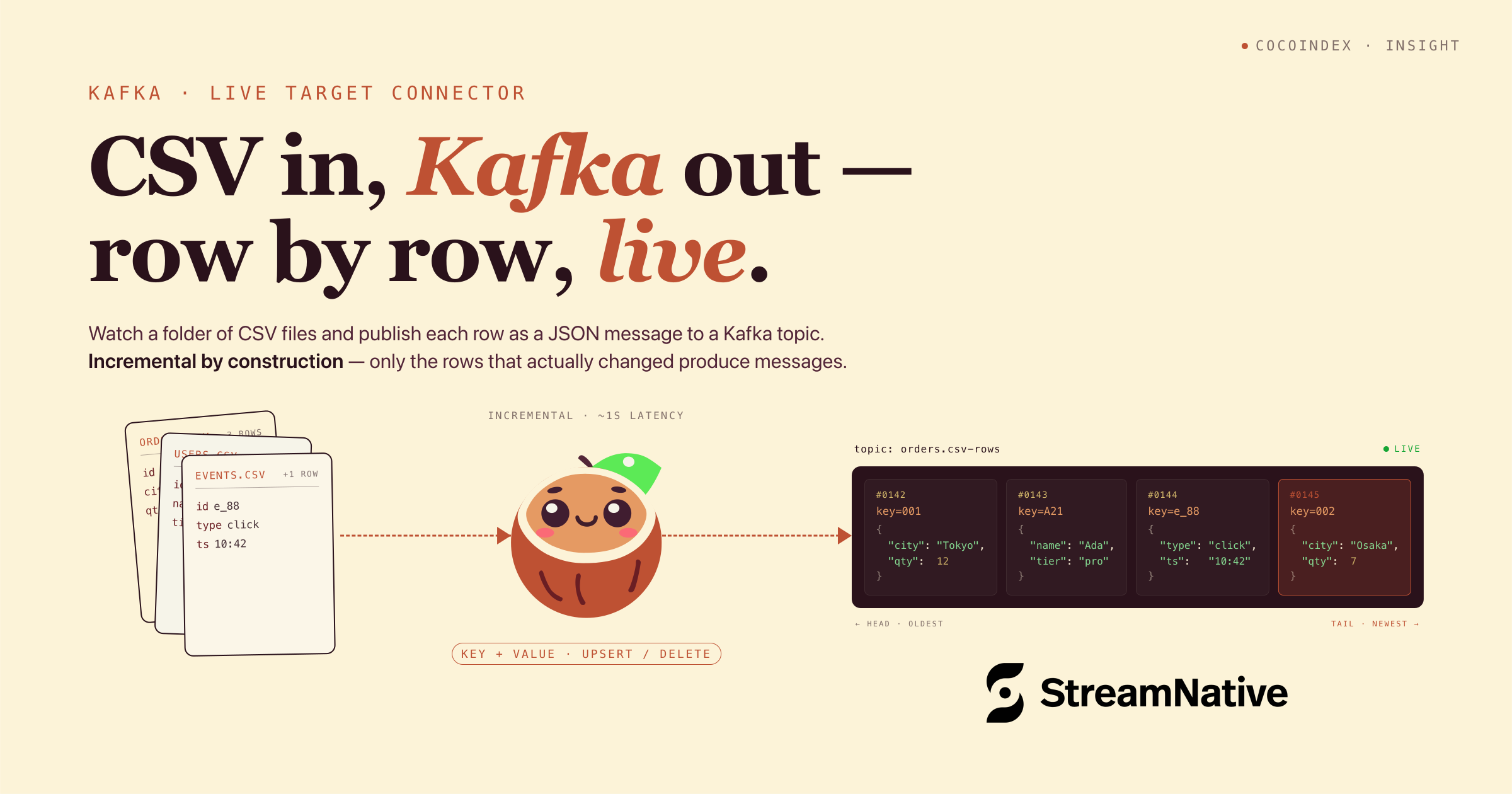
We’ll take a folder of CSV files and turn it into a live Kafka stream — each row published as a JSON message, keyed by its primary key. Edit a cell and, within a second, exactly one message for that one row lands on the topic. Add a row, get one new message. Delete a file, and every row from it is tombstoned.
The whole pipeline is ordinary async Python, and the Kafka topic is just a target you declare — the same way you’d declare a Postgres table or a vector index. CocoIndex’s Rust engine does the incremental processing underneath: it tracks what each row last looked like and produces a message only for rows that actually changed — no producer loop, no dedup bookkeeping, no “did I already send this?” logic.
Flow overview
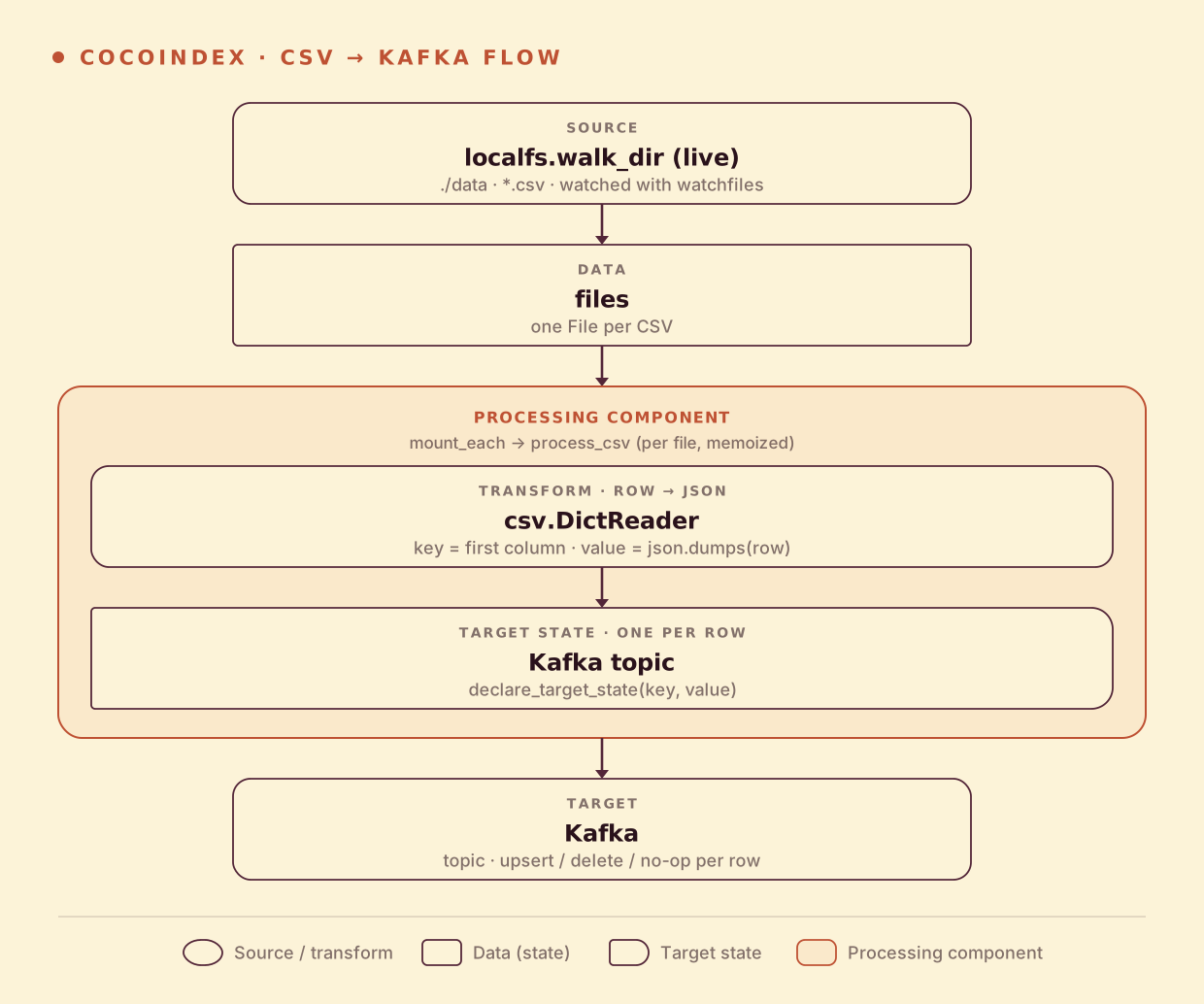
From a high level, these are the steps:
- Watch a local directory of CSV files (live).
- For each file, parse rows with
csv.DictReaderand turn each row into a JSON value keyed by its first column. - Declare each row as a target state on a Kafka topic — CocoIndex produces the upserts and deletes.
You declare the transformation logic with native Python, without worrying about how updates propagate. Think: target_state = transformation(source_state).
Why CSV? It’s the format that shows up everywhere and gets respect nowhere — BI exports, vendor dumps, spreadsheets parked in a shared drive. CSV files look structured but live like unstructured assets: dropped into a folder, edited at random, with no notifications and no schema contract. Turning a directory of them into a clean, row-keyed, diff-only Kafka stream is the same pattern that carries over to PDFs, codebases, and wikis — CSV just keeps the parser out of the way.
Setup
-
A running Kafka broker. Any broker the
confluent_kafkaclient can reach works — a locallocalhost:9092, or a managed one like StreamNative with SASL. If you don’t have one, a single-container Redpanda (Kafka-API compatible) is the quickest local broker:docker run -d --name redpanda -p 9092:9092 redpandadata/redpanda:latest \ redpanda start --mode dev-container --smp 1 \ --kafka-addr PLAINTEXT://0.0.0.0:9092 --advertise-kafka-addr PLAINTEXT://localhost:9092 # CocoIndex never creates topics — create the one it produces into: docker exec redpanda rpk topic create cocoindex-csv-rows -
Install CocoIndex with the Kafka extra:
pip install -U "cocoindex[kafka]" -
A
data/folder with a couple of CSV files. The example ships these:# data/products.csv sku,name,category,price SKU001,Wireless Mouse,Electronics,29.99 SKU002,Mechanical Keyboard,Electronics,89.99 SKU003,USB-C Hub,Accessories,45.00The first column (
sku) is the row’s primary key — it becomes the Kafka message key.
Shared resources: the Kafka producer
The Kafka producer is created once at app startup in a lifespan hook and stashed in a ContextKey, so the rest of the pipeline can grab it without threading it through every call:
import cocoindex as coco
from cocoindex.connectors import kafka, localfs
from confluent_kafka.aio import AIOProducer

KAFKA_PRODUCER = coco.ContextKey[AIOProducer]("kafka_producer")


@coco.lifespan
async def coco_lifespan(builder: coco.EnvironmentBuilder) -> AsyncIterator[None]:
    config: dict[str, str] = {"bootstrap.servers": KAFKA_BOOTSTRAP_SERVERS}
    if KAFKA_SASL_USERNAME:
        config.update({
            "sasl.mechanism": "PLAIN",
            "security.protocol": "SASL_SSL",
            "sasl.username": KAFKA_SASL_USERNAME,
            "sasl.password": KAFKA_SASL_PASSWORD,
        })
    producer = AIOProducer(config)
    builder.provide(KAFKA_PRODUCER, producer)
    yield
The SASL block is what a managed broker (StreamNative or similar) wants. For a local broker you can drop it and just point bootstrap.servers at localhost:9092. The ContextKey also does double duty later: CocoIndex’s state store identifies the topic by which key the producer was anchored to plus the topic name — so rotating the SASL password or swapping the broker endpoint doesn’t make it re-broadcast every row.
Process a file
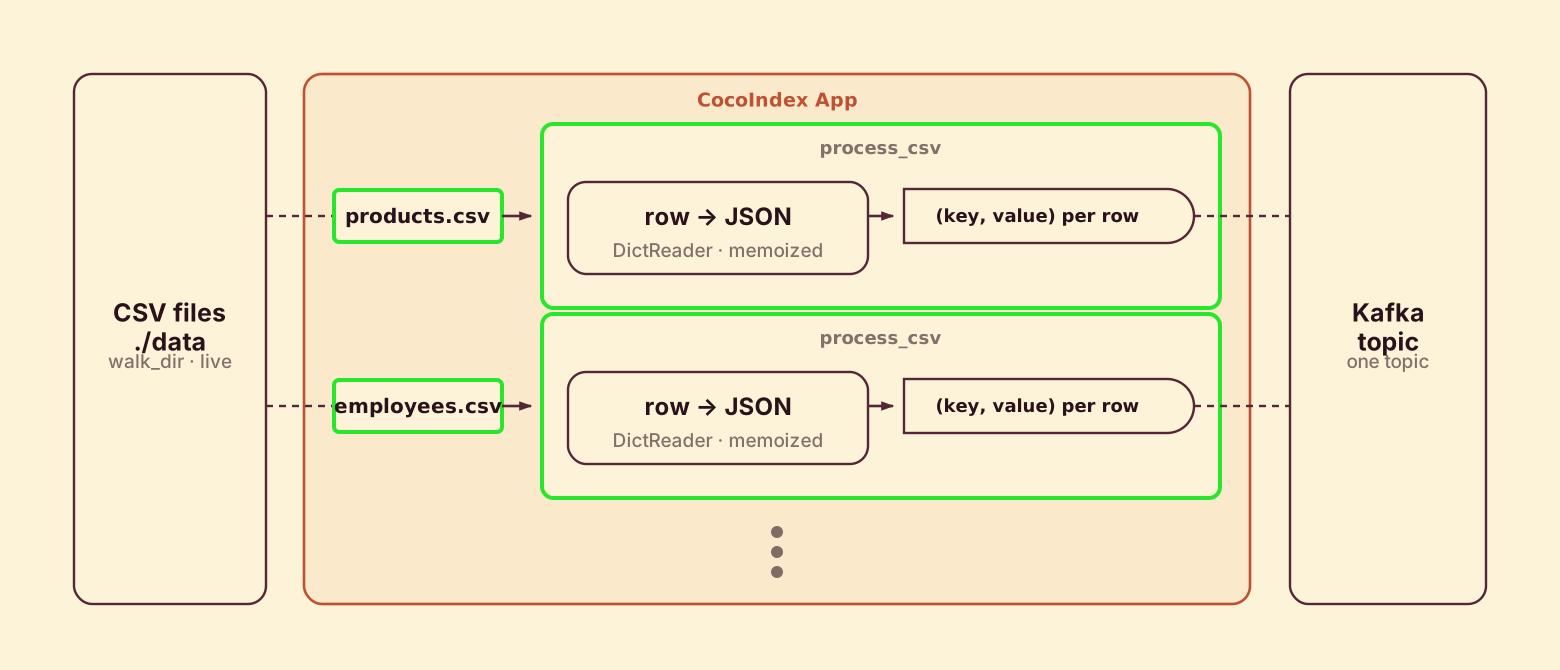
process_csv runs once per file. It reads the text, parses rows with csv.DictReader (the header row becomes the keys), and declares each row as a target state — key from the first column, value the JSON-encoded row:
@coco.fn(memo=True)
async def process_csv(file: FileLike, topic_target: kafka.KafkaTopicTarget) -> None:
    text = await file.read_text()
    reader = csv.DictReader(io.StringIO(text))

    headers = reader.fieldnames
    if not headers:
        return
    first_col = headers[0]

    for row in reader:
        key_value = row.get(first_col)
        if key_value is not None:
            value = json.dumps(row)
            topic_target.declare_target_state(key=key_value, value=value)
@coco.fn(memo=True) makes the per-file work incremental: if a file’s contents and this function’s code are both unchanged, process_csv doesn’t even run. Each file runs as its own processing component (mounted below), so the engine tracks each file’s rows independently — and when a file disappears, its rows are cleaned off the topic automatically.
Declare states, not messages
The one line worth pausing on is declare_target_state — deliberately not send_message() or produce().
topic_target.declare_target_state(key=key, value=value)CocoIndex is state-driven: like a spreadsheet cell or a SQL materialized view, you describe what the target should be as a function of the source, and the engine figures out the transitions. You don’t compute deltas, and you don’t write separate insert / update / delete code paths.
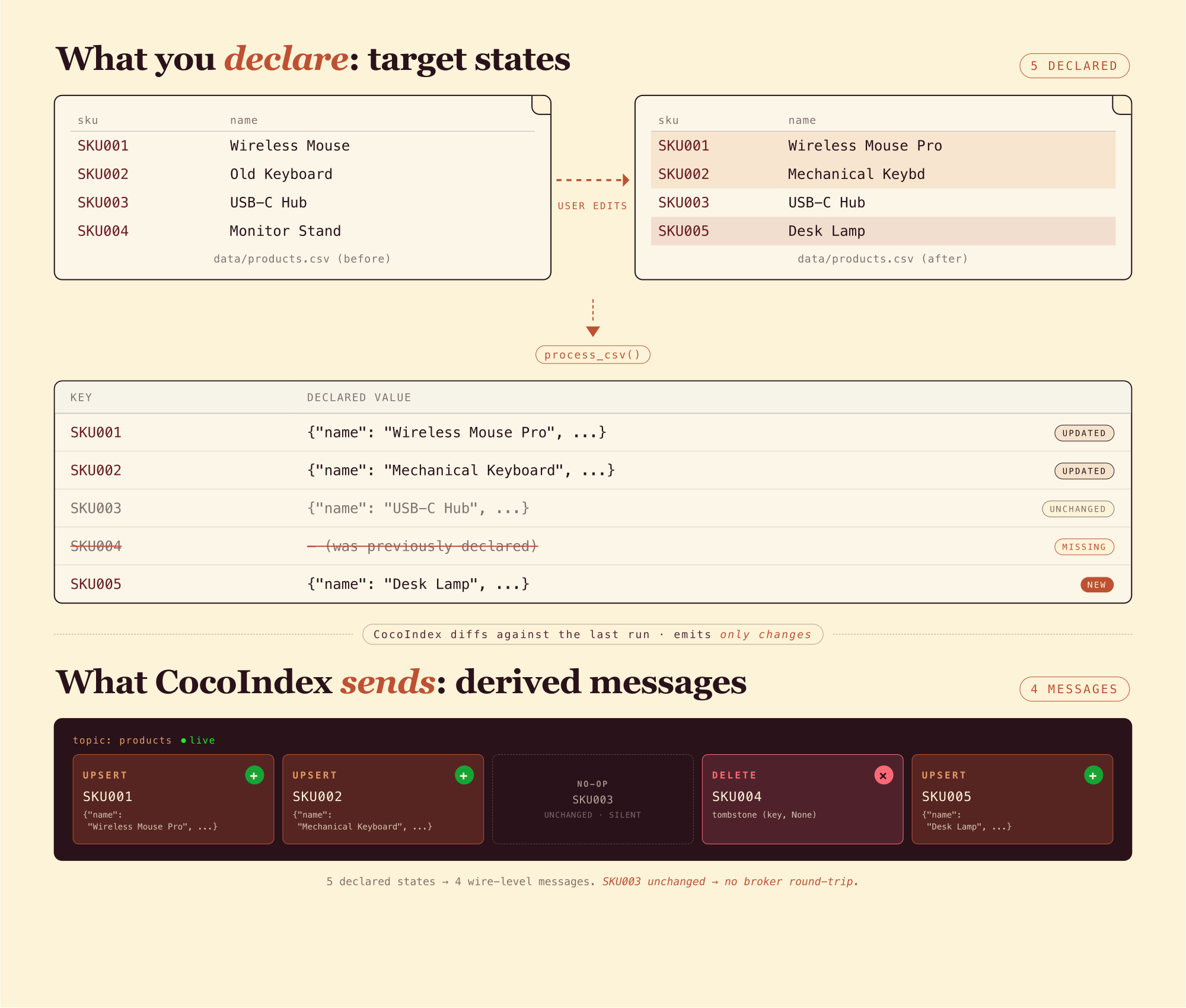
Kafka makes this vivid because its wire model is the opposite of state: a topic is a log of events, not a snapshot. CocoIndex owns the gap. When you call declare_target_state(key=k, value=v):
kis new, orvchanged → it produces an upsert message(k, v).kwas declared before but isn’t this time → it produces a delete message(k, None)(or a tombstone if you supplied adeletion_value_fn).kwas declared with the samev→ nothing is sent. No message, no broker round-trip, no consumer wakeup.
Messages are derived from state transitions; you only ever talk about states. It’s the same shape as the Postgres target (declare_target_state → INSERT / UPDATE / DELETE) — the wire ops differ, the API doesn’t, because the semantics are the same. The payoff: one process_csv is correct on the first run, every subsequent run, and after a crash-restart — there’s no separate “initial load” versus “incremental update” path.
Define the main function
app_main wires the source to the target. It mounts the Kafka topic, walks ./data for CSV files as a live source, and mounts one component per file:
@coco.fn
async def app_main() -> None:
    topic_target = await kafka.mount_kafka_topic_target(KAFKA_PRODUCER, KAFKA_TOPIC)

    files = localfs.walk_dir(
        localfs.FilePath(path="./data"),
        path_matcher=PatternFilePathMatcher(included_patterns=["**/*.csv"]),
        live=True,  # watch for changes; pass -L to `cocoindex update` to run live
    )
    await coco.mount_each(process_csv, files.items(), topic_target)


app = coco.App(coco.AppConfig(name="CsvToKafka"), app_main)
Two things to notice:
mount_kafka_topic_target(...)resolves the producer from the context key and hands back a target handle. The topic itself is user-managed — CocoIndex never creates or deletes topics, it just produces into one you already own.localfs.walk_dir(..., live=True)makes the filesystem source a live source: it scans once, then keeps watching./data(viawatchfiles) and pushes incremental updates downstream.mount_eachruns oneprocess_csvcomponent per file.
That’s the whole pipeline — one file, ~60 lines.
Run the pipeline
Copy .env.example to .env and fill in your Kafka bootstrap (and SASL creds if your broker needs them), then run the cocoindex CLI. Choose catch-up (scan, sync, exit) or live (catch up, then keep watching):
# Catch-up run: reconcile the topic up to now, then exit
cocoindex update main.py

# Live run: catch up, then keep watching ./data and produce on every change
cocoindex update -L main.py
Live mode is one keyword argument and one flag different from catch-up — live=True on walk_dir, and -L on the CLI. process_csv and the Kafka target don’t change: reconciliation logic is identical, the flag only controls whether the app scans once and exits or keeps watching. There’s no separate “streaming” code path to maintain.
Looking at the topic
Here’s the cocoindex-csv-rows topic after a run, in StreamNative’s hosted console (any Kafka consumer shows the same thing):
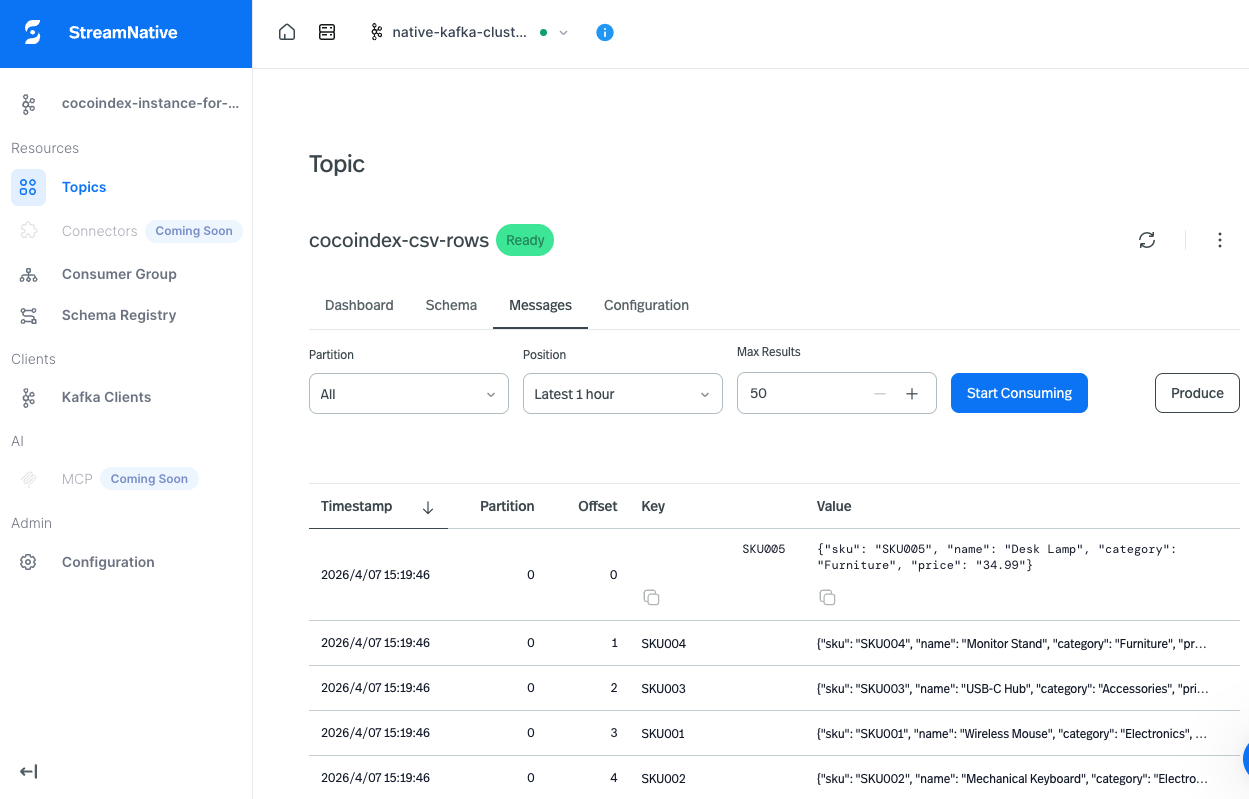
Keys are the row’s first column (SKU001, SKU002, …); values are the JSON-encoded rows. Edit a CSV locally and a new message with the same key appears — so log-compacted topics and key-based consumers always see the current state. Each key hashes to a partition via Kafka’s default partitioner, exactly as it would with a hand-rolled producer.
Incremental updates
This is where the declarative model pays for itself. You never compute a diff or write produce logic — change something, and CocoIndex works out the minimum set of messages to bring the topic in line. It keeps an internal state store remembering the last value sent for every key, and that store survives restarts, so stopping and restarting never re-broadcasts unchanged rows.
- Edit one cell — exactly one upsert message, for that one row. Every other row is silent.
- Add a row — one new upsert message.
- Delete a row — one delete message for its key.
- Add a CSV file —
process_csvruns once for it and publishes its rows. - Delete a CSV file — every row from it gets a delete message.
- Nothing changed — a re-run produces zero messages.
A catch-up run (cocoindex update main.py) does this once and exits; live mode (cocoindex update -L main.py) keeps watching and applies each change with sub-second latency.
Run it
The full, runnable example is in the CocoIndex repo: examples/csv_to_kafka. The natural next step is the consumer side — kafka_to_lancedb reads JSON messages off a topic and dispatches them into LanceDB tables, so the same declarative flow that produces changes can consume them too.
Got a folder of exports, a vendor dump, or any tabular data you want on a topic? Come tell us on Discord — and if this was useful, star CocoIndex on GitHub.