We’ll take a folder of Markdown files and render each one to HTML, writing the results to a second folder that stays in sync with the source. No database, no embeddings, no API keys — just files in, files out. It’s the smallest complete CocoIndex pipeline, and the cleanest way to see the source → transform → target shape that every larger example is built from.
The transform is your own ordinary async function. The heavy lifting — incremental processing, change tracking, watching the directory, and keeping the output folder in sync — runs in a Rust engine underneath, so only the files that actually changed get re-rendered and re-written.
Flow overview
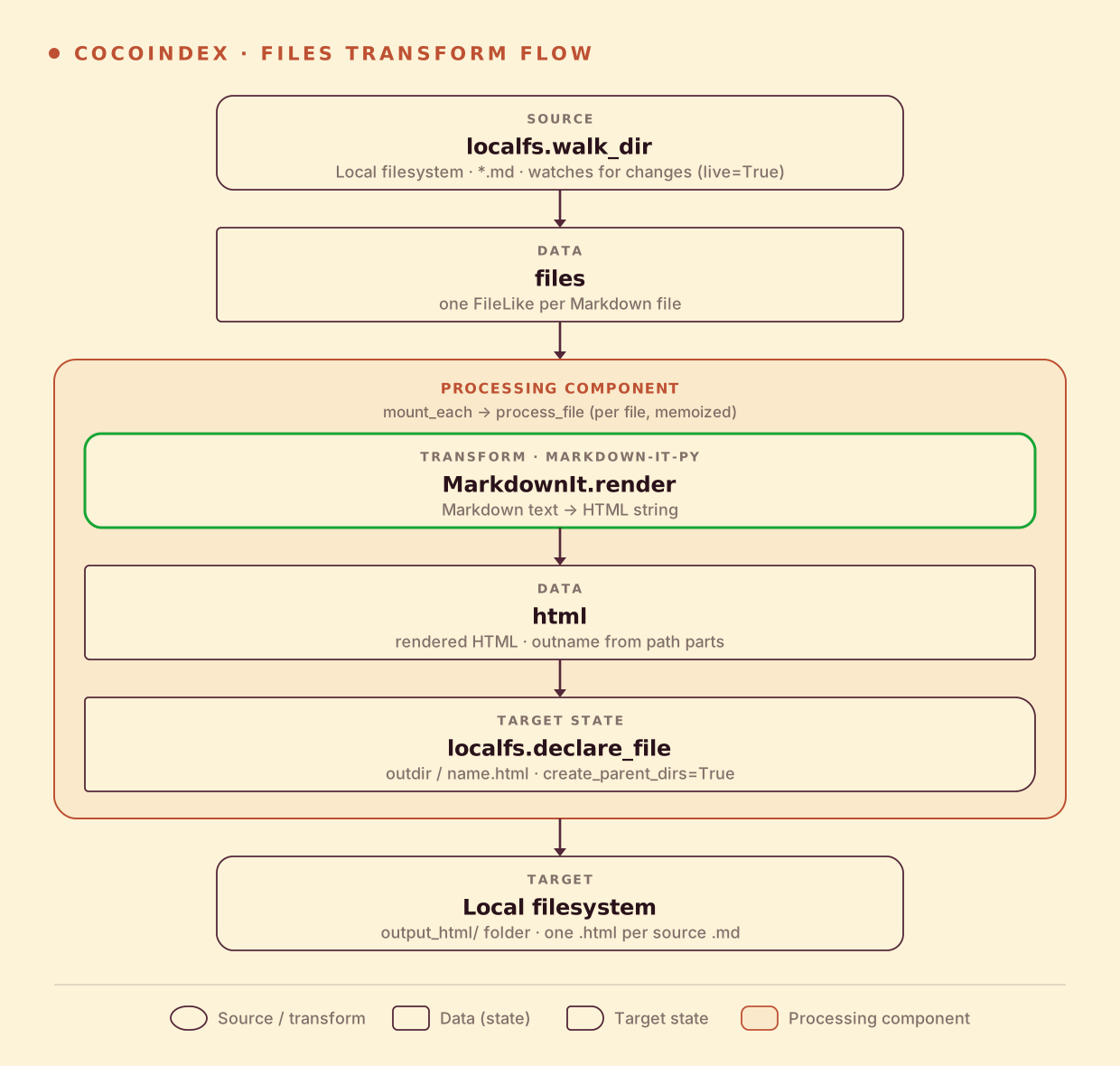
From a high level, these are the steps:
- Read Markdown files from a local directory, watching for changes.
- Render each file to HTML with markdown-it-py.
- Write each
.htmlfile to an output folder (as target states) on the local filesystem.
You declare the transformation logic with native Python, without worrying about how updates propagate. Think: target_state = transformation(source_state).
Process a file
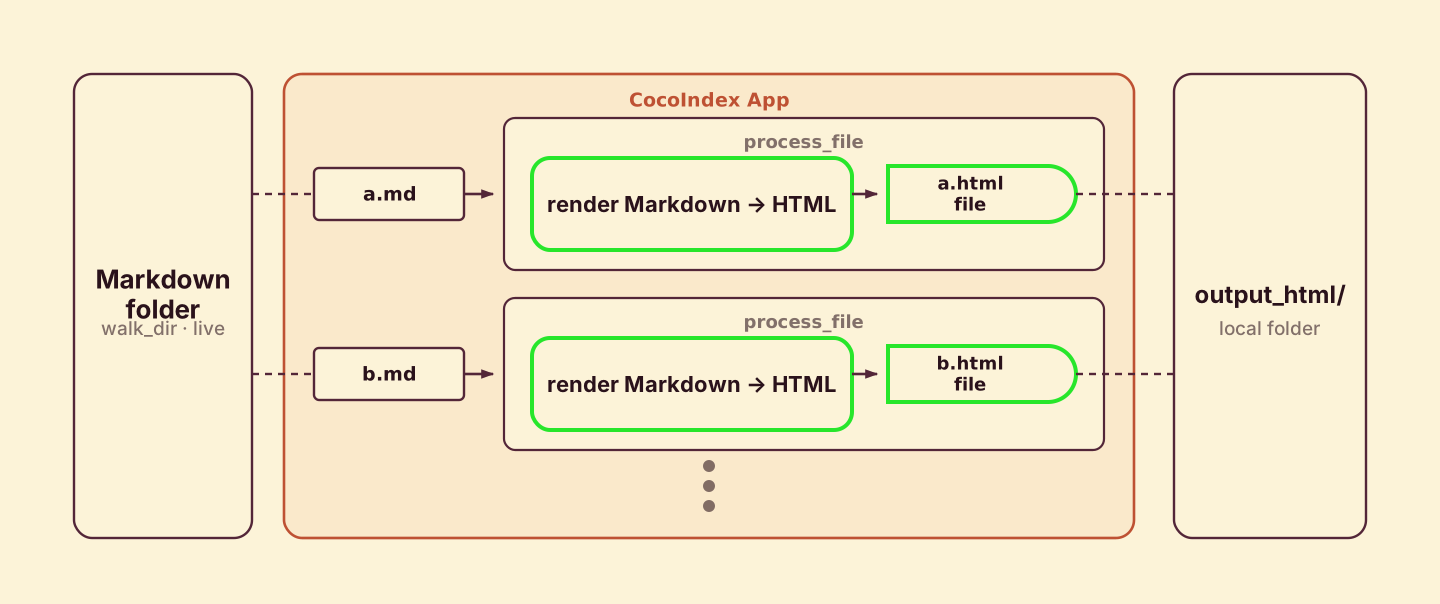
process_file runs once per file. It reads the Markdown, renders it to HTML, derives an output name from the source path, and declares the output file as a target state.
import pathlib

import cocoindex as coco
from cocoindex.resources.file import FileLike, PatternFilePathMatcher
from cocoindex.connectors import localfs
from markdown_it import MarkdownIt

_markdown_it = MarkdownIt("gfm-like")


@coco.fn(memo=True)
async def process_file(file: FileLike, outdir: pathlib.Path) -> None:
    html = _markdown_it.render(await file.read_text())
    outname = "__".join(file.file_path.path.parts) + ".html"
    localfs.declare_file(outdir / outname, html, create_parent_dirs=True)
The transform itself is just two lines: read the text, render it. The output name joins the source path parts with __ so subdir/file.md becomes subdir__file.html — a flat, collision-free name in the output folder.
localfs.declare_file declares the .html file as a target state on the local filesystem. You describe the file you want to exist; CocoIndex handles writing it, overwriting it when the content changes, and deleting it when the source Markdown is gone.
@coco.fn with memo=True is what makes this incremental: if a file’s content and this function’s code are both unchanged, the whole file is skipped on the next run, and its HTML output is left exactly as it is.
Define the main function
app_main wires the source to the target. It walks the source directory for Markdown files and mounts one processing component per file.
@coco.fn
async def app_main(sourcedir: pathlib.Path, outdir: pathlib.Path) -> None:
    files = localfs.walk_dir(
        sourcedir,
        path_matcher=PatternFilePathMatcher(included_patterns=["**/*.md"]),
        live=True,
    )
    await coco.mount_each(process_file, files.items(), outdir)
walk_dir lists the source folder, filtered to *.md by the PatternFilePathMatcher. live=True makes the filesystem source watch for changes, and mount_each runs one component per file so the engine can track and update each one independently — add, edit, or delete a Markdown file and only that file’s HTML moves.
Create the App
Bind app_main into a coco.App, pointing it at the source folder and the output folder.
app = coco.App(
    coco.AppConfig(name="FilesTransform"),
    app_main,
    sourcedir=pathlib.Path("./data"),
    outdir=pathlib.Path("./output_html"),
)
That is the entire pipeline — about 25 lines.
Setup
-
No external services required. Install CocoIndex and markdown-it-py:
pip install -U cocoindex "markdown-it-py[linkify,plugins]" -
A few
.mdfiles to convert. Grab the sample files from the repo, or drop your own notes into adata/directory.
Run the pipeline
Run the cocoindex CLI to build the output folder. Choose catch-up (scan, sync, exit) or live (catch up, then keep watching):
# Catch-up run
cocoindex update main

# Live run: keep watching for file changes
cocoindex update -L main
The converted files appear in ./output_html/, one .html per source .md.
Incremental updates
CocoIndex keeps the output folder in sync with your source files and does the minimum work to get there. You never compute a diff or write update logic: you change something, and CocoIndex works out exactly what to re-render and re-write. Two pieces make this work. @coco.fn(memo=True) decides what to recompute — a file is skipped when its content and the function’s code are both unchanged. localfs.declare_file decides what to write — the output file is created, overwritten, or deleted to match the declared target state.
- A file is added — only that file is rendered, and its
.htmlis written. The rest is untouched. - A file is edited — it is re-rendered and its
.htmlis overwritten in place. - A file is deleted — its
.htmloutput is removed from the target folder automatically.
The same machinery covers logic changes too: change the markdown-it preset or the output naming, and CocoIndex compares the new output against what is already on disk and applies only the difference. A catch-up run (cocoindex update main) does this once and exits; live mode (cocoindex update -L main) keeps watching and applies each change with low latency.
Run it
The full, runnable example is in the CocoIndex repo: examples/files_transform. This is the minimal building block — once it clicks, swap the transform for chunking and embedding and you have Semantic Search 101, or point the same flow at a Postgres or vector target.
If this helped, give CocoIndex a star on GitHub and come say hi in our Discord — we’d love to see what you build.