We’ll take a folder of PDFs — papers, RFCs, manuals, contracts — and turn it into a vector index you can search in plain English. The trick PDFs add over plain text: they have to be parsed first. We use docling to convert each PDF to clean Markdown, then chunk, embed, and store the vectors in Postgres.
The whole pipeline is ordinary async Python and your own types. The heavy lifting — incremental processing, change tracking, managed targets — runs in a Rust engine underneath, so only changed PDFs get re-parsed and re-embedded. The one genuinely expensive step (PDF parsing) runs on a GPU runner so it doesn’t block the event loop.
Flow overview
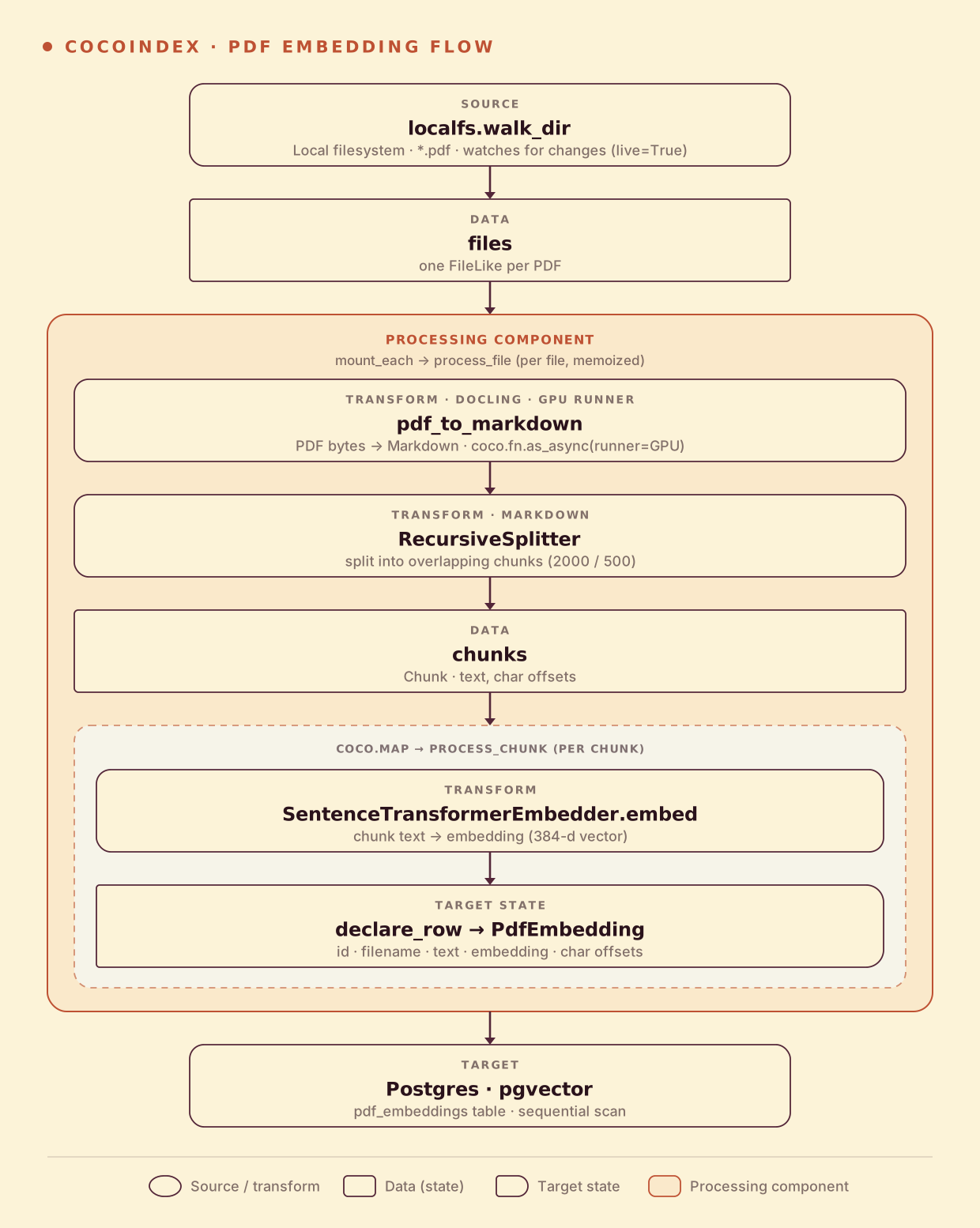
From a high level, these are the steps:
- Read PDF files from a local directory (live).
- Convert each PDF to Markdown with docling, split it into overlapping chunks, then embed every chunk.
- Store the chunks and their embeddings in Postgres (as target states).
You declare the transformation logic with native Python, without worrying about how updates propagate. Think: target_state = transformation(source_state).
Setup
-
A running Postgres with the pgvector extension. The repo ships a compose file:
docker compose -f dev/postgres.yaml up -d export POSTGRES_URL="postgres://cocoindex:cocoindex@localhost/cocoindex" -
Install CocoIndex and the dependencies this example uses (docling pulls in the PDF parser):
pip install -U "cocoindex[postgres,sentence_transformers]" asyncpg pgvector numpy docling python-dotenv -
A few PDFs to index. The example ships a
pdf_files/folder with a couple of papers and an RFC — or drop your own in.
Define the data and shared resources
PdfEmbedding defines one row of the output table — each chunk of text becomes one row, with its filename, character offsets, text, and embedding vector. coco_lifespan provides the shared resources every step needs — the Postgres connection pool and the embedding model — once at startup.
EMBED_MODEL = "sentence-transformers/all-MiniLM-L6-v2"
PG_DB = coco.ContextKey[asyncpg.Pool]("pdf_embedding_db")
EMBEDDER = coco.ContextKey[SentenceTransformerEmbedder]("embedder", detect_change=True)

_splitter = RecursiveSplitter()


@dataclass
class PdfEmbedding:
    id: int
    filename: str
    chunk_start: int
    chunk_end: int
    text: str
    embedding: Annotated[NDArray, EMBEDDER]


@coco.lifespan
async def coco_lifespan(builder: coco.EnvironmentBuilder) -> AsyncIterator[None]:
    async with asyncpg.create_pool(os.environ["POSTGRES_URL"]) as pool:
        builder.provide(PG_DB, pool)
        builder.provide(EMBEDDER, SentenceTransformerEmbedder(EMBED_MODEL))
        yield
embedding: Annotated[NDArray, EMBEDDER] ties the vector column to the embedder, so its dimensions are inferred automatically — and if you swap the model later, CocoIndex notices (detect_change=True) and re-embeds.
Convert PDFs to Markdown
This is the one step text embedding doesn’t have. docling reads the PDF and exports clean Markdown — preserving headings, tables, and reading order, which is exactly what makes the downstream chunks coherent.
@functools.cache
def pdf_converter() -> DocumentConverter:
    pipeline_options = PdfPipelineOptions(
        accelerator_options=AcceleratorOptions(device=AcceleratorDevice.CPU)
    )
    return DocumentConverter(
        format_options={InputFormat.PDF: PdfFormatOption(pipeline_options=pipeline_options)}
    )


@coco.fn.as_async(runner=coco.GPU)
def pdf_to_markdown(content: bytes) -> str:
    source = DocumentStream(name="input.pdf", stream=io.BytesIO(content))
    return pdf_converter().convert(source).document.export_to_markdown()
Two things make this hold up at scale:
@coco.fn.as_async(runner=coco.GPU)wraps a synchronous, CPU/GPU-heavy function so CocoIndex runs it on a dedicated GPU runner instead of blocking the async event loop. PDF parsing is the slow part of this pipeline; offloading it keeps the rest of the flow responsive.@functools.cachebuilds the doclingDocumentConverteronce and reuses it across every PDF — model load happens a single time, not per file.
Process a file
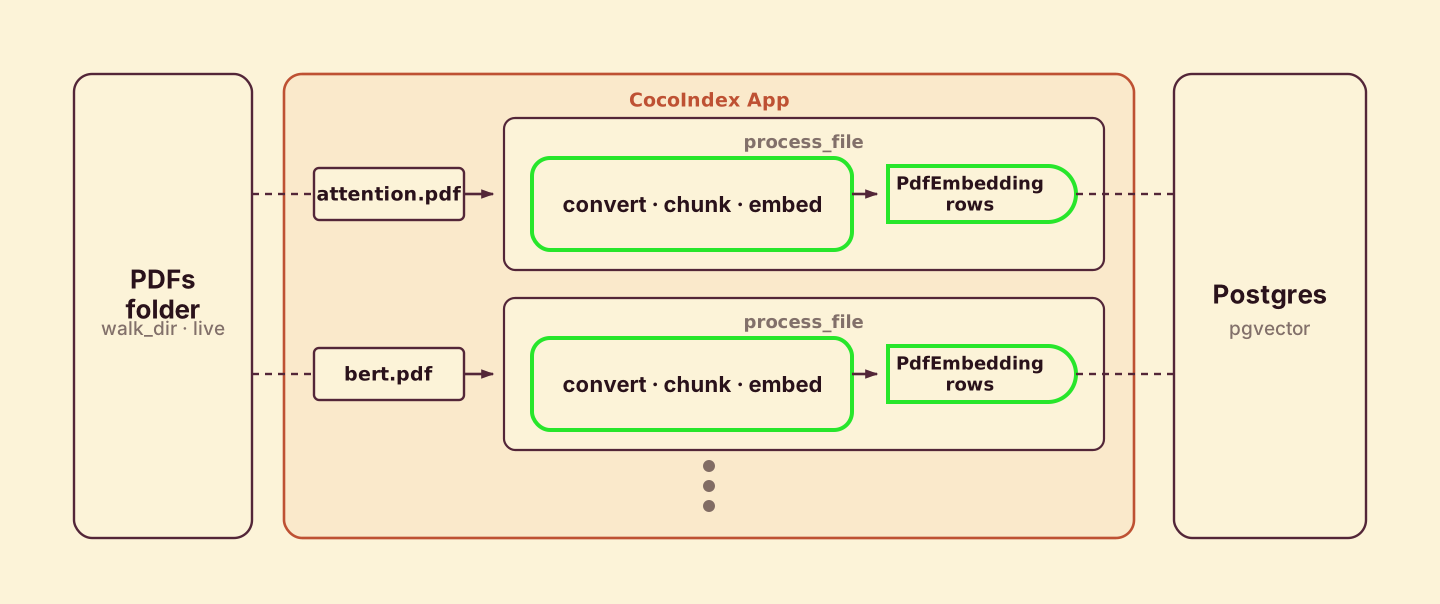
process_file runs once per PDF. It converts the PDF to Markdown, splits the text into overlapping chunks, and maps each chunk to process_chunk.
@coco.fn(memo=True)
async def process_file(
    file: FileLike,
    table: postgres.TableTarget[PdfEmbedding],
) -> None:
    markdown = await pdf_to_markdown(await file.read())
    chunks = _splitter.split(
        markdown, chunk_size=2000, chunk_overlap=500, language="markdown"
    )
    id_gen = IdGenerator()
    await coco.map(process_chunk, chunks, file.file_path.path, id_gen, table)
@coco.fn with memo=True is what makes this incremental: if a PDF’s content and this function’s code are both unchanged, the whole file is skipped on the next run — so you never re-run docling on a PDF you’ve already parsed. coco.map fans out to one process_chunk call per chunk.
Process a chunk
process_chunk embeds the chunk with the shared embedder and declares the target row.
@coco.fn
async def process_chunk(
    chunk: Chunk,
    filename: pathlib.PurePath,
    id_gen: IdGenerator,
    table: postgres.TableTarget[PdfEmbedding],
) -> None:
    table.declare_row(
        row=PdfEmbedding(
            id=await id_gen.next_id(chunk.text),
            filename=str(filename),
            chunk_start=chunk.start.char_offset,
            chunk_end=chunk.end.char_offset,
            text=chunk.text,
            embedding=await coco.use_context(EMBEDDER).embed(chunk.text),
        ),
    )
We use SentenceTransformerEmbedder with all-MiniLM-L6-v2 — a small, fast model that runs locally with no API key. table.declare_row declares the row as a target state; CocoIndex handles inserting, updating, or deleting it to match. Each row’s id is derived from the chunk text, so a chunk that survives a re-parse keeps its row.
Define the main function
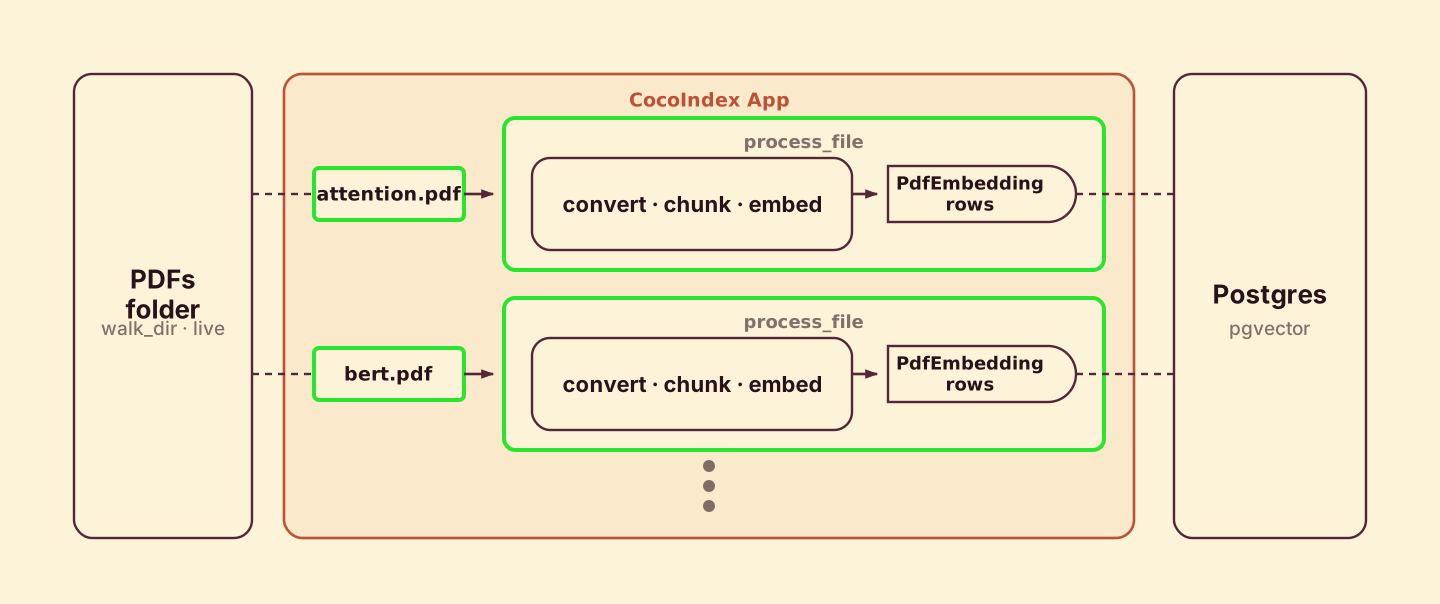
app_main wires the source to the target. It mounts the Postgres table, walks the source directory for PDFs, and mounts one processing component per file.
@coco.fn
async def app_main(sourcedir: pathlib.Path) -> None:
    target_table = await postgres.mount_table_target(
        PG_DB,
        table_name=TABLE_NAME,
        table_schema=await postgres.TableSchema.from_class(
            PdfEmbedding, primary_key=["id"],
        ),
        pg_schema_name=PG_SCHEMA_NAME,   # "coco_examples"
    )

    files = localfs.walk_dir(
        sourcedir,
        recursive=True,
        path_matcher=PatternFilePathMatcher(included_patterns=["**/*.pdf"]),
        live=True,  # watch for changes; pass -L to `cocoindex update` to run live
    )
    await coco.mount_each(process_file, files.items(), target_table)


app = coco.App(
    coco.AppConfig(name="PdfEmbeddingV1"),
    app_main,
    sourcedir=pathlib.Path("./pdf_files"),
)
mount_table_target creates and manages the Postgres table for you — schema, idempotent upserts, and orphan cleanup when a PDF disappears. live=True makes the filesystem source watch for changes, and mount_each runs one component per file so the engine can track and update them independently.
No vector index here. To keep the example minimal, this flow doesn’t declare a vector index, so queries do a sequential scan — fine for a few PDFs. For a larger corpus, add one line —
target_table.declare_vector_index(column="embedding")— exactly as the Semantic Search 101 example does, and pgvector serves approximate-nearest-neighbor queries instead.
Run the pipeline
Run the cocoindex CLI to build and update the index. Choose catch-up (scan, sync, exit) or live (catch up, then keep watching):
# Catch-up run
cocoindex update main

# Live run: keep watching for file changes
cocoindex update -L main
Query the index
Match user text against the index with a plain SQL query, reusing the same embedder from the indexing flow so indexing and querying stay consistent.
async def query_once(pool, embedder, query: str, *, top_k: int = 5) -> None:
    query_vec = await embedder.embed(query)
    async with pool.acquire() as conn:
        rows = await conn.fetch(
            f"""
            SELECT filename, text, embedding <=> $1 AS distance
            FROM "{PG_SCHEMA_NAME}"."{TABLE_NAME}"
            ORDER BY distance ASC
            LIMIT $2
            """,
            query_vec, top_k,
        )
    for r in rows:
        score = 1.0 - float(r["distance"])
        print(f"[{score:.3f}] {r['filename']}")
        print(f"    {r['text']}")
        print("---")
The <=> operator is pgvector’s cosine distance. We turn it into a similarity score and print the filename and the matching chunk. Run a search straight from the command line:
python main.py "what is attention?"With the sample papers indexed, the most semantically similar passages come back ranked — even when they share none of the words in your query. That’s the whole point of a vector index.
Incremental updates
CocoIndex keeps the index in sync with your PDFs and does the minimum work to get there. You never compute a diff or write update logic. Two pieces make this work. @coco.fn(memo=True) decides what to recompute — a PDF is skipped when its bytes and the function’s code are both unchanged, so docling never re-parses an unchanged file. mount_table_target decides what to write — each row’s id is derived from its chunk’s text, so it upserts only the rows that actually changed and deletes rows whose source is gone.
- A PDF is added — only that file is parsed, chunked, and embedded; its rows are inserted. The rest is untouched.
- A PDF is replaced — it is re-parsed and re-chunked; chunks whose text is unchanged keep their
idand embedding, genuinely new chunks are embedded and inserted, and chunks that no longer exist are deleted. - A PDF is deleted — its rows are removed from the target automatically.
The same machinery covers logic changes too: tune the chunk size or swap the embedding model, and CocoIndex compares the new output against what’s already in Postgres and applies only the difference. A catch-up run (cocoindex update main) does this once and exits; live mode (cocoindex update -L main) keeps watching and applies each change with low latency.
Run it
The full, runnable example is in the CocoIndex repo: examples/pdf_embedding. If your inputs are already plain text or Markdown, Semantic Search 101 is the same flow without the docling step; if you want the Markdown itself as the output, see PDF → Markdown.
Got a folder of papers, reports, or scanned docs you want to search by meaning? Come tell us on Discord — and if this was useful, star CocoIndex on GitHub.