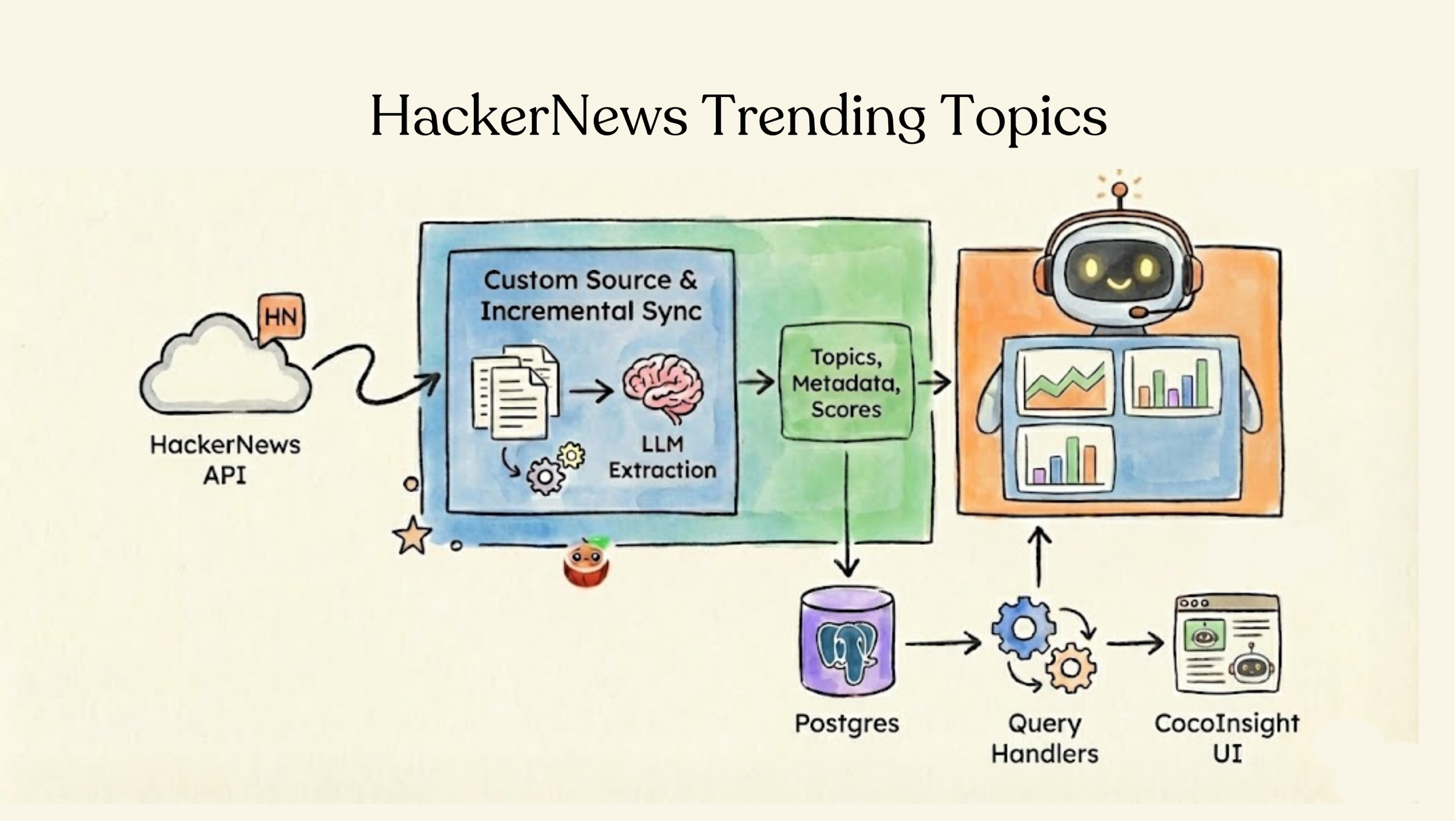
What is the tech community talking about right now? In this tutorial, we’ll build a pipeline that scrapes recent HackerNews stories and their comment threads, uses an LLM to pull out the topics each message is about, and stores everything in Postgres so you can rank what’s trending and search by topic.
The data source here isn’t a folder of files — it’s a public HTTP API. We fetch threads on the fly with the Algolia HackerNews API, so this example doubles as a recipe for plugging any custom source into a CocoIndex pipeline. Each run catches up on the latest stories, and because CocoIndex memoizes per-message work, re-running only does the new work.
Flow overview
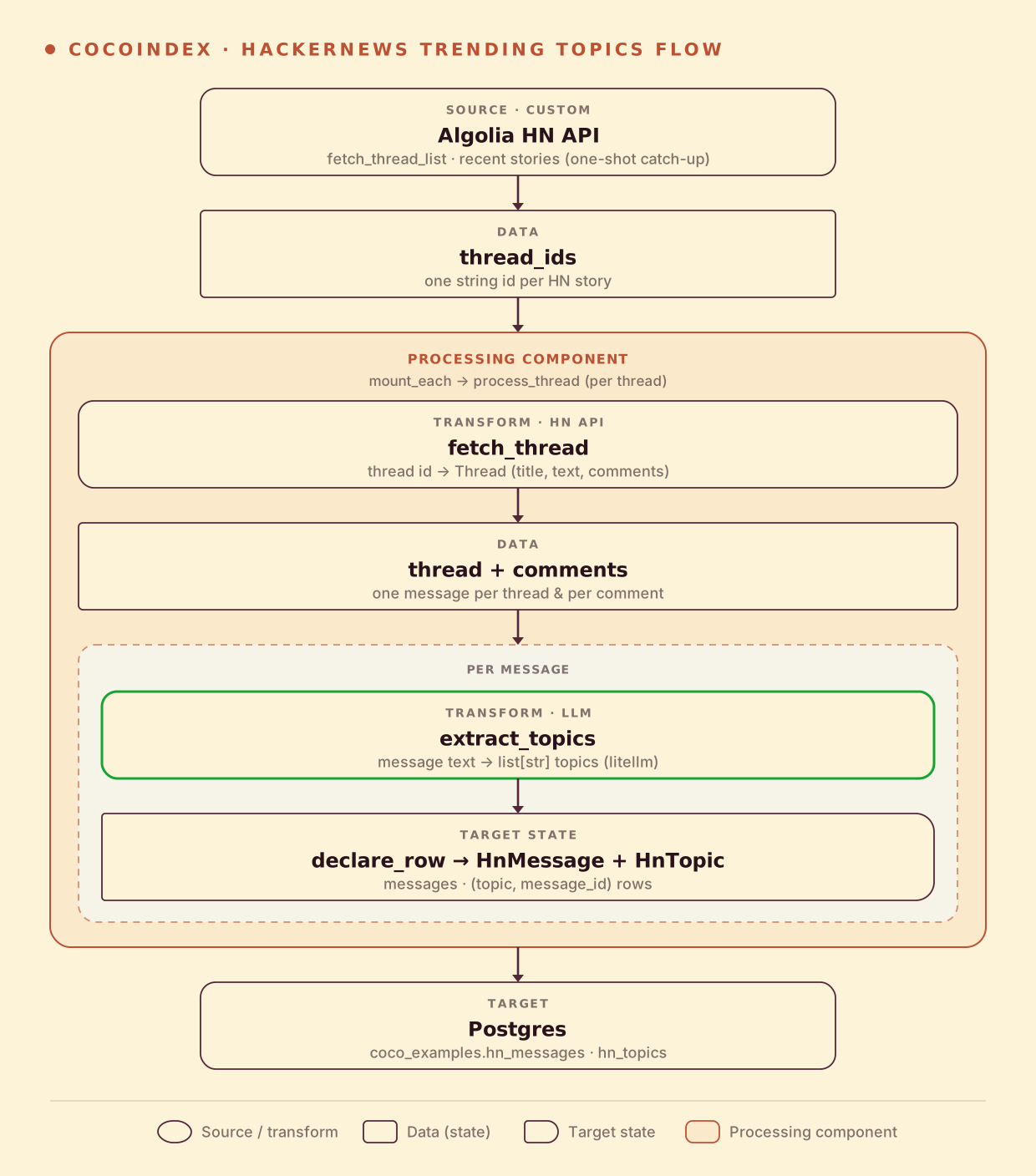
- Fetch a list of recent thread IDs from the Algolia HackerNews API
- For each thread, fetch the story and all of its comments
- Extract topics from each message (thread + every comment) using an LLM
- Store messages and their topics as rows in two Postgres tables
You declare the transformation logic with native Python without worrying about changes.
Think: target_state = transformation(source_state)
When the HackerNews feed moves on, or your processing logic changes (for example, switching to a different model, or refining the topic-extraction prompt), CocoIndex performs smart incremental processing that only reprocesses the minimum, and keeps your hn_messages and hn_topics tables in sync.
Define the data models
We model the HackerNews content we scrape, and the rows we want in Postgres, as plain Python dataclasses. The scraped Thread and Comment are what we pull from the API; HnMessage and HnTopic are the table schemas.
@dataclass
class Comment:
    id: str
    author: str | None
    text: str | None
    created_at: datetime | None


@dataclass
class Thread:
    id: str
    author: str | None
    text: str
    url: str | None
    created_at: datetime | None
    comments: list[Comment]


@dataclass
class HnMessage:
    """Schema for hn_messages table."""

    id: str
    thread_id: str
    content_type: str
    author: str | None
    text: str | None
    url: str | None
    created_at: datetime | None


@dataclass
class HnTopic:
    """Schema for hn_topics table."""

    topic: str
    message_id: str
    thread_id: str
    content_type: str
    created_at: datetime | None
A thread and each of its comments both become an HnMessage (distinguished by content_type). Every extracted topic becomes an HnTopic row keyed on (topic, message_id), so the same topic mentioned in many messages shows up many times — exactly what we want for ranking.
Extract topics with an LLM
The core transformation is a single CocoIndex function: text in, a list of topics out. We use litellm so any provider works, and ask the model to return structured JSON validated by a small Pydantic model.
class TopicsResponse(BaseModel):
    """Response containing a list of extracted topics."""

    topics: list[str] = Field(
        description="""List of extracted topics.

Each topic can be a product name, technology, model, people, company name, business domain, etc.
Capitalize for proper nouns and acronyms only.
Use the form that is clear alone.
Avoid acronyms unless very popular and unambiguous for common people even without context.
..."""
)@coco.fn
async def extract_topics(text: str | None) -> list[str]:
"""Extract topics from text using LLM."""
if not text or not text.strip():
return []
response = await acompletion(
model=LLM_MODEL,
messages=[
{
"role": "user",
"content": f"Extract topics from the following text:\n\n{text[:4000]}",
}
],
response_format=TopicsResponse,
)
content = response.choices[0].message.content
return TopicsResponse.model_validate_json(content).topicsThe prompt in TopicsResponse does the heavy lifting: it tells the model to normalize phrases into separate topics (“books for autistic kids” → “book”, “autistic”, “autistic kids”), keep proper nouns canonical (“PostgreSQL”, “Claude”), and emit multiple aliases for the same thing (“JFK”, “John Kennedy”). That normalization is what makes the trending ranking meaningful later.
Fetch from the HackerNews API
The source is a custom one — two small async functions over the Algolia HN API. fetch_thread_list returns the most recent story IDs; fetch_thread pulls one story and recursively flattens its comment tree.
async def fetch_thread_list(
    session: aiohttp.ClientSession, max_results: int = MAX_THREADS
) -> list[str]:
    """Fetch list of recent thread IDs from HackerNews."""
    search_url = "https://hn.algolia.com/api/v1/search_by_date"
    params: dict[str, str | int] = {"tags": "story", "hitsPerPage": max_results}

    async with session.get(search_url, params=params) as response:
        response.raise_for_status()
        data = await response.json()
        return [hit["objectID"] for hit in data.get("hits", []) if hit.get("objectID")]


async def fetch_thread(session: aiohttp.ClientSession, thread_id: str) -> Thread:
    """Fetch a single thread with all its comments."""
    item_url = f"https://hn.algolia.com/api/v1/items/{thread_id}"

    async with session.get(item_url) as response:
        response.raise_for_status()
        data = await response.json()

        comments: list[Comment] = []

        # Parse comments recursively
        def parse_comments(parent: dict[str, Any]) -> None:
            for child in parent.get("children", []):
                if comment_id := child.get("id"):
                    ctime = child.get("created_at")
                    comments.append(
                        Comment(
                            id=str(comment_id),
                            author=child.get("author"),
                            text=child.get("text"),
                            created_at=datetime.fromisoformat(ctime) if ctime else None,
                        )
                    )
                parse_comments(child)

        parse_comments(data)

        ctime = data.get("created_at")
        text = data.get("title", "")
        if more_text := data.get("text"):
            text += "\n\n" + more_text

        return Thread(
            id=thread_id,
            author=data.get("author"),
            text=text,
            url=data.get("url"),
            created_at=datetime.fromisoformat(ctime) if ctime else None,
            comments=comments,
        )
These are ordinary async def functions — no special CocoIndex decorators. Any HTTP API, queue, or third-party SDK can be a source this way: you fetch the data in plain Python and hand it to the pipeline.
Process each thread
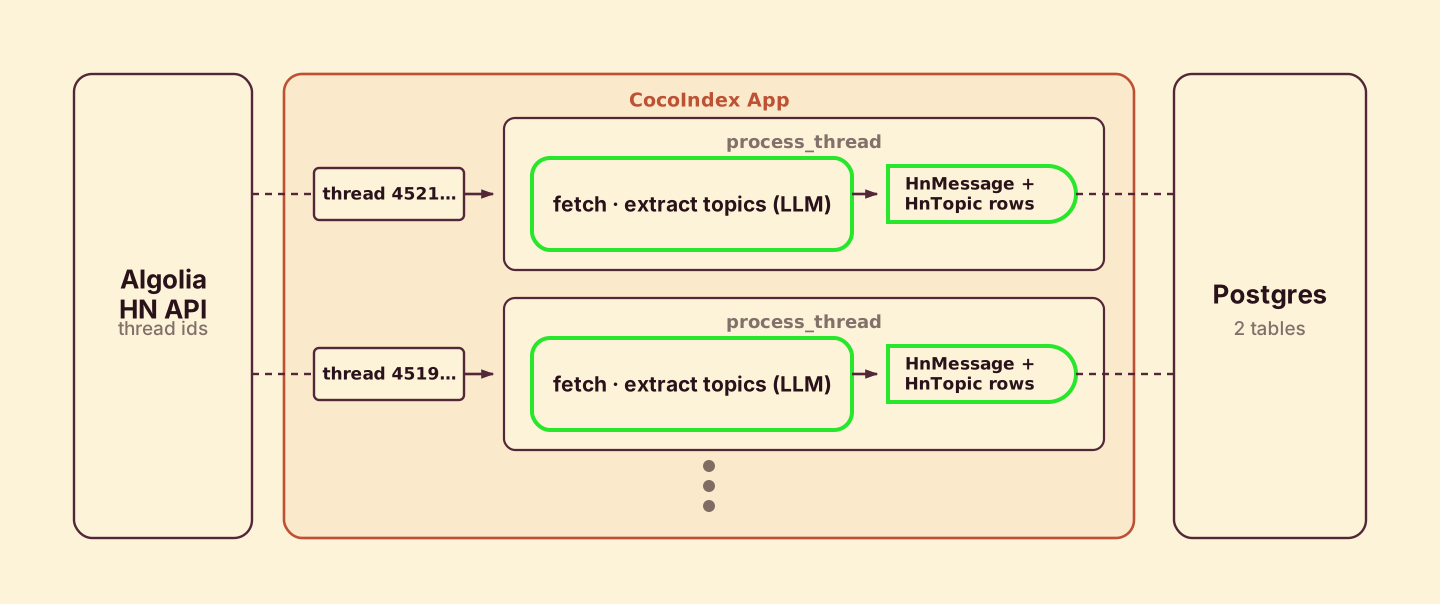
Each thread is processed by its own component. process_thread fetches the thread, extracts topics for the story and every comment, and declares the resulting rows.
@coco.fn
async def process_thread(
    thread_id: str,
    targets: TableTargets,
) -> None:
    """Fetch and process a single thread and its comments."""
    async with aiohttp.ClientSession() as session:
        thread = await fetch_thread(session, thread_id)
    thread_topics = await extract_topics(thread.text)

    # Declare thread message row
    targets.messages.declare_row(
        row=HnMessage(
            id=thread.id,
            thread_id=thread.id,
            content_type="thread",
            author=thread.author,
            text=thread.text,
            url=thread.url,
            created_at=thread.created_at,
        ),
    )
    # Declare thread topic rows
    for topic in thread_topics:
        targets.topics.declare_row(
            row=HnTopic(
                topic=topic,
                message_id=thread.id,
                thread_id=thread.id,
                content_type="thread",
                created_at=thread.created_at,
            ),
        )
    # Process comments
    for comment in thread.comments:
        comment_topics = await extract_topics(comment.text)

        targets.messages.declare_row(
            row=HnMessage(
                id=comment.id,
                thread_id=thread.id,
                content_type="comment",
                author=comment.author,
                text=comment.text,
                url="",
                created_at=comment.created_at,
            ),
        )
        for topic in comment_topics:
            targets.topics.declare_row(
                row=HnTopic(
                    topic=topic,
                    message_id=comment.id,
                    thread_id=thread.id,
                    content_type="comment",
                    created_at=comment.created_at,
                ),
            )
You declare what rows should exist — you don’t write inserts or deletes. When this component finishes, CocoIndex diffs the declared rows against the previous run at the same component path and applies only the create/update/delete needed. If a thread drops out of the feed, the rows it owned are cleaned up automatically.
Why a component per thread? A processing component groups one thread’s work together with its target rows. Each one runs independently and in parallel, and its rows are committed to Postgres as soon as that thread is done — no waiting for the rest of the batch.
Wire up the app
The main function mounts the two Postgres table targets, fetches the recent thread IDs, and fans out one process_thread component per thread with mount_each.
@dataclass
class TableTargets:
    """Container for table targets."""

    messages: postgres.TableTarget[HnMessage]
    topics: postgres.TableTarget[HnTopic]


@coco.fn
async def app_main() -> None:
    """Main pipeline function."""
    # Set up table targets
    messages_table = await postgres.mount_table_target(
        PG_DB,
        table_name="hn_messages",
        table_schema=await postgres.TableSchema.from_class(
            HnMessage, primary_key=["id"]
        ),
        pg_schema_name="coco_examples",
    )
    topics_table = await postgres.mount_table_target(
        PG_DB,
        table_name="hn_topics",
        table_schema=await postgres.TableSchema.from_class(
            HnTopic, primary_key=["topic", "message_id"]
        ),
        pg_schema_name="coco_examples",
    )
    targets = TableTargets(messages=messages_table, topics=topics_table)

    # Fetch thread IDs from HackerNews
    async with aiohttp.ClientSession() as session:
        thread_ids = await fetch_thread_list(session)

    # Process threads (each component fetches its own thread data)
    await coco.mount_each(process_thread, ((tid, tid) for tid in thread_ids), targets)


app = coco.App(
    coco.AppConfig(name="HNTrendingTopics"),
    app_main,
)
mount_each takes one (component_key, *args) tuple per item, so each thread gets a stable component path keyed on its ID. The TableSchema.from_class calls derive the SQL columns straight from the dataclasses, and the Postgres pool is provided once in the lifespan:
@coco.lifespan
async def coco_lifespan(builder: coco.EnvironmentBuilder) -> AsyncIterator[None]:
    builder.settings.db_path = pathlib.Path("./cocoindex.db")
    async with asyncpg.create_pool(DATABASE_URL) as pool:
        builder.provide(PG_DB, pool)
yieldSetup
-
Install CocoIndex and dependencies:
pip install 'cocoindex[postgres]>=1.0.7' asyncpg aiohttp litellm pydantic python-dotenv -
Start Postgres if you don’t have one running:
docker compose -f dev/postgres.yaml up -d -
Set your Postgres connection and LLM credentials (the default model is
gemini/gemini-2.5-flash):export POSTGRES_URL="postgres://cocoindex:cocoindex@localhost/cocoindex" export GEMINI_API_KEY="your-api-key" # Optional: any litellm model id, then set the matching provider key # export LLM_MODEL="gemini/gemini-2.5-flash"You can also put these in a
.envfile in the example directory —python main.pyloads it automatically.
Run the pipeline
Build the index — a one-shot catch-up over the latest threads (this example doesn’t use a live source):
cocoindex update mainCocoIndex will:
- Fetch the most recent
MAX_THREADS(default 10) story IDs from the Algolia HN API - Fetch each story and its comments, and run LLM topic extraction on every message
- Write rows into
coco_examples.hn_messagesandcoco_examples.hn_topics
Then explore the results. Show the top trending topics and drop into a search loop:
python main.pyOr jump straight to a topic search:
python main.py "rust"The trending score is computed in SQL: a thread-level mention counts for more than a comment-level one, grouped by topic and ordered by score.
Incremental updates
The real power shows when you run the pipeline again:
Catch up on new stories:
cocoindex update mainNew threads in the feed get processed; threads already in the database reuse their committed rows. Because per-message extraction is tracked, the expensive LLM calls only run for content CocoIndex hasn’t seen.
Change the extraction logic:
Edit the topic-extraction prompt or switch LLM_MODEL, then run cocoindex update main again. CocoIndex detects the changed logic and re-extracts, keeping the hn_topics table consistent with your new logic — no manual migration.
Run it
Full source on GitHub:
If CocoIndex helps, give us a star ⭐ on GitHub and join the conversation on Discord — we’d love to hear what you build.