
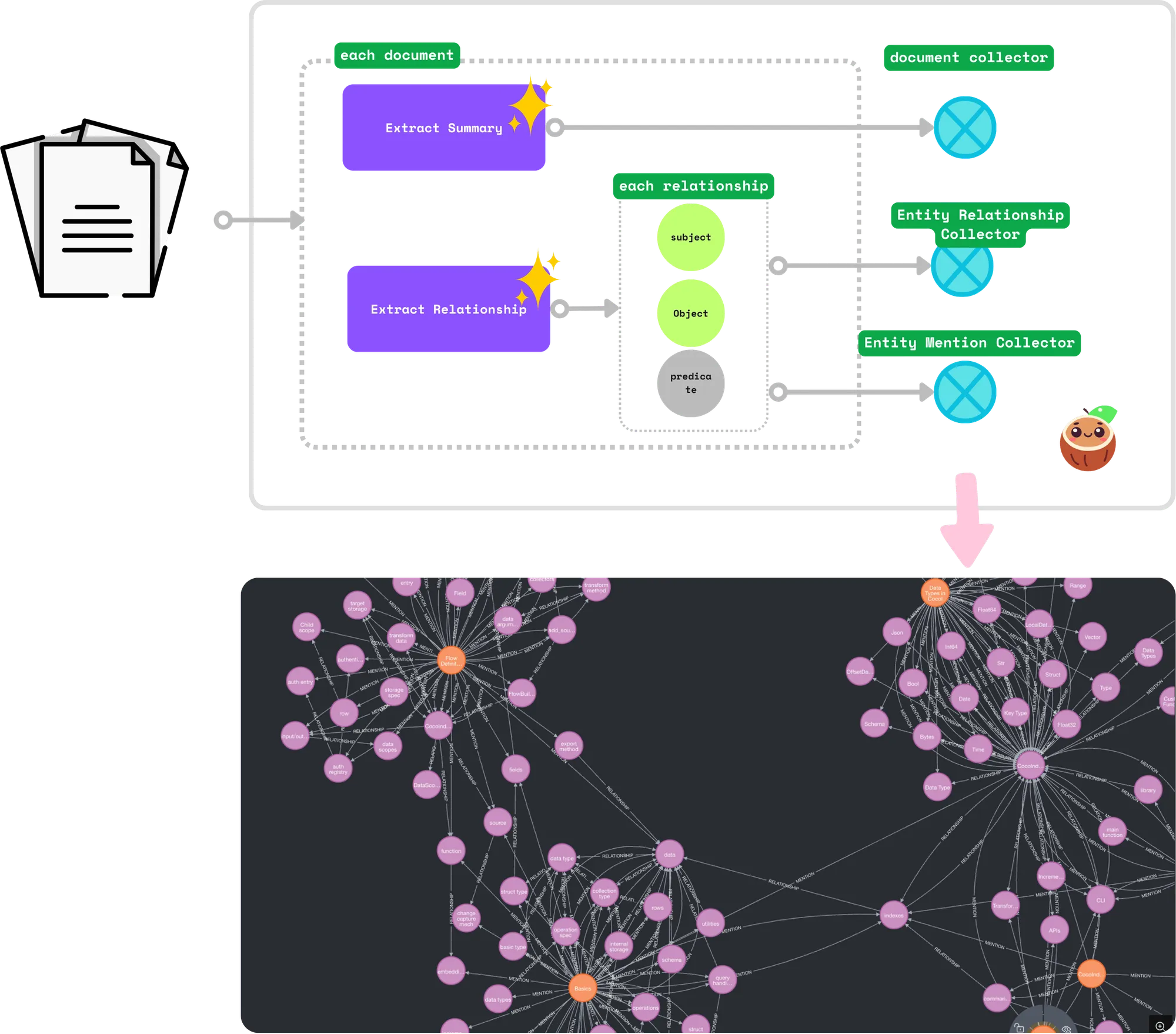
Documentation is a web of concepts pretending to be a list of files. Every page asserts relationships (“CocoIndex supports incremental processing”), but they are locked in prose. This post turns a folder of Markdown documents (CocoIndex’s own docs) into a Neo4j knowledge graph: an LLM reads each document and extracts the relationships between the concepts it talks about, and CocoIndex reconciles them into the graph incrementally as documents change.
We generate two kinds of relationships:
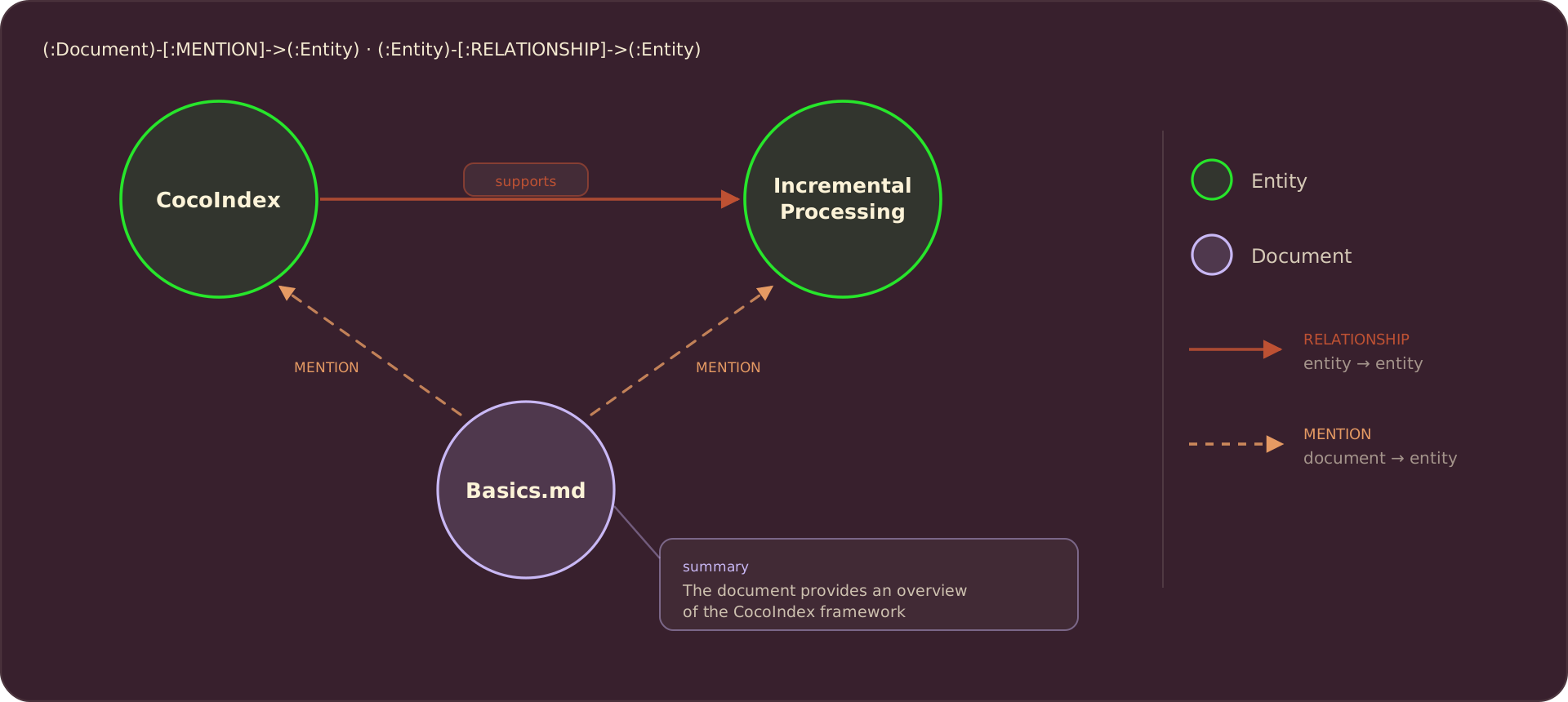
- Relationships between subjects and objects. E.g., “CocoIndex supports Incremental Processing”.
- Mentions of entities in a document. E.g.,
basics.mdmentionsCocoIndexandIncremental Processing.
The end result is a small, well-defined graph schema: two node labels (Document and Entity) and two relationship types (RELATIONSHIP between entities, and MENTION connecting a document to the entities it references). Everything the LLM extracts lands in one of those four shapes, which is what keeps the graph queryable rather than a loose pile of triples.
The source code is available at CocoIndex Examples - docs_to_knowledge_graph.
Prerequisites
- Install Neo4j, a graph database. A docker one-liner is in the Run it section below.
- An LLM API key. The example defaults to OpenAI, and the model is a LiteLLM id, so you can set
LLM_MODEL=ollama/llama3.2to run the extraction locally instead.
The graph schema
All nodes for Neo4j need two things:
- Label: the type of the node. E.g.,
Document,Entity. - Primary key: the field that uniquely identifies the node. E.g.,
filenameforDocumentnodes.
CocoIndex uses the primary key to match and deduplicate nodes: declaring the same key twice produces one node. In CocoIndex v1 the schema is plain dataclasses:
from dataclasses import dataclass

@dataclass
class Document:
    filename: str  # primary key
    title: str
    summary: str

@dataclass
class Entity:
    value: str  # primary key — the concept name

@dataclass
class Relationship:
    """RELATIONSHIP edge payload. ``id`` is a stable hash of the triple so the
    same (subject, predicate, object) always maps to a single edge; the
    ``predicate`` is stored as an edge property."""
    id: int
    predicate: str
MENTION carries no payload, so it needs no dataclass at all: the Neo4j connector derives its identity from the (document, entity) endpoints, one edge per pair.
The flow
Entities are shared across documents: the same concept, say CocoIndex, shows up in triples from many files, and every one of those references must collapse onto a single Entity node. So the pipeline runs in two phases. Phase 1 processes each document independently: it declares the Document node and extracts the relationship triples. Phase 2 is a single pass over all the triples: it owns the deduplicated Entity nodes and declares the RELATIONSHIP and MENTION edges.
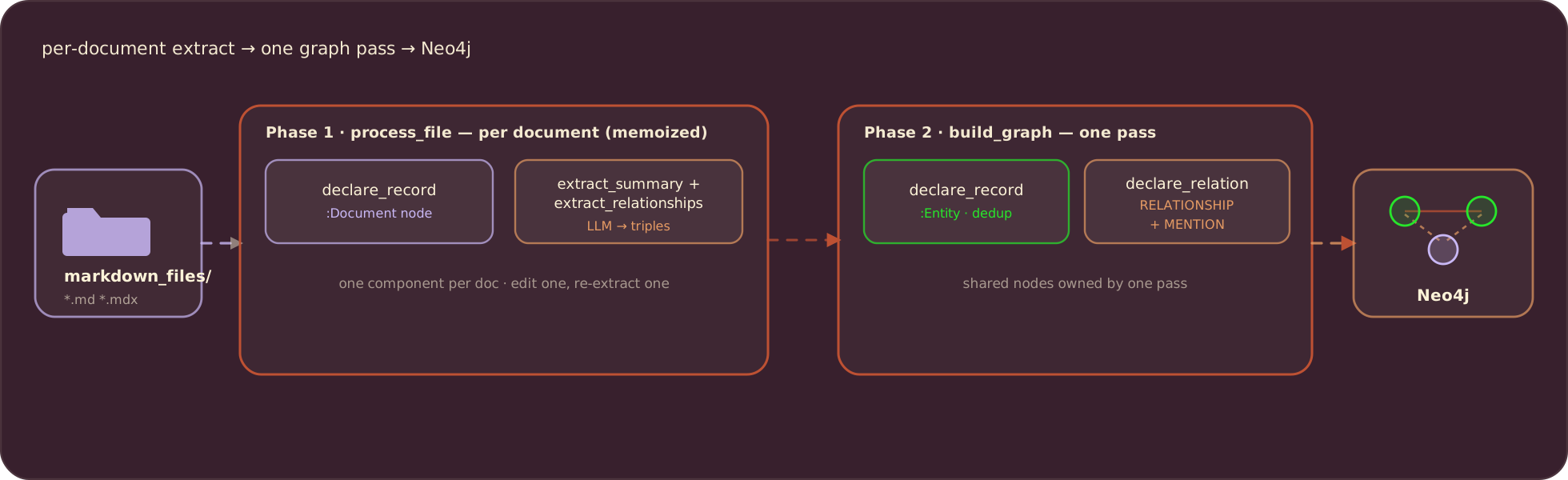
Because phase 1 runs one component per file, editing one document re-extracts only that document. The graph pass then diffs: nodes and edges that are no longer supported by any document are removed automatically.
Connect Neo4j
The Neo4j connection is provided once in the app lifespan and read anywhere with a ContextKey. The LLM model name is a context value too, declared with detect_change=True so swapping models re-extracts everything against the new one:
import cocoindex as coco
from cocoindex.connectors import localfs, neo4j

KG_DB = coco.ContextKey[neo4j.ConnectionFactory]("kg_db")
LLM_MODEL = coco.ContextKey[str]("llm_model", detect_change=True)


@coco.lifespan
async def coco_lifespan(builder: coco.EnvironmentBuilder) -> AsyncIterator[None]:
    builder.provide(
        KG_DB,
        neo4j.ConnectionFactory(
            uri=os.environ.get("NEO4J_URI", "bolt://localhost:7687"),
            auth=(
                os.environ.get("NEO4J_USER", "neo4j"),
                os.environ.get("NEO4J_PASSWORD", "cocoindex"),
            ),
            database=os.environ.get("NEO4J_DATABASE", "neo4j"),
        ),
    )
    builder.provide(LLM_MODEL, os.environ.get("LLM_MODEL", "openai/gpt-5-mini"))
    yield
Summarize each document
The extraction schemas are Pydantic models, and the field descriptions are part of the prompt. For the summary we ask for a title and one paragraph:
import pydantic

class DocumentSummary(pydantic.BaseModel):
    title: str = pydantic.Field(description="A concise title for the document.")
    summary: str = pydantic.Field(
        description="A one-paragraph summary of what the document covers."
    )
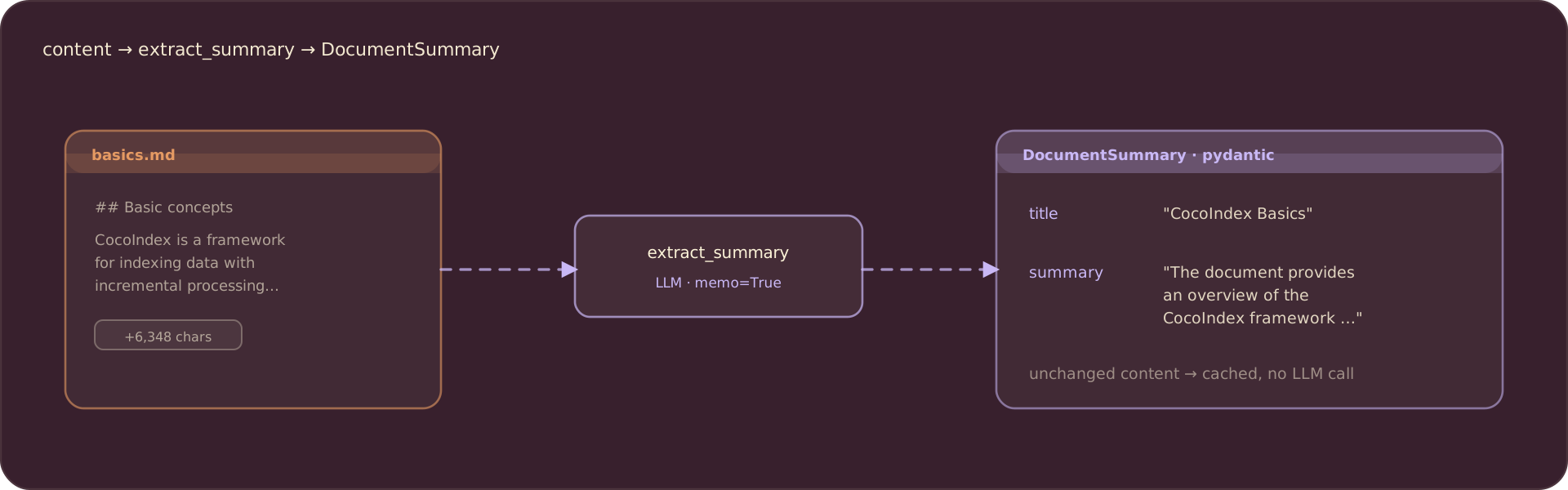
Extraction is one CocoIndex function that calls the model through instructor over LiteLLM, forcing the response to match the schema. memo=True memoizes the result by content, so an unchanged document is never sent to the model twice:
@coco.fn(memo=True)
async def extract_summary(content: str) -> DocumentSummary:
    client = instructor.from_litellm(litellm.acompletion, mode=instructor.Mode.JSON)
    result = await client.chat.completions.create(
        model=coco.use_context(LLM_MODEL),
        response_model=DocumentSummary,
        messages=[
            {"role": "system", "content": SUMMARY_PROMPT},
            {"role": "user", "content": content},
        ],
    )
    return DocumentSummary.model_validate(result.model_dump())
For each document the model returns a typed summary:
Extract relationship triples
A relationship is a (subject, predicate, object) triple. The subject and object become Entity nodes, and the predicate is the label on the edge between them:
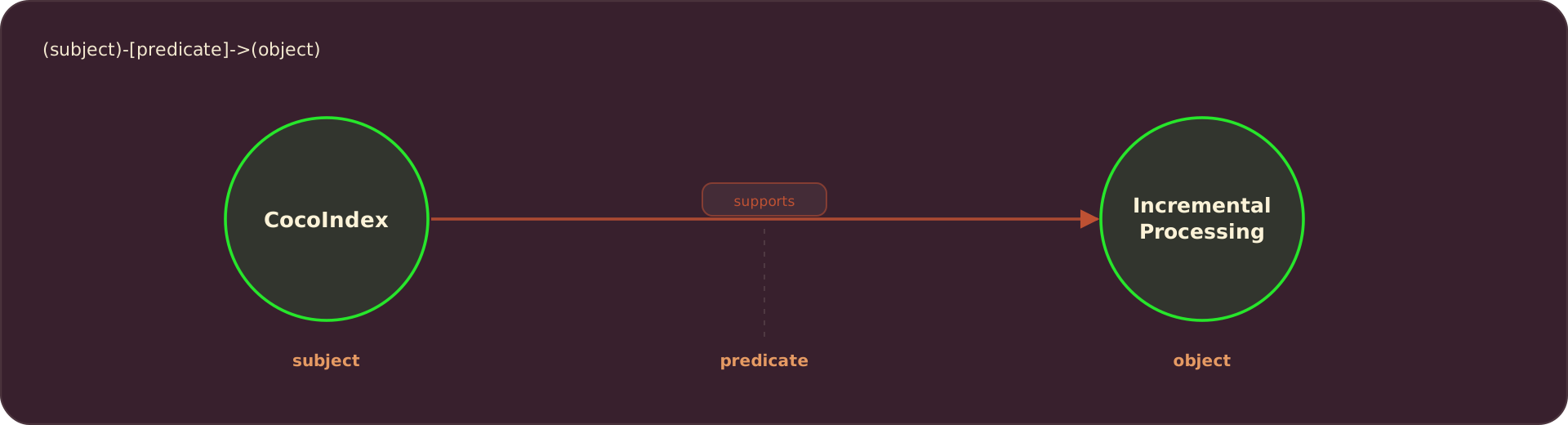
The Pydantic model mirrors that shape, and the system prompt steers the model toward concepts rather than code:
class ExtractedRelationship(pydantic.BaseModel):
    subject: str = pydantic.Field(
        description="The concept the statement is about, e.g. 'CocoIndex'."
    )
    predicate: str = pydantic.Field(
        description="How subject relates to object, e.g. 'supports'."
    )
    object: str = pydantic.Field(
        description="The related concept, e.g. 'Incremental Processing'."
    )

class RelationshipList(pydantic.BaseModel):
    relationships: list[ExtractedRelationship] = pydantic.Field(default_factory=list)


RELATIONSHIP_PROMPT = """\
You extract a concept knowledge graph from technical documentation.
List the salient (subject, predicate, object) relationships between concepts.
Focus on concepts and ignore code examples and implementation details.
Use concise noun phrases for subjects and objects and a short verb phrase for
the predicate. Return only relationships supported by the text.
"""
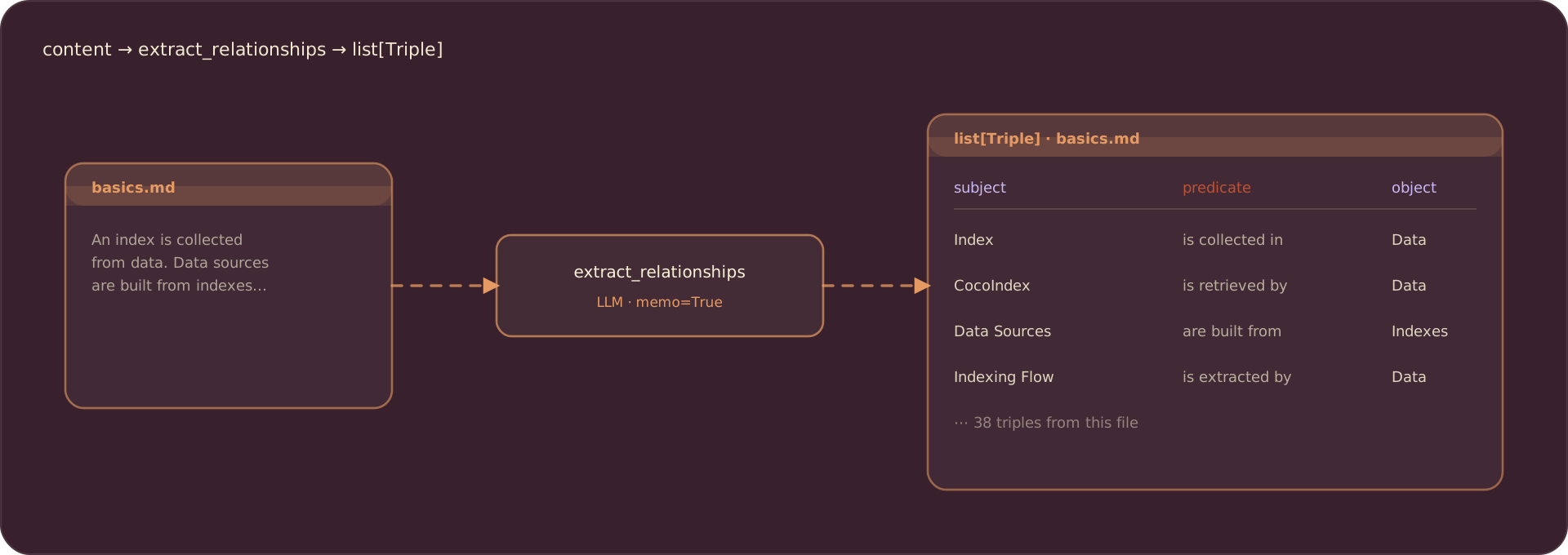
The extraction function has the same shape as the summary one, memoized the same way:
@coco.fn(memo=True)
async def extract_relationships(content: str) -> list[Triple]:
    client = instructor.from_litellm(litellm.acompletion, mode=instructor.Mode.JSON)
    result = await client.chat.completions.create(
        model=coco.use_context(LLM_MODEL),
        response_model=RelationshipList,
        messages=[
            {"role": "system", "content": RELATIONSHIP_PROMPT},
            {"role": "user", "content": content},
        ],
    )
    validated = RelationshipList.model_validate(result.model_dump())
    return [Triple(r.subject, r.predicate, r.object) for r in validated.relationships]
On the CocoIndex docs, one file yields a few dozen triples:
Phase 1: one Document node per file
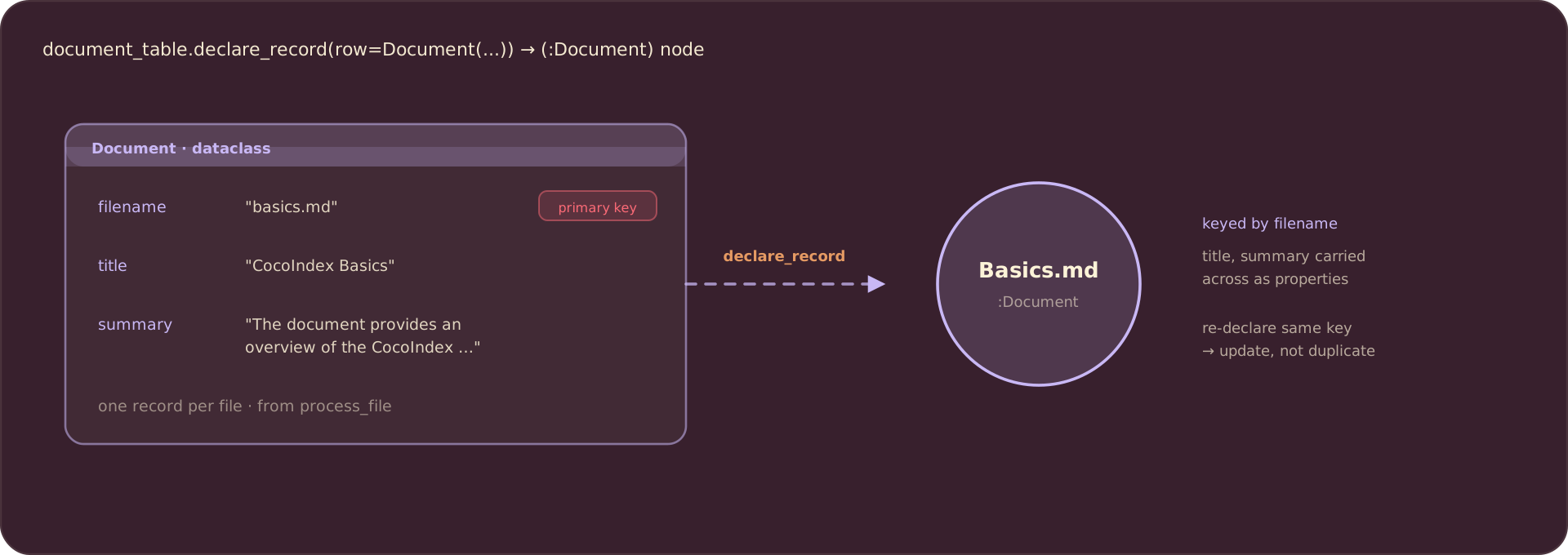
process_file handles a single document: read the content, extract the summary, declare the Document node into the graph, and return the triples for phase 2. declare_record writes one node; CocoIndex reconciles it into Neo4j by the primary key:
@coco.fn(memo=True)
async def process_file(
    file: localfs.File,
    document_table: neo4j.TableTarget[Document],
) -> DocTriples:
    content = await file.read_text()
    filename = file.file_path.path.as_posix()

    summary = await extract_summary(content)
    document_table.declare_record(
        row=Document(filename=filename, title=summary.title, summary=summary.summary)
    )

    triples = await extract_relationships(content)
    return DocTriples(filename=filename, triples=triples)
Each declared record becomes a Document node keyed by filename, with the title and summary carried across as node properties:
Phase 2: build the concept graph
Phase 2 receives the triples from every document. Because Entity nodes are keyed by value, declaring CocoIndex from ten different documents still produces exactly one node: CocoIndex deduplicates by the primary key. The edges then fan out from that one node, which is exactly what you want when you later query “what mentions this concept?”.
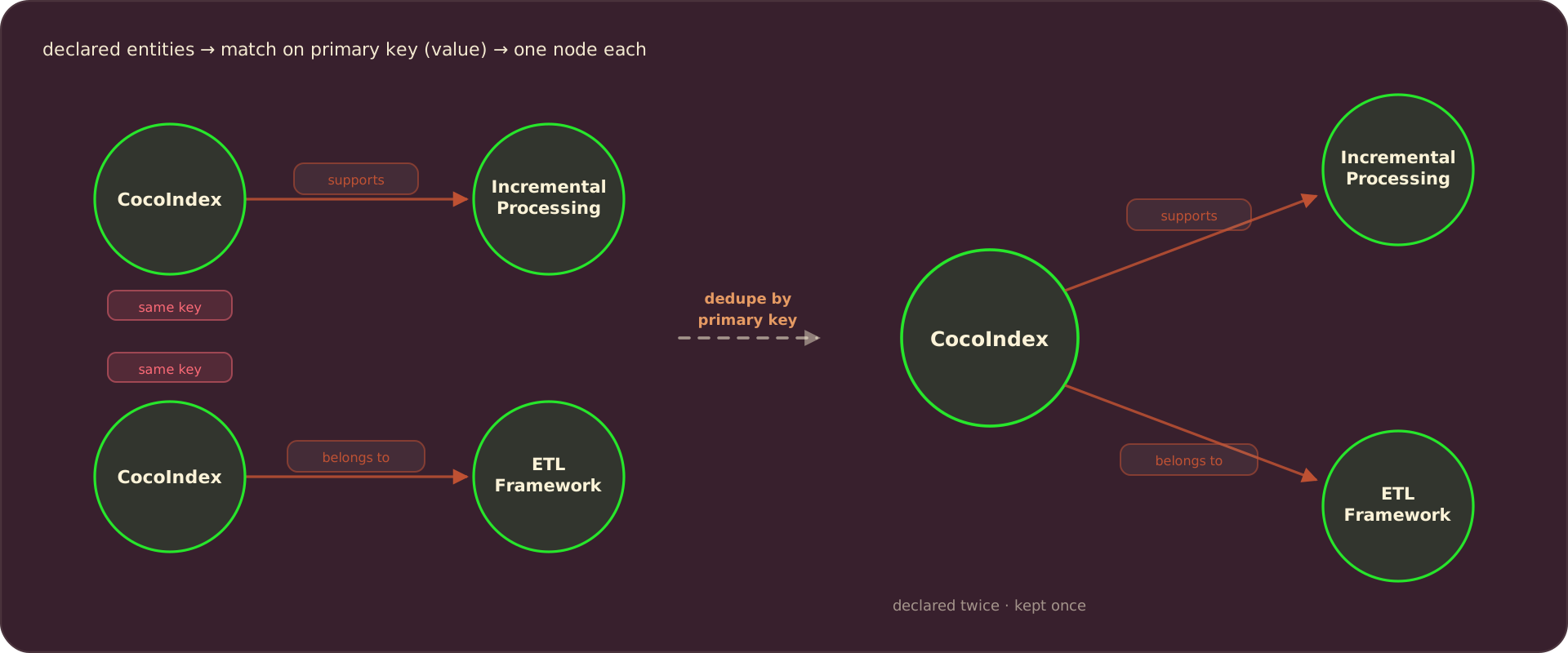
One pass gathers the distinct entities and mentions, then declares everything. declare_relation connects two nodes by their primary keys, and generate_id hashes each triple so the same fact always maps to the same edge, whether it is re-extracted or asserted again by another document:
@coco.fn
async def build_graph(
    docs: list[DocTriples],
    entity_table: neo4j.TableTarget[Entity],
    relationship_rel: neo4j.RelationTarget[Relationship],
    mention_rel: neo4j.RelationTarget[Any],
) -> None:
    entities: set[str] = set()
    mentions: set[tuple[str, str]] = set()  # (filename, entity value)

    for doc in docs:
        for t in doc.triples:
            entities.add(t.subject)
            entities.add(t.object)
            mentions.add((doc.filename, t.subject))
            mentions.add((doc.filename, t.object))

            rel_id = await generate_id((t.subject, t.predicate, t.object))
            relationship_rel.declare_relation(
                from_id=t.subject,
                to_id=t.object,
                record=Relationship(id=rel_id, predicate=t.predicate),
            )

    for value in entities:
        entity_table.declare_record(row=Entity(value=value))

    for filename, entity in mentions:
        mention_rel.declare_relation(from_id=filename, to_id=entity)
The RELATIONSHIP edges connect Entity nodes, with the predicate stored on the edge:
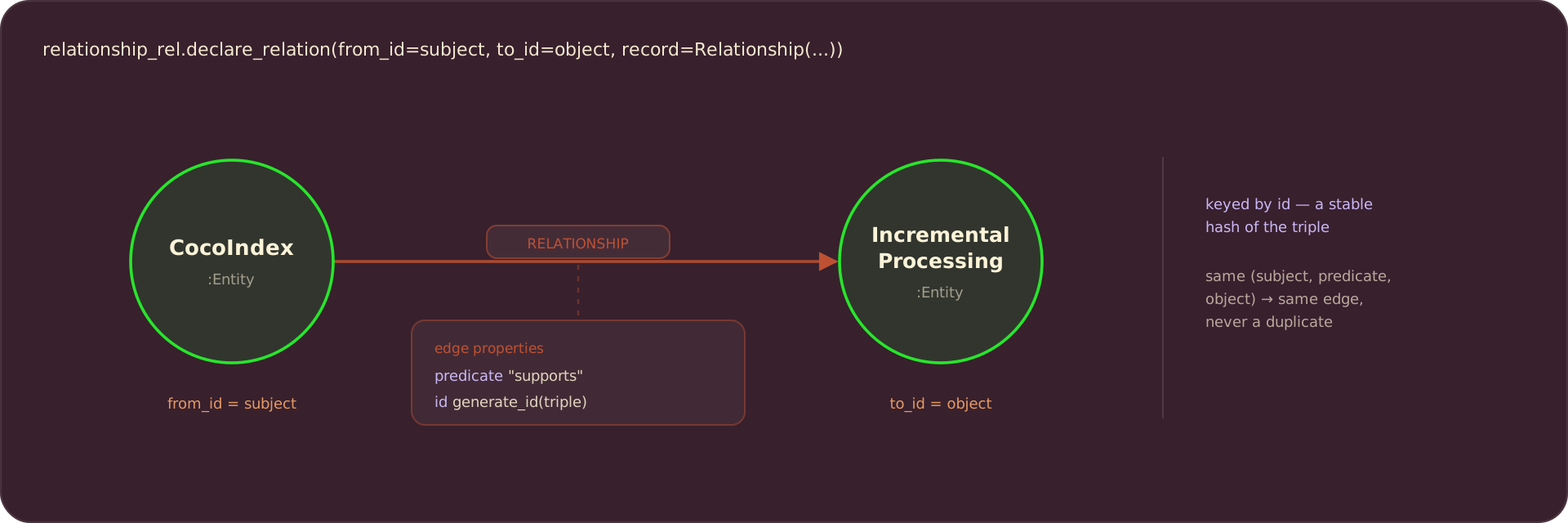
The MENTION edges record which document named which concept. For example, basics.md has a sentence “CocoIndex supports Incremental Processing”, so it mentions both CocoIndex and Incremental Processing:
Wire up the app
app_main mounts the two node tables and the two relation targets, walks the docs folder, fans out one process_file per document, then runs the single build_graph pass over the collected triples:
@coco.fn
async def app_main(sourcedir: pathlib.Path) -> None:
    document_table = await neo4j.mount_table_target(
        KG_DB,
        "Document",
        await neo4j.TableSchema.from_class(Document, primary_key="filename"),
        primary_key="filename",
    )
    entity_table = await neo4j.mount_table_target(
        KG_DB,
        "Entity",
        await neo4j.TableSchema.from_class(Entity, primary_key="value"),
        primary_key="value",
    )
    relationship_rel = await neo4j.mount_relation_target(
        KG_DB,
        "RELATIONSHIP",
        entity_table,
        entity_table,
        await neo4j.TableSchema.from_class(Relationship, primary_key="id"),
        primary_key="id",
    )
    mention_rel = await neo4j.mount_relation_target(
        KG_DB, "MENTION", document_table, entity_table
    )

    files = localfs.walk_dir(
        sourcedir,
        recursive=True,
        path_matcher=PatternFilePathMatcher(included_patterns=["**/*.md", "**/*.mdx"]),
    )
    file_coros = []
    async for path_key, file in files.items():
        file_coros.append(
            coco.use_mount(
                coco.component_subpath("file", path_key),
                process_file,
                file,
                document_table,
            )
        )
    docs: list[DocTriples] = list(await asyncio.gather(*file_coros))

    await coco.mount(
        coco.component_subpath("build_graph"),
        build_graph,
        docs,
        entity_table,
        relationship_rel,
        mention_rel,
    )


app = coco.App(
    coco.AppConfig(name="DocsToKnowledgeGraph"),
    app_main,
    sourcedir=pathlib.Path("./markdown_files"),
)
RELATIONSHIP is mounted with the Relationship schema so each distinct triple, keyed by the hashed id, becomes its own edge. MENTION is mounted without a schema, so the connector keys it by the endpoints.
Run it
Start Neo4j, install the example, and build the graph. The example ships a markdown_files/ folder of sample docs so it runs out of the box:
docker run -d -p 7474:7474 -p 7687:7687 -e NEO4J_AUTH=neo4j/cocoindex --name cocoindex-neo4j neo4j:5.26-community
cp .env.example .env     # set OPENAI_API_KEY (or LLM_MODEL=ollama/llama3.2 to run locally)
pip install -e .
cocoindex update main
To graph your own docs, drop .md / .mdx files into markdown_files/ (or point sourcedir at your real docs folder) and re-run. Only changed documents are re-extracted; a no-change re-run makes zero LLM calls.
Browse the knowledge graph
Open Neo4j Browser (username neo4j, password cocoindex) and run a Cypher query. To see how concepts relate:
MATCH (a:Entity)-[r:RELATIONSHIP]->(b:Entity)
RETURN a.value, r.predicate, b.value
To find the concepts mentioned in the most documents:
MATCH (d:Document)-[:MENTION]->(e:Entity)
RETURN e.value, count(DISTINCT d) AS docs
ORDER BY docs DESC LIMIT 10
Or MATCH p=()-->() RETURN p to see everything:
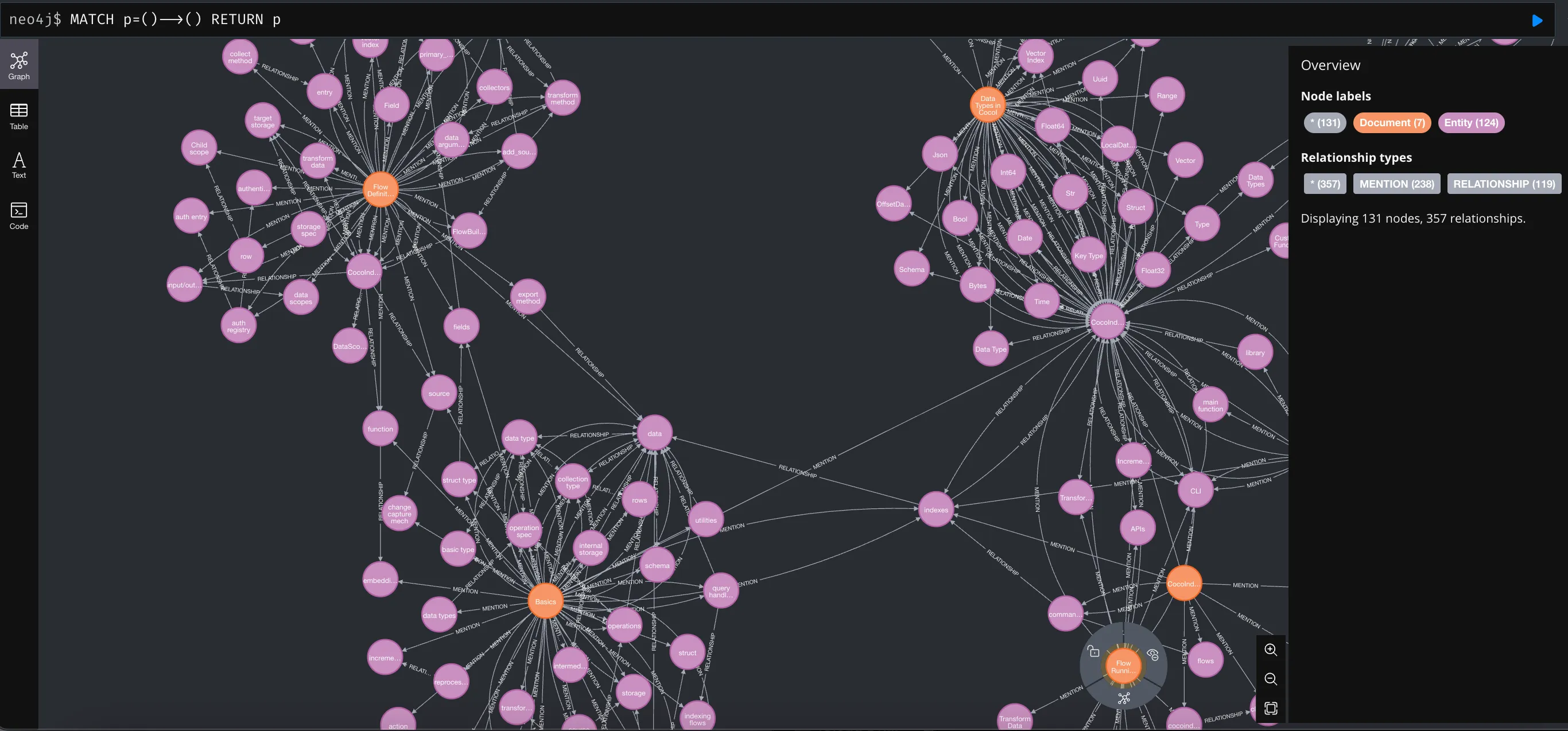
The LLM will sometimes name the same concept two ways (“CocoIndex” vs “Cocoindex”). The meeting notes graph example adds an embedding plus LLM entity-resolution pass that collapses near-duplicates; it drops into this pipeline between the two phases.
Support us
We are constantly adding examples and improving the runtime. If this was helpful, please star CocoIndex on GitHub.

About the author.

CEO and cofounder of CocoIndex. Writes about incremental data infrastructure, agents, and the engineering decisions behind the engine.
Frequently asked questions.
How do I build a knowledge graph from documents with an LLM?
Process your documents with CocoIndex: an LLM extracts subject–predicate–object relationships from each document, and CocoIndex declares them as nodes and edges in a graph database like Neo4j. In this example the pipeline reads CocoIndex's own Markdown docs and reconciles the graph incrementally as documents change. See The flow.
How do I extract structured subject-predicate-object relationships from text with an LLM?
Define a Pydantic model with subject, predicate, and object fields and pass it as the response_model to an LLM call via instructor over LiteLLM. The field descriptions guide the model toward good output, and wrapping the call in @coco.fn(memo=True) caches the extraction by content. See Extract relationship triples.
What is the difference between an entity relationship and an entity mention in a knowledge graph?
This example generates two kinds of edges. A RELATIONSHIP connects two entities, e.g. "CocoIndex supports Incremental Processing", with the predicate stored on the edge. A MENTION records that a document references an entity, e.g. basics.md mentions CocoIndex and Incremental Processing. They are declared through separate relation targets. See Phase 2: build the concept graph.
How does CocoIndex deduplicate nodes when building a Neo4j knowledge graph?
Every node has a label (its type, e.g. Document or Entity) and a primary key (e.g. filename for Document nodes, value for Entity nodes). CocoIndex matches nodes by the primary key: declaring the same key from many documents produces exactly one node. See Phase 2: build the concept graph.
How do I export relationships and entity nodes to Neo4j with CocoIndex?
Mount a node table per label with neo4j.mount_table_target and a relation target per edge type with neo4j.mount_relation_target, then declare rows with declare_record and edges with declare_relation(from_id=…, to_id=…). An edge with a payload (like the predicate) takes a schema and its own primary key; a payload-free edge like MENTION is keyed by its endpoints. See Wire up the app.
What do I need to run the knowledge graph example?
You need Neo4j as the graph database (a docker one-liner is in the post) and an LLM API key. The model id is a LiteLLM id, so you can swap OpenAI for a local model with LLM_MODEL=ollama/llama3.2. Unlike CocoIndex v0, no PostgreSQL is needed: incremental state is tracked in a local file. See Prerequisites.
How do I view the knowledge graph after building it?
Open Neo4j Browser at http://localhost:7474 using the dev credentials (username neo4j, password cocoindex) and run a Cypher query, e.g. MATCH p=()-->() RETURN p to see all relationships, or aggregate MENTION edges to rank the most-referenced concepts. See Browse the knowledge graph.
