
Incremental processing is one of the core values provided by CocoIndex. In CocoIndex, users declare the transformation, and don’t need to worry about the work to keep the index and source in sync.
CocoIndex creates & maintains an index, and keeps the derived index up to date based on source updates, with minimal computation and changes. That makes it suitable for ETL/RAG or any transformation tasks that stay low latency between source and index updates, and also minimizes the computation cost.
What is incremental processing?
Figuring out what exactly needs to be updated, and only updating that without having to recompute everything throughout.
How does it work?
You don’t really need to do anything special, just focus on defining the transformation needed.
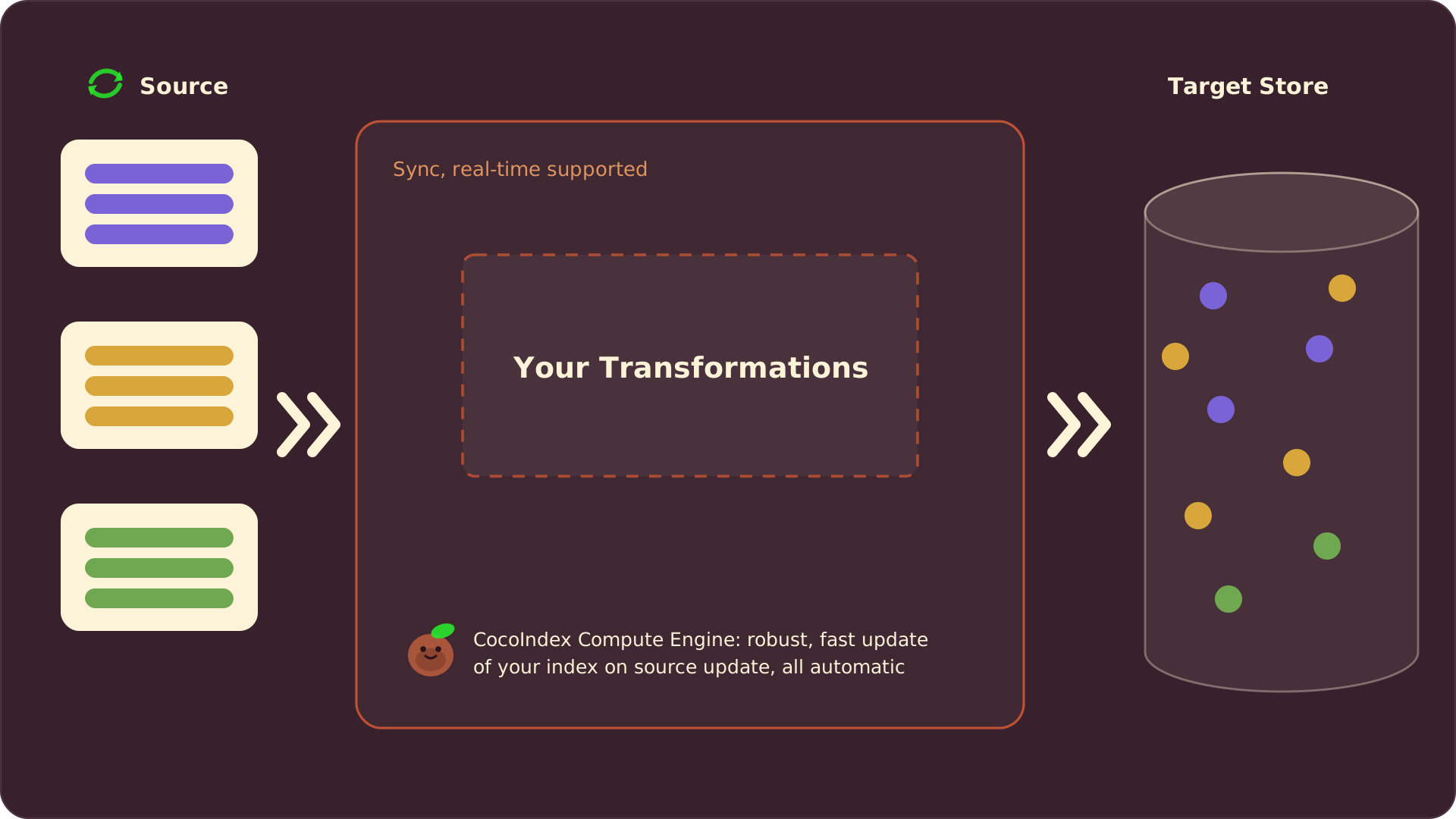
CocoIndex automatically tracks the lineage of your data and maintains a cache of computation results. When you update your source data, CocoIndex will:
- Identify which parts of the data have changed
- Only recompute transformations for the changed data
- Reuse cached results for unchanged data
- Update the index with minimal changes
And CocoIndex will handle the incremental processing for you.
CocoIndex provides two modes to run the pipeline:
- One-time update: Once triggered, CocoIndex updates the target data to reflect the version of source data up to the current moment.
- Live update: CocoIndex continuously reacts to changes of source data and updates the target data accordingly, based on various change capture mechanisms for the source.
Both modes run with incremental processing. You can view more details in Core Concepts.
Who needs incremental processing?
Many people may think incremental processing is only beneficial for large scale data. Thinking carefully, it really depends on the cost and requirement for data freshness.
Google processes huge scale data, backed by a huge amount of resources. Your data scale is much less, but your resource provision is also much more limited.
Incremental processing is needed under the following conditions:
-
High freshness requirement
For most user-facing applications this is needed. e.g. users update their documents, and it’s unexpected if they see stale information in search results.
If the search result is fed into an AI agent, it may mean an unexpected response to users (i.e. an LLM generates output based on inaccurate information). It’s more dangerous and users may even take the unexpected response without noticing.
-
Transformation cost is significantly higher than retrieval itself
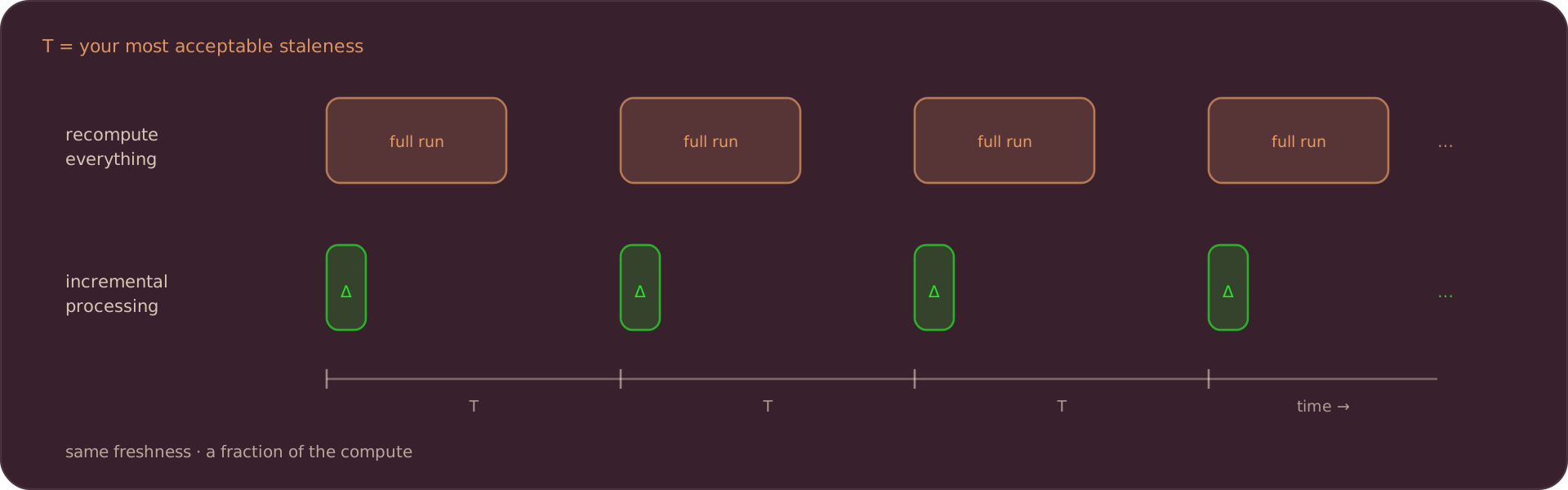
Overall, say T is your most acceptable staleness. If you don’t want to recompute the whole thing repeatedly every cycle of T, you will need incremental processing more or less.
How CocoIndex does incremental processing, by examples
We could take a look at a few examples to understand what CocoIndex handles behind the scenes for incremental processing.
Example 1: Update a document
Consider this scenario:
- I have a document. Initially, it’s split into 5 chunks, resulting in 5 rows with their embeddings in the index.
- After it’s updated, 3 of them are exactly the same as previous. Others are changed.
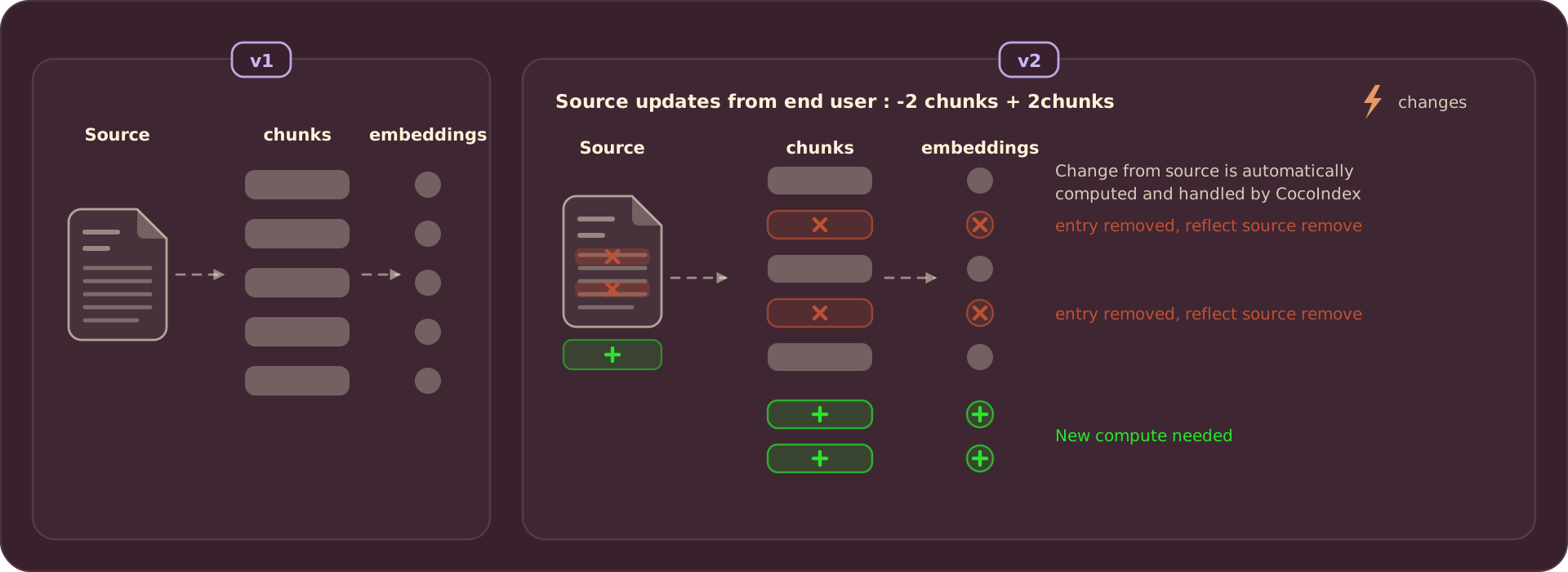
So we need to keep 3 rows, remove 2 previously existing rows, and add 2 new rows. These need to happen behind the scenes:
- Ideally, we only recompute embeddings for the 4 new rows, and reuse them for 3 unchanged chunks. This can save computation cost especially when the embedding API charges by usage. CocoIndex achieves this by maintaining a cache for heavy steps like embedding, and when the input for a transformation step isn’t changed, the output will be reused.
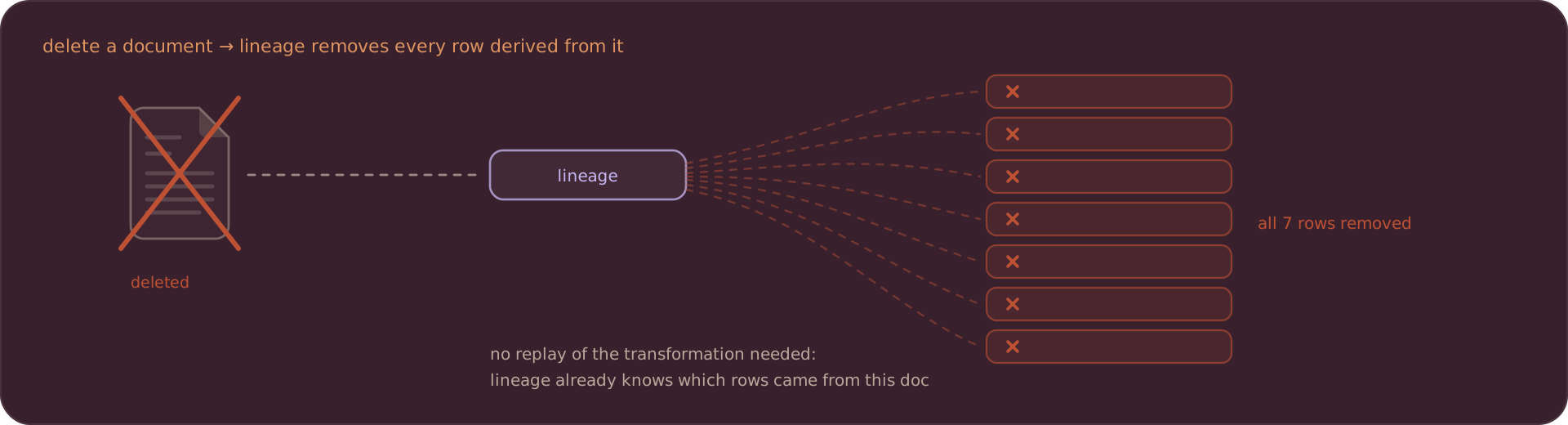
- Besides, we also maintain a lineage tracking in the internal storage. It keeps track of which rows in the index are derived from the previous version of this document, to make sure stale versions are properly removed.
CocoIndex takes care of this.
Example 2: Delete a document
Continuing with the same example. If we delete the document later, we need to delete all 7 rows derived from the document. Again, this needs to be based on the lineage tracking maintained by CocoIndex.
Example 3: Change of the transformation flow
The transformation flow may also be changed, for example, the chunking logic is upgraded, or a parameter passed to the chunker is adjusted. This may result in the following scenario:
- Before the change, the document is split into 5 chunks, resulting in 5 rows with their embeddings in the index.
- After the change, they become 6 chunks: 4 of the previous chunks remain unchanged, the remaining 1 is split into 2 smaller chunks.
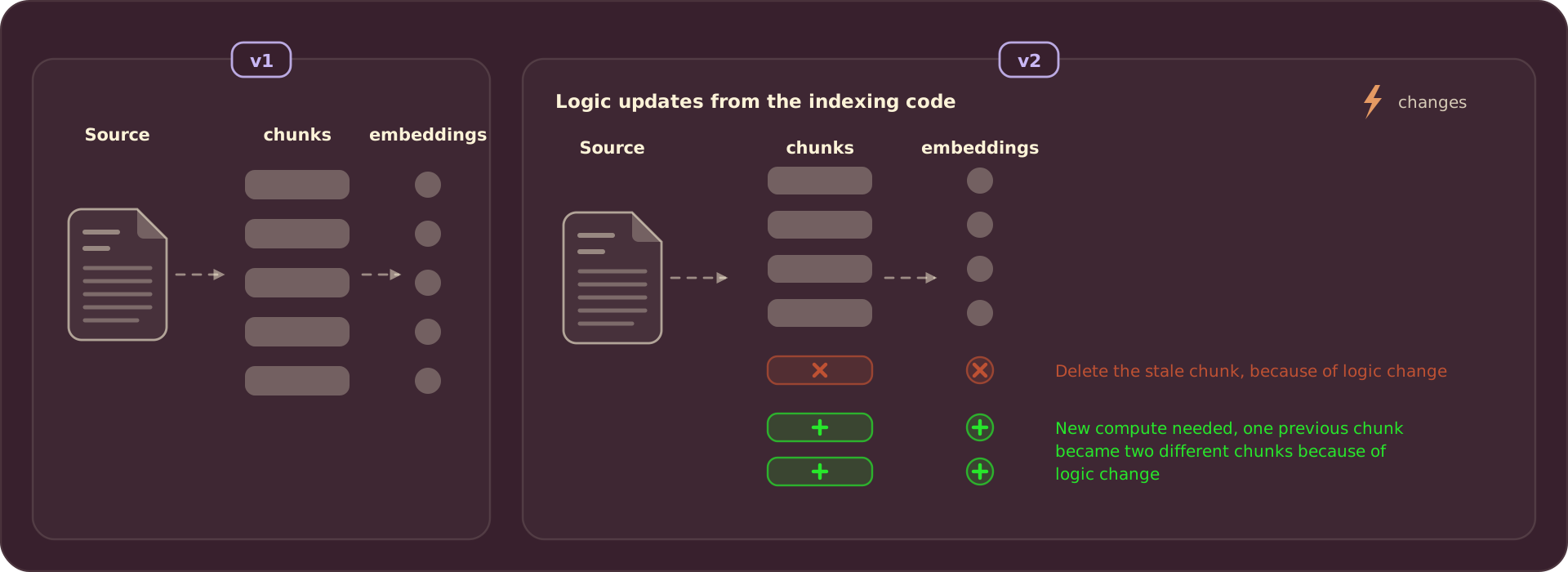
This falls into a similar situation as document update (example 1), and CocoIndex will take care of it. The approach is similar, while this involves some additional considerations:
-
We can still safely reuse embeddings for 4 unchanged chunks by the caching mechanism: this needs a prerequisite that the logic and parameters for embedding are unchanged. If the changed part is the embedding logic itself, we will recompute the embeddings for everything. CocoIndex is able to see if the logic or parameters for a step changed from the cached version, by putting this additional information in the cache key.
-
To remove stale rows in the target index, the lineage tracking works well again. Note that some other systems handle stale output deletions on source update/deletion by replaying the transformation logic on the previous version of input: this only works well when transformation is fully deterministic and never upgraded. CocoIndex’s lineage tracking based approach doesn’t have this limitation: it’s robust to transformation logic non-determinism and changes.
Example 4: Multiple inputs involved: merge / lookup / clustering
All examples above are simple cases: each single input row (e.g. a document) is involved independently during each specific transformation.
CocoIndex is a highly customizable framework, not only limited to simple chunking and embedding. It allows users to perform more complex advanced transformations, such as:
-
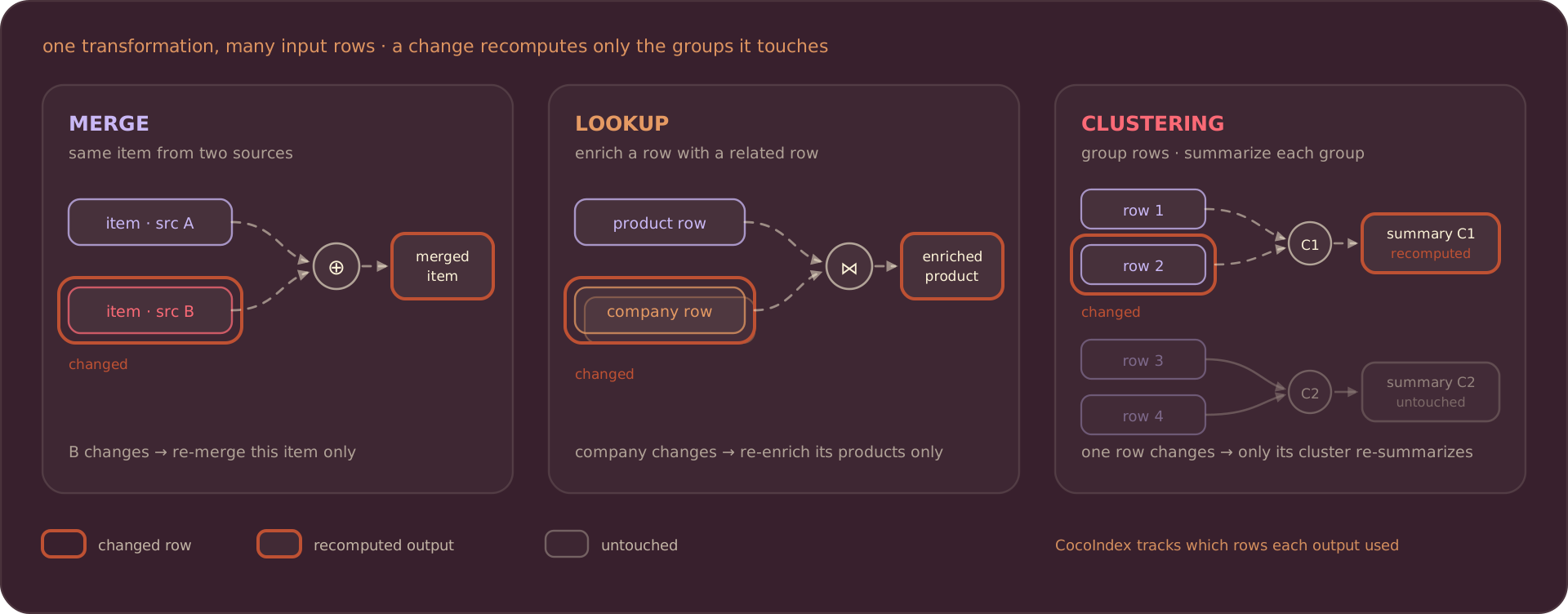
Merge. For example, you’re building an index for “all AI products”, and you want to combine information from multiple sources, some products exist in one source and some in multiple. For each product, you want to combine information from different sources.
-
Lookup. For example, you also have a data source about company information. During your transformation for each product, you want to enrich it with information of the company building the product, so a lookup for the company information is needed.
-
Clustering. For example, you want to cluster different products into scenarios, and create cluster-level summaries based on information of products in the cluster.
The common theme is that during transformation, multiple input rows (coming from single or multiple sources) need to be involved at the same time. Once a single input row is updated or deleted, CocoIndex will need to fetch other related rows from the same or other sources. Here which other rows are needed is based on which are involved in the transformations. CocoIndex keeps track of such relationships, and will fetch related rows and trigger necessary reprocessings incrementally.
Change data capture (CDC)
1. When source supports push change
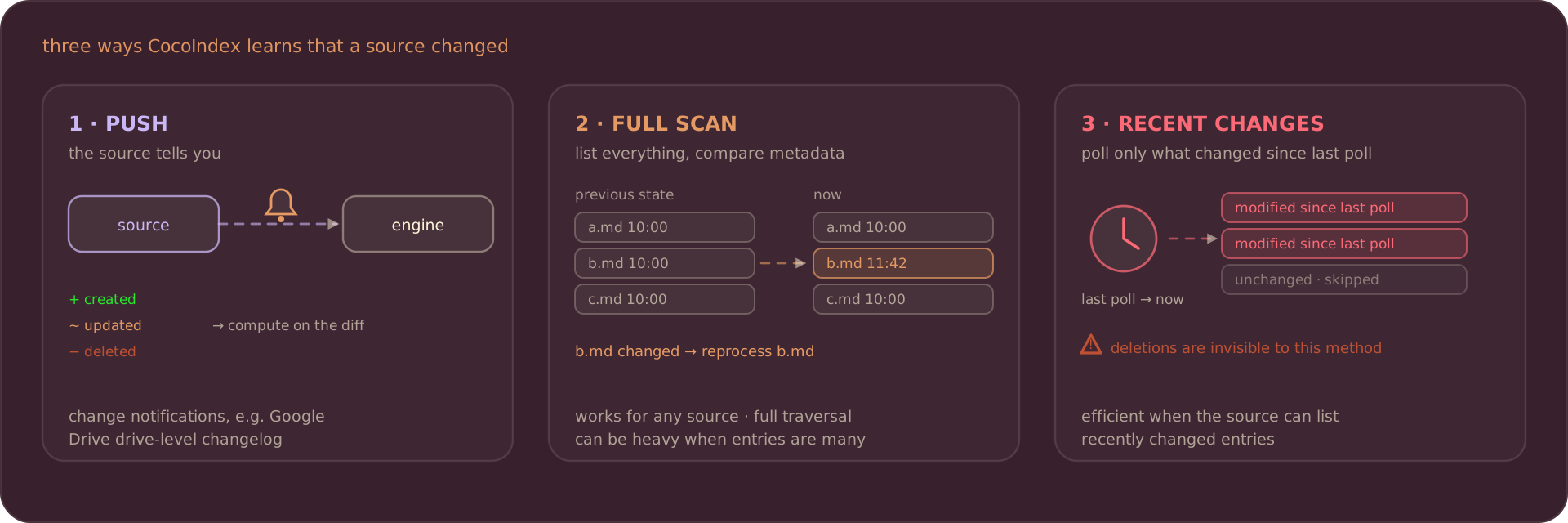
Some source connectors support push change. For example, Google Drive supports drive-level changelog and sends change notifications to your public URL, which is applicable for team drive and personal drive (only by OAuth, service account not supported). When a file is created, updated, or deleted, CocoIndex could compute based on the diff.
- Google Drive change log is only supported on the drive level, not the file/folder level.
- With service accounts, you can only enable changelog for team drives, by sharing the team drive with it.
2. Metadata-based, fullscan
All source connectors in CocoIndex provide a basic list API capability, which enables a generic change detection mechanism applicable to any data source.
For example, with local file systems, we can traverse all directories and subdirectories recursively to get the full list of entries and their metadata (like modification time). By comparing the current state with the previous state, CocoIndex can detect changes even without source-specific change notifications.
This approach works universally across all data sources, though when the number of entries is large, performing a complete traversal can be resource-intensive.
This is a generic mechanism applicable to all data sources, so all data sources can leverage this even if there’s no source-specific change capture.
3. Optimizations for specific sources
When the source connector provides advanced features to list entries, for example, listing most recently changed entries, CocoIndex could take advantage of that to provide more efficient change detection.
For example, when changelog is not available for Google Drive (see the conditions in the tip above), CocoIndex could monitor the change based on last modified vs last poll time, with a periodic trigger to check modified entries. However, this cannot capture full change, for example when an entry has been deleted.
Cache
In CocoIndex, every piece of the building block in the pipeline can be cached, keyed by memoization keys. Currently, whether or not cache is enabled is decided by the implementation of the function. For builtin functions, if it performs heavy transformation, cache is enabled.
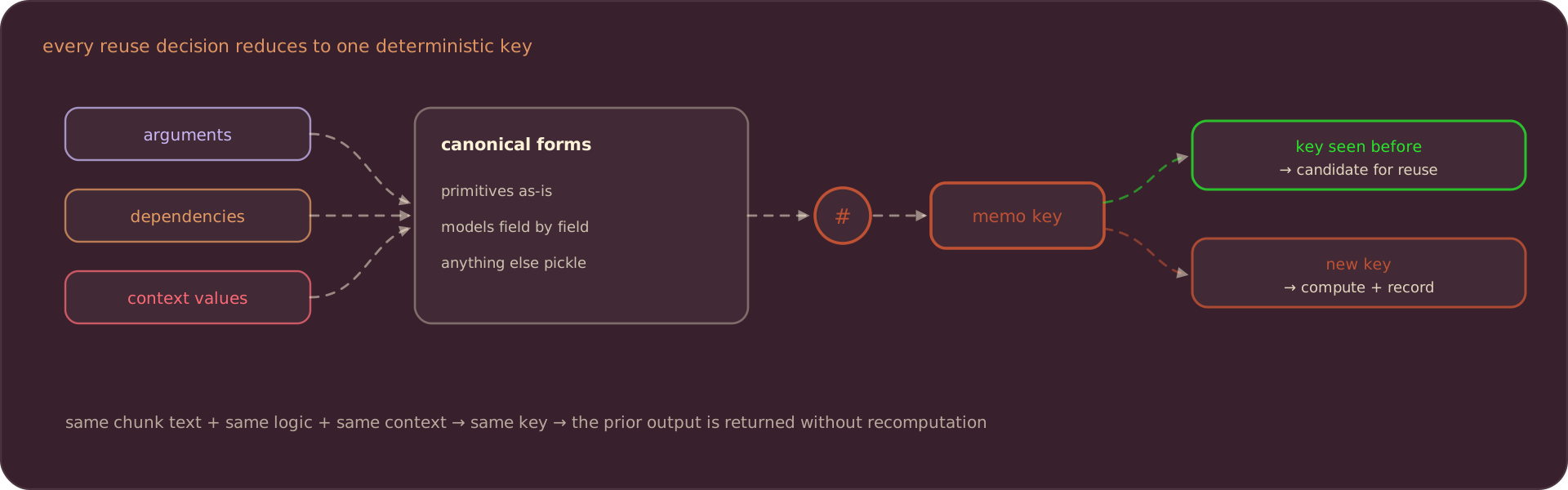
The decision of whether a cached result can be reused comes down to a single question: did anything the function depends on change? CocoIndex answers it by reducing every input (the function arguments, declared dependencies, and context values) to a deterministic fingerprint. Each value is mapped to a canonical form (primitives and containers directly, dataclasses and Pydantic models field by field, and a pickle fallback for anything else), and those forms are combined into one key. If that key matches a previously stored entry, the cached output is a candidate for reuse. This is the mechanism behind every reuse decision described in the examples above: when the embedding step sees the same chunk text and the same logic, its fingerprint is unchanged, and the prior embedding is returned without recomputation.
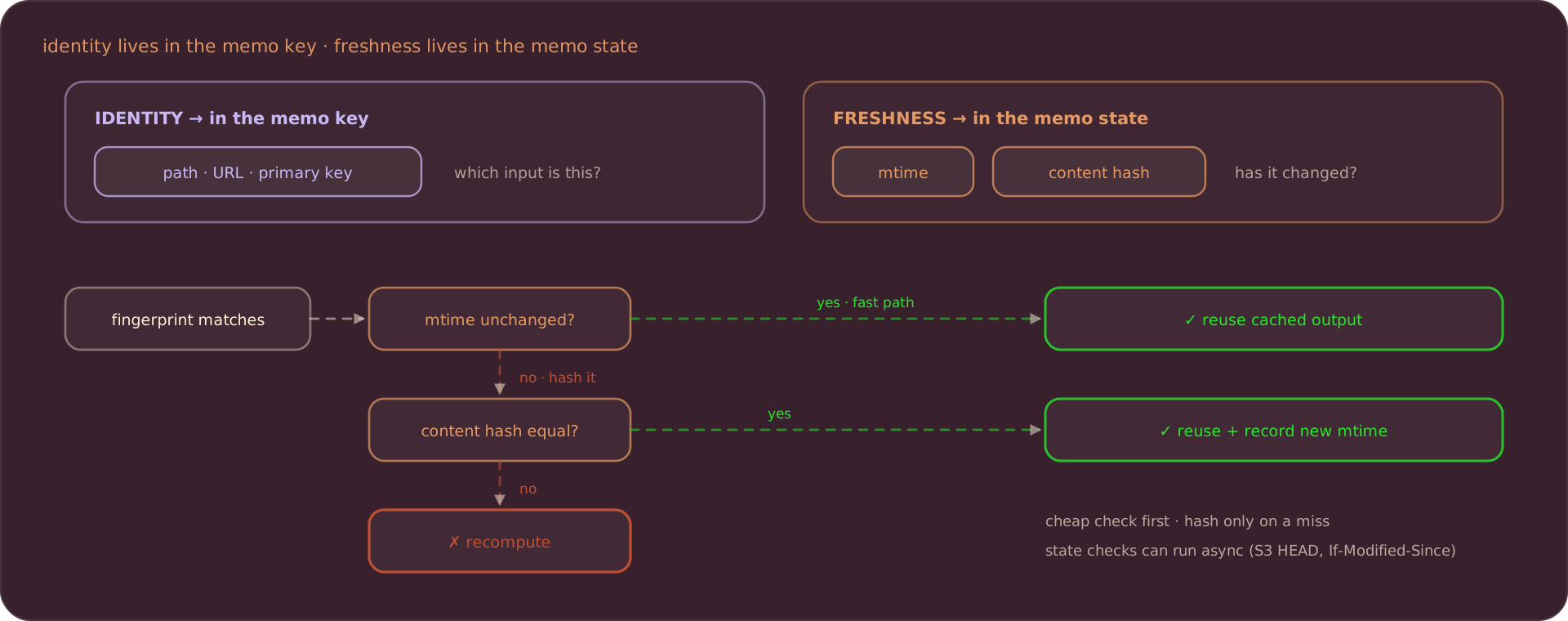
The subtle part is separating identity from freshness. A file’s path tells you which input you’re looking at; its modification time and content tell you whether that input has changed. Folding everything into one key works, but it forces an expensive check on every run: for a file, that means reading and hashing the whole thing each time. CocoIndex lets you split the two: keep the stable identifier (path, URL, primary key) in the memoization key, and attach a memo state that validates freshness only after the fingerprint matches. A state function can do a cheap check first (compare the modification time) and fall back to the expensive one (hash the content) only when the cheap check fails. Even then, it can confirm the content is identical and reuse the cached result while quietly recording the new modification time. State validation can also run asynchronously, which is what makes freshness checks like an S3 HEAD request or an If-Modified-Since header practical. See memoization keys for the full model.
Custom functions can take a parameter memo.
When True, CocoIndex memoizes the result of the function for reuse during reprocessing.
We recommend setting this to True for any function that is computationally intensive.
Output will be reused if both of these are unchanged: the input data and the behavior of the function.
When you change the function’s logic, bump version so the previously memoized results are invalidated.
For example, this enables memoization for a function:
import cocoindex as coco

@coco.fn(memo=True, version=1)
async def compute_something(arg1: str, arg2: int | None = None) -> str:
    ...
For a synchronous function you want to batch, force the async interface:
@coco.fn.as_async(memo=True, batching=True)
def compute_batch(args: list[str]) -> list[str]:
    ...
Thanks for reading and we love to hear from you! If you like our work, it would mean a lot to us if you could support Cocoindex on Github with a star.

About the author.

CEO and cofounder of CocoIndex. Writes about incremental data infrastructure, agents, and the engineering decisions behind the engine.
Frequently asked questions.
What is incremental processing in CocoIndex?
Incremental processing means figuring out what exactly needs to be updated and only updating that, instead of recomputing everything end to end. In CocoIndex you just declare the transformation; the framework keeps the derived index in sync with the source using minimal computation and changes.
How does incremental processing work without writing diff logic?
You don't do anything special: you define the transformation and CocoIndex automatically tracks the lineage of your data and caches computation results. On a source update it identifies which parts changed, recomputes transformations only for the changed data, reuses cached results for unchanged data, and updates the index with minimal changes.
See How does it work?.
Do I need incremental processing if my data is small?
Not only for large scale. Whether you need it depends on cost and data-freshness requirements. It helps when you have a high freshness requirement (most user-facing apps, where stale search results can even mislead an LLM-backed agent) or when transformation cost is significantly higher than retrieval itself. Put differently: if T is your acceptable staleness and you don't want to recompute everything every cycle of T, you need incremental processing.
What happens to the index when I edit or delete a source document?
When a document is edited, CocoIndex reuses cached embeddings for unchanged chunks, removes rows for chunks that no longer exist, and adds rows for new chunks, using lineage tracking to clear stale versions. When a document is deleted, all rows derived from it are removed, again via lineage tracking.
See Example 1: Update a document and Example 2: Delete a document.
Does CocoIndex reprocess everything when I change the transformation logic?
No. CocoIndex puts the logic and parameters of each step into the cache key, so it can tell when a step changed. If you change chunking, it reuses embeddings for unchanged chunks (provided the embedding logic and parameters are unchanged) and only re-embeds the chunks that actually changed; if you change the embedding logic itself, embeddings are recomputed. Stale target rows are removed via lineage tracking, which is robust to non-determinism and logic changes, unlike replay-based approaches.
How does CocoIndex detect changes in a source (change data capture)?
CocoIndex supports three mechanisms. Push change: connectors like Google Drive can receive change notifications and compute on the diff. Metadata-based full scan: every connector exposes a list API, so CocoIndex can compare current entry metadata (e.g. modification time) against the previous state — universal, but resource-intensive for very large entry counts. Source-specific optimizations: when a connector can list recently changed entries, CocoIndex uses that for more efficient detection (though polling by last-modified time can miss deletions).
How do I enable memoization for a custom function in CocoIndex?
Custom functions take a memo parameter; set it to True for any computationally intensive function. You can also provide a version that you increase when the function's behavior changes. A memoized output is reused only when the input data and the function's behavior are both unchanged — e.g. @coco.fn(memo=True, version=1).
See Cache.
