
In this blog, we’ll build a live semantic index over a codebase with CocoIndex V1. Point it at a repo, and you get a vector index you can search in natural language (“where do we embed chunks?”) that updates itself as you edit. It’s the kind of fresh, low-latency code context a coding agent needs, and it’s about 100 lines of plain async Python.
CocoIndex has built-in support for codebase chunking, with native Tree-sitter parsing and live updates.
The heavy lifting (incremental processing, change tracking, managed targets) runs in a Rust engine underneath. With a source that watches for changes, like the local filesystem in live mode, the index tracks your edits as they happen: save a file, and only the chunks that changed get re-embedded and re-upserted.
Use case
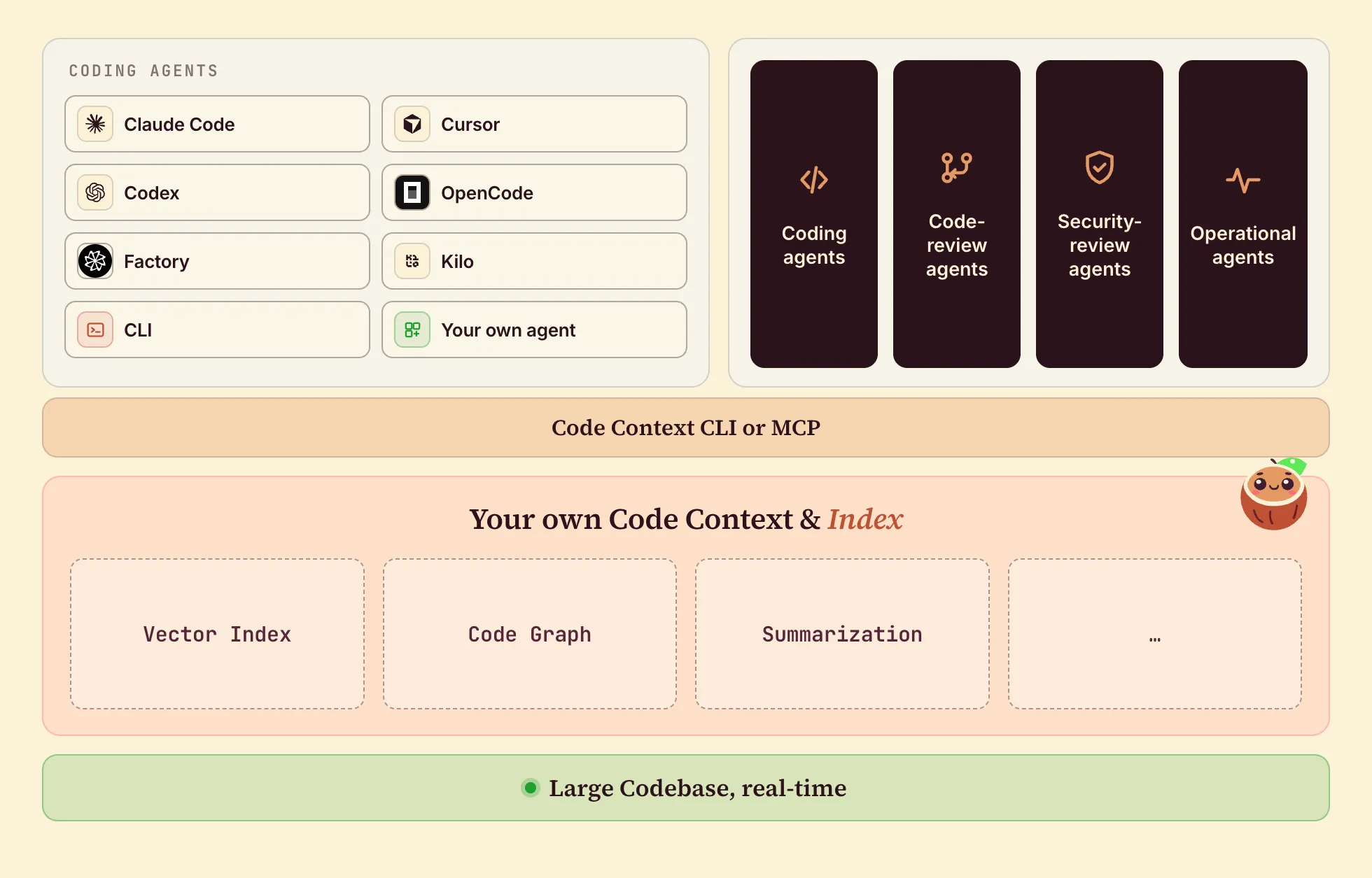
- Code context for agents: semantic context for Claude, Codex, OpenCode, Factory.
- Code search: natural-language and semantic search over your repo.
- Review & refactor agents: context for code review, security analysis, and large-scale refactoring.
Why CocoIndex for codebase indexing
A codebase is hard to keep indexed well, and it exercises most of what CocoIndex was built for:
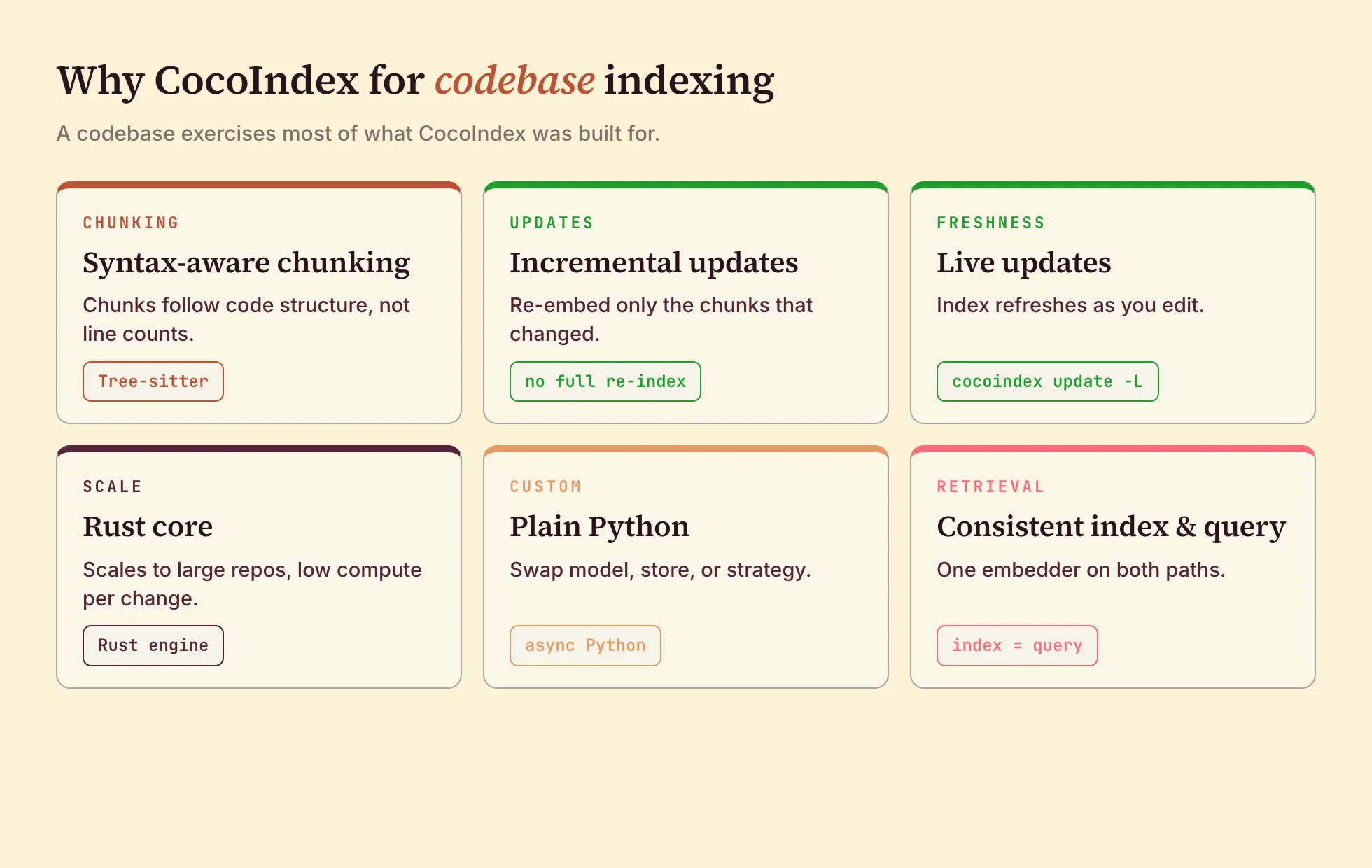
- Chunks follow real code structure (functions, classes, blocks) instead of arbitrary line windows. Tree-sitter parsing is built in for every major language.
- Code changes constantly: every commit, save, and rebase mutates a handful of files. CocoIndex re-embeds only the chunks that changed, and with
live=Truepluscocoindex update -Lit keeps watching and applies each edit as it happens. - The engine is Rust. The run below indexes 622 files in 43 seconds cold; after that, a save costs one file.
- The pipeline is ordinary
asyncPython and your own types. Pick your embedding model, chunking strategy, and vector database; if your agent can write Python, it can extend this flow.
examples/code_embedding The whole example is ~100 lines of plain Python. Clone it, point it at your repo, and swap in your favorite model or vector store.
Overview

From a high level, these are the steps:
- Read code files from a local directory.
- Split each file into syntax-aware chunks with Tree-sitter, then embed every chunk.
- Store the chunks and their embeddings in Postgres (as target states).
With CocoIndex, you declare the transformation logic with native Python, without worrying about handling updates.
Think: target_state = transformation(source_state).
When your codebase changes, or your processing logic changes (a different embedding model, a new chunk size), only the difference is reprocessed. The Incremental updates section walks through exactly what gets recomputed when.
Setup
In this example we store the indexed rows in Postgres with the pgvector extension. Your metadata and the vector search index both live there. CocoIndex supports many targets, so you can pick the one that works best for you.
-
If you don’t have Postgres running, use the Docker Compose file in the cocoindex repo to start one.
docker compose -f dev/postgres.yaml up -d -
Point CocoIndex at it
export POSTGRES_URL="postgres://cocoindex:cocoindex@localhost/cocoindex" -
Install CocoIndex and the dependencies
pip install -U "cocoindex[postgres,sentence_transformers]" asyncpg pgvector numpy python-dotenv
Define the App
Apps are the top-level runnable unit in CocoIndex. An app names your pipeline and binds a main function with its parameters.
Define the data and shared resources
This block sets up two things the rest of the code builds on. CodeEmbedding defines one row of the output table: each chunk of code becomes one row, with its text, location, and embedding vector. coco_lifespan provides the shared resources every step needs, the Postgres connection pool and the embedding model, built once at startup instead of per file.
import os
import pathlib
from dataclasses import dataclass
from typing import AsyncIterator, Annotated

import asyncpg
from numpy.typing import NDArray

import cocoindex as coco
from cocoindex.connectors import localfs, postgres
from cocoindex.ops.text import RecursiveSplitter, detect_code_language
from cocoindex.ops.sentence_transformers import SentenceTransformerEmbedder
from cocoindex.resources.chunk import Chunk
from cocoindex.resources.file import FileLike, PatternFilePathMatcher
from cocoindex.resources.id import IdGenerator

DATABASE_URL = os.getenv("POSTGRES_URL", "postgres://cocoindex:cocoindex@localhost/cocoindex")
TABLE_NAME = "code_embeddings"
EMBED_MODEL = "sentence-transformers/all-MiniLM-L6-v2"

PG_DB = coco.ContextKey[asyncpg.Pool]("code_embedding_db")
EMBEDDER = coco.ContextKey[SentenceTransformerEmbedder]("embedder", detect_change=True)

_splitter = RecursiveSplitter()


@dataclass
class CodeEmbedding:
    id: int
    filename: str
    code: str
    embedding: Annotated[NDArray, EMBEDDER]
    start_line: int
    end_line: int


@coco.lifespan
async def coco_lifespan(builder: coco.EnvironmentBuilder) -> AsyncIterator[None]:
    async with asyncpg.create_pool(DATABASE_URL) as pool:
        builder.provide(PG_DB, pool)
        builder.provide(EMBEDDER, SentenceTransformerEmbedder(EMBED_MODEL))
        yield
Define file processing
With the row schema and shared resources in place, we can write the actual work: turning a file into rows.
Process file
@coco.fn(memo=True)
async def process_file(
    file: FileLike,
    table: postgres.TableTarget[CodeEmbedding],
) -> None:
    text = await file.read_text()
    language = detect_code_language(filename=str(file.file_path.path.name))
    chunks = _splitter.split(
        text,
        chunk_size=1000,
        min_chunk_size=300,
        chunk_overlap=300,
        language=language,
    )
    id_gen = IdGenerator()
    await coco.map(process_chunk, chunks, file.file_path.path, id_gen, table)
process_file runs once per file. It reads the file, detects the language so Tree-sitter can parse it, splits the code along the syntax tree, and maps each chunk to process_chunk.
Each chunk is a coherent syntactic unit, so retrieval returns whole functions or blocks, never a fragment cut mid-statement. All major languages are supported (Python, Rust, JavaScript, TypeScript, Java, C++, and more); unknown types fall back to plain text.
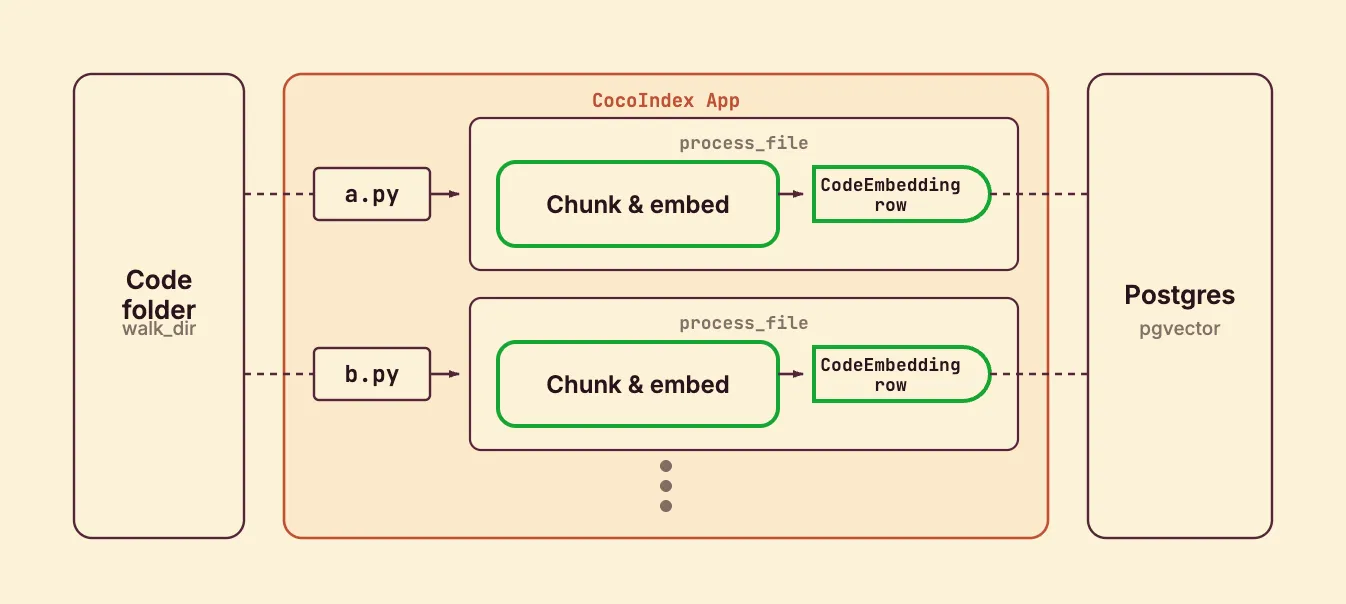
Note that @coco.fn with memo=True is what makes this incremental: if a file’s content and this function’s code are both unchanged, the whole file is skipped on the next run. coco.map fans out to one process_chunk call per chunk.
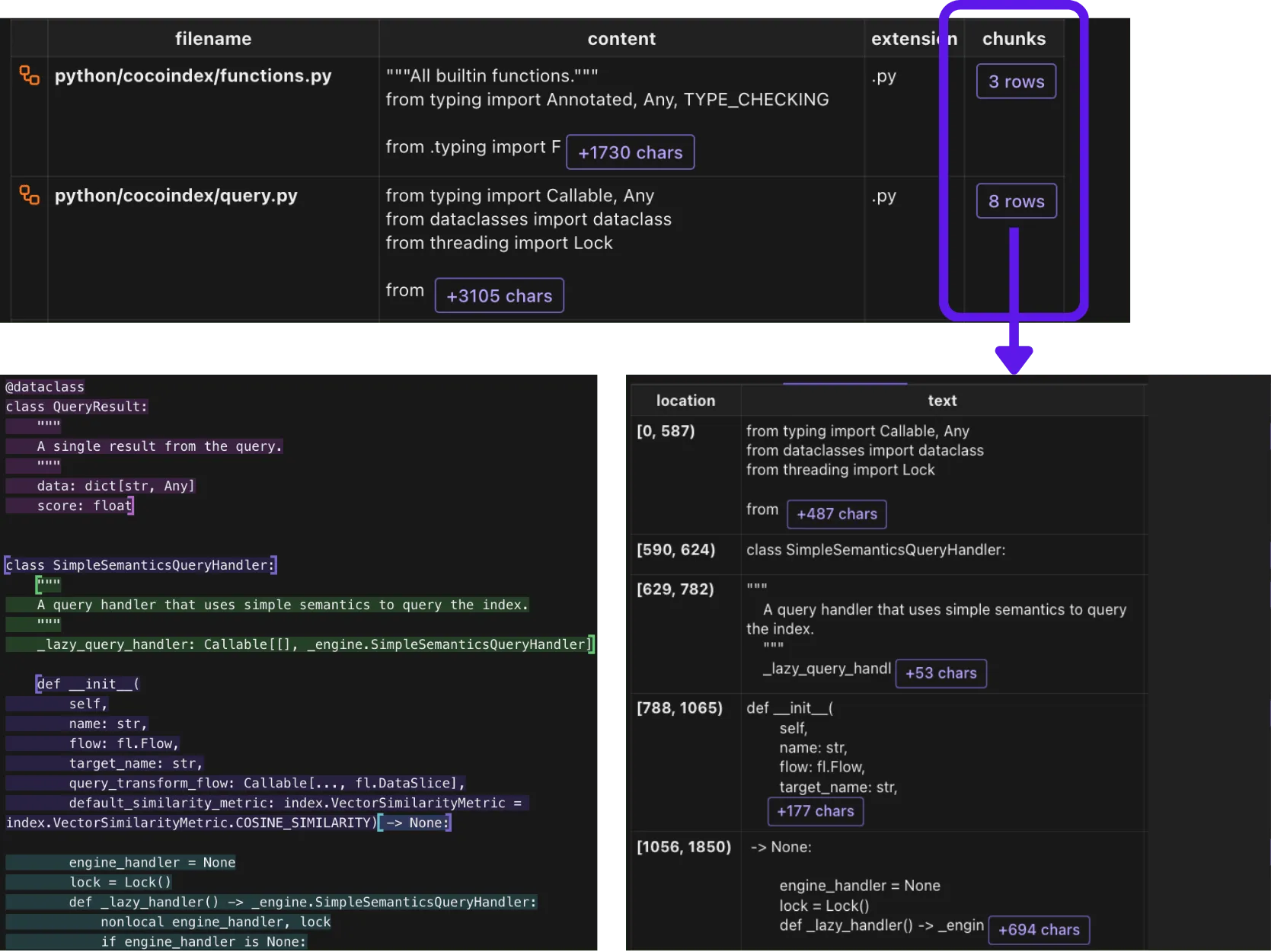
Here is what chunking produces: each file is split into syntactic chunks, each with its own location and text.
Process chunk
Next, we embed the chunk with the shared embedder and declare the target row.
@coco.fn
async def process_chunk(
    chunk: Chunk,
    filename: pathlib.PurePath,
    id_gen: IdGenerator,
    table: postgres.TableTarget[CodeEmbedding],
) -> None:
    embedding = await coco.use_context(EMBEDDER).embed(chunk.text)
    table.declare_row(
        row=CodeEmbedding(
            id=await id_gen.next_id(chunk.text),
            filename=str(filename),
            code=chunk.text,
            embedding=embedding,
            start_line=chunk.start.line,
            end_line=chunk.end.line,
        ),
    )
We use SentenceTransformerEmbedder with all-MiniLM-L6-v2; there are 12k+ sentence-transformer models on Hugging Face, so swap in whichever you prefer. Note chunk.start.line and chunk.end.line: V1 carries line numbers through, so search results point straight at the lines that matched.
Define the main function
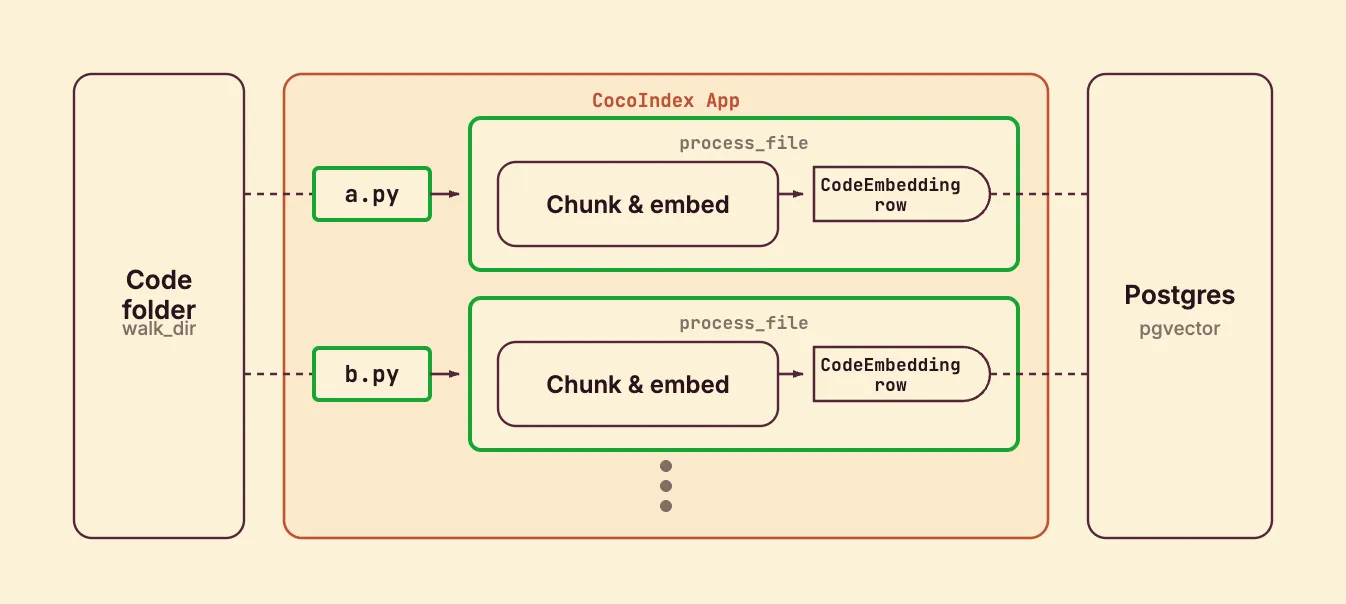
app_main wires the source to the target. It mounts the Postgres table (with a vector index), walks the codebase, and mounts one processing component per file.
@coco.fn
async def app_main(sourcedir: pathlib.Path) -> None:
    target_table = await postgres.mount_table_target(
        PG_DB,
        table_name=TABLE_NAME,
        table_schema=await postgres.TableSchema.from_class(
            CodeEmbedding, primary_key=["id"],
        ),
    )
    target_table.declare_vector_index(column="embedding")

    files = localfs.walk_dir(
        sourcedir,
        recursive=True,
        path_matcher=PatternFilePathMatcher(
            included_patterns=["**/*.py", "**/*.rs", "**/*.toml", "**/*.md", "**/*.mdx"],
            excluded_patterns=["**/.*", "**/target", "**/node_modules"],
        ),
        live=True,  # watch for changes; pass -L to `cocoindex update` to run live
    )
    await coco.mount_each(process_file, files.items(), target_table)
We walk the codebase from sourcedir (point this at the repository you want to index). We index files with the extensions .py, .rs, .toml, .md, .mdx, and skip dot-directories, target, and node_modules.
mount_table_target creates and manages the Postgres table for you: schema, the pgvector index, idempotent upserts, and orphan cleanup when a file disappears. live=True makes the filesystem source watch for changes, and mount_each runs one component per file so the engine can track and update them independently.
Create the App
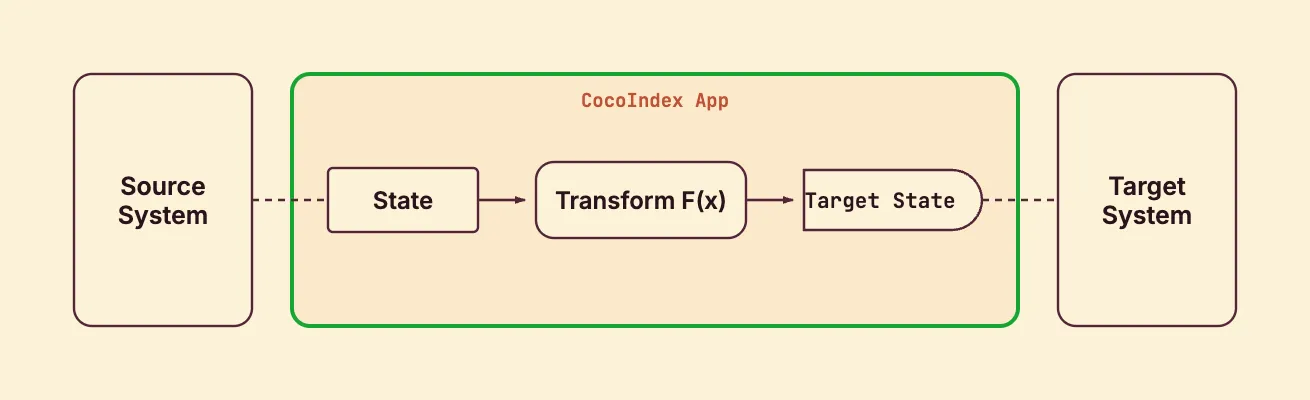
Bind app_main into a coco.App and point it at the codebase root.
app = coco.App(
    coco.AppConfig(name="CodeEmbeddingV1"),
    app_main,
    sourcedir=pathlib.Path(__file__).parent / ".." / "..",  # index from repo root
)
That is the entire indexing path.
Run the pipeline
Run the cocoindex CLI to set up and update the index. Choose catch-up (scan, sync, exit) or live (catch up, then keep watching):
# Catch-up run
cocoindex update main

# Live run: keep watching for file changes
cocoindex update -L main
You’ll see the index update state in the terminal:
✅ app_main: 1 total | 1 added
✅ declare_target_state_with_child: 1 total | 1 added
✅ _MountEachLiveComponent.process: 1 total | 1 added
✅ process_file: 622 total | 622 added
⏳ Elapsed: 43.4s
Query the index
We match user text against the index with a plain SQL query, reusing the same embedder from the indexing flow so indexing and querying stay consistent.
async def query_once(pool, embedder, query: str, *, top_k: int = 5) -> None:
    query_vec = await embedder.embed(query)
    async with pool.acquire() as conn:
        rows = await conn.fetch(
            f"""
            SELECT filename, code, embedding <=> $1 AS distance, start_line, end_line
            FROM "{TABLE_NAME}"
            ORDER BY distance ASC
            LIMIT $2
            """,
            query_vec, top_k,
        )
    for r in rows:
        score = 1.0 - float(r["distance"])
        print(f"[{score:.3f}] {r['filename']} (L{r['start_line']}-L{r['end_line']})")
        print(f"    {r['code']}")
        print("---")
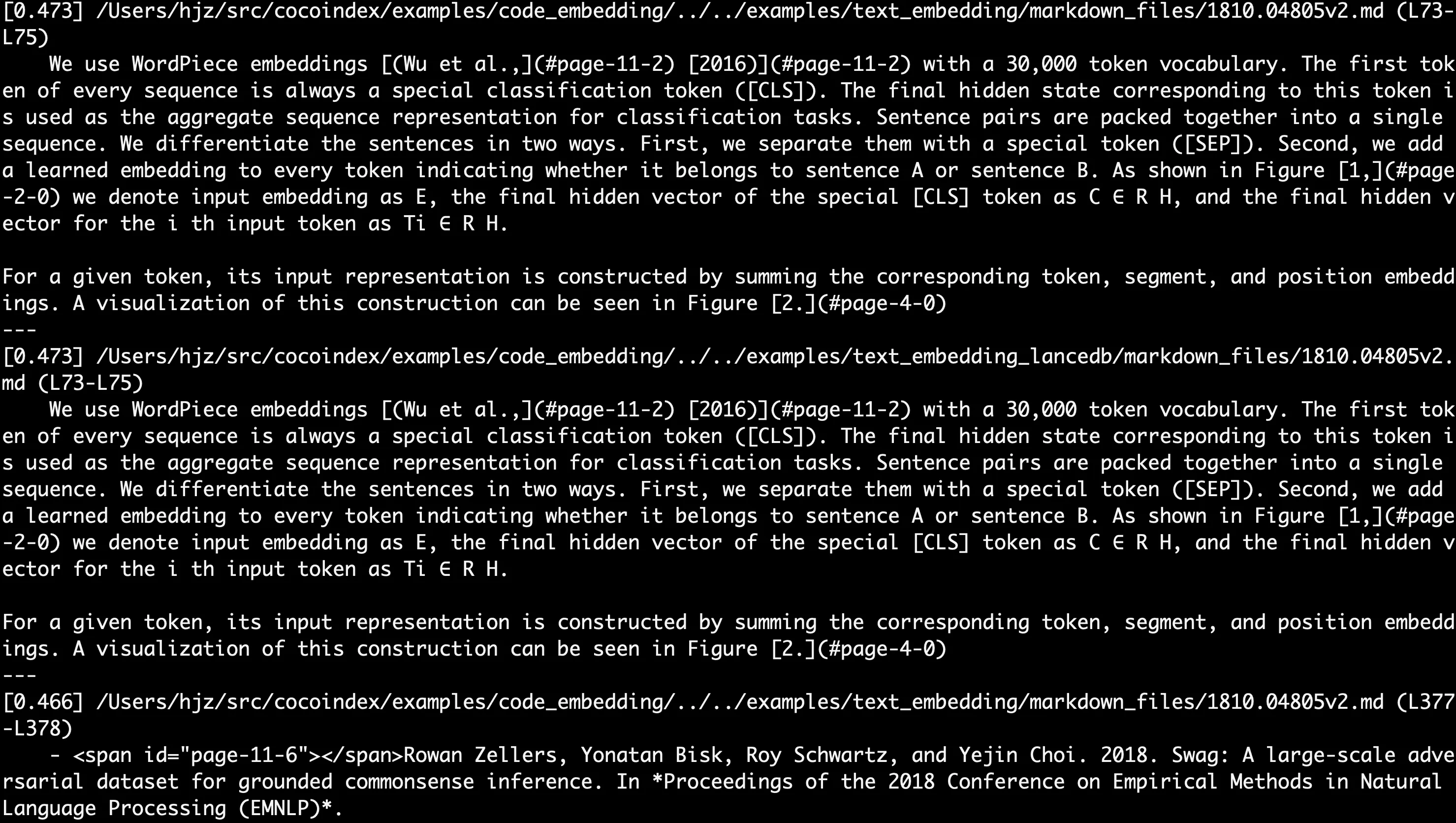
The <=> operator is pgvector’s cosine distance. We turn it into a similarity score and print the filename, the matched line range, and the code snippet. Run it against your index:
python main.py "embedding"The search results print in the terminal:
Incremental updates
You never compute a diff or write update logic: you change something, and CocoIndex works out what to embed, upsert, and delete. @coco.fn(memo=True) decides what to recompute: a file is skipped when its content and the function’s code are both unchanged, and an embedding is reused when its chunk text is unchanged. mount_table_target decides what to write: each row’s id is derived from its chunk’s content, so only rows that actually changed are upserted, and rows whose source is gone are deleted.
The same machinery covers two kinds of change: changes to your data (the code being indexed) and changes to your logic (the pipeline itself).
Data changes.
- A file is added: only that file is chunked and embedded, and its rows are inserted. The rest of the repo is untouched.
- A file is deleted: its rows are removed from the target.
- A file is edited: the file is re-chunked, and the new chunks usually overlap the old ones. Chunks whose text is unchanged keep their
idand embedding, so they are left as-is; genuinely new chunks are embedded and inserted; chunks that no longer exist are deleted. Edit one function and only that function’s chunks are re-embedded, even though the whole file was re-read.
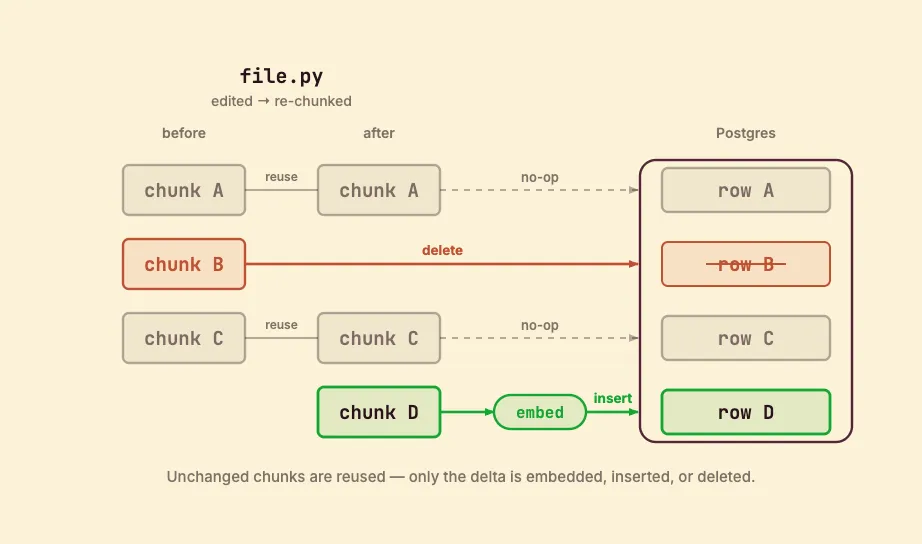
Logic changes. A pipeline change is reconciled the same way: CocoIndex compares the new output against what is already in Postgres and applies only the difference.
- Change the file patterns (
included_patterns/excluded_patterns): files that now match are added automatically; files that no longer match have their rows deleted automatically. - Tune the chunking (chunk size, overlap): files are re-chunked, producing the same partial-overlap diff shown above: unchanged chunks are no-ops, new chunks are embedded and inserted, dropped chunks are deleted.
- Swap the embedding model: the vectors genuinely change, so all embeddings are recomputed, but row identity is stable: it is an in-place update of the
embeddingcolumn, with no rows added or removed.
A catch-up run (cocoindex update main) does this once and exits; live mode (cocoindex update -L main) keeps watching and applies each change as you code.
CocoIndex Code
If you’d rather not wire the pipeline yourself, CocoIndex Code is an end-to-end implementation of exactly this indexing, packaged as a CLI and an MCP server. It does the same thing the example above does: AST-aware chunking, incremental re-index on file changes, local embeddings by default.
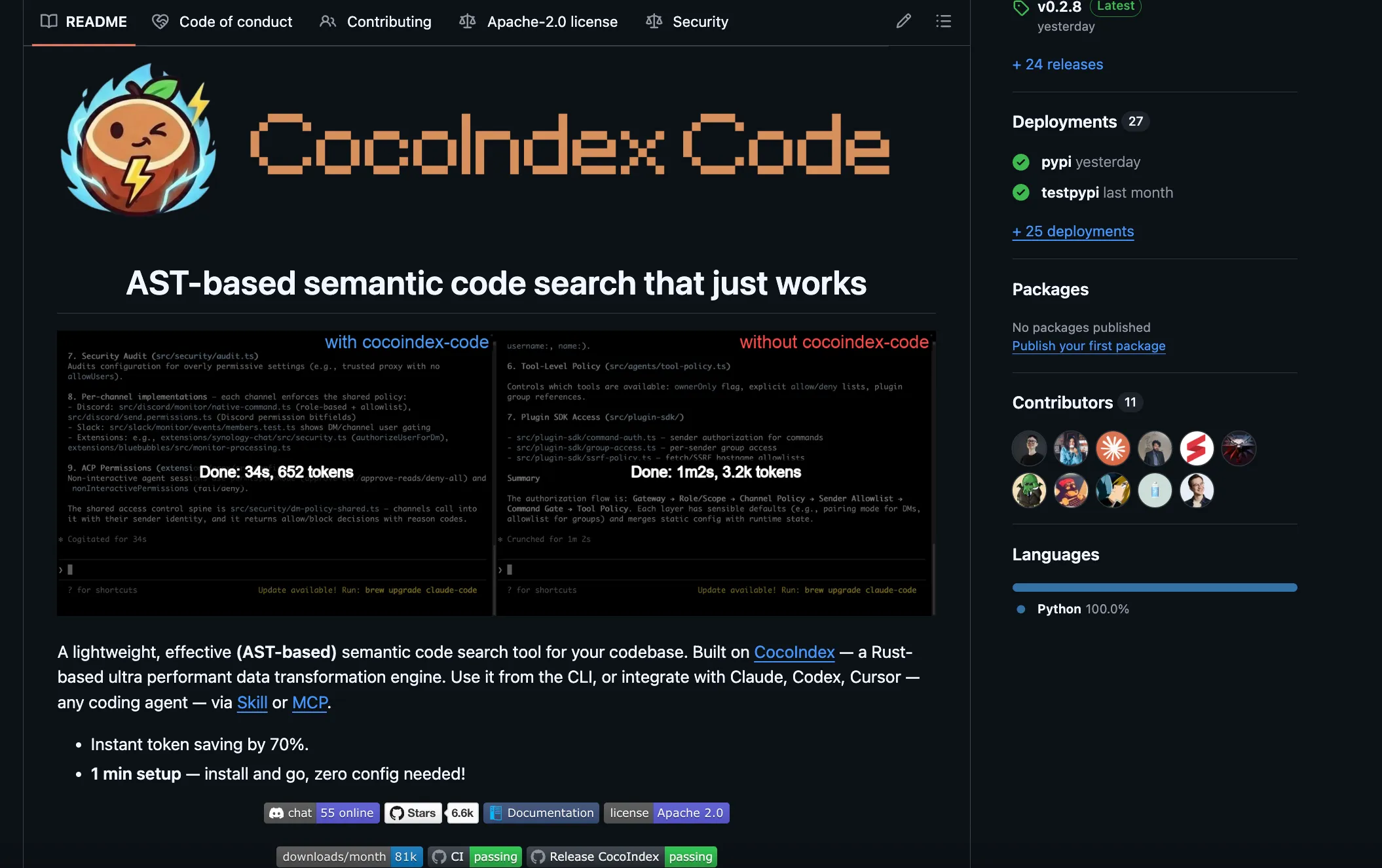
You can plug it straight into your coding agent or code-review agent:
- Claude Code skill:
npx skills add cocoindex-io/cocoindex-code, then invoke/ccc. - MCP server:
claude mcp add cocoindex-code -- ccc mcp(Codex, OpenCode, Cursor, and any MCP client work the same way). - CLI:
ccc indexto build the index,ccc search "where we embed chunks"to query it.
The agent gets the whole repository as semantic context instead of reading one file at a time.
Next steps
The full, runnable example is in the CocoIndex repo: examples/code_embedding, with a walkthrough in the index-codebase example.
- Point
sourcedirat your own repository. - Swap the embedding model or the target store; the pipeline is plain Python.
- Read the CocoIndex V1 docs for more on incremental processing, components, and targets.
Issues and contributions are welcome on GitHub.

About the author.

CEO and cofounder of CocoIndex. Writes about incremental data infrastructure, agents, and the engineering decisions behind the engine.
Frequently asked questions.
How does Tree-sitter improve RAG accuracy for codebases?
Fixed-size or line-window chunking cuts code at arbitrary offsets, so a chunk often starts mid-function or drops the signature, the imports, or the closing scope. Retrieval then returns fragments the model can't act on. CocoIndex chunks with Tree-sitter along the actual syntax tree, so every chunk is a coherent unit — a whole function, class, or block — and a match comes back as code you can read and edit. See Define file processing for the chunking step.
This is not just tidier: structure-aware chunking measurably improves retrieval. The 2025 cAST study reports gains in retrieval recall and downstream generation accuracy over non-structural baselines, and a separate comparison found that syntactic boundaries matter more than chunk size for code RAG. Coherent chunks also keep line numbers intact, so results point straight at the matched lines.
How do I index a large codebase so AI coding agents can understand it?
The standard recipe is: walk the repository, split each file into syntax-aware chunks, embed every chunk, and store the vectors in a database your agent can search by similarity. Natural-language or code queries ("where do we embed chunks?") then retrieve the most relevant snippets as context. CocoIndex does exactly this in about 100 lines of plain Python — see the Overview for the three-step flow.
What makes it scale is that the engine handles the hard parts for you: fan-out across files, a managed vector index, and incremental updates so re-runs only touch what changed. Point sourcedir at your repo and run it; the full example lives at examples/code_embedding.
What is the best way to index a monorepo for AI code assistants?
A monorepo magnifies three problems at once: many languages in one tree, constant churn, and the need to index only what matters. Tree-sitter covers 100+ languages from a single parser, so polyglot repos need no per-language wiring. CocoIndex's PatternFilePathMatcher lets you include just the extensions you care about and exclude vendored or generated trees (node_modules, target, dot-directories) — see Define the main function.
The churn problem is solved by incremental processing: a commit that touches ten files re-embeds those ten, not the whole monorepo. That keeps a multi-million-line tree indexable on every merge instead of only in a nightly batch.
How do tools like Cursor or Aider index your codebase?
They represent two different families. Cursor builds an embedding index: it chunks files, embeds them, stores the vectors in a cloud index, and syncs on change using a Merkle tree so only changed files are re-uploaded. Aider takes the opposite route — a Tree-sitter "repo map" that extracts symbols and ranks them with a PageRank-style graph, then feeds the top signatures into the model's context. No embeddings, and nothing leaves the machine.
CocoIndex is the build-your-own version of the embedding approach, with two differences: the index lives in your infrastructure, and the embedder can run locally, so you decide what scales to the cloud and what stays on the machine.
When should you use a dedicated codebase indexer like CocoIndex instead?
Reach for a dedicated indexer when you need control the IDE's built-in index doesn't give you: your own embedding model, your own vector store, your own chunking strategy, and one index that's shared across tools — coding agents, review bots, search UIs — rather than locked inside a single editor. It also fits when the index has to stay live without a nightly rebuild, or when indexing is part of a product you ship. See Why CocoIndex for codebase indexing.
If you just want autocomplete and chat in one editor, the built-in index is fine. If you'd rather not wire the pipeline yourself but still want it in your infra, CocoIndex Code packages this exact flow as a CLI and MCP server.
What is the difference between CocoIndex and built-in IDE code search?
Built-in IDE search is lexical and structural: it matches exact tokens, symbols, and definitions (grep, "go to definition", workspace symbol index). It's fast and precise when you know the name you're looking for. CocoIndex builds a semantic index — embeddings — so a query matches on meaning rather than spelling, which is what lets "where do we embed chunks?" find the right function even if those words never appear in the code. See Query the index.
The two are complementary: CocoIndex adds the retrieval layer that AI agents need, and because the index is a vector store you own, the same index is reusable outside the editor — in review pipelines, MCP servers, or your own apps.
How do I choose between local-only codebase indexing and cloud-based indexing?
Local-only keeps both the source and the embeddings on your machine: lowest latency, full privacy, no external API cost — bounded only by local compute, which is rarely an issue for a single repo. Cloud-based indexing scales to very large codebases and lets a team share one index, at the cost of code or embeddings leaving the machine. For most repositories, local is enough.
CocoIndex doesn't force the choice. It defaults to a local sentence-transformers embedder, and the target store is pluggable — Postgres/pgvector, Qdrant, LanceDB, and more — so the same pipeline runs fully local or points at a hosted vector database without changing the indexing code.
CocoIndex also supports a shared index for enterprise, which is most effective when you have a large corpus and many engineers working against the same index: it's built and updated once, incrementally, instead of every engineer re-indexing the same repositories on their own machine. To get started, contact us at [email protected].
How can I keep an AI codebase index in sync with frequent Git commits and CI/CD?
The key is to never rebuild the whole index. CocoIndex fingerprints each file and each processing function with memoization; if neither changed, the file is skipped, so a commit that touches a handful of files re-embeds only those files. A delete removes its rows. See Incremental updates.
Two operating modes cover CI/CD and local dev. Run a catch-up pass (cocoindex update) as a post-merge step in your pipeline, or run live mode (cocoindex update -L) to watch the working tree and apply each change within about a second of a save.
What is the best way to handle private repositories and access control when indexing code?
The main concern with private code is simple: it shouldn't leave the machine. Because CocoIndex runs the whole pipeline in your own infrastructure and can use a local embedder, source never has to hit a third-party API to be indexed. You also own the target store, so the vectors and metadata land where your existing access controls already apply.
For shared or multi-tenant indexes, give each row a stable key scoped per repository (or per team) and declare it that way, then filter at query time so each caller only retrieves what they're allowed to see. Keeping secrets out of the index is handled the same way you'd exclude any path — via the include/exclude patterns on the source.
