
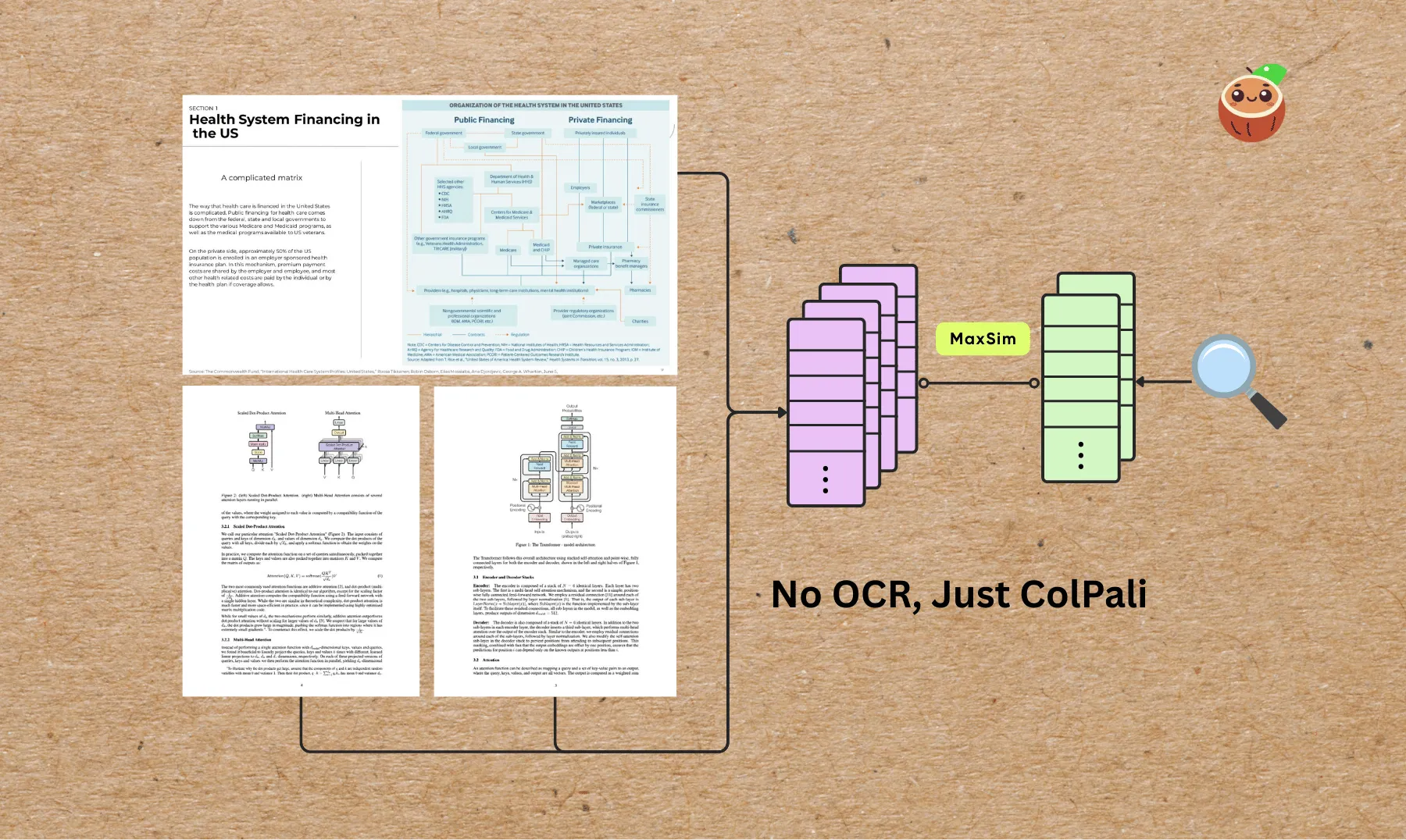
Do you have a messy collection of scanned documents, PDFs, academic papers, presentation slides, and standalone images, all mixed together with charts, tables, and figures, that you want to process into the same vector space for semantic search or to power an AI agent?
In this example, we’ll walk through how to build a visual document indexing pipeline using ColPali for embedding both PDFs and images, and then query the index using natural language.
We’ll skip OCR entirely: ColPali can directly understand document layouts, tables, and figures from images, making it perfect for semantic search across visual-heavy content.
If this helps you, ⭐ Star CocoIndex GitHub!
Use cases
- Semantic search across scanned documents and visual-heavy reports
- Searching tables, charts, or diagrams without OCR
- Cross-modal search (e.g., “find the page showing a bar chart about Q2 revenue”)
- Research paper figure indexing
- Historical archive search without text extraction
Flow overview
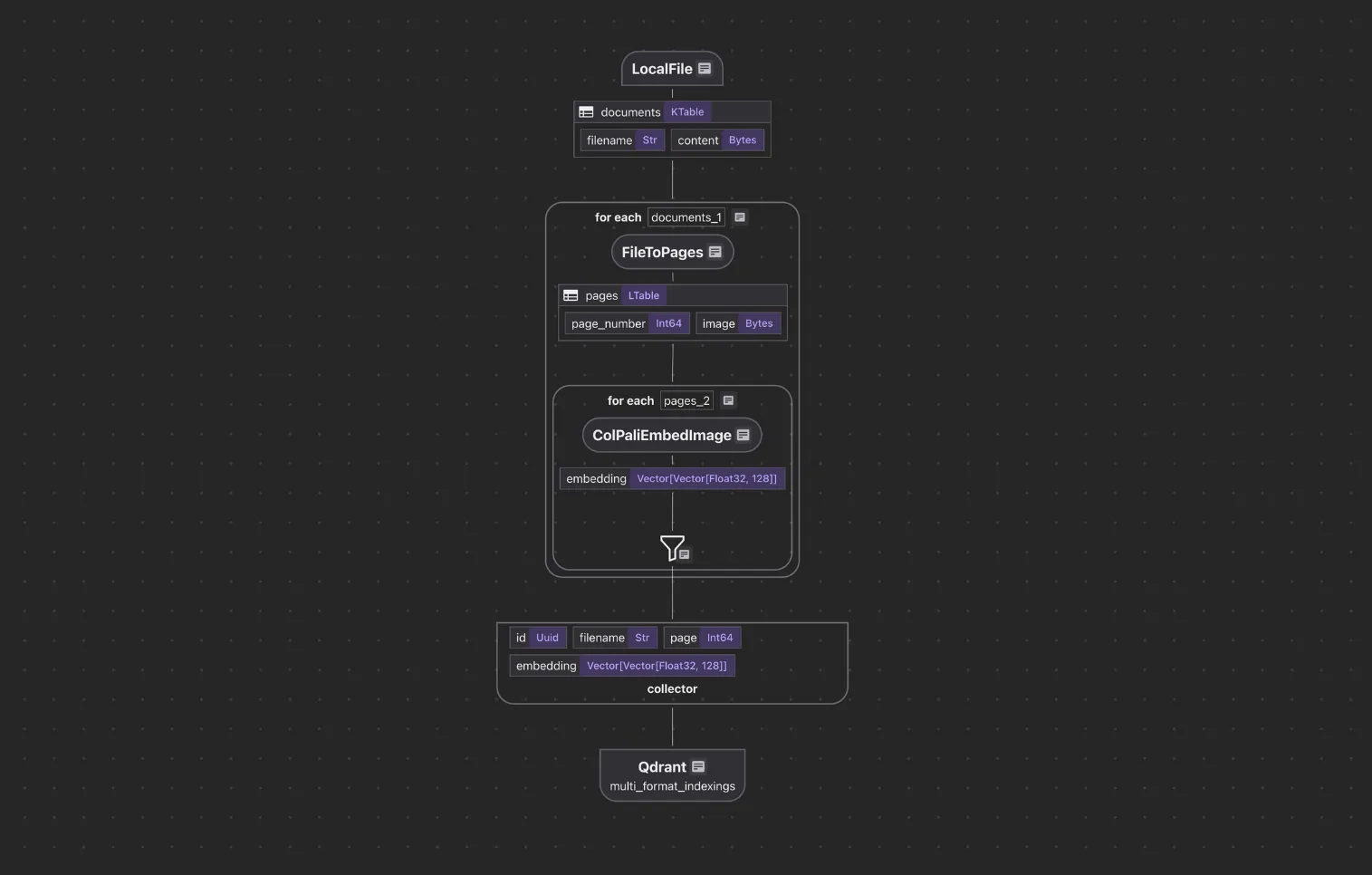
We’ll build a pipeline that:
- Ingests PDFs and images from a local directory
- Converts PDF pages into high-resolution images (300 DPI)
- Generates visual embeddings for each page/image using ColPali
- Stores embeddings + metadata in a Qdrant vector database
- Supports natural language queries directly against the visual index
Example queries:
- “handwritten lab notes about physics”
- “architectural floor plan with annotations”
- “pie chart of Q3 revenue”
Full code is open source and available here. :rocket: Only ~70 lines of Python on the indexing path (super simple!)
Core components
Image ingestion
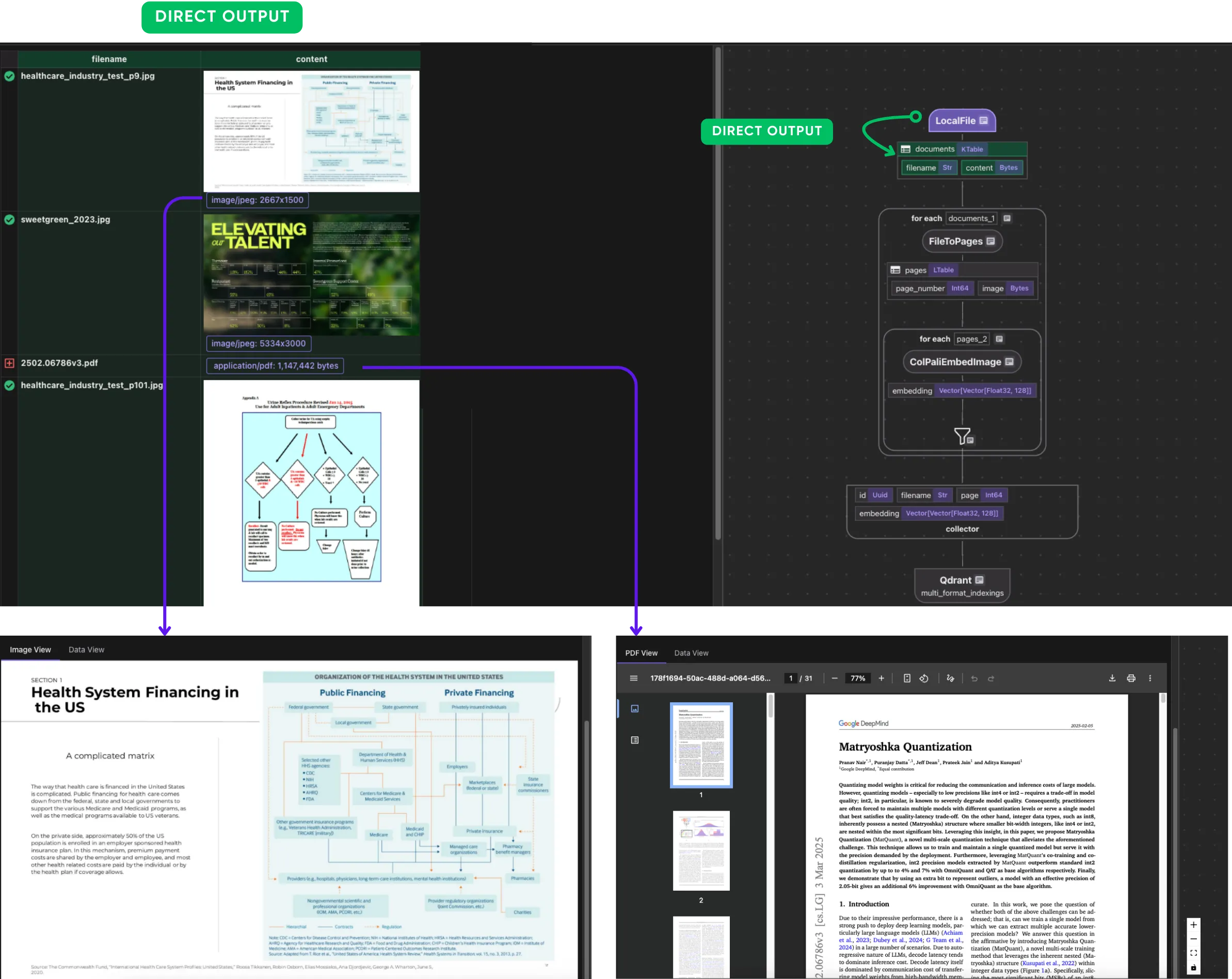
We use CocoIndex’s LocalFile source to read PDFs and images:
data_scope["documents"] = flow_builder.add_source(
    cocoindex.sources.LocalFile(path="source_files", binary=True)
)
Convert files to pages
We classify files by MIME type and process accordingly.
Define a dataclass:
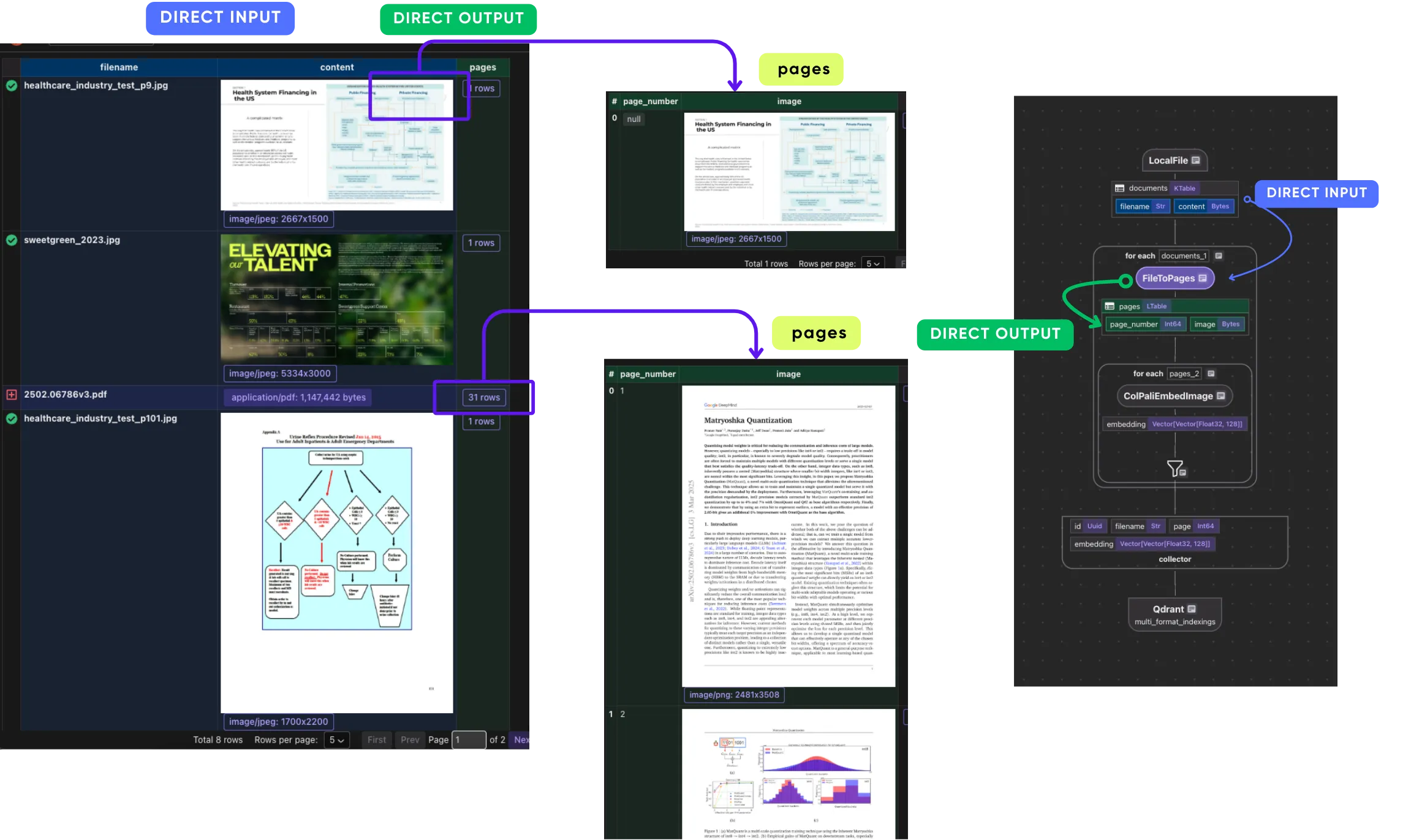
page_number: The page number (if applicable, only for PDFs)image: The binary content of that page as a PNG image
@dataclass
class Page:
  page_number: int | None
  image: bytes
This normalizes different file formats into a list of page images so the rest of the pipeline can process them uniformly. This file_to_pages custom function takes a filename and its raw binary content (bytes) and returns a list of Page objects, where each Page contains:
@cocoindex.op.function()
def file_to_pages(filename: str, content: bytes) -> list[Page]:
    mime_type, _ = mimetypes.guess_type(filename)

    if mime_type == "application/pdf":
        images = convert_from_bytes(content, dpi=300)
        pages = []
        for i, image in enumerate(images):
            with BytesIO() as buffer:
                image.save(buffer, format="PNG")
                pages.append(Page(page_number=i + 1, image=buffer.getvalue()))
        return pages
    elif mime_type and mime_type.startswith("image/"):
        return [Page(page_number=None, image=content)]
    else:
        return []
For each document:
- If the file is an image →
file_to_pagesreturns a singlePagewherepage["image"]is just the original image binary. - If the file is a PDF →
file_to_pagesconverts each page to a PNG, sopage["image"]contains that page’s PNG binary.
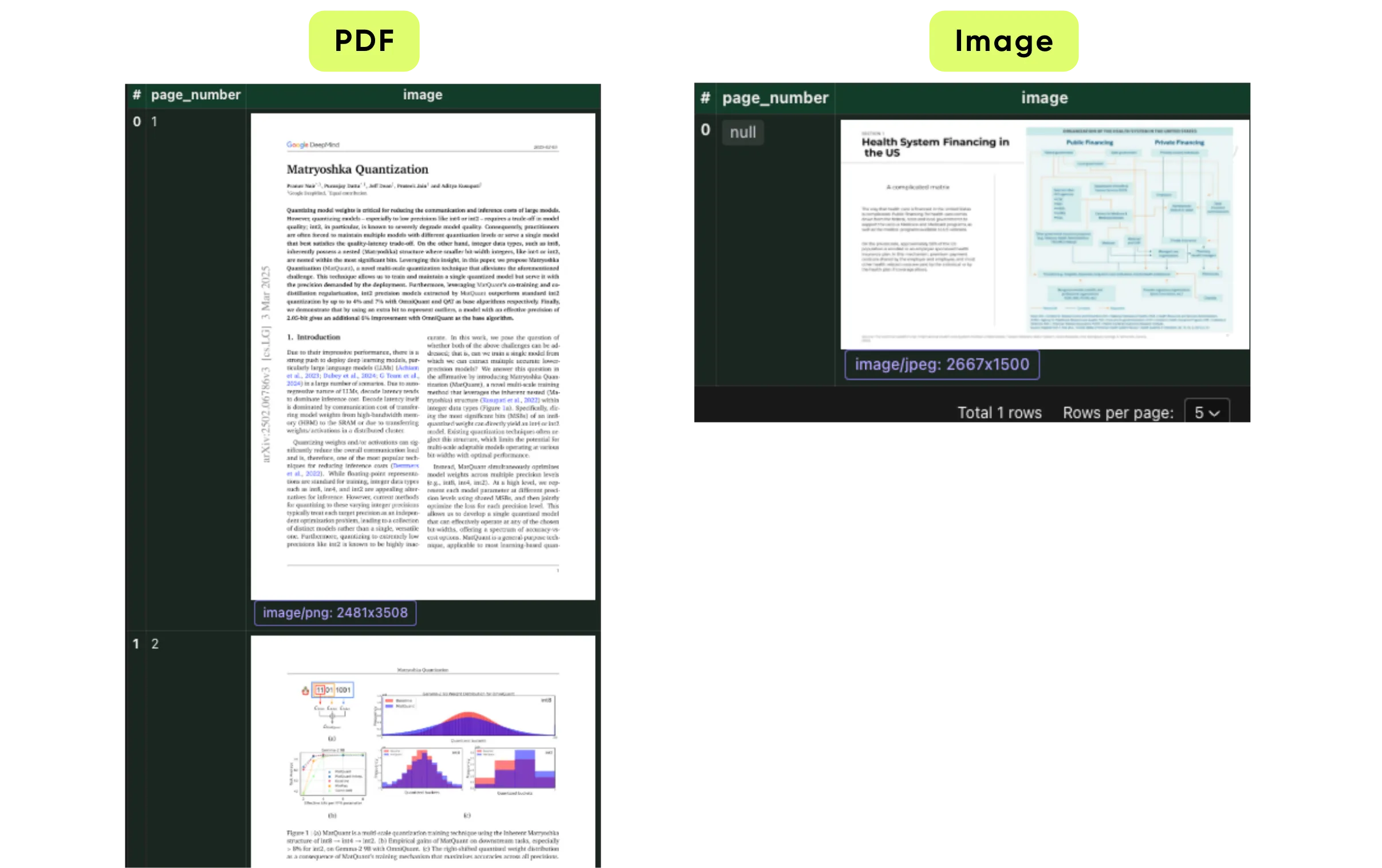
In the flow we convert all the files to pages. This makes each page and all images in the output data: pages.
 output_embeddings = data_scope.add_collector()

 with data_scope["documents"].row() as doc:
    doc["pages"] = flow_builder.transform(
        file_to_pages, filename=doc["filename"], content=doc["content"]
    )
Generate visual embeddings
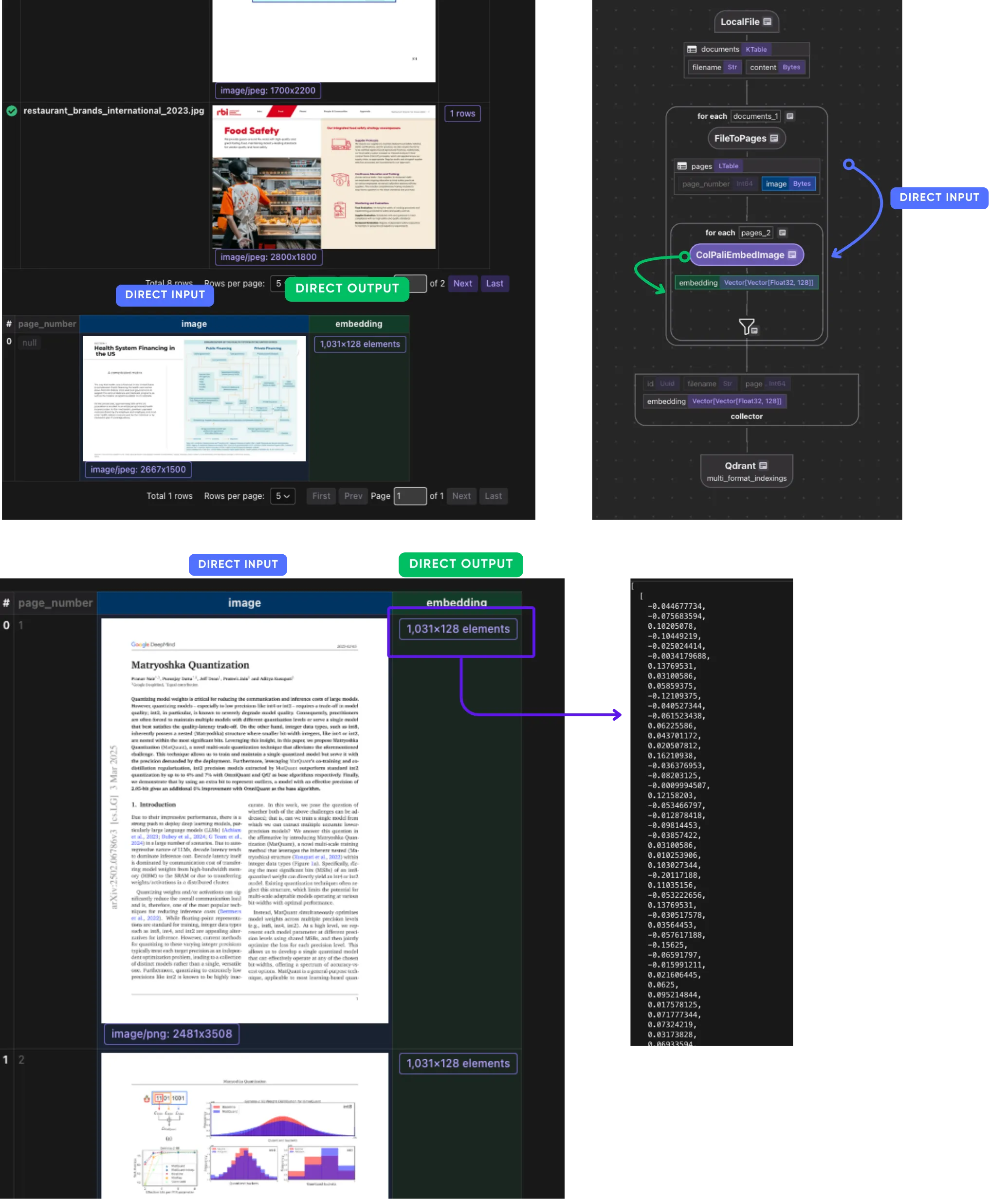
We use ColPali to generate embeddings for images on each page.
with doc["pages"].row() as page:
    page["embedding"] = page["image"].transform(
        cocoindex.functions.ColPaliEmbedImage(model=COLPALI_MODEL_NAME)
    )
    output_embeddings.collect(
                id=cocoindex.GeneratedField.UUID,
                filename=doc["filename"],
                page=page["page_number"],
                embedding=page["embedding"],
            )
ColPali Architecture fundamentally rethinks how documents, especially visually complex or image-rich ones, are represented and searched. Instead of reducing each image or page to a single dense vector (as in traditional bi-encoders), ColPali breaks an image into many smaller patches, preserving local spatial and semantic structure.
Each patch receives its own embedding, which together form a multi-vector representation of the complete document.
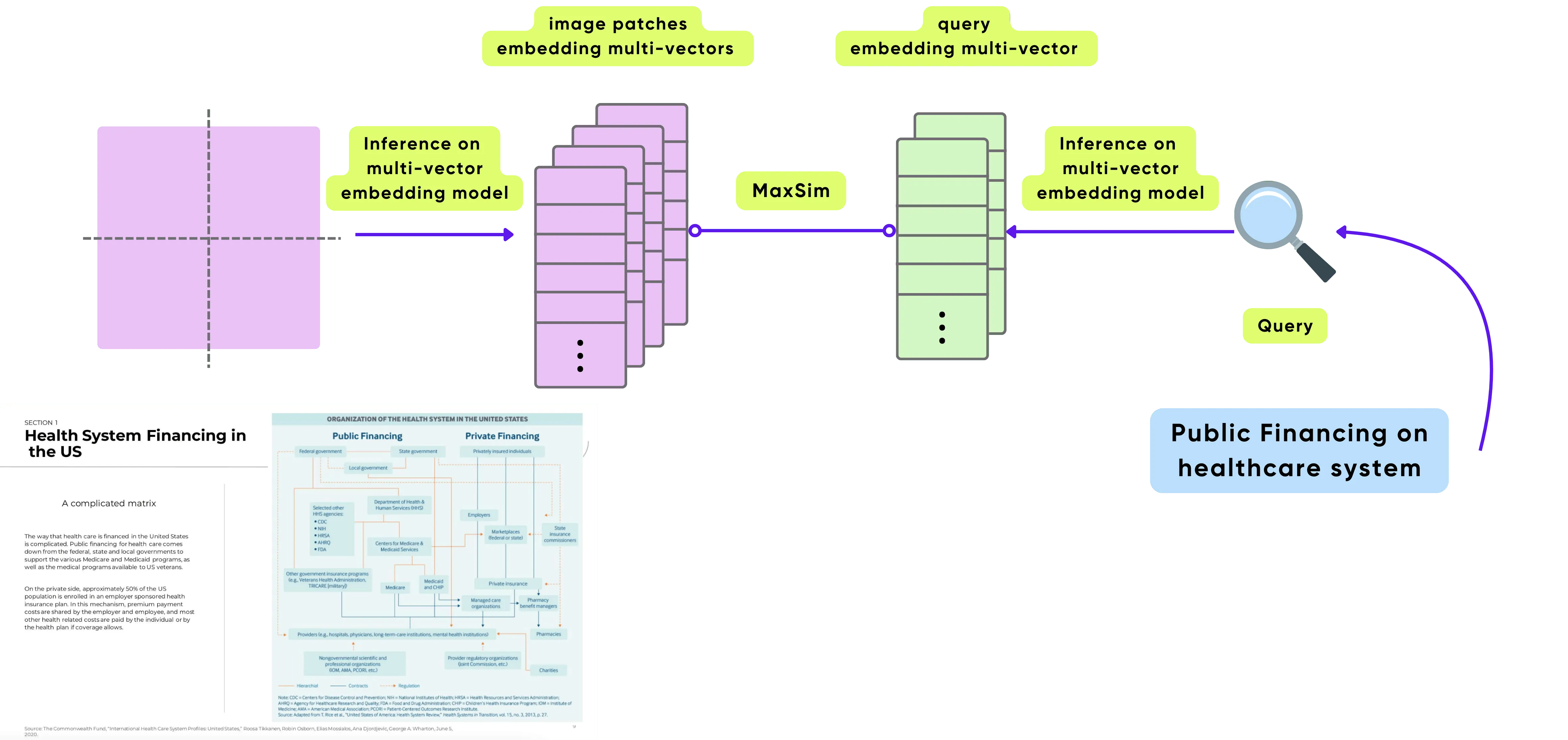
For a detailed explanation of ColPali Architecture, please refer to our previous blog with image search examples.
Collect & export to Qdrant
Note the ways to embed an image and a query are different, as they’re two different types of data.
Create a transform flow to embed the query:
@cocoindex.transform_flow()
def query_to_colpali_embedding(
    text: cocoindex.DataSlice[str],
) -> cocoindex.DataSlice[list[list[float]]]:
    return text.transform(
        cocoindex.functions.ColPaliEmbedQuery(model=COLPALI_MODEL_NAME)
    )
We store metadata and embeddings in Qdrant:
output_embeddings.export(
    "multi_format_indexings",
    cocoindex.targets.Qdrant(
        connection=qdrant_connection,
        collection_name=QDRANT_COLLECTION,
    ),
    primary_key_fields=["id"],
)
Query the index
ColPali supports text-to-visual embeddings, so we can search using natural language:
query_embedding = query_to_colpali_embedding.eval(query)

search_results = client.query_points(
    collection_name=QDRANT_COLLECTION,
    query=query_embedding,
    using="embedding",
    limit=5,
    with_payload=True,
)
Check out the full code here.
Debugging with CocoInsight
Run CocoInsight locally:
cocoindex server -ci mainOpen https://cocoindex.io/cocoinsight to:
- View extracted pages
- See embedding vectors and metadata
Support us
We’re constantly adding more examples and improving our runtime.
⭐ Star CocoIndex on GitHub and share the love :heart:!
And let us know what you are building with CocoIndex. We’d love to feature them.

About the author.

CEO and cofounder of CocoIndex. Writes about incremental data infrastructure, agents, and the engineering decisions behind the engine.
Frequently asked questions.
How do I index PDFs, images, and slides together in one vector index?
Ingest all the files from a directory, normalize each one into a list of page images, generate a visual embedding for every page with ColPali, and store the embeddings plus metadata in a Qdrant vector database. Because everything lands in the same vector space, you can run natural-language search across the whole mixed collection. See Flow overview.
How do I search documents without OCR?
Use ColPali, which can directly understand document layouts, tables, and figures from images, so the pipeline skips OCR entirely. PDF pages are rendered to images and embedded as-is, making this well suited to visual-heavy content like scanned documents, charts, and diagrams. See Generate visual embeddings.
How do I normalize PDFs and images into a uniform format for embedding?
Write a CocoIndex function that classifies each file by MIME type and returns a list of Page objects. For a PDF it converts each page to a 300 DPI PNG; for an image it returns a single page with the original binary; other types return an empty list. This gives the rest of the pipeline a uniform list of page images to process. See Convert files to pages.
How does ColPali represent a document for retrieval?
Instead of reducing each page to a single dense vector like a traditional bi-encoder, ColPali breaks an image into many smaller patches and gives each patch its own embedding. Together these form a multi-vector representation of the page, preserving local spatial and semantic structure for finer-grained matching. See Generate visual embeddings.
How do I embed a text query to search a ColPali visual index?
The ways to embed an image and a query differ because they are different data types. Define a @cocoindex.transform_flow() that runs cocoindex.functions.ColPaliEmbedQuery on the text, then call its .eval(query) and pass the result to Qdrant's query_points. ColPali supports text-to-visual embeddings, so a text query matches the visual index directly. See Query the index.
How many lines of code does the multi-format indexing pipeline take?
The post states the indexing path is only about 70 lines of Python. The full open-source example is available in the multi_format_indexing directory. See Flow overview.
What are good use cases for OCR-free visual document search?
The post lists semantic search across scanned documents and visual-heavy reports, searching tables/charts/diagrams without OCR, cross-modal search (e.g. "find the page showing a bar chart about Q2 revenue"), research paper figure indexing, and historical archive search without text extraction. See Use cases.
