
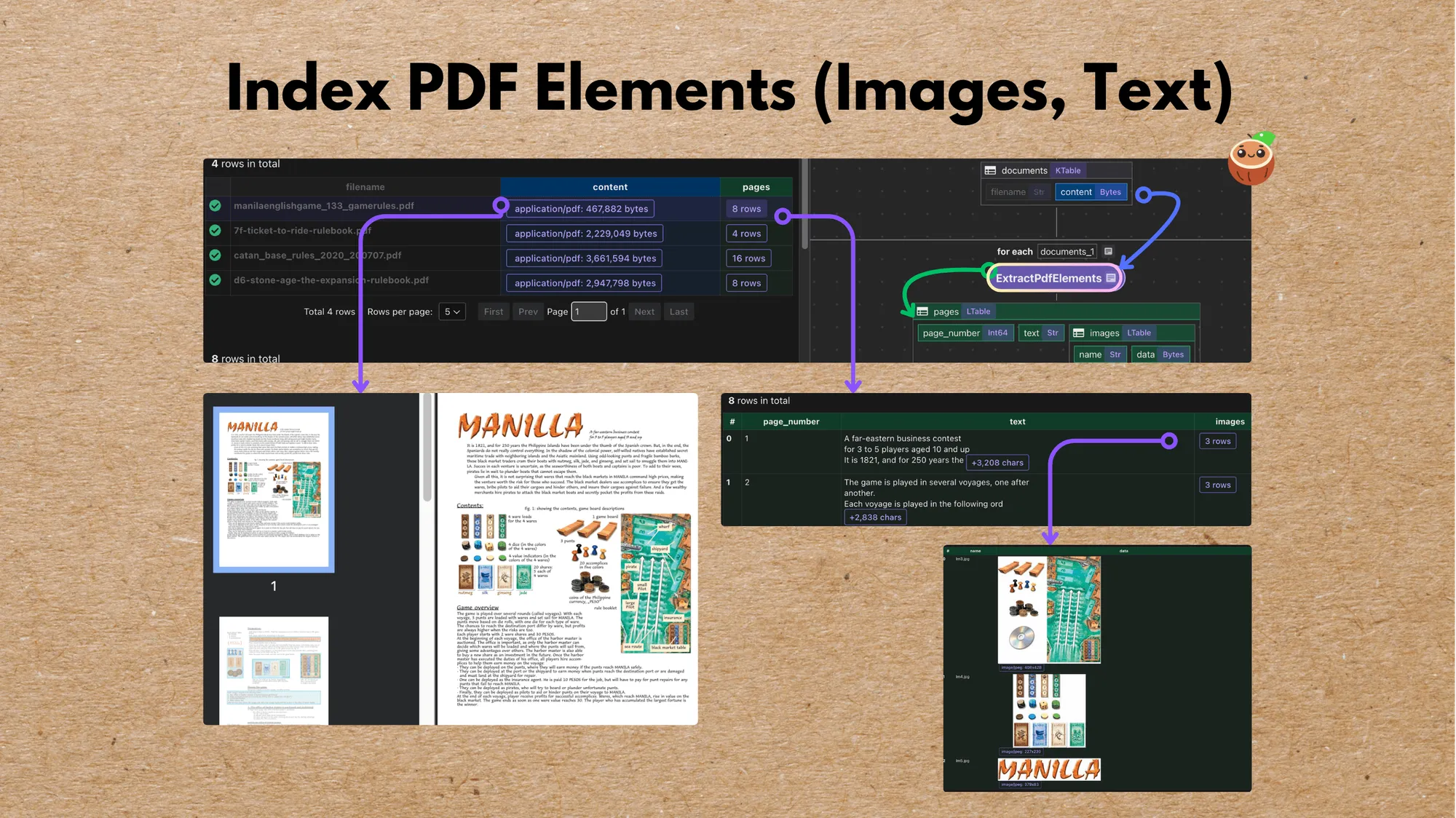
PDFs are rich with both text and visual content, from descriptive paragraphs to illustrations and tables. This example builds an end-to-end flow that parses, embeds, and indexes both, with full traceability to the original page. For a simpler variant that converts whole PDFs to Markdown, see the PDF to Markdown example.
In this example, we split out both text and images, link them back to page metadata, and enable unified semantic search. We’ll use CocoIndex to define the flow, SentenceTransformers for text embeddings, and CLIP for image embeddings, all stored in Qdrant for retrieval.
🔍 What it does
This flow automatically:
- Extracts page texts and images from PDF files
- Skips tiny or redundant images
- Creates consistent thumbnails (up to 512×512)
- Chunks and embeds text with SentenceTransformers (
all-MiniLM-L6-v2) - Embeds images with CLIP (
openai/clip-vit-large-patch14) - Stores both embeddings and metadata (e.g., where the text or image came from) in Qdrant, enabling unified semantic search across text and image modalities
📦 Prerequisite:
Run Qdrant
If you don’t have Qdrant running locally, start it via Docker:
docker run -p 6333:6333 -p 6334:6334 qdrant/qdrant📁 Input Data
We’ll use a few sample PDFs (board game manuals). Download them into the source_files directory:
./fetch_manual_urls.shOr, feel free to drop in any of your own PDFs.
⚙️ Run the flow
Install dependencies:
pip install -e .Then build your index (sets up tables automatically on first run):
cocoindex update --setup mainOr run in CocoInsight
cocoindex server -ci mainDefine the flow
Flow definition
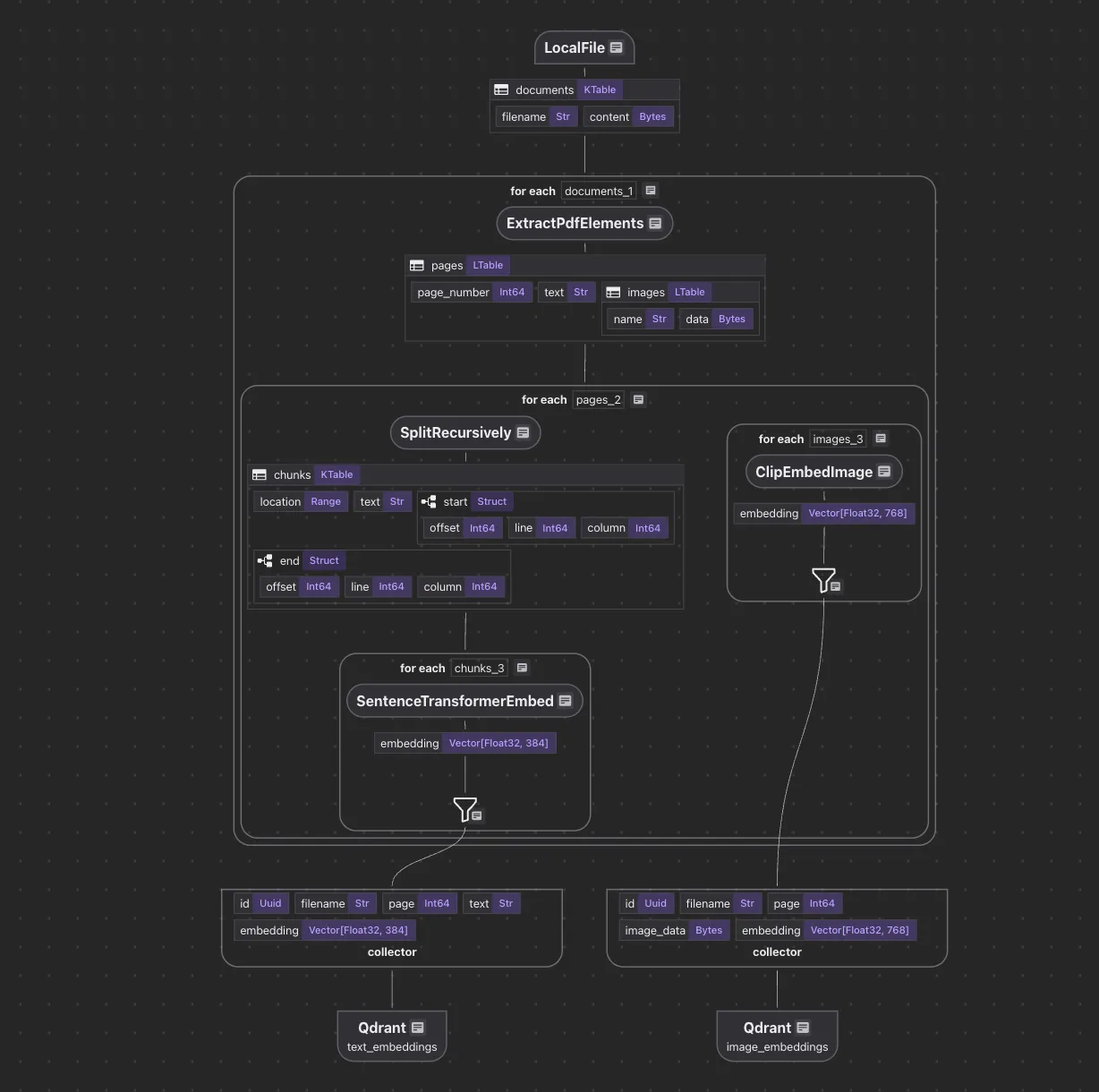
Let’s break down what happens inside the PdfElementsEmbedding flow.
@cocoindex.flow_def(name="PdfElementsEmbedding")
def multi_format_indexing_flow(
    flow_builder: cocoindex.FlowBuilder, data_scope: cocoindex.DataScope
) -> None:
    data_scope["documents"] = flow_builder.add_source(
        cocoindex.sources.LocalFile(
            path="source_files", included_patterns=["*.pdf"], binary=True
        )
    )
    text_output = data_scope.add_collector()
    image_output = data_scope.add_collector()
We define the flow, add a source, and add data collectors.
For flow definition, the decorator:
@cocoindex.flow_def(name="PdfElementsEmbedding")marks the function as a CocoIndex flow definition, registering it as part of the data indexing system.
When executed via CocoIndex runtime, it orchestrates data ingestion, transformation, and collection.
When started, CocoIndex’s runtime executes the flow in either one-time update or live update mode, and incrementally embeds only what changed.
Process each document
Extract PDF documents
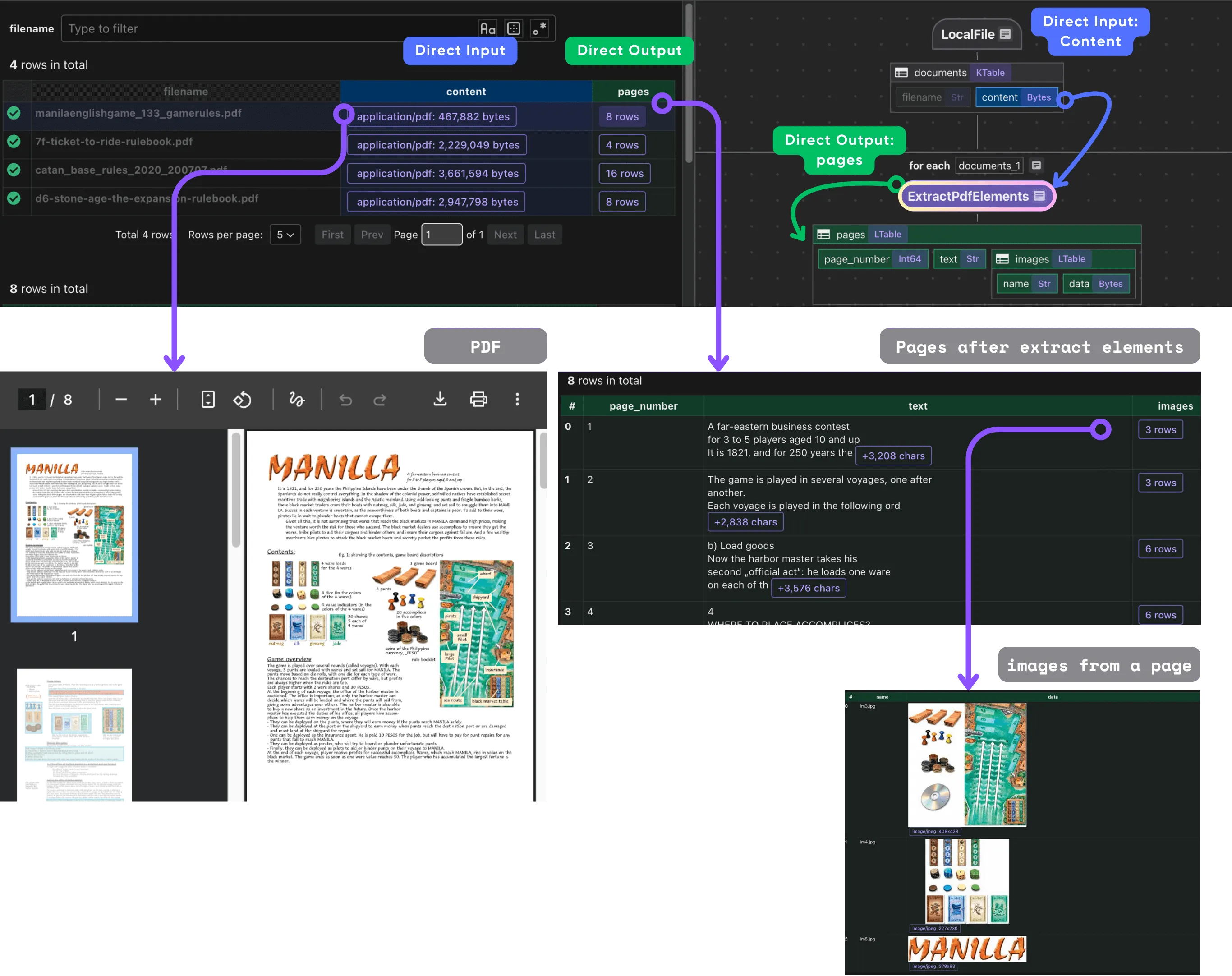
We iterate through each document row and run a custom transformation that extracts PDF elements.
with data_scope["documents"].row() as doc:
    doc["pages"] = doc["content"].transform(extract_pdf_elements)
Extract PDF elements
Define a dataclass for structured extraction: we want to extract a list of PdfPage, each of which has a page number, text, and a list of images.
@dataclass
class PdfImage:
    name: str
    data: bytes

@dataclass
class PdfPage:
    page_number: int
    text: str
    images: list[PdfImage]
Next, define a CocoIndex function called extract_pdf_elements that extracts both text and images from a PDF file, returning them as structured, page-wise data objects.
@cocoindex.op.function()
def extract_pdf_elements(content: bytes) -> list[PdfPage]:
    """
    Extract texts and images from a PDF file.
    """
    reader = PdfReader(io.BytesIO(content))
    result = []
    for i, page in enumerate(reader.pages):
        text = page.extract_text()
        images = []
        for image in page.images:
            img = image.image
            if img is None:
                continue
            # Skip very small images.
            if img.width < 16 or img.height < 16:
                continue
            thumbnail = io.BytesIO()
            img.thumbnail(IMG_THUMBNAIL_SIZE)
            img.save(thumbnail, img.format or "PNG")
            images.append(PdfImage(name=image.name, data=thumbnail.getvalue()))
        result.append(PdfPage(page_number=i + 1, text=text, images=images))
    return result
The extract_pdf_elements function reads a PDF file from bytes and extracts both text and images from each page in a structured way.
Using pypdf, it parses every page to retrieve text content and any embedded images, skipping empty or very small images to avoid noise.
Each image is resized to a consistent thumbnail size (up to 512×512) and converted into bytes for downstream use.
The result is a clean, per-page data structure (PdfPage) that contains the page number, extracted text, and processed images, making it easy to embed and index PDFs for multimodal search.
Process each page
Once we have the pages, we process each page.
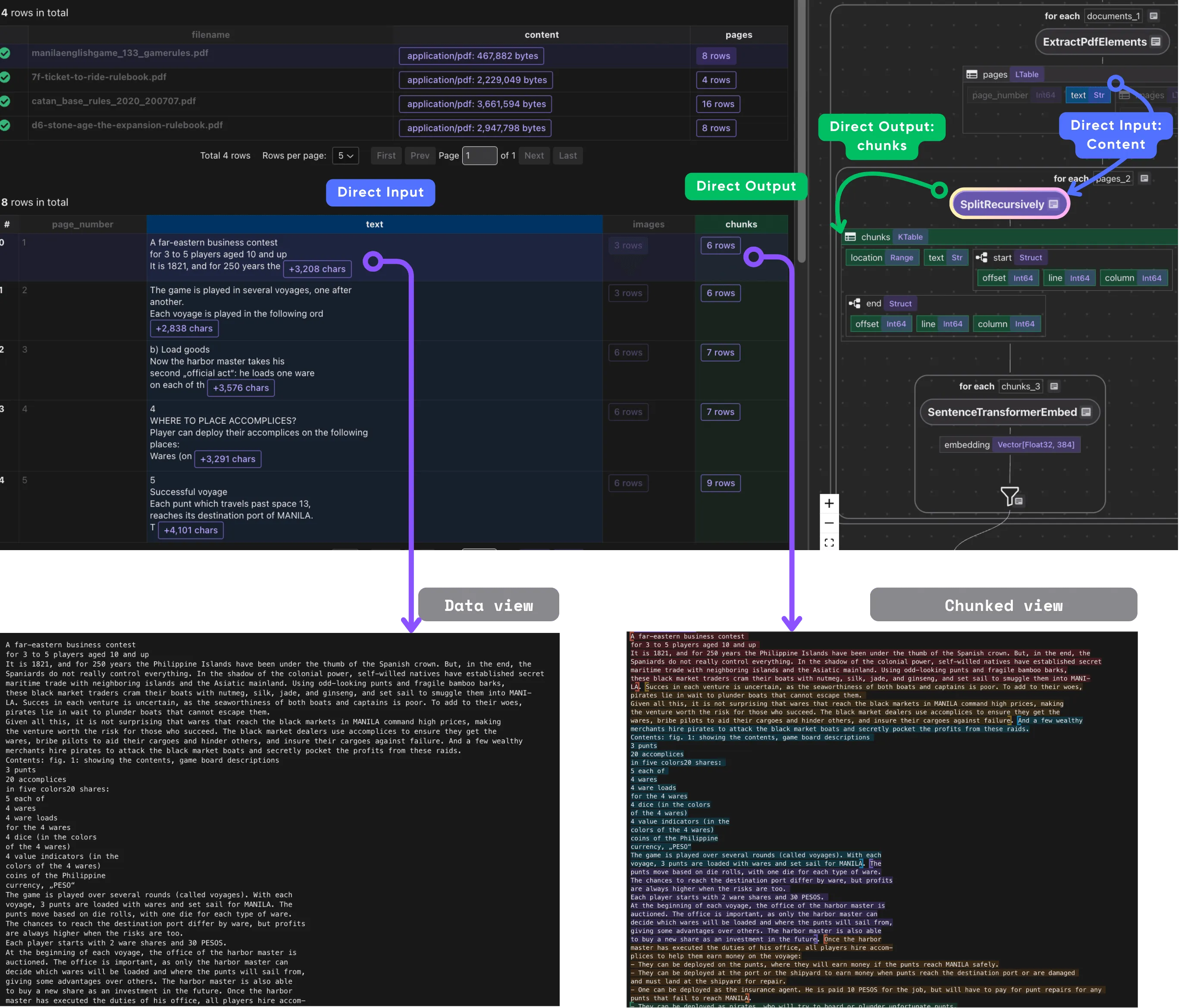
- Chunk the text
This takes each PDF page’s text and splits it into smaller, overlapping chunks.
with doc["pages"].row() as page:
    page["chunks"] = page["text"].transform(
        cocoindex.functions.SplitRecursively(
            custom_languages=[
                cocoindex.functions.CustomLanguageSpec(
                    language_name="text",
                    separators_regex=[
                        r"\n(\s*\n)+",
                        r"[\.!\?]\s+",
                        r"\n",
                        r"\s+",
                    ],
                )
            ]
        ),
        language="text",
        chunk_size=600,
        chunk_overlap=100,
    )
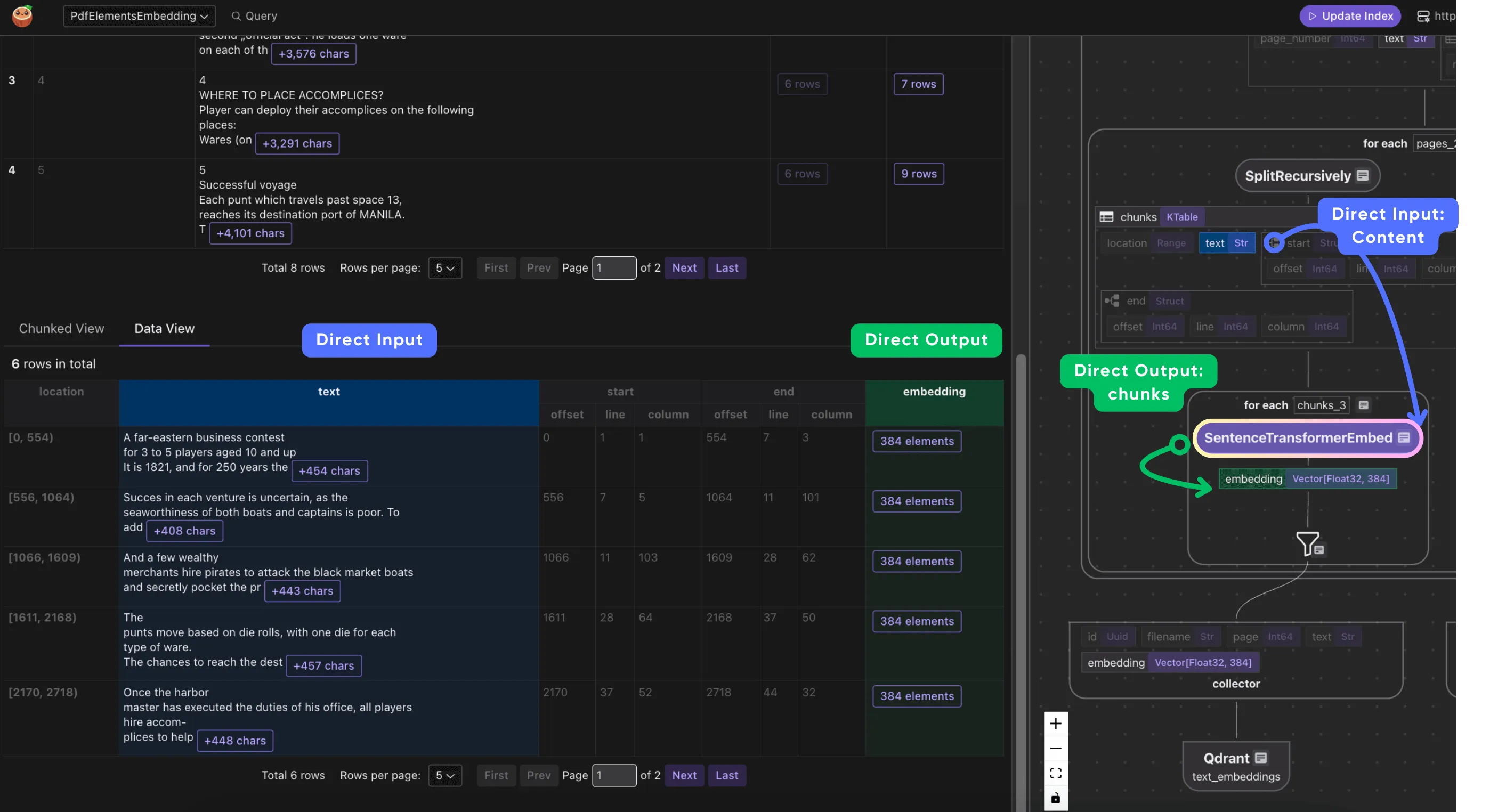
- Process each chunk
Embed and collect the metadata we need. Each chunk includes its embedding, original text, and references to the filename and page where it originated.
with page["chunks"].row() as chunk:
    chunk["embedding"] = chunk["text"].call(embed_text)
    text_output.collect(
        id=cocoindex.GeneratedField.UUID,
        filename=doc["filename"],
        page=page["page_number"],
        text=chunk["text"],
        embedding=chunk["embedding"],
    )
- Process each image
We use CLIP to embed the image and collect the data, embedding, and metadata filename, page_number.
with page["images"].row() as image:
    image["embedding"] = image["data"].transform(clip_embed_image)
    image_output.collect(
        id=cocoindex.GeneratedField.UUID,
        filename=doc["filename"],
        page=page["page_number"],
        image_data=image["data"],
        embedding=image["embedding"],
    )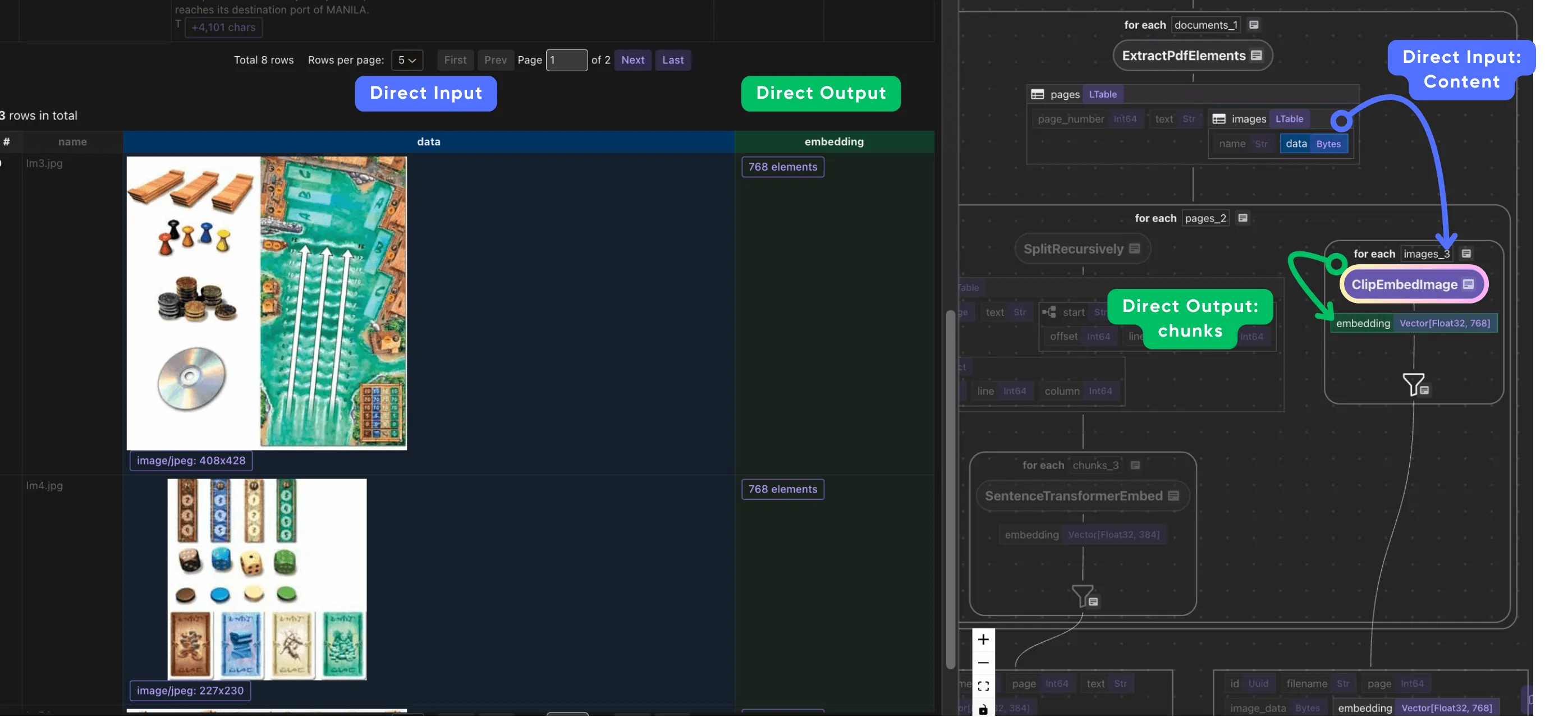
When we collect image outputs, we also want to preserve relevant metadata alongside the embeddings. For each image, we not only collect the image embedding and binary image data, but also metadata such as the original file name and page number. This association makes it possible to trace embedded images back to their source document and page during retrieval or exploration.
Export to Qdrant
Finally, we export the collected data to the target store.
text_output.export(
    "text_embeddings",
    cocoindex.targets.Qdrant(
        connection=qdrant_connection,
        collection_name=QDRANT_COLLECTION_TEXT,
    ),
    primary_key_fields=["id"],
)
image_output.export(
    "image_embeddings",
    cocoindex.targets.Qdrant(
        connection=qdrant_connection,
        collection_name=QDRANT_COLLECTION_IMAGE,
    ),
    primary_key_fields=["id"],
)
🧭 Explore with CocoInsight (free beta)
Use CocoInsight to visually trace your data lineage and debug the flow.
It connects locally with zero data retention.
Start your local server:
cocoindex server -ci mainThen open the UI 👉 https://cocoindex.io/cocoinsight
💡 Why this matters
Traditional document search only scratches the surface: it’s text-only and often brittle across document layouts. This flow gives you multimodal recall, meaning you can:
- Search PDFs by text or image similarity
- Retrieve related figures, diagrams, or captions
- Build next-generation retrieval systems across rich content formats
Compare with ColPali vision model (OCR free)
We also have an example for ColPali.
To compare the two approaches:
| Aspect | ColPali Multi-Vector Image Grids | Separate Text and Image Embeddings |
|---|---|---|
| Input | Whole page as an image grid (multi-vector patches) | Text extracted via OCR + images processed separately |
| Embedding | Multi-vector patch-level embeddings preserving spatial context | Independent text and image vectors |
| Query Matching | Late interaction between text token embeddings and image patches | Separate embedding similarity / fusion |
| Document Structure Handling | Maintains layout and visual cues implicitly | Layout structure inferred by heuristics |
| OCR Dependence | Minimal to none; model reads text visually | Heavy dependence on OCR (for scanned PDFs) and text extraction |
| Use Case Strength | Document-heavy, visual-rich formats | General image and text data, simpler layouts |
| Complexity | Higher computational cost, more complex storage | Simpler architecture; fewer compute resources needed |
In essence, ColPali excels in deep, integrated vision-text understanding, ideal for visually complex documents, while splitting text and images for separate embeddings is more modular but prone to losing spatial and semantic cohesion. The choice depends on your document complexity, precision needs, and resource constraints.
Support us
⭐ Star CocoIndex on GitHub and share with your community if you find it useful!

About the author.

CEO and cofounder of CocoIndex. Writes about incremental data infrastructure, agents, and the engineering decisions behind the engine.
Frequently asked questions.
How do I extract both text and images from a PDF in Python?
Define a CocoIndex function that reads the PDF bytes with pypdf and iterates over each page, calling page.extract_text() for text and page.images for embedded images. The example returns a per-page PdfPage dataclass containing the page number, text, and a list of PdfImage objects. See Extract PDF elements.
How do I embed PDF text and images with different models?
Use one model per modality. This flow embeds text chunks with SentenceTransformers (all-MiniLM-L6-v2) and images with CLIP (openai/clip-vit-large-patch14), then stores both in Qdrant for unified semantic search. See What it does.
How do I keep PDF embeddings traceable back to their source page?
When collecting each embedding, also collect metadata alongside it. For every text chunk and image the flow records the filename and page number, so any retrieved result can be traced back to the exact source document and page during retrieval or exploration. See Extract PDF elements.
How do I avoid indexing tiny or redundant images from a PDF?
The extract_pdf_elements function skips images smaller than 16×16 pixels to avoid noise, and resizes everything else to a consistent thumbnail (up to 512×512) before embedding. This keeps the index focused on meaningful visual content. See Extract PDF elements.
How do I store text and image embeddings in Qdrant?
Export each collector to its own Qdrant collection with cocoindex.targets.Qdrant, using a shared connection and a generated UUID as the primary_key_fields. The example exports text to one collection and images to another. See Export to Qdrant.
What is the difference between ColPali and separate text/image embeddings?
ColPali treats a whole page as a multi-vector image grid with late interaction, preserving layout and visual cues with minimal OCR dependence — strong for visually complex documents. Splitting text and images into independent embeddings is a simpler, more modular architecture with fewer compute resources, but it relies on OCR and can lose spatial cohesion. The right choice depends on document complexity, precision needs, and resource constraints. See Compare with ColPali vision model.
Why use multimodal embeddings for PDF search?
Traditional document search is text-only and brittle across layouts. Indexing both text and images gives you multimodal recall: you can search PDFs by text or image similarity, retrieve related figures, diagrams, or captions, and build retrieval systems across rich content formats. See Why this matters.
