
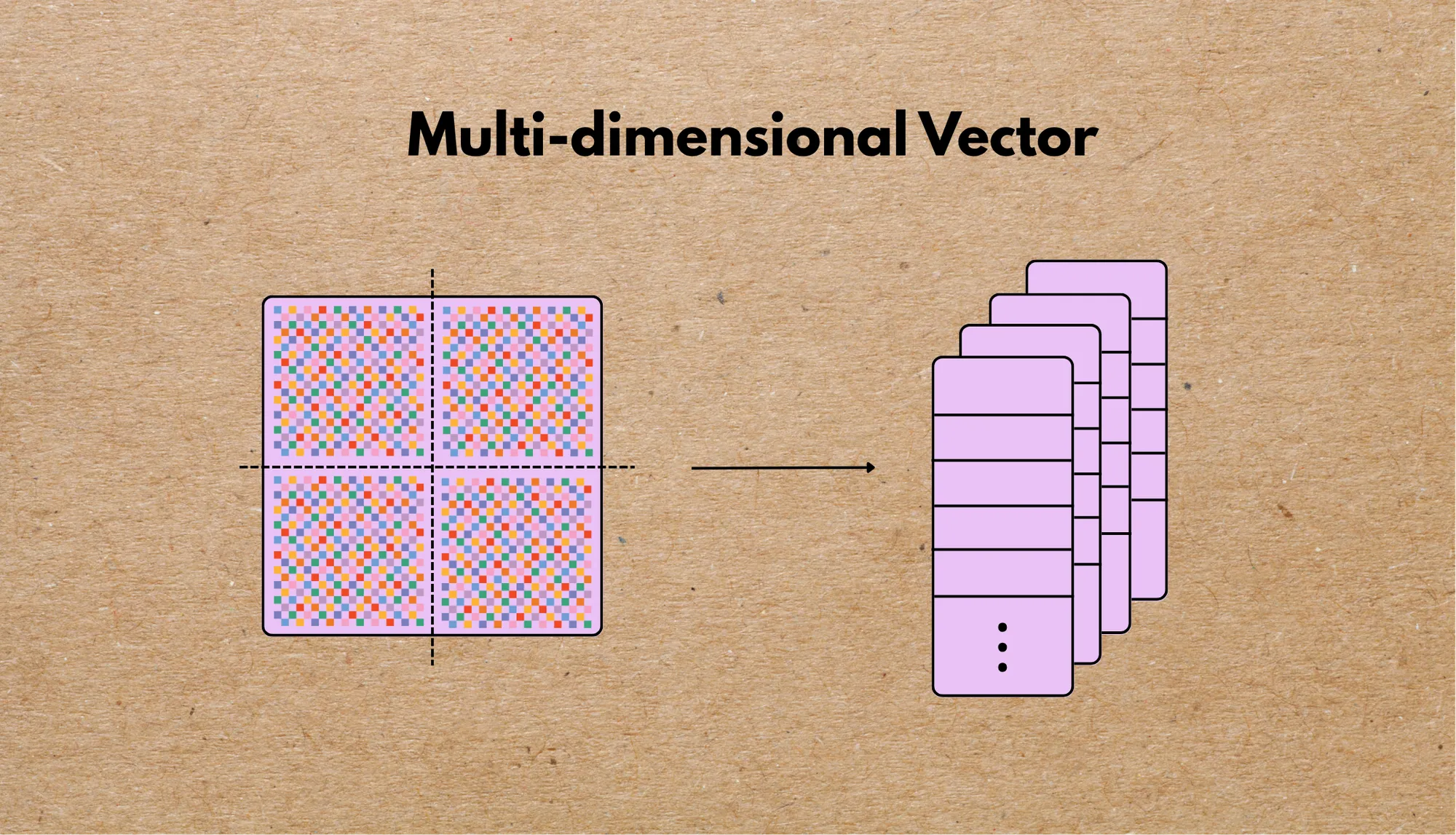
CocoIndex now provides robust and flexible support for typed vector data, from simple numeric arrays to deeply nested multi-dimensional vectors. This support is designed for seamless integration with high-performance vector databases such as Qdrant, and enables advanced indexing, embedding, and retrieval workflows across diverse data modalities.
In this post, we’ll break down:
- What types of vectors CocoIndex supports
- How they are represented in Python
- How we handle dimensionality
- How they map to Qdrant vectors or payloads
- Practical examples of usage
:star: Star CocoIndex on GitHub if you like it!
Multi-vector embedding search architecture
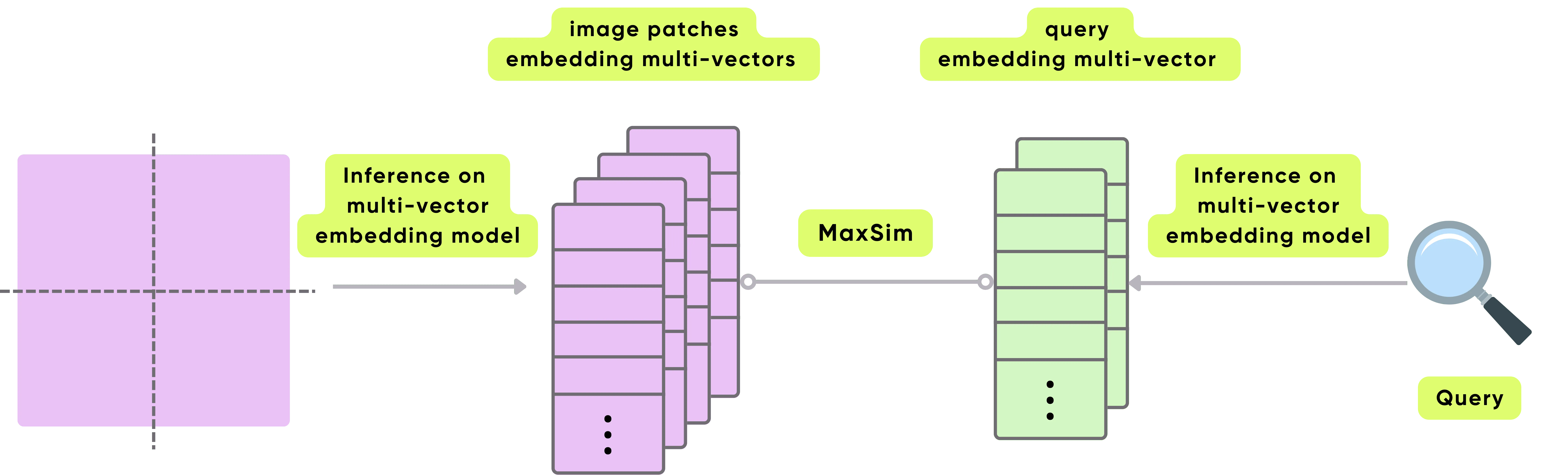
This architecture enables fine-grained retrieval by leveraging multi-vector embeddings for both images and queries. The system supports high-resolution semantic matching by comparing dense sets of embeddings from both modalities using a similarity operator like MaxSim.
-
Input Image Preprocessing: The image is divided into patches (typically non-overlapping or slightly overlapping regions). Each patch is treated as a semantic unit and will be embedded individually.
-
Multi-Vector Image Embedding: A multi-vector embedding model processes each image patch independently. Instead of encoding the entire image into a single vector, the model produces a set of embedding vectors per image (one or more vectors per patch). This results in a multi-vector representation of the image, preserving local semantic information.
-
Query Embedding: A query (text or image) is passed through a similar multi-vector embedding model, producing a set of embedding vectors that capture different semantic aspects of the query.
-
MaxSim Similarity Matching: The MaxSim operation compares all query vectors with all image vectors. For each query vector, it finds the maximum similarity score with any image vector. These max scores are aggregated (e.g., summed or averaged) to yield a final relevance score. This method allows the query to flexibly match any relevant part of the image representation.
-
Retrieval Based on the final similarity scores, the system retrieves the most relevant images for the given query.
What Python vector types does CocoIndex support?
CocoIndex accepts a range of vector types with strong typing guarantees. See CocoIndex data type documentation for more details.
CocoIndex automatically infers types, so when defining a flow, you don’t need to explicitly specify any types. You only need to specify types explicitly when defining custom functions.
1. One-dimensional vectors
from cocoindex import Vector, Float32
from typing import Literal

Vector[Float32]                     # dynamic dimension
Vector[Float32, Literal[384]]       # fixed dimension of 384
These types are interpreted as:
- Underlying Python type:
numpy.typing.NDArray[np.float32]orlist[float] - Dimension-aware: When used with
Literal[N], dimension size is explicitly enforced - Supported number types:
- Python native types:
float,int - CocoIndex type aliases:
Float32,Float64,Int64. They’re aliases for Python native types but annotated with CocoIndex type information to indicate the exact bit size. Using them as custom function return types, you can control the exact type used downstream, within the engine and target, and more - numpy number types:
numpy.float32,numpy.float64,numpy.int64
- Python native types:
2. Two-dimensional vectors (multi-vectors)
Vector[Vector[Float32, Literal[3]], Literal[2]]This declares a vector with two rows of 3-element vectors. These are treated as multi-vectors (e.g., multiple embeddings per point).
- Underlying Python type:
numpy.typing.NDArray[np.float32, Literal[3, 2]]or- nested
list[list[float]]
- Semantics: Useful for scenarios like comparing sets of embeddings per item, multi-view representations, or batched encodings
What is a multi-dimensional vector?
A multi-dimensional vector is simply a vector whose elements are themselves vectors, essentially a matrix or a nested list. In CocoIndex, we represent this using Vector[Vector[T, N], M], meaning M vectors, each of dimension N. M and N are optional: CocoIndex doesn’t require them to be fixed, while some targets have requirements, e.g. a multi-vector exported to Qdrant needs to have a fixed inner dimension, i.e. Vector[Vector[T, N]].
This concept is crucial in deep learning and multi-modal applications, for example:
- An image might be represented as a collection of patch-level embeddings.
- A document could be broken down into paragraph-level vectors.
- A user session might be a sequence of behavioral vectors.
Instead of flattening these rich representations, CocoIndex supports them natively through nested Vector typing.
Imagine a 1024x1024 image processed by a Vision Transformer (ViT). Instead of one global image vector, ViT outputs a vector per patch (e.g. 8x8 patches → 64 vectors).
Vector[Vector[Float32, Literal[768]]]- 196 patches, each with a 768-dim embedding
- Enables local feature matching and region-aware retrieval
Why not just use a flat vector?
You could flatten a 2x3 multi-vector like [[1,2,3],[4,5,6]] into [1,2,3,4,5,6], but you’d lose semantic boundaries.
With true multi-vectors:
- Each sub-vector retains its meaning
- You can match/query at the sub-vector level
- Vector DBs like Qdrant can score across multiple embeddings, choosing the best match (e.g., closest patch, paragraph, or step)
- The inner vector can have a fixed dimension even if the outer dimension is variable, which is quite common, e.g. the number of patches of images and the number of paragraphs of articles depend on specific data. A vector having a fixed dimension is required by most vector databases, as it’s essential for building a vector index.
How do CocoIndex vector types map to Qdrant?
Qdrant is a popular vector database that supports both dense vectors and multi-vectors. CocoIndex maps vector types to Qdrant-compatible formats as follows:
| CocoIndex Type | Qdrant Type |
|---|---|
Vector[Float32, Literal[N]] | Dense Vector |
Vector[Vector[Float32, Literal[N]]] | MultiVector |
| Anything else | Stored as part of Qdrant’s JSON payload |
Qdrant only accepts vectors with fixed dimension. CocoIndex automatically detects vector shapes and maps unsupported or dynamic-dimension vectors into payloads instead.
In CocoIndex, data is structured as rows and fields:
- A row corresponds to a Qdrant point
- A field can either:
- Be a named vector, if it fits Qdrant’s vector constraints
- Be part of the payload, for non-conforming types
This hybrid approach gives you the flexibility of structured metadata with the power of vector search.
How the type becomes a column
The mapping above isn’t something you configure by hand — it falls out of the type. A vector column is fully described by two facts: the dtype of each element and the number of dimensions. CocoIndex captures exactly that in a vector schema, and a multi-vector is simply that single-vector schema wrapped to say “a variable number of these.” When a connector sets up a target, it reads the schema off the field’s type annotation and translates it into whatever the destination requires — vector(N) in Postgres, fixed_size_list<float32>(N) in LanceDB, or a multi-vector collection in Qdrant.
This is also where the fixed-inner-dimension rule becomes concrete. The outer count can stay dynamic — one image yields as many patch vectors as it has patches — but each inner vector has to declare a fixed dtype and size, because that’s the unit the vector index is actually built over. The schema is what carries that guarantee from your Python types down to the storage layer, so the column is provisioned correctly the first time rather than inferred from whatever the first row happened to contain.
Finally
With the ability to support deeply typed vectors and multi-dimensional embeddings, CocoIndex brings structure and semantic clarity to vector data pipelines. Whether you’re indexing images, text, audio, or abstract graph representations, our typing system ensures compatibility, debuggability, and correctness at scale.
We’re constantly adding more examples and improving our runtime. If you found this helpful, please ⭐ star CocoIndex on GitHub and share it with others.

About the author.

CEO and cofounder of CocoIndex. Writes about incremental data infrastructure, agents, and the engineering decisions behind the engine.
Frequently asked questions.
What is a multi-dimensional vector (multi-vector) in embeddings?
A multi-dimensional vector is a vector whose elements are themselves vectors, essentially a matrix or nested list. CocoIndex represents it as Vector[Vector[T, N], M], meaning M vectors each of dimension N. It is useful when one item is naturally many embeddings, e.g. patch-level embeddings for an image, paragraph-level vectors for a document, or a sequence of behavioral vectors for a session. See What is a multi-dimensional vector?
Why use multi-vectors instead of flattening into a single flat vector?
You could flatten [[1,2,3],[4,5,6]] into [1,2,3,4,5,6], but you would lose semantic boundaries. With true multi-vectors each sub-vector keeps its meaning, you can match and query at the sub-vector level, and vector databases like Qdrant can score across multiple embeddings to pick the best match (e.g. the closest patch or paragraph). See Why not just use a flat vector?
What vector types does CocoIndex support in Python?
CocoIndex accepts typed one-dimensional vectors such as Vector[Float32] (dynamic dimension) and Vector[Float32, Literal[384]] (fixed dimension), and two-dimensional multi-vectors such as Vector[Vector[Float32, Literal[3]], Literal[2]]. Supported number types include Python float/int, CocoIndex aliases (Float32, Float64, Int64), and numpy number types. See What Python vector types does CocoIndex support?
How do I declare a fixed vs. dynamic vector dimension in CocoIndex?
Use Literal[N] to enforce a fixed dimension, e.g. Vector[Float32, Literal[384]], or omit it for a dynamic dimension, e.g. Vector[Float32]. In Vector[Vector[T, N], M] both M and N are optional; a common pattern is a fixed inner dimension with a variable outer count, like Vector[Vector[Float32, Literal[768]]] for a variable number of 768-dim patch embeddings. See What Python vector types does CocoIndex support?
How do CocoIndex vector types map to Qdrant?
CocoIndex maps Vector[Float32, Literal[N]] to a Qdrant dense vector, Vector[Vector[Float32, Literal[N]]] to a Qdrant multi-vector, and anything else into Qdrant's JSON payload. A CocoIndex row maps to a Qdrant point, and each field becomes either a named vector (if it fits Qdrant's constraints) or part of the payload. See How do CocoIndex vector types map to Qdrant?
Does Qdrant require a fixed vector dimension?
Yes. The post notes Qdrant only accepts vectors with a fixed dimension, which is essential for building a vector index. CocoIndex automatically detects vector shapes and maps unsupported or dynamic-dimension vectors into the payload instead. For a multi-vector, the inner dimension must be fixed even when the outer count (e.g. number of patches or paragraphs) varies. See How do CocoIndex vector types map to Qdrant?
How does multi-vector retrieval with MaxSim work?
Both the item (e.g. image patches) and the query are encoded as sets of embeddings. The MaxSim operation compares all query vectors against all item vectors; for each query vector it takes the maximum similarity with any item vector, and those scores are aggregated (e.g. summed or averaged) into a final relevance score. This lets the query flexibly match any relevant part of the item's representation. See Multi-vector embedding search architecture.
