
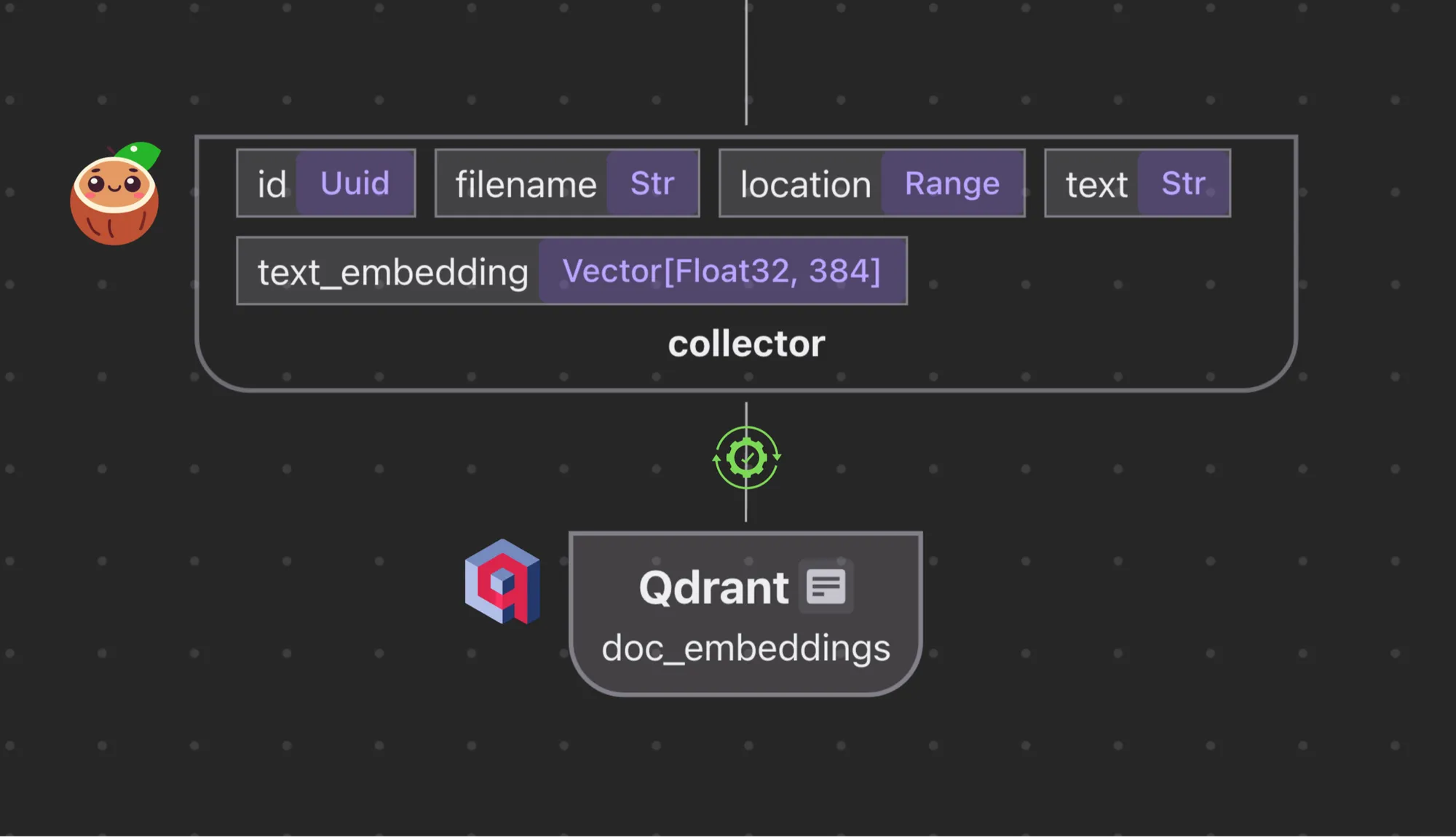
CocoIndex supports Qdrant natively. The integration features a high-performance Rust stack with incremental processing end to end for scale and data freshness. 🎉 We just rolled out our latest change that handles automatic target schema setup with Qdrant from the CocoIndex indexing flow.
That means developers don’t need to do any schema setup, including setting up tables, field types, keys, and indexes for target stores. The setup is the result of schema inference from the CocoIndex flow definition. It is already supported with native integration with Postgres, Neo4j, and LanceDB. This allows for more seamless operation between the indexing and target stores.
No more manual setup
Previously, users had to manually create the collection before indexing:
curl -X PUT 'http://localhost:6333/collections/image_search' \
  -H 'Content-Type: application/json' \
  -d '{
    "vectors": {
      "embedding": {
        "size": 768,
        "distance": "Cosine"
      }
    }
  }'
With the new change, users don’t need to do any manual collection management.
How it works
Flow definition
Following the dataflow programming model, the user defines a flow, where every step has output data type information, and the next step takes in data type information. See an example (~100 lines of Python end to end).
In short, it can be presented as the following lineage graph.
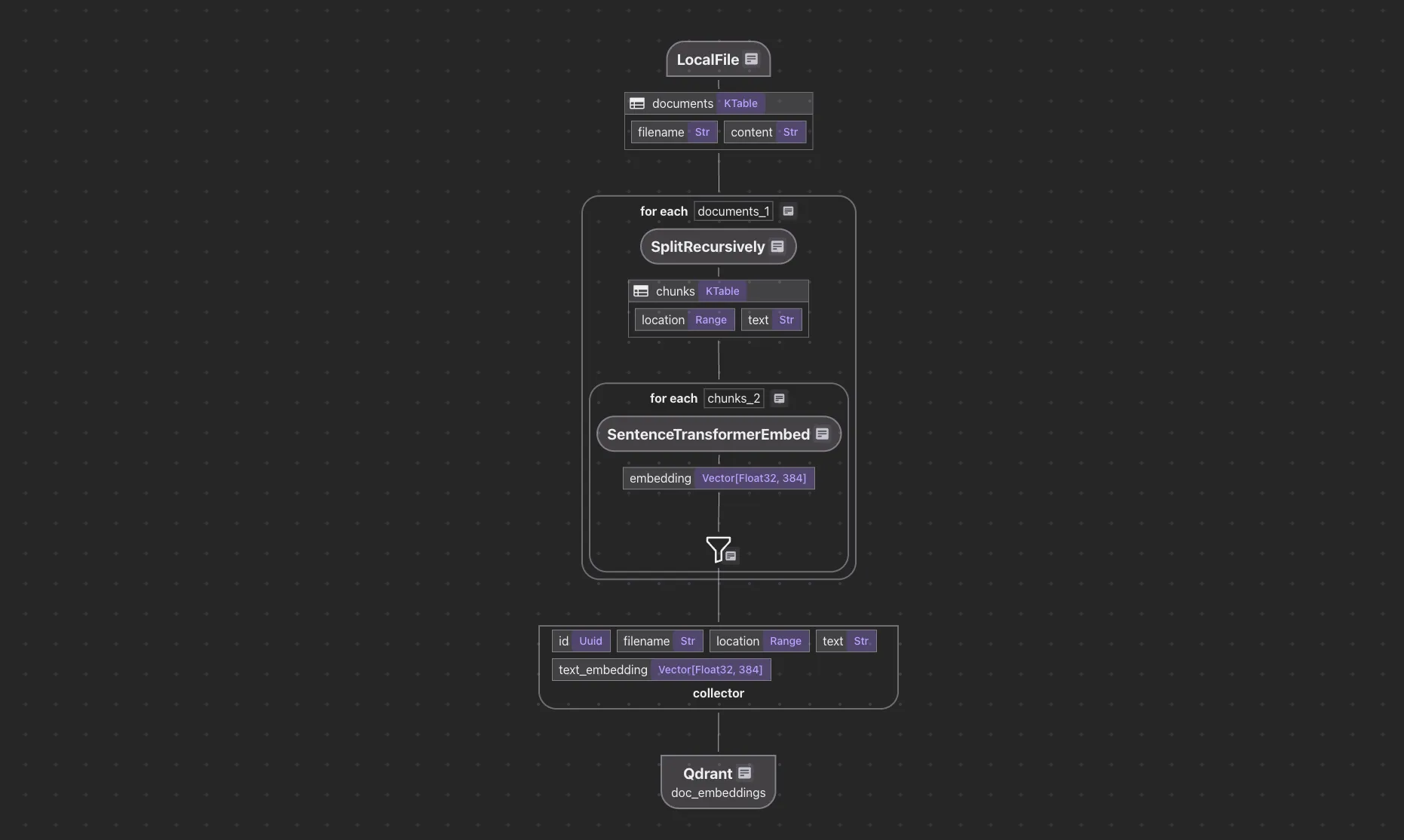
In the declarative dataflow as above:
Target = Formula (Source)
It implies both data and the expected target schema. A single flow definition drives both data processing (including change handling) and target schema setup, providing a single source of truth for both data and schema. A similar way to think about it is like type systems inferring data type from operators and inputs: type inference (for example, Rust).
In the indexing flow, exporting embeddings and metadata directly to Qdrant is all you need.
doc_embeddings.export(
    "doc_embeddings",
    cocoindex.storages.Qdrant(collection_name=QDRANT_COLLECTION),
    primary_key_fields=["id"],
)
In this example,
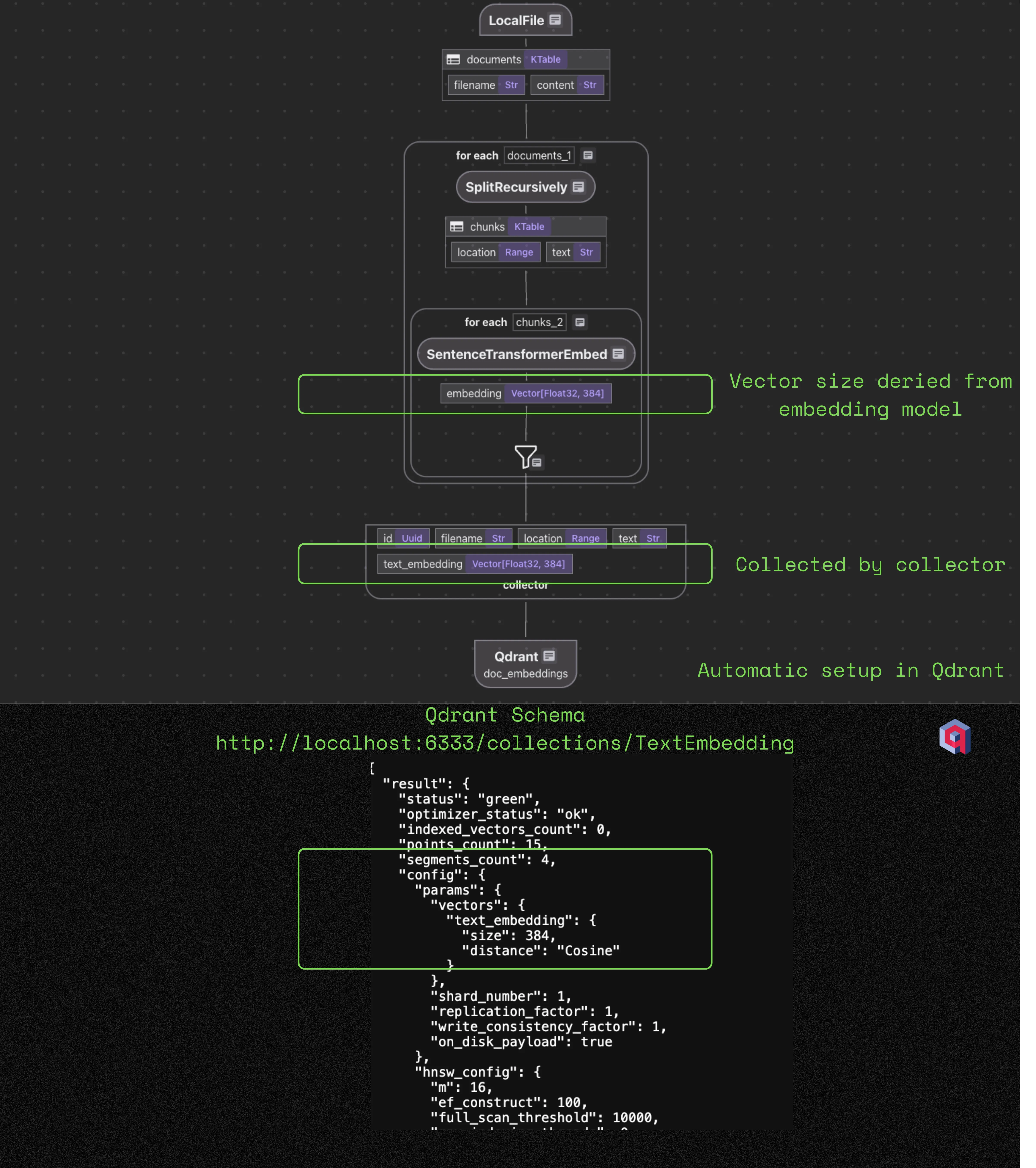
As part of the Qdrant schema setup, it is necessary to specify the vector size for embedding fields. Qdrant only needs a schema for vector fields, including the vector size and distance. Other fields are not part of the schema. The vector name and size need to be consistent with the flow, and users need to maintain them manually otherwise.
When using CocoIndex, the vector size is decided by the embedding model. For example:
-
At the
SentenceTransformerEmbedtransformation step, the data fieldembeddinghas Vector[float, 384] type. It is automatically generated because we usedSentenceTransformerEmbedwith theall-MiniLM-L6-v2model, which has 384 dimensions. -
When we added it to the
doc_embeddingscollector, the datatype of field embeddings was carried over. -
doc_embeddingscollector exports to Qdrant, and the schema setup is derived consistently in a robust way.
If you have multiple fields with different embedding models, the vector size will be different for each embedding field. It’ll end up with multiple different Named Vectors in Qdrant, with different sizes.
CocoIndex always automatically handles the schema, no matter how many fields/vectors are involved in your flow, and you can just focus on the transformation logic.
Setup and update
To start a CocoIndex process, users need to first run the setup, which covers all the necessary setup for any backends needed.
cocoindex setup maincocoindex setup
- Creates new backends for the schema setup, like tables/collections/etc.
- Alters existing backends with schema changes: it’ll try to do a non-destructive update if possible, e.g. primary keys don’t change and target storage supports in-place schema update (e.g.
ALTER TABLEin Postgres); otherwise, drop and recreate. - Drops stale backends.
Developers then run
cocoindex update main [-L]to start an indexing pipeline (-L for long-running).
If you’ve made logic updates that require the schema on the target store to be updated, don’t worry.
When you run cocoindex update again after the logic update, CocoIndex will infer the schema for the target store.
It requires a cocoindex setup to push the schema to the target store, which will notify you in the CLI.
As a choice of design, CocoIndex won’t update any schema without your notice, as some schema updates may involve destructive changes.
For example, in the example above, if users change the embedding model, the vector size may change.
cocoindex setup will drop the previous collection and create a new one, and in the next cocoindex update run,
values will be populated.
Here the cached intermediate computation data will be reused, so it’ll be a lot faster than building the index from scratch.
Note that Qdrant doesn’t support ALTER TABLE like most relational databases, so it’s a drop-and-recreate.
Drop a flow
To drop a flow, you’d run:
cocoindex drop maincocoindex drop drops the backends when dropping the flow.
All backend entities for the target stores, such as a PostgreSQL table or a Qdrant collection, are owned by the flow as derived data, so they will be dropped too.
Why automatic target schema inference?
The question should really be, why not?
The traditional way is users fully figure out when and how to set up/update the target schema themselves, including the specific schema. Indexing flows often span multiple systems. For example:
On the target store:
- Vector databases (PGVector, Qdrant, etc.)
- Relational databases (PostgreSQL)
- Graph databases (Neo4j, Kuzu, etc.)
The data types you’re outputting and your target schema must match up.
If there’s any internal state tracking, e.g., in the case of incremental processing:
- Internal tables (state tracking)
It’s tedious and painful to do this manually, as all of these systems must agree on schema and structure. This typically requires:
- Manual setup and syncing of schemas.
- Tight coordination between developers, DevOps, and data engineers: people writing the code may not be the same people deploying / running it in an organization.
- Debugging misalignments between flow logic and storage layers.
- Production rollout is typically stressful.
Any additional moving parts to the indexing pipeline system add friction: any mismatch between the logic and the storage schema could result in silent failures or subtle bugs.
- In some cases, it’s not silent failures. The failure should be obvious, e.g. if users forget to create a table or collection, it’ll just error out when writing to the target. In this case, the way to figure out the exact schema/configuration for the target is still subtle though.
- Some other scenarios can lead to non-obvious issues, i.e. out of sync between storage for internal states and the target. e.g. users may drop the flow and recreate, but not do so for the target; or drop and recreate the target, but not do so for the internal storage. Then they’re out of sync and there will be hard-to-debug issues. The gist is, a pipeline usually needs multiple backends, and it can be error-prone to keep them in sync manually.
Continuous changes to a system introduce persistent pains in production. Every time a data flow is updated, the target schema must evolve alongside, making it not a one-off tedious process, but an ongoing source of friction.
In real-world data systems, new fields often need indexing, old ones get deprecated, and transformations evolve. If a type changes, the schema must adapt. These shifts magnify the complexity and underscore the need for more resilient, adaptable infrastructure.
Following the dataflow programming model, every step is derived data all the way to the end. Indexing infrastructure requires data consistency between the indexing pipeline and target stores, and the fewer loose ends, the easier and more robust it will be.
Our vision: declarative, flow-based indexing
When we started CocoIndex, our vision was to allow developers to define data transformation and indexing logic declaratively, and CocoIndex does the rest. One big step toward this is automatic schema setup.
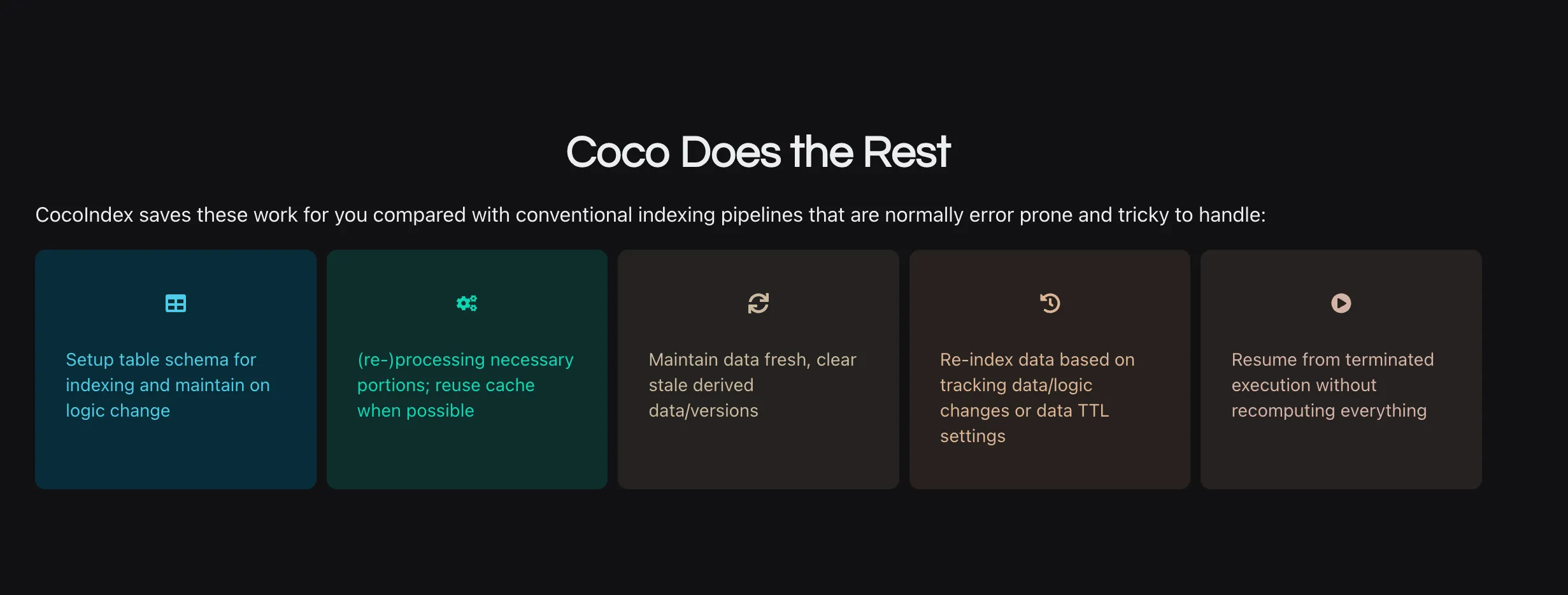
We’re committed to taking care of the underlying infrastructure, so developers can focus on what matters: the data and the logic. We are serious when we say, you can have a production-ready data pipeline for AI with ~100 lines of Python code.
If you’ve ever struggled with keeping your indexing logic and storage setup in sync, we’ve been there. Let us know what you’d love to see next.

About the author.

CEO and cofounder of CocoIndex. Writes about incremental data infrastructure, agents, and the engineering decisions behind the engine.
Frequently asked questions.
Does CocoIndex create Qdrant collections automatically?
Yes. CocoIndex sets up the Qdrant target schema automatically by inferring it from your indexing flow definition. You no longer need to manually create the collection, set field types, keys, or indexes before indexing. Previously users had to curl a PUT to /collections/... with the vector size and distance; now exporting embeddings and metadata directly to Qdrant is all you need.
How does CocoIndex infer the Qdrant vector size?
The vector size is decided by the embedding model used in the flow. For example, the SentenceTransformerEmbed step with the all-MiniLM-L6-v2 model produces a Vector[float, 384] field, so 384 is carried through the collector and used when the schema is set up in Qdrant. If you use multiple embedding models, each embedding field gets its own size, ending up as multiple Named Vectors in Qdrant with different sizes.
See How it works
What does cocoindex setup do for a Qdrant target?
cocoindex setup main covers all the backend setup a flow needs. It creates new backends (such as tables and collections) for the inferred schema, alters existing backends non-destructively when possible (for example an in-place update where the target supports it), and drops stale backends. Because Qdrant does not support ALTER TABLE like relational databases, a schema change such as a new vector size is a drop-and-recreate.
See How it works
What happens to my Qdrant collection if I change the embedding model?
Changing the embedding model can change the vector size. On the next cocoindex setup, CocoIndex drops the previous collection and creates a new one, and the following cocoindex update repopulates the values. Because cached intermediate computation is reused, rebuilding is much faster than starting the index from scratch.
See How it works
Will CocoIndex change my target schema without warning?
No. By design, CocoIndex will not update any schema without your notice, because some schema updates involve destructive changes. When a logic update requires the target schema to change, cocoindex update infers the new schema and notifies you in the CLI that a cocoindex setup is required to push it to the target store.
See How it works
Why should target schema setup be automatic instead of manual?
Indexing flows usually span multiple backends, such as vector databases, relational databases, graph databases, and internal state-tracking tables, and all of them must agree on schema and structure. Doing this manually requires syncing schemas by hand, tight coordination between developers and operators, and debugging silent failures or out-of-sync state. A single flow definition that drives both data processing and schema setup gives you one source of truth and fewer loose ends.
Which target stores support automatic schema inference in CocoIndex?
Beyond Qdrant, automatic target schema setup is already supported with native integrations for Postgres, Neo4j, and LanceDB. The same flow definition implies both the data and the expected target schema, similar to how a type system infers data types from operators and inputs.
See How it works
