

CocoIndex can read data from any system: internal APIs, databases, file systems, cloud storage, legacy services. You are not limited to the built-in connector library. Whatever you can fetch from Python, CocoIndex can ingest incrementally, track for changes, and keep in sync with your targets.
The original version of this post introduced a dedicated source connector API (SourceSpec, source_connector, list() / get_value()). CocoIndex v1 removed the need for that interface: a custom source is now ordinary async Python plus processing components. This post describes the v1 approach, with a mapping from the v0 API for readers of the original.
Custom sources are the complement to custom targets, giving you control over both ends of a pipeline: where data comes from and where it lands.
Why not build another thousand connectors?
We could, and expanding the connector library is on the roadmap. But more connectors alone don’t solve the problem. Enterprise data is siloed behind complex systems, inconsistent schemas, and fragile integrations. What pipelines actually need is infrastructure that handles ever-changing datasets, reconciles differences across systems, and keeps data flows durable and observable. That is where CocoIndex focuses: the incremental processing engine underneath, with sources as a thin layer you can supply yourself.
Assemble pipelines from building blocks
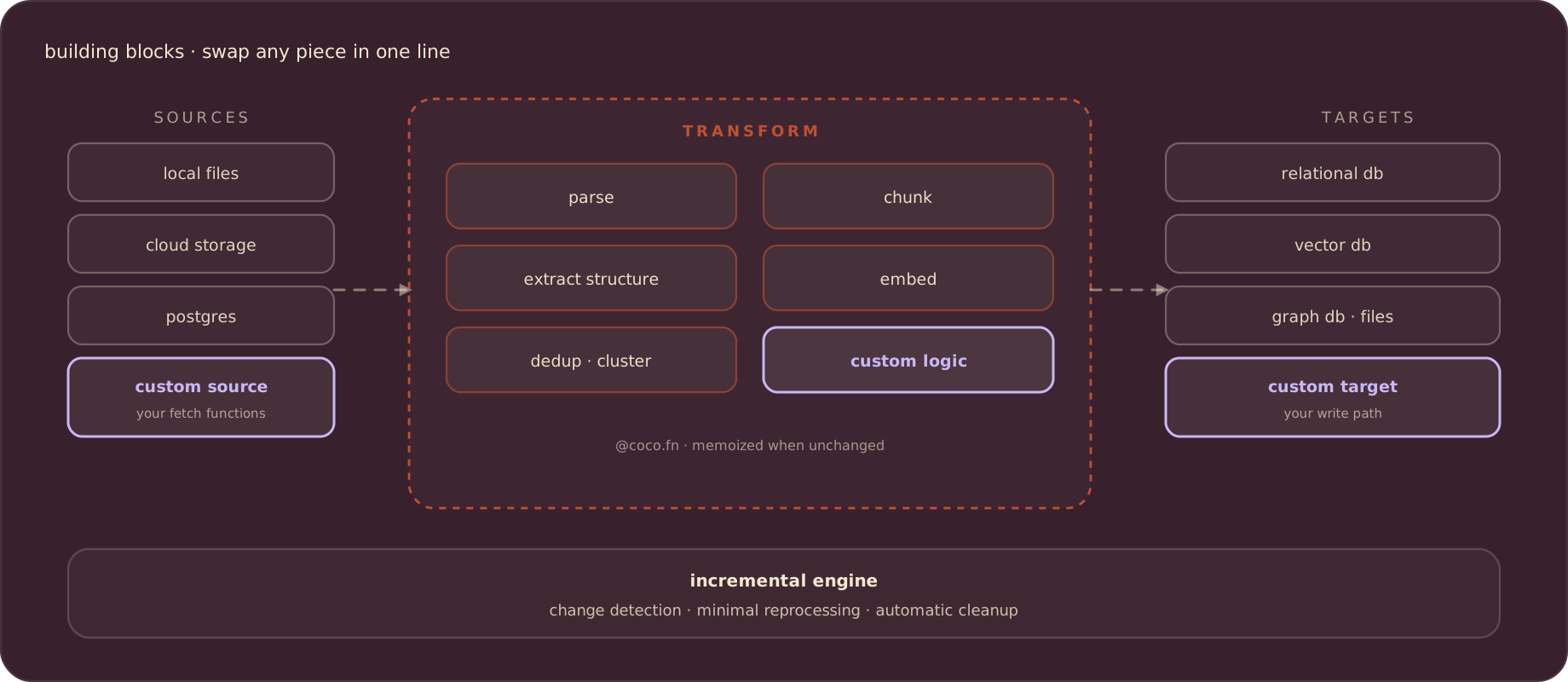
CocoIndex apps are modular: sources, transformations, and targets compose, and each block swaps in a single line of code. Custom sources are the input-side block you supply yourself, alongside:
- Custom targets: write to any system, with the same diff-and-sync treatment as built-in targets.
- Custom transformations: domain-specific logic as ordinary decorated functions.
- Built-in connectors and operations for the common cases.
Mix and match to build end-to-end pipelines that stay incremental and traceable, whatever they read from or write to.
What a custom source looks like in v1
A custom source is two ordinary async functions and one processing component: no decorators on the fetch code, connector class, or plugin registration.
- A listing function that returns what exists right now, as stable keys.
- A fetch function that returns the full content for one key.
- A processing component, one per item, that transforms the content and declares the rows that should exist downstream.
Here is the shape, using an internal ticketing API as the example:
import cocoindex as coco
from cocoindex.connectors import postgres


@dataclass
class TicketRow:
    id: str
    title: str
    body: str
    updated_at: datetime


async def list_ticket_ids() -> list[str]:
    """Ask your system what exists right now."""
    ...


async def fetch_ticket(ticket_id: str) -> TicketRow:
    """Fetch the full content for one item."""
    ...


@coco.fn
async def process_ticket(
    ticket_id: str, table: postgres.TableTarget[TicketRow]
) -> None:
    ticket = await fetch_ticket(ticket_id)
    table.declare_row(row=ticket)


@coco.fn
async def app_main() -> None:
    table = await postgres.mount_table_target(
        PG_DB,
        table_name="tickets",
        table_schema=await postgres.TableSchema.from_class(
            TicketRow, primary_key=["id"]
        ),
    )
    ticket_ids = await list_ticket_ids()
    await coco.mount_each(process_ticket, ((t, t) for t in ticket_ids), table)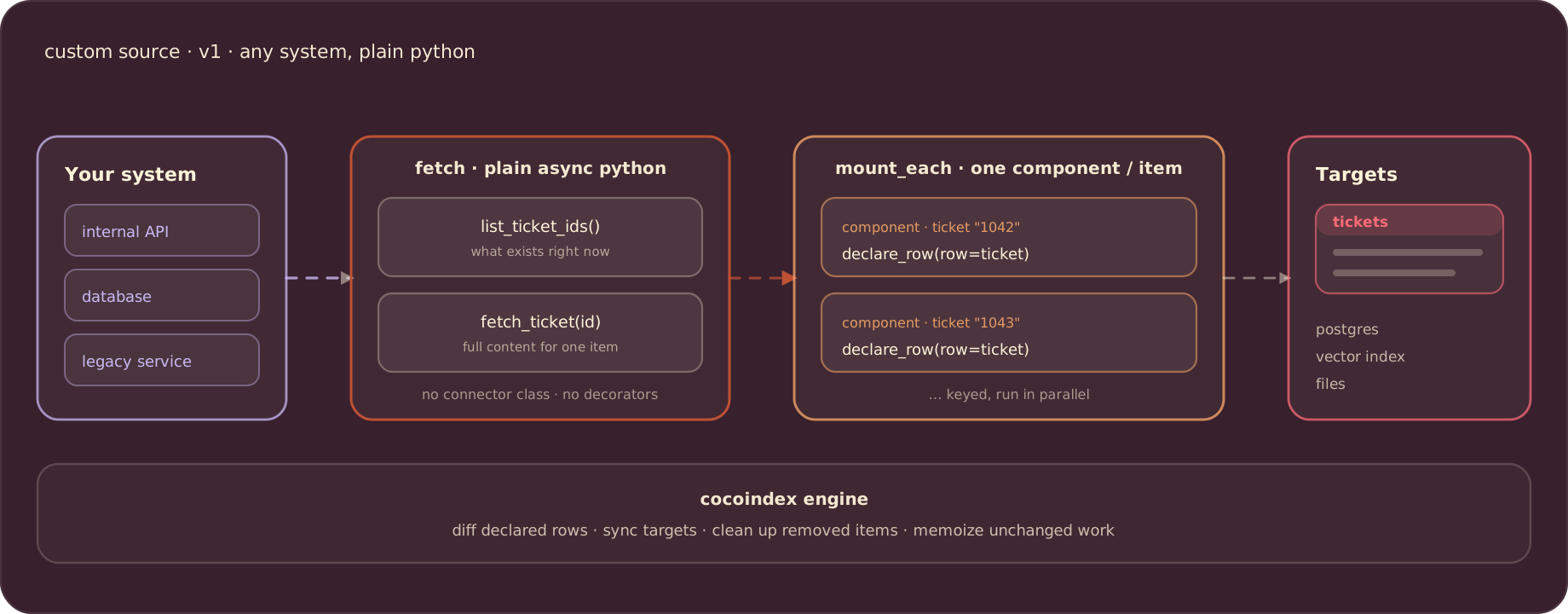
Three details carry the weight here:
coco.mount_eachfans out one processing component per item, keyed by the ID you pass. That key gives each item a stable component path across runs, which is how the engine matches an item to its previous run.declare_rowstates what should exist in the target. You never write inserts, updates, or deletes. The engine compares the declared rows against the previous run and applies only the difference.- The fetch functions are plain
async def. Any HTTP API, message queue, SDK, or database driver works the same way. Authentication and connection pooling live where they normally would in Python: create the client in the app lifespan and share it through a context key.
The downstream half of the pipeline (chunking, embedding, LLM extraction, graph building) is written exactly the same way as for a built-in connector. A transformation doesn’t know or care whether its input came from S3, Postgres, or your ticketing API.
How it stays incremental
The engine never assumes it must reprocess everything. On each run:
- Items whose key is new get processed and their rows created.
- Items already seen are matched by component path. Unchanged declared rows produce no writes; changed rows produce exactly the update needed.
- Items that disappear from your listing have their target states cleaned up automatically. If a ticket is deleted upstream, its rows go away downstream without any delete logic on your side.
Every @coco.fn participates in change detection: the engine fingerprints inputs and logic, so it knows when a function’s result may have changed, including when you edit the code. For expensive steps such as embedding or LLM extraction, add memo=True and the memoized result is reused whenever inputs and logic are unchanged. Re-running a pipeline over a mostly-unchanged source only pays for what actually changed.
In v0 this efficiency depended on your connector exposing an ordinal (a timestamp or version number) so the engine could skip unchanged items. In v1 the engine fingerprints and diffs on its own, so any source gets incremental behavior without cooperating. To keep a source fresh over time, run cocoindex update on a schedule; sources with native change watching plug into live mode.
From the v0 connector API
If you read the original version of this post, or wrote a v0 custom source, here is where each piece went:
| v0 connector API | v1 equivalent |
|---|---|
SourceSpec | Plain function arguments and app config |
create(spec) | Your own client setup, typically in the app lifespan |
list() | A listing function plus the keys passed to mount_each |
get_value(key) | A fetch call inside the per-item component |
| Key and value types | The component key, plus dataclasses for rows |
provides_ordinal() | Not needed: change detection and memoization |
The v0 interface asked you to fit your system into a connector contract so the engine could read through it. The v1 model inverts that: you read your system with whatever code is natural, and the engine tracks the results. Less to implement, and nothing to learn beyond the concepts the rest of the framework already uses.
When to build a custom source
Reach for a custom source when there is genuinely no built-in connector for where your data lives: an internal or proprietary API, a legacy database with an unusual access path, or a SaaS product CocoIndex doesn’t ship a connector for yet. If a built-in connector already covers your system, use it. The value of the custom-source model is the long tail of your systems, brought in without forking or patching the engine.
Common shapes we see:
- Knowledge aggregation for LLM context: wikis, ticket systems, and internal APIs each become a fetch function and a component, and the index stays current as they change.
- Data stitching: one component fetches from several services (auth, billing, usage) and declares a single composite row, so the join happens before the data hits your index.
- Legacy wrappers: wrap a painful read path (SOAP, XML, mainframe exports) in a fetch function and get a modern, queryable table on the other side.
See it in action
The HackerNews example is a complete custom source built this way: it fetches recent stories and their nested comments from the Algolia HN API, extracts topics from every message with an LLM, and keeps two Postgres tables in sync for search and analytics.
The custom-source walkthrough builds it step by step, and the example gallery has more pipelines to start from.
If you build a source for a system others use too, we’d like to hear about it: CocoIndex on GitHub.

About the author.

CEO and cofounder of CocoIndex. Writes about incremental data infrastructure, agents, and the engineering decisions behind the engine.
Frequently asked questions.
What is a custom source in CocoIndex?
A custom source is how CocoIndex reads data from a system with no built-in connector. In CocoIndex v1 it is ordinary async Python: a listing function that returns what exists right now as stable keys, a fetch function that returns the full content for one key, and a processing component per item that declares the rows that should exist downstream. There is no connector interface to implement.
Do I need to implement a connector API to add a custom source?
No. The v0 connector interface (SourceSpec, source_connector, list() / get_value()) was removed in CocoIndex v1. You fetch data with plain async def functions, fan out one processing component per item with coco.mount_each, and declare target rows with declare_row. The engine handles change detection, syncing, and cleanup.
Why doesn't CocoIndex just build more prebuilt connectors?
Expanding the connector library is on the roadmap, but connectors alone don't solve the underlying problems. Enterprise data is siloed behind complex systems, inconsistent schemas, and fragile integrations, so pipelines need infrastructure that handles ever-changing datasets, reconciles differences across systems, and keeps data flows durable and observable. CocoIndex focuses on that engine and lets you supply the source layer yourself when needed.
How does a custom source support incremental updates?
Each item runs as a processing component with a stable key, so the engine matches it to its previous run. Unchanged declared rows produce no writes, changed rows produce exactly the update needed, and items that disappear from the listing have their target rows cleaned up automatically. Functions decorated with @coco.fn participate in change detection, and memo=True caches expensive results so they are reused when inputs and logic are unchanged.
What happened to SourceSpec, source_connector, and provides_ordinal from v0?
They no longer exist in CocoIndex v1. SourceSpec becomes plain function arguments and app config, create() becomes your own client setup in the app lifespan, list() becomes a listing function plus the keys passed to mount_each, and get_value() becomes a fetch call inside the per-item component. Ordinals are unnecessary because the engine fingerprints inputs and logic and diffs declared rows on its own.
When should I build a custom source?
When no built-in connector covers where your data lives: an internal or proprietary API, a legacy database with an unusual access path, or a SaaS product without a shipped connector. Common shapes include aggregating wikis and ticket systems into LLM context, stitching several services into one composite row, and wrapping legacy read paths to get a modern queryable table. If a built-in connector already covers your system, use it.
