
CocoIndex supports custom targets: you can export data to any destination, whether it’s a local file, cloud storage, a REST API, or your own bespoke system, and still get incremental updates, change tracking, and automatic cleanup from the engine.
The original version of this post introduced the v0 connector API (TargetSpec, target_connector, get_persistent_key() / apply_setup_change() / mutate()). CocoIndex v1 replaced it with the target-state system: a TargetHandler that reconciles desired state against tracking records. This post describes the v1 approach, with a mapping from the v0 API for readers of the original.
Thanks to the community for the suggestions and early feedback that shaped this capability.
Swap targets without rewriting your pipeline
CocoIndex targets share one declarative pattern: you state what should exist, and the connector keeps the external system in sync. Writing HTML files to a folder and rows to Postgres look the same at the call site:
# Local files
localfs.declare_file(outdir / name, html, create_parent_dirs=True)

# Postgres: same declare pattern, different connector
table.declare_row(row=DocEmbedding(id=id, embedding=vec))
Because the transformation logic never touches write paths, swapping a target doesn’t ripple through the pipeline. Custom targets extend the same pattern to systems CocoIndex doesn’t ship a connector for: you implement the reconciliation once, and your pipeline code keeps declaring state the same way. They are the write-side counterpart of custom sources.
What a custom target looks like in v1
A custom target connector is the piece that connects CocoIndex’s declarative target states to an external system. You implement three small things:
- A tracking record: the minimal information persisted per item to detect changes on future runs. For a file, a content fingerprint; for a row, a hash of the row data.
- An action and a sink: the action describes one operation (write this file, delete this row); the
TargetActionSinkexecutes a batch of them against the external system. - A
TargetHandlerwith one required method,reconcile(): given the desired state for a key and the tracking records from previous runs, return an action if something must change, orNoneto skip.
Registration ties it together: coco.register_root_target_states_provider() takes your handler and returns a provider your user-facing API uses to declare target states.
At runtime the engine drives the loop: it collects everything your pipeline declared, calls reconcile() per key (passing NON_EXISTENCE for keys that disappeared, which is how cleanup happens), batches the returned actions by sink, executes them, and persists the new tracking records for next time. reconcile() itself must be non-blocking; all I/O lives in the sink.
How change detection works
The reason a custom target gets incremental updates “for free” is that you never write an imperative sync loop. You describe the desired state and the handler reconciles it against what existed before. To detect changes without re-reading the whole target, the tracking record stores just enough to compare, typically a content fingerprint from the connectorkits.fingerprint utilities, not the full content. When the fingerprint of the desired state matches the stored record, reconcile() returns None and the item is skipped cheaply.
One subtlety: because an update can be interrupted, the engine may carry multiple possible previous states for an item until a run confirms which one is real. That’s why reconcile() receives a collection of previous records, plus a prev_may_be_missing flag, and why the conservative skip condition checks that all of them match. It’s also why actions must be idempotent: re-applying a write that already landed has no ill effect, so a resumed run converges to the correct target state regardless of where the prior one stopped.
Example: export markdown files to local HTML
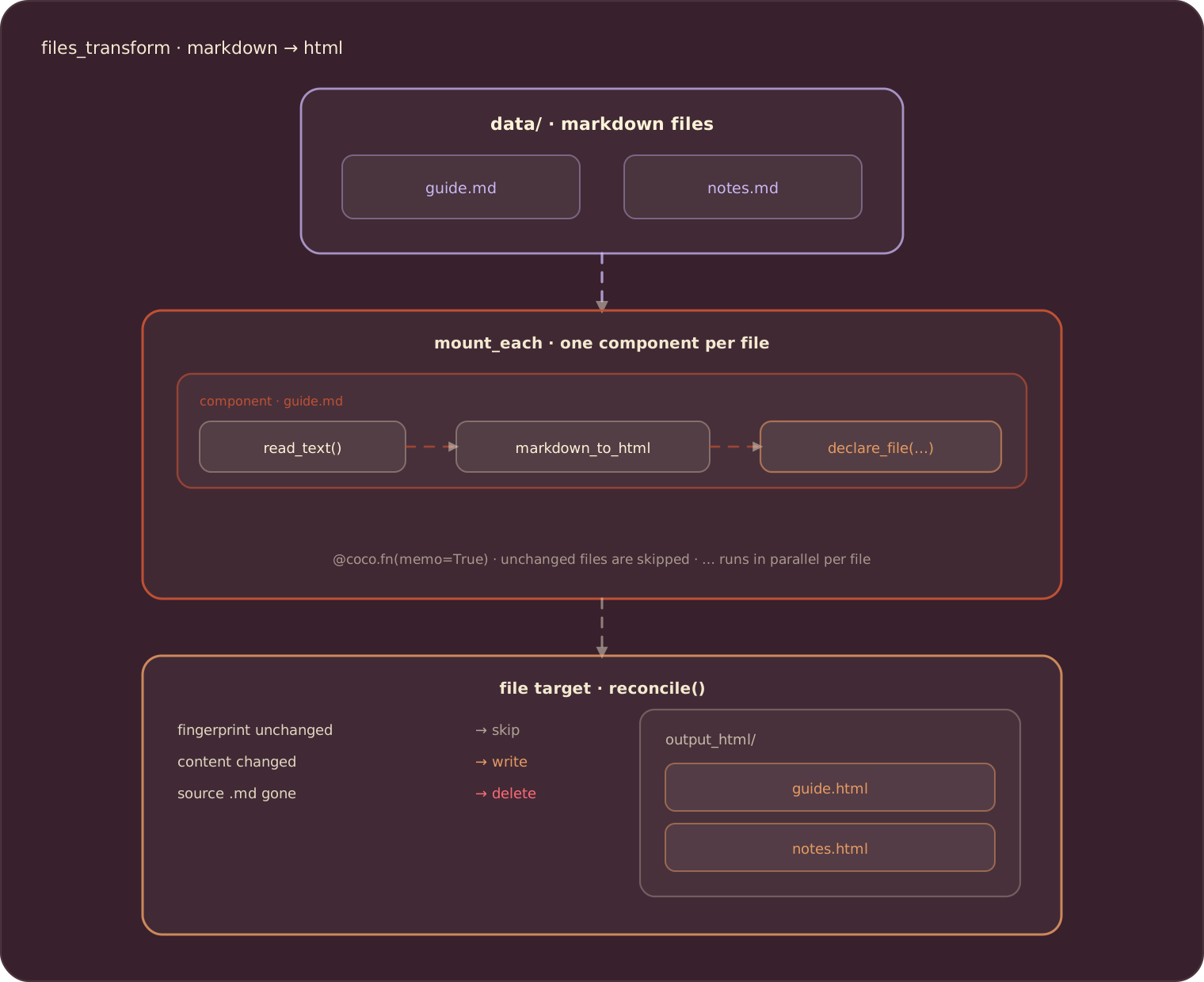
Let’s walk through the same example the original post used: converting .md files to .html on disk, incrementally. The pipeline side is the files_transform example; it uses the built-in localfs target, and afterwards we’ll build a simplified version of that file target ourselves.
The pipeline
One processing component per markdown file: read, render, declare the HTML file that should exist.
@coco.fn(memo=True)
async def process_file(file: FileLike, outdir: pathlib.Path) -> None:
    html = _markdown_it.render(await file.read_text())
    outname = "__".join(file.file_path.path.parts) + ".html"
    localfs.declare_file(outdir / outname, html, create_parent_dirs=True)


@coco.fn
async def app_main(sourcedir: pathlib.Path, outdir: pathlib.Path) -> None:
    files = localfs.walk_dir(
        sourcedir,
        path_matcher=PatternFilePathMatcher(included_patterns=["**/*.md"]),
        live=True,
    )
    await coco.mount_each(process_file, files.items(), outdir)
declare_file states what should exist; the connector writes it, overwrites it on change, and deletes the .html when the source .md disappears. No file I/O glue in the pipeline.
Build the file target yourself
Here is a simplified version of that localfs connector, following the custom target connector guide. First the types: an action describing one file operation, and a tracking record holding a content fingerprint.
class _FileAction(NamedTuple):
    path: pathlib.Path
    content: bytes | None  # None = delete


@dataclass(frozen=True, slots=True)
class _FileTrackingRecord:
    fingerprint: bytes
The sink applies a batch of actions. Note every operation is idempotent (missing_ok, exist_ok):
def _apply_actions(
    context_provider: coco.ContextProvider, actions: Sequence[_FileAction]
) -> None:
    for action in actions:
        if action.content is None:
            action.path.unlink(missing_ok=True)
        else:
            action.path.parent.mkdir(parents=True, exist_ok=True)
            action.path.write_bytes(action.content)


_file_sink = coco.TargetActionSink[_FileAction, None].from_fn(_apply_actions)
The handler holds the reconciliation logic: delete when the state is gone, skip when every possible previous record matches the new fingerprint, write otherwise.
class _FileHandler(coco.TargetHandler[_FileContent, _FileTrackingRecord]):
    def __init__(self, base_path: pathlib.Path):
        self._base_path = base_path

    def reconcile(
        self,
        key: coco.StableKey,
        desired_target_state: _FileContent | coco.NonExistenceType,
        prev_possible_records: Collection[_FileTrackingRecord],
        prev_may_be_missing: bool,
        /,
    ) -> coco.TargetReconcileOutput[_FileAction, _FileTrackingRecord] | None:
        path = self._base_path / key

        if coco.is_non_existence(desired_target_state):
            if not prev_possible_records and not prev_may_be_missing:
                return None
            return coco.TargetReconcileOutput(
                action=_FileAction(path=path, content=None),
                sink=_file_sink,
                tracking_record=coco.NON_EXISTENCE,
            )

        target_fp = fingerprint_bytes(desired_target_state)

        if not prev_may_be_missing and all(
            prev.fingerprint == target_fp for prev in prev_possible_records
        ):
            return None

        return coco.TargetReconcileOutput(
            action=_FileAction(path=path, content=desired_target_state),
            sink=_file_sink,
            tracking_record=_FileTrackingRecord(fingerprint=target_fp),
        )
Registering the handler returns a provider, and a thin user-facing wrapper turns it into the declare_file call the pipeline uses:
_provider = coco.register_root_target_states_provider(
    "myproject.io/file", _FileHandler(base_path)
)


def declare_file(filename: str, content: bytes) -> None:
    coco.declare_target_state(_provider.target_state(filename, content))
Containers (a directory whose files are children, a table whose rows are children) follow the same pattern one level deeper: the parent’s sink returns a ChildTargetDef with a handler for the children. The connector guide covers that, along with attachments for auxiliary state like vector indexes.
Run it
pip install -e .
cocoindex update main        # catch-up: scan, sync, exit
cocoindex update -L main     # live: keep watching for file changes
Add, modify, or remove files under data/ and only the changed files are reprocessed; a removed source’s .html is deleted automatically. Live mode keeps the output continuously synchronized, useful for fast-changing content like internal wikis.
From the v0 connector API
If you wrote a v0 custom target, here is where each piece went:
| v0 connector API | v1 equivalent |
|---|---|
TargetSpec | Plain value types declared per target state |
get_persistent_key() | The StableKey per state, with ContextKey for external resources |
apply_setup_change() | The container target’s reconcile() and sink |
mutate() | Per-item reconcile() plus batched actions in the sink |
| Automatic tracking | A tracking record you define (usually a fingerprint) |
prepare() | Handler construction, or context_provider at action time |
The v0 API split targets into setup (DDL-like) and data (DML-like) methods. The v1 model unifies both as target states reconciled the same way, which is what makes containers, children, and attachments compose: a table and its rows are the same concept at two levels.
Best practices
- Idempotency matters: actions should be safe to run more than once (
ON CONFLICT DO UPDATE,missing_ok=True,exist_ok=True), because interrupted runs re-apply. - Keep tracking records minimal: a fingerprint beats storing content; the engine persists them per item across runs.
- Handle multiple previous states: skip only when all
prev_possible_recordsmatch andprev_may_be_missingis false. - Use
ContextKeyfor external resource identity: put the stable logical name in the target state key, never hosts or credentials, so rotating a password doesn’t orphan tracked state.
When to build a custom target
Most pipelines use built-in connectors and never need one. Reach for a custom target connector when you integrate with a system CocoIndex doesn’t cover, need custom change detection (such as content-based fingerprinting), or manage hierarchical state (containers with children). For a simple “write this somewhere” step with no cleanup requirement, a regular memoized function is often enough; the connector machinery earns its keep when you want the engine to track and clean up what it wrote.
If you build a connector for a system others use too, tell us about it: CocoIndex on GitHub.

About the author.

CEO and cofounder of CocoIndex. Writes about incremental data infrastructure, agents, and the engineering decisions behind the engine.
Frequently asked questions.
What is a custom target in CocoIndex?
A custom target connector connects CocoIndex's declarative target-state system to an external system. You implement three pieces: a tracking record (minimal per-item state for change detection, typically a fingerprint), an action plus a TargetActionSink that executes batches of operations, and a TargetHandler whose reconcile() compares desired state against previous records and returns an action only when something must change.
How do custom targets get incremental updates and cleanup?
You declare what should exist; the engine collects the declarations, calls reconcile() per key, and passes NON_EXISTENCE for keys no longer declared, which is how deletions happen automatically. Tracking records let the handler skip unchanged items by comparing fingerprints instead of re-reading the target. Because interrupted runs can leave several possible previous states, reconcile() receives a collection of records and actions must be idempotent so re-applying converges.
What happened to TargetSpec, get_persistent_key, apply_setup_change, and mutate from v0?
The v0 connector interface was replaced in CocoIndex v1 by the target-state system. TargetSpec becomes plain value types, get_persistent_key() becomes the stable key of each target state (with ContextKey for external resources), apply_setup_change() becomes the container target's reconcile() and sink, and mutate() becomes per-item reconcile() with batched actions executed by the sink.
When should I build a custom target connector?
When you integrate with a system CocoIndex has no built-in connector for, need custom change detection such as content-based fingerprinting, or manage hierarchical target states (containers with children). For a simple write with no cleanup requirement, a regular memoized function is often enough; the connector machinery is most valuable when the engine should track and clean up what it wrote.
How do containers like tables and directories work?
Containers follow the same handler pattern one level deeper: the parent target (directory, table) reconciles itself, and its sink returns a ChildTargetDef carrying a handler for the children (files, rows). Children then reconcile independently with their own tracking records. Attachments extend this with auxiliary state such as vector indexes, tracked separately from regular children.
What are the best practices for writing a target connector?
Keep actions idempotent (ON CONFLICT DO UPDATE, missing_ok=True) because interrupted runs re-apply them. Keep tracking records minimal, usually a fingerprint rather than full content. Skip an item only when all possible previous records match and prev_may_be_missing is false. Use a ContextKey logical name in target state keys instead of hosts or credentials, so rotating a password doesn't orphan tracked state.
See Best practices.
