
CocoIndex just got a Kafka target connector. You can now declare Kafka topics as a target of your pipeline the same way you’d declare a Postgres table or a vector index, and CocoIndex will incrementally produce messages as your source data changes: no producer loop or bookkeeping, and no “did I already publish this row?” logic.
In this post we walk through a small but complete example: watch a local directory of CSV files, turn each row into a JSON message keyed by the row’s primary key, and publish to a Kafka topic hosted on StreamNative. The whole pipeline is about 60 lines of Python, and it runs in live mode: edit a CSV, and within a second only the changed rows show up on the topic.
Getting data into Kafka has always been a pile of glue: producers, dedup state, deletes, schema re-bootstraps, file-watcher debouncing. Easy to get subtly wrong, never interesting to maintain.
The new connector lets you skip it. Hand CocoIndex an AIOProducer, a topic, and a function mapping each source row to a key and value. It handles the rest, producing messages only for rows that actually changed.
From static knowledge to streaming signals
Many agent stacks today are built around periodic snapshots of their knowledge sources. The wiki is re-indexed overnight, the codebase is re-embedded on a cron, the CRM is re-pulled on a schedule, and agents read those snapshots over and over, hoping to detect when something has changed. For long-running agents that may execute for hours at a time, a snapshot captured at the start of the run quickly drifts out of sync with the underlying data.
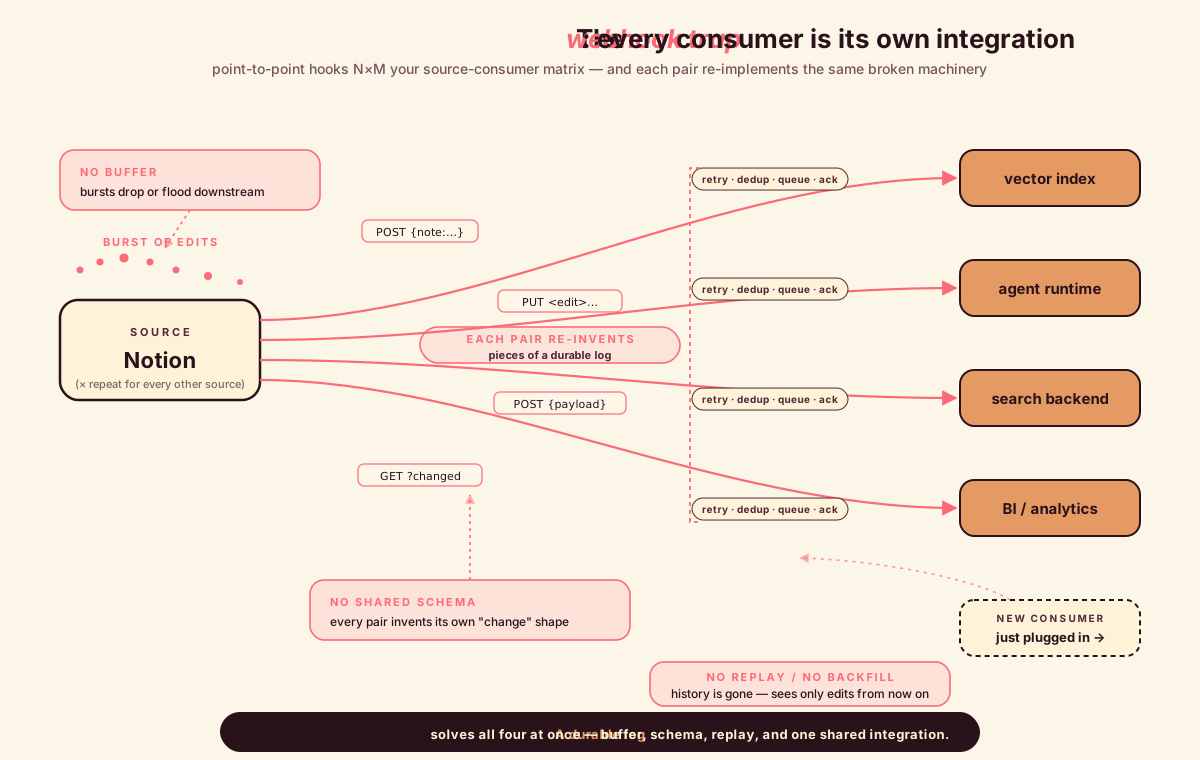
A common next step is to wire sources directly to consumers via point-to-point webhooks, but this approach has well-known limitations once more than one consumer is involved. There is no shared path for replay or backfill, no buffer to absorb bursts when many changes arrive at once, and no common schema describing what a “change” looks like across systems. Teams that go down this path tend to end up reimplementing pieces of a durable log, separately, in each integration.
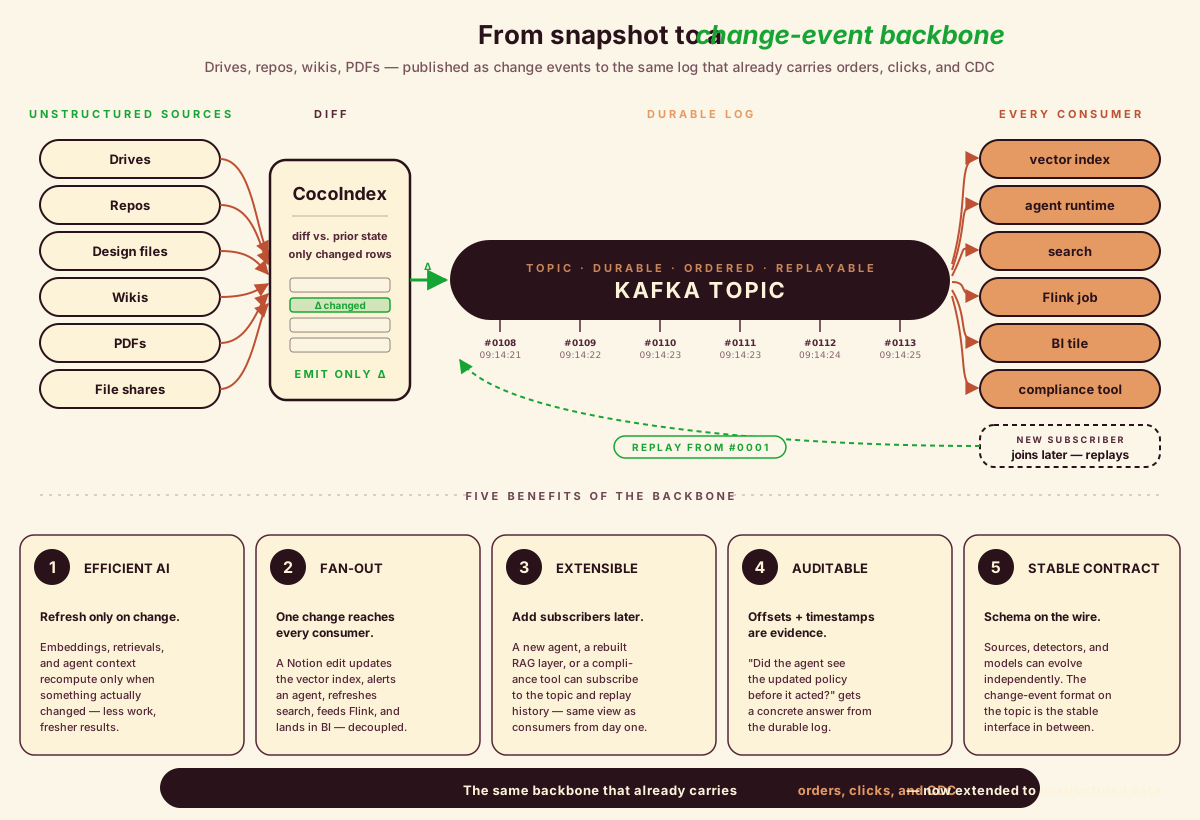
The combination of CocoIndex and Kafka takes a different approach: it treats the knowledge layer the same way operational data has been handled for years: as a stream of change events rather than a snapshot to be re-read. Drives, repos, design files, wikis, PDFs, and file shares (the unstructured data that has traditionally lived outside the streaming world) can be published to the same event backbone that already carries orders, clicks, and CDC traffic. The benefits show up in several places:
- More efficient AI workloads. Embeddings, retrievals, and agent context are refreshed only when something has actually changed, which reduces redundant work and improves freshness at the same time.
- A single change reaches every consumer. A commit, a renamed Drive document, or a Notion edit can update the vector index, notify an agent, update search, feed a Flink job, and land in a BI tile, without any of those systems needing to know about each other.
- Easier extensibility. A new agent, a rebuilt RAG layer, or a compliance tool can be added as another subscriber to the topic, with the log providing replay so it sees historical changes the same way it sees new ones.
- Better auditability. Each change consumed by an agent is durably recorded with offsets and timestamps, which makes it possible to answer questions like “did the agent see the updated policy before it acted?” with concrete evidence.
- A stable contract over time. The change-event schema on the topic provides a stable interface between sources and consumers. Detectors, sources, and models can evolve independently while the wire format stays consistent.
It is worth stating the contrast directly. A static unstructured knowledge graph is rebuilt on a schedule, drifts between rebuilds, and pushes freshness logic into each consumer. A stream of unstructured change events stays current by construction and gives every consumer (agents, indexes, analytics, auditors) a shared view of what has changed. Most AI stacks today are built around the former; production agents tend to benefit more from the latter.
Kafka: message in, message out — now from the unstructured world
Kafka’s contract is famously simple: a message goes in, a message comes out. That single shape is what makes the rest of the streaming ecosystem composable: Flink, ksqlDB, vector stores, OLAP sinks, search backends, microservices, agent runtimes. Anything downstream gets a real-time, replayable, fan-out-by-default view of the world by just reading a topic.
The catch is that the messages going in have historically been the structured kind: orders, clicks, IoT telemetry, Debezium CDC off Postgres or MySQL. The other half of the business (meeting notes, codebases, design files, PDFs, file shares, wikis) has lived in a parallel universe of vendor-specific webhooks, nightly batch jobs, and one-off ETL scripts no one wants to own.
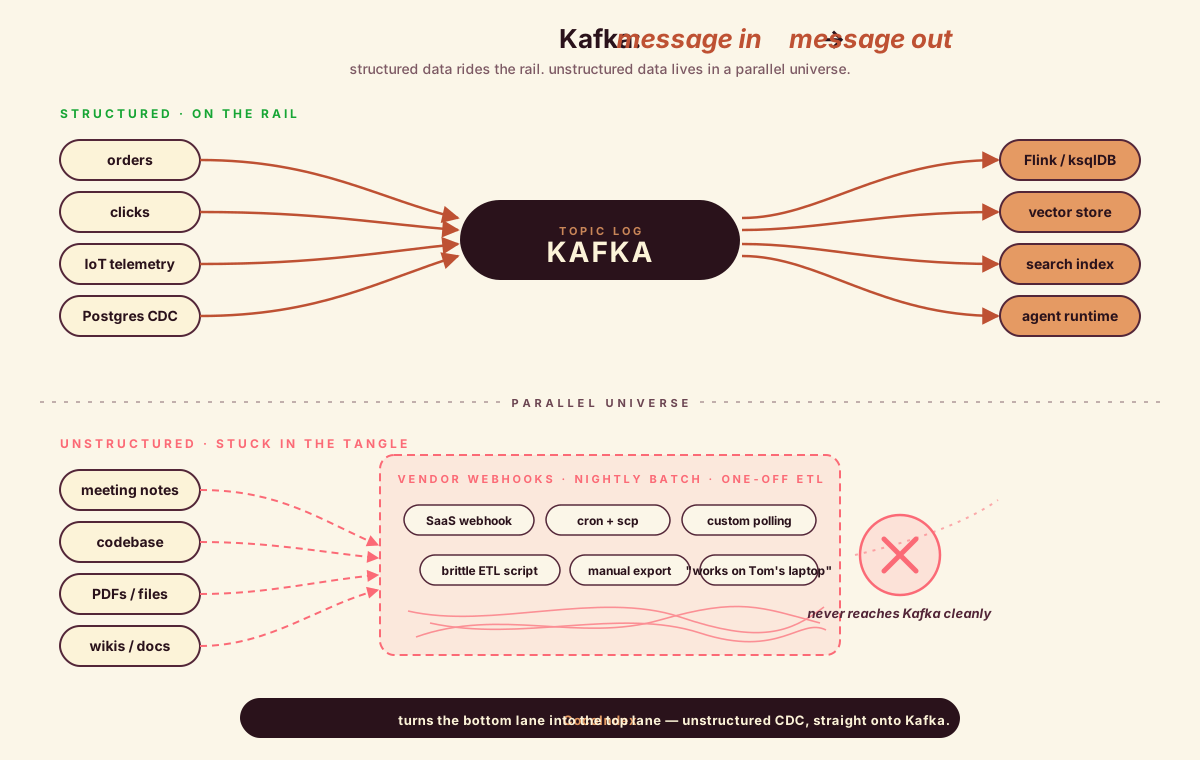
CocoIndex closes that gap. It treats dynamically-changing unstructured assets as first-class CDC sources and emits clean key/value change events into Kafka, with upsert / delete / no-op semantics described later in this post.
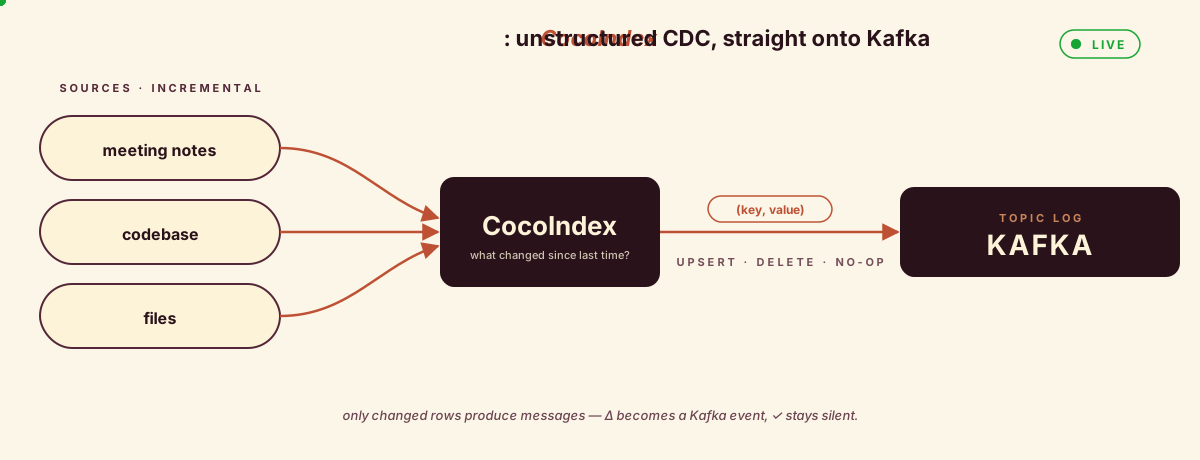
The point is not “another connector.” It is that Kafka stays Kafka (message in, message out) and CocoIndex makes the in side cover the dynamic, unstructured majority of the data that previously couldn’t get there cleanly. Every team that already knows how to consume from Kafka now gets the unstructured world for free.
Why choose CocoIndex with Kafka
Kafka is great at durable, high-throughput event streaming, but it expects you to solve data shaping, schema evolution, and incremental change detection yourself. CocoIndex turns that into a declarative problem:
-
Define transformations like formulas: “from this table or API, derive these messages and fields.” CocoIndex computes and re-computes derived data whenever sources change, similar to spreadsheet formulas reacting to edits.
-
Built-in incremental processing: CocoIndex keeps local state (checksums, primary keys, or version markers) so subsequent runs push only changed or deleted rows into Kafka topics.
-
Schema-aware updates: when schemas change upstream, CocoIndex re-derives downstream messages instead of forcing you to manually re-bootstrap topics or write ad-hoc migration scripts.
-
Pluggable sinks beyond Kafka: the same flow that feeds Kafka can also populate vector databases, OLTP/OLAP stores, or search indexes, so Kafka events and your AI/search backends stay in sync from a single definition.
declare_target_state semantics, key/value mapping, and topic management.
Partnership with StreamNative
We’re partnering with StreamNative to bring real-time data infrastructure to AI workloads. The two halves fit cleanly because they answer different questions: CocoIndex looks at noisy, dynamic, unstructured sources and produces a precise answer to “what’s different since last time?” StreamNative’s Ursa-powered Kafka service makes sure that answer reaches every system that cares, reliably, at scale, with history intact. With Kafka in the middle, sources don’t have to behave like streams and agents don’t have to behave like database clients; the topic absorbs the impedance mismatch and lets each side evolve on its own schedule.
The example: CSV files → JSON messages
To make all of this concrete, we’ll build the smallest end-to-end pipeline that exercises the new connector: a local data/ folder of CSV files, watched in real time, with each row published as a JSON message to a Kafka topic on StreamNative. Edit a cell, and within a second exactly one message (for that one row) appears on the topic. Add a row, get one new message. Delete a file, and every row from it is tombstoned. The whole thing is around sixty lines of Python.
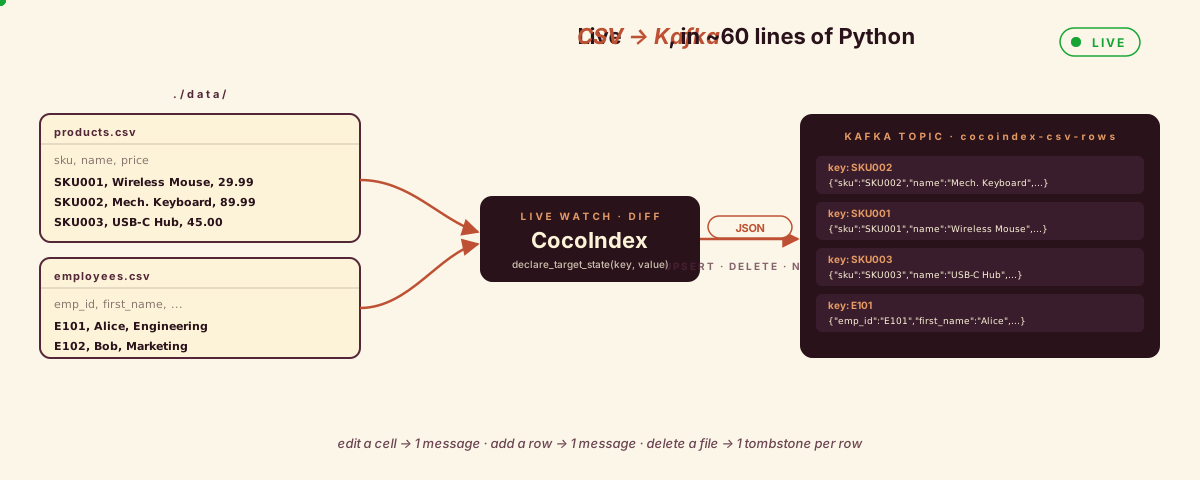
CSV is a deliberately humble starting point. It’s the format that shows up everywhere and gets respect nowhere: exports from BI tools, dumps from vendors who won’t give you a webhook, spreadsheets parked in a shared drive by a colleague, output from a nightly script no one wants to maintain. CSV files look structured but live like unstructured assets: dropped into a folder, edited at random, with no notifications and no schema contract. If we can turn a directory of them into a clean, row-keyed, live Kafka stream with diff-only writes, the same pattern carries over to the noisier sources mentioned earlier: PDFs, codebases, wikis, design files. CSV just lets us focus on the new connector and the live-update loop without getting tangled in a richer parser.
The full example lives in the CocoIndex repo. Here’s the shape of it.
Example · GitHubexamples/csv_to_kafka Clone it, point it at a Kafka broker, and watch a folder of CSVs flow into a topic. If it saves you an afternoon, drop a ⭐ on the repo; that's how more connectors get prioritized.
We have a data/ folder with a couple of CSV files:
# data/products.csv
sku,name,category,price
SKU001,Wireless Mouse,Electronics,29.99
SKU002,Mechanical Keyboard,Electronics,89.99
SKU003,USB-C Hub,Accessories,45.00# data/employees.csv
emp_id,first_name,last_name,department,email
E101,Alice,Chen,Engineering,[email protected]
E102,Bob,Smith,Marketing,[email protected]The goal: every row becomes a JSON message on a Kafka topic, keyed by the value of the row’s first column (the primary key). When a CSV file is edited, only the rows that actually changed should be re-published.
The pipeline
First, the Kafka producer is set up once at app startup using a lifespan hook, and stashed in a ContextKey so the rest of the pipeline can grab it without passing it around:
import cocoindex as coco
from cocoindex.connectors import kafka, localfs
from confluent_kafka.aio import AIOProducer

KAFKA_PRODUCER = coco.ContextKey[AIOProducer]("kafka_producer", tracked=False)

@coco.lifespan
async def coco_lifespan(builder: coco.EnvironmentBuilder):
    config = {
        "bootstrap.servers": KAFKA_BOOTSTRAP_SERVERS,
        "sasl.mechanism": "PLAIN",
        "security.protocol": "SASL_SSL",
        "sasl.username": KAFKA_SASL_USERNAME,
        "sasl.password": KAFKA_SASL_PASSWORD,
    }
    producer = AIOProducer(config)
    builder.provide(KAFKA_PRODUCER, producer)
    yield
ContextKey is how CocoIndex shares the producer across components without threading it through every function call; we’ll come back to it later. The SASL block is what StreamNative (or any production broker) wants. For a local broker you can drop those four lines and just point bootstrap.servers at localhost:9092.
Next, the per-file processor. This is where the new Kafka API shows up:
@coco.fn(memo=True)
async def process_csv(file: FileLike, topic_target: kafka.KafkaTopicTarget) -> None:
    text = await file.read_text()
    reader = csv.DictReader(io.StringIO(text))

    headers = reader.fieldnames
    if not headers:
        return
    first_col = headers[0]

    for row in reader:
        key_value = row.get(first_col)
        if key_value is not None:
            value = json.dumps(row)
            topic_target.declare_target_state(key=key_value, value=value)
The @coco.fn(memo=True) decorator means the per-file work itself is memoized too: if a file’s contents haven’t changed, process_csv doesn’t even run.
Declare states, not messages
topic_target.declare_target_state(key=key, value=value)It’s deliberately not called send_message() or produce() or declare_message(). It’s declare_target_state.
CocoIndex is a state-driven data framework. The mental model is the same one you’d use for a spreadsheet, a React component tree, or a SQL materialized view: you describe what the target should look like as a function of the source, and the framework figures out the transitions. You don’t compute deltas. You don’t track “what did I send last time.” You don’t handle insert vs. update vs. delete as separate code paths. You just say, “given this CSV row, the target state for key SKU001 is this JSON blob,” and that’s it.
Kafka makes that distinction unusually visible because Kafka’s wire model is the opposite: a topic is a log of events, not a snapshot. Producers send change events; consumers (or compacted topics) reconstruct state from the log. So the question is: who’s responsible for the gap between “I have desired states” and “the broker needs to receive change events”?
In CocoIndex, the framework owns that gap. When you call declare_target_state(key=k, value=v):
- If
kis new orvdiffers from the last value the framework remembers fork, it emits an upsert message:(k, v)on the wire. - If
kwas previously declared but isn’t declared this time, it emits a delete message:(k, None), or(k, deletion_value_fn(k))if you supplied a tombstone constructor. - If
kwas previously declared with the samev, nothing is sent to the broker, and no consumer wakes up.
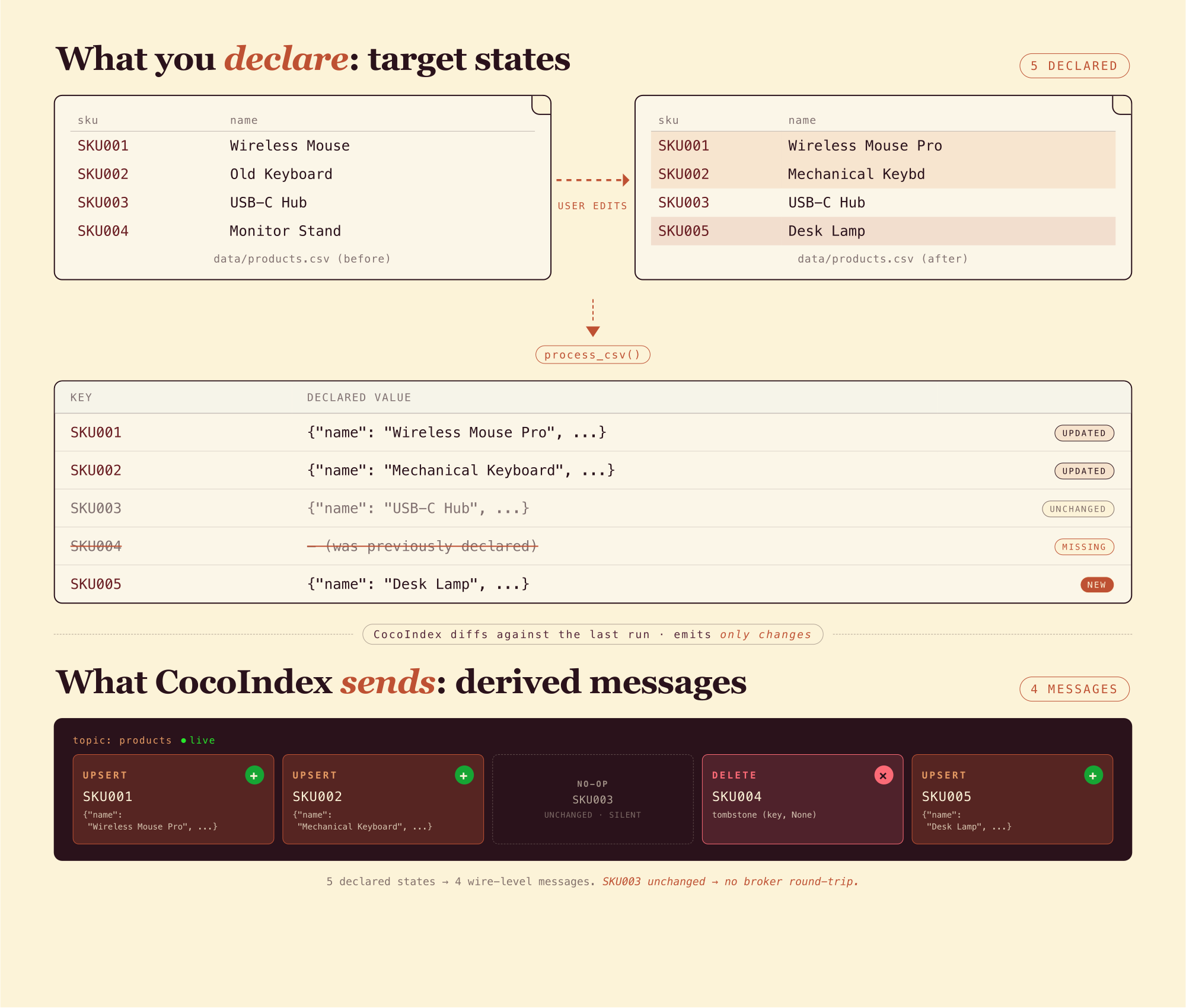
Messages are derived from state transitions. You only ever talk about states. This is exactly the same pattern as the Postgres target (declare_target_state → INSERT / UPDATE / DELETE) and the vector index targets: the wire-level operations differ, but the user-facing API is the same shape, because the semantics are the same.
The reason this matters in practice: it means the same process_csv function works correctly on the first run and every run after, whether a row is edited or removed, a file is deleted, or the whole pipeline crashes and restarts. There is no separate “initial load” code path versus “incremental update” code path. There’s just “given the source, here’s what the target should look like,” and that statement is true whether the target is empty, half-populated, or already in sync.
Finally, wire it all together:
@coco.fn
async def app_main() -> None:
    topic_target = await kafka.mount_kafka_topic_target(KAFKA_PRODUCER, KAFKA_TOPIC)

    files = localfs.walk_dir(
        localfs.FilePath(path="./data"),
        path_matcher=PatternFilePathMatcher(included_patterns=["**/*.csv"]),
        live=True,
    )
    await coco.mount_each(process_csv, files.items(), topic_target)

app = coco.App(coco.AppConfig(name="CsvToKafka"), app_main)
Two things to notice here:
mount_kafka_topic_target(...)resolves the producer from the context key and gives back a handle. The topic itself is user-managed: CocoIndex never creates or deletes topics; it just produces into one you already own.localfs.walk_dir(..., live=True)turns the directory walker into a live source: it does an initial scan, then keeps watching the filesystem and pushes incremental updates downstream. Combined withcocoindex update -L, the whole pipeline runs continuously instead of one-shot.
Live mode: one flag, everything else is the same
So far we’ve described what happens on a single run. But in reality, source files get edited, rows get added and removed, and you usually want the topic to keep up. The same process_csv runs as a catch-up run (scan once, reconcile everything that’s changed since last time, exit) or as a continuously-running pipeline that keeps watching for changes. The diff between the two is one keyword argument and one CLI flag:
Catch-up run:
files = localfs.walk_dir(
    localfs.FilePath(path="./data"),
    path_matcher=PatternFilePathMatcher(included_patterns=["**/*.csv"]),
)
await coco.mount_each(process_csv, files.items(), topic_target)cocoindex update main.pyLive:
files = localfs.walk_dir(
    localfs.FilePath(path="./data"),
    path_matcher=PatternFilePathMatcher(included_patterns=["**/*.csv"]),
    live=True,                 # ← +1 line
)
await coco.mount_each(process_csv, files.items(), topic_target)cocoindex update -L main.py # ← +1 flagThat’s the entire diff. process_csv doesn’t change. The Kafka target doesn’t change. There’s no separate “streaming” code path to maintain.
Run the live version:
cocoindex update -L main.pyCocoIndex does a full scan first, publishes one message per row, then sits there watching data/:
- Edit one cell in
products.csv: exactly one Kafka message is produced for that one row (modulo broker retries; the producer is at-least-once by default). The other four rows are silent. - Add a new row: one new message.
- Delete a row: one delete message (no value, since this example doesn’t supply a
deletion_value_fn). - Add a brand new CSV file:
process_csvruns once for that file, publishing its rows. - Delete a CSV file: every row from that file gets a delete message.
What the flag actually does (and doesn’t do)
It’s worth being precise about this, because it’s easy to assume the flag is doing more magic than it is.
Reconciliation happens in both modes. Whether you run cocoindex update or cocoindex update -L, you declare target states and CocoIndex computes deltas against the previous run, emitting only the upsert and delete messages needed to bring the topic in line. To do that, CocoIndex maintains an internal state store that remembers, for every declared key, the fingerprint of the value last sent. That store survives restarts, so when you stop and restart the pipeline it picks up where it left off: no re-broadcast of unchanged rows.
This is also where the ContextKey from earlier earns its keep. The state store doesn’t identify “this Kafka topic” by SASL credentials or bootstrap address. It identifies it by the ContextKey it was anchored to (here, KAFKA_PRODUCER) plus the topic name. If you later rotate the SASL password, swap the broker endpoint, or replace the AIOProducer with a differently configured one, the same ContextKey is enough for CocoIndex to recognize the backend as the same one, and the state store carries over.
The flag controls when reconciliation runs. That’s it. In a catch-up run, CocoIndex scans sources once, reconciles up to the moment, and exits. In live mode, it does the same initial catch-up, then keeps watching the sources for changes and reconciles incrementally as they arrive. The code path, reconciliation logic, and target API are identical: just catch-up-and-exit vs. catch-up-and-keep-watching.
The “watching” half comes from the source itself, not the flag. localfs.walk_dir(..., live=True) returns a live source backed by watchfiles; it knows how to deliver filesystem events. A non-live source (or live=False) just enumerates current state and stops. The CLI -L flag tells the runtime to keep the app alive so the watcher’s events have something to drive.
One Kafka detail worth mentioning since the connector doesn’t change it: each declared key is hashed to a partition by Kafka’s default partitioner, so the same key always lands on the same partition. Log compaction and key-based consumers behave exactly the way they’d behave with any hand-rolled producer.
What do the messages look like on the topic?
We pointed this at a Kafka cluster on StreamNative Cloud. It gave us a real SASL_SSL endpoint in one click, with a hosted console for inspecting messages without writing a consumer. (Plain localhost:9092 works too if you skip the SASL fields in the producer config.)
Here’s what shows up in the console for the cocoindex-csv-rows topic after running the example:
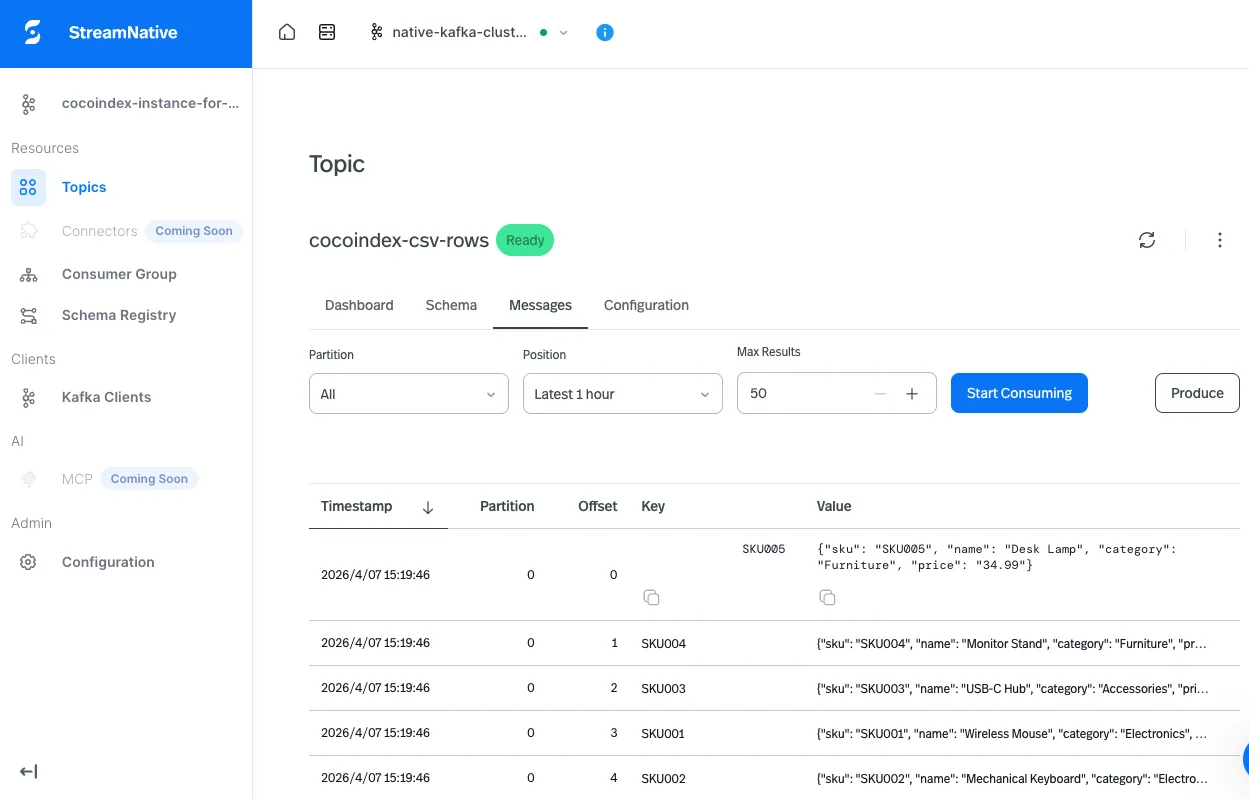
Keys are the row’s primary-key column (SKU001, E101, …); values are the JSON-encoded rows. Edit a CSV locally, refresh, and a new message with the same key appears: same key, latest value wins, log-compacted consumers get exactly the current state.
Try it
The Kafka connector ships as an optional dependency group: pip install cocoindex[kafka] if you’re pulling it into an existing project. To run the example directly:
git clone https://github.com/cocoindex-io/cocoindex
cd cocoindex/examples/csv_to_kafka
cp .env.example .env  # fill in your Kafka bootstrap + SASL creds
pip install -e .
cocoindex update -L main.py
No cloud broker handy? Point KAFKA_BOOTSTRAP_SERVERS at localhost:9092 and leave the SASL fields empty. The example works against any Kafka the confluent_kafka client can connect to.
Then go edit data/products.csv and watch the messages land.
Support our work
If this project helps you, we’d appreciate a GitHub star at the CocoIndex project.

About the author.

Maintainer of CocoIndex, Ex-Google Infra Lead. Writes about incremental data infrastructure, Rust internals, and the engineering decisions behind the engine.
Frequently asked questions.
How do I stream CSV files into Kafka without writing a custom producer loop?
Use CocoIndex's Kafka target connector. Hand it an AIOProducer, a topic name, and a function mapping each source row to a (key, value) — CocoIndex owns the producer loop, dedup state, deletes, and live filesystem watching. The full CSV pipeline is about 60 lines of Python: clone examples/csv_to_kafka, point KAFKA_BOOTSTRAP_SERVERS at any broker (StreamNative, Confluent, or local localhost:9092), and run cocoindex update -L main.py. Edit a CSV cell and exactly one message lands on the topic within a second. See The pipeline for the wiring.
How do I publish only changed rows to Kafka (diff-only writes)?
Call topic_target.declare_target_state(key=k, value=v) for every row you want present on the topic. CocoIndex fingerprints the last value sent for each key — if v matches, nothing is sent (no broker round-trip, no consumer wakeup); if it differs, an upsert is produced; if a previously declared key disappears, a delete (Kafka tombstone, or a custom value via deletion_value_fn) goes out.
The state store survives restarts, so reconciliation is identical on first run, hundredth run, or after a crash — there is no separate "initial load" vs. "incremental update" code path. Same semantics as CocoIndex's Postgres and vector-index targets. See Declare states, not messages and Incremental processing for the underlying mechanics.
How do I move from snapshot-based RAG to streaming change events for AI agents?
Replace the nightly re-index with a live CocoIndex pipeline whose target is a Kafka topic. Sources — Drive, repos, wikis, S3 buckets, file shares, CSV folders — emit per-row change events as they're edited; agents, vector indexes, search backends, and analytics jobs each subscribe to the same topic and react incrementally.
The benefits compound: embeddings recompute only when something actually changed, every consumer sees the same change-event stream with replay available for new subscribers, and long-running agents stop drifting from a snapshot captured hours earlier. The change-event schema becomes a stable contract between sources and consumers that lets each side evolve on its own schedule. See From static knowledge to streaming signals for the architectural shift.
What does CDC for unstructured data look like?
The same wire shape Debezium gives for Postgres CDC — per-key upsert / delete / no-op events on a Kafka topic — but applied to the unstructured world: meeting notes, PDFs, codebases, drives, wikis, design files. Each source row (a CSV row, a Markdown chunk, a Drive file, a Notion block) gets a stable key; CocoIndex fingerprints values against the previous run and emits only the rows that changed, with deletes when a source item disappears.
Downstream consumers — Flink, vector stores, search, agents — read the topic the way they already read structured CDC, without knowing the source is unstructured. The same flow can also fan out to Postgres, Qdrant, LanceDB, or a custom target in one pass. See Why choose CocoIndex with Kafka.
Why use Kafka instead of webhooks for unstructured data sources?
Webhooks are point-to-point. Every new consumer means re-wiring the source, with no shared replay path, no buffer to absorb bursts, and no common schema describing what a "change" looks like across systems. Teams that go down that road usually end up reimplementing pieces of a durable log, separately, in each integration.
A Kafka topic is durable, replayable, and fan-out-by-default: a single edit to a Notion page or a renamed Drive document can update a vector index, notify an agent, feed a Flink job, and land in a BI tile — without any of those systems knowing about each other. New subscribers come online and replay the log to bootstrap, so historical changes look the same as new ones. See From static knowledge to streaming signals for the full trade-off.
