
Most image search squeezes each image into a single vector. That works until the image is dense: a page with a chart and a table, a form with many fields, a photo with several objects. One vector blurs all of that together.
ColPali takes a different approach. It splits each image into a grid of patches and embeds every patch into its own vector, so an image becomes a bag of vectors instead of one. A text query is matched patch by patch, late-interaction style, which holds up on exactly the dense, text-heavy images where a single embedding falls apart.
This post builds an image index with ColPali and a Qdrant multivector collection, rewritten for CocoIndex v1. CocoIndex handles the incremental multi-vector indexing, the managed Qdrant collection, and live updates; ColPali does the embedding in plain Python. The full example is in the CocoIndex v1 repo.
Star CocoIndex on GitHub if you like it.
Why ColPali
ColPali (Contextual Late-interaction over Patches) rethinks how image-rich documents are represented and searched. Instead of one dense vector per image, it keeps one vector per patch and scores queries against those patches directly:
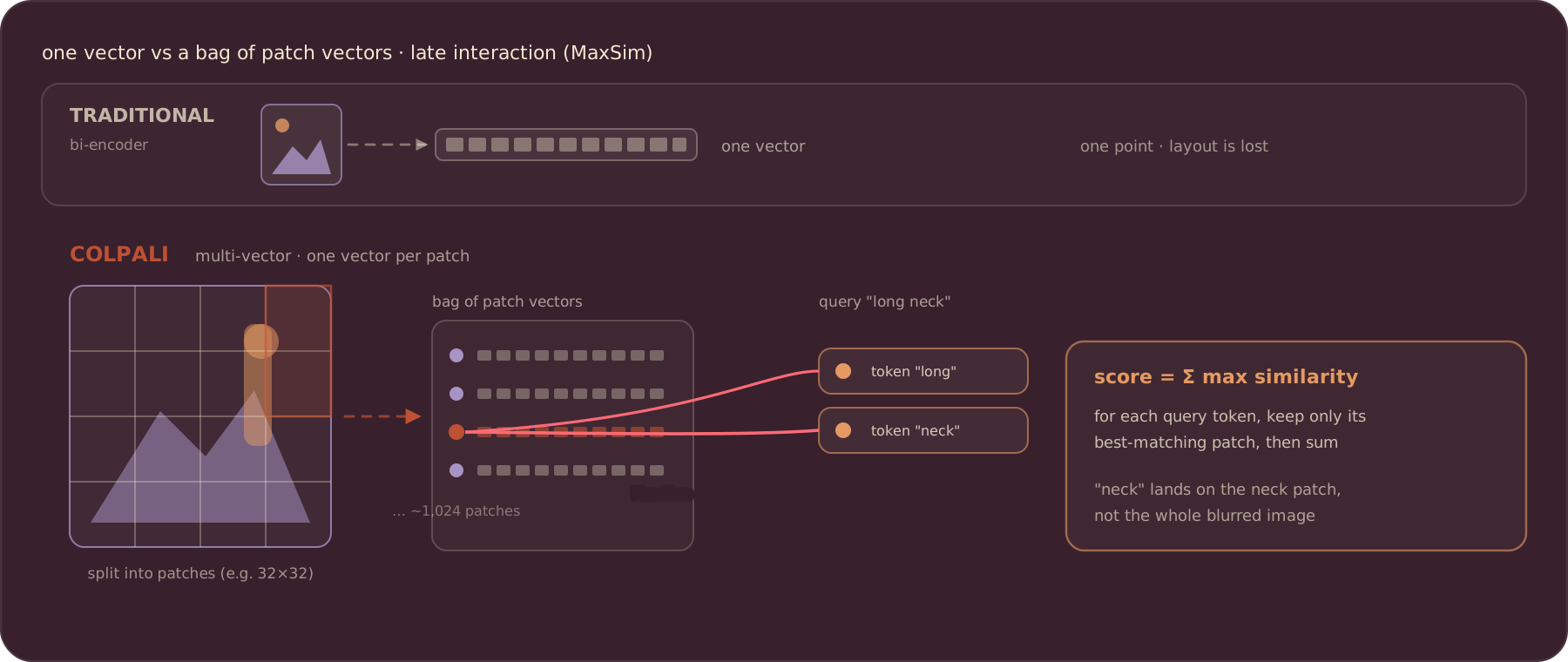
- Fine-grained visual search. Each image is split into a grid (commonly 32×32, about 1,024 patches per page), and every patch is embedded with awareness of both visual and textual cues. Queries are broken into token embeddings and matched against the most relevant patches, far finer than a single-vector model.
- Spatial structure is preserved. Global vectors lose layout. Patch embeddings keep spatial relationships, so a match can localize to a region: a diagram in a manual, a table on a form.
- Late interaction with MaxSim. Following ColBERT, each query token is compared against all patch embeddings; MaxSim keeps only the best-matching patch per query token, then sums those maxima into the final score. It is precise, interpretable, and cheap at query time because there is no up-front cross-attention.
- No OCR pipeline. Images are processed natively, so there is no error-prone text extraction step, and visual elements OCR skips (charts, drawings, logos) are still captured.
The indexing flow
The flow reads images from a local folder, embeds each with ColPali, and stores the result as one multivector point per image in Qdrant:
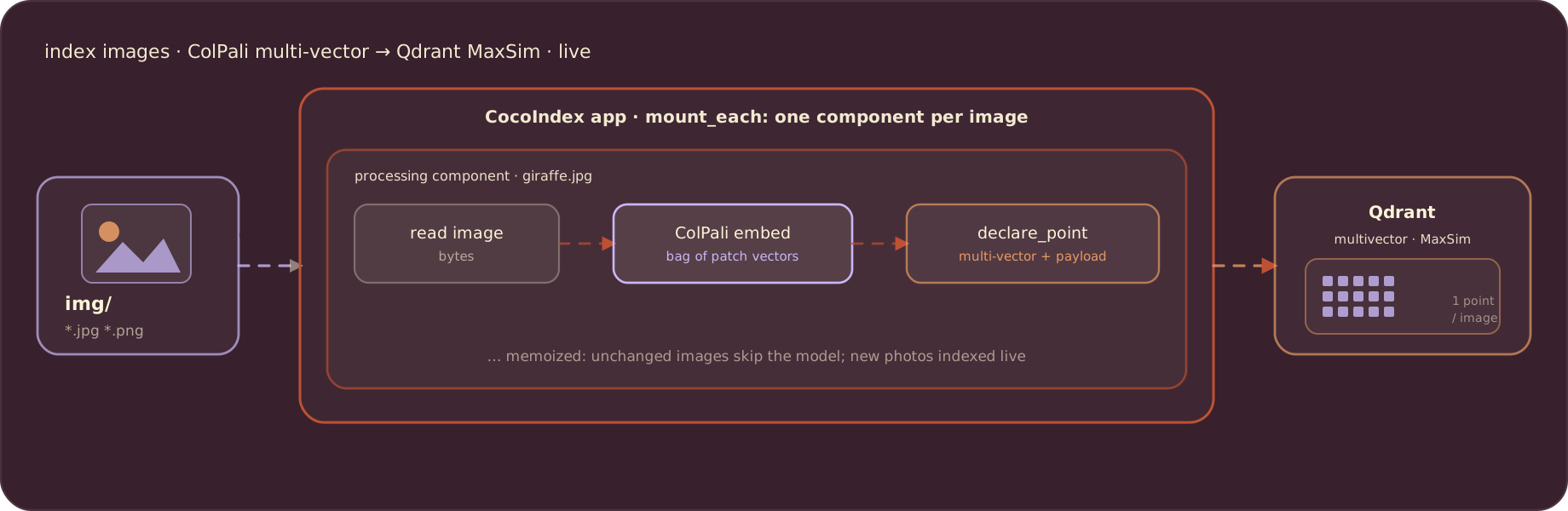
Each image is its own processing component, so change detection is per image and the flow runs live.
Embed with ColPali
The embedding is plain Python using the colpali_engine library. Load the model once, then turn image bytes into a list of patch vectors (list[list[float]]):
import functools
import io
from PIL import Image
import torch
from colpali_engine import ColPali, ColPaliProcessor
from colpali_engine.utils.torch_utils import (
    get_torch_device,
    unbind_padded_multivector_embeddings,
)


@functools.cache
def get_colpali() -> tuple[ColPali, ColPaliProcessor, str]:
    model = ColPali.from_pretrained(COLPALI_MODEL_NAME)
    processor = ColPaliProcessor.from_pretrained(COLPALI_MODEL_NAME)
    device = get_torch_device("auto")
    return model.to(device).eval(), processor, device


def embed_image_bytes(img_bytes: bytes) -> list[list[float]]:
    model, processor, device = get_colpali()
    image = Image.open(io.BytesIO(img_bytes)).convert("RGB")
    batch = processor.process_images([image]).to(device)
    with torch.no_grad():
        embeddings = model(**batch)
    padding_side = getattr(processor.tokenizer, "padding_side", "right")
    unpadded = unbind_padded_multivector_embeddings(embeddings, padding_side=padding_side)
    return unpadded[0].cpu().tolist()
The same colpali_engine model embeds a text query into its own per-token vectors at search time, which is what makes the query and the image comparable patch by patch.
Index each image
One component processes one image: read the bytes, embed them, and declare a Qdrant point keyed by a stable uuid5 of the path. memo=True skips images that have not changed:
import cocoindex as coco
from cocoindex.connectors import qdrant
from cocoindex.resources.file import FileLike


@coco.fn(memo=True)
async def process_file(file: FileLike[str], target: qdrant.CollectionTarget) -> None:
    content = await file.read()
    embedding = embed_image_bytes(content)  # list[list[float]]: multi-vector
    point = qdrant.PointStruct(
        id=_image_id(file.file_path.path),
        vector=embedding,
        payload={"filename": str(file.file_path.path)},
    )
    target.declare_point(point)
Configure the Qdrant multivector collection
The collection is where late interaction actually happens. A MultiVectorSchema with multivector_comparator="max_sim" tells Qdrant to do the MaxSim scoring, so the query side just hands over the query’s bag of vectors. app_main mounts the collection, walks the image folder in live mode, and fans out one process_file per image:
import numpy as np
from cocoindex.connectors import localfs
from cocoindex.resources.file import PatternFilePathMatcher
from cocoindex.resources.schema import MultiVectorSchema, VectorSchema


@coco.fn
async def app_main(sourcedir: pathlib.Path) -> None:
    model, _, _ = get_colpali()
    dim = int(getattr(model, "dim", 128))

    target = await qdrant.mount_collection_target(
        QDRANT_DB,
        collection_name=QDRANT_COLLECTION,
        schema=await qdrant.CollectionSchema.create(
            vectors=qdrant.QdrantVectorDef(
                schema=MultiVectorSchema(
                    vector_schema=VectorSchema(dtype=np.dtype(np.float32), size=dim)
                ),
                distance="cosine",
                multivector_comparator="max_sim",
            )
        ),
    )

    files = localfs.walk_dir(
        sourcedir,
        recursive=True,
        path_matcher=PatternFilePathMatcher(
            included_patterns=["**/*.jpg", "**/*.jpeg", "**/*.png"]
        ),
        live=True,
    )
    await coco.mount_each(process_file, files.items(), target)


app = coco.App(
    coco.AppConfig(name="ImageSearchColpali"),
    app_main,
    sourcedir=pathlib.Path("./img"),
)
What is stored
Unlike a typical image pipeline that stores one vector per image, ColPali stores a multi-vector: the outer dimension is the number of patches, the inner dimension is the model’s hidden size. That is what makes the collection compatible with late-interaction queries. See how CocoIndex models a vector index schema for details.
Serve it live
The example wraps the flow in a FastAPI app. Its lifespan starts the flow in live mode, blocks startup until the first sweep is READY, then keeps watching the folder in the background while serving search:
@asynccontextmanager
async def lifespan(app: FastAPI) -> AsyncIterator[None]:
    async with coco.runtime():
        _client = qdrant.create_client(pipeline.qdrant_url(), prefer_grpc=True)
        update_handle = pipeline.app.update(live=True)
        async for snap in update_handle.watch():
            if snap.status is coco.UpdateStatus.READY:
                break
        update_task = asyncio.create_task(update_handle.result())
        try:
            yield
        finally:
            update_task.cancel()
Because the source runs live, a new photo in img/ is searchable within a second, with no rebuild step. Each image is its own component, so deleting one removes its Qdrant point automatically.
Query the index
Search embeds the query text into ColPali’s per-token space and lets Qdrant do the MaxSim scoring against every image’s patches:
@app.get("/search")
async def search(q: str, limit: int = 5) -> dict[str, Any]:
    query_embedding = pipeline.embed_query(q)  # list[list[float]]: one vector per token
    results = pipeline._qdrant_search(_client, pipeline.QDRANT_COLLECTION, query_embedding, limit)
    return {"results": [
        {"filename": (r.payload or {}).get("filename"), "score": r.score}
        for r in results
    ]}
Run it
Start Qdrant, install the example (cocoindex[colpali,qdrant] pulls in torch, transformers, and pillow), and run the server. It indexes img/ in live mode on startup, so there is no separate indexing command:
docker run -d -p 6333:6333 -p 6334:6334 qdrant/qdrant
pip install -e .
python -m uvicorn api:app --reload --host 0.0.0.0 --port 8000
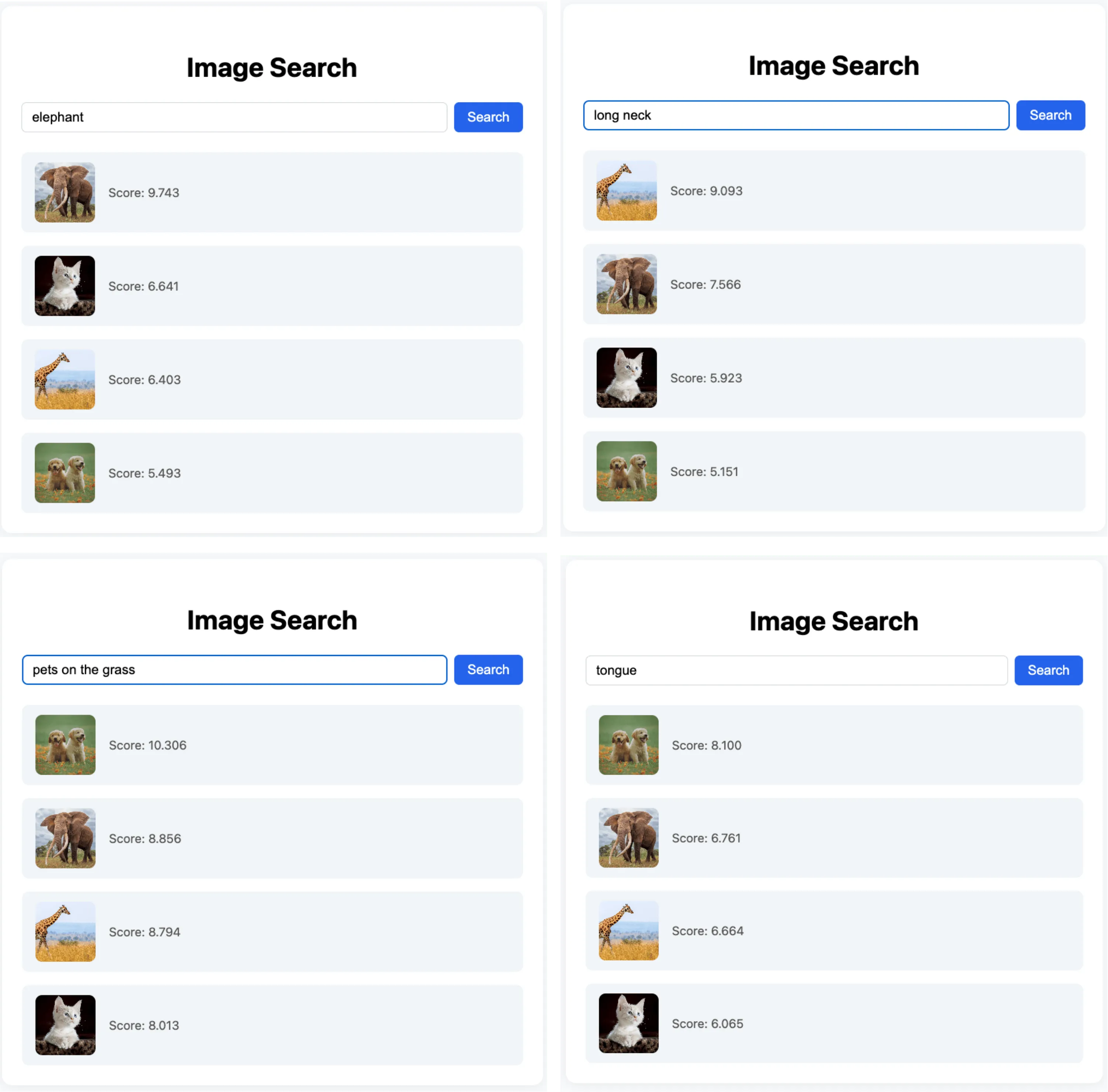
Type a query like “long neck” and you get the giraffe back. On dense, text-heavy, or busy images the results hold up better than CLIP with a single dense vector, because the match is patch by patch instead of image-wide:
Connect to any source, kept in sync
Local files are just one source. Swapping the source leaves the rest of the flow unchanged, and CocoIndex keeps the index fresh as files are added, updated, or deleted. Beyond the local filesystem, CocoIndex supports source connectors including:
Support us
We are constantly adding examples and improving the runtime. If this was helpful, please star CocoIndex on GitHub and share it.

About the author.

CEO and cofounder of CocoIndex. Writes about incremental data infrastructure, agents, and the engineering decisions behind the engine.
Frequently asked questions.
What is ColPali and why use it for image indexing?
ColPali (Contextual Late-interaction over Patches) is a multimodal retrieval model that rethinks how visually complex documents are represented. Instead of reducing each image to a single dense vector, ColPali breaks an image into many smaller patches and gives each patch its own embedding, together forming a multi-vector representation. This preserves local spatial and semantic structure, supports fine-grained visual search, and bypasses error-prone OCR pipelines.
See Why ColPali.
How do I embed an image with ColPali in CocoIndex v1?
The embedding is plain Python with the colpali_engine library, called inside a CocoIndex function. Load the model once, then embed_image_bytes turns image bytes into a list[list[float]] (one vector per patch). Wrap it in @coco.fn(memo=True) so unchanged images are skipped, and declare a Qdrant point for each image.
See Embed with ColPali.
What does ColPali actually store as an embedding?
Unlike typical image search pipelines that store one global vector per image, ColPali stores a multi-vector: the outer dimension is the number of patches and the inner dimension is the model's hidden size. This makes the collection multi-vector ready and compatible with late-interaction query strategies like MaxSim.
See What is stored.
How does ColPali compare to single-vector CLIP image search?
Each image is split into a grid (commonly 32×32, about 1,024 patches per page) and every patch is embedded with contextual awareness, so ColPali can localize a query to a region of a page rather than collapsing it into one global vector. On dense, text-heavy, or busy images the results hold up better than CLIP with a single dense vector; the cost is more vectors per image.
See Why ColPali.
How do you keep a ColPali image index up to date automatically?
Run the flow in live mode. The example's FastAPI lifespan calls pipeline.app.update(live=True), blocks startup until the first sweep is READY, then keeps watching the folder in the background. A new image is searchable within a second, with no rebuild step, and deleting an image removes its Qdrant point automatically.
See Serve it live.
How are ColPali embeddings stored in Qdrant for MaxSim retrieval?
Mount a Qdrant collection target with qdrant.mount_collection_target and a MultiVectorSchema configured with multivector_comparator="max_sim". That makes Qdrant do the late-interaction scoring: at query time you embed the query into ColPali's per-token space and Qdrant runs MaxSim against every image's patch vectors.
See Configure the Qdrant multivector collection and Query the index.
