
A folder of photos becomes searchable by meaning the moment you stop relying on filenames and tags. You type “a cute animal” or “long neck” and the matching pictures come back, with no captions and no manual labeling.
The trick is CLIP: it embeds an image and a piece of text into the same vector space, so a text query and a matching picture land near each other. This post builds that search with CocoIndex v1. It walks a local image folder, embeds each picture with CLIP, and stores the vectors in Qdrant. The index runs in live mode inside a FastAPI server, so dropping a new photo into the folder makes it searchable within a second, with no rebuild step.
The full code is in the CocoIndex v1 repo.
The flow
Each image is its own processing component: read the bytes, embed them with the CLIP image encoder, and declare a Qdrant point. There is no text to chunk, so the indexing path is one embedding per image.
memo=True: unchanged images skip CLIP.
The shared image-text space
CLIP is trained to place a picture and its description near each other in one embedding space. At index time we only ever embed pixels (get_image_features); at query time we embed text (get_text_features). Because both land in the same space, “long neck” ends up close to the giraffe photo even though that image was never described in words.
The vector database never learns that one vector came from an image and the other from text. It just returns nearest neighbors by cosine distance. So making a new image searchable never requires writing anything about it: dropping the file in the folder is enough.
Technologies
CLIP ViT-L/14
CLIP ViT-L/14 is a vision-language model that embeds images and text into a shared 768-dimensional space. We use it two ways: to embed each image at index time, and to convert a natural-language query into that same space at search time.
The embedding size is not hardcoded. It comes from model.config.projection_dim, so swapping in a smaller variant like CLIP ViT-B/32 (faster, slightly lower accuracy) only changes one model name; the collection is created to match.
CocoIndex
CocoIndex is an open-source data transformation framework for AI, with incremental processing built in. You declare the transformation in plain Python and your own types; change tracking, the live watch, and the managed Qdrant collection run in a Rust engine underneath.
Qdrant
Qdrant is a vector database. We store the image vectors as points and query them by cosine distance through the CocoIndex Qdrant connector.
FastAPI
FastAPI serves the search API and hosts the live index in its lifespan, so one process both keeps the collection current and answers queries.
Prerequisites
- Install Qdrant:
docker run -d -p 6333:6333 -p 6334:6334 qdrant/qdrant. - Python 3.11+ with
torch,transformers, andpillowfor CLIP.
CocoIndex v1 keeps its own processing state in a local file (set by COCOINDEX_DB, defaulting to ./cocoindex.db), so there is no separate tracking database to run.
Define the pipeline
The pipeline lives in pipeline.py. The Qdrant client is created once in the app lifespan and read anywhere with a ContextKey:
import cocoindex as coco
from cocoindex.connectors import qdrant

QDRANT_DB = coco.ContextKey[QdrantClient]("image_search_qdrant")


@coco.lifespan
async def coco_lifespan(builder: coco.EnvironmentBuilder) -> AsyncIterator[None]:
    client = qdrant.create_client(qdrant_url(), prefer_grpc=True)
    builder.provide(QDRANT_DB, client)
    yield
CLIP is loaded once and reused. The image and query encoders are ordinary helpers, so nothing about them is CocoIndex-specific:
@functools.cache
def get_clip_model() -> tuple[CLIPModel, CLIPProcessor]:
    model = CLIPModel.from_pretrained(CLIP_MODEL_NAME)
    processor = CLIPProcessor.from_pretrained(CLIP_MODEL_NAME)
    return model, processor


def embed_image_bytes(img_bytes: bytes) -> list[float]:
    model, processor = get_clip_model()
    image = Image.open(io.BytesIO(img_bytes)).convert("RGB")
    inputs = processor(images=image, return_tensors="pt")
    with torch.no_grad():
        out = model.get_image_features(**inputs)
    return _projected_features(out)[0].tolist()
One component per image
process_file handles a single image: read its bytes, embed them, and declare a Qdrant point keyed by a stable uuid5 of the path. memo=True means an unchanged image is never re-embedded, and because each image is its own component, deleting a file removes its point automatically:
@coco.fn(memo=True)
async def process_file(file: FileLike, target: qdrant.CollectionTarget) -> None:
    content = await file.read()
    embedding = embed_image_bytes(content)
    point = qdrant.PointStruct(
        id=_image_id(file.file_path.path),          # stable uuid5 of the path
        vector=embedding,
        payload={"filename": str(file.file_path.path)},
    )
    target.declare_point(point)
Wire up the app
app_main creates the Qdrant collection (its vector size comes straight from CLIP’s projection_dim), walks the image folder in live mode, and fans out one process_file per image with mount_each:
@coco.fn
async def app_main(sourcedir: pathlib.Path) -> None:
    model, _ = get_clip_model()
    dim: int = model.config.projection_dim

    target = await qdrant.mount_collection_target(
        QDRANT_DB,
        collection_name=QDRANT_COLLECTION,
        schema=await qdrant.CollectionSchema.create(
            vectors=qdrant.QdrantVectorDef(
                schema=VectorSchema(dtype=np.dtype(np.float32), size=dim),
                distance="cosine",
            )
        ),
    )

    files = localfs.walk_dir(
        sourcedir,
        recursive=True,
        path_matcher=PatternFilePathMatcher(
            included_patterns=["**/*.jpg", "**/*.jpeg", "**/*.png"]
        ),
        live=True,
    )
    await coco.mount_each(process_file, files.items(), target)


app = coco.App(
    coco.AppConfig(name="ImageSearchQdrantV1"),
    app_main,
    sourcedir=pathlib.Path("./img"),
)
Query the index
Search embeds the text with the same CLIP model, this time through the text encoder, and asks Qdrant for the nearest image vectors:
def embed_query(text: str) -> list[float]:
    model, processor = get_clip_model()
    inputs = processor(text=[text], return_tensors="pt", padding=True)
    with torch.no_grad():
        out = model.get_text_features(**inputs)
    return _projected_features(out)[0].tolist()
The FastAPI /search endpoint embeds the query and returns the top matches with their scores:
@app.get("/search")
async def search(q: str = Query(...), limit: int = Query(5)) -> dict[str, Any]:
    query_embedding = pipeline.embed_query(q)
    results = pipeline._qdrant_search(
        _client, pipeline.QDRANT_COLLECTION, query_embedding, limit
    )
    return {
        "results": [
            {"filename": (r.payload or {}).get("filename"), "score": r.score}
            for r in results
        ]
    }
Run it as a live service
The index does not need a separate build step. api.py starts the flow in live mode inside the FastAPI lifespan: it blocks startup until the first sweep reports READY so the collection is queryable, then keeps watching img/ in the background while it serves requests:
@asynccontextmanager
async def lifespan(app: FastAPI) -> AsyncIterator[None]:
    global _client
    async with coco.runtime():
        _client = qdrant.create_client(pipeline.qdrant_url(), prefer_grpc=True)

        update_handle = pipeline.app.update(live=True)
        async for snap in update_handle.watch():
            if snap.status is coco.UpdateStatus.READY:
                break
        update_task = asyncio.create_task(update_handle.result())
        try:
            yield
        finally:
            update_task.cancel()
            with contextlib.suppress(asyncio.CancelledError):
                await update_task
            _client = None
Time to have fun
Start Qdrant, install the example, and run the server. The example ships an img/ folder with a few animals:
docker run -d -p 6333:6333 -p 6334:6334 qdrant/qdrant
pip install "cocoindex[qdrant]" fastapi torch transformers pillow qdrant-client uvicorn python-dotenv
python -m uvicorn api:app --reload --host 0.0.0.0 --port 8000
Then run the frontend and open it in the browser:
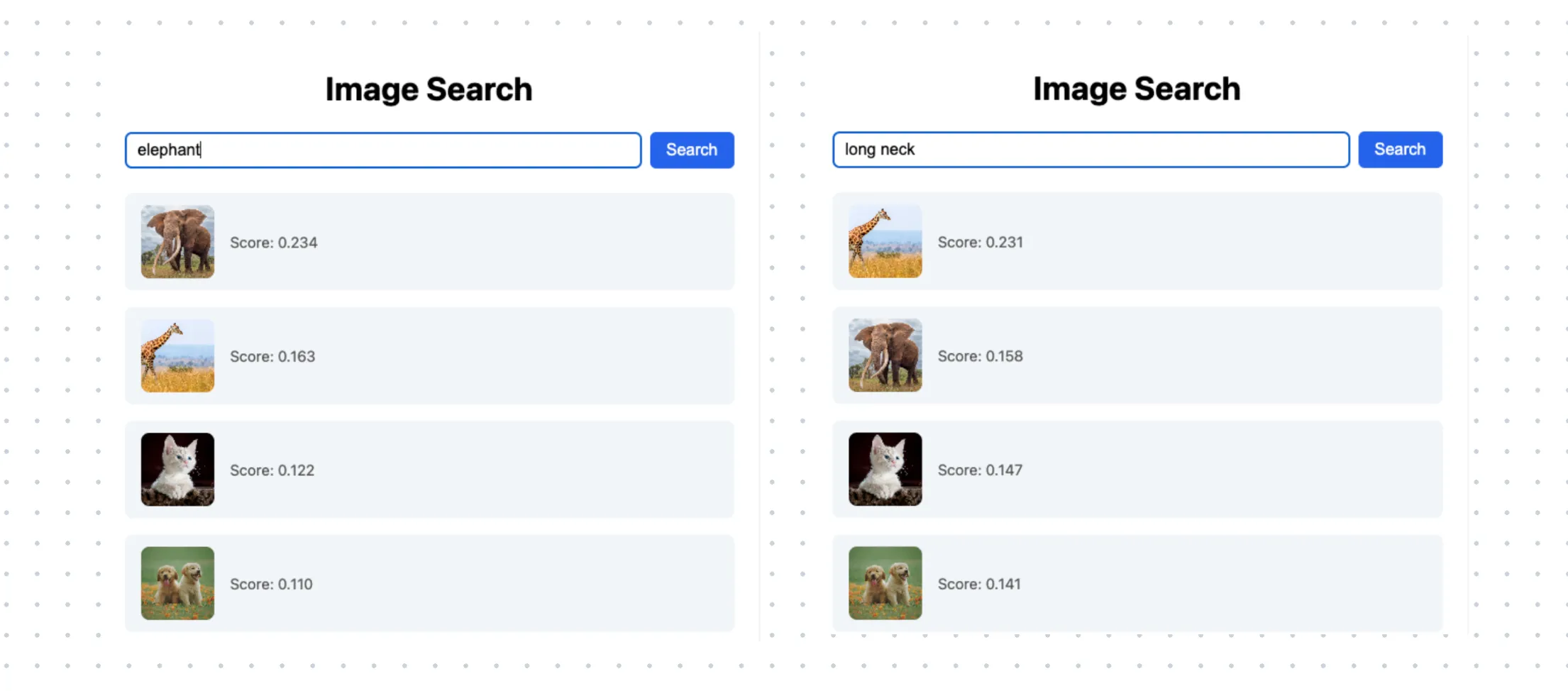
cd frontend && npm install && npm run dev # http://localhost:5173Query “elephant” and the elephant ranks first; query “long neck” and the giraffe wins, then the other animals fall in line by CLIP similarity. None of these images was ever tagged with a word:
Now drop another image into the img/ folder, for example this cute squirrel. Because the folder is watched in live mode, it is embedded and searchable within a second, no command to re-run.
Acknowledgement

This image search project was largely contributed by @par4m, Param Arora, an open source developer at Google Summer of Code.
Support us
We are constantly adding examples and improving the runtime. If this was helpful, please star CocoIndex on GitHub.
Frequently asked questions
How do I build image search with natural language queries?
Use the multimodal model CLIP to embed images and text into the same vector space, store the image embeddings in a vector database, and at query time embed the natural-language query with the same model and run a similarity search. In this example CocoIndex builds the indexing flow, CLIP generates the embeddings, and Qdrant serves the search. See Define the pipeline and Query the index.
How does CLIP enable searching images with text?
CLIP ViT-L/14 is a vision-language model trained to align visual and textual representations in one shared embedding space. The pipeline uses it to embed images directly and to convert natural-language queries into that same space, so a text query can be compared against image embeddings for cross-modal similarity search, with no manual tagging needed. See The shared image-text space.
How do I embed an image into a vector in CocoIndex v1?
Write a plain helper (embed_image_bytes) that opens the image bytes and runs CLIP's get_image_features, then call it from a CocoIndex function decorated with @coco.fn(memo=True). The function reads the file, embeds it, and declares a Qdrant point with target.declare_point(...). memo=True caches per-image work, so an unchanged image is never re-embedded. See One component per image.
What is the difference between embedding an image and embedding a query in this pipeline?
They use different CLIP entry points. Images are embedded with model.get_image_features in embed_image_bytes, while text queries are embedded with model.get_text_features in embed_query. Because CLIP maps both into the same embedding space, the text query vector can be compared directly against the stored image vectors for cross-modal similarity search. See Query the index.
How do I keep an image search index up to date as new images are added?
Run the flow in live mode. The local folder source is created with live=True, and the FastAPI app starts the index with app.update(live=True) inside its lifespan, so it keeps watching the folder in the background. Because each image is its own processing component and memo=True skips unchanged files, dropping a new image into the folder makes it searchable within about a second, with no rebuild step. See Run it as a live service.
What do I need to run the CocoIndex v1 image search example?
The example uses CLIP for embeddings, Qdrant as the vector database, and FastAPI for the live search API. CocoIndex v1 keeps its own processing state in a local file (COCOINDEX_DB, default ./cocoindex.db), so there is no separate tracking database to run: the prerequisites are Qdrant and the CLIP Python dependencies. See Prerequisites.
What is the difference between CLIP ViT-L/14 and ViT-B/32 for image search?
The example uses CLIP ViT-L/14. The vector size comes from model.config.projection_dim, so swapping in CLIP ViT-B/32 (a smaller, faster model with slightly lower accuracy) only changes the model name and the collection is created to match. It suits cases where speed and lower resource use matter more than top accuracy. See CLIP ViT-L/14.
About the author

CEO and cofounder of CocoIndex. Writes about incremental data infrastructure, agents, and the engineering decisions behind the engine.
Build fresh context for your agents.
CocoIndex keeps derived data in sync with its sources. Only what changed re-runs.
