
CocoIndex supports multi-modal processing natively: it can process both text and images with the same programming model and observe in the same user flow (in CocoInsight).
In this blog, we’ll walk through a comprehensive example of building a scalable face recognition pipeline using CocoIndex. We’ll show how to extract and embed faces from images, structure the data relationally, and export everything into a vector database for real-time querying.
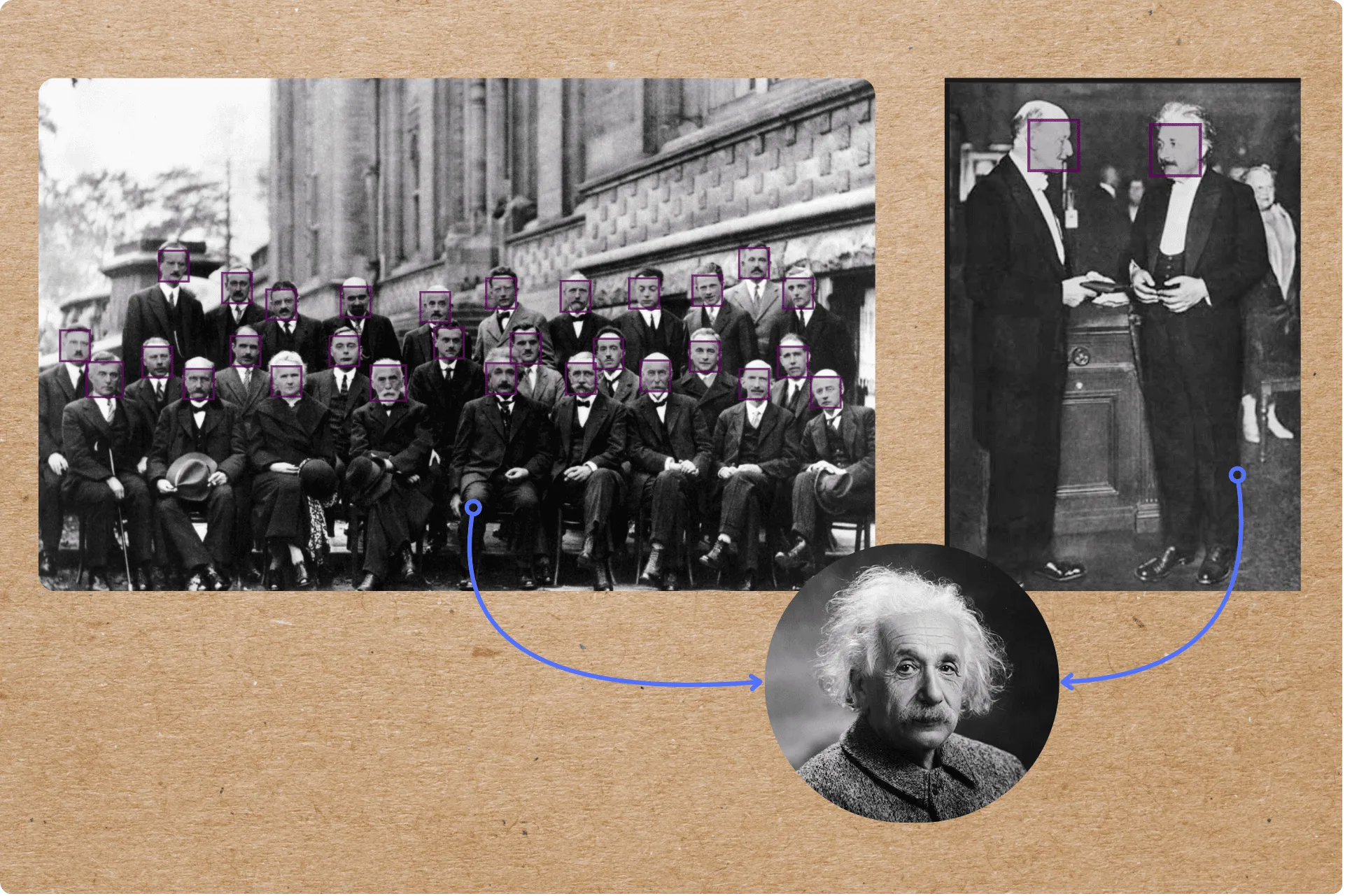
CocoInsight can now visualize identified sections of an image based on the bounding boxes and make it easier to understand and evaluate AI extractions - seamlessly attaching computed features in the context of unstructured visual data.
If you find this tutorial helpful, we’d greatly appreciate it if you could ⭐ star CocoIndex on GitHub.
Use cases
- Photo search
- Face-based access control and surveillance
- Visual deduplication and identity detection
- Multimodal search involving people or facial identity
- Social graph analysis from photos
What we will achieve
The photo taken of this conference’s participants is sometimes entitled “The Most Intelligent Picture Ever Taken”, for its depiction of the world’s leading physicists gathered together in one shot (Wikipedia).
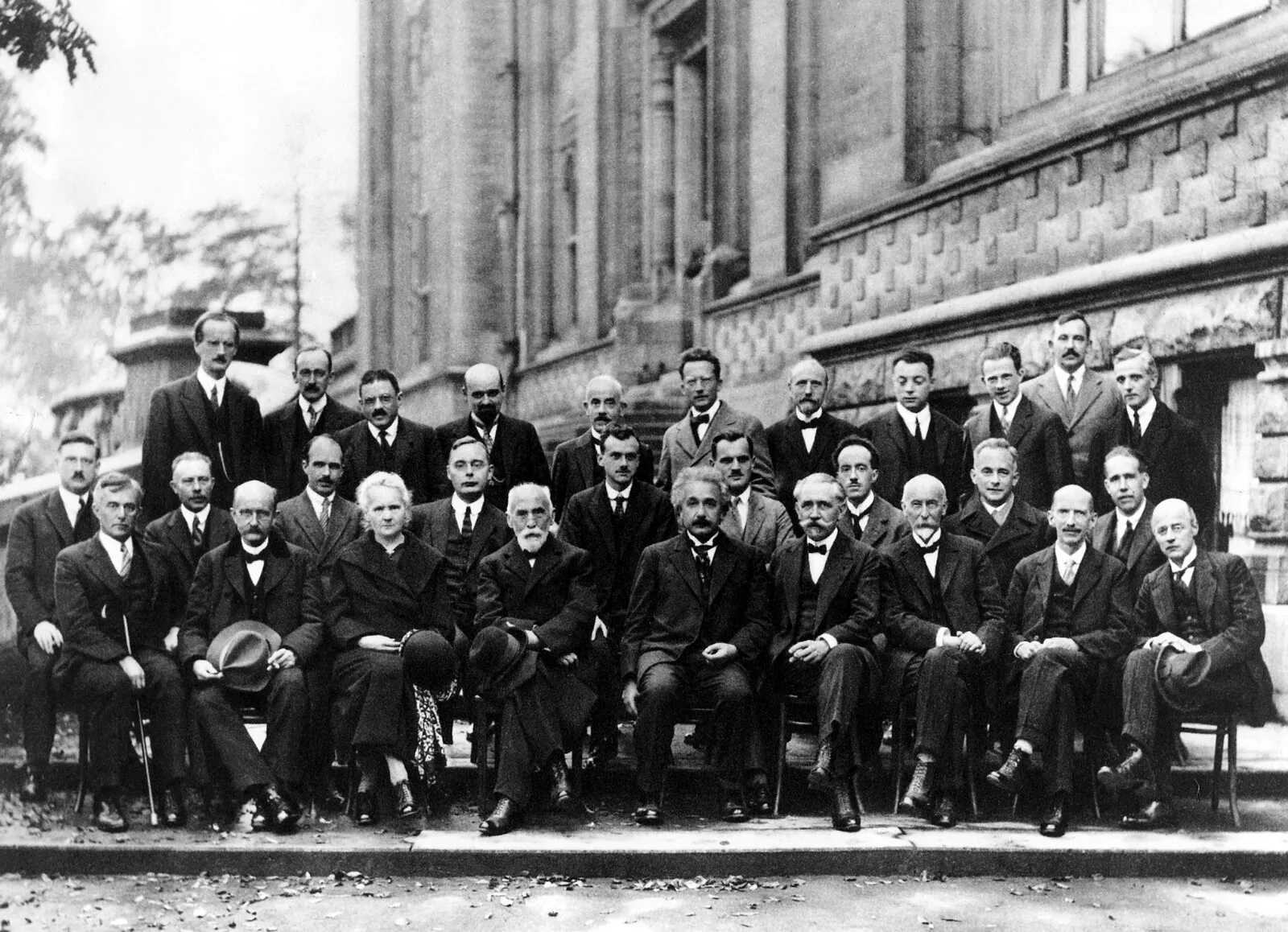
Here’s what we want to accomplish:
- Detect all faces in the image and extract their bounding boxes
- Crop and encode each face image into a 128-dimensional face embedding
- Store metadata and vectors in a structured index to support queries like: “Find all similar faces to this one” or “Search images that include this person”
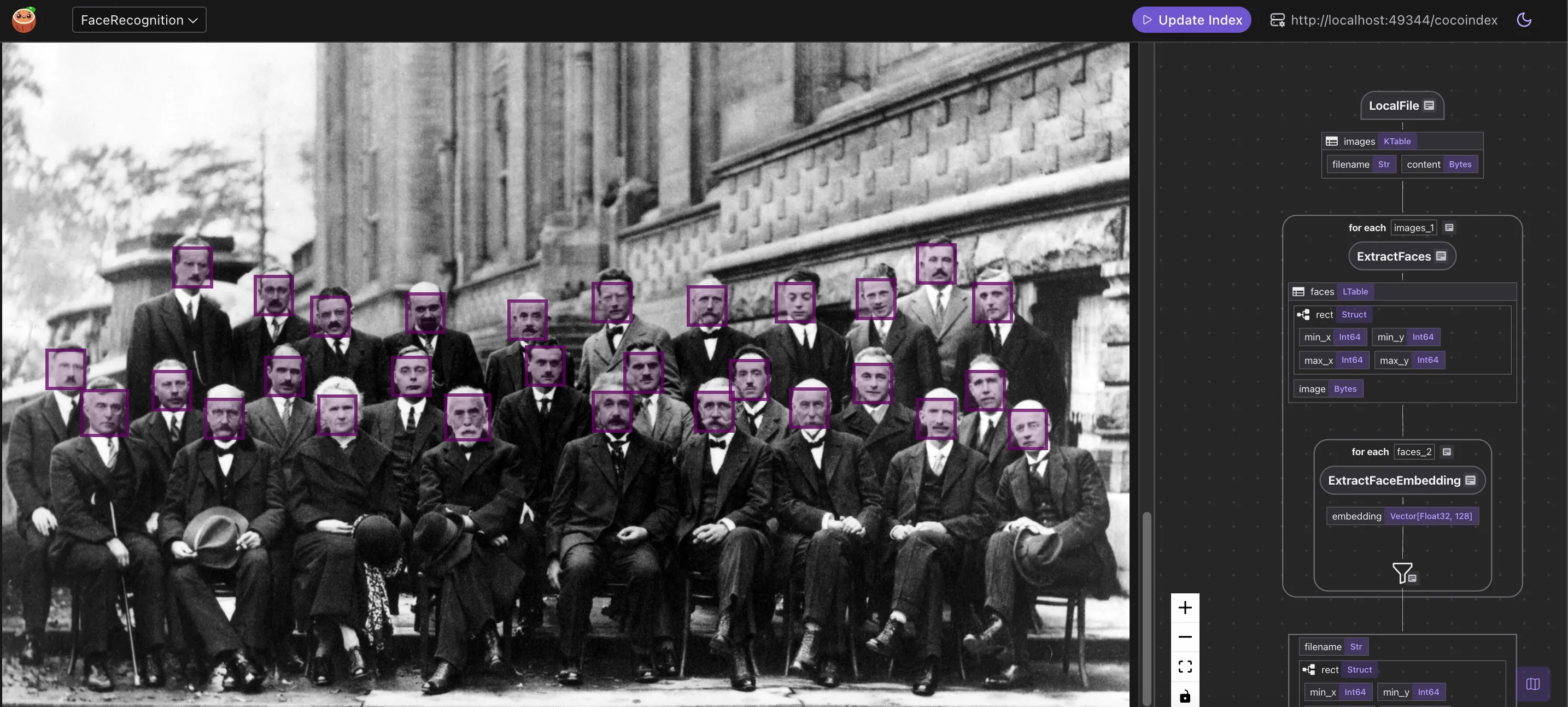
⭐ You can find the full code here.
Indexing Flow
- We ingest a list of images.
- For each image, we:
- Extract faces from the image.
- Compute embeddings for each face.
- We export the following fields to a table in Postgres with PGVector:
- Filename, rect, embedding for each face.
Core components
Image ingestion
We monitor an images/ directory using the built-in LocalFile source. All newly added files are automatically processed and indexed.
python
CopyEdit
@cocoindex.flow_def(name="FaceRecognition")
def face_recognition_flow(flow_builder, data_scope):
    data_scope["images"] = flow_builder.add_source(
        cocoindex.sources.LocalFile(path="images", binary=True),
        refresh_interval=datetime.timedelta(seconds=10),
    )
This creates a table with filename and content fields. 📂

You can connect it to your S3 Buckets (with SQS integration, example) or Azure Blob store.
Detect and extract faces
We use the face_recognition library under the hood, powered by dlib’s CNN-based face detector. Since the model is slow on large images, we downscale wide images before detection.
@cocoindex.op.function(
    cache=True,
    behavior_version=1,
    gpu=True,
    arg_relationship=(cocoindex.op.ArgRelationship.RECTS_BASE_IMAGE, "content"),
)
def extract_faces(content: bytes) -> list[FaceBase]:
    orig_img = Image.open(io.BytesIO(content)).convert("RGB")

    # The model is too slow on large images, so we resize them if too large.
    if orig_img.width > MAX_IMAGE_WIDTH:
        ratio = orig_img.width * 1.0 / MAX_IMAGE_WIDTH
        img = orig_img.resize(
            (MAX_IMAGE_WIDTH, int(orig_img.height / ratio)),
            resample=Image.Resampling.BICUBIC,
        )
    else:
        ratio = 1.0
        img = orig_img

    # Extract face locations.
    locs = face_recognition.face_locations(np.array(img), model="cnn")

    faces: list[FaceBase] = []
    for min_y, max_x, max_y, min_x in locs:
        rect = ImageRect(
            min_x=int(min_x * ratio),
            min_y=int(min_y * ratio),
            max_x=int(max_x * ratio),
            max_y=int(max_y * ratio),
        )

        # Crop the face and save it as a PNG.
        buf = io.BytesIO()
        orig_img.crop((rect.min_x, rect.min_y, rect.max_x, rect.max_y)).save(
            buf, format="PNG"
        )
        face = buf.getvalue()
        faces.append(FaceBase(rect, face))

    return faces
We transform the image content:
with data_scope["images"].row() as image:
    image["faces"] = image["content"].transform(extract_faces)
After this step, each image has a list of detected faces and bounding boxes.
Each detected face is cropped from the original image and stored as a PNG.

Sample Extraction:
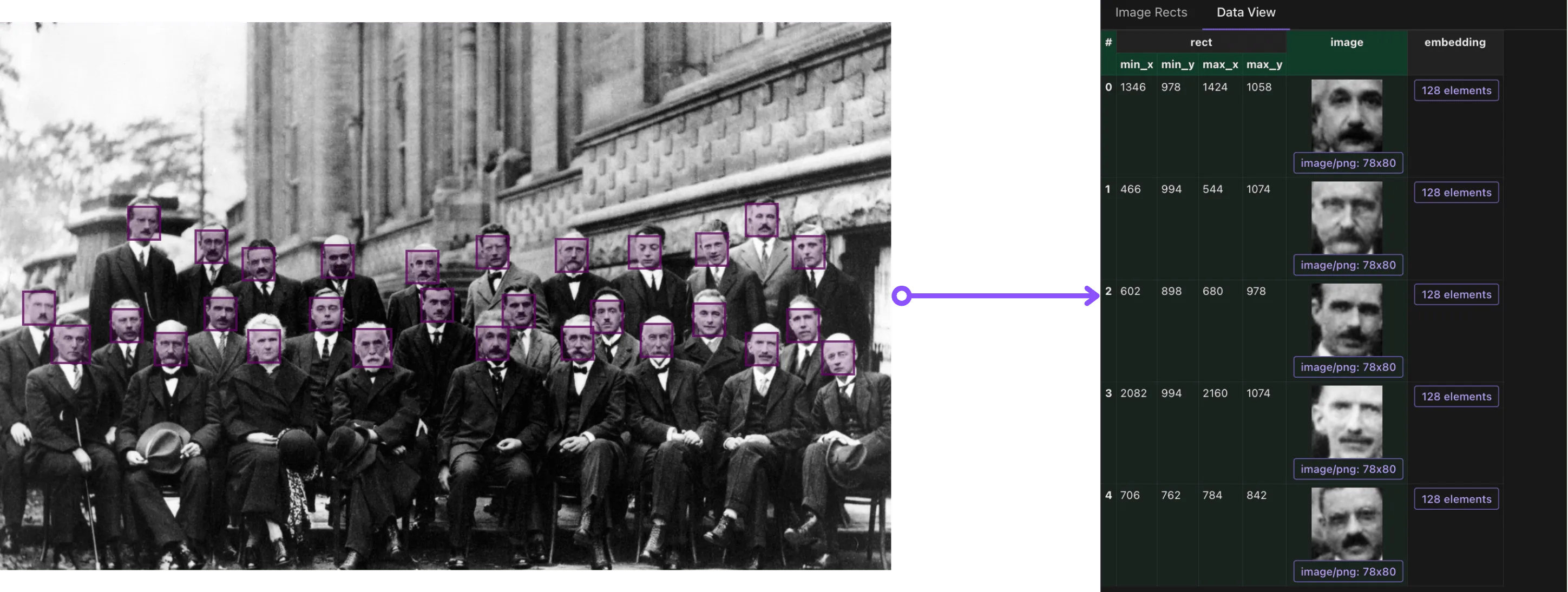
Sample Extraction:

Compute face embeddings
We encode each cropped face using the same library. This generates a 128-dimensional vector representation per face.
@cocoindex.op.function(cache=True, behavior_version=1, gpu=True)
def extract_face_embedding(
    face: bytes,
) -> cocoindex.Vector[cocoindex.Float32, typing.Literal[128]]:
    """Extract the embedding of a face."""
    img = Image.open(io.BytesIO(face)).convert("RGB")
    embedding = face_recognition.face_encodings(
        np.array(img),
        known_face_locations=[(0, img.width - 1, img.height - 1, 0)],
    )[0]
    return embedding
We plug the embedding function into the flow:
with image["faces"].row() as face:
    face["embedding"] = face["image"].transform(extract_face_embedding)
After this step, we have embeddings ready to be indexed!
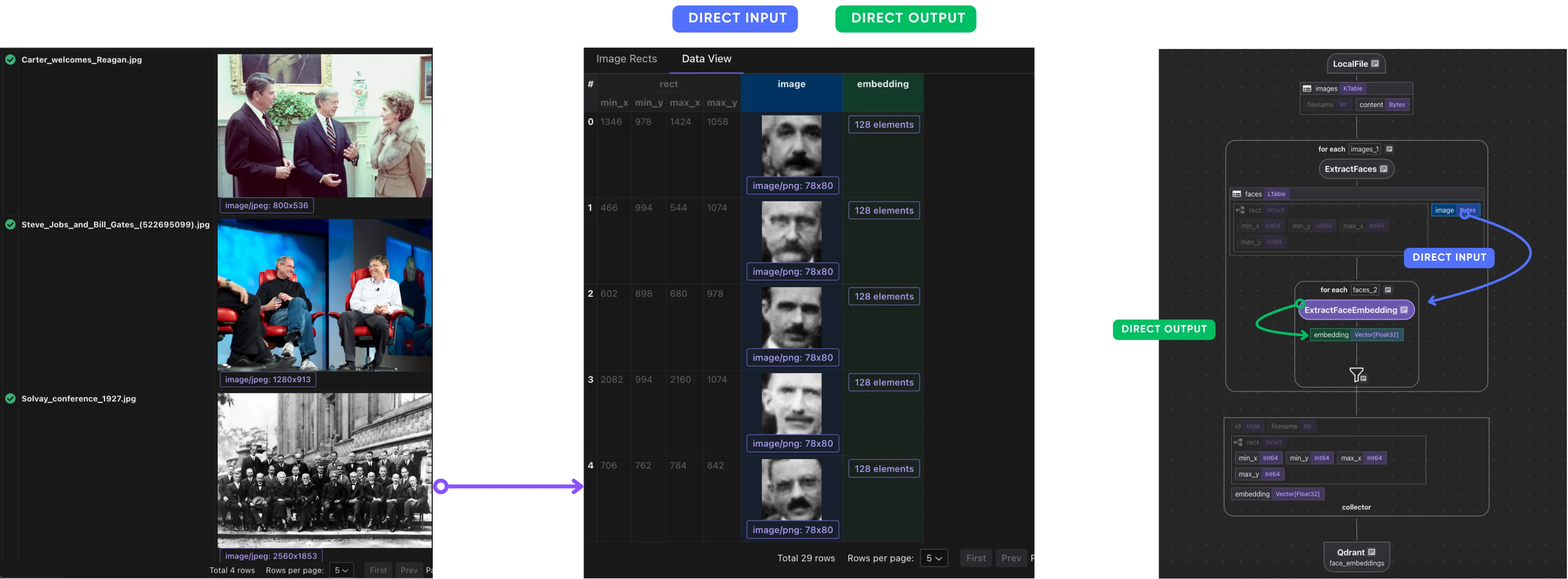
Collect and export embeddings
We now collect structured data for each face: filename, bounding box, and embedding.
face_embeddings = data_scope.add_collector()

face_embeddings.collect(
    id=cocoindex.GeneratedField.UUID,
    filename=image["filename"],
    rect=face["rect"],
    embedding=face["embedding"],
)
We export to a Qdrant collection:
face_embeddings.export(
    QDRANT_COLLECTION,
    cocoindex.targets.Qdrant(
        collection_name=QDRANT_COLLECTION
    ),
    primary_key_fields=["id"],
)
Now you can run cosine similarity queries over facial vectors.
CocoIndex supports a 1-line switch to other vector databases like Postgres.
Query the index
You can now build facial search apps or dashboards. For example:
- Given a new face embedding, find the most similar faces
- Find all face images that appear in a set of photos
- Cluster embeddings to group visually similar people
For querying embeddings, check out the Image Search project.
If you’d like to see a full example on the query path with image match, give it a shout at our group.
Support us
We’re constantly adding more examples and improving our runtime. If you found this helpful, please ⭐ star CocoIndex on GitHub and share it with others.
Thanks for reading!
Let us know what pipelines you’re building. We’d love to feature them.
Frequently asked questions
How do you build a face detection and recognition pipeline with CocoIndex?
The pipeline ingests a list of images, and for each image it extracts faces (with bounding boxes) and computes an embedding for each face, then exports the filename, bounding box (rect), and embedding for every face into a vector database. CocoIndex processes text and images with the same programming model, so the whole flow is multi-modal.
See Core components.
Which library does this example use to detect and embed faces?
It uses the face_recognition library, powered by dlib's CNN-based face detector (model="cnn"). The same library encodes each cropped face into a 128-dimensional vector via face_encodings. Because the detector is slow on large images, wide images are downscaled before detection and the bounding boxes are scaled back to the original resolution.
How are detected faces cropped and stored?
For each detected face location, the example builds an ImageRect bounding box, crops that region from the original image, and saves it as PNG bytes. Each image then carries a list of detected faces with their bounding boxes, ready for embedding.
How does CocoIndex avoid recomputing face embeddings on unchanged images?
Both the extract_faces and extract_face_embedding functions are decorated with @cocoindex.op.function(cache=True, behavior_version=1, gpu=True). The LocalFile source also uses a refresh_interval, so newly added files are automatically processed and indexed without reprocessing everything.
See Image ingestion and Compute face embeddings.
Which vector database does the face index export to, and can I switch it?
The example collects each face's id (a generated UUID), filename, rect, and embedding, then exports to a Qdrant collection keyed by id, enabling cosine similarity queries over facial vectors. CocoIndex supports a one-line switch to other vector databases such as Postgres with pgvector.
What can you query once faces are indexed?
With embeddings in a vector store you can, for example, find the most similar faces to a given face embedding, find all face images that appear across a set of photos, or cluster embeddings to group visually similar people. The post lists use cases such as photo search, face-based access control, visual deduplication, and social graph analysis from photos.
See Query the index.
About the author

CEO and cofounder of CocoIndex. Writes about incremental data infrastructure, agents, and the engineering decisions behind the engine.
Build fresh context for your agents.
CocoIndex keeps derived data in sync with its sources. Only what changed re-runs.
