
CocoIndex has native support for Amazon S3 as a data source. This post builds a small pipeline that reads Markdown files from an S3 bucket, chunks and embeds them, and writes the vectors to a Postgres pgvector table for semantic search.
The point of the example is incremental processing: adding one object to the bucket embeds one object, not the whole bucket. It is Semantic Search 101 with the source swapped from a local folder to S3; everything downstream is the same.
The full project is in the CocoIndex v1 repo.
Why incremental processing
Incremental processing processes only the data that changed since the last run, instead of reprocessing everything. It matters most in three situations.
High freshness requirements. For user-facing search, stale results are a real problem: when someone updates a document, they expect it reflected in search right away. Feed a stale result into an AI agent and the model answers from out-of-date information, often without anyone noticing.
Expensive transforms. When each item goes through an embedding model or an LLM, the transform costs far more than the retrieval. Recomputing unchanged items burns money for no benefit.
Large datasets. With terabytes in S3, reprocessing everything on each new file is impractical on time, cost, and compute. Incremental processing keeps the work proportional to the change, not the corpus.
A useful way to think about it: if T is the staleness you can tolerate, and you do not want to recompute the whole corpus every T, you need incremental processing.
How CocoIndex processes only what changed
CocoIndex tracks each unit of work by a fingerprint of its input and the transform code. On the next run, anything whose fingerprint is unchanged is skipped, and its downstream rows are left untouched.
The granularity is finer than the file. If a Markdown file has many chunks and you edit one paragraph, only the chunks that actually changed are re-embedded; the rest reuse their cached vectors:
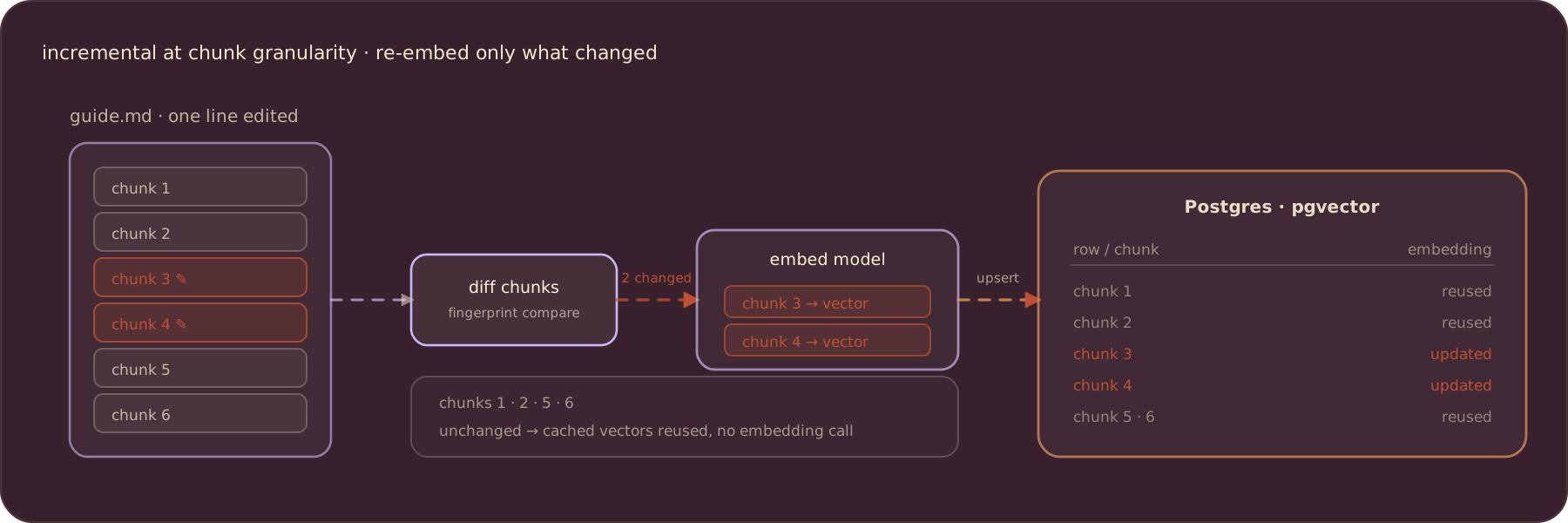
That is where the savings come from. The expensive embedding calls run only for content CocoIndex has not seen, and the vector store ends up consistent either way.
The indexing flow
The flow reads Markdown files from S3, and for each file splits it into chunks, embeds each chunk, and declares a row in the vector table:
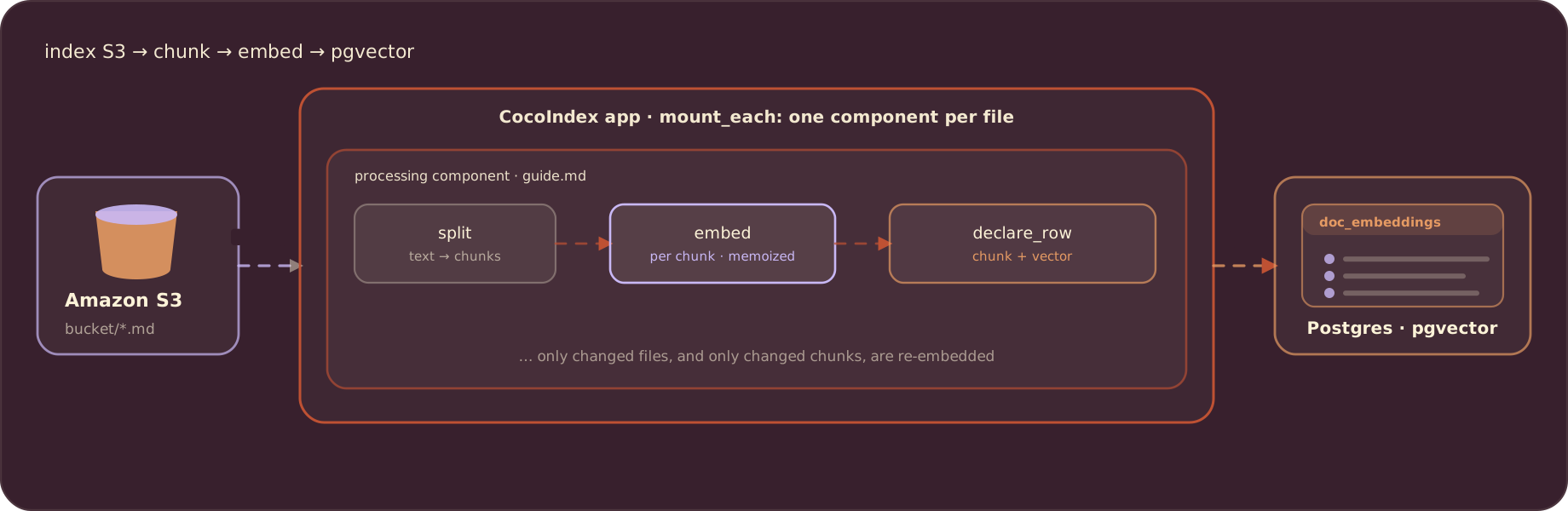
Each file is handled by its own processing component, so change detection and parallelism are per file.
Define the pipeline
Shared resources (the Postgres pool, the S3 client, and the embedder) are provided once in the app lifespan and read anywhere with coco.use_context:
import cocoindex as coco
from cocoindex.connectors import amazon_s3, postgres
from cocoindex.ops.sentence_transformers import SentenceTransformerEmbedder

EMBED_MODEL = "sentence-transformers/all-MiniLM-L6-v2"

PG_DB = coco.ContextKey[asyncpg.Pool]("s3_embedding_db")
S3_CLIENT = coco.ContextKey[AioBaseClient]("s3_client")
EMBEDDER = coco.ContextKey[SentenceTransformerEmbedder]("embedder", detect_change=True)


@coco.lifespan
async def coco_lifespan(builder: coco.EnvironmentBuilder) -> AsyncIterator[None]:
    async with asyncpg.create_pool(DATABASE_URL) as pool:
        builder.provide(PG_DB, pool)
        builder.provide(EMBEDDER, SentenceTransformerEmbedder(EMBED_MODEL))

        session = aiobotocore.session.get_session()
        async with session.create_client("s3") as s3_client:
            builder.provide(S3_CLIENT, s3_client)
            yield
detect_change=True on the embedder means swapping the model re-runs only the embedding step, not the whole pipeline.
The target row is a plain dataclass. The embedding column is annotated with the embedder so CocoIndex knows the vector dimension:
@dataclass
class DocEmbedding:
    id: int
    filename: str
    chunk_start: int
    chunk_end: int
    text: str
    embedding: Annotated[NDArray, EMBEDDER]
Chunk, embed, declare
Each chunk becomes one row. process_chunk embeds the chunk text and declares the row; CocoIndex works out whether that is an insert or an update:
@coco.fn
async def process_chunk(
    chunk: Chunk,
    filename: str,
    id_gen: IdGenerator,
    table: postgres.TableTarget[DocEmbedding],
) -> None:
    table.declare_row(
        row=DocEmbedding(
            id=await id_gen.next_id(chunk.text),
            filename=filename,
            chunk_start=chunk.start.char_offset,
            chunk_end=chunk.end.char_offset,
            text=chunk.text,
            embedding=await coco.use_context(EMBEDDER).embed(chunk.text),
        ),
    )
process_file reads one S3 file, splits it into chunks, and maps process_chunk over them. memo=True caches per-file work, so an unchanged file is skipped entirely:
_splitter = RecursiveSplitter()


@coco.fn(memo=True)
async def process_file(
    file: amazon_s3.S3File,
    table: postgres.TableTarget[DocEmbedding],
) -> None:
    text = await file.read_text()
    chunks = _splitter.split(
        text, chunk_size=2000, chunk_overlap=500, language="markdown"
    )
    id_gen = IdGenerator()
    await coco.map(process_chunk, chunks, file.file_path.path.as_posix(), id_gen, table)
Wire up the app
app_main mounts the pgvector table target, lists the Markdown objects in the bucket, and fans out one process_file component per file with mount_each:
@coco.fn
async def app_main() -> None:
    target_table = await postgres.mount_table_target(
        PG_DB,
        table_name=TABLE_NAME,
        table_schema=await postgres.TableSchema.from_class(
            DocEmbedding, primary_key=["id"]
        ),
        pg_schema_name=PG_SCHEMA_NAME,
    )

    client = coco.use_context(S3_CLIENT)
    files = amazon_s3.list_objects(
        client,
        S3_BUCKET,
        prefix=S3_PREFIX,
        path_matcher=PatternFilePathMatcher(included_patterns=["**/*.md"]),
    )
    await coco.mount_each(process_file, files.items(), target_table)


app = coco.App(
    coco.AppConfig(name="AmazonS3Embedding"),
    app_main,
)
amazon_s3.list_objects returns the objects under the prefix; files.items() yields (key, file) pairs, and mount_each gives each file a stable component path keyed on its S3 path.
Set up the S3 bucket
Follow the Amazon S3 connector docs to create a bucket and grant read access. The pipeline needs read-only S3 permissions (AmazonS3ReadOnlyAccess is enough), and standard AWS credentials in the environment. Point the pipeline at the bucket with a .env file:
POSTGRES_URL=postgresql://cocoindex:cocoindex@localhost/cocoindex
S3_BUCKET=your-bucket-name
S3_PREFIX=
Then upload your Markdown files to the bucket.
Run the pipeline
Build the index. This is a one-shot catch-up over the objects in the bucket:
cocoindex update mainThe first run embeds everything. Every run after that does only the new work: new and changed files are processed, unchanged files are skipped, and within a changed file only the changed chunks are re-embedded.
For fresh data, schedule the update on whatever cadence you need (cron, Airflow, GitHub Actions, an Azure or Lambda function). Because re-runs only touch what changed, running the pipeline often is cheap. If you need event-driven, second-level freshness instead of scheduled runs, use one of CocoIndex’s streaming sources (Kafka, Iggy, or Valkey) as the source of your pipeline.
Once the index is built, query it:
python main.py "your query"Support us
We are constantly adding features and examples. If this was useful, a star on GitHub helps others find CocoIndex and keeps us going.

About the author.

CEO and cofounder of CocoIndex. Writes about incremental data infrastructure, agents, and the engineering decisions behind the engine.
Frequently asked questions.
How do I build an incremental ETL pipeline on Amazon S3?
CocoIndex has native support for Amazon S3 as a data source. You list the objects with amazon_s3.list_objects, hand them to coco.mount_each, and each file is processed by its own component that chunks, embeds, and declares vector rows. CocoIndex fingerprints every file and processes only what changed, so adding one object embeds one object, not the whole bucket.
See The indexing flow.
When should I use incremental processing instead of reprocessing everything?
Incremental processing only handles data that is new or changed since the last run. It is most valuable when you have a high freshness requirement (users shouldn't see stale search results), a high transformation cost (for example expensive embedding or AI models), or large-scale data where reprocessing terabytes on every new file is impractical. The rule of thumb: if T is your acceptable staleness and you don't want to recompute everything every cycle of T, you need incremental processing.
Does CocoIndex re-embed an entire file when only part of it changes?
No. CocoIndex tracks work at the granularity of your flow, finer than a whole file. If a file has M chunks and only N of them changed, only those N chunks are re-embedded, as long as the transform logic is unchanged; the rest reuse their cached vectors. Only the changed rows are upserted into the vector store.
What IAM permissions does CocoIndex need to read from S3?
Read-only S3 access is enough — the AmazonS3ReadOnlyAccess policy plus standard AWS credentials in the environment. The pipeline only lists and reads objects; it does not write to the bucket. See the Amazon S3 connector docs for the full setup.
See Set up the S3 bucket.
How do I keep the S3 index fresh?
Run cocoindex update main on a schedule that matches the freshness you need — cron, Airflow, GitHub Actions, or an Azure/Lambda function. Because a re-run only touches files and chunks that changed, running it often is cheap. The S3 source is a one-shot catch-up per run; if you need event-driven, second-level freshness instead, use a streaming source (Kafka, Iggy, or Valkey) as the source of the pipeline.
See Run the pipeline.
Can I use the same pipeline for local files or other object stores?
Yes. This example is Semantic Search 101 with the source swapped from a local folder to S3; chunking, embedding, the pgvector target, and the query are identical. Swapping the source to localfs, Azure Blob, or Google Drive leaves the rest of the flow unchanged.
See Define the pipeline.
