
Keyword search only finds the words you typed. Ask “how do I log back in?” and a page titled “recover your account access” never comes up, because it shares no words with your query.
Semantic search fixes that. It matches on meaning, so a question finds the right answer even when the wording is completely different. This guide builds a semantic search index from scratch with CocoIndex v1 and Postgres, and explains each idea as it comes up. No prior experience with embeddings needed.
The full code is in the CocoIndex v1 repo. A star on GitHub is appreciated if this helps.
What is a text embedding?
An embedding is a list of numbers (a vector) that a model assigns to a piece of text so that its position captures the text’s meaning. Texts that mean similar things get vectors that sit close together; unrelated texts land far apart.
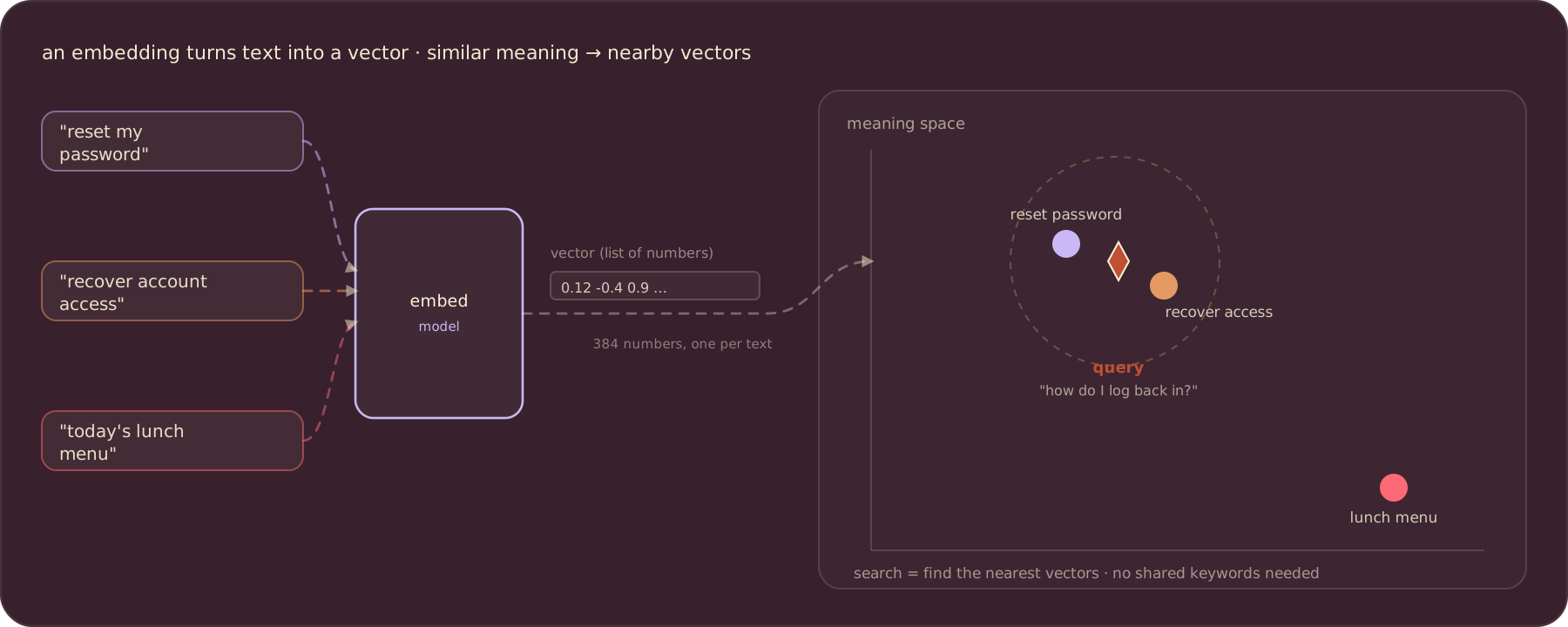
Once every piece of text is a point in this space, search becomes geometry. You embed the query the same way, then look for the nearest points. “How do I log back in?” lands next to “reset my password” and “recover account access,” and nowhere near “today’s lunch menu,” with no shared keywords required.
The model here is all-MiniLM-L6-v2, which turns any text into a 384-number vector. It is small, fast, and good enough to feel magic on real documents.
What we’ll build
The index is a short pipeline: read files, split each into chunks, embed each chunk, and store the vectors in Postgres so you can search them.
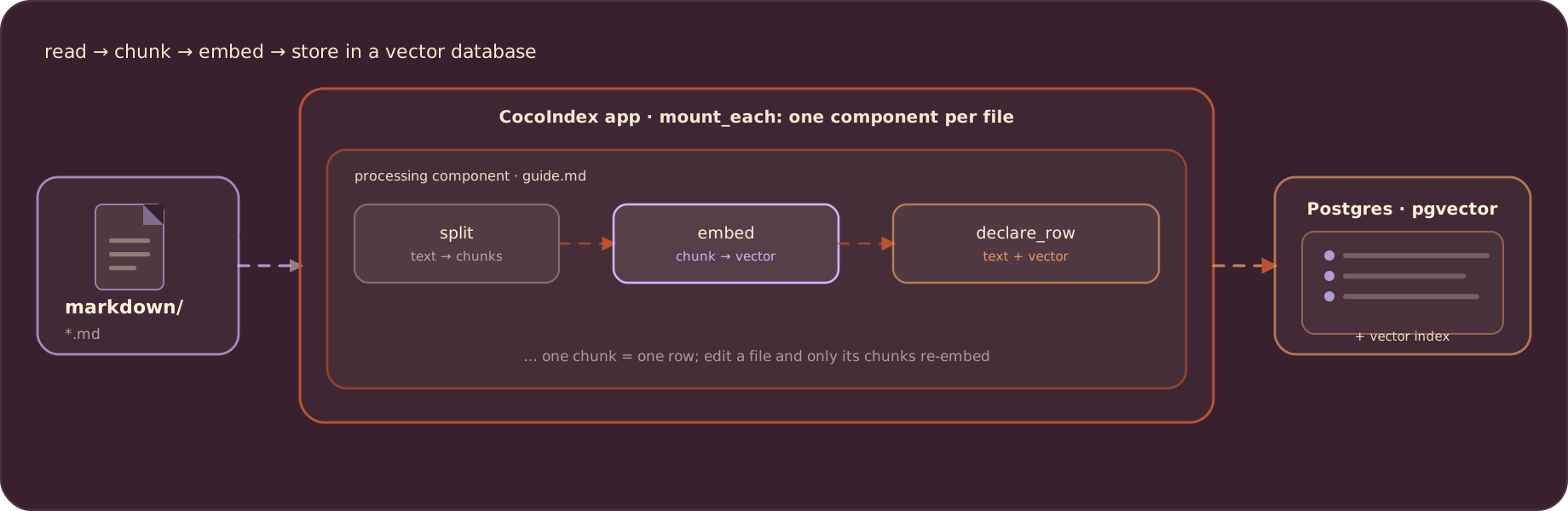
Why split into chunks instead of embedding a whole file? A single vector can only capture so much. A long document is about many things, and squeezing all of them into one vector blurs them together, the same way one photo-wide vector blurs a busy image. Splitting the document into smaller passages and embedding each one keeps the meaning sharp and lets search point at the exact passage that answers a query.
Why CocoIndex?
You could write this pipeline by hand. The hard part is not embedding once; it is keeping the index correct as your documents change. By hand you would track which files changed, figure out which chunks are new, embed only those, and insert, update, or delete rows so the database matches, forever.
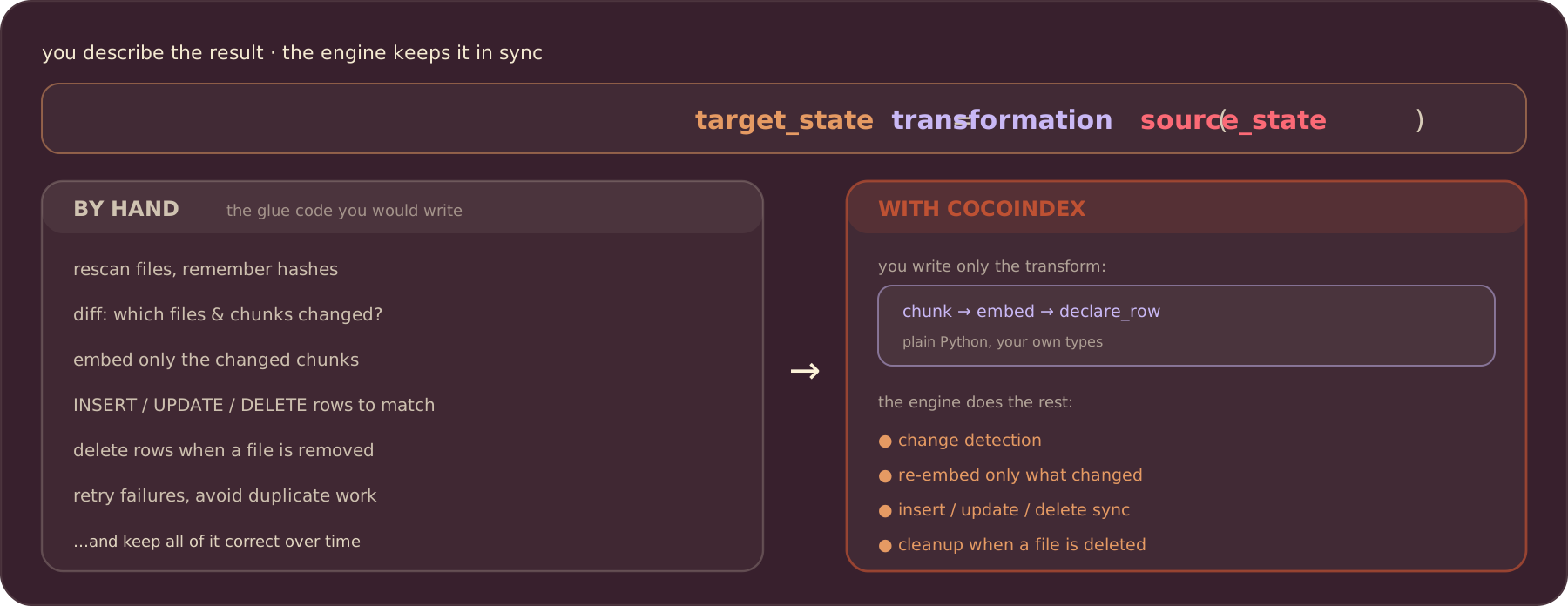
CocoIndex is declarative. You describe the target as a function of the source, target_state = transformation(source_state), and a Rust engine keeps the two in sync. You write only the transform (chunk, embed, declare a row). The engine handles change detection, re-embeds only what changed, and applies the right inserts, updates, and deletes, including cleaning up when a file is removed. Edit one paragraph and only that chunk is re-embedded.
Build it
Prerequisites
Install Postgres with the pgvector extension; that is where the embeddings live. Set the connection string:
export POSTGRES_URL="postgres://cocoindex:cocoindex@localhost/cocoindex"Define the row
Each chunk becomes one row. A plain dataclass describes the columns; the embedding field is annotated with the embedder so CocoIndex knows the vector’s size:
from dataclasses import dataclass
from typing import Annotated
from numpy.typing import NDArray

import cocoindex as coco
from cocoindex.ops.sentence_transformers import SentenceTransformerEmbedder

EMBED_MODEL = "sentence-transformers/all-MiniLM-L6-v2"
EMBEDDER = coco.ContextKey[SentenceTransformerEmbedder]("embedder", detect_change=True)


@dataclass
class DocEmbedding:
    id: int
    filename: str
    chunk_start: int
    chunk_end: int
    text: str
    embedding: Annotated[NDArray, EMBEDDER]
The database connection and the embedder are created once, in the app lifespan:
import asyncpg
from cocoindex.connectors import postgres

PG_DB = coco.ContextKey[asyncpg.Pool]("text_embedding_db")


@coco.lifespan
async def coco_lifespan(builder: coco.EnvironmentBuilder) -> AsyncIterator[None]:
    async with asyncpg.create_pool(DATABASE_URL) as pool:
        builder.provide(PG_DB, pool)
        builder.provide(EMBEDDER, SentenceTransformerEmbedder(EMBED_MODEL))
        yield
Chunk and embed
process_chunk embeds one chunk and declares its row. process_file reads a file, splits it into chunks, and maps process_chunk over them. memo=True caches per-file work, so an unchanged file is skipped:
from cocoindex.ops.text import RecursiveSplitter
from cocoindex.resources.chunk import Chunk
from cocoindex.resources.file import FileLike
from cocoindex.resources.id import IdGenerator

_splitter = RecursiveSplitter()


@coco.fn
async def process_chunk(
    chunk: Chunk,
    filename: pathlib.PurePath,
    id_gen: IdGenerator,
    table: postgres.TableTarget[DocEmbedding],
) -> None:
    table.declare_row(
        row=DocEmbedding(
            id=await id_gen.next_id(chunk.text),
            filename=str(filename),
            chunk_start=chunk.start.char_offset,
            chunk_end=chunk.end.char_offset,
            text=chunk.text,
            embedding=await coco.use_context(EMBEDDER).embed(chunk.text),
        ),
    )


@coco.fn(memo=True)
async def process_file(
    file: FileLike[str],
    table: postgres.TableTarget[DocEmbedding],
) -> None:
    text = await file.read_text()
    chunks = _splitter.split(text, chunk_size=2000, chunk_overlap=500, language="markdown")
    id_gen = IdGenerator()
    await coco.map(process_chunk, chunks, file.file_path.path, id_gen, table)
Wire up the app
app_main mounts the Postgres table, adds a vector index for fast nearest-neighbor search, walks the folder of Markdown files, and runs one process_file per file:
from cocoindex.connectors import localfs
from cocoindex.resources.file import PatternFilePathMatcher


@coco.fn
async def app_main(sourcedir: pathlib.Path) -> None:
    table = await postgres.mount_table_target(
        PG_DB,
        table_name="doc_embeddings",
        table_schema=await postgres.TableSchema.from_class(DocEmbedding, primary_key=["id"]),
        pg_schema_name="coco_examples",
    )
    table.declare_vector_index(column="embedding")

    files = localfs.walk_dir(
        sourcedir,
        recursive=True,
        path_matcher=PatternFilePathMatcher(included_patterns=["**/*.md"]),
        live=True,
    )
    await coco.mount_each(process_file, files.items(), table)


app = coco.App(
    coco.AppConfig(name="TextEmbedding"),
    app_main,
    sourcedir=pathlib.Path("./markdown_files"),
)
Build the index
pip install "cocoindex[postgres]" sentence-transformers asyncpg pgvector
cocoindex update main
The first run embeds everything. Re-run it any time and only new or changed files are processed. Add -L (cocoindex update -L main) to watch the folder and update the index live as files change.
Query the index
Searching is the mirror image of indexing: embed the query with the same model, then ask Postgres for the nearest vectors. The <=> operator is pgvector’s cosine distance, so smaller means more similar:
async def query_once(pool, embedder, query: str, *, top_k: int = 5) -> None:
    query_vec = await embedder.embed(query)
    async with pool.acquire() as conn:
        rows = await conn.fetch(
            """
            SELECT filename, text, embedding <=> $1 AS distance
            FROM "coco_examples"."doc_embeddings"
            ORDER BY distance ASC
            LIMIT $2
            """,
            query_vec,
            top_k,
        )
    for r in rows:
        print(f"[{1.0 - float(r['distance']):.3f}] {r['filename']}")
        print(f"    {r['text']}")
Run it and ask questions in plain language:
python main.py "how do I get started?"You get back the passages whose meaning is closest to your question, ranked by similarity, even when they share none of your words.
Where to go next
You now have the core of semantic search: chunk, embed, store, and query by nearest neighbor. The same shape extends a long way. Swap the source for Amazon S3, Azure Blob, or Google Drive; swap the target for a dedicated vector database like Qdrant; or feed the retrieved passages to an LLM to build RAG. Because the pipeline is declarative and incremental, none of that changes how you keep the index fresh.
Support us
We are constantly adding examples and improving the runtime. If this guide helped, please star CocoIndex on GitHub.

About the author.

CEO and cofounder of CocoIndex. Writes about incremental data infrastructure, agents, and the engineering decisions behind the engine.
Frequently asked questions.
What is a text embedding, in plain terms?
An embedding is a list of numbers (a vector) that a model assigns to a piece of text so its position captures the text's meaning. Texts that mean similar things get vectors that sit close together, and unrelated texts land far apart. Once every text is a point in this space, search becomes geometry: embed the query the same way and find the nearest points, no shared keywords required.
Why chunk documents before embedding them?
A single vector can only capture so much. A long document is about many things, and squeezing all of them into one vector blurs them together. Splitting the document into smaller passages and embedding each one keeps the meaning sharp and lets search point at the exact passage that answers a query. This tutorial chunks Markdown with RecursiveSplitter at chunk size 2000 and overlap 500.
See What we'll build.
How do I build a text embedding index with CocoIndex v1?
Walk the files with localfs.walk_dir and fan out one component per file with coco.mount_each. Each component splits the file with RecursiveSplitter, embeds each chunk with SentenceTransformerEmbedder, and calls declare_row to store the text and its vector in a Postgres pgvector table mounted with postgres.mount_table_target. Add declare_vector_index for fast nearest-neighbor search.
See Build it.
Which embedding model does this use, and how big are the vectors?
sentence-transformers/all-MiniLM-L6-v2, which turns any text into a 384-number vector. It is small, fast, and a good balance of speed and quality; you can swap in another SentenceTransformer model by changing one string. The same model must embed both the indexed chunks and the search query so the vectors are comparable.
Why use CocoIndex instead of writing the pipeline by hand?
Embedding once is easy; keeping the index correct as documents change is the hard part. By hand you would track which files changed, embed only the new chunks, and insert, update, or delete rows to match, forever. CocoIndex is declarative: you write only the transform (chunk → embed → declare_row) and the engine does change detection, re-embeds only what changed, and syncs the database, including cleanup when a file is deleted.
See Why CocoIndex?.
How do I query the embedding index?
Embed the query with the same model, then ask Postgres for the nearest vectors. The example runs a SQL query using pgvector's <=> cosine-distance operator, ordered ascending (smaller distance = more similar) with a LIMIT. Run python main.py "your question" and you get back the closest passages by meaning, ranked by similarity.
See Query the index.
