
Meeting notes capture decisions, action items, who was in the room, and how people and tasks connect. Most teams keep them as static documents, reachable only through text search. A knowledge graph lets you query them like a database instead: “Who attended the budget planning meetings?” or “What tasks did Sarah get assigned across every meeting?”
To answer questions like these you extract structured information from unstructured notes and store it as a graph, which makes relationship queries direct instead of impossible.
This post walks through the Meeting Notes Graph example: a CocoIndex v1 pipeline that reads Markdown meeting notes from Google Drive, extracts structure with an LLM, deduplicates person names with embedding-based entity resolution, and builds a queryable graph in Neo4j.
The project is open-sourced in the CocoIndex v1 repo.
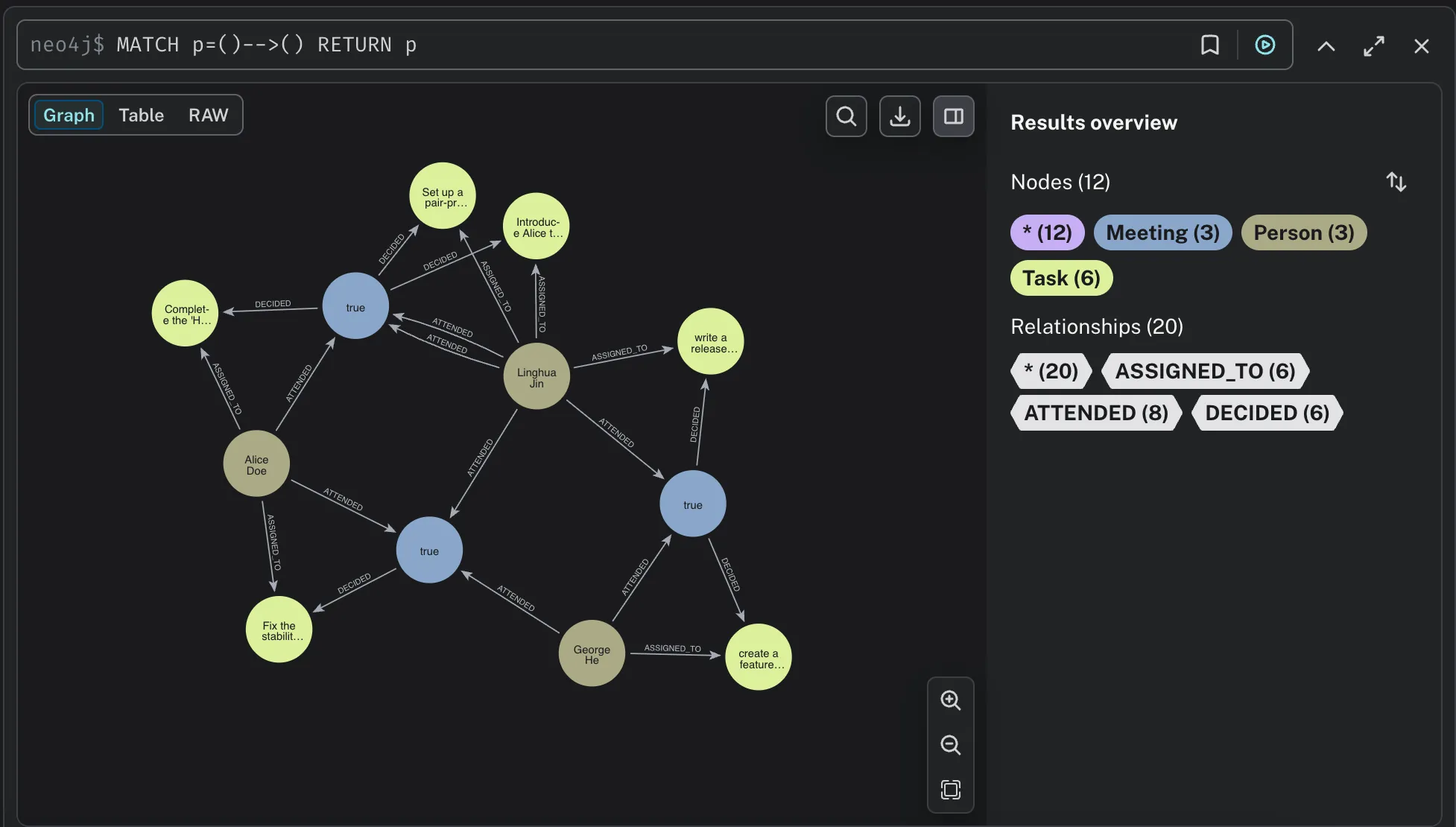
Why a graph, and why incremental
Meeting notes are living documents. Attendee names get corrected, tasks get reassigned, and decisions get revised. A batch pipeline that rebuilds the whole graph on every edit is wasteful once you have more than a handful of files, and it makes near-real-time freshness expensive.
CocoIndex processes incrementally: it detects which files changed and reprocesses only those. Unchanged notes never hit the LLM, and the graph write is a no-op for anything that did not change. The heavy LLM extraction step is memoized, so as long as a section’s text and the model are unchanged, the cached result is reused.
The graph model
We build a property graph with three node types and three edge types:
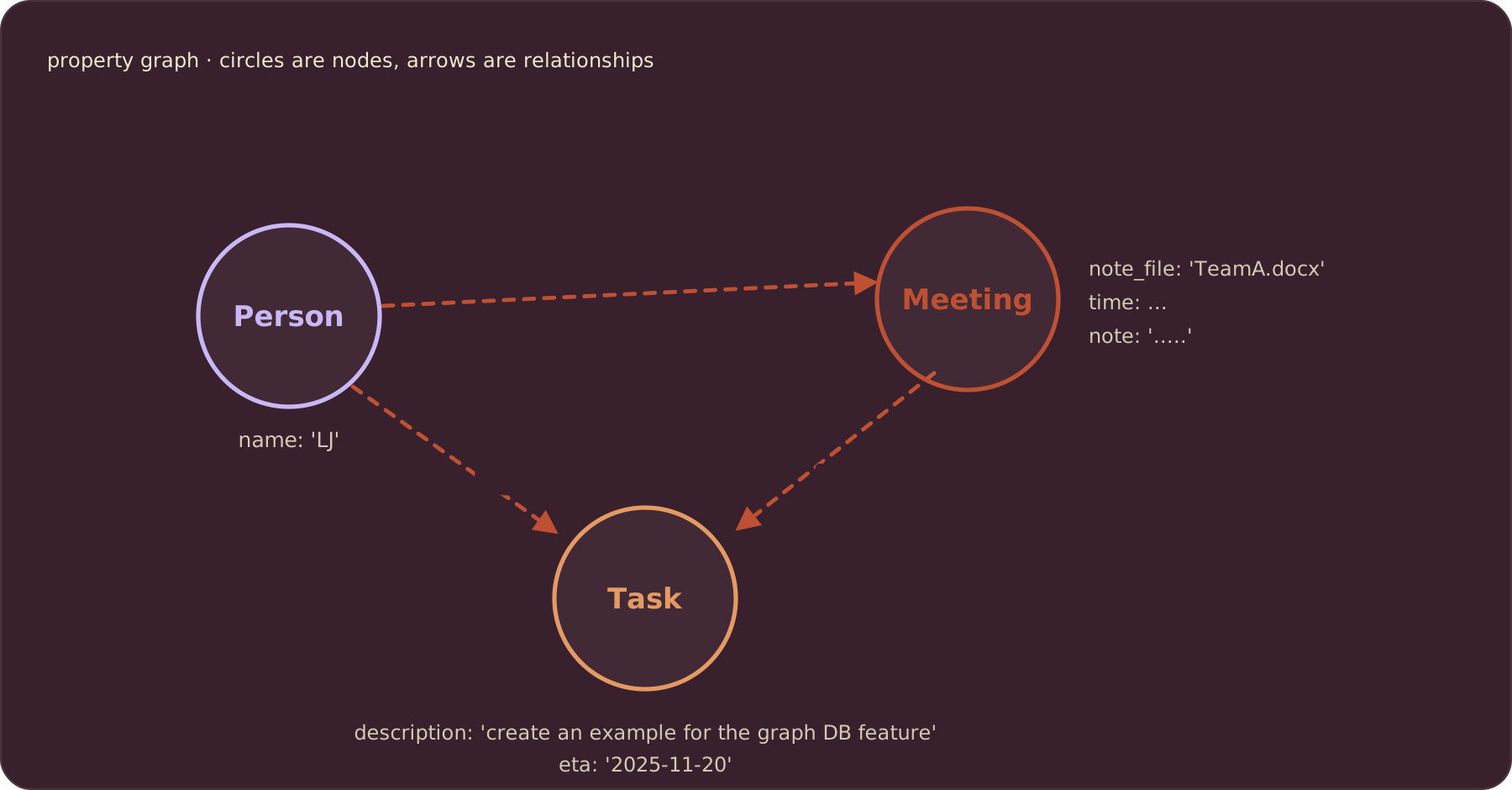
Nodes
Meeting: one per meeting section, with its date and notesPerson: a canonical individual (organizer, participant, or task assignee)Task: an action item decided in a meeting
Edges
ATTENDED:Person → Meeting, carrying anis_organizerflagDECIDED:Meeting → TaskASSIGNED_TO:Person → Task
To learn more about property graphs, see CocoIndex’s Property Graph Targets documentation.
Define the pipeline
CocoIndex v1 is declarative and Python-native: you write plain async Python and the Rust engine handles incremental processing. The whole example lives in one main.py, wrapped in a coco.App:
import cocoindex as coco
from cocoindex.connectors import google_drive, neo4j
from cocoindex.ops.entity_resolution import ResolvedEntities, resolve_entities
from cocoindex.ops.entity_resolution.llm_resolver import LlmPairResolver
from cocoindex.ops.sentence_transformers import SentenceTransformerEmbedder
from cocoindex.resources.id import IdGenerator

app = coco.App(coco.AppConfig(name="MeetingNotesGraphNeo4j"), app_main)
Shared resources
The Neo4j connection, the two LLM models, and the embedder are provided once in the app lifespan and retrieved anywhere with coco.use_context. The neo4j.ConnectionFactory reads standard connection settings from the environment, defaulting to a local Neo4j:
KG_DB = coco.ContextKey[neo4j.ConnectionFactory]("kg_db")
LLM_MODEL = coco.ContextKey[str]("llm_model", detect_change=True)
RESOLUTION_LLM_MODEL = coco.ContextKey[str]("resolution_llm_model", detect_change=True)
EMBEDDER = coco.ContextKey[SentenceTransformerEmbedder]("embedder", detect_change=True)

@coco.lifespan
async def coco_lifespan(builder: coco.EnvironmentBuilder) -> AsyncIterator[None]:
    builder.provide(
        KG_DB,
        neo4j.ConnectionFactory(
            uri=os.environ.get("NEO4J_URI", "bolt://localhost:7687"),
            auth=(
                os.environ.get("NEO4J_USER", "neo4j"),
                os.environ.get("NEO4J_PASSWORD", "cocoindex"),
            ),
            database=os.environ.get("NEO4J_DATABASE", "neo4j"),
        ),
    )
    builder.provide(LLM_MODEL, os.environ.get("LLM_MODEL", "openai/gpt-5-mini"))
    builder.provide(
        RESOLUTION_LLM_MODEL,
        os.environ.get("RESOLUTION_LLM_MODEL", "openai/gpt-5-mini"),
    )
    builder.provide(
        EMBEDDER,
        SentenceTransformerEmbedder("Snowflake/snowflake-arctic-embed-xs"),
    )
    yield
detect_change=True means swapping a model or the embedder re-runs only the affected steps.
Node and edge schemas
Node rows are plain dataclasses. The primary key of each becomes the node’s identity in Neo4j, so re-runs reconcile existing nodes in place instead of duplicating them:
@dataclass
class Meeting:
    id: int
    note_file: str
    time: datetime.date
    note: str

@dataclass
class Person:
    name: str  # canonical

@dataclass
class Task:
    description: str

@dataclass
class AttendedRel:
    is_organizer: bool
AttendedRel is the edge payload for ATTENDED. DECIDED and ASSIGNED_TO carry no payload, so they are declared without a record. Relation primary keys are auto-derived by the Neo4j connector from (from_id, to_id), giving exactly one edge per endpoint pair.
Each dataclass maps directly to the graph: a record becomes a node keyed by its primary key, and a declared relation becomes an edge between two endpoint keys.
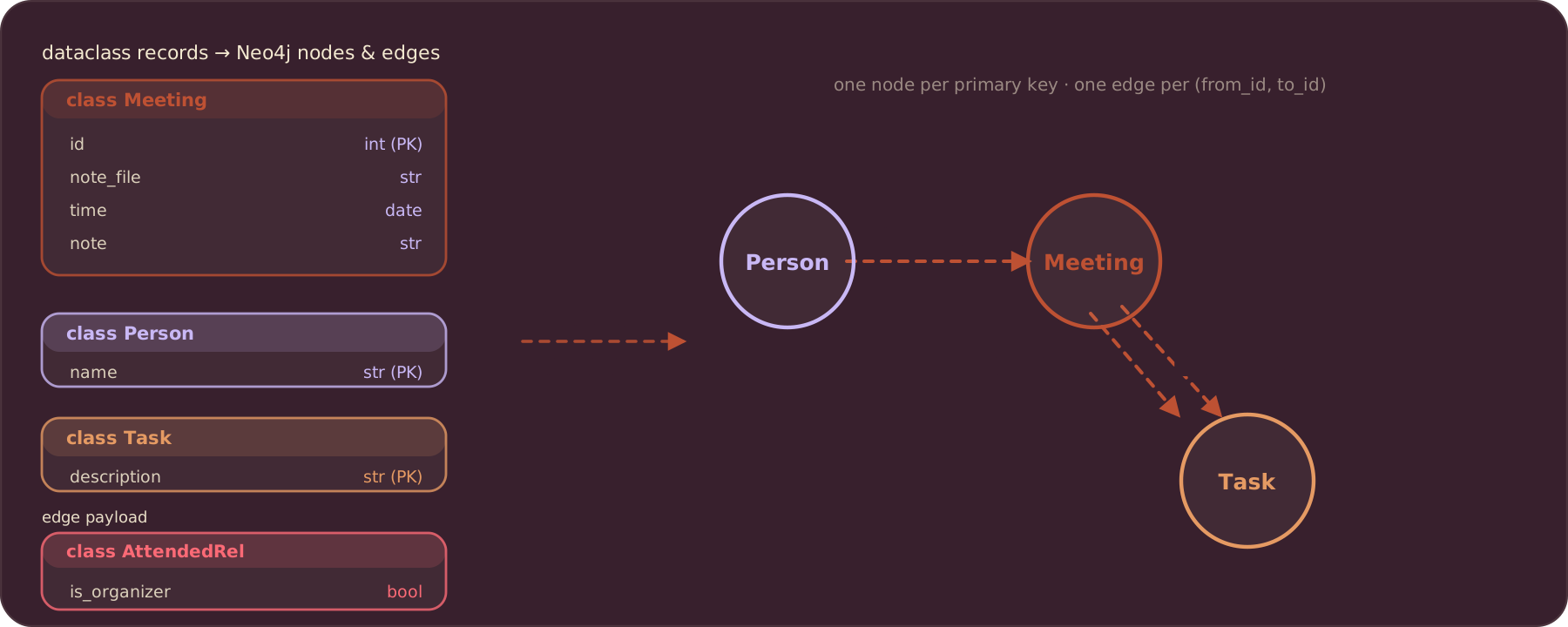
The extraction schema
The LLM extraction target is a set of Pydantic models. instructor uses these as the response schema, so the model returns structured data that matches the Python types instead of free-form text:
class ExtractedPerson(pydantic.BaseModel):
    name: str = pydantic.Field(
        description="Full name of the person, as written in the note."
    )

class ExtractedTask(pydantic.BaseModel):
    description: str = pydantic.Field(
        description="Concise, standalone description of the task or action item."
    )
    assigned_to: list[ExtractedPerson] = pydantic.Field(default_factory=list)

class ExtractedMeeting(pydantic.BaseModel):
    time: datetime.date
    note: str
    organizer: ExtractedPerson
    participants: list[ExtractedPerson] = pydantic.Field(default_factory=list)
    tasks: list[ExtractedTask] = pydantic.Field(default_factory=list)
Split, then extract
A single note file often holds several meetings. _split_meetings breaks the text at Markdown headings (# or ##) so each section becomes one meeting:
_HEADING_RE = re.compile(r"\n\n##?\s+")

def _split_meetings(text: str) -> list[str]:
    parts = _HEADING_RE.split("\n\n" + text)
    return [p.strip() for p in parts if p.strip()]
Each section goes to extract_meeting, which calls the model through LiteLLM and instructor. The model comes from the LLM_MODEL context (default openai/gpt-5-mini), and memo=True caches the result so an unchanged section is never re-extracted:
@coco.fn(memo=True)
async def extract_meeting(section_text: str) -> ExtractedMeeting:
    client = instructor.from_litellm(litellm.acompletion, mode=instructor.Mode.JSON)
    result = await client.chat.completions.create(
        model=coco.use_context(LLM_MODEL),
        response_model=ExtractedMeeting,
        messages=[
            {"role": "system", "content": EXTRACT_PROMPT},
            {"role": "user", "content": section_text},
        ],
    )
    return ExtractedMeeting.model_validate(result.model_dump())
Three phases
The pipeline runs in three phases. Phase 1 extracts each file and declares the nodes and edges it can build on its own. Phase 2 resolves person names across the whole corpus. Phase 3 declares the canonical Person nodes and the edges that touch people.
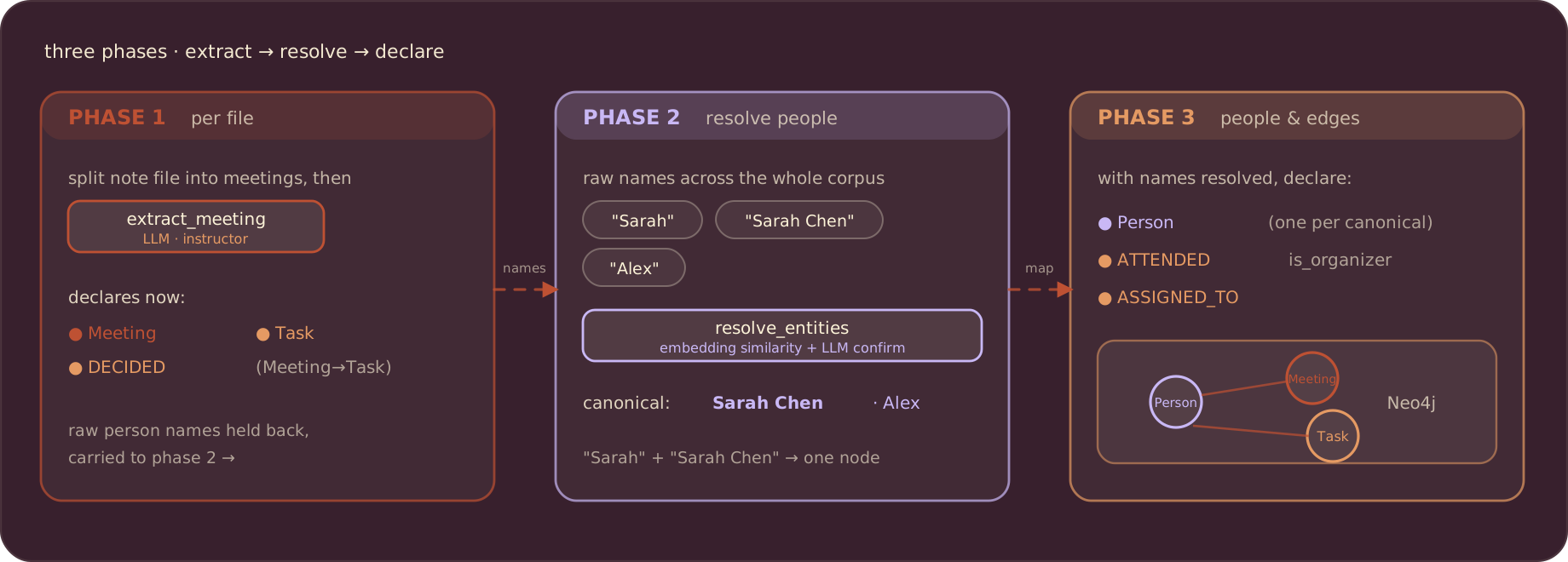
Phase 1: per-file extraction
process_file reads a Drive file, splits it, and for each meeting declares a Meeting node and its Task nodes plus DECIDED edges. Meeting IDs come from an IdGenerator keyed on the meeting date. Person names are not resolved yet, so the raw names are collected into a MeetingExtraction and returned for later phases:
@coco.fn(memo=True)
async def process_file(
    file: google_drive.DriveFile,
    meeting_table: neo4j.TableTarget[Meeting],
    task_table: neo4j.TableTarget[Task],
    decided_rel: neo4j.RelationTarget[Any],
) -> list[MeetingExtraction]:
    text = await file.read_text()
    note_file = file.file_path.path.as_posix()
    id_generator = IdGenerator()
    extractions = []
    for section in _split_meetings(text):
        extracted = await extract_meeting(section)
        meeting_id = await id_generator.next_id(extracted.time)

        meeting_table.declare_record(
            row=Meeting(
                id=meeting_id,
                note_file=note_file,
                time=extracted.time,
                note=extracted.note,
            )
        )

        for task in extracted.tasks:
            task_table.declare_record(row=Task(description=task.description))
            decided_rel.declare_relation(from_id=meeting_id, to_id=task.description)

        extractions.append(
            MeetingExtraction(
                meeting_id=meeting_id,
                organizer=extracted.organizer.name,
                participants=[p.name for p in extracted.participants],
                task_assignees=[
                    (t.description, [a.name for a in t.assigned_to])
                    for t in extracted.tasks
                ],
            )
        )
    return extractions
Phase 2: person entity resolution
The same person shows up under different names across files: “Sarah” in one note, “Sarah Chen” in another. If you create a Person node per raw string, the graph fragments and relationship queries miss edges.
_resolve_persons deduplicates raw names with embedding-based entity resolution. Candidate matches are found by embedding similarity, then confirmed pairwise by an LLM. The result maps every raw name to a canonical one:
@coco.fn(memo=True)
async def _resolve_persons(raw_persons: set[str]) -> ResolvedEntities:
    return await resolve_entities(
        entities=raw_persons,
        embedder=coco.use_context(EMBEDDER),
        resolve_pair=LlmPairResolver(model=coco.use_context(RESOLUTION_LLM_MODEL)),
    )
ResolvedEntities exposes .canonicals() for the deduplicated set and .canonical_of(raw_name) to look up which canonical a raw name folds into. So “Sarah” and “Sarah Chen” collapse to a single Person node.
Phase 3: canonical people and their edges
With names resolved, create_person_relations declares one Person node per canonical name, then the person-touching edges. ATTENDED aggregates organizer and participants so a person listed as both gets a single edge with is_organizer=True. ASSIGNED_TO dedupes per canonical person and task:
@coco.fn
async def create_person_relations(
    meetings: list[MeetingExtraction],
    persons: ResolvedEntities,
    person_table: neo4j.TableTarget[Person],
    attended_rel: neo4j.RelationTarget[Any],
    assigned_rel: neo4j.RelationTarget[Any],
) -> None:
    for canonical_name in persons.canonicals():
        person_table.declare_record(row=Person(name=canonical_name))

    for m in meetings:
        attendees: dict[str, bool] = {persons.canonical_of(m.organizer): True}
        for p in m.participants:
            attendees.setdefault(persons.canonical_of(p), False)

        for canonical, is_organizer in attendees.items():
            attended_rel.declare_relation(
                from_id=canonical,
                to_id=m.meeting_id,
                record=AttendedRel(is_organizer=is_organizer),
            )

        for task_desc, assignees in m.task_assignees:
            seen: set[str] = set()
            for raw in assignees:
                canonical = persons.canonical_of(raw)
                if canonical in seen:
                    continue
                seen.add(canonical)
                assigned_rel.declare_relation(from_id=canonical, to_id=task_desc)
Wiring it together
app_main mounts the three node tables and three relation targets, then runs the phases. Node tables take a TableSchema and a primary key; relations mount without a schema so the connector derives their PK from the endpoints. The Google Drive source is iterated with async for, and each file is processed under its own component path so change detection is per-file:
@coco.fn
async def app_main() -> None:
    meeting_table = await neo4j.mount_table_target(
        KG_DB, "Meeting",
        await neo4j.TableSchema.from_class(Meeting, primary_key="id"),
        primary_key="id",
    )
    person_table = await neo4j.mount_table_target(
        KG_DB, "Person",
        await neo4j.TableSchema.from_class(Person, primary_key="name"),
        primary_key="name",
    )
    task_table = await neo4j.mount_table_target(
        KG_DB, "Task",
        await neo4j.TableSchema.from_class(Task, primary_key="description"),
        primary_key="description",
    )

    attended_rel = await neo4j.mount_relation_target(
        KG_DB, "ATTENDED", person_table, meeting_table
    )
    decided_rel = await neo4j.mount_relation_target(
        KG_DB, "DECIDED", meeting_table, task_table
    )
    assigned_rel = await neo4j.mount_relation_target(
        KG_DB, "ASSIGNED_TO", person_table, task_table
    )

    # Phase 1: per-file extraction
    source = google_drive.GoogleDriveSource(
        service_account_credential_path=os.environ["GOOGLE_SERVICE_ACCOUNT_CREDENTIAL"],
        root_folder_ids=[
            f.strip()
            for f in os.environ["GOOGLE_DRIVE_ROOT_FOLDER_IDS"].split(",")
            if f.strip()
        ],
    )
    file_coros = []
    async for path_key, file in source.items():
        file_coros.append(
            coco.use_mount(
                coco.component_subpath("file", path_key),
                process_file, file, meeting_table, task_table, decided_rel,
            )
        )
    per_file = list(await asyncio.gather(*file_coros))
    all_meetings = [m for ms in per_file for m in ms]

    # Phase 2: person entity resolution
    raw_persons: set[str] = set()
    for m in all_meetings:
        raw_persons.add(m.organizer)
        raw_persons.update(m.participants)
        for _task_desc, assignees in m.task_assignees:
            raw_persons.update(assignees)
    persons = await coco.use_mount(
        coco.component_subpath("resolve_persons"), _resolve_persons, raw_persons
    )

    # Phase 3: declare Person nodes + person-touching relations
    await coco.mount(
        coco.component_subpath("person_relations"),
        create_person_relations,
        all_meetings, persons, person_table, attended_rel, assigned_rel,
    )
When a component finishes, CocoIndex compares its declared nodes and edges against the previous run and applies only the differences: new items are inserted, changed ones updated, and items whose source file disappeared are removed. Nothing that stayed the same is rewritten.
Run
Prerequisites
- Neo4j running locally. Default connection
bolt://localhost:7687, browser at http://localhost, usernameneo4j, passwordcocoindex. - An OpenAI API key (
OPENAI_API_KEY). The default models areopenai/gpt-5-minifor both extraction and resolution. - Google Drive service-account credentials. Create a Google Cloud service account, download its JSON key, share the source folders with the service-account email, and collect the folder IDs. See Setup for Google Drive.
Set the environment variables:
export OPENAI_API_KEY=sk-...
export GOOGLE_SERVICE_ACCOUNT_CREDENTIAL=/absolute/path/to/service_account.json
export GOOGLE_DRIVE_ROOT_FOLDER_IDS=folderId1,folderId2
GOOGLE_DRIVE_ROOT_FOLDER_IDS accepts a comma-separated list.
Build the graph
pip install -e .
cocoindex update main
Use cocoindex update -L main for live mode, which keeps watching Drive and updates the graph as notes change.
Browse the graph
Open Neo4j Browser at http://localhost
and run Cypher:// All relationships
MATCH p=()-->() RETURN p
// Who attended which meetings (including organizer)
MATCH (p:Person)-[:ATTENDED]->(m:Meeting)
RETURN p, m
// Tasks decided in meetings
MATCH (m:Meeting)-[:DECIDED]->(t:Task)
RETURN m, t
// Task assignments
MATCH (p:Person)-[:ASSIGNED_TO]->(t:Task)
RETURN p, t
Where else this applies
The same pattern (ingest → split → extract → resolve entities → build graph) fits any text-heavy domain where the entities and their relationships matter more than the raw text:
- Research papers: build a graph of concepts, authors, and citations across a repository, and keep it current as papers are added or revised.
- Support tickets: link issues, solutions, customers, and recurring patterns across a large, frequently edited ticket base.
- Compliance documents: extract requirements from policies and trace how a policy change cascades through related obligations.
- Competitive intelligence: connect companies, products, and market moves extracted from public filings and news.
Summary
This example turns unstructured meeting notes into a queryable Neo4j graph: an LLM extracts structure, embedding-based entity resolution keeps one node per real person, and CocoIndex’s incremental processing keeps the graph in sync as notes change without reprocessing the whole corpus. The same source → split → extract → resolve → graph template carries over to any domain where relationships are the thing you want to query.
Support CocoIndex ❤️
If this example was helpful, the easiest way to support CocoIndex is to give the project a ⭐ on GitHub.
Your stars help us grow the community, stay motivated, and keep shipping better tools for real-time data ingestion and transformation.

About the author.

CEO and cofounder of CocoIndex. Writes about incremental data infrastructure, agents, and the engineering decisions behind the engine.
Frequently asked questions.
How do I build a knowledge graph from meeting notes?
Ingest your meeting notes (here Markdown files in Google Drive), split each document into individual meetings, use an LLM to extract structured data (decisions, tasks, owners, participants), collect nodes and relationships, and export them to a graph database like Neo4j. The pipeline turns unstructured notes into a queryable graph so you can ask questions like "who attended budget-planning meetings?". See Architecture overview.
How do I extract structured data from meeting notes with an LLM?
Define Python dataclasses for the schema you want (Person, Task, and a top-level Meeting with organizer, participants, and tasks), then pass output_type=Meeting to cocoindex.functions.ExtractByLlm. The LLM uses the dataclass schema as its extraction template and returns structured data matching the Python types, which is far more reliable than free-form output. See Define meeting schema.
How does CocoIndex avoid reprocessing unchanged documents?
CocoIndex does incremental processing with automatic change tracking: it lists files with their last-modified time, identifies only files added or modified since the last successful run, skips unchanged files entirely, and passes only changed documents downstream. The post notes that in an enterprise with 1% daily churn, only 1% of documents trigger downstream work, so unchanged files never hit your LLM API. See Add source and collector.
How do I split a document containing multiple meetings into separate meetings?
Use cocoindex.functions.SplitBySeparators with a regex that matches Markdown headers preceded by blank lines (r"\n\n##?\ ") and keep_separator="RIGHT", which keeps each header with the segment that follows it so each section becomes a separate meeting with its context preserved. See Extract meetings.
How does CocoIndex deduplicate nodes when exporting to Neo4j?
Each export declares primary_key_fields, and CocoIndex matches nodes by those keys. Meetings are keyed by note_file and time; Person nodes are declared with name as the key and Task nodes with description, using Neo4jDeclaration for nodes that only appear inside relationships. If a node with the same primary key already exists, CocoIndex reuses it instead of creating a duplicate. See Map to graph database.
How much does incremental processing reduce LLM costs for a knowledge graph pipeline?
The post reports that changing only a few meeting-note files triggers re-processing of just those files, giving a 99%+ reduction in LLM API costs for a typical 1% daily churn, along with lower compute consumption, less database I/O, and shorter pipeline execution time. See Incremental processing with change detection.
What else can this meeting-notes knowledge graph pattern be used for?
The post lists several enterprise applications of the same source → detect changes → split → extract → collect → export pattern: research paper analysis, customer support ticket analysis, email thread summarization, compliance documentation tracking, and competitive intelligence. Each benefits from incremental processing because the underlying documents are continually edited. See Real-world enterprise applications.
Can the meeting notes knowledge graph update in real time?
Yes. By changing the execution mode from batch to live, the pipeline continuously monitors Google Drive and updates the knowledge graph in near real time, reflecting edits and deletions within the next polling interval. The export step is also incremental, mutating the graph only for nodes and relationships that actually changed. See Key CocoIndex features demonstrated.
