
Most of your data already lives in a database. This example takes an existing Postgres table of products, reads it row by row, derives a couple of fields, embeds each row, and writes the result, including the vector, back into Postgres with pgvector. Structured data in, searchable-by-meaning index out, no separate export step.
You declare the transformation in native Python and your own types, target_state = transformation(source_state), and a Rust engine handles the heavy lifting underneath: incremental processing, change tracking, and managed targets. Only the rows that changed get re-embedded and re-upserted.
The full code is in the CocoIndex v1 repo. A star on GitHub is appreciated if this helps.
What we’ll build
The pipeline reads product rows from source_products, computes a total_value and a combined full_description, embeds that description, and stores the enriched rows plus their vectors in a second Postgres table.
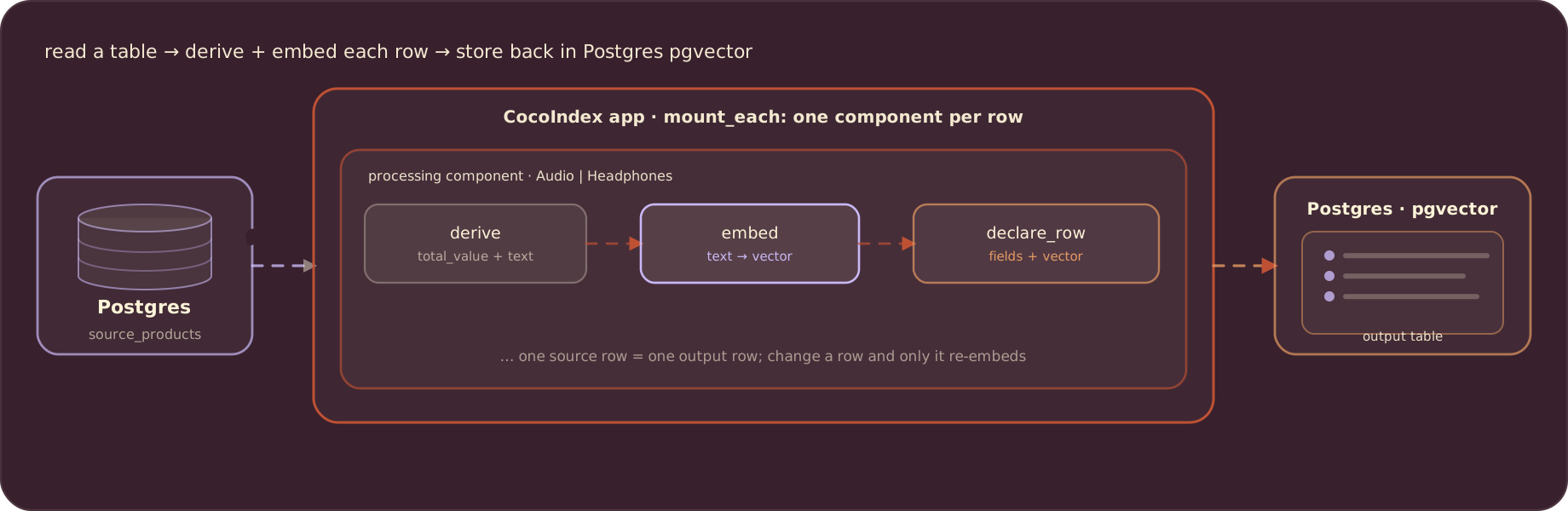
Both ends are Postgres here, but they need not be: point the source at one database and the target at another by setting a different connection string. The source can be any table you already have.
Define the row shapes
Each source row maps into a plain dataclass, and each output row into another. The embedding field is annotated with the embedder so CocoIndex infers the vector’s size automatically:
from dataclasses import dataclass
from typing import Annotated
from numpy.typing import NDArray

import cocoindex as coco
from cocoindex.ops.sentence_transformers import SentenceTransformerEmbedder

EMBED_MODEL = "sentence-transformers/all-MiniLM-L6-v2"
EMBEDDER = coco.ContextKey[SentenceTransformerEmbedder]("embedder", detect_change=True)


@dataclass
class SourceProduct:
    product_category: str
    product_name: str
    description: str
    price: float
    amount: int


@dataclass
class OutputProduct:
    product_category: str
    product_name: str
    description: str
    price: float
    amount: int
    total_value: float
    embedding: Annotated[NDArray, EMBEDDER]
The database pools and the embedder are created once, in the app lifespan. Set SOURCE_DATABASE_URL to read from a separate database, or leave it pointing at the same instance:
import asyncpg
from cocoindex.connectors import postgres

PG_DB = coco.ContextKey[asyncpg.Pool]("postgres_source_db")
SOURCE_POOL = coco.ContextKey[asyncpg.Pool]("source_pool")


@coco.lifespan
async def coco_lifespan(builder: coco.EnvironmentBuilder) -> AsyncIterator[None]:
    async with (
        asyncpg.create_pool(DATABASE_URL) as target_pool,
        asyncpg.create_pool(SOURCE_DATABASE_URL) as source_pool,
    ):
        builder.provide(PG_DB, target_pool)
        builder.provide(SOURCE_POOL, source_pool)
        builder.provide(EMBEDDER, SentenceTransformerEmbedder(EMBED_MODEL))
        yield
Transform and embed each row
process_product runs once per source row. It computes the derived fields, embeds the composed description, and declares the output row. memo=True caches this work, so a row whose content and code are unchanged is skipped on the next run:
@coco.fn(memo=True)
async def process_product(
    product: SourceProduct,
    table: postgres.TableTarget[OutputProduct],
) -> None:
    full_description = (
        f"Category: {product.product_category}\n"
        f"Name: {product.product_name}\n\n{product.description}"
    )
    total_value = product.price * product.amount
    embedding = await coco.use_context(EMBEDDER).embed(full_description)
    table.declare_row(
        row=OutputProduct(
            product_category=product.product_category,
            product_name=product.product_name,
            description=product.description,
            price=product.price,
            amount=product.amount,
            total_value=total_value,
            embedding=embedding,
        ),
    )
Embeddings carry more meaning when they see more context. We embed the composed description, category and name included, so a search for “wireless audio” matches even when the body text never says it.
The AI step and the plain arithmetic sit side by side in the same function. total_value = price * amount is an ordinary Python expression; embed(...) is a model call. To CocoIndex both are just transforms that derive an output field from the source row.
Wire up the app
app_main mounts the target table, opens the source table, and runs one processing component per source row:
@coco.fn
async def app_main() -> None:
    target_table = await postgres.mount_table_target(
        PG_DB,
        table_name="output",
        table_schema=await postgres.TableSchema.from_class(
            OutputProduct,
            primary_key=["product_category", "product_name"],
        ),
        pg_schema_name="coco_examples_v1",
    )

    source = postgres.PgTableSource(
        coco.use_context(SOURCE_POOL),
        table_name="source_products",
        row_type=SourceProduct,
    )

    await coco.mount_each(
        process_product,
        source.fetch_rows().items(lambda p: (p.product_category, p.product_name)),
        target_table,
    )


app = coco.App(
    coco.AppConfig(name="PostgresSourceV1"),
    app_main,
)
PgTableSource reads the existing table directly, and row_type=SourceProduct maps each row straight into the dataclass. items(...) tags each row with its (product_category, product_name) composite key, which becomes the output row’s primary key. mount_table_target creates and manages the target table for you: schema, idempotent upserts, and cleanup of rows whose source disappeared.
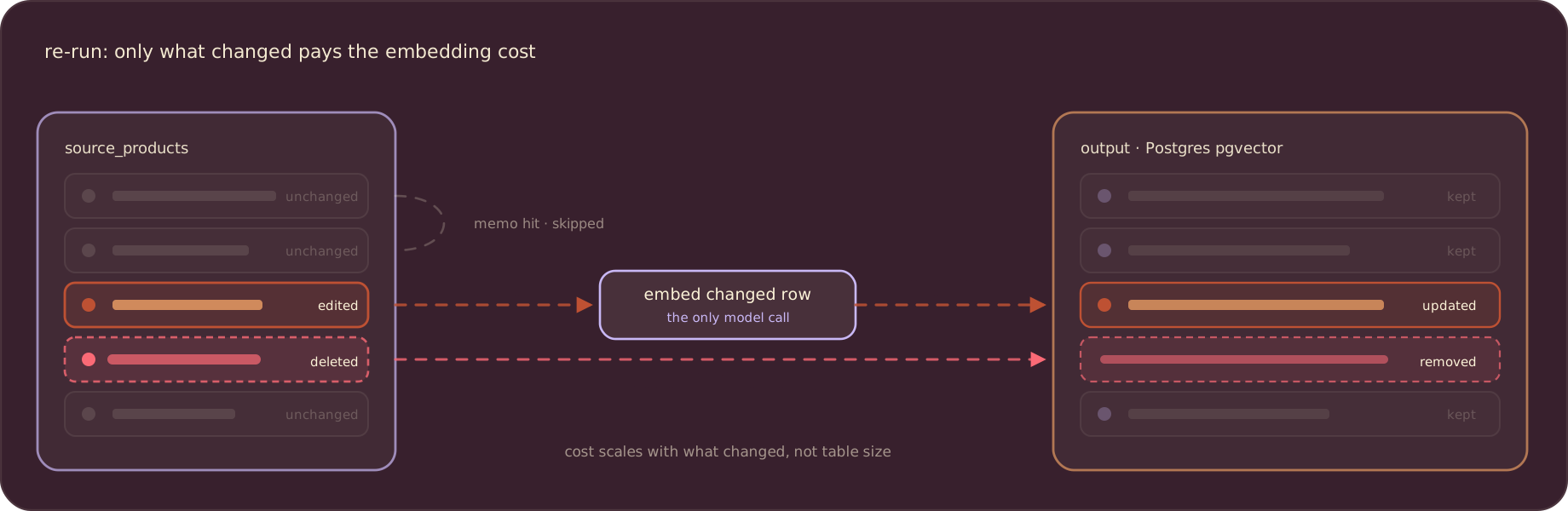
Because the output key derives from the source row, incremental updates are exact. Change one product and only that row is re-embedded and re-upserted; delete a source row and its output row is removed. That is what memo=True and the derived key buy you: the expensive embedding work scales with how much actually changed, not with the size of the table.
Run it
Start Postgres with pgvector (the repo ships a compose file), configure the connection strings, and seed the source table:
docker compose -f ../../dev/postgres.yaml up -d
cp .env.example .env     # set POSTGRES_URL and SOURCE_DATABASE_URL
pip install -e .
psql "$SOURCE_DATABASE_URL" -f ./prepare_source_data.sql
Build the index. The Postgres source runs as a one-shot catch-up: it scans the source table, syncs the target, and exits.
cocoindex update mainRe-run it any time; only new or changed rows are processed. To keep the index fresh on a schedule, run cocoindex update from cron.
Query the index
Searching is the mirror image of indexing: embed the query with the same model, then ask Postgres for the nearest vectors. The <=> operator is pgvector’s cosine distance, so smaller means more similar:
async def query_once(pool, embedder, query: str, *, top_k: int = 5) -> None:
    query_vec = await embedder.embed(query)
    async with pool.acquire() as conn:
        rows = await conn.fetch(
            """
            SELECT product_category, product_name, description, amount,
                   total_value, embedding <=> $1 AS distance
            FROM "coco_examples_v1"."output"
            ORDER BY distance ASC
            LIMIT $2
            """,
            query_vec,
            top_k,
        )
    for r in rows:
        score = 1.0 - float(r["distance"])
        print(f"[{score:.3f}] {r['product_category']} | {r['product_name']}")
        print(f"    {r['description']}")
Run it and ask in plain language:
python main.py "wireless headphones"The closest products come back ranked, even when they share none of the words in your query. That is the point of a vector index over your structured data.
Where to go next
You now have a semantic index over an existing Postgres table, kept in sync incrementally. The same shape extends a long way: swap the source for Amazon S3, Azure Blob, or Google Drive; swap the target for a dedicated vector database like Qdrant; or feed the retrieved rows to an LLM for RAG. Because the pipeline is declarative and incremental, none of that changes how you keep the index fresh.
Support us
We are constantly adding examples and improving the runtime. If this guide helped, please star CocoIndex on GitHub and let us know what you are building.

About the author.

CEO and cofounder of CocoIndex. Writes about incremental data infrastructure, agents, and the engineering decisions behind the engine.
Frequently asked questions.
How do I use an existing PostgreSQL table as a source in CocoIndex?
Open the table with postgres.PgTableSource(pool, table_name="source_products", row_type=SourceProduct), then call .fetch_rows().items(...) to tag each row with a key and pass it to coco.mount_each. Passing row_type maps each database row straight into your dataclass. See Wire up the app.
How does incremental sync work with a Postgres source in CocoIndex v1?
The processing function is decorated with @coco.fn(memo=True), so a row whose content and code are unchanged is skipped. Because the output row's primary key derives from the source row, only changed rows are re-embedded and re-upserted, and rows whose source disappeared are deleted. The Postgres source runs as a one-shot catch-up, so schedule cocoindex update from cron to keep the index fresh. See Run it.
How do I combine AI and non-AI transformations in one function?
Inside a single @coco.fn you compute plain fields and call the embedder side by side. The example derives total_value = price * amount with ordinary Python and builds a full_description by concatenating fields, then embeds that string with coco.use_context(EMBEDDER).embed(...). To CocoIndex both are just transforms that derive an output field from the source row. See Transform and embed each row.
How do I store embeddings in Postgres with pgvector in CocoIndex v1?
Annotate the embedding field as Annotated[NDArray, EMBEDDER] on your output dataclass so CocoIndex infers the vector size, then mount the target with postgres.mount_table_target(...) and a TableSchema.from_class(OutputProduct, primary_key=[...]). CocoIndex creates and manages the target table: schema, idempotent upserts, and cleanup. See Wire up the app.
Can the source and target be different databases?
Yes. The lifespan provides two connection pools, and you set SOURCE_DATABASE_URL to read from a separate instance while writing to the one behind POSTGRES_URL. Leave them equal to use a single database for both. See Define the row shapes.
How do I run a semantic search query over the indexed Postgres table?
Embed the query with the same model, then run a SQL query that orders by pgvector's cosine distance operator (embedding <=> $1) and limits to the top matches. Smaller distance means more similar, and the example prints a similarity score of 1.0 - distance. See Query the index.
