
A pile of product listings has recommendations hiding in plain sight: a pen pairs with ink refills and a notebook; a monitor pairs with a stand and an HDMI cable. That knowledge is locked in the prose of each listing. This post builds a recommendation engine from it: an LLM pulls the knowledge out, and a Neo4j graph connects it.
For each product, CocoIndex v1 asks an LLM two things: what the product is (its taxonomy), and what a buyer might also need (its complementary taxonomy). Those labels become nodes and edges in a Neo4j graph, and the recommendation falls out of the graph: a product whose “also need” matches another product’s “is” is the thing to cross-sell.
The full code is in the CocoIndex v1 repo.
The data model
Two node types and two edge types are enough:
Productnodes, one per listing, keyed byid(the filename), carryingtitleandprice.Taxonomynodes, one per distinct label (gel pen,notebook,ink refill), keyed byvalueand shared across products.PRODUCT_TAXONOMYedges,Product → Taxonomy: what the product is.PRODUCT_COMPLEMENTARY_TAXONOMYedges,Product → Taxonomy: what pairs with it.
The nodes are plain dataclasses:
from dataclasses import dataclass

@dataclass
class Product:
    id: str      # primary key (the filename stem)
    title: str
    price: float

@dataclass
class Taxonomy:
    value: str   # primary key (the taxonomy label)
The flow
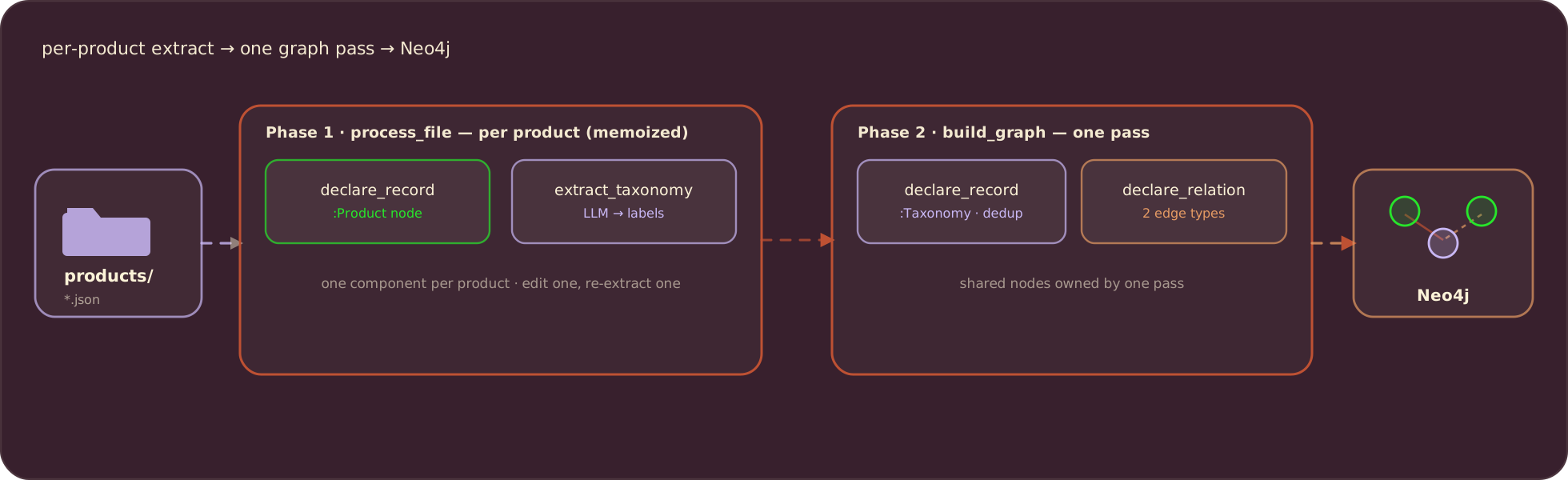
Because taxonomy labels are shared across products, the pipeline runs in two phases: per-product extraction declares each Product node and carries its labels forward, then a single graph-building pass declares the deduplicated Taxonomy nodes and all the edges.
Connect Neo4j
The Neo4j connection is provided once in the app lifespan and read anywhere with a ContextKey. The LLM model name is a context value too, declared with detect_change=True so swapping models re-extracts everything against the new one:
import cocoindex as coco
from cocoindex.connectors import neo4j

KG_DB = coco.ContextKey[neo4j.ConnectionFactory]("kg_db")
LLM_MODEL = coco.ContextKey[str]("llm_model", detect_change=True)


@coco.lifespan
async def coco_lifespan(builder: coco.EnvironmentBuilder) -> AsyncIterator[None]:
    builder.provide(
        KG_DB,
        neo4j.ConnectionFactory(
            uri=os.environ.get("NEO4J_URI", "bolt://localhost:7687"),
            auth=(os.environ["NEO4J_USER"], os.environ["NEO4J_PASSWORD"]),
        ),
    )
    builder.provide(LLM_MODEL, os.environ.get("LLM_MODEL", "openai/gpt-4.1"))
    yield
Extract the taxonomy
The extraction schema is the whole prompt. A Pydantic model asks for two lists, and the field descriptions tell the model exactly what a good label looks like: a concise noun, US English, specific rather than broad (gel pen, not office supplies):
import pydantic

class ProductTaxonomy(pydantic.BaseModel):
    name: str = pydantic.Field(
        description="A concise noun for the product's core function, no branding "
        "or style. Common US English, lowercase. Prefer specific ('pen') over "
        "broad ('office supplies')."
    )

class ProductTaxonomyInfo(pydantic.BaseModel):
    taxonomies: list[ProductTaxonomy] = pydantic.Field(
        description="Taxonomies describing what this product is."
    )
    complementary_taxonomies: list[ProductTaxonomy] = pydantic.Field(
        description="Taxonomies for complementary products a buyer might also need."
    )
Extraction is one CocoIndex function that calls the model through instructor over LiteLLM, forcing the response to match the schema. memo=True caches the result by content, so an unchanged product is never sent to the model twice:
@coco.fn(memo=True)
async def extract_taxonomy(detail: str) -> ProductTaxonomyInfo:
    client = instructor.from_litellm(litellm.acompletion, mode=instructor.Mode.JSON)
    result = await client.chat.completions.create(
        model=coco.use_context(LLM_MODEL),
        response_model=ProductTaxonomyInfo,
        messages=[
            {"role": "system", "content": TAXONOMY_PROMPT},
            {"role": "user", "content": detail},
        ],
    )
    return ProductTaxonomyInfo.model_validate(result.model_dump())
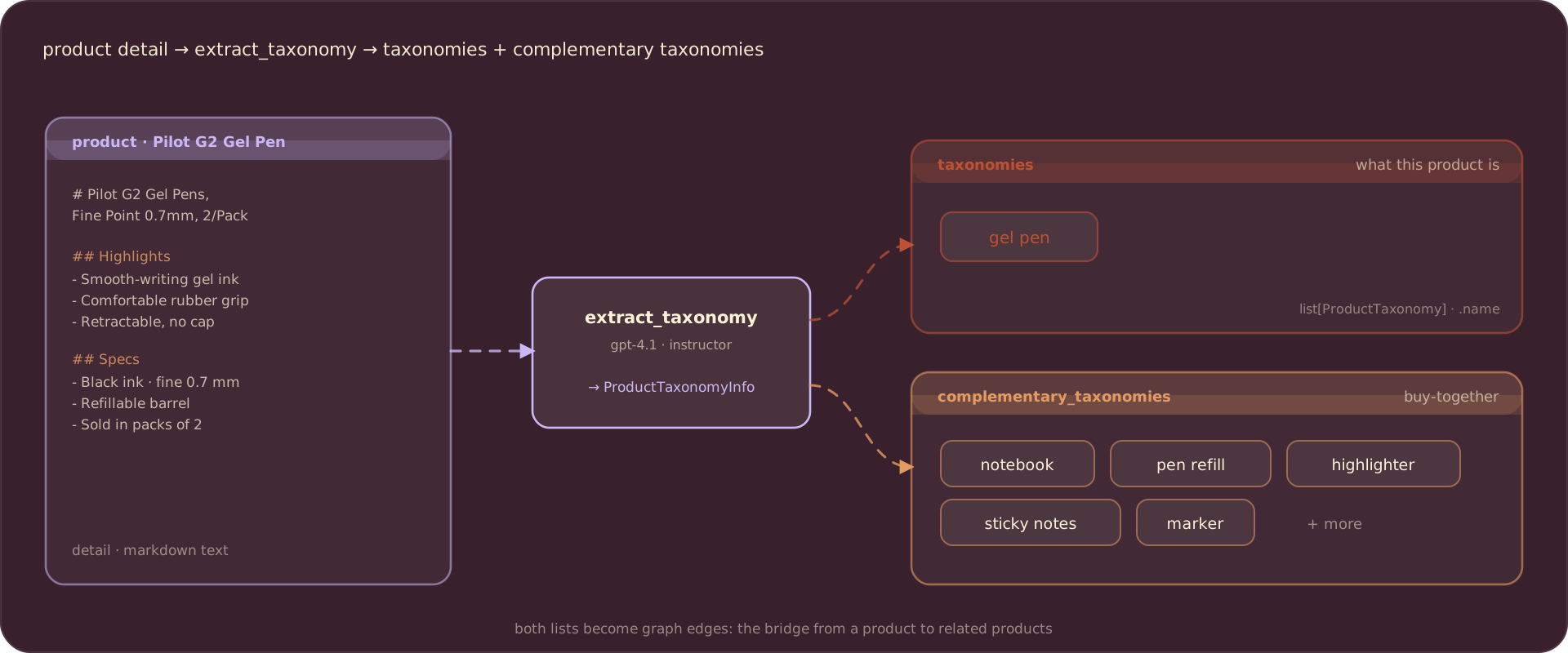
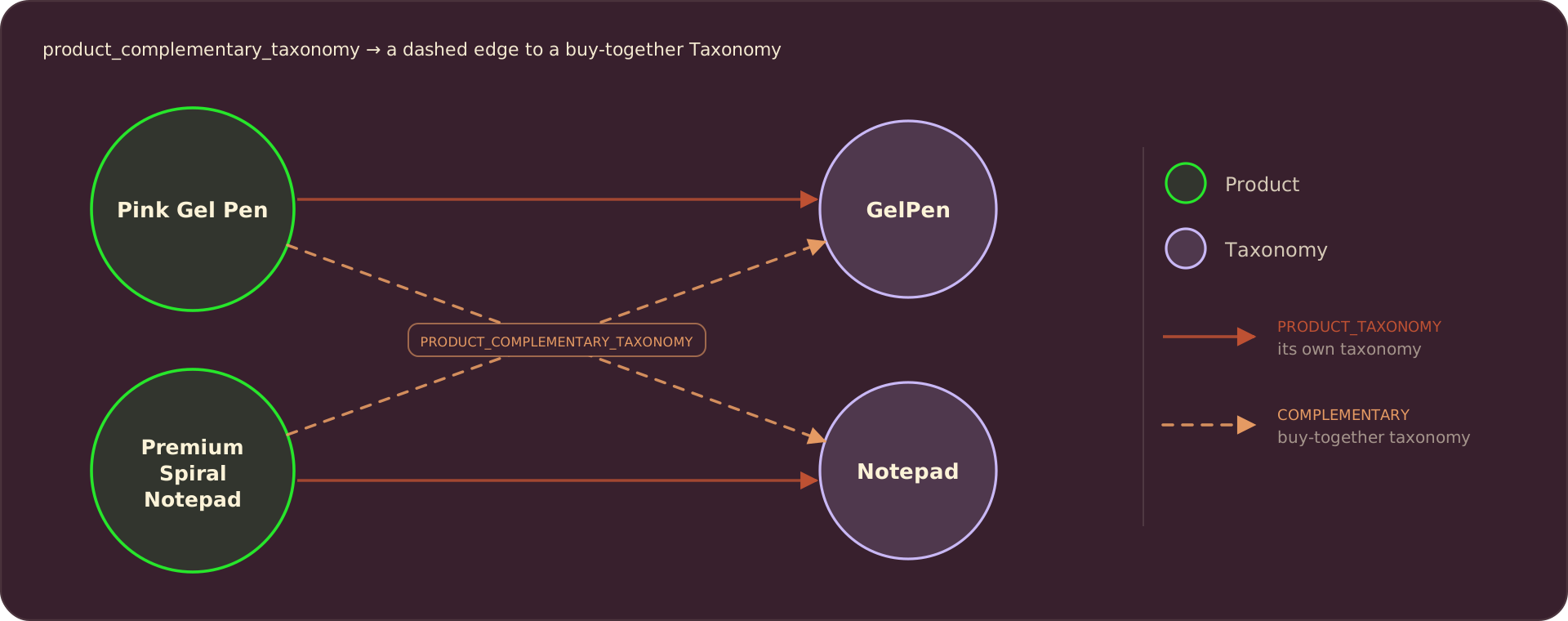
For the gel pen, the model returns gel pen as the taxonomy, and notebook, pen refill, and the like as complementary taxonomies:
Phase 1: one Product node per file
process_file handles a single product: read the JSON, declare its Product node into the graph, extract the taxonomy, and return the labels for phase two. declare_record writes one node; CocoIndex reconciles it into Neo4j by the primary key:
@coco.fn(memo=True)
async def process_file(
    file: FileLike,
    product_table: neo4j.TableTarget[Product],
) -> ProductTaxonomies:
    raw = json.loads(await file.read_text())
    product_id = file.file_path.path.name.removesuffix(".json")
    price = float(str(raw["price"]).lstrip("$").replace(",", ""))

    product_table.declare_record(row=Product(id=product_id, title=raw["title"], price=price))

    info = await extract_taxonomy(PRODUCT_TEMPLATE.render(**raw))
    return ProductTaxonomies(
        product_id=product_id,
        taxonomies=[t.name for t in info.taxonomies],
        complementary=[t.name for t in info.complementary_taxonomies],
    )
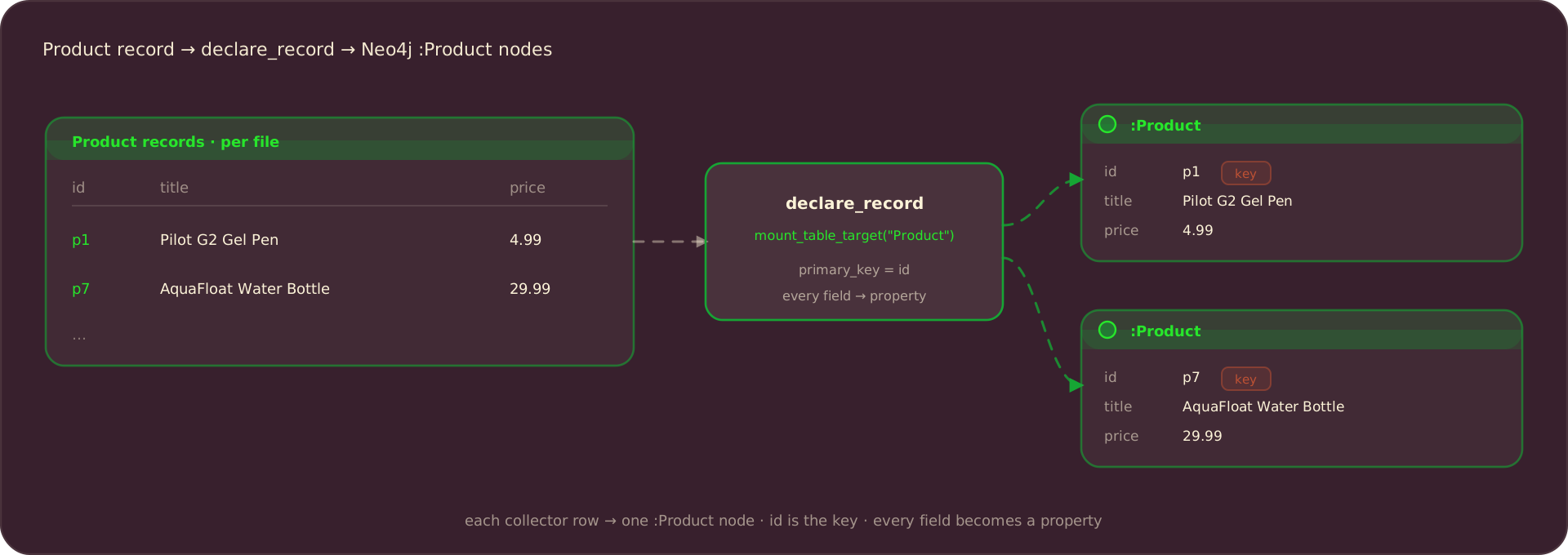
Each declared Product becomes a node with id as its key and every field as a property:
Phase 2: shared Taxonomy nodes and the edges
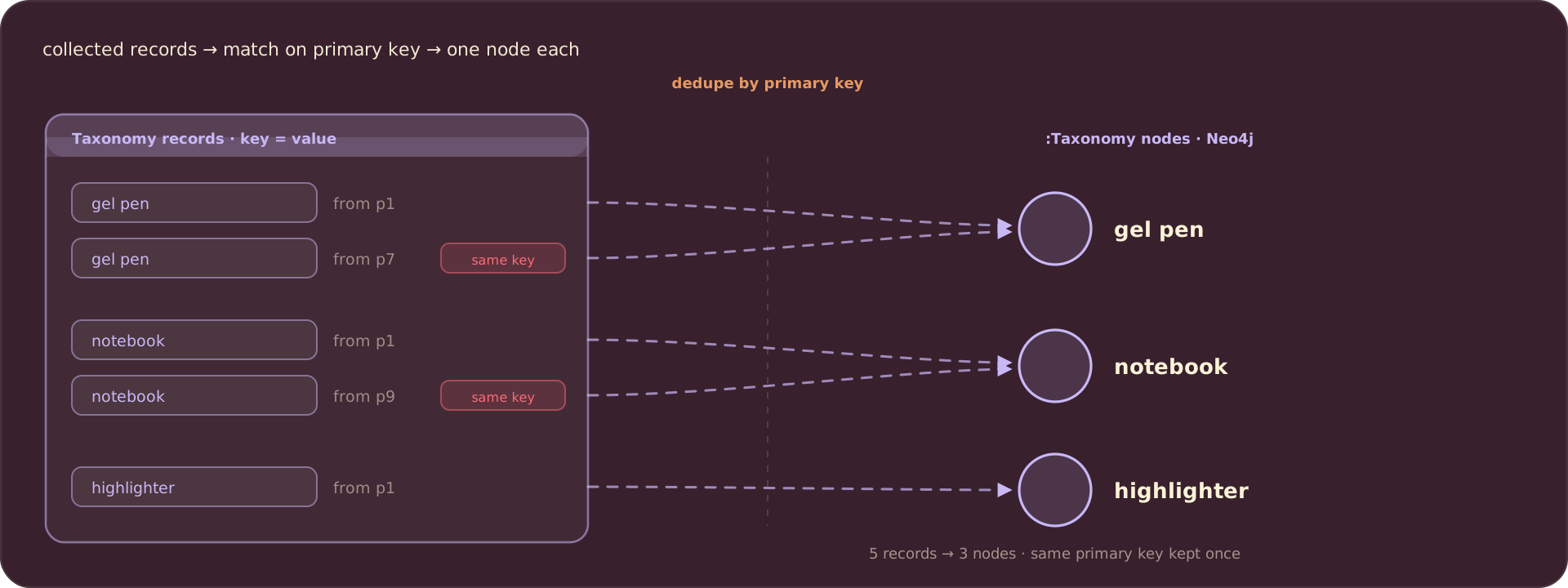
Taxonomy labels repeat across products, so one pass owns them. It gathers every label, declares the Taxonomy nodes, and declares the edges. Because a node is keyed by value, declaring gel pen from ten different products still produces exactly one node: CocoIndex deduplicates by the primary key.
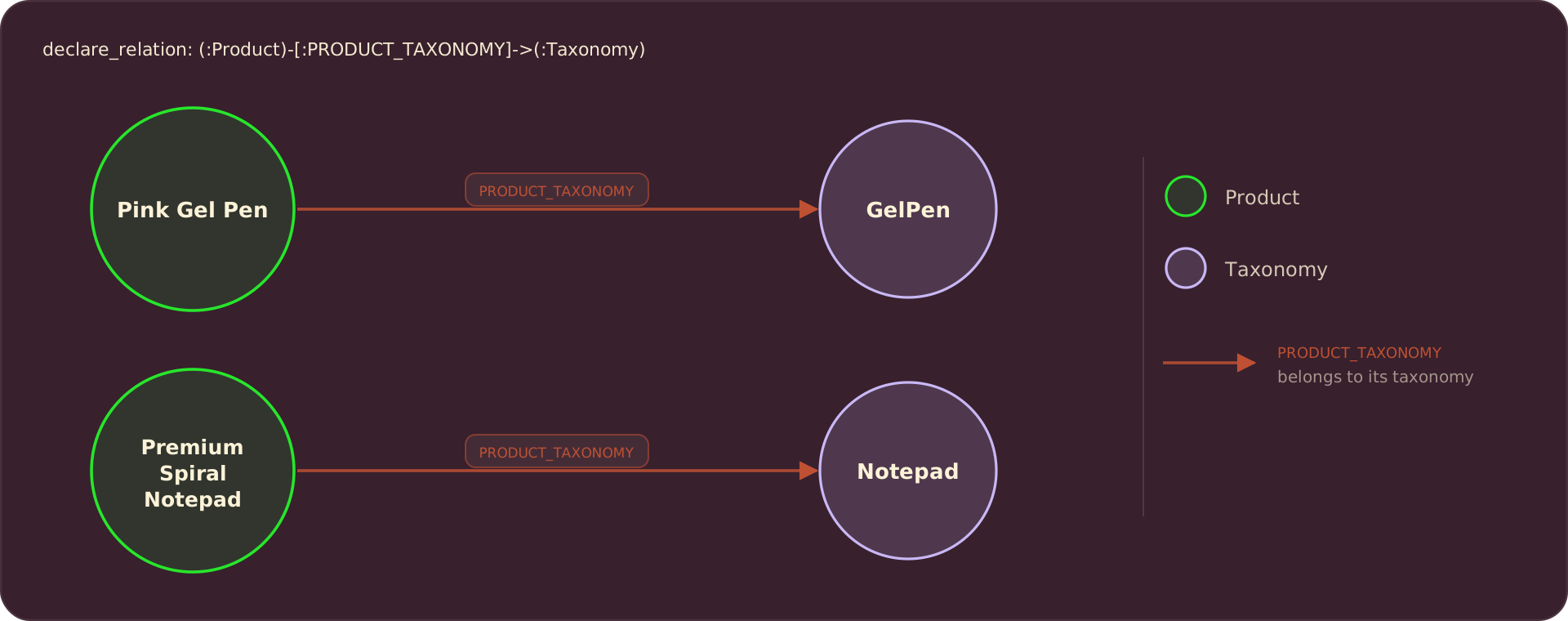
declare_relation connects a product to a taxonomy by their keys. Two relation targets, one per edge type, share the same Product and Taxonomy node tables:
@coco.fn
async def build_graph(
    products: list[ProductTaxonomies],
    taxonomy_table: neo4j.TableTarget[Taxonomy],
    product_taxonomy_rel: neo4j.RelationTarget[Any],
    complementary_rel: neo4j.RelationTarget[Any],
) -> None:
    labels = {t for p in products for t in (*p.taxonomies, *p.complementary)}
    for value in labels:
        taxonomy_table.declare_record(row=Taxonomy(value=value))

    for p in products:
        for t in set(p.taxonomies):
            product_taxonomy_rel.declare_relation(from_id=p.product_id, to_id=t)
        for t in set(p.complementary):
            complementary_rel.declare_relation(from_id=p.product_id, to_id=t)
The PRODUCT_TAXONOMY edges link each product to what it is:
The PRODUCT_COMPLEMENTARY_TAXONOMY edges add what pairs with it. These are the edges that cross between products and make recommendations possible:
Wire up the app
app_main mounts the two node tables and the two relation targets, walks the product folder, fans out one process_file per product, then runs the single build_graph pass over the collected labels:
@coco.fn
async def app_main(sourcedir: pathlib.Path) -> None:
    product_table = await neo4j.mount_table_target(
        KG_DB, "Product",
        await neo4j.TableSchema.from_class(Product, primary_key="id"),
        primary_key="id",
    )
    taxonomy_table = await neo4j.mount_table_target(
        KG_DB, "Taxonomy",
        await neo4j.TableSchema.from_class(Taxonomy, primary_key="value"),
        primary_key="value",
    )
    product_taxonomy_rel = await neo4j.mount_relation_target(
        KG_DB, "PRODUCT_TAXONOMY", product_table, taxonomy_table
    )
    complementary_rel = await neo4j.mount_relation_target(
        KG_DB, "PRODUCT_COMPLEMENTARY_TAXONOMY", product_table, taxonomy_table
    )

    files = localfs.walk_dir(
        sourcedir, recursive=True,
        path_matcher=PatternFilePathMatcher(included_patterns=["**/*.json"]),
    )
    products = list(await asyncio.gather(*[
        coco.use_mount(coco.component_subpath("file", key), process_file, file, product_table)
        async for key, file in files.items()
    ]))

    await coco.mount(
        coco.component_subpath("build_graph"),
        build_graph, products, taxonomy_table, product_taxonomy_rel, complementary_rel,
    )


app = coco.App(coco.AppConfig(name="ProductRecommendation"), app_main,
               sourcedir=pathlib.Path("./products"))
Run it
Start Neo4j, install the example, and build the graph. The example ships a products/ folder of sample listings:
docker run -d -p 7474:7474 -p 7687:7687 -e NEO4J_AUTH=neo4j/cocoindex neo4j:5.26-community
pip install "cocoindex[neo4j]" instructor litellm pydantic jinja2
cocoindex update main
On the nine sample products that is nine Product nodes, around forty Taxonomy nodes, and both edge types wired up. Editing one product re-extracts only that product, then the graph diffs: new nodes and edges are added, and ones no longer supported anywhere are removed.
Query the recommendations
Open Neo4j Browser (neo4j / cocoindex) and let the graph do the recommending. To find products to pair with a gel pen, walk from the pen’s complementary taxonomy to any product that is that taxonomy:
MATCH (:Taxonomy {value: "gel pen"})<-[:PRODUCT_TAXONOMY]-(:Product)
      -[:PRODUCT_COMPLEMENTARY_TAXONOMY]->(need:Taxonomy)
MATCH (rec:Product)-[:PRODUCT_TAXONOMY]->(need)
RETURN DISTINCT rec.title
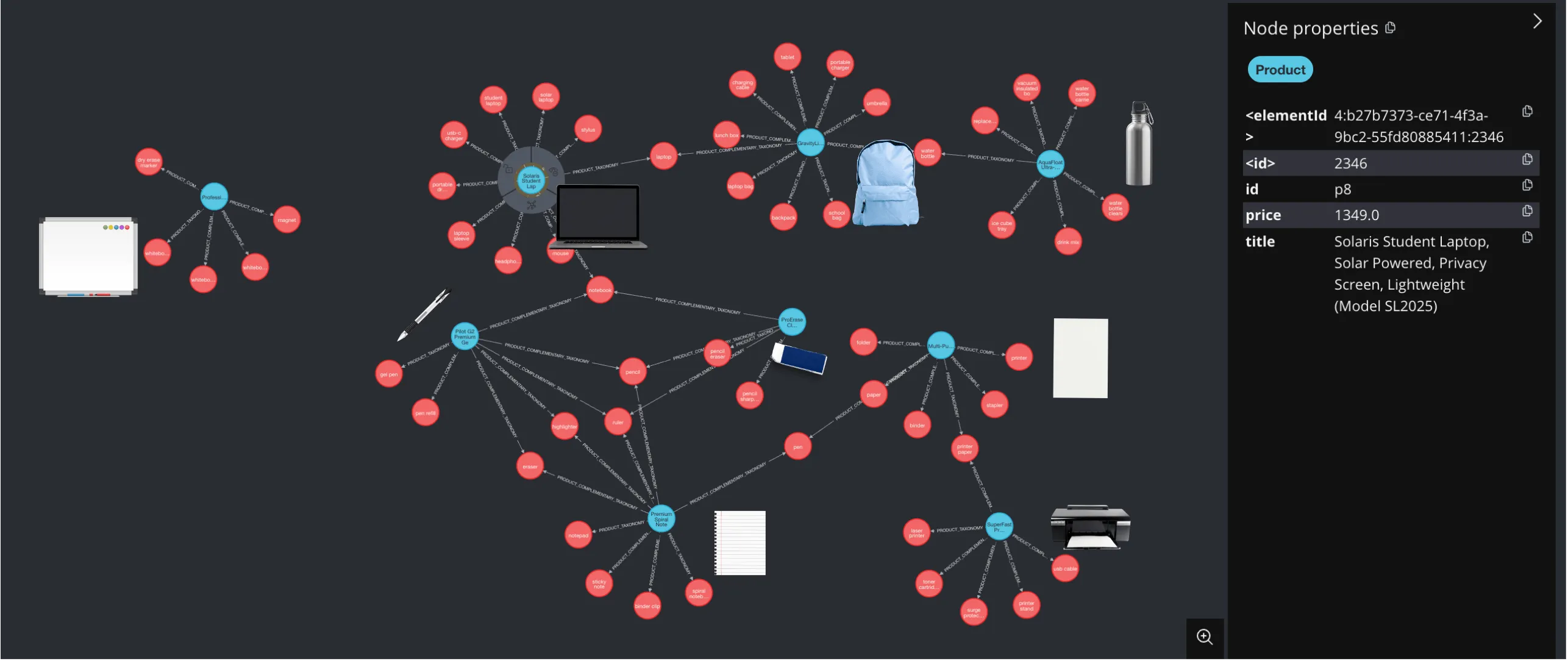
On the sample data, recommending for a pen surfaces the notepad and the multipurpose paper, the cross-sell you would want. To see the whole graph, MATCH p=()-->() RETURN p:
Support us
We are constantly adding examples and improving the runtime. If this was helpful, please star CocoIndex on GitHub.

About the author.

CEO and cofounder of CocoIndex. Writes about incremental data infrastructure, agents, and the engineering decisions behind the engine.
Frequently asked questions.
How do I build a product recommendation engine with an LLM and a graph database?
For each product, use an LLM to extract two things: what the product is (its taxonomy) and what a buyer might also need (its complementary taxonomy). Declare those as Product and Taxonomy nodes plus PRODUCT_TAXONOMY and PRODUCT_COMPLEMENTARY_TAXONOMY edges in Neo4j. A product whose complementary taxonomy matches another product's is-a taxonomy is the thing to recommend. See The data model.
What is a product taxonomy in this example?
A concise noun (or short noun phrase) for a product's core function, without branding or style, in common US English, lowercase, and specific rather than broad (gel pen, not office supplies). A product can have several. Taxonomy labels are shared across products, so gel pen is one node every relevant product points at. See The data model.
How do I use an LLM to extract product taxonomy in CocoIndex v1?
Describe the output as a Pydantic model (ProductTaxonomyInfo with taxonomies and complementary_taxonomies), and let the field descriptions carry the instructions. A single @coco.fn(memo=True) function calls the model through instructor over LiteLLM, forcing the response to match the schema. memo=True caches by content, so an unchanged product is never re-sent. See Extract the taxonomy.
How do I find complementary products customers buy together?
Ask the LLM, as part of extraction, for the complementary_taxonomies a buyer of this product might also need. For a gel pen that yields notebook, pen refill, and the like. Those become PRODUCT_COMPLEMENTARY_TAXONOMY edges via declare_relation, and they are the edges that make cross-sell recommendations possible. See Phase 2: shared Taxonomy nodes and the edges.
How does CocoIndex v1 map nodes and relationships to Neo4j?
Mount a node table per label with neo4j.mount_table_target and write nodes with declare_record; mount a relation target per edge type with neo4j.mount_relation_target and write edges with declare_relation(from_id, to_id). Nodes are keyed by a primary key (id for Product, value for Taxonomy), so declaring the same label from many products deduplicates to one node. See Phase 1 and Phase 2.
What do I need to run the CocoIndex v1 product recommendation example?
Neo4j as the graph database and an OpenAI API key (or set LLM_MODEL to a local Ollama model). CocoIndex v1 keeps its own processing state in a local file, so there is no separate tracking database to run. Start Neo4j, pip install the example, and run cocoindex update main. See Run it.
How do I query the recommendations in the graph?
Open the Neo4j Browser at http://localhost:7474 (neo4j / cocoindex). To recommend products to pair with a gel pen, walk from the pen's complementary taxonomy to any product that is that taxonomy with a Cypher query; on the sample data that surfaces the notepad and multipurpose paper. Use MATCH p=()-->() RETURN p to see the whole graph. See Query the recommendations.
