
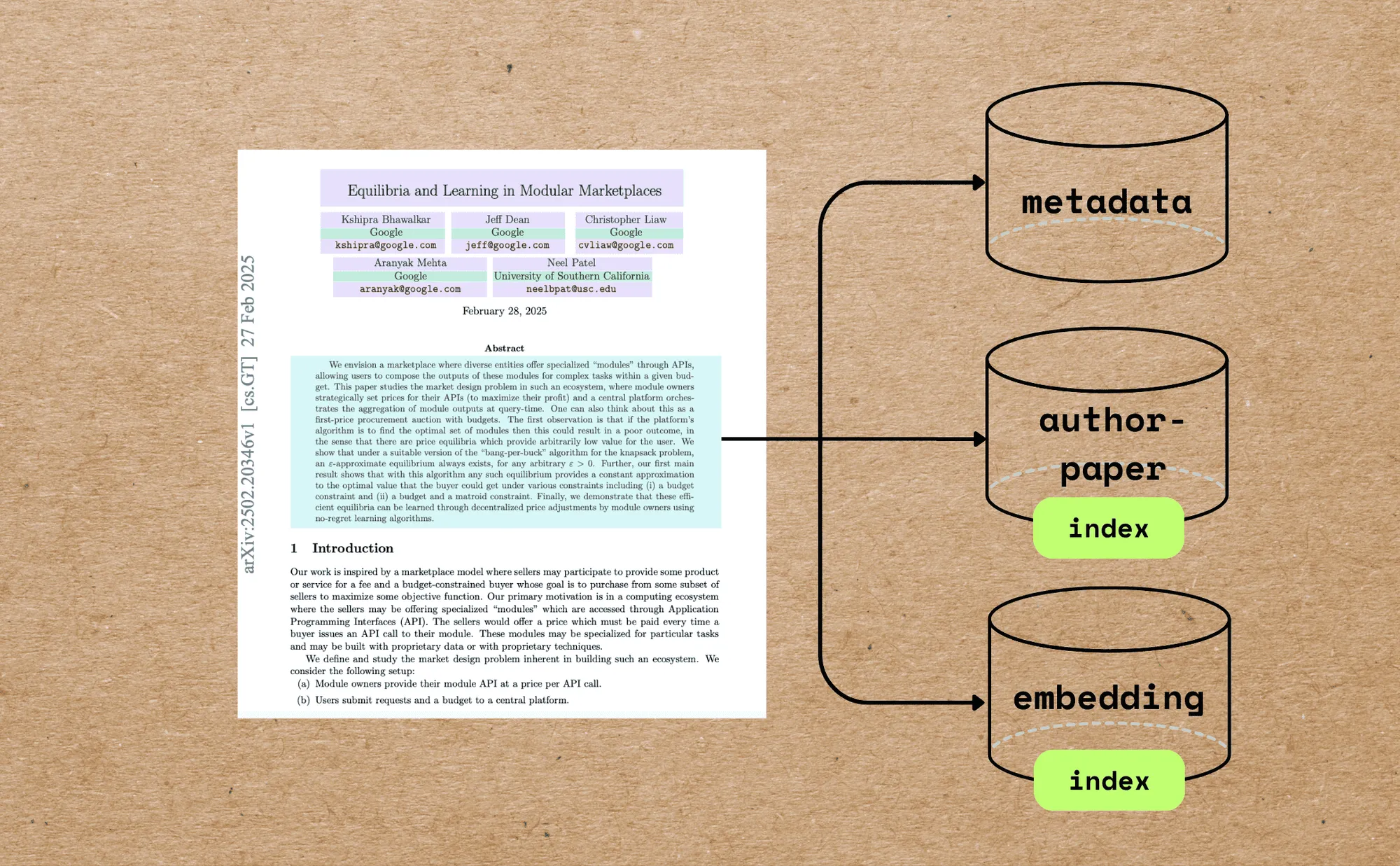
The first page of a paper holds almost everything you’d want to query: title, authors, abstract. But it’s locked in PDF prose. This walkthrough reads just that page, hands the text to an LLM with a strict schema, gets back clean typed JSON, and embeds the metadata so you can search papers by meaning. One PDF fans out into three Postgres tables, and CocoIndex keeps all three in sync as the folder changes.
The full code is in the CocoIndex v1 repo. A star on GitHub is appreciated if this helps.
What we’ll build
Each PDF flows through one processing component: slice out the first page, pull its text, extract metadata with the LLM, and embed the title and abstract. The component declares rows into three tables.
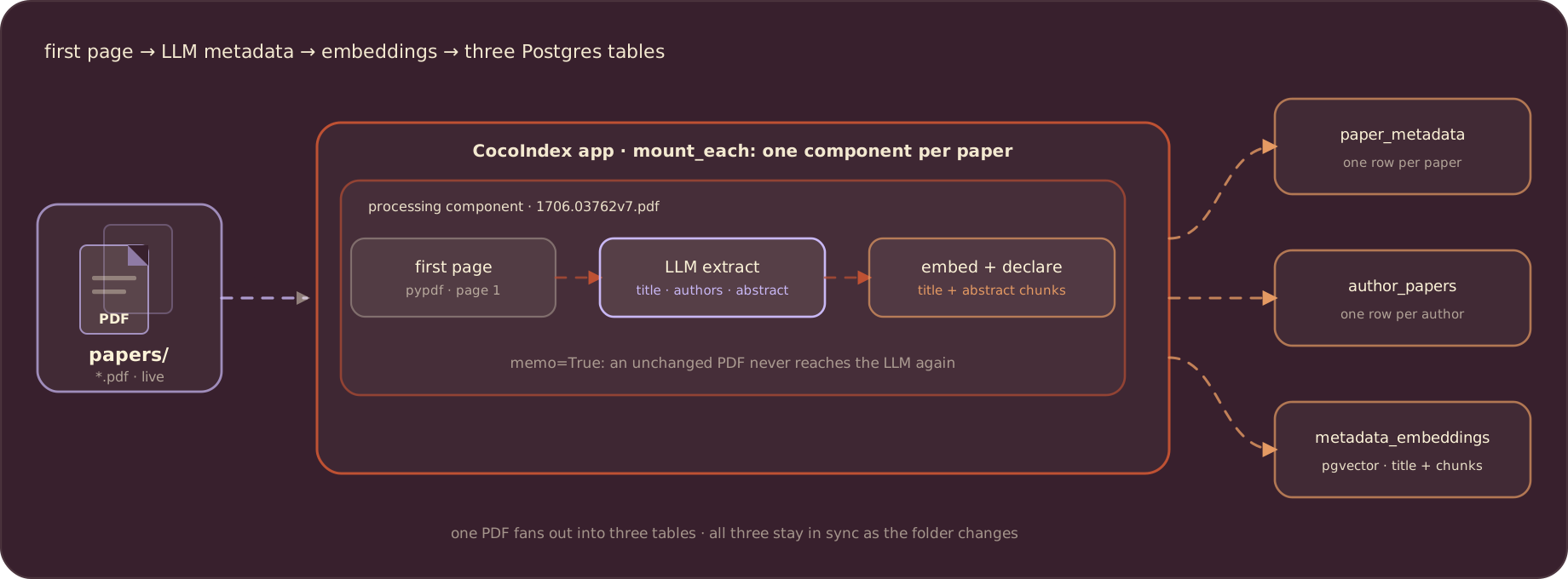
The three tables serve three kinds of queries. paper_metadata holds one row per paper for lookups and joins. author_papers maps each author name to a filename, so “all the papers by Jeff Dean” is a plain SQL WHERE. metadata_embeddings holds one vector per title and per abstract chunk, for semantic search with pgvector.
Define the models and rows
Two pydantic models describe what the LLM must return. Validation is the contract: a malformed response fails loudly instead of writing junk.
from pydantic import BaseModel, Field


class AuthorModel(BaseModel):
    name: str
    email: str | None = None
    affiliation: str | None = None


class PaperMetadataModel(BaseModel):
    title: str
    authors: list[AuthorModel] = Field(default_factory=list)
    abstract: str
The pydantic models are the LLM contract only. What lands in Postgres is described separately, by three dataclasses, one per table. Keeping the two layers apart lets the table shape differ from the LLM’s: rows add filename and num_pages, and authors are stored as plain dicts. The embedding field is annotated with the embedder so CocoIndex infers the vector size:
import uuid
from dataclasses import dataclass
from typing import Annotated
from numpy.typing import NDArray

import cocoindex as coco
from cocoindex.ops.sentence_transformers import SentenceTransformerEmbedder

EMBED_MODEL = "sentence-transformers/all-MiniLM-L6-v2"
EMBEDDER = coco.ContextKey[SentenceTransformerEmbedder]("embedder", detect_change=True)


@dataclass
class PaperMetadataRow:
    filename: str
    title: str
    authors: list[dict[str, str | None]]
    abstract: str
    num_pages: int


@dataclass
class AuthorPaperRow:
    author_name: str
    filename: str


@dataclass
class MetadataEmbeddingRow:
    id: uuid.UUID
    filename: str
    location: str
    text: str
    embedding: Annotated[NDArray, EMBEDDER]
The database pool and the embedder are created once, in the app lifespan:
import asyncpg
from cocoindex.connectors import postgres

PG_DB = coco.ContextKey[asyncpg.Pool]("paper_metadata_db")


@coco.lifespan
async def coco_lifespan(builder: coco.EnvironmentBuilder) -> AsyncIterator[None]:
    async with asyncpg.create_pool(os.getenv("POSTGRES_URL")) as pool:
        builder.provide(PG_DB, pool)
        builder.provide(EMBEDDER, SentenceTransformerEmbedder(EMBED_MODEL))
        yield
Read the first page
A paper can be large. The Attention Is All You Need PDF in the sample folder is 2,215,244 bytes, and other arXiv PDFs run to dozens of pages. The metadata we want lives on page one, so we slice it out with pypdf and never send the rest anywhere:
import io
from pypdf import PdfReader, PdfWriter


@dataclass
class PaperBasicInfo:
    num_pages: int
    first_page: bytes


@coco.fn
def extract_basic_info(content: bytes) -> PaperBasicInfo:
    """Extract first page bytes and page count from a PDF."""
    reader = PdfReader(io.BytesIO(content))

    output = io.BytesIO()
    writer = PdfWriter()
    writer.add_page(reader.pages[0])
    writer.write(output)

    return PaperBasicInfo(num_pages=len(reader.pages), first_page=output.getvalue())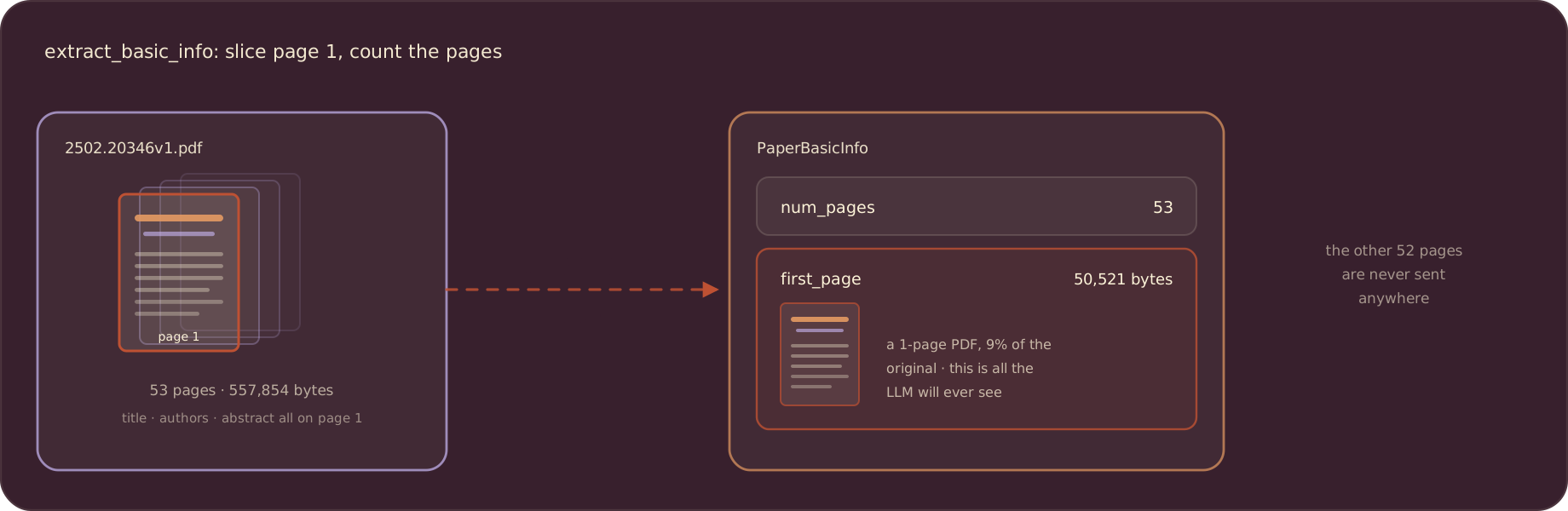
A second small function pulls the text off that single page:
@coco.fn
def pdf_to_markdown(content: bytes) -> str:
    """Convert PDF bytes to text using pypdf."""
    reader = PdfReader(io.BytesIO(content))
    page_text = reader.pages[0].extract_text() if reader.pages else ""
    return page_text or ""
pypdf keeps the example dependency-light. If your PDFs are heavier on layout, swap this function’s body for Marker or Docling; the rest of the pipeline does not change.
Extract metadata with an LLM
One call turns the first-page prose into typed fields. The system prompt pins the schema, response_format forces JSON, temperature=0 keeps it deterministic, and model_validate_json parses the response into the pydantic model:
import functools
from openai import OpenAI

LLM_MODEL = "gpt-4o"


@functools.cache
def openai_client() -> OpenAI:
    return OpenAI()


@coco.fn
def extract_metadata(markdown: str) -> PaperMetadataModel:
    """Extract paper metadata from first-page text using an LLM."""
    client = openai_client()
    response = client.chat.completions.create(
        model=LLM_MODEL,
        messages=[
            {
                "role": "system",
                "content": (
                    "You extract metadata from academic paper first pages. "
                    "Return only JSON with keys: title, authors, abstract. "
                    "authors is a list of {name, email, affiliation}. "
                    "Use null for missing fields."
                ),
            },
            {
                "role": "user",
                "content": markdown[:4000],
            },
        ],
        response_format={"type": "json_object"},
        temperature=0,
    )

    content = response.choices[0].message.content
    if not content:
        raise RuntimeError("LLM returned empty content.")
    return PaperMetadataModel.model_validate_json(content)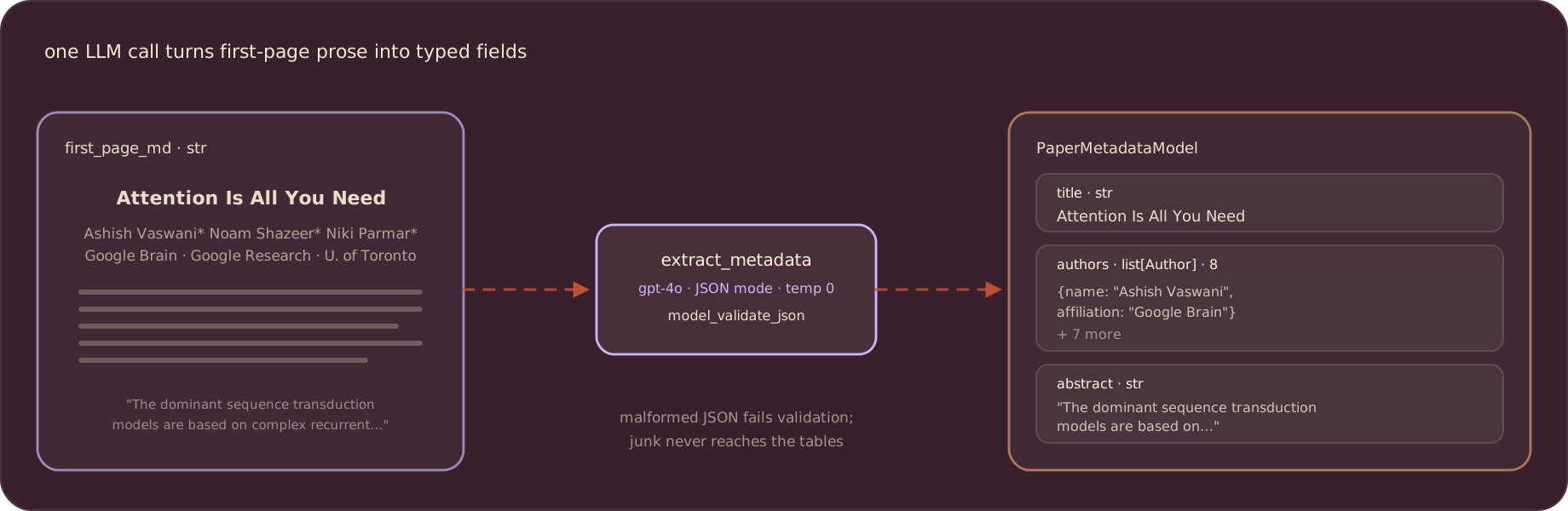
Process one paper into three tables
process_file is the whole per-paper pipeline: read, slice, extract, embed, declare. memo=True caches it, so an unchanged PDF is skipped on the next run:
from cocoindex.ops.text import CustomLanguageConfig, RecursiveSplitter
from cocoindex.resources.file import FileLike

_abstract_splitter = RecursiveSplitter(
    custom_languages=[
        CustomLanguageConfig(
            language_name="abstract",
            separators_regex=[r"[.?!]+\s+", r"[:;]\s+", r",\s+", r"\s+"],
        )
    ]
)


@coco.fn(memo=True)
async def process_file(
    file: FileLike,
    metadata_table: postgres.TableTarget[PaperMetadataRow],
    author_table: postgres.TableTarget[AuthorPaperRow],
    embedding_table: postgres.TableTarget[MetadataEmbeddingRow],
) -> None:
    content = await file.read()

    basic_info = extract_basic_info(content)
    first_page_md = pdf_to_markdown(basic_info.first_page)
    metadata = extract_metadata(first_page_md)

    metadata_table.declare_row(
        row=PaperMetadataRow(
            filename=str(file.file_path.path),
            title=metadata.title,
            authors=[a.model_dump() for a in metadata.authors],
            abstract=metadata.abstract,
            num_pages=basic_info.num_pages,
        ),
    )

    for author in metadata.authors:
        if author.name:
            author_table.declare_row(
                row=AuthorPaperRow(
                    author_name=author.name,
                    filename=str(file.file_path.path),
                ),
            )

    title_embedding = await coco.use_context(EMBEDDER).embed(metadata.title)
    embedding_table.declare_row(
        row=MetadataEmbeddingRow(
            id=uuid.uuid4(),
            filename=str(file.file_path.path),
            location="title",
            text=metadata.title,
            embedding=title_embedding,
        ),
    )

    abstract_chunks = _abstract_splitter.split(
        metadata.abstract,
        chunk_size=500,
        min_chunk_size=200,
        chunk_overlap=150,
        language="abstract",
    )
    for chunk in abstract_chunks:
        embedding_table.declare_row(
            row=MetadataEmbeddingRow(
                id=uuid.uuid4(),
                filename=str(file.file_path.path),
                location="abstract",
                text=chunk.text,
                embedding=await coco.use_context(EMBEDDER).embed(chunk.text),
            ),
        )
Run the numbers for one concrete paper. Attention Is All You Need has 8 authors, and its 1,139-character abstract splits into 3 chunks with these settings (sentence-aware separators, chunk size 500, overlap 150). So the function declares 13 rows: 1 metadata row, 8 author rows, and 4 embedding rows (the title plus the 3 chunks):
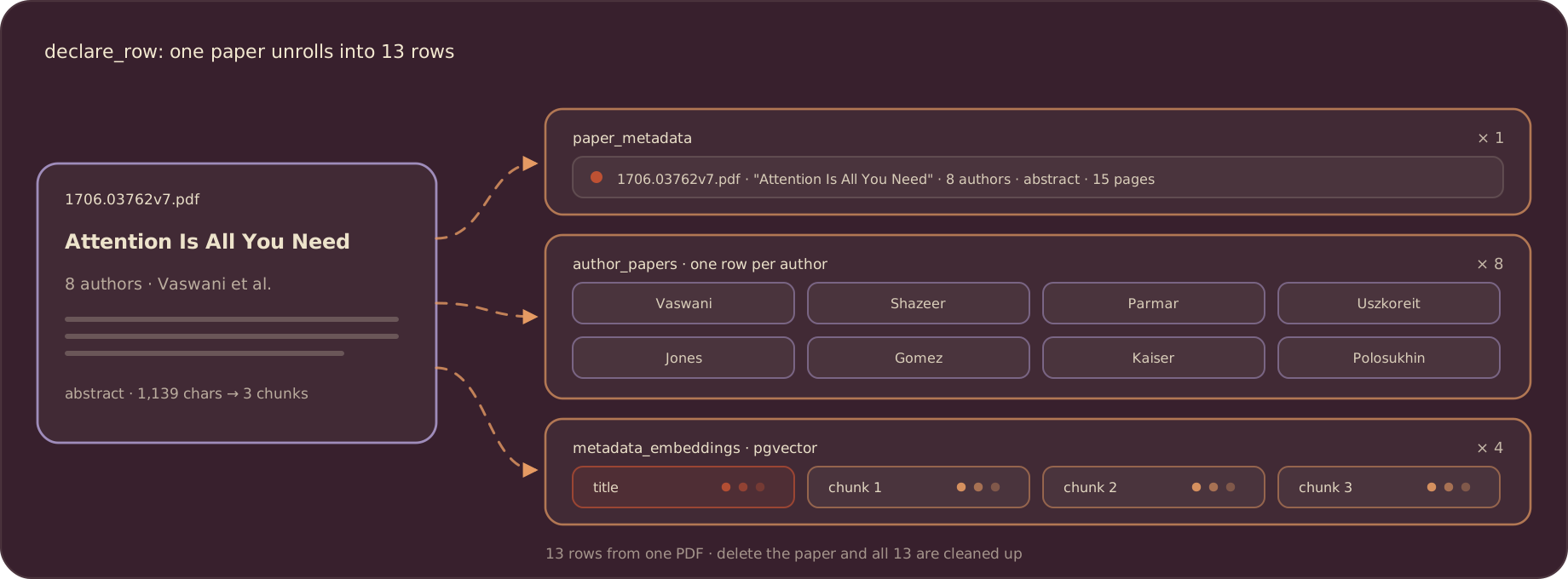
The abstract is chunked because a long abstract blurs into a single vector; per-chunk embeddings keep search sharp. And everything is declarative: remove the PDF from the folder and all 13 rows across the three tables are cleaned up on the next run.
Wire up the app
app_main mounts the three target tables, walks the folder of PDFs, and runs one process_file per file:
import pathlib
from cocoindex.connectors import localfs
from cocoindex.resources.file import PatternFilePathMatcher

PG_SCHEMA_NAME = "coco_examples_v1"


@coco.fn
async def app_main(sourcedir: pathlib.Path) -> None:
    metadata_table = await postgres.mount_table_target(
        PG_DB,
        table_name="paper_metadata",
        table_schema=await postgres.TableSchema.from_class(
            PaperMetadataRow,
            primary_key=["filename"],
        ),
        pg_schema_name=PG_SCHEMA_NAME,
    )
    author_table = await postgres.mount_table_target(
        PG_DB,
        table_name="author_papers",
        table_schema=await postgres.TableSchema.from_class(
            AuthorPaperRow,
            primary_key=["author_name", "filename"],
        ),
        pg_schema_name=PG_SCHEMA_NAME,
    )
    embedding_table = await postgres.mount_table_target(
        PG_DB,
        table_name="metadata_embeddings",
        table_schema=await postgres.TableSchema.from_class(
            MetadataEmbeddingRow,
            primary_key=["id"],
        ),
        pg_schema_name=PG_SCHEMA_NAME,
    )

    files = localfs.walk_dir(
        sourcedir,
        recursive=True,
        path_matcher=PatternFilePathMatcher(included_patterns=["**/*.pdf"]),
        live=True,
    )
    await coco.mount_each(
        process_file, files.items(), metadata_table, author_table, embedding_table
    )


app = coco.App(
    coco.AppConfig(name="PaperMetadataV1"),
    app_main,
    sourcedir=pathlib.Path("./papers"),
)
mount_table_target creates and manages each table: schema, idempotent upserts, and removal of rows whose source vanished. walk_dir(..., live=True) means the source can watch the folder; drop a new PDF in and it gets indexed without re-running anything.
Run it
Start Postgres with pgvector (the repo ships a compose file), set POSTGRES_URL and OPENAI_API_KEY, and build the index. The example folder ships sample papers, including Attention Is All You Need, so it works out of the box:
docker compose -f ../../dev/postgres.yaml up -d
pip install -e .
cocoindex update main
The first run extracts and embeds everything; re-runs only process changed files. Add -L (cocoindex update -L main) to watch the folder and update the index live.
Query the index
Semantic search embeds the query with the same model and asks Postgres for the nearest vectors; <=> is pgvector’s cosine distance:
async def query_once(pool, embedder, query: str, *, top_k: int = 5) -> None:
    query_vec = await embedder.embed(query)
    async with pool.acquire() as conn:
        rows = await conn.fetch(
            """
            SELECT filename, location, text, embedding <=> $1 AS distance
            FROM "coco_examples_v1"."metadata_embeddings"
            ORDER BY distance ASC
            LIMIT $2
            """,
            query_vec,
            top_k,
        )
    for r in rows:
        score = 1.0 - float(r["distance"])
        print(f"[{score:.3f}] {r['filename']} ({r['location']})")
print(f" {r['text']}")python main.py "sequence models without recurrence"Matches come back from both titles and abstract chunks, with the location column telling you which. The author index needs no embeddings at all:
SELECT filename FROM "coco_examples_v1"."author_papers"
WHERE author_name = 'Ashish Vaswani';
Where to go next
The shape here generalizes past papers: any document family with a metadata-rich region (contracts, invoices, intake forms) can use the same slice-extract-validate-embed pipeline. Swap the source for Amazon S3 or Google Drive, swap the target for Qdrant, or feed the metadata tables to an agent. For full-text embedding of the whole PDF body, see text embeddings 101.
Support us
We are constantly adding examples and improving the runtime. If this guide helped, please star CocoIndex on GitHub and let us know what you are building.

About the author.

CEO and cofounder of CocoIndex. Writes about incremental data infrastructure, agents, and the engineering decisions behind the engine.
Frequently asked questions.
How do I extract structured metadata from academic PDFs with an LLM?
Send the first-page text to the LLM with a system prompt that pins the schema (title, authors, abstract), force JSON with response_format={"type": "json_object"}, keep temperature=0, and parse the response with pydantic's model_validate_json. A malformed response fails validation instead of writing junk. See Extract metadata with an LLM.
Why extract only the first page of each paper?
Title, authors, and abstract all live on page one, and papers can be large: the sample Attention Is All You Need PDF is 53 pages and 557,854 bytes, while its first page alone is 50,521 bytes. Slicing page one with pypdf keeps the LLM call small, and the other 52 pages are never sent anywhere. See Read the first page.
How does one paper produce rows in three different tables?
The per-paper function receives three postgres.TableTarget handles and declares rows into each: one paper_metadata row, one author_papers row per author, and one metadata_embeddings row for the title plus one per abstract chunk. CocoIndex keeps all three tables in sync, including cleanup when a paper is removed. See Process one paper into three tables.
How do incremental updates work for this pipeline?
The per-paper function is decorated with @coco.fn(memo=True), so an unchanged PDF is skipped and never reaches the LLM again. The folder source is opened with live=True; run cocoindex update -L main to watch it and index new or changed papers as they appear. See Wire up the app.
How do I find all papers by a given author?
Query the author_papers table, which holds one row per author name and filename: SELECT filename FROM author_papers WHERE author_name = 'Ashish Vaswani'. No embeddings involved; it is a plain relational lookup. See Query the index.
How do I run semantic search over titles and abstracts?
Embed the query with the same sentence-transformer model, then order by pgvector's cosine distance operator (embedding <=> $1) over the metadata_embeddings table. Each hit's location column tells you whether it matched the title or an abstract chunk. See Query the index.
