
Custom sources are one of the most useful ideas in CocoIndex. They let you turn any API, internal or external, into a first-class incremental data stream that the framework can diff, track, and sync.
Think of it as React for data flows: you declare what your target should look like as a function of the source, and CocoIndex handles incremental updates, state persistence, and downstream sync. In CocoIndex v1 this needs no special connector API. A custom source is ordinary async Python that fetches data, plus processing components that declare the rows that should exist downstream.
This post walks through a custom source for HackerNews built that way. It fetches recent stories and their nested comments through the Algolia HN API, extracts topics from every message with an LLM, and keeps two Postgres tables in sync for search and analytics.
The project is open-sourced in the CocoIndex v1 repo.
Why use a custom source?
In many scenarios, pipelines don’t just read from clean tables. They depend on:
- Internal REST services
- Partner APIs
- Legacy systems
- Non-standard data models that don’t fit traditional connectors
CocoIndex makes these integrations declarative and incremental without a plugin interface. You fetch data with plain async def functions, each item runs as its own processing component, and the component declares the target rows it owns. The engine takes it from there: change detection, syncing to the target, and cleanup when an item disappears from the source.
Project walkthrough: building a HackerNews index
Goals
- Call the HackerNews search API
- Fetch nested comments for each story
- Extract topics from every message with an LLM
- Store messages and topics in Postgres
- Search the index by topic
CocoIndex handles change detection, idempotency, and state sync automatically.
Overview
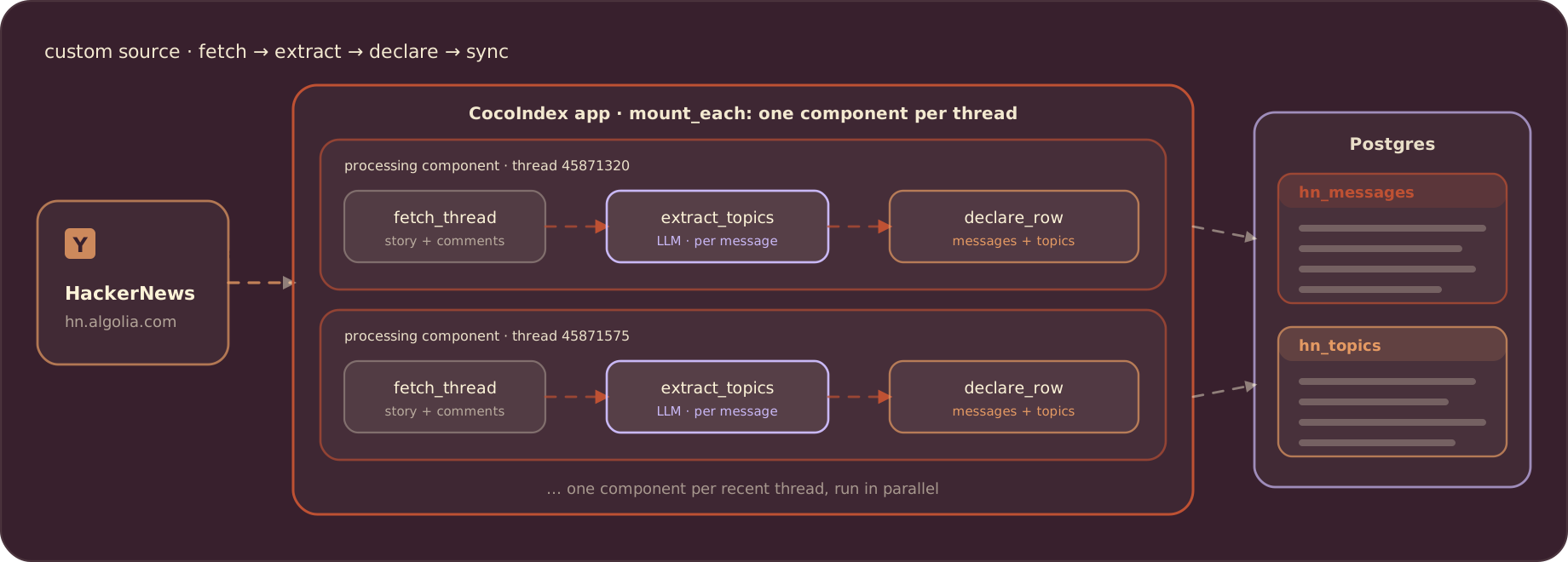
The pipeline consists of three parts:
- Two async functions over the Algolia HN API
fetch_thread_listlists recent story IDsfetch_threadpulls one story with its full comment tree
- One processing component per thread
process_threadextracts topics from the story and every comment- Declares rows into two Postgres tables (
hn_messages,hn_topics)
- Query utilities
- Rank trending topics in SQL
- Search messages by topic
Each cocoindex update catches up on the latest stories and only does the work it hasn’t seen before.
Prerequisites
- Postgres running locally. The example repo ships a compose file:
docker compose -f dev/postgres.yaml up -d. - An LLM API key. The default model is
gemini/gemini-2.5-flashthrough litellm; setGEMINI_API_KEY, or setLLM_MODELto any litellm model id and the matching provider key.
Define the data models
Everything the pipeline handles is a plain dataclass. Thread and Comment model what we scrape from the API:
@dataclass
class Comment:
    id: str
    author: str | None
    text: str | None
    created_at: datetime | None


@dataclass
class Thread:
    id: str
    author: str | None
    text: str
    url: str | None
    created_at: datetime | None
    comments: list[Comment]
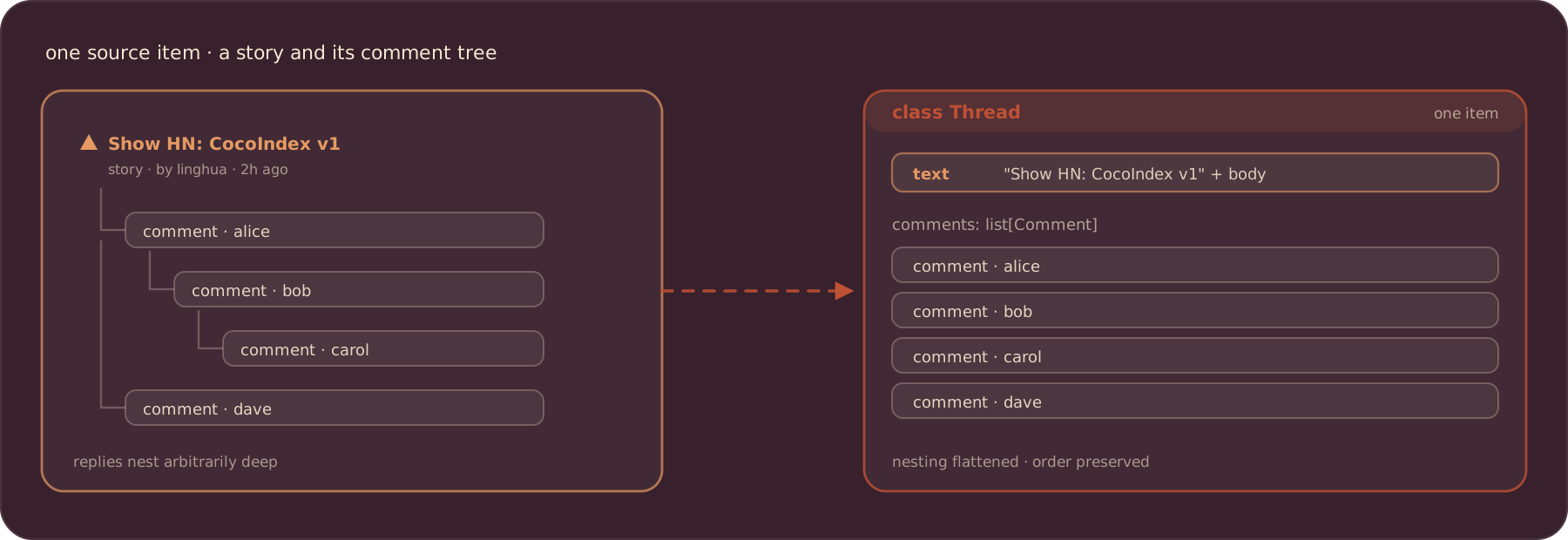
Each source item is one thread: a story plus all of its comments, flattened out of HackerNews’ nested reply tree into a single list.
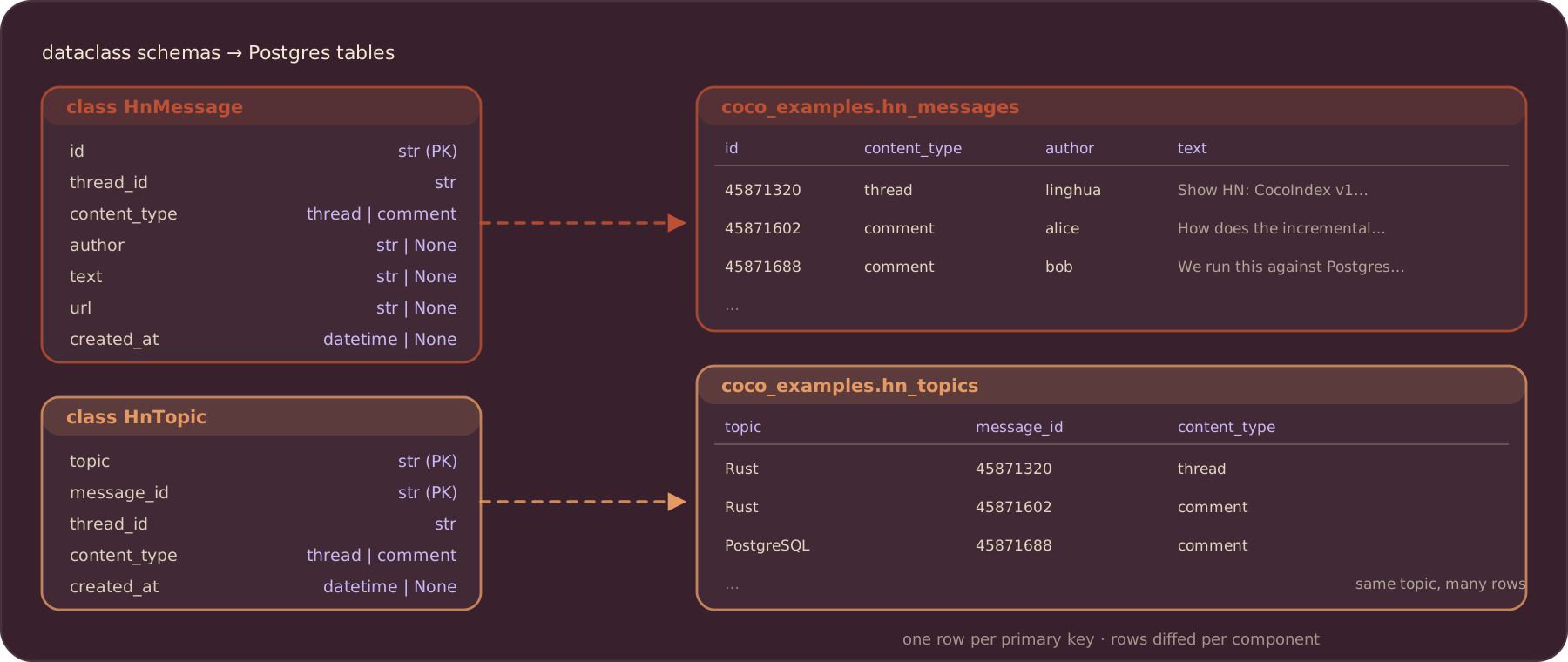
HnMessage and HnTopic are the schemas of the two target tables:
@dataclass
class HnMessage:
    """Schema for hn_messages table."""

    id: str
    thread_id: str
    content_type: str
    author: str | None
    text: str | None
    url: str | None
    created_at: datetime | None


@dataclass
class HnTopic:
    """Schema for hn_topics table."""

    topic: str
    message_id: str
    thread_id: str
    content_type: str
    created_at: datetime | None
A thread and each of its comments both become an HnMessage row, distinguished by content_type. Every extracted topic becomes an HnTopic row keyed on (topic, message_id), so the same topic mentioned in many messages shows up many times, which is exactly what makes ranking meaningful.
Primary keys are the identity of a row, the same role the key type played for a v0 custom source: they must be stable over time so re-runs reconcile rows in place instead of duplicating them.
Fetch from the HackerNews API
The source itself is two small async functions over the Algolia HN API. No decorators, no connector class.
Listing recent threads
fetch_thread_list returns the most recent story IDs. CocoIndex uses this list to know which threads exist right now:
async def fetch_thread_list(
    session: aiohttp.ClientSession, max_results: int = MAX_THREADS
) -> list[str]:
    """Fetch list of recent thread IDs from HackerNews."""
    search_url = "https://hn.algolia.com/api/v1/search_by_date"
    params: dict[str, str | int] = {"tags": "story", "hitsPerPage": max_results}

    async with session.get(search_url, params=params) as response:
        response.raise_for_status()
        data = await response.json()
        thread_ids = [
            hit["objectID"] for hit in data.get("hits", []) if hit.get("objectID")
        ]
        return thread_ids
Fetching a full thread
fetch_thread pulls one story with all its comments and parses the raw JSON into the structured Thread. The inner parse_comments walks the reply tree recursively and flattens it; the story title and body are combined into the thread text:
async def fetch_thread(session: aiohttp.ClientSession, thread_id: str) -> Thread:
    """Fetch a single thread with all its comments."""
    item_url = f"https://hn.algolia.com/api/v1/items/{thread_id}"

    async with session.get(item_url) as response:
        response.raise_for_status()
        data = await response.json()

        comments: list[Comment] = []

        # Parse comments recursively
        def parse_comments(parent: dict[str, Any]) -> None:
            for child in parent.get("children", []):
                if comment_id := child.get("id"):
                    ctime = child.get("created_at")
                    comments.append(
                        Comment(
                            id=str(comment_id),
                            author=child.get("author"),
                            text=child.get("text"),
                            created_at=datetime.fromisoformat(ctime) if ctime else None,
                        )
                    )
                parse_comments(child)

        parse_comments(data)

        ctime = data.get("created_at")
        text = data.get("title", "")
        if more_text := data.get("text"):
            text += "\n\n" + more_text

        return Thread(
            id=thread_id,
            author=data.get("author"),
            text=text,
            url=data.get("url"),
            created_at=datetime.fromisoformat(ctime) if ctime else None,
            comments=comments,
        )
These are ordinary async def functions. Any HTTP API, message queue, or third-party SDK can be a source the same way: fetch the data in plain Python and hand it to the pipeline.
Extract topics with an LLM
The core transformation is a single CocoIndex function: text in, a list of topics out. The response schema is a small Pydantic model, so the LLM returns structured data instead of free-form text:
class TopicsResponse(BaseModel):
    """Response containing a list of extracted topics."""

    topics: list[str] = Field(
        description="""List of extracted topics.

Each topic can be a product name, technology, model, people, company name, business domain, etc.
Capitalize for proper nouns and acronyms only.
Use the form that is clear alone.
..."""
)@coco.fn
async def extract_topics(text: str | None) -> list[str]:
"""Extract topics from text using LLM."""
if not text or not text.strip():
return []
response = await acompletion(
model=LLM_MODEL,
messages=[
{
"role": "user",
"content": f"Extract topics from the following text:\n\n{text[:4000]}",
}
],
response_format=TopicsResponse,
)
content = response.choices[0].message.content
return TopicsResponse.model_validate_json(content).topicsThe prompt in TopicsResponse does the heavy lifting: it normalizes phrases into separate topics (“books for autistic kids” → “book”, “autistic”, “autistic kids”), keeps proper nouns canonical (“PostgreSQL”, “Claude”), and emits aliases for the same thing (“JFK”, “John Kennedy”).
Process each thread
Each thread runs as its own processing component. process_thread fetches the thread, extracts topics for the story and every comment, and declares the resulting rows:
@coco.fn
async def process_thread(
    thread_id: str,
    targets: TableTargets,
) -> None:
    """Fetch and process a single thread and its comments."""
    async with aiohttp.ClientSession() as session:
        thread = await fetch_thread(session, thread_id)
    thread_topics = await extract_topics(thread.text)

    # Declare thread message row
    targets.messages.declare_row(
        row=HnMessage(
            id=thread.id,
            thread_id=thread.id,
            content_type="thread",
            author=thread.author,
            text=thread.text,
            url=thread.url,
            created_at=thread.created_at,
        ),
    )
    # Declare thread topic rows
    for topic in thread_topics:
        targets.topics.declare_row(
            row=HnTopic(
                topic=topic,
                message_id=thread.id,
                thread_id=thread.id,
                content_type="thread",
                created_at=thread.created_at,
            ),
        )
    # Process comments
    for comment in thread.comments:
        comment_topics = await extract_topics(comment.text)

        # Declare comment message row
        targets.messages.declare_row(
            row=HnMessage(
                id=comment.id,
                thread_id=thread.id,
                content_type="comment",
                author=comment.author,
                text=comment.text,
                url="",
                created_at=comment.created_at,
            ),
        )
        # Declare comment topic rows
        for topic in comment_topics:
            targets.topics.declare_row(
                row=HnTopic(
                    topic=topic,
                    message_id=comment.id,
                    thread_id=thread.id,
                    content_type="comment",
                    created_at=comment.created_at,
                ),
            )
You declare what rows should exist; you don’t write inserts or deletes. When the component finishes, CocoIndex diffs the declared rows against the previous run at the same component path and applies only the creates, updates, and deletes needed. If a thread drops out of the feed, the rows it owned are cleaned up automatically.
Why a component per thread? A processing component groups one thread’s work together with the target rows it owns. Each component runs independently and in parallel, and its rows are committed to Postgres as soon as that thread is done, without waiting for the rest of the batch.
Wire up the app
The Postgres pool is provided once in the app lifespan and referenced by a context key:
PG_DB = coco.ContextKey[asyncpg.Pool]("hn_db")


@coco.lifespan
async def coco_lifespan(builder: coco.EnvironmentBuilder) -> AsyncIterator[None]:
    builder.settings.db_path = pathlib.Path("./cocoindex.db")
    async with asyncpg.create_pool(DATABASE_URL) as pool:
        builder.provide(PG_DB, pool)
        yield
app_main mounts the two table targets, fetches the recent thread IDs, and fans out one process_thread component per thread with coco.mount_each:
@dataclass
class TableTargets:
    """Container for table targets."""

    messages: postgres.TableTarget[HnMessage]
    topics: postgres.TableTarget[HnTopic]


@coco.fn
async def app_main() -> None:
    """Main pipeline function."""
    # Set up table targets
    messages_table = await postgres.mount_table_target(
        PG_DB,
        table_name="hn_messages",
        table_schema=await postgres.TableSchema.from_class(
            HnMessage, primary_key=["id"]
        ),
        pg_schema_name="coco_examples",
    )
    topics_table = await postgres.mount_table_target(
        PG_DB,
        table_name="hn_topics",
        table_schema=await postgres.TableSchema.from_class(
            HnTopic, primary_key=["topic", "message_id"]
        ),
        pg_schema_name="coco_examples",
    )
    targets = TableTargets(messages=messages_table, topics=topics_table)

    # Fetch thread IDs from HackerNews
    async with aiohttp.ClientSession() as session:
        thread_ids = await fetch_thread_list(session)

    # Process threads (each component fetches its own thread data)
    await coco.mount_each(process_thread, ((tid, tid) for tid in thread_ids), targets)


app = coco.App(
    coco.AppConfig(name="HNTrendingTopics"),
    app_main,
)
mount_each takes one (component_key, *args) tuple per item, so each thread gets a stable component path keyed on its ID. The TableSchema.from_class calls derive the SQL columns straight from the dataclasses. That’s the whole app: plain Python on top, the Rust engine handling incremental sync underneath.
Query and search the index
The index is two plain Postgres tables, so you can query them with any library or framework. The example ships two query helpers over asyncpg. Trending topics are ranked in SQL, weighting a thread-level mention higher than a comment-level one:
SELECT
    topic,
    SUM(CASE WHEN content_type = 'thread' THEN 5 ELSE 1 END) AS score,
    MAX(created_at) AS latest_mention,
    COUNT(DISTINCT thread_id) AS thread_count
FROM coco_examples.hn_topics
GROUP BY topic
ORDER BY score DESC, latest_mention DESC
LIMIT 20
And topic search joins the two tables to return the underlying messages:
SELECT m.id, m.thread_id, m.author, m.content_type, m.text, m.created_at, t.topic
FROM coco_examples.hn_topics t
JOIN coco_examples.hn_messages m ON t.message_id = m.id
WHERE LOWER(t.topic) LIKE LOWER($1)
ORDER BY m.created_at DESC
Run it
Install the project in editable mode from the example directory:
pip install -e .Then build the index:
cocoindex update mainThis fetches the most recent MAX_THREADS (default 10) stories, runs LLM topic extraction on every message, and writes coco_examples.hn_messages and coco_examples.hn_topics. This source is a one-shot catch-up per run: each cocoindex update syncs the tables to the current feed.
Re-running is where the incremental model pays off:
- New threads in the feed get processed; threads already in the database reuse their committed rows, so the expensive LLM calls only run for content CocoIndex hasn’t seen.
- Change the extraction prompt or switch
LLM_MODEL, and the next update re-extracts to keephn_topicsconsistent with the new logic. No manual migration.
Explore the results from the command line:
python main.py            # top 20 trending topics + interactive search
python main.py "rust"     # search content for one topic
What you can build next
This example opens the door to a lot more:
- Run LLM summarization on top of indexed threads
- Add embeddings and vector search
- Mirror HN into your internal data warehouse
- Build a real-time HN dashboard
- Extend to other news sources (Reddit, Lobsters, etc.)
Because the whole pipeline is declarative and incremental, extending it is a matter of declaring more rows.
Since a custom source is just Python code that fetches data, the best use cases are usually “hard-to-reach” data: systems that don’t have standard database connectors, have complex nesting, or require heavy pre-processing.
The knowledge aggregator for LLM context
Building a context engine for an AI bot often requires pulling from non-standard documentation sources: wikis, ticket systems, internal APIs. Each becomes a fetch function and a component, and the index stays current as the sources change.
The composite entity (data stitching)
Most companies have user data fragmented across multiple microservices. A custom source can act as a virtual join before the data ever hits your index. For example, a component:
- Fetches a user ID from an auth service (Okta, Auth0)
- Uses that ID to fetch billing status from the Stripe API
- Uses that ID to fetch usage logs from an internal Redis
Instead of managing ETL joins downstream, the component declares a single User360 row. CocoIndex tracks the state of that composite object; if the user upgrades in Stripe or changes their email in Auth0, the index updates automatically.
The legacy wrapper (modernization layer)
Enterprises often have valuable data locked in systems that are painful to query (SOAP, XML, mainframes). Wrap the legacy read path in a fetch function and you get a modern, queryable SQL interface via the CocoIndex target, without rewriting the legacy system itself.
Public data monitor (competitive intelligence)
Tracking changes on public websites or APIs that don’t offer webhooks: competitor pricing pages, regulatory feeds, market data APIs. Because CocoIndex diffs declared rows against the previous run, downstream tables only change when the data actually changes, rather than filling up with identical polling results.
Why this matters
Custom sources extend the same declarative model to any API: internal, external, legacy, or real-time.
This unlocks a simple pattern:
If you can fetch it, CocoIndex can index it, diff it, and sync it.
Whether you’re indexing HackerNews or stitching together dozens of enterprise services, the framework gives you a stable backbone: persistent state, deterministic incremental updates, automatic cleanup, and flexible target exports with minimal infrastructure overhead.
Support CocoIndex ❤️
If this example was helpful, the easiest way to support CocoIndex is to give the project a ⭐ on GitHub.
Your stars help us grow the community, stay motivated, and keep shipping better tools for real-time data ingestion and transformation.

About the author.

CEO and cofounder of CocoIndex. Writes about incremental data infrastructure, agents, and the engineering decisions behind the engine.
Frequently asked questions.
How do I build a custom HackerNews source with CocoIndex?
In CocoIndex v1 a custom source needs no connector API: write plain async def functions over the HackerNews API (fetch_thread_list lists recent story IDs, fetch_thread pulls one story with its flattened comment tree), then fan out one processing component per thread with coco.mount_each. Each component declares the Postgres rows it owns and CocoIndex diffs and syncs them automatically.
Why use a custom source instead of a prebuilt connector?
Pipelines often depend on internal REST services, partner APIs, legacy systems, or non-standard data models that don't fit traditional connectors. With CocoIndex you fetch that data in ordinary Python, and the engine still gives you change detection, incremental sync, and automatic cleanup, the same guarantees a built-in connector gets.
How do I model the data for a custom source?
Everything is a plain dataclass: Thread and Comment model what you scrape from the API, while HnMessage and HnTopic are the target table schemas. Primary keys are the identity of a row and must be stable over time, so re-runs reconcile rows in place instead of duplicating them.
How does CocoIndex keep the HackerNews index incremental?
Each thread runs as a processing component with a stable component path keyed on its ID. When a component finishes, CocoIndex diffs its declared rows against the previous run and applies only the needed creates, updates, and deletes. Threads already in the database reuse their committed rows, so LLM calls only run for content CocoIndex hasn't seen, and threads that drop out of the feed have their rows cleaned up automatically.
See Process each thread.
How do I export HackerNews data to Postgres and search it?
Mount two table targets with postgres.mount_table_target, deriving SQL columns from the dataclasses via TableSchema.from_class, and declare rows with declare_row. The result is two plain Postgres tables you can query with any library: the example ranks trending topics with a SQL aggregate and searches messages by topic with a join.
How do I run the HackerNews pipeline?
Install the example with pip install -e ., then run cocoindex update main to fetch the latest stories, extract topics, and write the tables. Re-running catches up on new stories and only re-processes what changed; editing the prompt or switching LLM_MODEL triggers re-extraction so the tables stay consistent with the new logic.
See Run it.
What else can I build with CocoIndex custom sources?
The pattern generalizes to "hard-to-reach" data: knowledge aggregators over non-standard documentation sources, virtual joins that stitch microservice data into a single composite row, modern SQL interfaces over legacy SOAP/XML systems, and public data monitors whose tables only change when the data actually changes.
