
CocoIndex now provides native support for Kuzu as a target graph data store. This integration features a high-performance knowledge graph stack with real-time updates.
What is Kuzu?
Kuzu is a graph database that is designed to be fast, scalable, and easy to use. We love Kuzu because it is highly performant, lightweight, and open source.
Kuzu has been officially archived as per their announcement.
CocoIndex is an ultra performant real-time data transformation framework. With a dataflow programming model, CocoIndex simplifies building and maintaining knowledge graphs with continuous source updates. You can read the official CocoIndex Documentation for Property Graph Targets here.
We understand preparing data is highly use-case based, and there is no one-size-fits-all solution. We take the composition approach. Instead of you building everything, we provide tons of native building blocks. By standardizing the interface, we make it easier to plug in and play with a 1-line code switch, as simple as assembling the building blocks.
If you are using CocoIndex to build your knowledge graph, you can use Kuzu as a target graph data store.
How to map to Kuzu in CocoIndex
The GraphDB interface in CocoIndex is standardized. If you are already using Neo4j, you just need to switch the configuration to export to Kuzu as below. CocoIndex supports exporting to Kuzu through its API server. You can bring up a Kuzu API server locally by running:
KUZU_DB_DIR=$HOME/.kuzudb
KUZU_PORT=8123
docker run -d --name kuzu -p ${KUZU_PORT}:8000 -v ${KUZU_DB_DIR}:/database kuzudb/api-server:latest
In your CocoIndex flow, you need to add the Kuzu connection spec to your flow.
kuzu_conn_spec = cocoindex.add_auth_entry(
    "KuzuConnection",
    cocoindex.storages.KuzuConnection(
        api_server_url="http://localhost:8123",
    ),
)
What does it look like to build an indexing flow with CocoIndex + Kuzu
A CocoIndex knowledge graph example that got the most love is to build a knowledge graph with an LLM; here is a detailed step-by-step blog. In the project, we process a list of documents, and use an LLM to extract relationships between the concepts in each document.
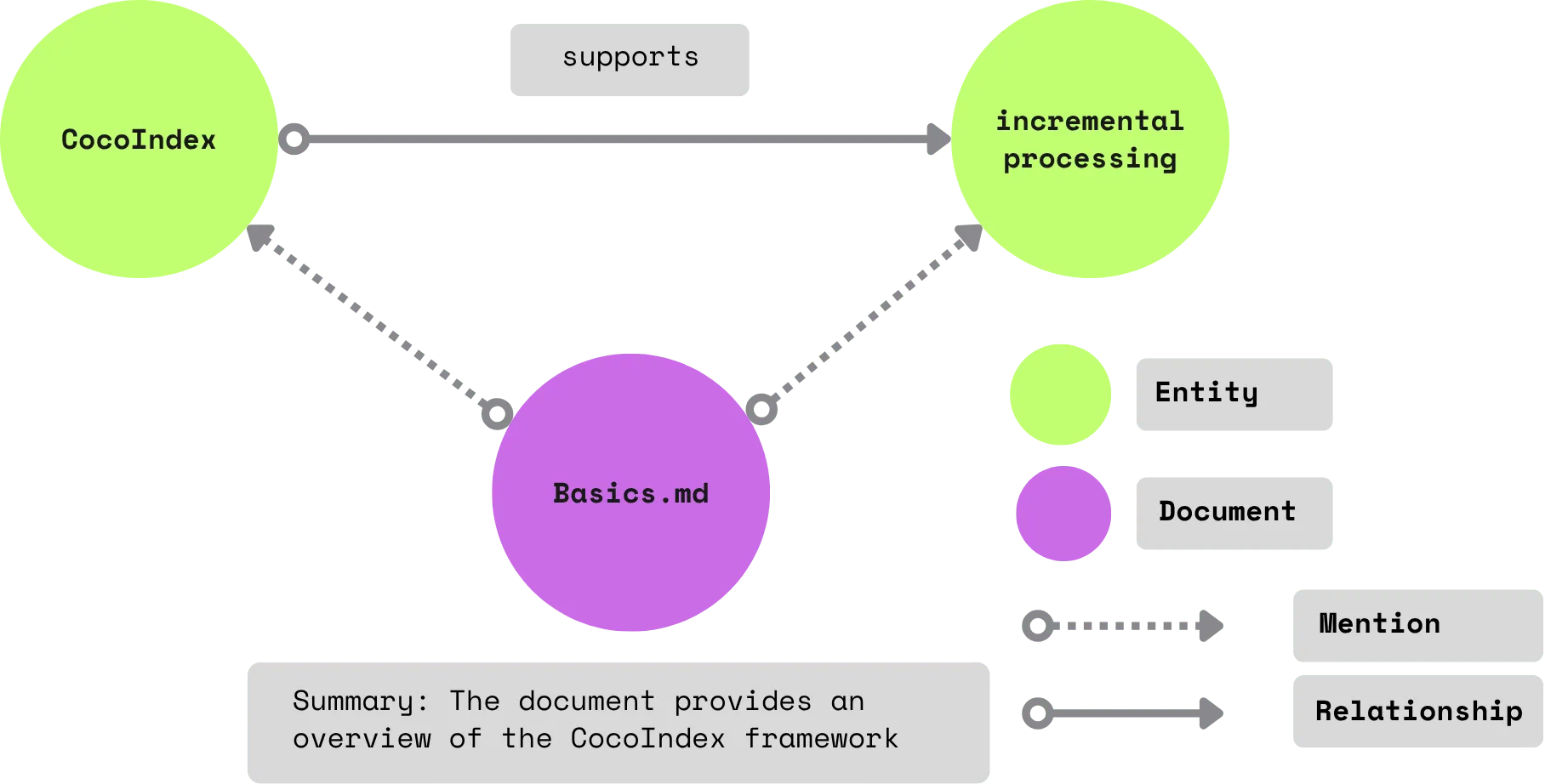
We will generate two kinds of relationships from the documents:
- Relationships between subjects and objects. E.g., “CocoIndex supports Incremental Processing”
- Mentions of entities in a document. E.g., “core/basics.mdx” mentions CocoIndex and Incremental Processing.
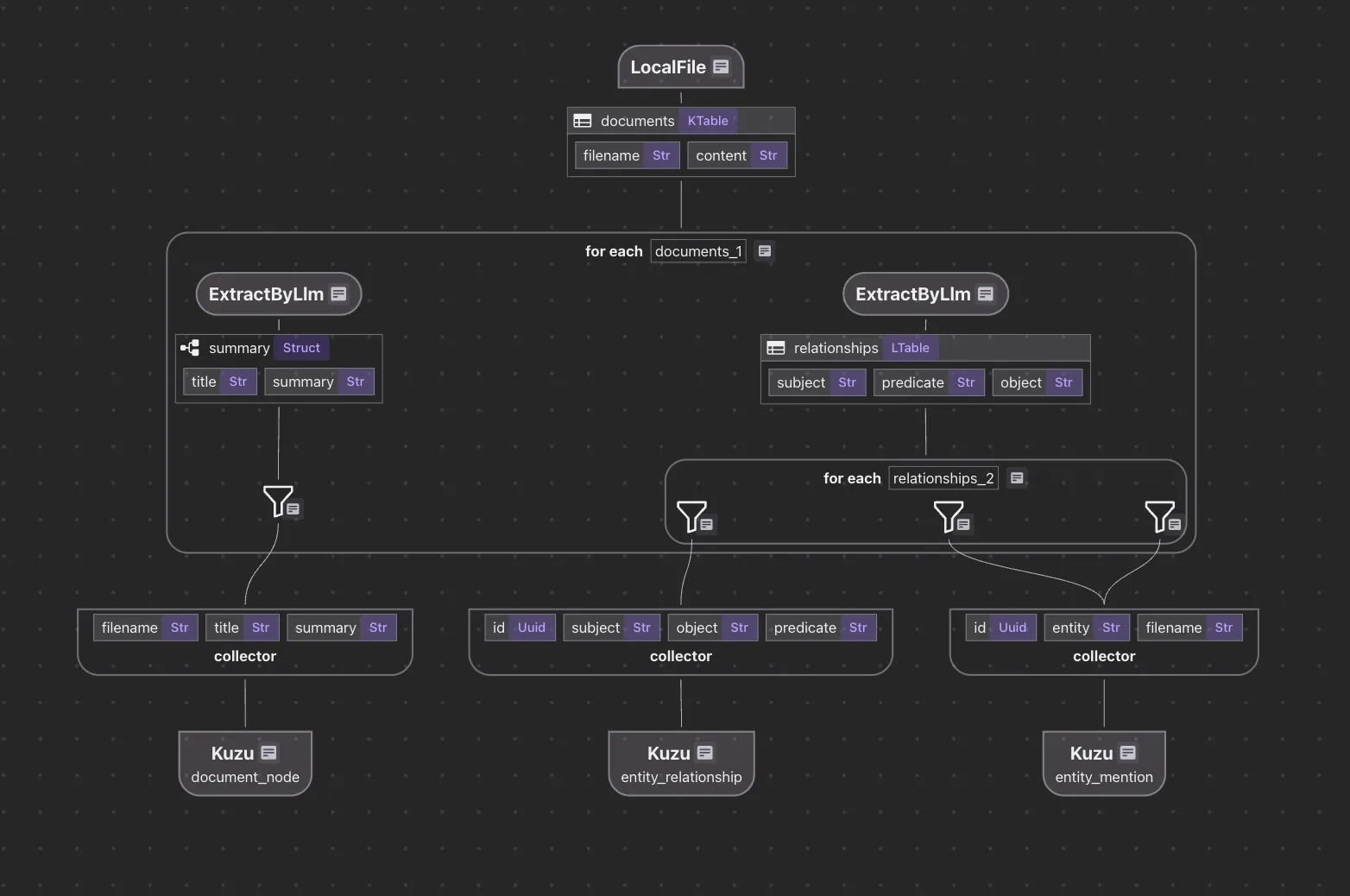
The indexing flow looks like this for Kuzu:
The code is available here.
- Ingest the documents into CocoIndex
- Process the documents, for each document:
- Map document nodes: Use an LLM to generate a summary, and map the documents to Graph nodes in Kuzu.
- Map relationship nodes: Use an LLM to extract relationships, and export the relationships to Kuzu.
Notably, it only takes ~200 lines of Python to have a production-ready knowledge graph, including class definitions, prompts, and configs.
To highlight how the relationship extraction works, you will define a Python class for structured extraction.
@dataclasses.dataclass
class Relationship:
    """
    Describe a relationship between two entities.
    Subject and object should be Core CocoIndex concepts only, should be nouns. For example, `CocoIndex`, `Incremental Processing`, `ETL`,  `Data` etc.
    """

    subject: str
    predicate: str
    object: str
If you have a predefined set of ontologies, you can skip the entity extraction and use existing entities.
Call a transformation in the flow to extract the relationships from the document.
with data_scope["documents"].row() as doc:

    # extract relationships from document
    doc["relationships"] = doc["content"].transform(
        cocoindex.functions.ExtractByLlm(
            llm_spec=cocoindex.LlmSpec(
                # Supported LLM: https://cocoindex.io/docs/ops/litellm/
                api_type=cocoindex.LlmApiType.OPENAI,
                model="gpt-4o",
            ),
            output_type=list[Relationship],
            instruction=(
                "Please extract relationships from CocoIndex documents. "
                "Focus on concepts and ignore examples and code. "
            ),
        )
    )
You could use CocoInsight to verify each pair of the relationships.
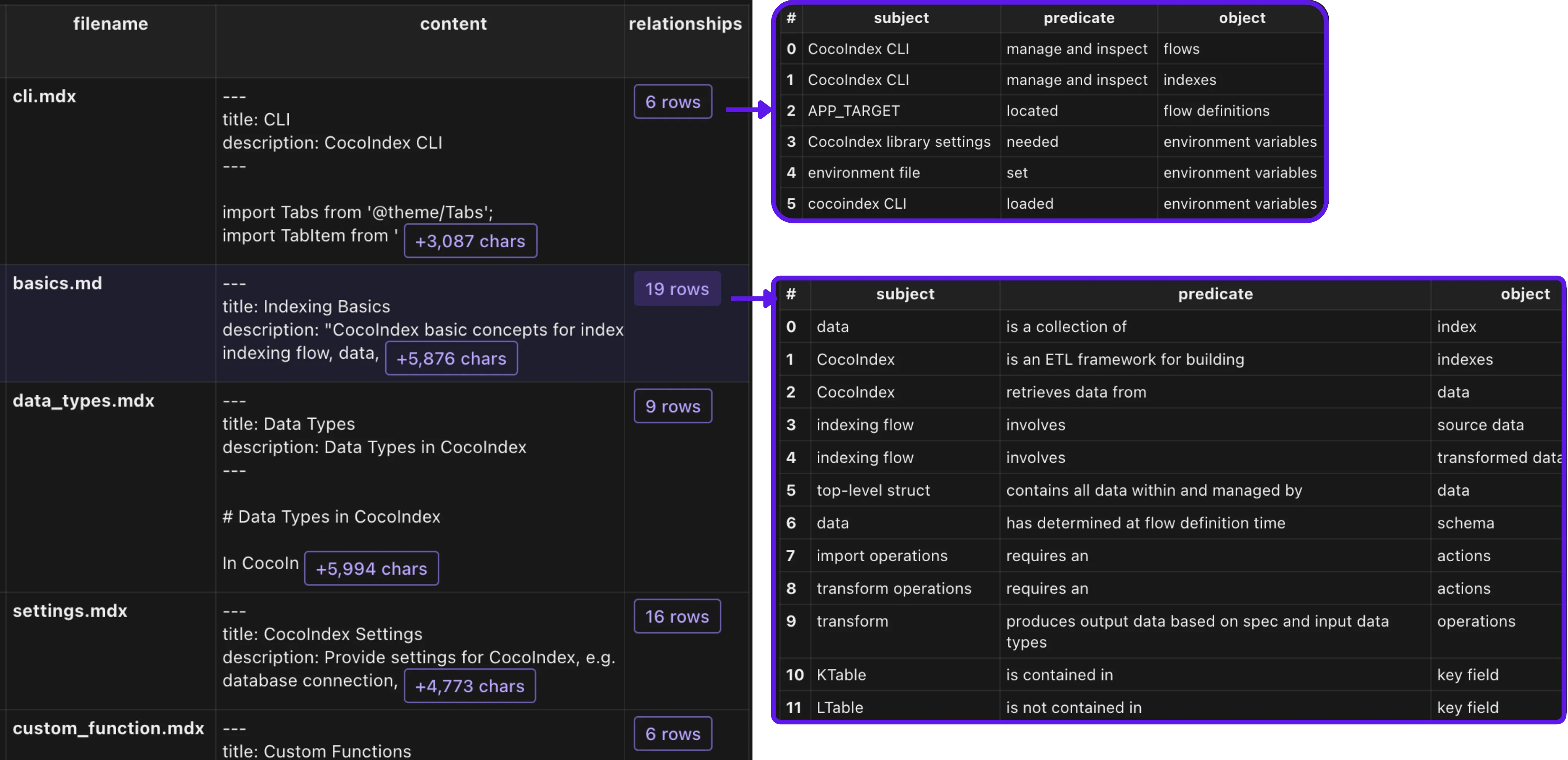
and then collect the relationship using the entity_relationship collector.
with doc["relationships"].row() as relationship:
    # relationship between two entities
    entity_relationship.collect(
        id=cocoindex.GeneratedField.UUID,
        subject=relationship["subject"],
        object=relationship["object"],
        predicate=relationship["predicate"],
    )
CocoIndex follows a dataflow programming model. Rather than defining data operations like creations, updates or deletions, developers only need to focus on transformations or formulas based on source data. The framework takes care of the data operations such as when to create, update, or delete.
Once you have collected the relationships, you can directly map them to Kuzu as below.
    entity_relationship.export(
        "entity_relationship",
         cocoindex.storages.Kuzu(
            connection=conn_spec,
            mapping=cocoindex.storages.Relationships(
                rel_type="RELATIONSHIP",
                source=cocoindex.storages.NodeFromFields(
                    label="Entity",
                    fields=[
                        cocoindex.storages.TargetFieldMapping(
                            source="subject", target="value"
                        ),
                    ],
                ),
                target=cocoindex.storages.NodeFromFields(
                    label="Entity",
                    fields=[
                        cocoindex.storages.TargetFieldMapping(
                            source="object", target="value"
                        ),
                    ],
                ),
            ),
        ),
        primary_key_fields=["id"],
    )
Amazingly, while working on this Kuzu example, I had a previous flow that I ran locally with Neo4j. It was instant to export to Kuzu. CocoIndex is based on incremental processing, and if you have already run this flow before and just switched targets, the intermediate transformation results can be reused.
To run the Kuzu Explorer, an open source UI for Kuzu, you need to first bring down the Kuzu API server.
And then you can run the following command to start the Kuzu Explorer:
KUZU_EXPLORER_PORT=8124
docker run -d --name kuzu-explorer -p ${KUZU_EXPLORER_PORT}:8000  -v ${KUZU_DB_DIR}:/database -e MODE=READ_ONLY  kuzudb/explorer:latest
We could then access the explorer at http://localhost:8124. We could run a Cypher query to explore the graph.
MATCH p=()-->() RETURN p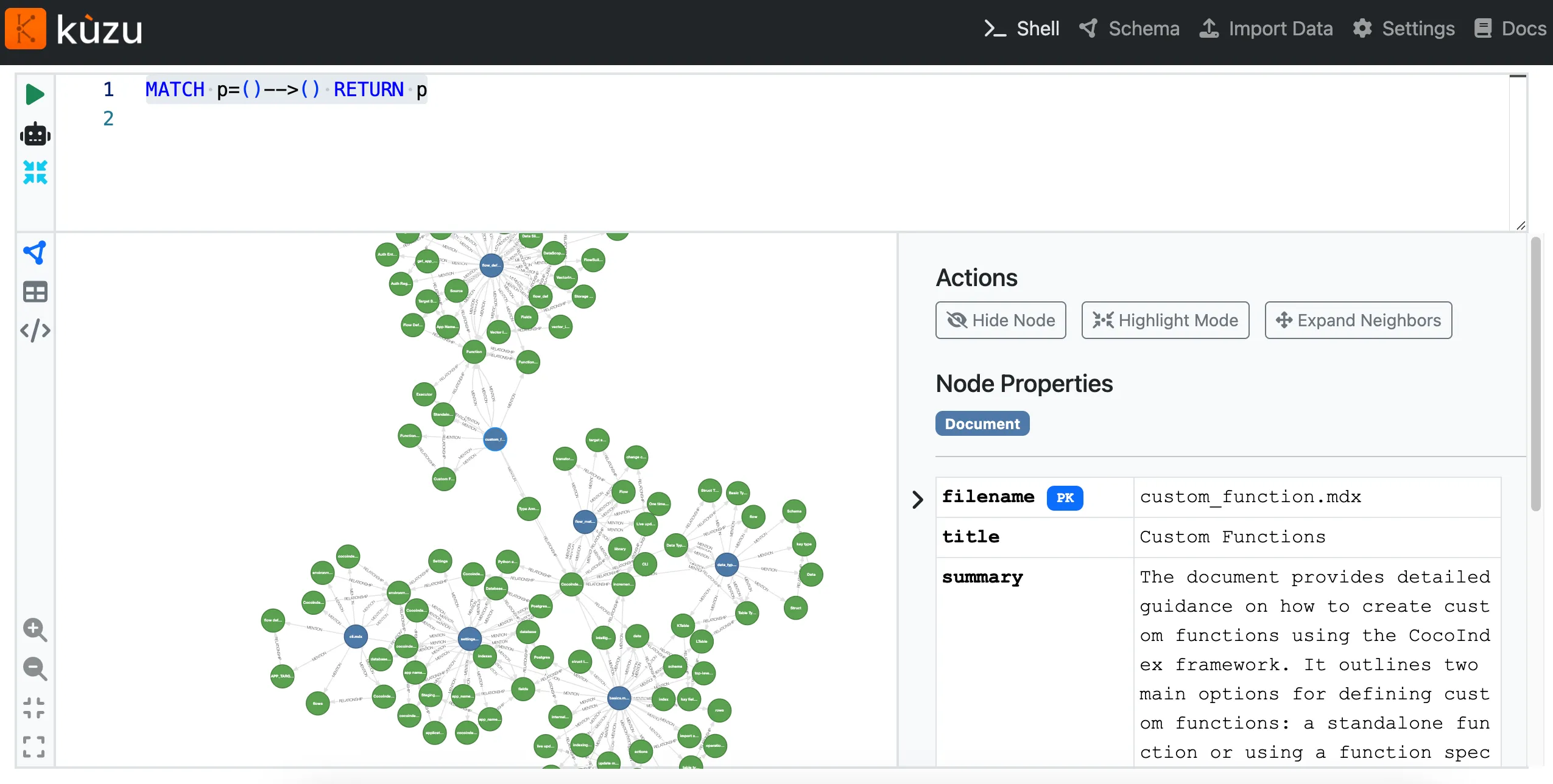
Support us
We are constantly improving, and more features and examples are coming soon. If this article is helpful, please drop us a star ⭐ at GitHub to help us grow.
Thanks for reading!

About the author.

CEO and cofounder of CocoIndex. Writes about incremental data infrastructure, agents, and the engineering decisions behind the engine.
Frequently asked questions.
What is Kuzu and why use it with CocoIndex?
Kuzu is a graph database designed to be fast, scalable, and easy to use; the post describes it as highly performant, lightweight, and open source. CocoIndex now provides native support for Kuzu as a target graph data store, pairing CocoIndex's real-time, incremental data transformation with Kuzu's graph queries. Note the post also flags that Kuzu has since been officially archived per their announcement. See What is Kuzu?
How do I switch a CocoIndex knowledge graph from Neo4j to Kuzu?
CocoIndex's GraphDB interface is standardized, so if you are already exporting to Neo4j you only need to switch the configuration to target Kuzu. Add a cocoindex.storages.KuzuConnection auth entry pointing at the Kuzu API server URL, then export your collectors to cocoindex.storages.Kuzu instead of Neo4j. See How to map to Kuzu in CocoIndex.
How do I connect CocoIndex to a Kuzu database?
CocoIndex exports to Kuzu through its API server. Bring up a Kuzu API server locally with the provided docker run command (mapping a port to the container's 8000 and mounting a database directory), then register a cocoindex.storages.KuzuConnection with api_server_url set to that server (e.g. http://localhost:8123). See How to map to Kuzu in CocoIndex.
How much code does it take to build a production-ready knowledge graph with CocoIndex and Kuzu?
According to the post, it takes only about 200 lines of Python to have a production-ready knowledge graph, including class definitions, prompts, and configs. The flow ingests documents, uses an LLM to summarize and extract relationships, and maps the results to Kuzu graph nodes and relationships. See What does it look like to build an indexing flow with CocoIndex + Kuzu.
Can I reuse computation when switching CocoIndex targets from Neo4j to Kuzu?
Yes. CocoIndex is based on incremental processing, so if you previously ran a flow against Neo4j and then switch the target to Kuzu, the intermediate transformation results can be reused. The author notes the export to Kuzu was effectively instant because the prior local Neo4j run's intermediate results were reused. See What does it look like to build an indexing flow with CocoIndex + Kuzu.
How do I explore a Kuzu graph visually?
Use Kuzu Explorer, the open-source UI for Kuzu. First bring down the Kuzu API server, then start Kuzu Explorer with the provided docker run command, open it in your browser, and run a Cypher query such as MATCH p=()-->() RETURN p to explore the graph. See What does it look like to build an indexing flow with CocoIndex + Kuzu.
