Building SEC EDGAR Financial Analytics with CocoIndex and Apache Doris


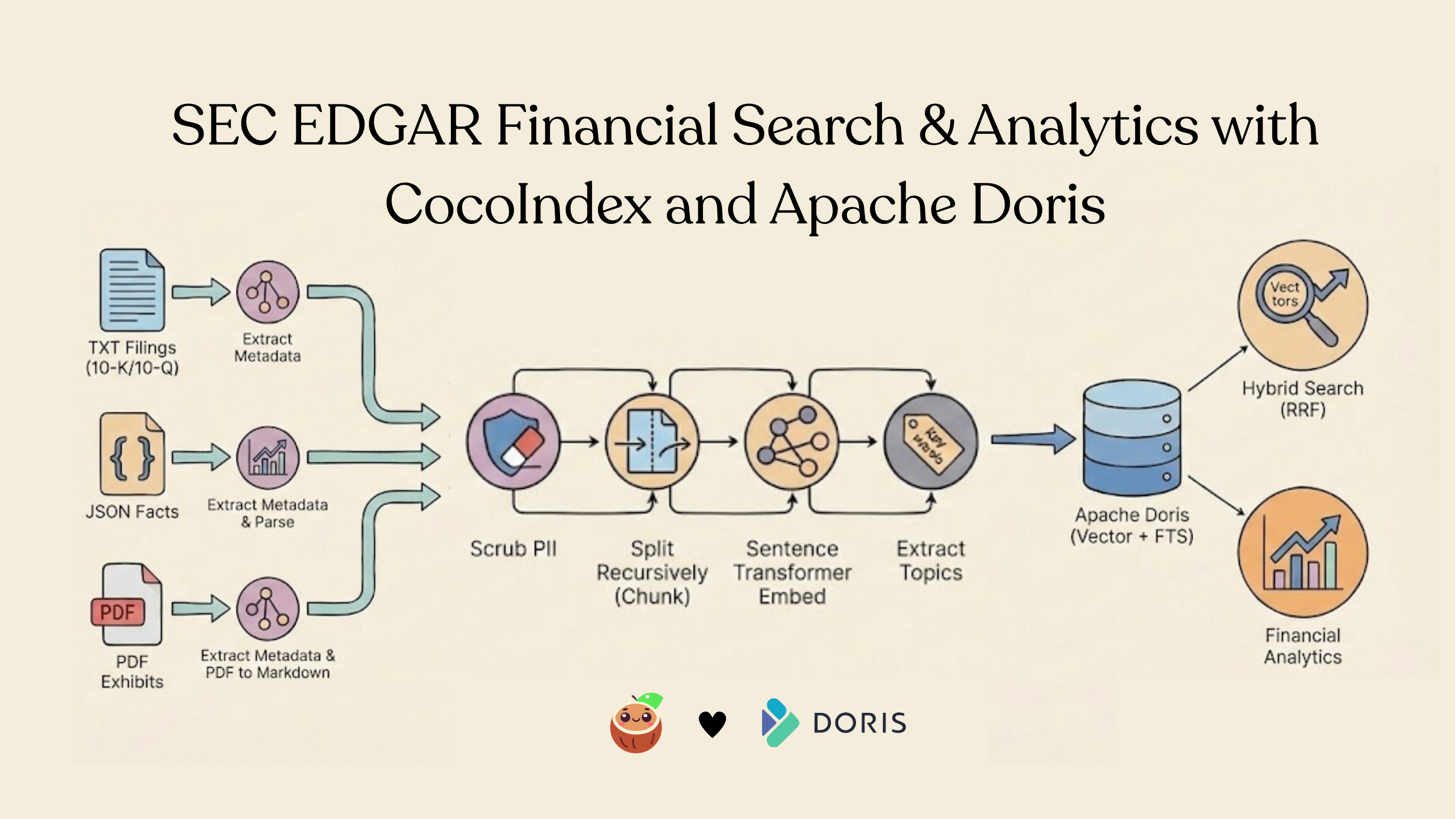
SEC filings are the backbone of financial transparency. Every public company in the United States files 10-Ks, 10-Qs, proxy statements, and exhibits with the SEC -- thousands of documents each quarter across text, structured data, and PDF formats.
Searching across all of these effectively requires more than keyword matching. You need semantic understanding, structured metadata filtering, and the ability to combine multiple document formats into a single searchable index.
In this post, we walk through the SEC EDGAR Financial Analytics example: a CocoIndex pipeline that ingests three source types (TXT filings, JSON company facts, PDF exhibits), scrubs PII, extracts topic tags, generates embeddings, and exports everything into Apache Doris for hybrid search combining vector similarity with full-text matching using Reciprocal Rank Fusion (RRF).
The project is open sourced and can be found here.
Why CocoIndex?
CocoIndex is a Rust-based, open-source data transformation framework for AI workloads, combining high performance with flexibility. It supports incremental processing, data lineage, and customizable logic, allowing teams to build efficient and intelligent data pipelines. CocoIndex makes transformation pipelines modular, transparent, and easy to maintain.
Why Apache Doris?
Apache Doris is an open-source, Apache-licensed real-time MPP data warehouse built for lightning-fast analytics. It supports high-concurrency workloads with real-time data ingestion and querying, handles both structured and semi-structured (VARIANT) data, includes full-text inverted indexes, and—once generally available—will feature native vector storage and approximate nearest neighbor (ANN) search using functions like cosine_distance().
Together, CocoIndex and Apache Doris form a powerful agentic data infrastructure stack. CocoIndex transforms and indexes unstructured data through modular, lineage-tracked pipelines with built-in incremental processing, while Apache Doris delivers real-time analytics at scale with sub-second ingestion latency, sub-100ms query response, and 10k QPS concurrency—capabilities purpose-built for AI agents that need to make fast, data-driven decisions. The combination bridges the gap from raw, unstructured data to ultra-performant real-time search and analytics, while CocoIndex's data lineage and transparency ensure the auditability and compliance that regulated industries demand.
Architecture overview
The pipeline follows a multi-source, unified-collector pattern:
┌─────────────────────────────────────────────────────────────────────────┐
│                     CocoIndex Multi-Source Pipeline                     │
│                                                                         │
│  ┌──────────────┐   ┌──────────────┐   ┌──────────────┐                 │
│  │ TXT Filings  │   │ JSON Facts   │   │ PDF Exhibits │                 │
│  │ (10-K/10-Q)  │   │ (API Data)   │   │ (Documents)  │                 │
│  └──────┬───────┘   └──────┬───────┘   └──────┬───────┘                 │
│         │                  │                  │                         │
│         ▼                  ▼                  ▼                         │
│  ┌─────────────────────────────────────────────────────┐                │
│  │              Unified Chunk Collector                │                │
│  │   Scrub PII → Chunk → Embed → Extract Topics        │                │
│  └─────────────────────────────────────────────────────┘                │
│                          │                                              │
│                          ▼                                              │
│                   Apache Doris                                          │
│         (HNSW vector index + inverted FTS index)                        │
└─────────────────────────────────────────────────────────────────────────┘
Three different file formats feed into a single collector. Each source extracts its own metadata, and performs PII scrubbing, splitting, embedding, topic extraction. The output lands in a single Doris table with both vector and full-text indexes.
Define CocoIndex flow
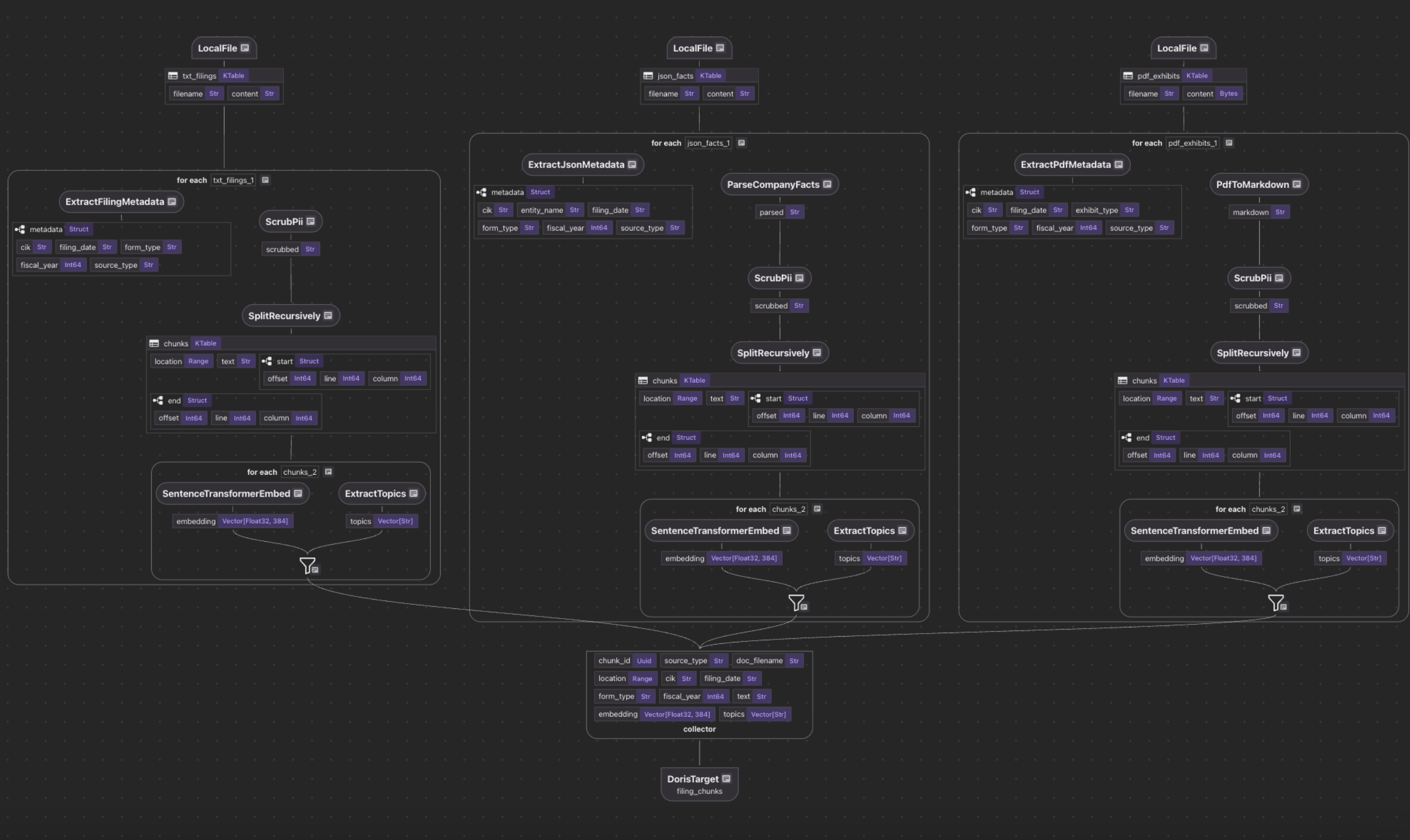
The entry point is a single @cocoindex.flow_def that wires up three sources, a shared collector, and a Doris export target.
Defining the sources
@cocoindex.flow_def(name="SECFilingAnalytics")
def sec_filing_flow(
    flow_builder: cocoindex.FlowBuilder, data_scope: cocoindex.DataScope
) -> None:
    # TXT filings (10-K risk factors, plain text)
    data_scope["txt_filings"] = flow_builder.add_source(
        cocoindex.sources.LocalFile(path="data/filings", included_patterns=["*.txt"]),
        refresh_interval=timedelta(hours=1),
    )

    # JSON company facts (SEC XBRL API format)
    data_scope["json_facts"] = flow_builder.add_source(
        cocoindex.sources.LocalFile(
            path="data/company_facts", included_patterns=["*.json"]
        ),
        refresh_interval=timedelta(hours=1),
    )

    # PDF exhibits (binary mode for docling conversion)
    data_scope["pdf_exhibits"] = flow_builder.add_source(
        cocoindex.sources.LocalFile(
            path="data/exhibits_pdf", included_patterns=["*.pdf"], binary=True
        ),
        refresh_interval=timedelta(hours=1),
    )
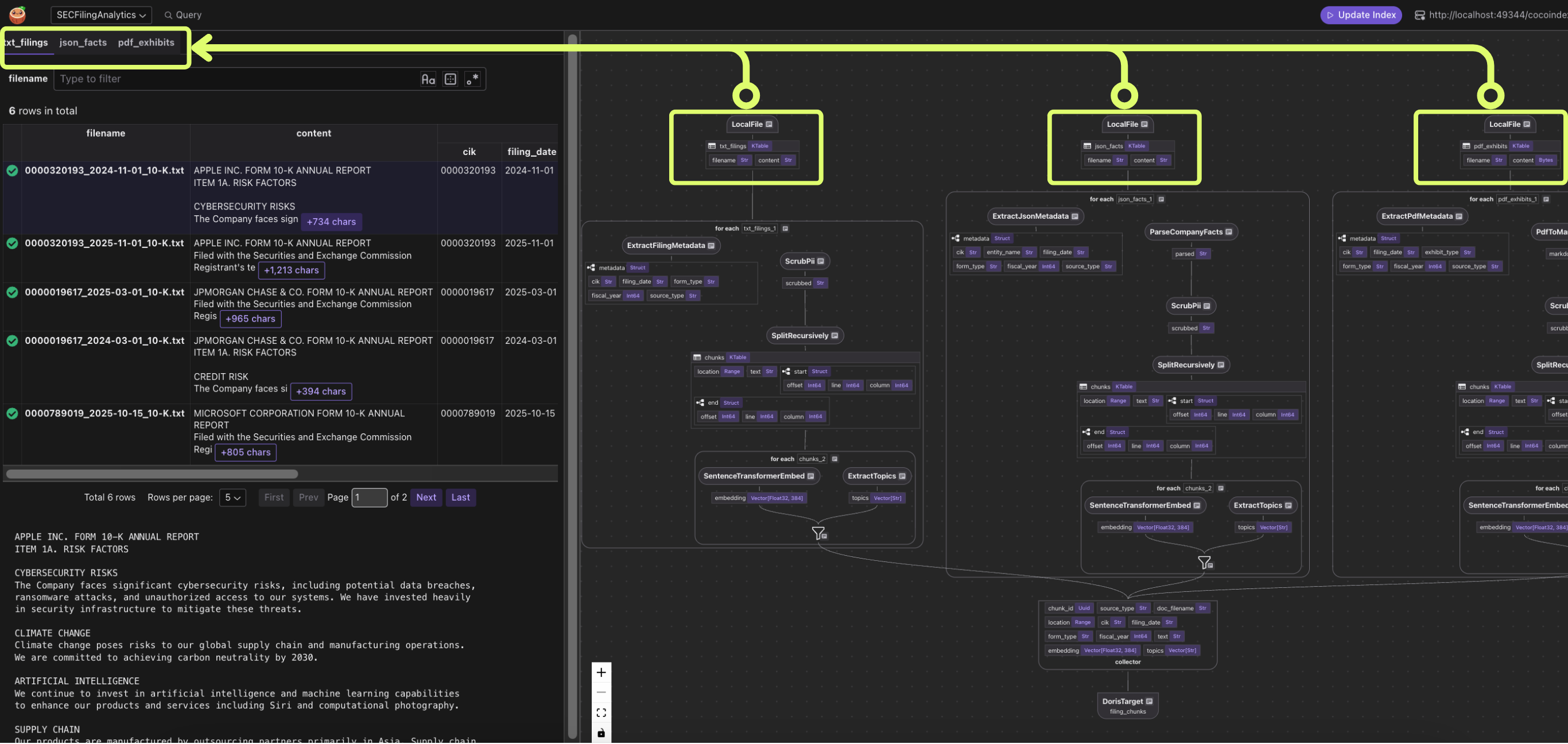
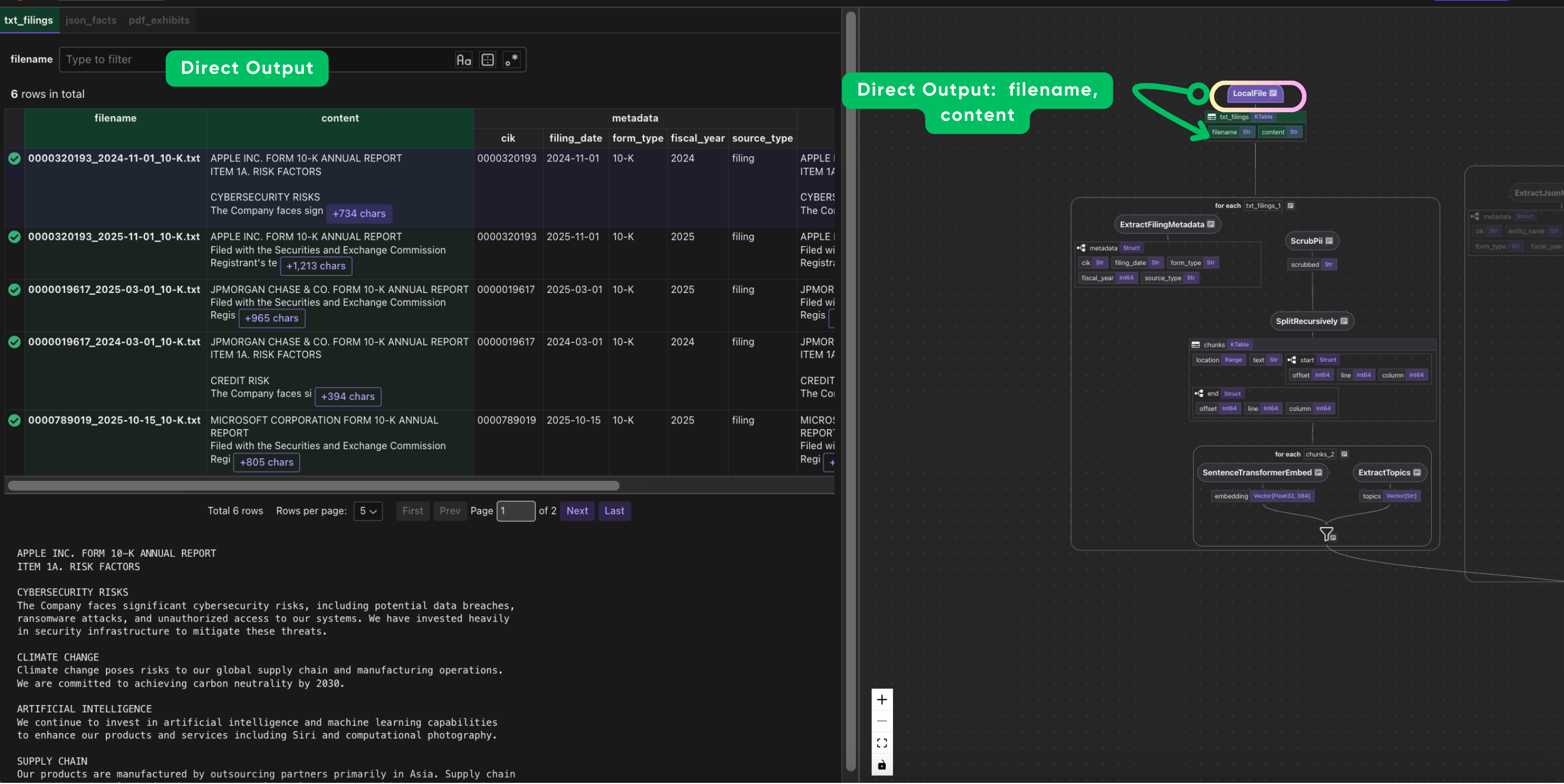
Each source uses LocalFile with pattern filtering.
The unified collector
Rather than exporting each source separately, a single collector merges all three into one table:
chunk_collector = data_scope.add_collector()
Each source processes its documents independently, but they all feed into chunk_collector with the same schema. This is the key design pattern: different source formats, one search index.
Process Text filings
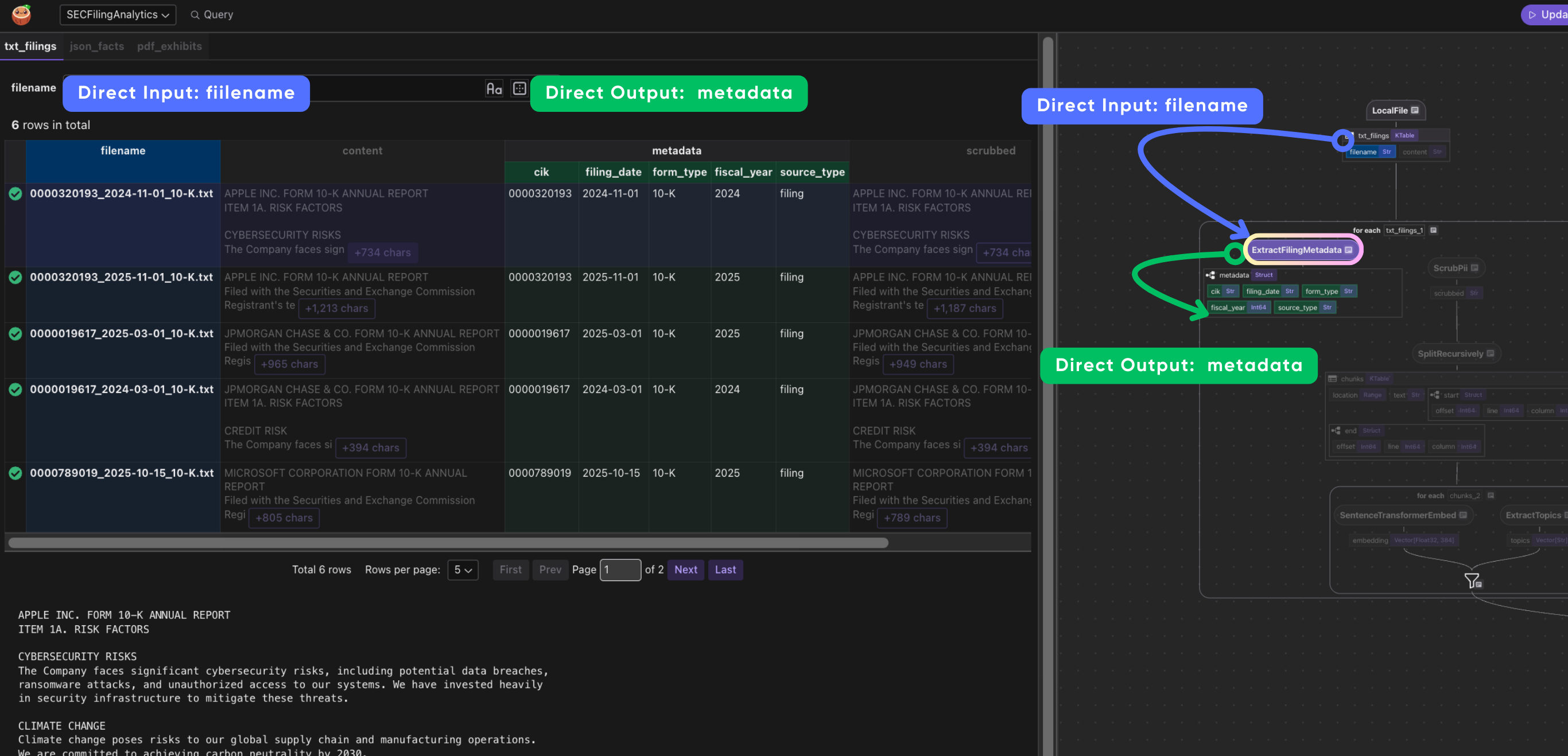
Extract filing metadata
extract_filing_metadata parses the structured filename convention {CIK}_{date}_{form}.txt
to pull out the company identifier (CIK), filing date, and form type (10-K, 10-Q, etc.) -- metadata needed for filtering and aggregation at query time.
@dataclass
class FilingMetadata:
    """Structured metadata from SEC filing filename."""

    cik: str  # Company identifier (e.g., 0000320193 = Apple)
    filing_date: str  # ISO date
    form_type: str  # 10-K, 10-Q, 8-K
    fiscal_year: int | None
    source_type: str  # "filing" — for multi-source filtering
@cocoindex.op.function(cache=True, behavior_version=1)
def extract_filing_metadata(filename: str) -> FilingMetadata:
    """
    Parse metadata from filename: {CIK}_{date}_{form}.txt

    Example: 0000320193_2024-11-01_10-K.txt
    """
    base_name = filename.rsplit(".", 1)[0] if "." in filename else filename
    parts = base_name.split("_")

    cik = parts[0] if len(parts) > 0 else "unknown"
    filing_date = parts[1] if len(parts) > 1 else "2024-01-01"
    form_type = parts[2] if len(parts) > 2 else "10-K"

    try:
        fiscal_year = int(filing_date[:4])
    except (ValueError, IndexError):
        fiscal_year = None

    return FilingMetadata(
        cik=cik,
        filing_date=filing_date,
        form_type=form_type,
        fiscal_year=fiscal_year,
        source_type="filing",
    )
CocoIndex supports parse and extract by LLM natively in many of its examples, for example, ExtactByLLM, Extract With DSPy. In this example, we intentionally used a deterministic parser (generated by LLM and validated), and no LLM involved at runtime. When you know the file format upfront, a regex or string parser is faster, cheaper, and more reliable than calling an LLM on every document.
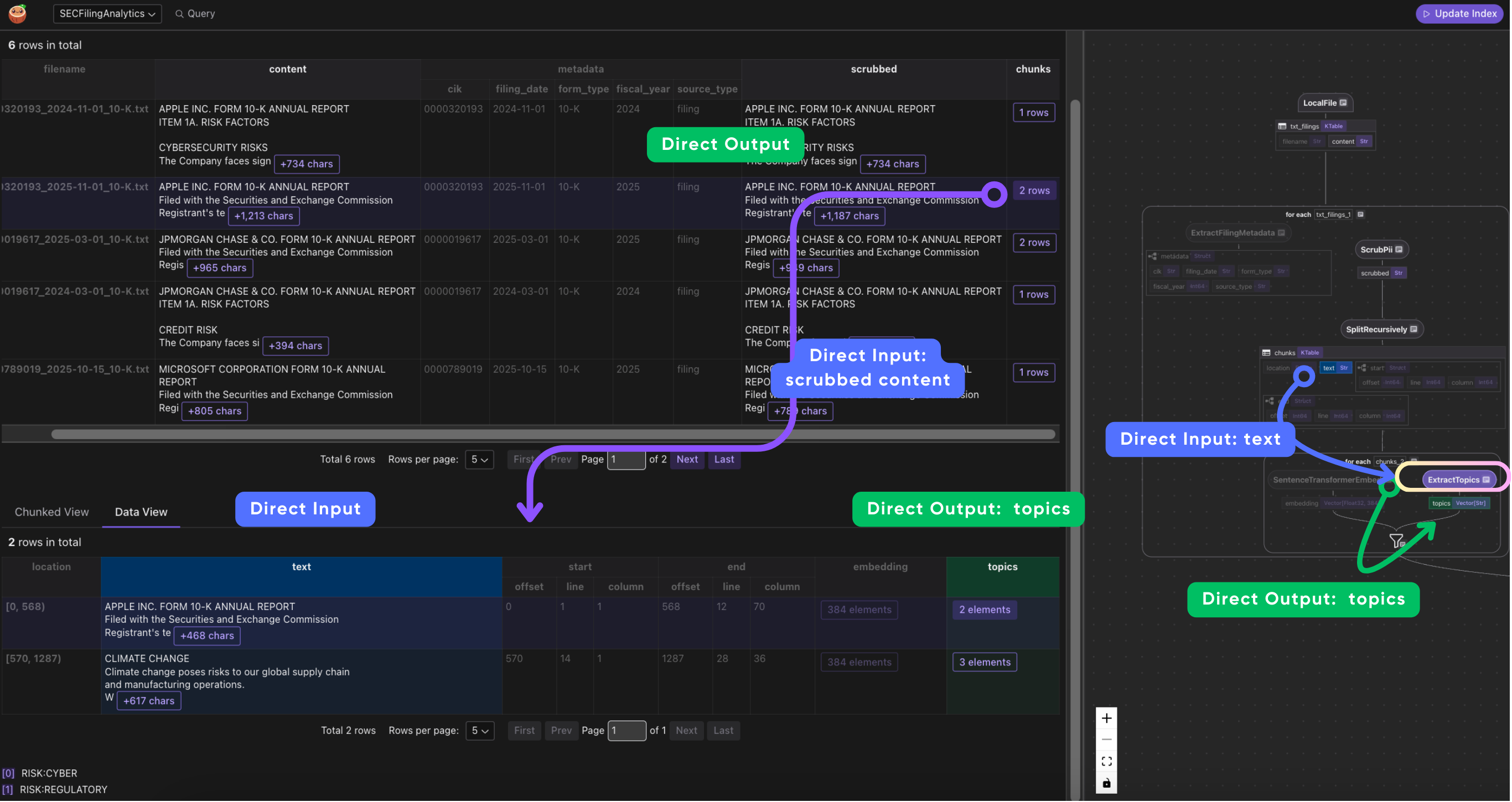
Tools like CocoInsight are especially useful here, since they help validate data and can potentially provide feedback to the pipeline when you use LLM-generated parsers.
Chunk processing for semantic search
We use cocoindex to generate structured data and ai workloads like embeddings for semantic search.
The process_and_collect function is where the real work happens:
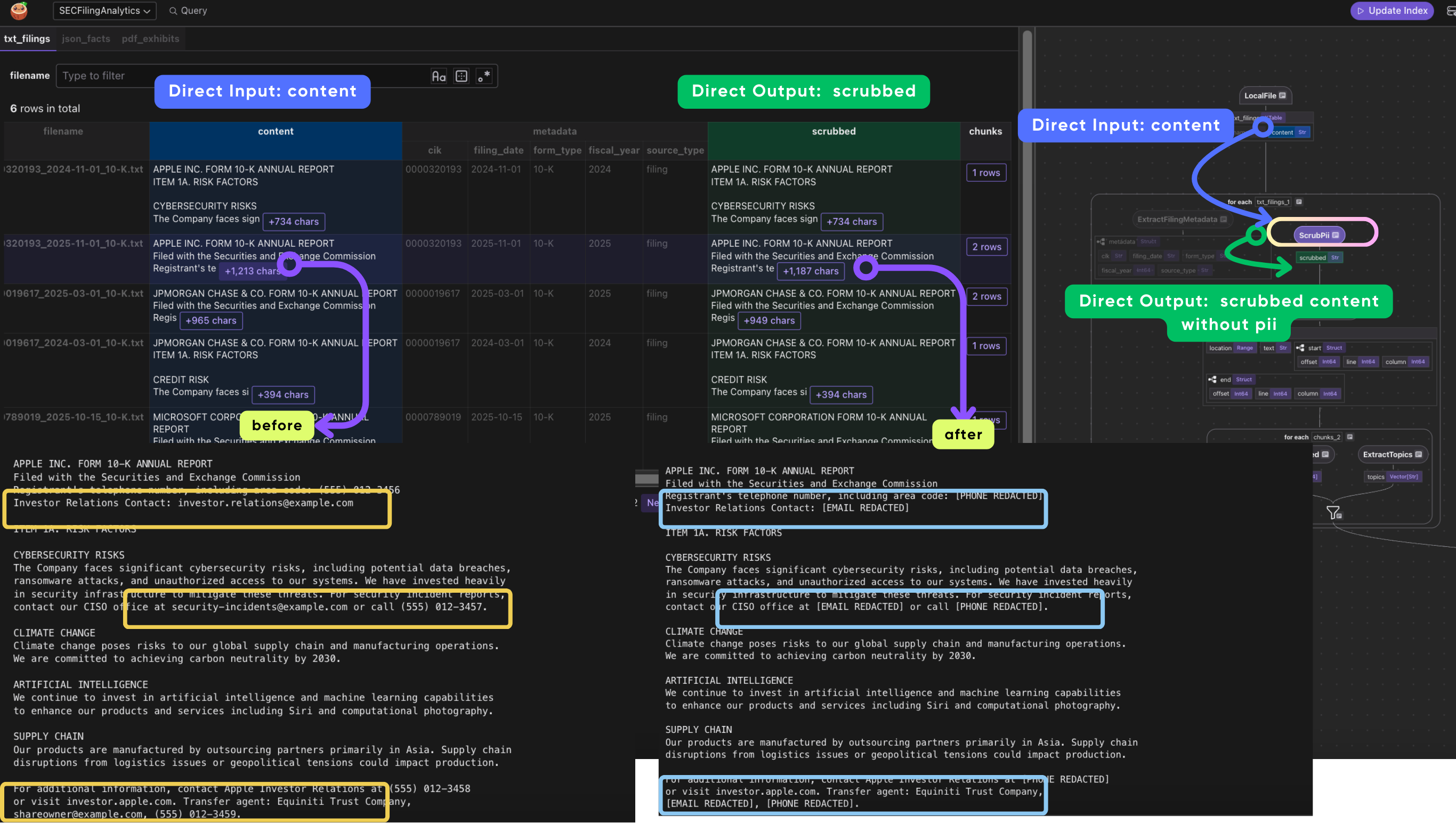
1. Scrub PII before chunking
PII (Personally Identifiable Information) includes things like Social Security numbers, phone numbers, and email addresses. SEC filings sometimes contain these inadvertently (there are even SEC rules about this -- Reg S-T Rule 83). Scrubbing happens on the full document before chunking so that a phone number or SSN split across a chunk boundary can't slip through into the search index.
def process_and_collect(
    doc: cocoindex.DataScope,
    text_field: str,
    metadata: cocoindex.DataSlice,
    collector: cocoindex.flow.DataCollector,
) -> None:
    # 1. Scrub PII before chunking
    doc["scrubbed"] = doc[text_field].transform(scrub_pii)
2. Split into chunks
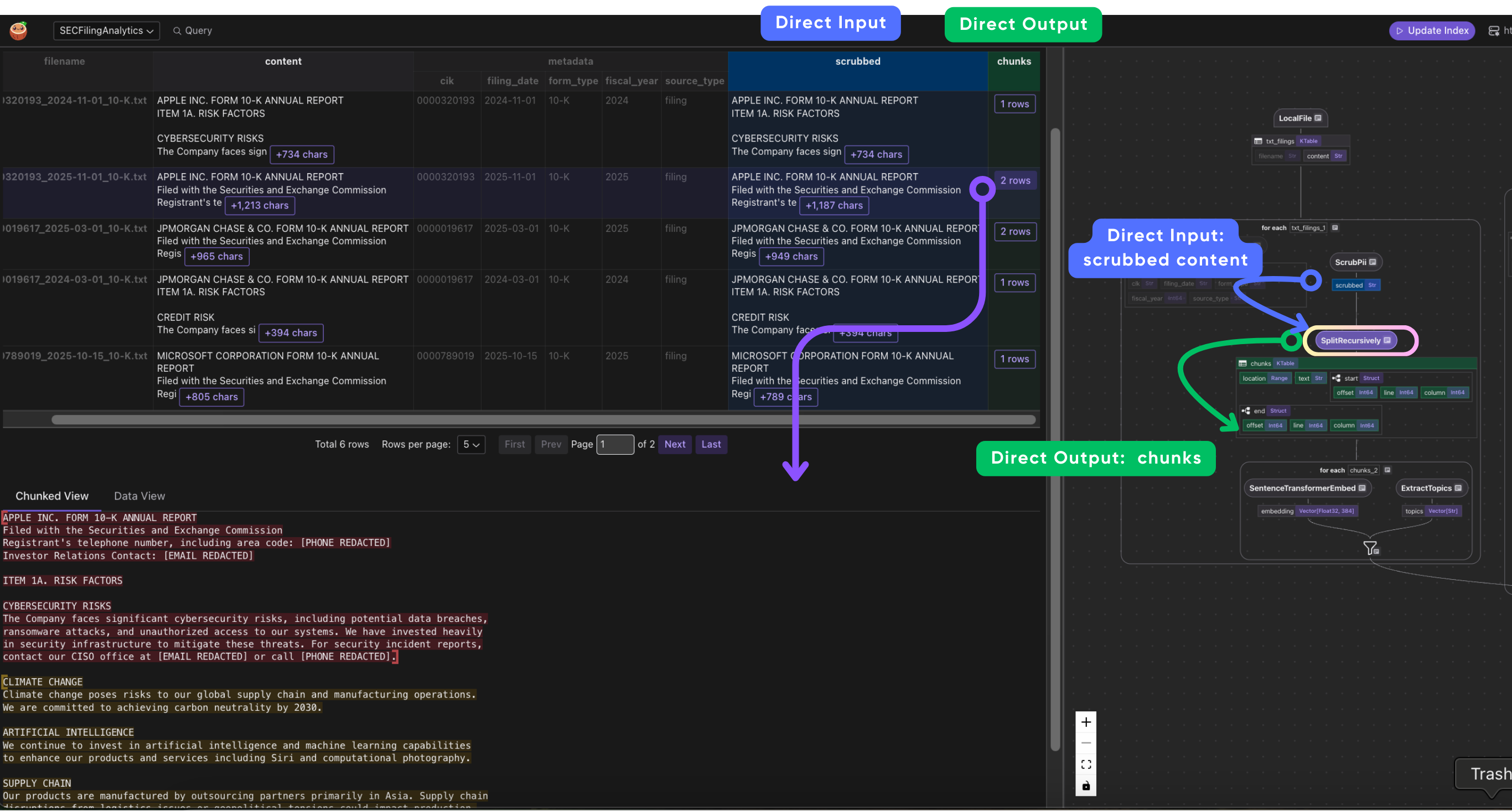
Chunk size is a tradeoff: too large and you lose search resolution (a 10,000-character chunk matches broadly but vaguely), too small and each chunk lacks enough context to be meaningful on its own. We use 1,000 characters with 200-character overlap as a practical middle ground for SEC filings.
SplitRecursively splits text by respecting document structure -- it tries to break at markdown headings, then paragraphs, then sentences, before falling back to character boundaries. This preserves semantic coherence within each chunk.
A flat splitter would just cut every N characters regardless of where a sentence or section ends, often splitting mid-thought.
doc["chunks"] = doc["scrubbed"].transform(
    cocoindex.functions.SplitRecursively(),
    language="markdown",
    chunk_size=1000,
    chunk_overlap=200,
)
- Per-chunk: embed, extract topics, and collector
For each chunk, we generate an embedding vector (for semantic search) and extract topic tags (for structured filtering). Then collector.collect assembles a row combining the chunk's text, embedding, and topics with the document-level metadata (CIK, filing date, form type) inherited from the parent document. This is how each chunk carries enough context for both search relevance and downstream filtering.
with doc["chunks"].row() as chunk:
    chunk["embedding"] = text_to_embedding(chunk["text"])
    chunk["topics"] = chunk["text"].transform(extract_topics)

    collector.collect(
        chunk_id=cocoindex.GeneratedField.UUID,
        source_type=metadata["source_type"],
        doc_filename=doc["filename"],
        location=chunk["location"],
        cik=metadata["cik"],
        filing_date=metadata["filing_date"],
        form_type=metadata["form_type"],
        fiscal_year=metadata["fiscal_year"],
        text=chunk["text"],
        embedding=chunk["embedding"],
        topics=chunk["topics"],
    )
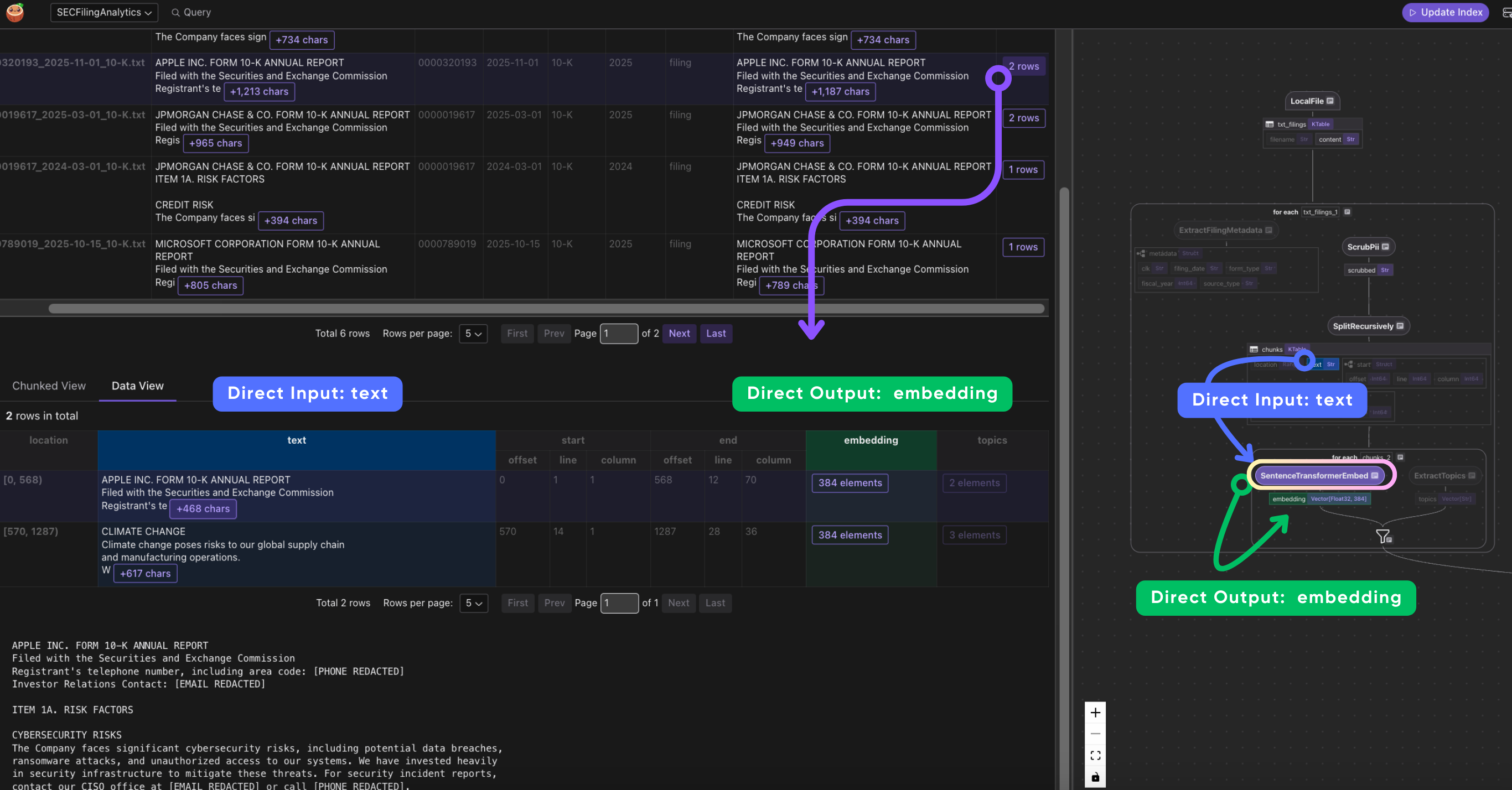
The order matters: PII is scrubbed before chunking so sensitive data never enters the index. Each chunk gets an embedding vector and a list of topic tags. The collector schema includes both the chunk content and all the metadata needed for filtering downstream.
Topics are extracted as string arrays, enabling Doris array filtering:
@cocoindex.op.function(cache=True, behavior_version=1)
def extract_topics(text: str) -> list[str]:
    topic_keywords = {
        "RISK:CYBER": ["cybersecurity", "data breach", "ransomware", ...],
        "RISK:CLIMATE": ["climate change", "carbon", "sustainability", ...],
        "TOPIC:AI": ["artificial intelligence", "machine learning", ...],
        "TOPIC:FINANCIAL": ["revenue", "net income", "assets", ...],
        ...
    }
    text_lower = text.lower()
    return [topic for topic, keywords in topic_keywords.items()
            if any(kw in text_lower for kw in keywords)]
This produces arrays like ["RISK:CYBER", "TOPIC:AI"] that can be filtered in Doris with json_contains(topics, '"RISK:CYBER"').
- Wire to CocoIndex flow
with data_scope["txt_filings"].row() as filing:
    filing["metadata"] = filing["filename"].transform(extract_filing_metadata)
    process_and_collect(filing, "content", filing["metadata"], chunk_collector)
Process JSON facts and PDF exhibits
JSON company facts and PDF exhibits follow the similar pattern pattern: extract metadata, convert to searchable text, then feed into the shared process_and_collect pipeline.
For JSON facts,
# JSON Facts
with data_scope["json_facts"].row() as facts:
    facts["metadata"] = facts["filename"].transform(
        extract_json_metadata, content=facts["content"]
    )
    facts["parsed"] = facts["content"].transform(parse_company_facts)
    process_and_collect(facts, "parsed", facts["metadata"], chunk_collector)
extract_json_metadataparses the CIK and entity name from the SEC XBRL format.parse_company_factsconverts structured financial metrics (revenue, net income, etc.) into natural language text so they're discoverable via semantic search.
For PDF exhibits,
# PDF Exhibits
with data_scope["pdf_exhibits"].row() as pdf:
    pdf["metadata"] = pdf["filename"].transform(extract_pdf_metadata)
    pdf["markdown"] = pdf["content"].transform(pdf_to_markdown)
    process_and_collect(pdf, "markdown", pdf["metadata"], chunk_collector)
pdf_to_markdown uses docling to convert binary PDF bytes into markdown text.
Once converted, the markdown goes through the same process_and_collect pipeline as the other sources.
Exporting to Doris
The export step creates the Doris table with both vector and full-text search indexes:
chunk_collector.export(
    "filing_chunks",
    coco_doris.DorisTarget(
        fe_host=DORIS_FE_HOST,
        fe_http_port=DORIS_FE_HTTP_PORT,
        be_load_host=DORIS_BE_LOAD_HOST,
        query_port=DORIS_QUERY_PORT,
        username=DORIS_USERNAME,
        password=DORIS_PASSWORD,
        database=DORIS_DATABASE,
        table=TABLE_CHUNKS,
    ),
    primary_key_fields=["chunk_id"],
    vector_indexes=[
        cocoindex.VectorIndexDef(
            field_name="embedding",
            metric=cocoindex.VectorSimilarityMetric.L2_DISTANCE,
        )
    ],
    fts_indexes=[
        cocoindex.FtsIndexDef(
            field_name="text", parameters={"parser": "unicode"}
        )
    ],
)
Two indexes on the same table:
- HNSW vector index on the
embeddingfield for semantic similarity search - Inverted index on the
textfield for keyword matching withMATCH_ANY
This dual-index setup is what makes hybrid search possible without maintaining separate stores.
Hybrid search with RRF
The search function in main.py combines semantic and lexical ranking using Reciprocal Rank Fusion:
async def search(
    query: str,
    time_gate_days: int | None = None,
    source_types: list[str] | None = None,
    limit: int = 10,
) -> list[dict]:
    table = f"{DORIS_DATABASE}.{TABLE_CHUNKS}"
    embedding = format_embedding(await text_to_embedding.eval_async(query))
    keywords = extract_keywords(query)

    sql = f"""
    WITH
    semantic AS (
        SELECT chunk_id, doc_filename, cik, filing_date, source_type, text, topics,
               ROW_NUMBER() OVER (ORDER BY l2_distance(embedding, {embedding})) AS rank
        FROM {table} WHERE {where}
    ),
    lexical AS (
        SELECT chunk_id,
               ROW_NUMBER() OVER (ORDER BY CASE WHEN text MATCH_ANY '{keywords}'
                                  THEN 0 ELSE 1 END) AS rank
        FROM {table} WHERE {where}
    )
    SELECT s.*, l.rank AS lex_rank,
           1.0/(60 + s.rank) + 1.0/(60 + l.rank) AS score
    FROM semantic s JOIN lexical l USING (chunk_id)
    ORDER BY score DESC LIMIT {limit}
    """
The RRF formula 1/(k + rank) with k=60 is a standard approach for combining rankings from different signals without needing to normalize scores. A chunk that ranks #1 in both semantic and lexical search gets 1/61 + 1/61 = 0.0328. A chunk that's #1 semantically but #100 lexically gets 1/61 + 1/160 = 0.0226. The formula naturally balances both signals.
The search also supports optional filters:
time_gate_days-- restrict to filings within the last N dayssource_types-- filter by document type ("filing","facts","exhibit")
Running the example
Prerequisites
- Python 3.11+
- Docker and Docker Compose (for Doris + PostgreSQL)
Quick start
cd examples/sec_edgar_analytics

# Install dependencies
pip install -e .

# Start infrastructure
docker compose up -d
# Wait ~90 seconds for Doris to initialize

# Configure environment
cp .env.example .env

# Generate sample data
python -c "from download import create_sample_data; create_sample_data()"

# Set up tables and run the pipeline
cocoindex setup main.py
cocoindex update main.py
Visualizing with CocoInsight
cocoindex server -ci main.py
Then open https://cocoindex.io/cocoinsight to see the full data lineage: which source files produced which chunks, how transformations flow through the pipeline, and the complete graph from raw document to indexed embedding.
Interactive search
python main.py
SEC EDGAR Financial Analytics
========================================
Enter a search query to find relevant SEC filings.

Search: cybersecurity risks in cloud infrastructure

1. [0.0325] 0000789019_2024-10-15_10-K.txt
   CIK: 0000789019 | Source: filing | Topics: ["RISK:CYBER","RISK:REGULATORY","TOPIC:AI","TOPIC:CLOUD"]
   MICROSOFT CORPORATION FORM 10-K ANNUAL REPORT
   CLOUD INFRASTRUCTURE
   Our Azure cloud platform faces intense competition from AWS...

2. [0.0320] 0000320193_2024-11-01_10-K.txt
   CIK: 0000320193 | Source: filing | Topics: ["RISK:CYBER","RISK:CLIMATE","RISK:SUPPLY","RISK:REGULATORY","TOPIC:AI"]
   APPLE INC. FORM 10-K ANNUAL REPORT
   CYBERSECURITY RISKS
   The Company faces significant cybersecurity risks, including potential d...

3. [0.0313] 0000320193_2025-11-01_10-K.txt
   CIK: 0000320193 | Source: filing | Topics: ["RISK:CLIMATE","RISK:SUPPLY","TOPIC:AI"]
   CLIMATE CHANGE
   Climate change poses risks to our global supply chain...
Direct Doris queries
You can also query the index directly via MySQL protocol:
mysql -h localhost -P 9030 -u root
Array field filtering
-- Find all chunks tagged with cybersecurity risk
SELECT doc_filename, text, topics
FROM sec_analytics.filing_chunks
WHERE json_contains(topics, '"RISK:CYBER"');

-- Chunks matching any of multiple topics
SELECT doc_filename, text
FROM sec_analytics.filing_chunks
WHERE json_contains(topics, '"RISK:CYBER"')
   OR json_contains(topics, '"RISK:CLIMATE"');
Portfolio aggregation
-- Top 3 relevant chunks per company
WITH ranked AS (
    SELECT cik, doc_filename, text,
           l2_distance(embedding, [...]) AS score,
           ROW_NUMBER() OVER (PARTITION BY cik ORDER BY score ASC) AS rank
    FROM sec_analytics.filing_chunks
    WHERE cik IN ('0000320193', '0000789019')
)
SELECT * FROM ranked WHERE rank <= 3;
Temporal trends
-- Cybersecurity mentions by fiscal year
SELECT fiscal_year,
       COUNT(DISTINCT cik) AS num_companies,
       COUNT(*) AS total_mentions
FROM sec_analytics.filing_chunks
WHERE text MATCH_ANY 'cybersecurity risk'
GROUP BY fiscal_year
ORDER BY fiscal_year DESC;
What's next
The techniques in this example -- multi-source ingestion, array field filtering, hybrid search, PII scrubbing, temporal scoring -- generalize beyond financial documents. The same patterns apply to healthcare records, legal documents, or any domain where you need to search across heterogeneous document formats with structured metadata filtering.
Check out the full source code, including a Jupyter notebook tutorial for interactive exploration.