Build a Self-Updating Wiki for Your Codebases with LLM

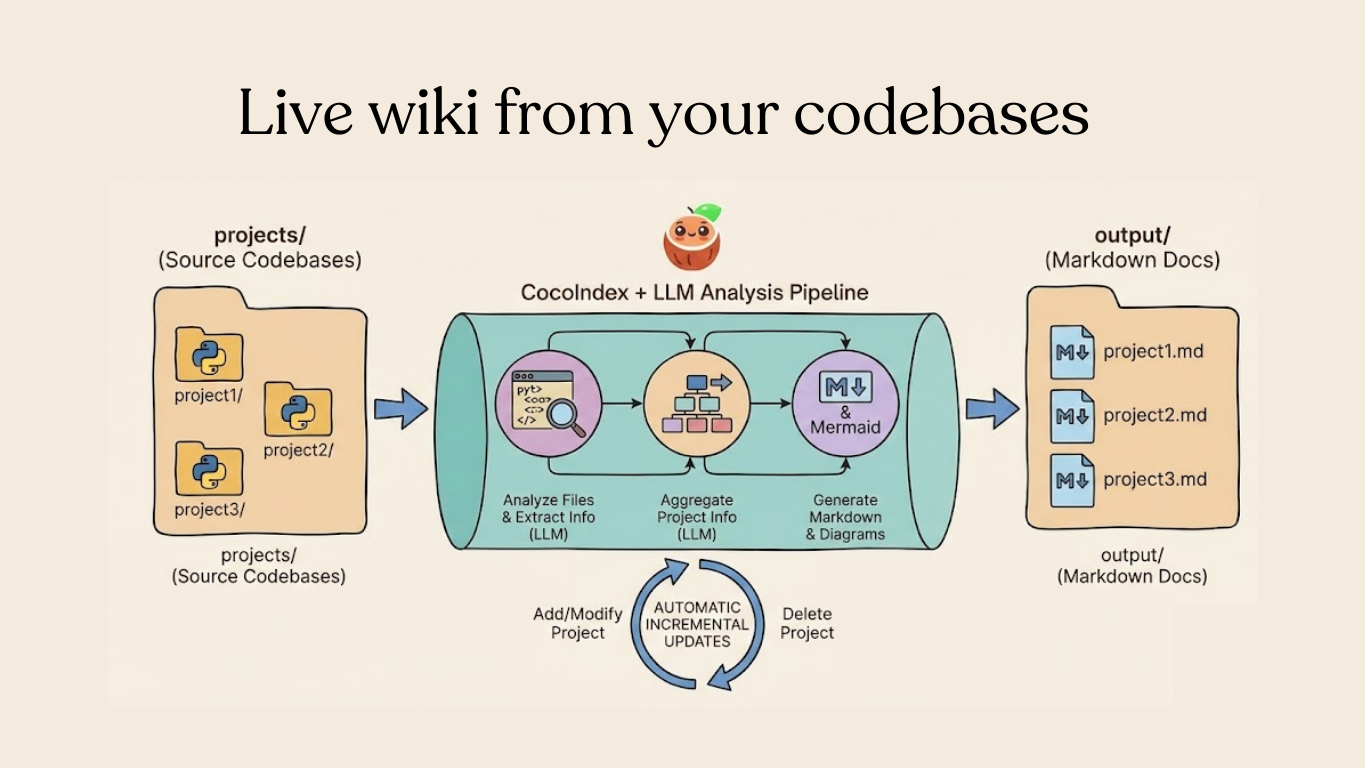
Your code is the source of truth — so why is your documentation always out of date? In this tutorial, we'll build a pipeline that automatically generates a wiki page for each project in your codebase, and keeps it fresh with incremental processing.
The full source code is available at CocoIndex Examples - multi_codebase_summarization.
⭐ Star CocoIndex if you find it helpful!
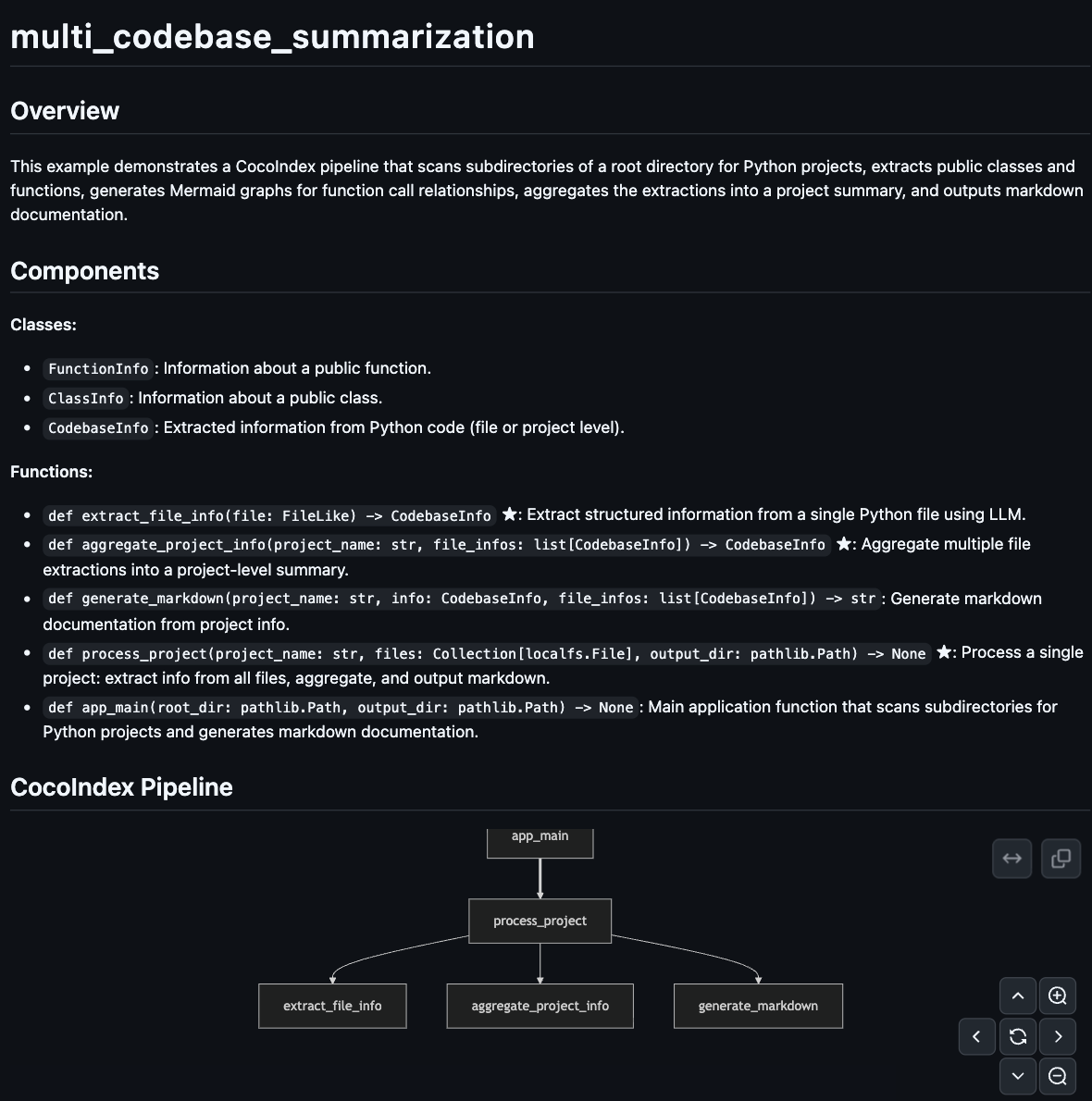
Here's an example of the generated documentation:
The Problem
Documentation rots. Someone refactors a module, and the wiki is already wrong. Nobody updates it until a new engineer asks "can I trust these docs?" — and the answer is always no.
What if the code was the documentation? Not in the "self-documenting code" handwave sense, but literally — a pipeline that reads your source, understands it, and produces structured documentation that stays current automatically.
What We'll Build
This project is using CocoIndex v1. We'd love your suggestions!
A pipeline that:
- Scans subdirectories, treating each as a separate project
- Extracts structured information from each Python file using an LLM (classes, functions, relationships)
- Aggregates file-level data into project-level summaries
- Generates Markdown documentation with Mermaid diagrams
The key insight:
target_state = transformation(source_state)
You declare what the transformation is. CocoIndex figures out when and what to re-process.
The reality of modern codebases
Your codebase isn't static. Developers push 20+ PRs a day. AI coding agents generate and modify files around the clock. Internal knowledge bases evolve as teams document new patterns and deprecate old ones.
This high-frequency change is the new normal — and traditional documentation pipelines simply can't keep up. Run a batch job nightly? By morning, dozens of files have changed. Run it hourly? You're burning compute on full rebuilds when only a handful of files actually changed.
The gap between "source of truth" and "derived artifacts" grows wider every hour.
Why not just write a script?
You could write a Python script that loops through files, calls an LLM, and writes Markdown. It would work — once. But then:
- File changes: You edit one file. Do you re-run the entire pipeline? That's slow and expensive.
- Tracking state: Which files have changed? You'd need to track timestamps, checksums, or diffs yourself.
- LLM costs: Re-analyzing unchanged files wastes API calls. At scale, this adds up fast.
- Logic changes: You tweak your extraction prompt. Now everything needs reprocessing — but only for that specific transformation.
The traditional approach forces you to think about caching, invalidation, and orchestration — problems orthogonal to your actual goal.
The declarative difference
With CocoIndex, you focus purely on the transformation logic:
- Define your functions — How to extract info from a file, how to aggregate, how to format
- Declare dependencies — CocoIndex tracks what depends on what
- Run once, update forever — Changes propagate automatically
When your source data updates (a file is edited), or your processing logic changes (you switch models, update prompts), CocoIndex performs smart incremental processing. Only the affected portions are recomputed. Your output stays in sync with your source — always.
Prerequisites
Install dependencies:
pip install --pre 'cocoindex>=1.0.0a6' instructor litellm pydantic
Set up environment:
export GEMINI_API_KEY="your-api-key"
export LLM_MODEL="gemini/gemini-2.5-flash"
echo "COCOINDEX_DB=./cocoindex.db" > .env
Create a projects/ directory with subdirectories for each Python project:
projects/
├── my_project_1/
│   ├── main.py
│   └── utils.py
├── my_project_2/
│   └── app.py
└── ...
Define the app
Define a CocoIndex App — the top-level runnable unit in CocoIndex.

import cocoindex as coco

LLM_MODEL = os.environ.get("LLM_MODEL", "gemini/gemini-2.5-flash")


app = coco.App(
    "MultiCodebaseSummarization",
    app_main,
    root_dir=pathlib.Path("./projects"),
    output_dir=pathlib.Path("./output"),
)
- The app scans
projects/and outputs documentation tooutput/
Define the main function
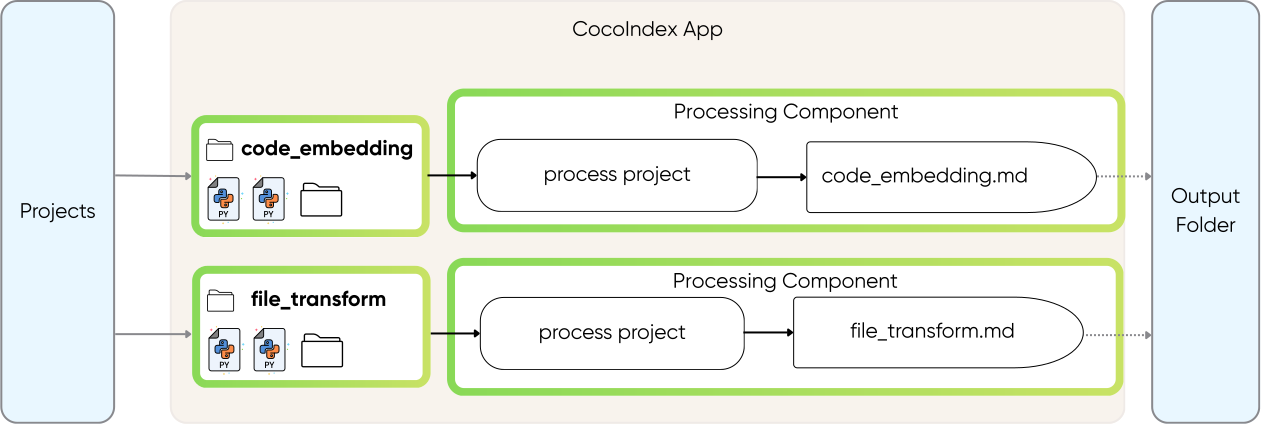
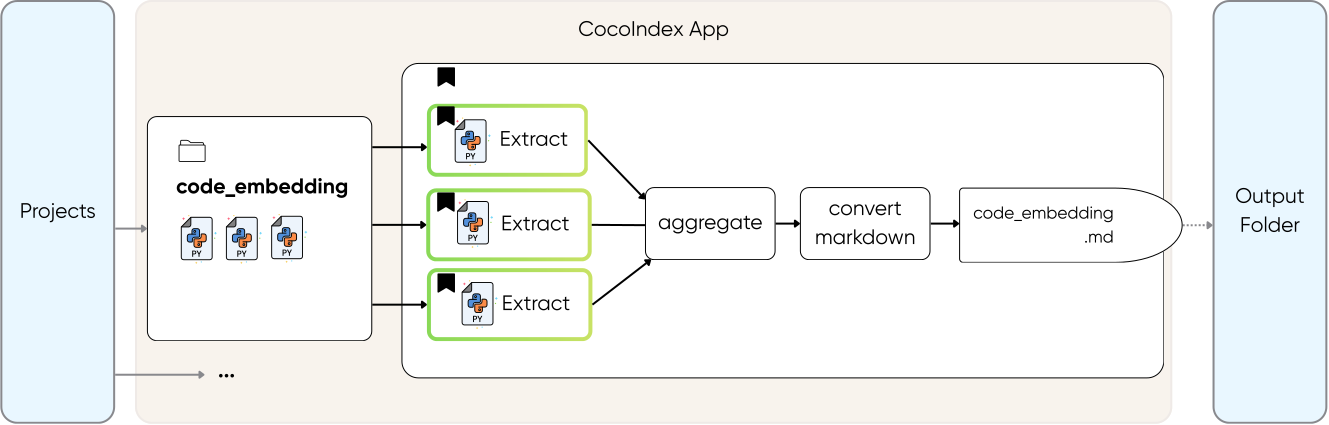
In the main function, we walk through each project in the subdirectories and process it.
It is up to you to declare the process granularity. It can be
- at a directory level per project. For example, code_embedding is a project, each containing multiple files,
- or at file level,
- or at even smaller units (e.g., page level, or semantic unit level).
In this example, we have a projects folder containing 20+ projects. It is natural to pick granularity at the directory level for each project, because we want to create a wiki page per project.
@coco.function
def app_main(
    root_dir: pathlib.Path,
    output_dir: pathlib.Path,
) -> None:
    """Scan subdirectories and generate documentation for each project."""
    for entry in root_dir.resolve().iterdir():
        if not entry.is_dir() or entry.name.startswith("."):
            continue
        project_name = entry.name

        files = list(
            localfs.walk_dir(
                entry,
                recursive=True,
                path_matcher=PatternFilePathMatcher(
                    included_patterns=["*.py"],
                    excluded_patterns=[".*", "__pycache__"],
                ),
            )
        )

        if files:
            coco.mount(
                coco.component_subpath("project", project_name),
                process_project,
                project_name,
                files,
                output_dir,
            )
The main function does two things:
-
Find all projects — Loop through each subdirectory in
root_dir, treating each as a separate project. -
Mount a processing component for each project — For each project with Python files,
coco.mount()sets up a processing component. CocoIndex handles the execution and tracks dependencies automatically.
Why processing components? A processing component groups an item's processing together with its target states. Each component runs independently and in parallel.
In this case, when project_a finishes, its results are applied to the external system immediately, without waiting for project_b or any other project.
To learn more about processing components, you can read the documentation:
Processing ComponentProcess each project
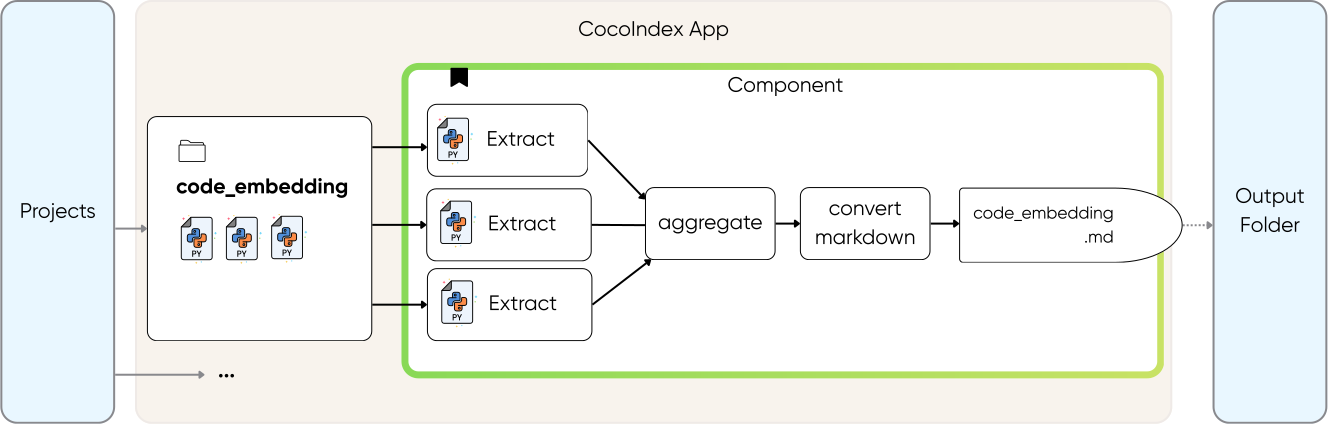
For each project, we will
- use LLM to extract info
- aggregate all the extraction into a project-level summary
- output the extraction to a nice documentation with a Mermaid diagram.
@coco.function(memo=True)
async def process_project(
    project_name: str,
    files: Collection[localfs.File],
    output_dir: pathlib.Path,
) -> None:
    """Process a project: extract, aggregate, and output markdown."""
    # Extract info from each file concurrently using asyncio.gather
    file_infos = await asyncio.gather(*[extract_file_info(f) for f in files])

    # Aggregate into project-level summary
    project_info = await aggregate_project_info(project_name, file_infos)

    # Generate and output markdown
    markdown = generate_markdown(project_name, project_info, file_infos)
    localfs.declare_file(
        output_dir / f"{project_name}.md", markdown, create_parent_dirs=True
    )
Concurrent processing with async — By using asyncio.gather(), all file extractions run concurrently. This is significantly faster than sequential processing, especially when making LLM API calls.
Extract file information with LLM
Now let's take a look at the details for each transformation. For file extraction, we define a structure using Pydantic and use Instructor to extract with LLMs.
Define the data models
The key to structured LLM outputs is defining clear Pydantic models.
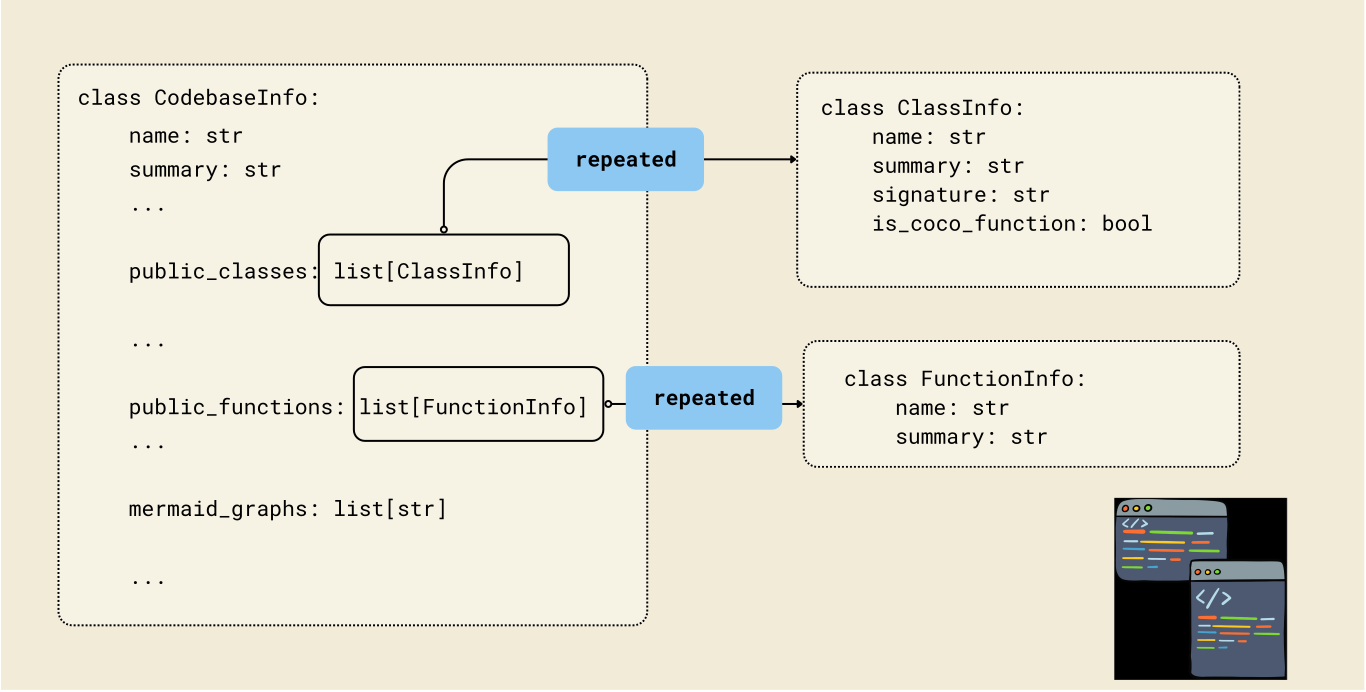
class FunctionInfo(BaseModel):
    """Information about a public function."""
    name: str = Field(description="Function name")
    signature: str = Field(
        description="Function signature, e.g. 'async def foo(x: int) -> str'"
    )
    is_coco_function: bool = Field(
        description="Whether decorated with @coco.function"
    )
    summary: str = Field(description="Brief summary of what the function does")


class ClassInfo(BaseModel):
    """Information about a public class."""
    name: str = Field(description="Class name")
    summary: str = Field(description="Brief summary of what the class represents")


class CodebaseInfo(BaseModel):
    """Extracted information from Python code."""
    name: str = Field(description="File path or project name")
    summary: str = Field(description="Brief summary of purpose and functionality")
    public_classes: list[ClassInfo] = Field(default_factory=list)
    public_functions: list[FunctionInfo] = Field(default_factory=list)
    mermaid_graphs: list[str] = Field(
        default_factory=list,
        description="Mermaid graphs showing function relationships"
    )
Extract file info
The core extraction function uses memoization to cache LLM results:
_instructor_client = instructor.from_litellm(acompletion, mode=instructor.Mode.JSON)

@coco.function(memo=True)
async def extract_file_info(file: FileLike) -> CodebaseInfo:
    """Extract structured information from a single Python file using LLM."""
    content = file.read_text()
    file_path = str(file.file_path.path)

    prompt = f"""Analyze the following Python file and extract structured information...""" # see full prompt below

    result = await _instructor_client.chat.completions.create(
        model=LLM_MODEL,
        response_model=CodebaseInfo,
        messages=[{"role": "user", "content": prompt}],
    )
    return CodebaseInfo.model_validate(result.model_dump())
📝 See the full prompt in the repo.
Why memo=True? When input data and code haven't changed, CocoIndex skips recomputation entirely and returns the previous result. This gives you fine-grained control over incremental processing — unchanged files skip expensive computation or unnecessary remote LLM calls automatically.
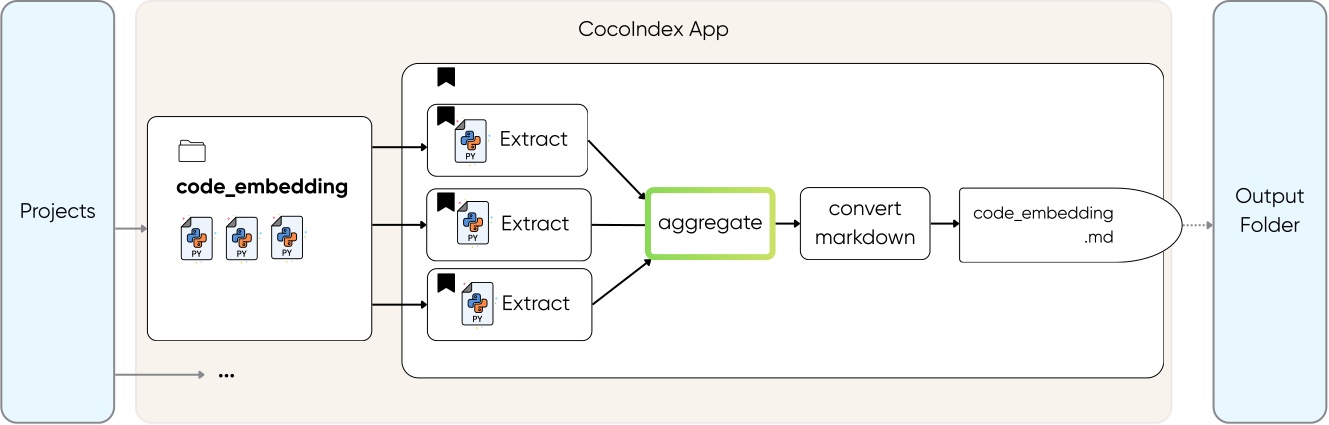
Aggregate project information
For projects with multiple files, we aggregate into a unified summary:
@coco.function
async def aggregate_project_info(
    project_name: str,
    file_infos: list[CodebaseInfo],
) -> CodebaseInfo:
    """Aggregate multiple file extractions into a project-level summary."""
    if not file_infos:
        return CodebaseInfo(
            name=project_name, summary="Empty project with no Python files."
        )

    # Single file - just update the name
    if len(file_infos) == 1:
        info = file_infos[0]
        return CodebaseInfo(
            name=project_name,
            summary=info.summary,
            public_classes=info.public_classes,
            public_functions=info.public_functions,
            mermaid_graphs=info.mermaid_graphs,
        )

    # Multiple files - use LLM to create unified summary
    files_text = "\n\n".join(
        f"### {info.name}\n"
        f"Summary: {info.summary}\n"
        f"Classes: {', '.join(c.name for c in info.public_classes) or 'None'}\n"
        f"Functions: {', '.join(f.name for f in info.public_functions) or 'None'}"
        for info in file_infos
    )

    # Collect all mermaid graphs from files
    all_graphs = [g for info in file_infos for g in info.mermaid_graphs]

    prompt = f"""Aggregate the following Python files into a project-level summary...""" # see full prompt in repo

    result = await _instructor_client.chat.completions.create(
        model=LLM_MODEL,
        response_model=CodebaseInfo,
        messages=[{"role": "user", "content": prompt}],
    )
    result = CodebaseInfo.model_validate(result.model_dump())

    # Keep original file-level graphs if LLM didn't generate a unified one
    if not result.mermaid_graphs and all_graphs:
        result.mermaid_graphs = all_graphs

    return result
📝 See the full prompt in the repo.
This function combines file-level extractions into a single project summary:
- Single file project — Just use that file's info directly (no extra LLM call needed)
- Multi-file project — Ask the LLM to synthesize all file summaries into one cohesive project overview
The result is a unified CodebaseInfo that represents the entire project, not individual files.
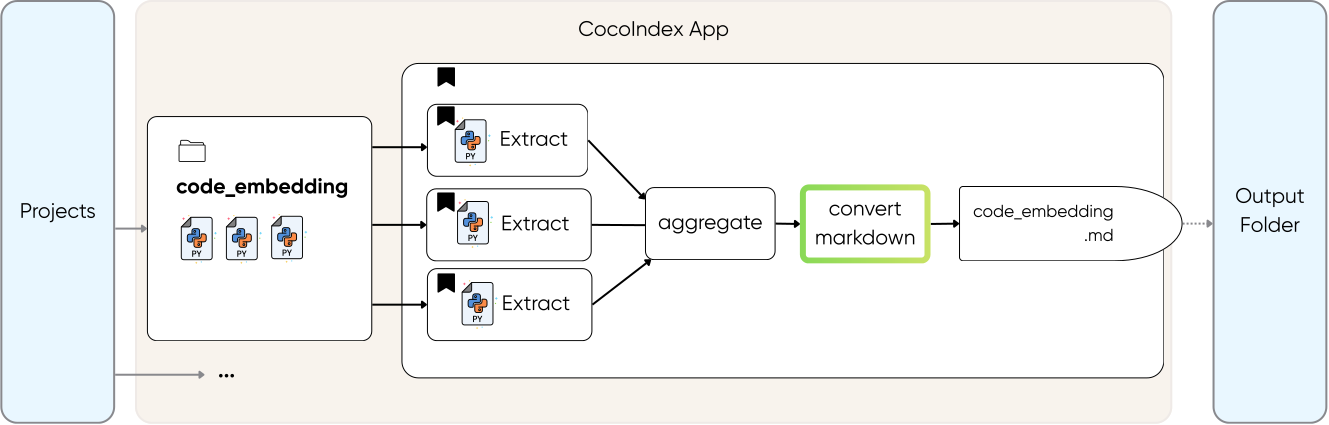
Generate markdown output
Create output markdown for each project.
@coco.function
def generate_markdown(
    project_name: str, info: CodebaseInfo, file_infos: list[CodebaseInfo]
) -> str:
    """Generate markdown documentation from project info."""
    lines = [
        f"# {project_name}",
        "",
        "## Overview",
        "",
        info.summary,
        "",
    ]

    if info.public_classes or info.public_functions:
        lines.extend(["## Components", ""])

        if info.public_classes:
            lines.append("**Classes:**")
            for cls in info.public_classes:
                lines.append(f"- `{cls.name}`: {cls.summary}")
            lines.append("")

        if info.public_functions:
            lines.append("**Functions:**")
            for fn in info.public_functions:
                marker = " ★" if fn.is_coco_function else ""
                lines.append(f"- `{fn.signature}`{marker}: {fn.summary}")
            lines.append("")

    if info.mermaid_graphs:
        lines.extend(["## CocoIndex Pipeline", ""])
        for graph in info.mermaid_graphs:
            graph_content = graph.strip()
            if not graph_content.startswith("```"):
                lines.append("```mermaid")
                lines.append(graph_content)
                lines.append("```")
            else:
                lines.append(graph_content)
            lines.append("")

    if len(file_infos) > 1:
        lines.extend(["## File Details", ""])
        for fi in file_infos:
            lines.extend([f"### {fi.name}", "", fi.summary, ""])

    lines.extend(["---", "", "*★ = CocoIndex function*"])
    return "\n".join(lines)
This function converts the structured CodebaseInfo into readable documentation:
- Overview — Project summary at the top
- Components — Lists classes and functions with descriptions (★ marks CocoIndex functions)
- Pipeline diagram — Mermaid graphs showing how functions connect
- File details — For multi-file projects, includes per-file summaries
Run the pipeline
cocoindex update main.py
CocoIndex will:
- Scan each subdirectory in
projects/ - Extract structured information from Python files using the LLM
- Aggregate file summaries into project summaries
- Generate Markdown files in
output/
Check the output:
ls output/
# project1.md project2.md ...
Incremental Updates
The real power shows when you make changes:
Modify a file:
# Edit a Python file in one of your projects
cocoindex update main.py
# Only the modified file is re-analyzed
Add a new project:
mkdir projects/new_project
# Add .py files
cocoindex update main.py
# Only the new project is processed
Output Example
Each generated Markdown file includes:
- Overview — What the project does
- Components — Public classes and functions with descriptions
- Pipeline diagram — Mermaid graph showing how functions connect
- File details — Per-file summaries for multi-file projects
Key Patterns
This example showcases several powerful patterns:
- Structured LLM outputs — Pydantic models + Instructor = validated, typed data every time
- Memoized LLM calls — Same input = cached result. Cut costs by 80-90%
- Async concurrent processing —
asyncio.gather()for parallel extraction - Hierarchical aggregation — Extract at file level, aggregate to project level
- Incremental processing — Only re-process what changed
Why This Matters
This isn't just about generating nicer docs. It's about a fundamental shift in how we think about derived knowledge.
The rise of long-horizon agents
AI agents are no longer just answering one-off questions. They're operating autonomously over hours, days, or weeks — planning, executing, and adapting. These long-horizon agents need accurate, up-to-date knowledge to make effective decisions.
When an agent is debugging a failing build at 3am, it can't rely on documentation that was accurate last week. It needs to know:
- What changed recently?
- How do these modules interact now?
- What's the current state of the system?
Stale knowledge leads to wrong decisions. Wrong decisions compound over time. For autonomous agents, timely access to fresh knowledge isn't a nice-to-have — it's the difference between success and failure.
Change as the first-degree primitive
In the agentic world, change becomes the fundamental unit of work. An agent doesn't just read the codebase once — it reacts to changes, processes deltas, and updates its understanding incrementally.
This is why incremental processing matters:
- Efficiency: Only process what changed, not the entire corpus
- Latency: Surface new knowledge within minutes, not hours
- Cost: Avoid redundant LLM calls on unchanged content
- Scalability: Handle codebases that would be impossible to reprocess from scratch
When you declare transformations declaratively, you're not just writing a pipeline — you're building infrastructure that keeps derived knowledge synchronized with source truth, automatically.
The future isn't batch jobs that run nightly. It's reactive systems where knowledge flows continuously from source to consumer — whether that consumer is a human engineer or an AI agent making decisions at 3am.
Thanks to the Community 🤗🎉
@prrao87

Thanks @prrao87 for reviewing the example and providing detailed feedback on terminology, style and conceptual clarity! We love your contribution in shaping developer experience.
We love building with the community — if you have ideas, questions, or want to contribute, join us on Discord!
Next Steps
- Try the full example
- Read the step-by-step tutorial
- Join the CocoIndex Discord for questions
If you find CocoIndex useful, star us on GitHub — it helps more developers discover the project!