
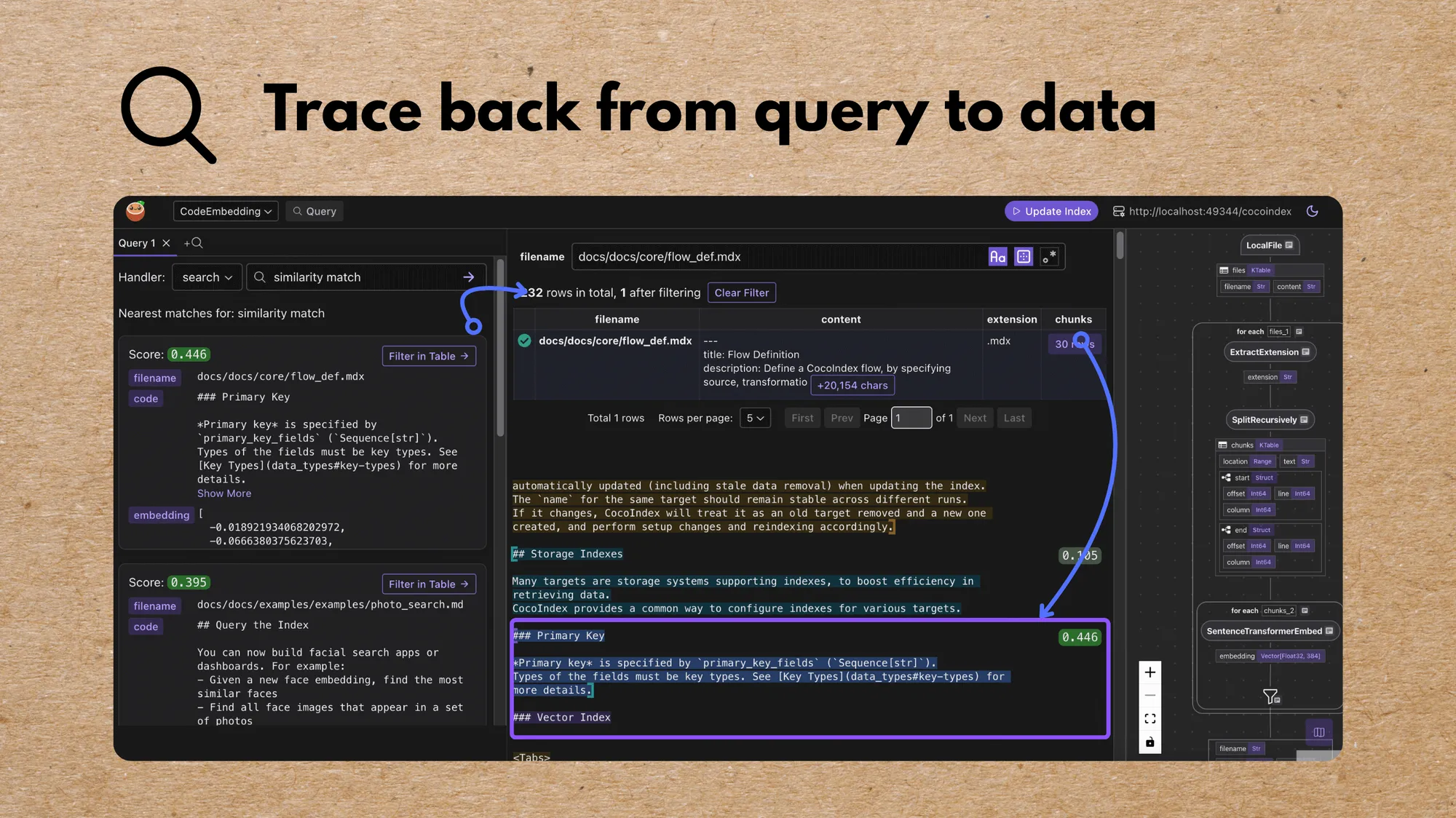
We are launching a major feature in both CocoIndex and CocoInsight to help users iterate faster on the indexing strategy, and trace back all the way to the data, to make the transformation experience more seamlessly integrated with the end goal.
We deeply care about making the overall experience seamless. With the new launch, you can define query handlers, so that you can easily run queries in tools like CocoInsight.
CocoInsight
Does my data transformation create a meaningful index for retrieval?
In CocoInsight, we’ve added a Query mode. You can enable this by adding a CocoIndex Query Handler. You can quickly query the index, and view the collected information for any entity.
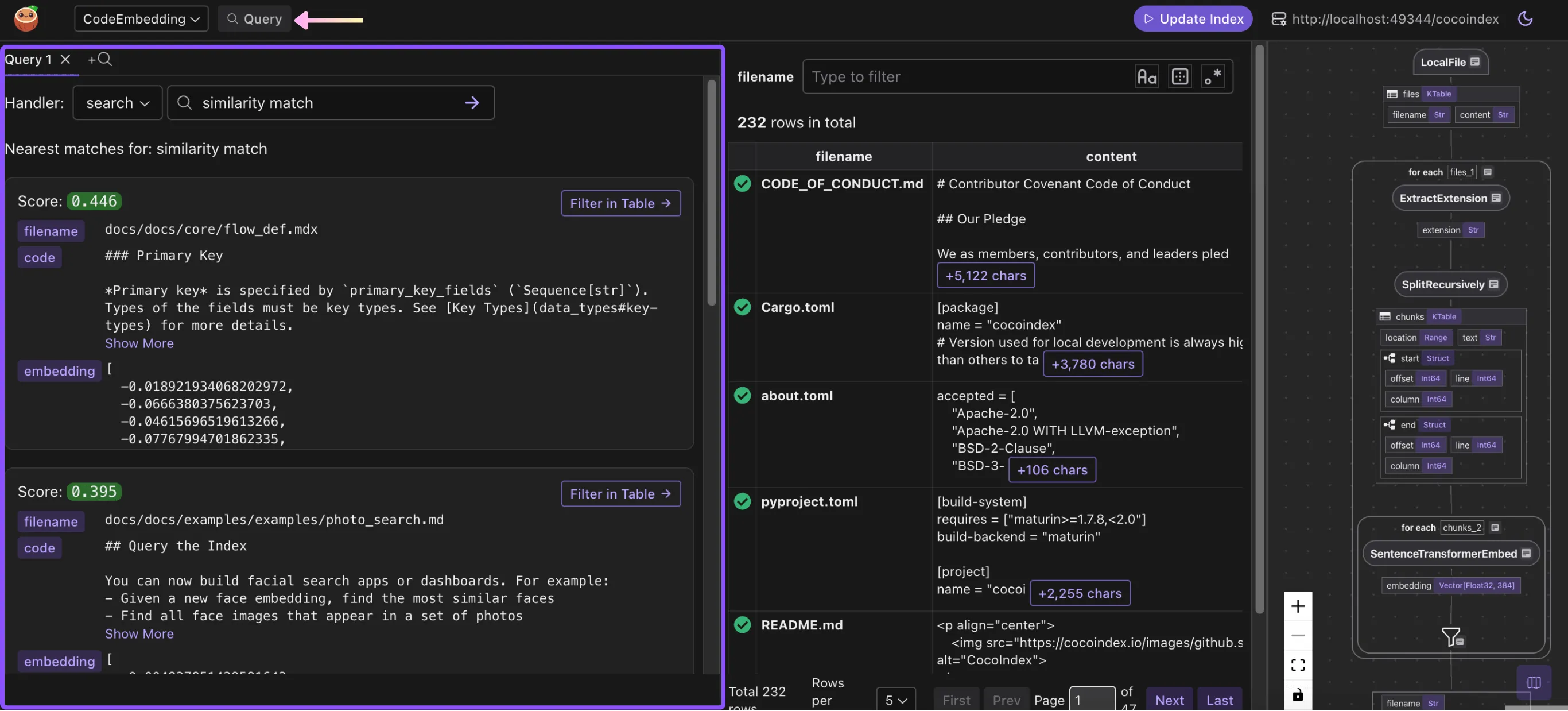
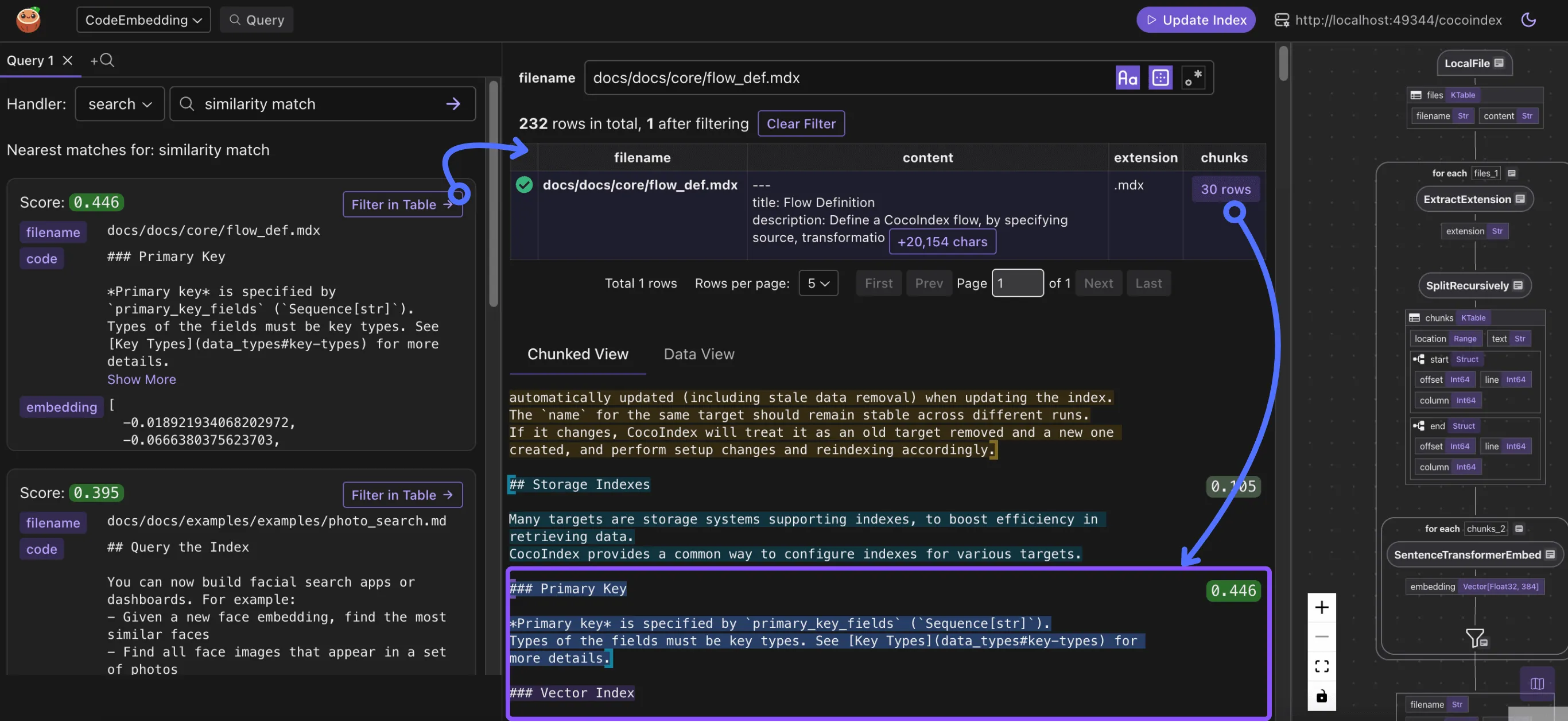
The result is directly linked and can be traced back step by step to how data is generated on the indexing path.
Where are the results coming from?
For example, this snippet comes from the file docs/docs/core/flow_def.mdx. The file was split into 30 chunks after transformation.
Why is my chunk / snippet not showing in the search result?
When you perform a query, on the ranking path, you’d usually have a scoring mechanism. On CocoInsight, you can quickly find any files you have in your mind, and for any chunks, you can scan the scoring in the same context.
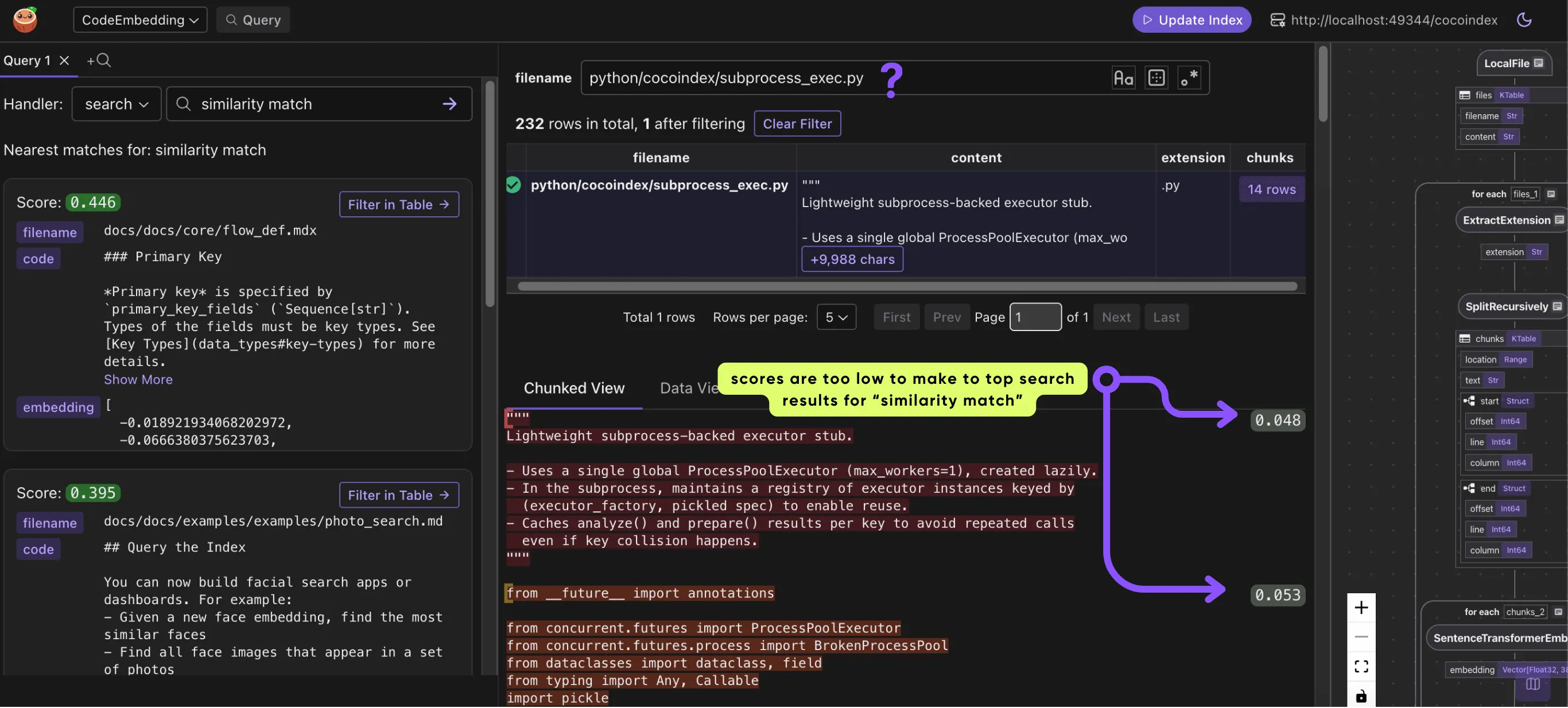
This gives you a powerful toolset with direct insight into end-to-end data transformation, to quickly iterate on the data indexing strategy without any headaches of building any additional UI or tools.
Integrate query logic with CocoIndex
Query handler
To run queries in CocoInsight, you need to define query handlers. You can use any libraries or frameworks of your choice to perform queries.
You can read more in the documentation about Query Handler.
Query handlers let you expose a simple function that takes a query string and returns structured results. They are discoverable by tools like CocoInsight so you can query your indexes without building your own UI.
For example:
# Declaring it as a query handler, so that you can easily run queries in CocoInsight.
@code_embedding_flow.query_handler(
    result_fields=cocoindex.QueryHandlerResultFields(
        embedding=["embedding"], score="score"
    )
)
def search(query: str) -> cocoindex.QueryOutput:
    # Get the table name, for the export target in the code_embedding_flow above.
    table_name = cocoindex.utils.get_target_default_name(
        code_embedding_flow, "code_embeddings"
    )
    # Evaluate the transform flow defined below with the input query, to get the embedding.
    query_vector = code_to_embedding.eval(query)
    # Run the query and get the results.
    with connection_pool().connection() as conn:
        register_vector(conn)
        with conn.cursor() as cur:
            cur.execute(
                f"""
                SELECT filename, code, embedding, embedding <=> %s AS distance, start, "end"
                FROM {table_name} ORDER BY distance LIMIT %s
            """,
                (query_vector, TOP_K),
            )
            return cocoindex.QueryOutput(
                query_info=cocoindex.QueryInfo(
                    embedding=query_vector,
                    similarity_metric=cocoindex.VectorSimilarityMetric.COSINE_SIMILARITY,
                ),
                results=[
                    {
                        "filename": row[0],
                        "code": row[1],
                        "embedding": row[2],
                        "score": 1.0 - row[3],
                        "start": row[4],
                        "end": row[5],
                    }
                    for row in cur.fetchall()
                ],
            )
This code defines a query handler that:
- Turns the input query into an embedding vector.
code_to_embeddingis a shared transformation flow between the Query and Index paths; see the detailed explanation below. - Searches a database of code embeddings using cosine similarity.
- Returns the top matching code snippets with their filename, code, embedding, score, and positions.
Sharing logic between indexing and query
Sometimes, transformation logic needs to be shared between indexing and querying, e.g. when we build a vector index and query against it, the embedding computation needs to be consistent between indexing and querying.
You can find the documentation about Transformation Flow.
You can use @cocoindex.transform_flow() to define shared logic. For example:
@cocoindex.transform_flow()
def text_to_embedding(text: cocoindex.DataSlice[str]) -> cocoindex.DataSlice[NDArray[np.float32]]:
    return text.transform(
        cocoindex.functions.SentenceTransformerEmbed(
            model="sentence-transformers/all-MiniLM-L6-v2"))
In your indexing flow, you can directly call it:
with doc["chunks"].row() as chunk:
    chunk["embedding"] = text_to_embedding(chunk["text"])
In your query logic, you can call the eval() method with a specific value:
def search(query: str) -> cocoindex.QueryOutput:
    # Evaluate the transform flow defined below with the input query, to get the embedding.
    query_vector = code_to_embedding.eval(query)
Examples
Beyond vector index
We use a vector index in this blog, following the text embedding example. CocoIndex is a powerful data transformation framework that goes beyond vector indexes. You can use it to build vector indexes, knowledge graphs, structured extraction and transformation, and any custom logic towards your need for efficient retrieval from fresh data.
Support us
We’re constantly adding more examples and improving our runtime. ⭐ Star CocoIndex on GitHub and share the love ❤️ !
And let us know what you are building with CocoIndex. We’d love to feature it.

About the author.

CEO and cofounder of CocoIndex. Writes about incremental data infrastructure, agents, and the engineering decisions behind the engine.
Frequently asked questions.
What is a query handler in CocoIndex?
A query handler is a simple function that takes a query string and returns structured results. Declaring it with @flow.query_handler(...) makes it discoverable by tools like CocoInsight, so you can query your indexes without building your own UI. See Query handler.
How do I run queries against my index inside CocoInsight?
Enable Query mode by adding a CocoIndex Query Handler. You can then run queries and view the collected information for any entity directly in CocoInsight, with each result linked back to how the data was generated on the indexing path. See CocoInsight.
How do I keep embedding logic consistent between indexing and querying?
Define the shared logic once with @cocoindex.transform_flow(). In the indexing flow you call it directly on a data slice; in the query path you call its eval() method with the query string. This guarantees the embedding computation is identical on both paths. See Sharing logic between indexing and query.
How do I trace a search result back to its source data?
In CocoInsight, query results are directly linked and can be traced step by step back to how the data was generated on the indexing path — for example, a snippet can be traced to the source file it came from and the chunks that file was split into after transformation. See Where are the results coming from?.
Why is my chunk not showing up in the search results?
On the ranking path you usually have a scoring mechanism. In CocoInsight you can locate any file, and for any of its chunks scan the scoring in the same context — so you can see why a particular chunk ranked where it did without building extra tooling. See Why is my chunk / snippet not showing in the search result?.
Does query support only work with vector indexes?
No. A vector index is used in this walkthrough, but CocoIndex is a general data transformation framework: you can also build knowledge graphs, structured extraction and transformation, and any custom retrieval logic over fresh data. See Beyond vector index.
