Use Discord channels as the source for Semantic Search 101: a forum’s posts, and a text or announcement channel’s messages and threads. The chunking, embedding, and Postgres/pgvector target stay the same; each row also keeps a link back to the post or message it came from.
Start with the base walkthrough for the chunk-and-embed implementation, then connect Discord as the source.
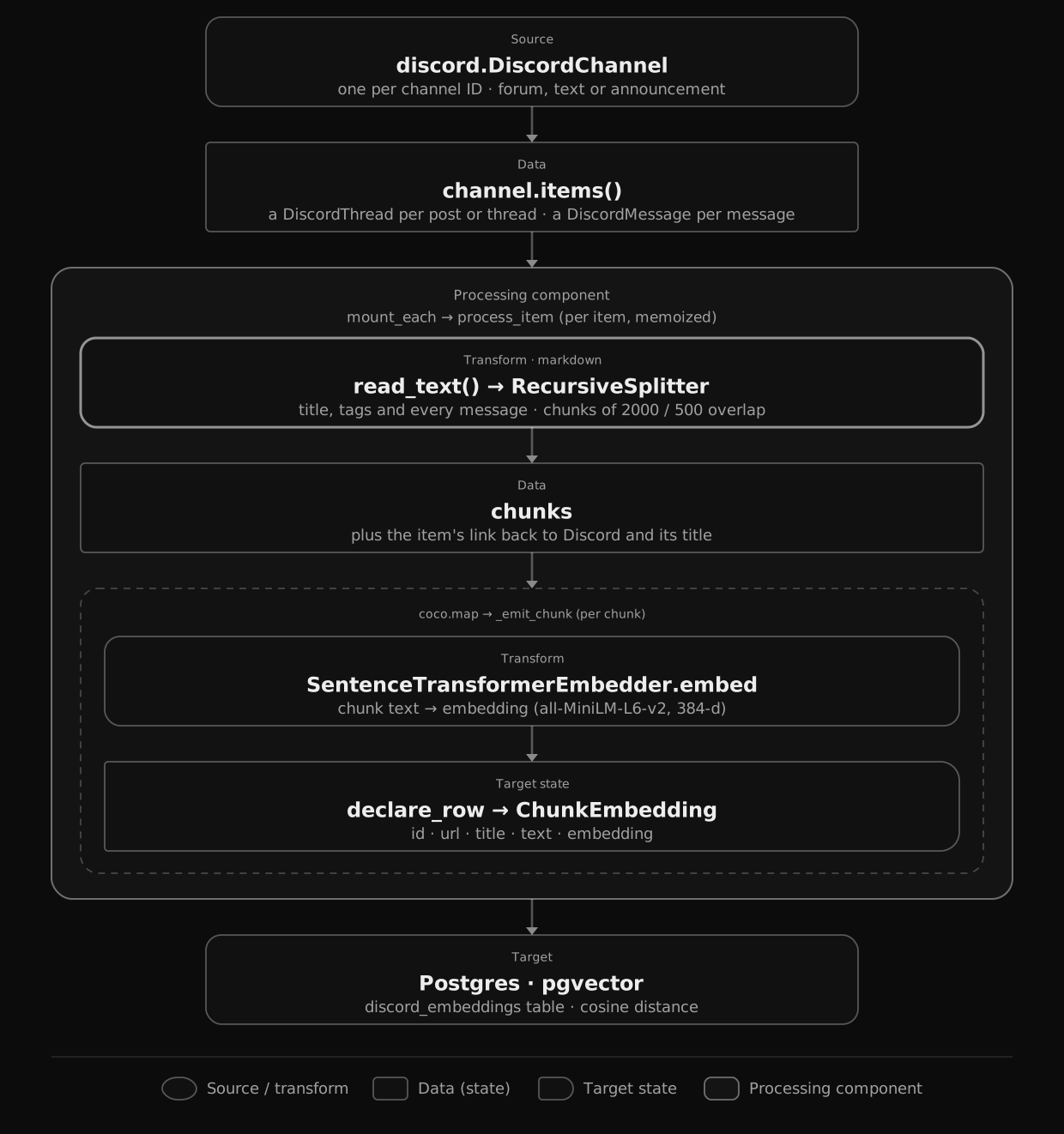
Flow overview
 Open diagram at full size
From a high level, these are the steps:
- List each channel’s items with the Discord connector: one per forum post or thread, and one per message outside a thread.
- Render each item as text (a post’s title, tags and every message in it) and split it into chunks, then embed every chunk.
- Store the chunks and their embeddings in Postgres (as target states), each row with a link back to Discord.
You declare the transformation logic with native Python, without worrying about how updates propagate. Think: target_state = transformation(source_state).
Connect to Discord
The connector reads through a bot: a DiscordApp holds its token and the HTTP client, and lives for the whole run, so the lifespan opens it next to the Postgres pool and the embedder.
PG_DB = coco.ContextKey[asyncpg.Pool]("discord_text_embedding_db")
DISCORD = coco.ContextKey[discord.DiscordApp]("discord")
EMBEDDER = coco.ContextKey[SentenceTransformerEmbedder]("embedder", detect_change=True)


@coco.lifespan
async def coco_lifespan(
    builder: coco.EnvironmentBuilder,
) -> AsyncIterator[None]:
    async with (
        asyncpg.create_pool(DATABASE_URL) as pool,
        discord.DiscordApp(token=os.environ["DISCORD_BOT_TOKEN"]) as app,
    ):
        builder.provide(PG_DB, pool)
        builder.provide(DISCORD, app)
        builder.provide(EMBEDDER, SentenceTransformerEmbedder(EMBED_MODEL))
        yield
Each channel is a DiscordChannel. An item is fingerprinted by every field it exposes, so a change to any of them reruns it. The example picks only the fields its text and links read:
MESSAGE_FIELDS = [
    "author",
    "channel_id",
    "content",
    "embeds",
    "guild_id",
    "mentions",
    "type",
]
THREAD_FIELDS = [
    "guild_id",
    "name",
    "tags",
    "message_count",
    "total_message_sent",
    "last_message_id",
    "archived",
    "archive_timestamp",
    "locked",
]
Reactions, pins and member counts are left out, so a reaction, a pin or someone joining a thread re-embeds nothing. A thread keeps its counters, last message, archive and lock fields: the messages inside a thread aren’t part of its fingerprint, so those fields are the only signs that they changed. Choosing fields lists what each one is for.
Process an item
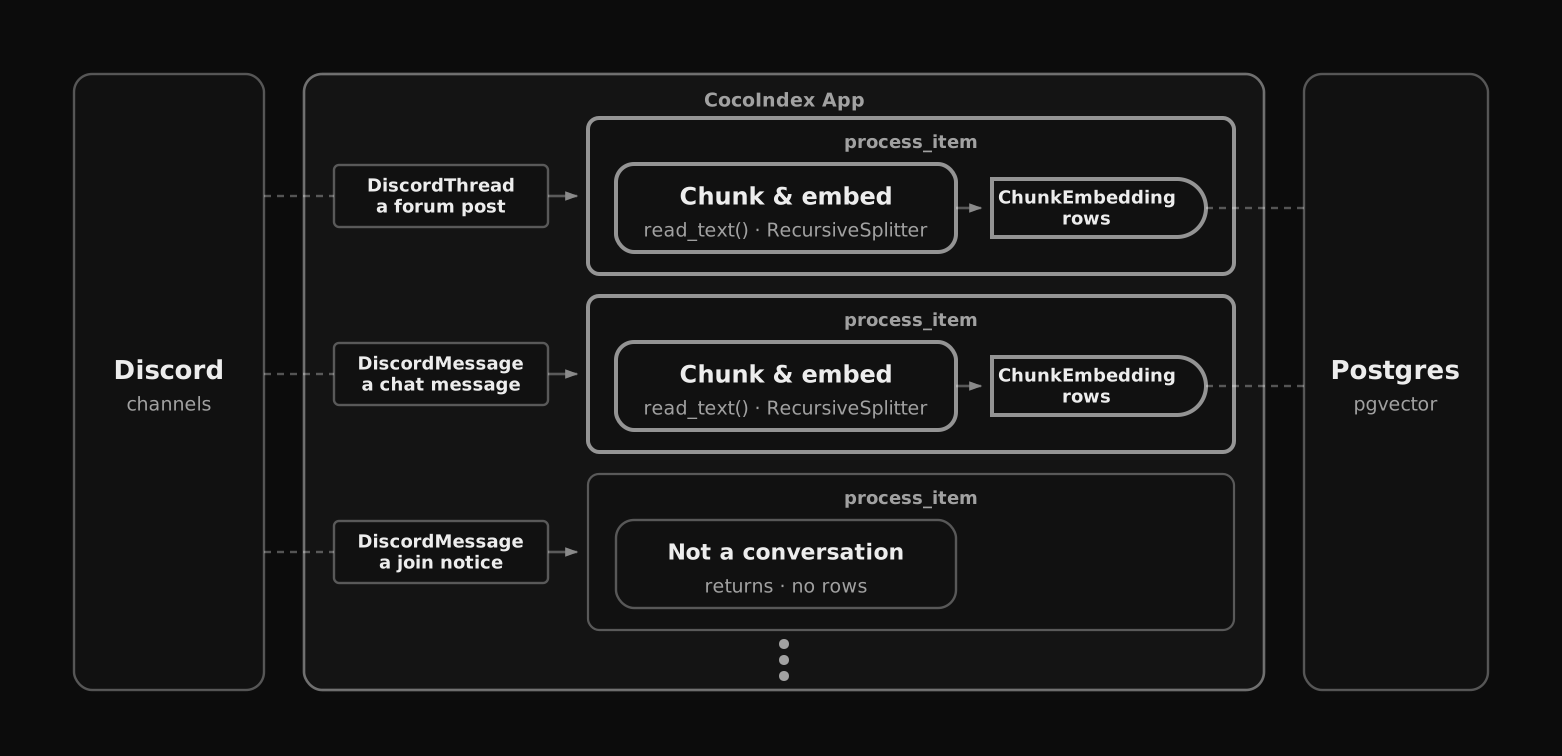
process_item is the processing component for one item, either a DiscordThread (a forum post, or a thread in a text or announcement channel) or a DiscordMessage (a message outside a thread).
 Open diagram at full size
@dataclass
class ChunkEmbedding:
    id: int
    url: str
    title: str
    text: str
    embedding: Annotated[NDArray, EMBEDDER]


@coco.fn(memo=True)
async def process_item(
    item: discord.DiscordMessage | discord.DiscordThread,
    table: postgres.TableTarget[ChunkEmbedding],
) -> None:
    if isinstance(item, discord.DiscordThread):
        url = f"https://discord.com/channels/{item.guild_id}/{item.id}"
        title = item.name or ""
    elif item.type in CONVERSATION_TYPES:
        url = (
            f"https://discord.com/channels/{item.guild_id}/{item.channel_id}/{item.id}"
        )
        title = ""
    else:
        return
    text = await item.read_text()
    chunks = _splitter.split(
        text, chunk_size=2000, chunk_overlap=500, language="markdown"
    )
    id_gen = IdGenerator()
await coco.map(_emit_chunk, chunks, url, title, id_gen, table)- The link. A thread’s URL is the server’s ID and the thread’s; a message’s adds the channel’s.
urlandtitlego on every row, so a search result opens the post or message it came from. - System notices are skipped.
CONVERSATION_TYPESis(0, 19, 20, 23): default messages, replies, and slash and context-menu commands. Joins, pins and the other notices return before reading anything, so they get no rows. System message types and filtering lists them all. - The text.
read_text()renders a thread as its name, aTags:line if it has tags, then each message asauthor: text, oldest first; a message asauthor: text, with a bot’s rich embeds (author, title, description, fields, footer) as lines of text. So an announcement posted as an embed is searchable too.
From there it’s the base example’s chunk-and-embed: _emit_chunk embeds each chunk and declares one ChunkEmbedding row, with an id derived from the chunk text.
@coco.fn
async def _emit_chunk(
    chunk: Chunk,
    url: str,
    title: str,
    id_gen: IdGenerator,
    table: postgres.TableTarget[ChunkEmbedding],
) -> None:
    table.declare_row(
        row=ChunkEmbedding(
            id=await id_gen.next_id(chunk.text),
            url=url,
            title=title,
            text=chunk.text,
            embedding=await coco.use_context(EMBEDDER).embed(chunk.text),
        ),
    )
Define the main function
app_main mounts the Postgres table, then one component per channel, and sync_channel mounts one process_item per item with mount_each.
@coco.fn
async def sync_channel(
    channel: discord.DiscordChannel,
    table: postgres.TableTarget[ChunkEmbedding],
) -> None:
    await coco.mount_each(process_item, channel.items(), table)


@coco.fn
async def app_main() -> None:
    table = await postgres.mount_table_target(
        PG_DB,
        table_name=TABLE_NAME,
        table_schema=await postgres.TableSchema.from_class(
            ChunkEmbedding,
            primary_key=["id"],
        ),
        pg_schema_name=PG_SCHEMA_NAME,
    )

    app = coco.use_context(DISCORD)
    channel_ids = [
        cid.strip()
        for cid in os.environ["DISCORD_CHANNEL_IDS"].split(",")
        if cid.strip()
    ]
    channels = [
        (
            cid,
            discord.DiscordChannel(
                app=app,
                channel_id=cid,
                message_fields=MESSAGE_FIELDS,
                thread_fields=THREAD_FIELDS,
            ),
        )
        for cid in channel_ids
    ]
    await coco.mount_each(sync_channel, channels, table)
channel.items() yields (key, item) pairs keyed by each message’s or thread’s Discord ID, so mount_each tracks every item on its own, and the channels are keyed by their IDs. mount_table_target creates and manages the Postgres table: schema, idempotent upserts, and cleanup of the rows whose item is gone.
Setup
-
A Discord bot in your server, with the Message Content intent turned on, and View Channels and Read Message History in the channels to index. The connector page’s Setup walks through it. The bot only reads.
-
The channels to index: forum, text or announcement channels. To copy a channel’s ID, turn on Developer Mode (User Settings → Advanced) and right-click the channel.
-
A running Postgres with the pgvector extension:
docker compose -f ../../dev/postgres.yaml up -d -
From the example folder, copy
.env.exampleto.envand setDISCORD_BOT_TOKEN, andDISCORD_CHANNEL_IDSto one or more channel IDs, comma-separated. Then install the dependencies:cp .env.example .env pip install -e . -
Optionally, fill the channels with made-up posts:
seed_server.pywrites support posts into a forum, a chat into a text channel, and two announcements (a release note and a maintenance notice) as rich embeds into an announcement channel. It posts through webhooks, so the bot never writes. A webhook belongs to one channel: in each channel’s settings, open Integrations → Webhooks → New Webhook, and copy its URL into.envasDISCORD_SEED_FORUM_WEBHOOK_URL,DISCORD_SEED_TEXT_WEBHOOK_URLorDISCORD_SEED_ANNOUNCEMENT_WEBHOOK_URL. The script fills the channels whose webhook is set; it creates forum posts without tags, so the forum mustn’t require them. Run it once, since every run posts everything again:python seed_server.py
Run the pipeline
The Discord source has no live mode, so build the index with a single cocoindex update; each run lists every channel and catches up:
cocoindex update mainThen search straight from the command line, reusing the same embedder from the indexing flow so indexing and querying stay consistent:
python main.py "notes stop syncing in the morning"Each result shows a post’s or thread’s title and its link, or a message’s link, then the matching chunk. In the seeded channels, the forum post Sync stops after my laptop wakes from sleep comes back first. A message’s embeds are part of its text, so python main.py "is sync down for maintenance?" finds the seeded maintenance announcement.
Incremental updates
Just like the base example, CocoIndex does the minimum work to keep the index in sync. @coco.fn(memo=True) on process_item skips any item whose exposed fields and the function’s code are both unchanged, without fetching a thread’s messages, and mount_table_target upserts only the rows that changed and deletes rows whose item is gone.
- A post gets a reply, loses a message, or is renamed or retagged: it’s read and embedded again; other posts are left alone.
- A post is closed or locked: it reruns, but its text is the same, and embeddings are cached by text, so nothing is embedded again.
- A post or message is deleted: its rows are removed on the next run.
- A reaction or someone joining a thread: nothing reruns, since the channel doesn’t expose those fields.
- A pin: Discord posts a pin notice, which gets no row. In a text channel the notice is a new item; inside a thread it’s a new message, so the thread reruns, but its text is the same, so nothing is embedded again.
One thing isn’t picked up right away: an edit to a message inside a post. Discord reports no change on the post for it, so it’s indexed the next time the post changes in one of the ways above. See The gap inside threads.
To see it, run cocoindex update main again after each change in Discord and read its process_item line:
- Reply to one of the forum posts:
1 reprocessed, the rest unchanged. Only that post was embedded again. - React to a message in the text channel: nothing reprocessed.
- Start a thread on a message in the text channel (hover over it, then Create Thread) and post in it:
1 reprocessed. The message’s rows now hold the thread’s text, under its title. Discord may also post a “started a thread” notice in the channel; that shows as1 added, a new item but a system notice, so it gets no row. - Delete a forum post:
1 deleted, and the post’s rows are gone.
Run it
The full, runnable example is in the CocoIndex repo: examples/discord_text_embedding. The Discord connector page covers the rest of the API: choosing fields, rate limits, and what deletes outputs. If you haven’t yet, read Semantic Search 101 for the line-by-line tour of chunking and embedding.