Building a Real-Time HackerNews Trending Topics Detector with CocoIndex: A Deep Dive into Custom Sources and AI

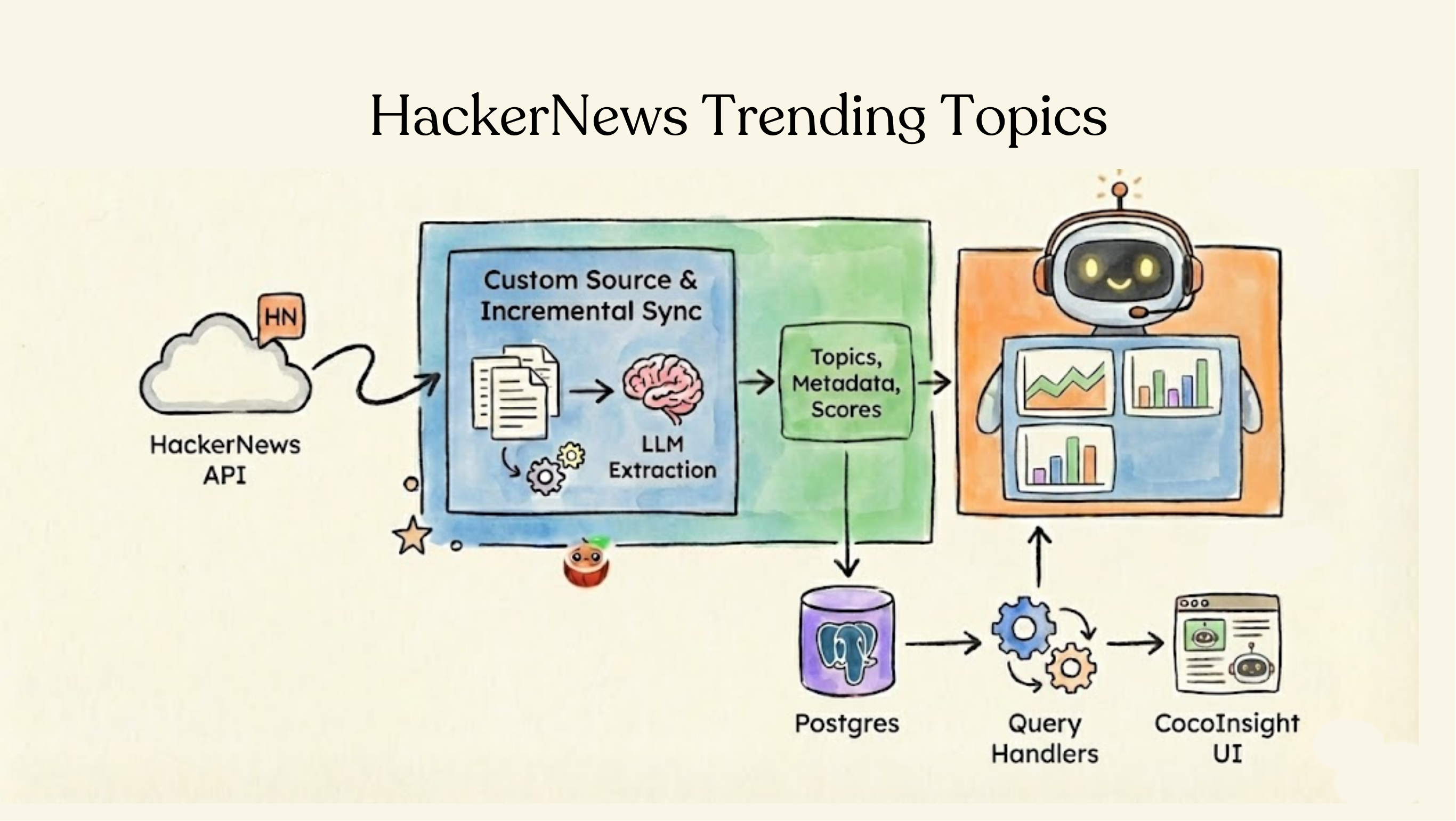
In the age of information overload, understanding what's trending—and why—is crucial for developers, researchers, and data engineers. HackerNews is one of the most influential tech communities, but manually tracking emerging topics across thousands of threads and comments is practically impossible.
What if you could automatically index HackerNews content, extract topics using AI, and query trending discussions in real-time? That's exactly what CocoIndex enables through its Custom Sources framework combined with LLM-powered extraction.
In this post, we'll explore the HackerNews Trending Topics example, a production-ready pipeline that demonstrates some of the most powerful concepts in CocoIndex: incremental data syncing, LLM-powered information extraction, and queryable indexes.
Why build from HackerNews?
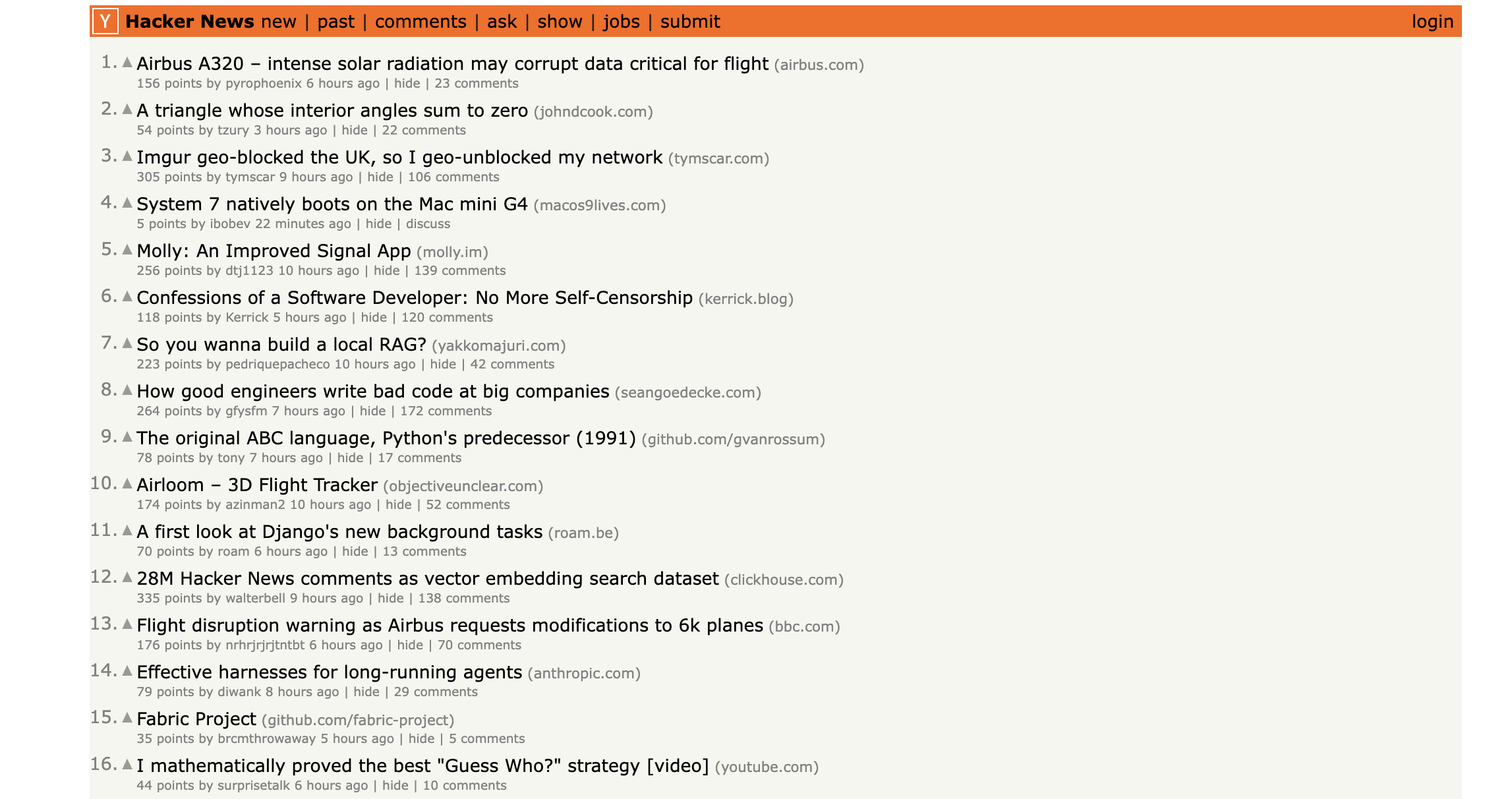
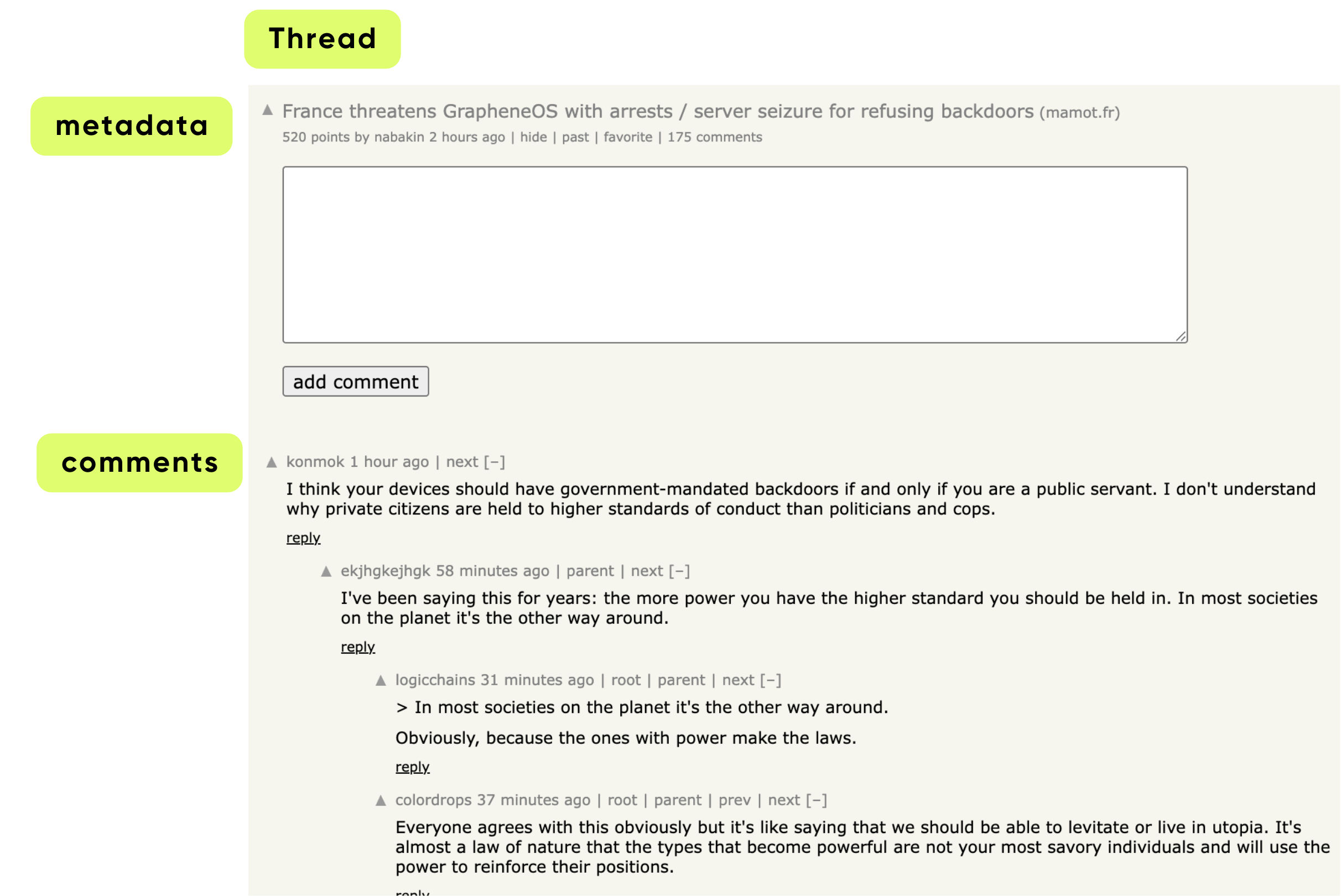
HackerNews creates thousands of new threads and comments daily. Each thread can have hundreds of nested comments, each potentially discussing important technologies, products, or companies. HackerNews is one of the best signals for:
- what technologies are trending
- what topics developers are discussing
- emerging products, companies, and ideas
- sentiment and early-stage feedback
Traditional approaches to topic tracking are painful:
- Manual monitoring: Impossible to scale
- Dumb polling: Fetching everything every time wastes API calls
- Batch processing: Creates latency and data staleness
- Monolithic pipelines: Hard to maintain and extend
CocoIndex solves all of these through a declarative, incremental approach.
This demo illustrates:
Custom Source → Flow Definition → Query Handlers
    (API)        (Transform)      (Real-time Search)
- How to wrap an external API (HackerNews Algolia API) into a first-class incremental source
- How to extract structured topics from free-form text using LLMs
- How CocoIndex automatically diffs, syncs, and exports data into Postgres
- How to write Query Handlers to serve topic search and trending queries
- How to build foundation blocks for continuous-agent workflows that reason over structured data
The full data pipeline
The Full Data Pipeline
Here's the complete flow:

text
HackerNews API
    ↓
HackerNewsConnector
    ├─ list()      → Thread IDs + timestamps
    ├─ get_value() → Full threads + comments
    └─ provides_ordinal() → Enable incremental syncing
    ↓
Flow Definition
    ├─ Register source (auto-refresh every 30s)
    ├─ Create collectors (message_index, topic_index)
    ├─ For each thread:
    │  ├─ Extract topics with LLM
    │  ├─ Collect thread metadata
    │  ├─ Collect extracted topics
    │  └─ For each comment:
    │     ├─ Extract topics with LLM
    │     ├─ Collect comment metadata
    │     └─ Collect extracted topics
    └─ Export
    ↓
Postgres Tables
    ├─ hn_messages (full-text search)
    └─ hn_topics (topic tracking)
    ↓
Query Handlers
    ├─ search_by_topic(query) → Find discussions about X
    ├─ get_trending_topics(limit) → Top 20 topics by score
    └─ get_threads_for_topic(topic) → Threads discussing X
    ↓
CocoInsight UI / API Clients
Index flow
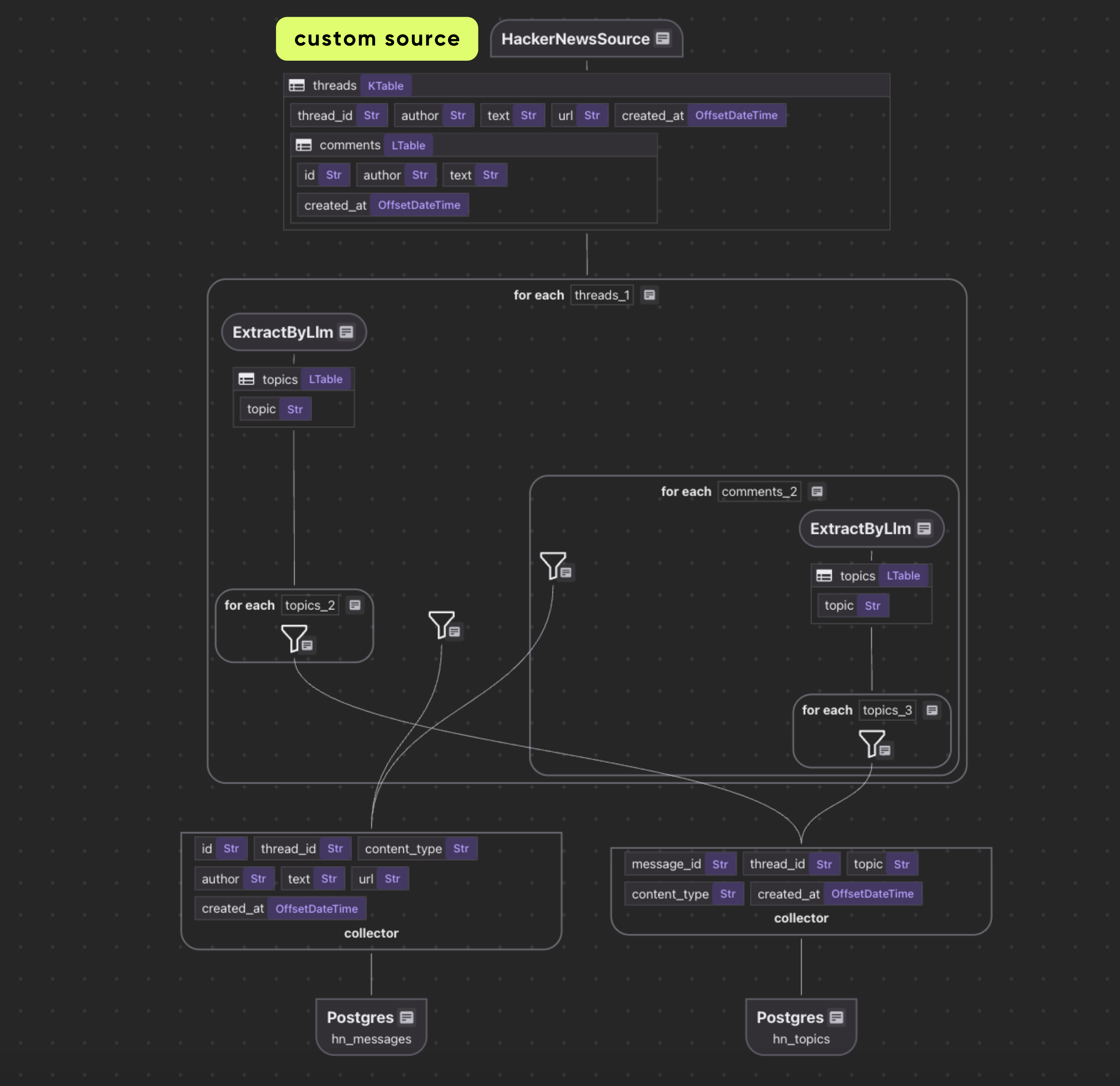
Custom source
Defining the data model
Row key type
Purpose: uniquely identify each HackerNews thread from the source
class _HackerNewsThreadKey(NamedTuple):
    thread_id: str
CocoIndex recommends to use stable keys. HN thread IDs are perfect keys.
Value type
@dataclasses.dataclass
class _HackerNewsComment:
    id: str
    author: str | None
    text: str | None
    created_at: datetime | None

@dataclasses.dataclass
class _HackerNewsThread:
    """Value type for HackerNews source."""
    author: str | None
    text: str
    url: str | None
    created_at: datetime | None
    comments: list[_HackerNewsComment]
This code defines two Python dataclasses for structuring HackerNews data:
A HackerNews thread (_HackerNewsThread) has a bunch of metadata (e.g., author, text, etc.) and a list of comments (_HackerNewsComment).
Building a custom source connector
A Custom Source has two parts:
- SourceSpec — declarative configuration
- SourceConnector — operational logic for reading data
Writing the SourceSpec
A SourceSpec in CocoIndex is a declarative configuration that tells the system what data to fetch and how to connect to a source.
class HackerNewsSource(SourceSpec):
    """Source spec for HackerNews API."""
    tag: str | None = None
    max_results: int = 100
A SourceSpec holds config for the source:
| Field | Purpose |
|---|---|
tag | HN API filter (e.g., "story") |
max_results | number of search results per poll |
When the flow is created, these parameters feed into the connector.
Defining the connector
This is the core of the custom source.
It defines:
- how to list items (discover threads)
- how to fetch values (fetch metadata + comments)
- how to parse deeply nested structures
Constructor & factory method
@source_connector(
    spec_cls=HackerNewsSource,
    key_type=_HackerNewsThreadKey,
    value_type=_HackerNewsThread,
)
class HackerNewsConnector:
    """Custom source connector for HackerNews API."""

    _spec: HackerNewsSource
    _session: aiohttp.ClientSession

    def __init__(self, spec: HackerNewsSource, session: aiohttp.ClientSession):
        self._spec = spec
        self._session = session

    @staticmethod
    async def create(spec: HackerNewsSource) -> "HackerNewsConnector":
        """Create a HackerNews connector from the spec."""
        return HackerNewsConnector(spec, aiohttp.ClientSession())
- Stores the spec
- Creates an async HTTP session
CocoIndex calls create once when building the flow.
Listing available threads
The list() method in HackerNewsConnector is responsible for discovering all available HackerNews threads that match the given criteria (tag, max results) and returning metadata about them. CocoIndex uses this to know which threads exist and which may have changed.
async def list(
    self,
) -> AsyncIterator[PartialSourceRow[_HackerNewsThreadKey, _HackerNewsThread]]:
    """List HackerNews threads using the search API."""
    # Use HackerNews search API
    search_url = "https://hn.algolia.com/api/v1/search_by_date"
    params: dict[str, Any] = {"hitsPerPage": self._spec.max_results}

    if self._spec.tag:
        params["tags"] = self._spec.tag
    async with self._session.get(search_url, params=params) as response:
        response.raise_for_status()
        data = await response.json()
        for hit in data.get("hits", []):
            if thread_id := hit.get("objectID", None):
                utime = hit.get("updated_at")
                ordinal = (
                    int(datetime.fromisoformat(utime).timestamp())
                    if utime
                    else NO_ORDINAL
                )
                yield PartialSourceRow(
                    key=_HackerNewsThreadKey(thread_id=thread_id),
                    data=PartialSourceRowData(ordinal=ordinal),
                )
list() fetches metadata for all recent HackerNews threads.
- For each thread:
- It generates a
PartialSourceRowwith:key: the thread IDordinal: the last updated timestamp
- It generates a
❗ Important:
Only lightweight metadata is fetched here (IDs + updated_at), not full content.
This enables incremental refresh:
- CocoIndex remembers ordinals
- Only fetches full items when ordinals change
Fetching full thread content
This async method fetches a single HackerNews thread (including its comments) from the API, and wraps the result in a PartialSourceRowData object — the structure CocoIndex uses for row-level ingestion.
async def get_value(
    self, key: _HackerNewsThreadKey
) -> PartialSourceRowData[_HackerNewsThread]:
    """Get a specific HackerNews thread by ID using the items API."""

    # Use HackerNews items API to get full thread with comments
    item_url = f"https://hn.algolia.com/api/v1/items/{key.thread_id}"

    async with self._session.get(item_url) as response:
        response.raise_for_status()
        data = await response.json()

        if not data:
            return PartialSourceRowData(
                value=NON_EXISTENCE,
                ordinal=NO_ORDINAL,
                content_version_fp=None,
            )
        return PartialSourceRowData(
            value=HackerNewsConnector._parse_hackernews_thread(data)
        )
get_value()fetches the full content of a specific thread, including comments.- Parses the raw JSON into structured Python objects (
_HackerNewsThread+_HackerNewsComment). - Returns a
PartialSourceRowDatacontaining the full thread.
Ordinal support
Tells CocoIndex that this source provides ordinals. You can use any property that increases monotonically on change as an ordinal. We use a timestamp here. E.g., a timestamp or a version number.
def provides_ordinal(self) -> bool:
    return True
CocoIndex uses ordinals to incrementally update only changed threads, improving efficiency.
The genius of Custom Sources is the separation of discovery from fetching.
Sync 1:
  list()      → 200 thread IDs + timestamps (fast)
  get_value() → 200 full threads (expensive)

Sync 2 (30s later):
  list()      → 200 thread IDs + timestamps (fast)
  [CocoIndex detects only 15 changed]
  get_value() → 15 full threads only
  [Result: 92% fewer API calls!]
This is why ordinals (timestamps) matter. Without them, you'd fetch everything every time.
Parsing JSON into structured data
HackerNews returns comments in a tree structure:
Thread
  ├─ Comment A
  │   ├─ Reply to A (Comment B)
  │   │   └─ Reply to B (Comment C)
  └─ Comment D
This static method takes the raw JSON response from the API and turns it into a normalized _HackerNewsThread object containing:
- The post (title, text, metadata)
- All nested comments, flattened into a single list
- Proper Python datetime objects
It performs recursive traversal of the comment tree.
@staticmethod
def _parse_hackernews_thread(data: dict[str, Any]) -> _HackerNewsThread:
    comments: list[_HackerNewsComment] = []

    def _add_comments(parent: dict[str, Any]) -> None:
        children = parent.get("children", None)
        if not children:
            return
        for child in children:
            ctime = child.get("created_at")
            if comment_id := child.get("id", None):
                comments.append(
                    _HackerNewsComment(
                        id=str(comment_id),
                        author=child.get("author", ""),
                        text=child.get("text", ""),
                        created_at=datetime.fromisoformat(ctime) if ctime else None,
                    )
                )
            _add_comments(child)

    _add_comments(data)

    ctime = data.get("created_at")
    text = data.get("title", "")
    if more_text := data.get("text", None):
        text += "\n\n" + more_text
    return _HackerNewsThread(
        author=data.get("author"),
        text=text,
        url=data.get("url"),
        created_at=datetime.fromisoformat(ctime) if ctime else None,
        comments=comments,
    )
- Converts raw HackerNews API response into
_HackerNewsThreadand_HackerNewsComment. _add_comments()recursively parses nested comments.- Combines
title+textinto the main thread content. - Produces a fully structured object ready for indexing.
Flow Definition: hackernews_trending_topics_flow
Declare flow
@cocoindex.flow_def(name="HackerNewsTrendingTopics")
def hackernews_trending_topics_flow(
    flow_builder: cocoindex.FlowBuilder, data_scope: cocoindex.DataScope
) -> None:
    """
    Define a flow that indexes HackerNews threads, comments, and extracts trending topics.
    """

    # Add the custom source to the flow
    data_scope["threads"] = flow_builder.add_source(
        HackerNewsSource(tag="story", max_results=200),
        refresh_interval=timedelta(seconds=30),
    )

    # Create collectors for different types of searchable content
    message_index = data_scope.add_collector()
    topic_index = data_scope.add_collector()
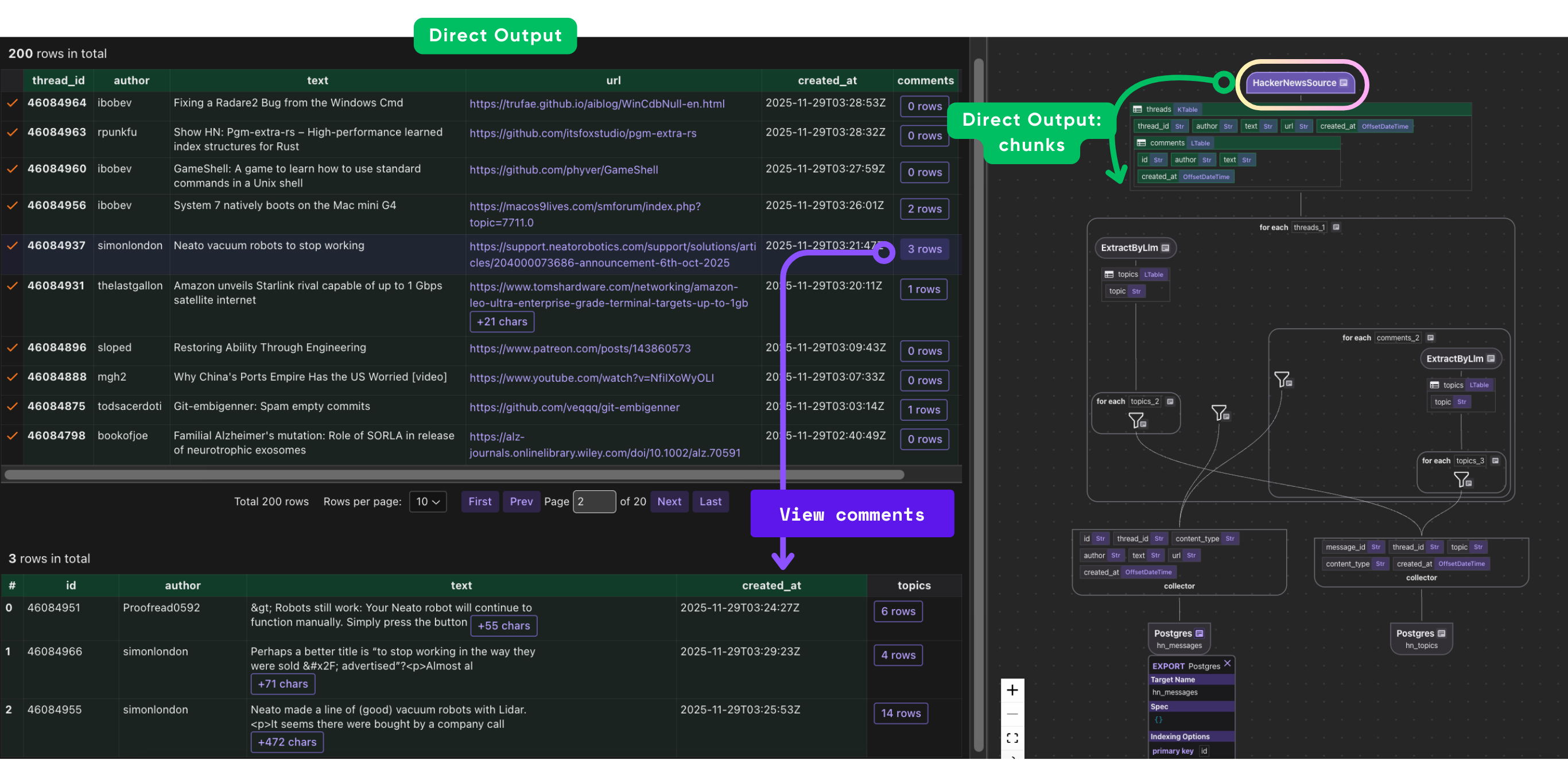
This block sets up a CocoIndex flow that fetches HackerNews stories and prepares them for indexing. It registers a flow called HackerNewsTrendingTopics, then adds a HackerNewsSource that retrieves up to 200 stories and refreshes every 30 seconds, storing the result in data_scope["threads"] for downstream steps.
Finally, it creates two collectors—one for storing indexed messages and another for extracted topics—providing the core storage layers the rest of the pipeline will build on.
Process each thread
Define topics for LLM extraction
@dataclasses.dataclass
class Topic:
    """
    A single topic extracted from text.

    The topic can be a product name, technology, model, people, company name, business domain, etc.
    Capitalize for proper nouns and acronyms only.
    Use the form that is clear alone.
    Avoid acronyms unless very popular and unambiguous for common people even without context.

    Examples:
    - "Anthropic" (not "ANTHR")
    - "Claude" (specific product name)
    - "React" (well-known library)
    - "PostgreSQL" (canonical database name)

    For topics that are a phrase combining multiple things, normalize into multiple topics if needed. Examples:
    - "books for autistic kids" -> "book", "autistic", "autistic kids"
    - "local Large Language Model" -> "local Large Language Model", "Large Language Model"

    For people, use preferred name and last name. Examples:
    - "Bill Clinton" instead of "William Jefferson Clinton"

    When there're multiple common ways to refer to the same thing, use multiple topics. Examples:
    - "John Kennedy", "JFK"
    """

    topic: str
This dataclass defines a Topic, representing a single normalized concept extracted from text—such as a product, technology, company, person, or domain. It provides a prompt for the LLM to extract topics into structured information. Here we used a simple string. You could also generate knowledge graphs, or use it to extract other information too.
Process each thread and use LLM for extraction
with data_scope["threads"].row() as thread:
    # Extract topics from thread text using LLM
    thread["topics"] = thread["text"].transform(
        cocoindex.functions.ExtractByLlm(
            llm_spec=cocoindex.LlmSpec(
                api_type=cocoindex.LlmApiType.OPENAI, model="gpt-5-mini"
            ),
            output_type=list[Topic],
        )
    )

    # Index the main thread content
    message_index.collect(
        id=thread["thread_id"],
        thread_id=thread["thread_id"],
        content_type="thread",
        author=thread["author"],
        text=thread["text"],
        url=thread["url"],
        created_at=thread["created_at"],
    )

    # Collect topics from thread
    with thread["topics"].row() as topic:
        topic_index.collect(
            message_id=thread["thread_id"],
            thread_id=thread["thread_id"],
            topic=topic["topic"],
            content_type="thread",
            created_at=thread["created_at"],
        )
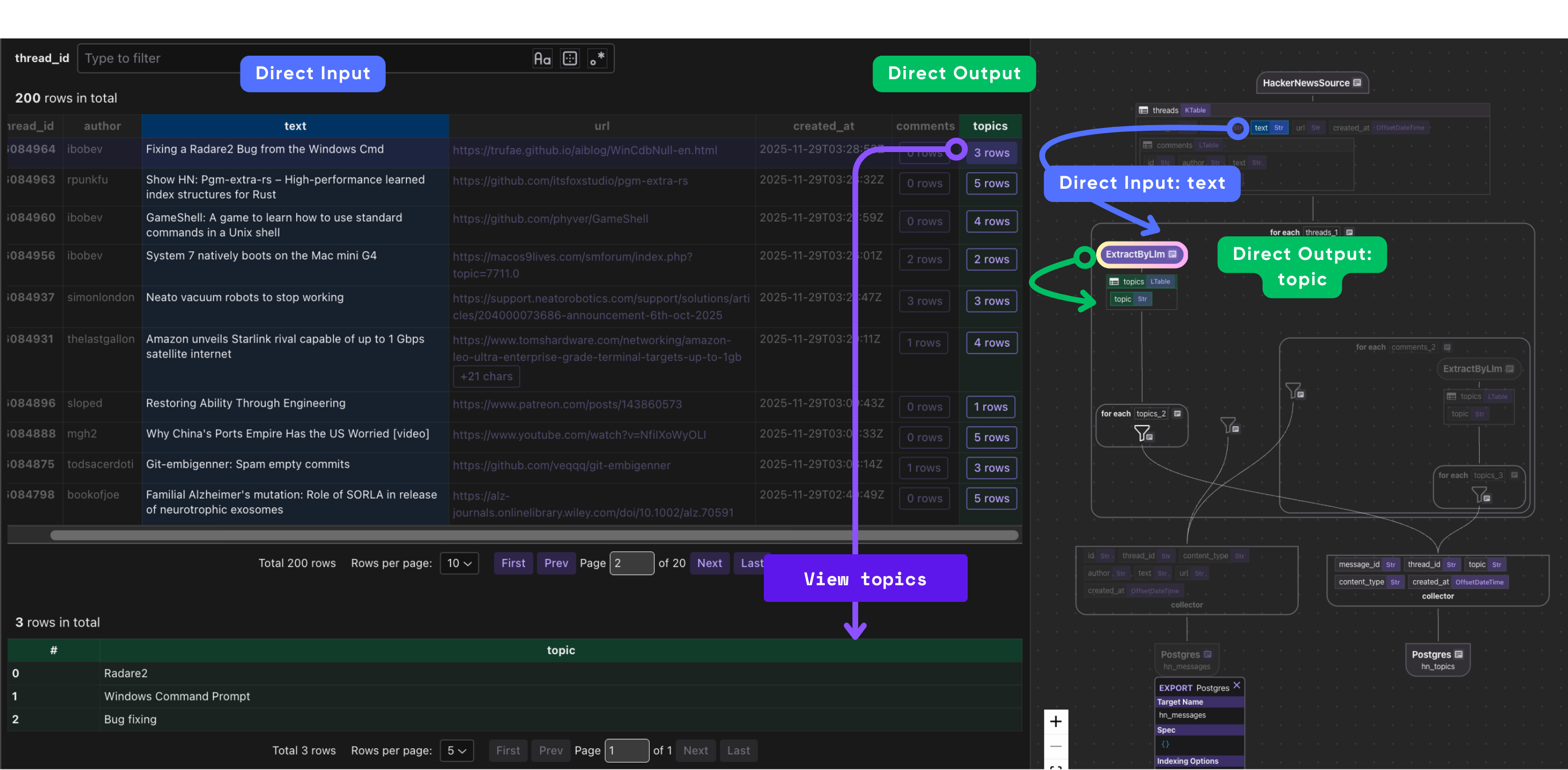
This block processes each HackerNews thread as it flows through the pipeline. Inside data_scope["threads"].row(), each thread represents a single story record.
- We use an LLM (
gpt-5-mini) to extract semantic topics from the thread's text by applyingExtractByLlm, which returns a list ofTopicobjects. - We use
message_indexto collect relevant metadata for this thread. - We use
topic_indexto collect extracted topics and their relationships with threads.
Index individual comments
# Index individual comments
with thread["comments"].row() as comment:
    # Extract topics from comment text using LLM
    comment["topics"] = comment["text"].transform(
        cocoindex.functions.ExtractByLlm(
            llm_spec=cocoindex.LlmSpec(
                api_type=cocoindex.LlmApiType.OPENAI, model="gpt-5-mini"
            ),
            output_type=list[Topic],
        )
    )

    message_index.collect(
        id=comment["id"],
        thread_id=thread["thread_id"],
        content_type="comment",
        author=comment["author"],
        text=comment["text"],
        url="",
        created_at=comment["created_at"],
    )

    # Collect topics from comment
    with comment["topics"].row() as topic:
        topic_index.collect(
            message_id=comment["id"],
            thread_id=thread["thread_id"],
            topic=topic["topic"],
            content_type="comment",
            created_at=comment["created_at"],
        )
This block processes every comment attached to a thread. For each comment, it:
- Extracts semantic topics from the comment text using the same LLM-based
ExtractByLlmfunction, storing the resulting list ofTopicobjects incomment["topics"]. - Collects the comment and metadata in
message_index. - Collects each
topicfrom a comment. Each topic record links back to the comment and thread and includes the normalized topic string and timestamp.
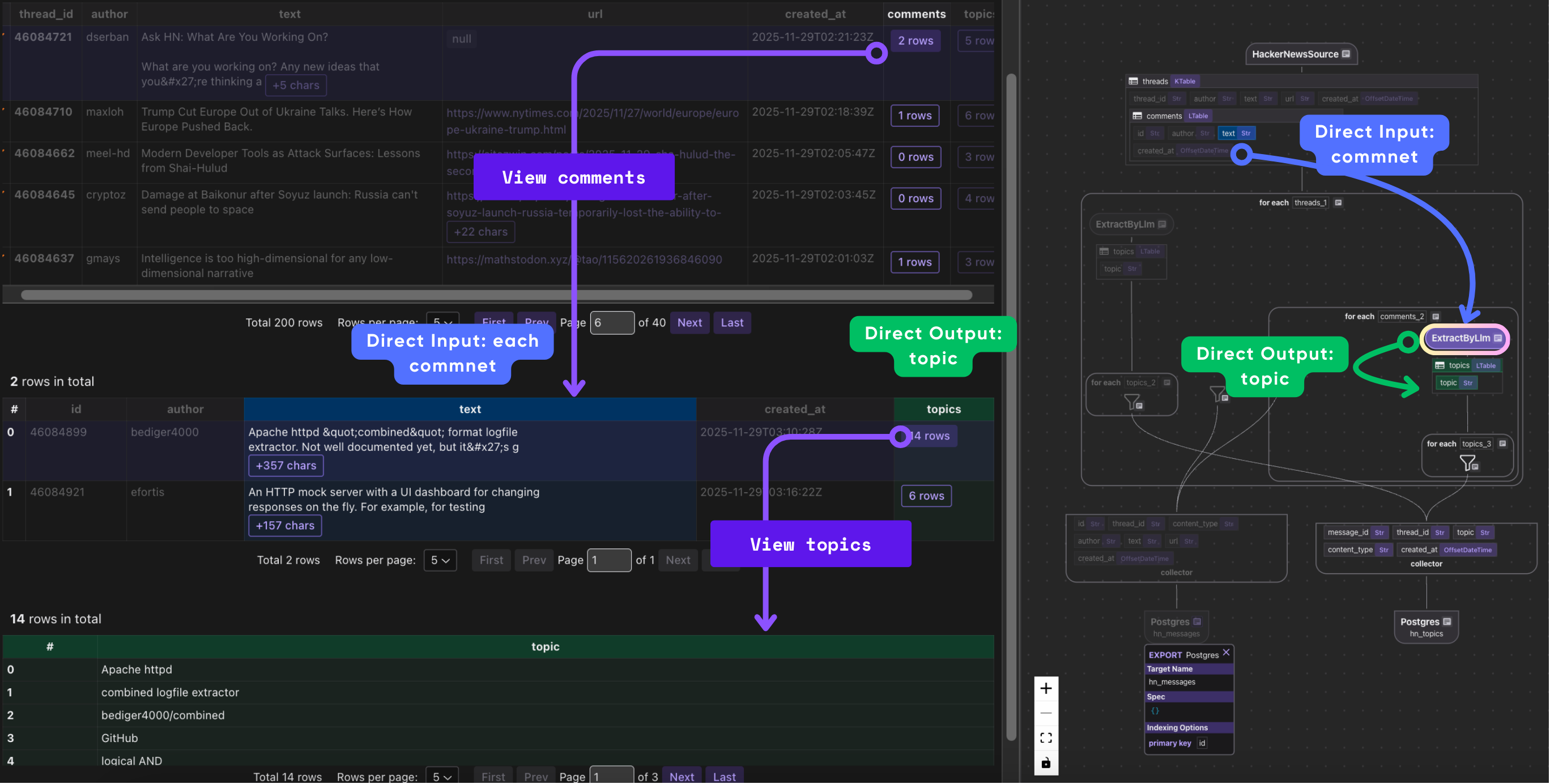
In short, this block enriches every comment with LLM-derived topics, indexes the comment itself, and separately indexes each individual topic for topic-level search and trend analysis.
Export index to database
    # Export to database tables
    message_index.export(
        "hn_messages",
        cocoindex.targets.Postgres(),
        primary_key_fields=["id"],
    )

    # Export topics to separate table
    topic_index.export(
        "hn_topics",
        cocoindex.targets.Postgres(),
        primary_key_fields=["topic", "message_id"],
    )
Query handlers
search_by_topic(query) → Find discussions about X
@functools.cache
def connection_pool() -> ConnectionPool:
    """Get a connection pool to the database."""
    return ConnectionPool(os.environ["COCOINDEX_DATABASE_URL"])

@hackernews_trending_topics_flow.query_handler()
def search_by_topic(topic: str) -> cocoindex.QueryOutput:
    """Search HackerNews content by topic."""
    topic_table = cocoindex.utils.get_target_default_name(
        hackernews_trending_topics_flow, "hn_topics"
    )
    message_table = cocoindex.utils.get_target_default_name(
        hackernews_trending_topics_flow, "hn_messages"
    )

    with connection_pool().connection() as conn:
        with conn.cursor() as cur:
            # Search for matching topics and join with messages
            cur.execute(
                f"""
                SELECT m.id, m.thread_id, m.author, m.content_type, m.text, m.created_at, t.topic
                FROM {topic_table} t
                JOIN {message_table} m ON t.message_id = m.id
                WHERE LOWER(t.topic) LIKE LOWER(%s)
                ORDER BY m.created_at DESC
                """,
                (f"%{topic}%",),
            )

            results = []
            for row in cur.fetchall():
                results.append(
                    {
                        "id": row[0],
                        "url": f"https://news.ycombinator.com/item?id={row[1]}",
                        "author": row[2],
                        "type": row[3],
                        "text": row[4],
                        "created_at": row[5].isoformat(),
                        "topic": row[6],
                    }
                )

            return cocoindex.QueryOutput(results=results)
This block adds a query interface to the flow so users can search HackerNews content by topic.
The @hackernews_trending_topics_flow.query_handler() decorator registers search_by_topic() as a query endpoint for the flow.
When a topic string is provided, the function determines the actual database table names for the topics and messages collectors, then connects to the database and runs a SQL query that finds all topic records matching the search term (case-insensitive) and joins them with their corresponding message entries.
get_threads_for_topic(topic) → Threads discussing X
def get_threads_for_topic(topic: str) -> list[dict[str, Any]]:
    """Get the threads for a given topic."""
    topic_table = cocoindex.utils.get_target_default_name(
        hackernews_trending_topics_flow, "hn_topics"
    )
    with connection_pool().connection() as conn:
        with conn.cursor() as cur:
            cur.execute(
                f"""
                SELECT
                    thread_id,
                    SUM(CASE WHEN content_type = 'thread' THEN {THREAD_LEVEL_MENTION_SCORE} ELSE {COMMENT_LEVEL_MENTION_SCORE} END) AS score,
                    MAX(created_at) AS latest_mention
                FROM {topic_table} WHERE topic = %s
                GROUP BY thread_id ORDER BY score DESC, latest_mention DESC""",
                (topic,),
            )
            return [
                {
                    "url": f"https://news.ycombinator.com/item?id={row[0]}",
                    "score": row[1],
                    "latest_time": row[2].isoformat(),
                }
                for row in cur.fetchall()
            ]
This function finds all HackerNews threads related to a given topic and ranks them. It looks up the topic table in the database, calculates a score for each thread (higher for main threads, lower for comments), and finds the most recent mention.
It then returns a list of threads with their URL, score, and latest mention time, so you can see which threads are most relevant or trending for that topic.
Why weighted score in SQL:
- A topic in the original thread = primary subject
- A topic in comments = supporting discussion
By weighting 5:1, the system prioritizes original discussions over tangential mentions. This creates better trending rankings.
get_trending_topics(limit) → Top 20 topics by score
This function finds the most popular topics on HackerNews.
@hackernews_trending_topics_flow.query_handler()
def get_trending_topics(_query: str = "", limit: int = 20) -> cocoindex.QueryOutput:
    """Get the most trending topics across all HackerNews content."""
    topic_table = cocoindex.utils.get_target_default_name(
        hackernews_trending_topics_flow, "hn_topics"
    )

    with connection_pool().connection() as conn:
        with conn.cursor() as cur:
            # Aggregate topics by frequency
            cur.execute(
                f"""
                SELECT
                    topic,
                    SUM(CASE WHEN content_type = 'thread' THEN {THREAD_LEVEL_MENTION_SCORE} ELSE {COMMENT_LEVEL_MENTION_SCORE} END) AS score,
                    MAX(created_at) AS latest_mention
                FROM {topic_table}
                GROUP BY topic
                ORDER BY score DESC, latest_mention DESC
                LIMIT %s
                """,
                (limit,),
            )

            results = []
            for row in cur.fetchall():
                results.append(
                    {
                        "topic": row[0],
                        "score": row[1],
                        "latest_time": row[2].isoformat(),
                        "threads": get_threads_for_topic(row[0]),
                    }
                )

            return cocoindex.QueryOutput(results=results)
It looks at all indexed threads and comments, calculates a score for each topic (giving higher weight to main threads), and records the most recent mention. It then sorts the topics by score and recency, takes the top results (up to limit), and also fetches the threads related to each topic. Finally, it returns this information in a structured format so you can see trending topics along with the threads where they appear.
Running the pipeline
On-demand update
cocoindex update main
Live mode
cocoindex update -L main
- Polls HackerNews every 30 seconds (configurable)
- Automatically keeps index in sync
- Perfect for dashboards and real-time apps
Debug with CocoInsight
CocoInsight lets you visualize and debug your flow, see the lineage of your data, and understand what’s happening under the hood.
Start the server:
cocoindex server -ci main
Then open the UI in your browser: https://cocoindex.io/cocoinsight
CocoInsight has zero pipeline data retention — it’s safe for debugging and inspecting your flows locally.
Note that this requires QueryHandler setup in previous step.
Test queries
After running the pipeline, you can query the extracted topics:
# Get trending topics
cocoindex query main.py get_trending_topics --limit 20

# Search content by specific topic
cocoindex query main.py search_by_topic --topic "Claude"

# Search by text content
cocoindex query main.py search_text --query "artificial intelligence"
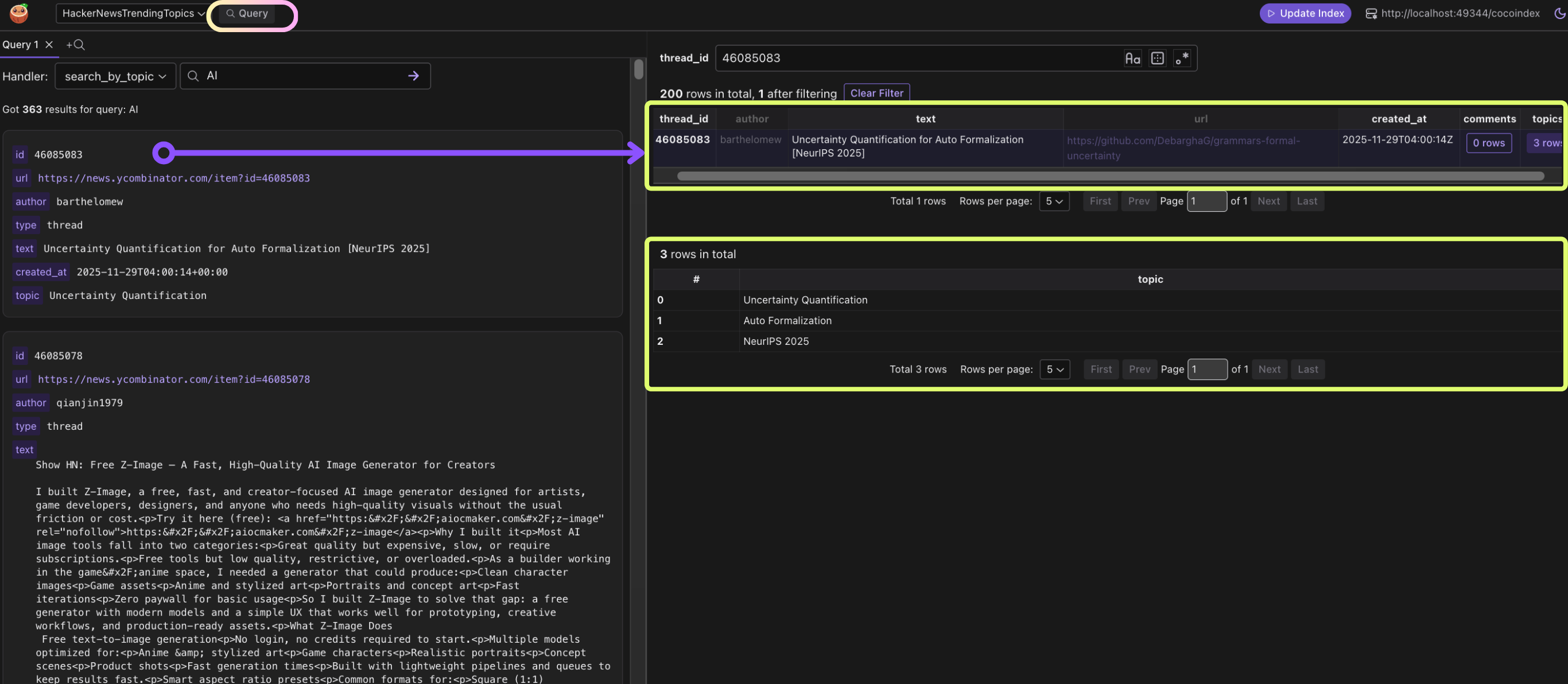
You can also test the query handlers in CocoInsight. It shows the query results and the data lineage to debug, iterate, and audit easily.
What can be built on top of this pipeline?
Once you have structured topics extracted from HackerNews in real-time, the possibilities are vast. Here are some ideas:
1. Real-time trending dashboards
With the get_trending_topics() and get_threads_for_topic() query handlers, you can create a live dashboard showing the hottest topics, which threads are driving discussion, and how the conversation evolves over time.
- Use case: A tech news portal that surfaces trending technologies and products daily.
- Benefit: Decision-makers, researchers, and investors can act on emerging trends faster than traditional news aggregation.
2. Sentiment-aware trend analysis
By enriching this pipeline with an LLM-powered sentiment extraction function, you can track not just what’s trending, but how people feel about it.
- Use case: Detect early hype or criticism for a new product or technology.
- Benefit: Investors or product managers can gauge public reception in near real-time.
3. Influencer or key contributor tracking
Since each message stores the author field, you can analyze which users drive conversations around trending topics.
- Use case: Identify top contributors in AI, Web3, or other domains.
- Benefit: Build targeted outreach, influencer networks, or citation metrics.
4. Continuous knowledge graphs
The extracted topics can feed a knowledge graph, connecting companies, products, technologies, and people.
- Use case: Map relationships between emerging tech products, startups, and contributors on HackerNews.
- Benefit: Supports advanced AI agents or recommendation systems that reason over real-world tech trends.
5. Real-time AI agents
By integrating with an AI agent framework, the indexed topics and threads become actionable knowledge. Your agent could:
- Answer questions like “What are the top AI models being discussed today?”
- Suggest investment opportunities or competitive intelligence insights.
- Automatically generate summaries or reports for Slack/email.
Why use CocoIndex for this?
-
Incremental Sync
Traditional pipelines fetch everything repeatedly. CocoIndex fetches only new or updated threads, dramatically reducing API calls and latency.
-
Declarative & Modular
Flows, collectors, and query handlers are modular. You can add new sources (Reddit, Twitter, internal chat logs) or new transformations (summaries, sentiment analysis, embeddings) without rewriting the entire pipeline.
-
LLM Integration is Seamless
CocoIndex treats LLMs as first-class citizens for structured extraction. You don’t need complex glue code — the framework handles transformation, type enforcement, and storage.
-
Queryable Structured Index
Topics and messages are stored in Postgres, ready for SQL queries or API-based search. You can serve both analytics dashboards and AI agents from the same structured store.
-
Supports Continuous Workflows
CocoIndex pipelines can run live, with real-time updates every few seconds. Combine this with AI agents, and you have a self-updating knowledge system that reasons over the latest information.
Why CocoIndex fits continuous monitoring workloads
CocoIndex is designed for systems that need to continuously monitor, detect, and respond to change with minimal engineering overhead. Its incremental syncing, structured extraction, and automatic index updates let you react to new data instantly—without rebuilding pipelines, reprocessing everything, or managing complex workflows. It’s a lightweight but powerful foundation for real-time analytics, alerting, and autonomous agents.
Support us ❤️
Enjoying CocoIndex? Give us a ⭐️ on GitHub and share it with your peers. Every star helps more developers discover the project and strengthens the community.